If you have been following the AI boom recently, then you must have heard of vector databases. Alongside all the AI hype, we have also seen the rise of vector databases. Companies like Pinecone and Chroma have been on the rise. All these DB companies have been investing and raising millions of dollars. Chroma DB, for example, is an open source project available on GitHub under the Apache license with around ~1.6k stars, and it raised $18 million in seed funding at a $75 million valuation.
But within just a few years, we are now talking about a completely vectorless architecture. A new methodology where chunking and storing vectors is no longer needed. And most importantly, this approach has given better results than traditional vector DBs in many cases.
In this article, lets understand how and why vector DBs were needed in the first place, what problems they had, and how this new vectorless method is solving the problems which the traditional way had.
What are vectors?
One major difference between humans and computers is how they process things. Humans tend to do it through text and language, while computers understand only numbers. As a result, since the dawn of NLP, people have tried to come up with ways to encode text into numbers so that we can feed it to a computer program. There can be a whole separate blog on the evolution of encoding text starting from bag of words all the way to modern day vectors. But for now, let's stick to modern day vectors.
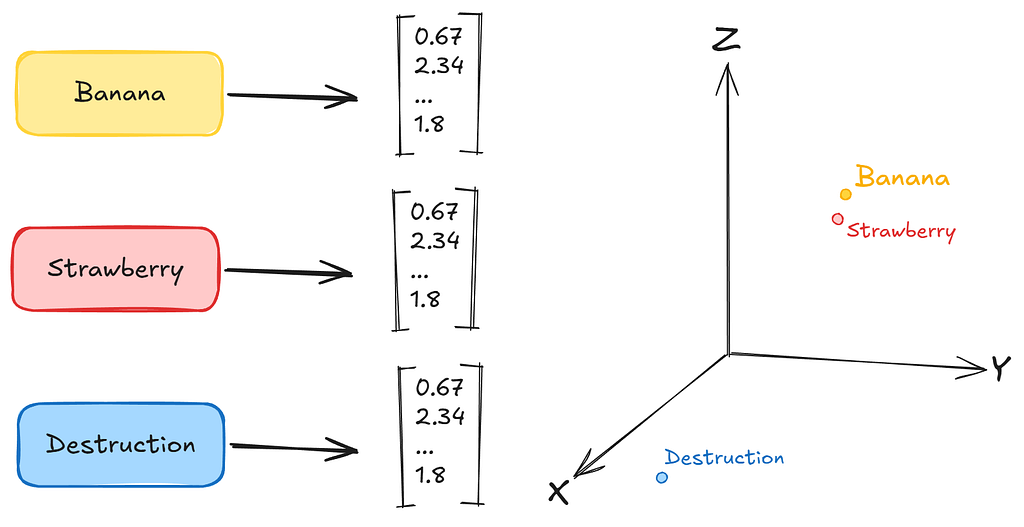
A vector is merely a list of numbers which usually means something. In other words, you can take any word and convert it into a 1D vector in an N dimensional space.
For example: the word “banana” can be converted into a vector of numbers like [0.67, 2.34, 1.8, …. n numbers], let's say n is 786. Which means these 786 numbers represent the word “banana” in a certain dimension. Similarly, the word “strawberry” will also have a 786 long vector of numbers, maybe [0.61, 2.47, 1.4, …. n numbers] where n=786. Now the interesting part, you might notice, is that both the vectors of “banana” and “strawberry” are very similar to each other.
Contrastly, the word “destruction” might have a vector like [190.3, -55.2, 57.9, ….. n] which will be very different than the earlier two examples.
So, in short, a vector is basically a list of numbers which, when projected in an N dimensional space, represents the meaning of a word. Which essentially means similar words like apples, bananas, strawberries will be grouped closely together. A vector store is a database where these vectors are stored. In there itself, similar vectors are grouped together.
Why were vectors useful?
The thing to note here is that, because of this architecture, it became very easy to get the semantic meaning of a word and fetch other words which are “similar” to a particular word.
This is possible because of “similarity search”. Basically we apply some math to find vectors which are semantically similar to each other. Like cosine similarity.
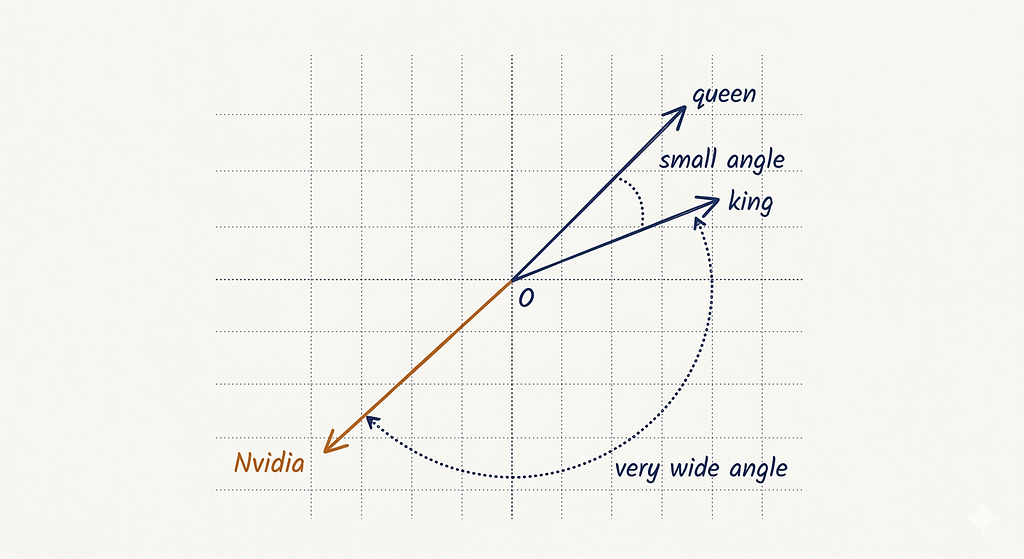
Hence, you can now tell how similar two vectors are based on their distance. This feature is very useful to AI. Because we can fetch relevant information given a vector. This is the foundation on which RAG (Retrieval Augmented Generation) is based on. We break a document into chunks, convert those chunks into vectors and store them in a vector DB. While asking questions, the user’s query is also converted into a vector and is mapped to find the most similar vectors in the vector DB. We feed this to an LLM and expect it to answer.
Quick Example
Let's quickly see this in action. We will use the sentence-transformers library which makes embedding text into vectors very easy.
from sentence_transformers import SentenceTransformer
from sklearn.metrics.pairwise import cosine_similarity

model = SentenceTransformer('all-MiniLM-L6-v2')

words = ["banana", "strawberry", "destruction"]
embeddings = model.encode(words)

print(embeddings[0][:5])
print(len(embeddings[0]))
Output:
>> [-5.4311547e-02  1.4045638e-02 -2.4816280e-02  2.6878271e-02 -7.1190312e-05]
>> 384
So, the word “banana” got converted into a list of numbers. It is actually 384 numbers long; we are just printing the first 5 here. The same thing happens for “strawberry” and “destruction” each becomes a 384-dimensional vector.
Now let's compare them using cosine similarity.
banana_vs_strawberry = cosine_similarity([embeddings[0]], [embeddings[1]])
banana_vs_destruction = cosine_similarity([embeddings[0]], [embeddings[2]])

print("banana vs strawberry:", banana_vs_strawberry)
print("banana vs destruction:", banana_vs_destruction)
Output:
banana vs strawberry: [[0.83642113]]
banana vs destruction: [[0.23221526]]
And there it is. The cosine similarity between “banana” and “strawberry” comes out to 0.84, which is pretty high, meaning the two vectors are pointing in similar directions. But "banana" and "destruction" gives us 0.23basically these two vectors are nowhere near each other in the embedding space.
This is exactly the property vector DBs exploit. Given any query, they can quickly fetch other text that is semantically close to it.
The problem with this approach
The thing is that similarity is NOT the same as relevance.
Imagine if you are reading a long financial report and you ask, “What was the change in net revenue from Q2 to Q3 2024?” A vector DB will fetch the chunks which are most similar to your question. Meaning it will return chunks that talk about “net revenue” or “Q2” or “Q3” anywhere present in the document. Now these chunks may or may NOT contain the actual answer you are looking for. In other words, the vector DB approach doesn’t understand your question, it just mathematically computes distance between vectors.
Besides this, the chunking strategy most RAG systems use is inherently broken. The moment we break a document into chunks, we lose context. A paragraph that referred to “the company” loses its meaning when “the company” was actually defined two pages earlier. Cross references break. Tables get split mid row. Section hierarchies disappear. We are basically asking the LLM to answer questions from shuffled pages.
Enter: Reasoning-based retrieval
Vectorless retrieval is a retrieval approach that replaces this semantic similarity search with LLM-powered reasoning over a structured document index. No embeddings, no vector database, no cosine similarity.
The name comes from the PageIndex framework, published in September 2025 by Mingtian Zhang, Yu Tang, and the PageIndex team at VectifyAI.
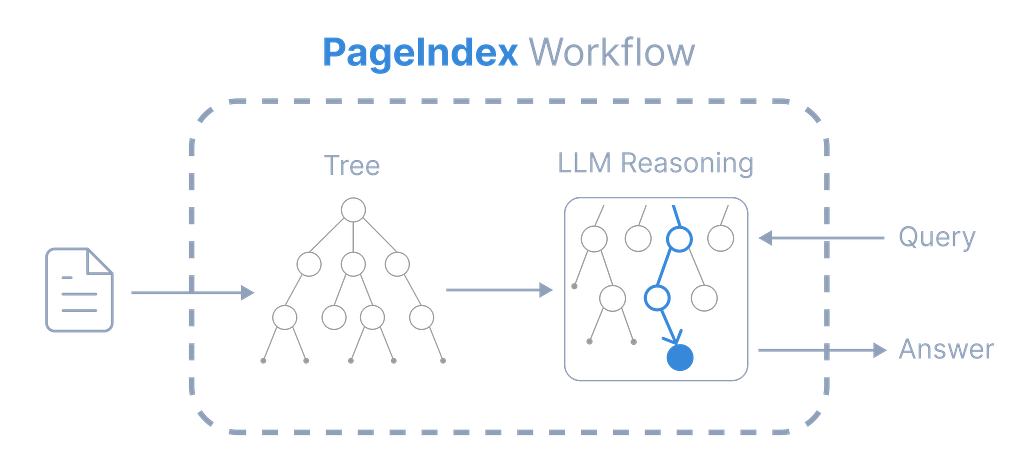
PageIndex suggests 3 distinct properties that are totally different than traditional RAG:
- No vectors: Vector similarity or distance is not calculated. Instead, an LLM reasons over the document to find the answer to a human query.
- No chunking: The natural order of the document is maintained. The document is organized into natural sections that reflect its actual structure.
- Human-like retrieval: The most interesting part of this approach is that it mimics exactly how a human expert navigates a document for an answer.
Human like retrieval
When a domain expert needs to find information in a stack of pages, they don’t go through every page to find the answer to a given question. They follow very specific steps, something like:
- Scan the table of contents to understand the structure.
- Think and pick which sections are likely to contain the answer.
- Navigate to those specific sections.
- Read the relevant content.
- Come up with an answer.
The vectorless architecture
The system does retrieval in two steps.
Step 1: Build the index
When you input a document, instead of creating embedding vectors for it, the system asks an LLM to analyze the document’s structure. In the first few pages, it looks for a TOC (Table of Contents). If found, it uses it as a reference. If not found, it generates a hierarchical tree with sections broken down according to their meaning. This acts as a point of reference. Each node in the tree has:
- A title (section name)
- A summary (what the section covers)
- A page range (which pages this node covers)
- Child nodes (subsections)
The LLM generates this structure by reading the document and identifying its natural organization.
Example: Here we used an epdf on microservices which is available here.
Document: "Microservices Architecture Guide"
├── 1. Introduction [pages 1-3]
│   Summary: "Defines microservices, compares with monoliths..."
│   ├── 1.1 What Are Microservices [pages 1-1]
│   ├── 1.2 Why Microservices Matter [pages 1-2]
│   └── 1.3 Monolith vs Microservices [pages 2-3]
├── 2. Core Design Principles [pages 3-6]
│   Summary: "Covers single responsibility, loose coupling, API design..."
│   ├── 2.1 Single Responsibility [pages 3-4]
│   ├── 2.2 Loose Coupling [pages 4-5]
│   └── ...
└── ...
Step 2: Reasoning-Based Tree Search
When a user asks a query, the system passes the tree structure to an LLM as additional context and asks it to reason out which nodes are likely to contain the answer. The section after this shows the code used to create a simple vectorless retrieval process. There you will see the prompt used to instruct the LLM for this use case.
The LLM reasons over the contents and the question and comes up with a ranked list of nodes to retrieve. The catch here is that, instead of converting into vectors and calculating cosine similarity against all available chunks, this architecture simply asks the LLM: “Given this detailed table of contents, where should I look for this answer?”
Another interesting thing is that the LLM can follow cross-references and identify which questions belong to which content. While going through a part, if it finds a reference to another section, it can backtrack in the tree and go to the referenced page. Basically, it exactly mimics how a human would look for an answer in a text document.
User Question
    ↓
[LLM reads tree index]  ← titles + summaries only
    ↓
"Section 2.2 and 3.1 are relevant because..."  ← explicit reasoning
    ↓
[Extract text from sections 2.2 and 3.1]
    ↓
[LLM generates answer with page citations]
    ↓
Answer + Sources
Simple vectorless retrieval example with code
- Imports and installations
%pip install -q --upgrade pageindex

from pageindex import PageIndexClient
import pageindex.utils as utils
from huggingface_hub import AsyncInferenceClient
import os, requests
import json
2. Setup pageindex and hugging face for your LLM, you can also use openAI or any other more sophisticated models. Here I am using opensource Llama model. You can generate a pageindex API key from here.
PAGEINDEX_API_KEY = "YOUR_PAGEINDEX_API_KEY"
HF_TOKEN = "YOUR_HF_INDEX_KEY"
pi_client = PageIndexClient(api_key=PAGEINDEX_API_KEY)
3. Choosing your LLM is an important step. Try to avoid extremely small models — anything less than 3 billion parameters might not be able to generate the exact JSON output needed in this system.
async def call_llm(prompt, model="meta-llama/Llama-3.1-8B-Instruct", temperature=0):
    client = AsyncInferenceClient(token=HF_TOKEN)
    response = await client.chat.completions.create(
        model=model,
        messages=[{"role": "user", "content": prompt}],
        temperature=temperature
    )
    return response.choices[0].message.content.strip()
4. Tree generation step, here is where you pass in a PDF or any text document to the system and PageIndex generates a tree structure based on the content of the document. Here we are using the same microservices vs monolithic architecture eBook shared above.
pdf_url = "https://cdn2.hubspot.net/hubfs/2854653/Digital%20Files/digital-knowledge-center/ebook/microservices-eBook.pdf"
pdf_path = os.path.join("../data", pdf_url.split('/')[-1])
os.makedirs(os.path.dirname(pdf_path), exist_ok=True)

response = requests.get(pdf_url)
with open(pdf_path, "wb") as f:
    f.write(response.content)
print(f"Downloaded {pdf_url}")

doc_id = pi_client.submit_document(pdf_path)["doc_id"]
print('Document Submitted:', doc_id)

if pi_client.is_retrieval_ready(doc_id):
    tree = pi_client.get_tree(doc_id, node_summary=True)['result']
    print('Simplified Tree Structure of the Document:')
    utils.print_tree(tree)
else:
    print("Processing document, please try again later...")
Output — Here is an sample of the output. As you can see the entire pdf is broken down into small sections.
Simplified Tree Structure of the Document:
[{'title': 'THE MICROSERVICES HANDBOOK',
  'node_id': '0000',
  'prefix_summary': '# THE MICROSERVICES HANDBOOK\n\neBOOK\n02\nC...',
  'nodes': [{'title': 'The Microservices Handbook',
             'node_id': '0001',
             'summary': 'This text introduces the concept of micr...'},
            {'title': 'What is Microservices Architecture?',
             'node_id': '0002',
             'summary': '## What is Microservices Architecture?\n\n...'},
            {'title': 'Microservices vs Monolithic Architecture',
             'node_id': '0003',
             'prefix_summary': '## Microservices vs Monolithic Architect...',
             'nodes': [{'title': 'Monolithic:',
                        'node_id': '0004',
                        'summary': 'The text describes monolithic architectu...'},
                       {'title': 'Microservice:',
                        'node_id': '0005',
                        'summary': '### Microservice:\n\nThe microservice arch...'}]},
....
5. Reason based retireval with tree search, here is how we are using an LLM to search and identify the nodes that might contain the answer to the query.
query = "What is the difference between monolith and microservices"

tree_without_text = utils.remove_fields(tree.copy(), fields=['text'])

search_prompt = f"""
You are given a question and a tree structure of a document.
Each node contains a node id, node title, and a corresponding summary.
Your task is to find all nodes that are likely to contain the answer to the question.

Question: {query}

Document tree structure:
{json.dumps(tree_without_text, indent=2)}

Please reply in the following JSON format:
{{
    "thinking": "<Your thinking process on which nodes are relevant to the question>",
    "node_list": ["node_id_1", "node_id_2", ..., "node_id_n"]
}}
Directly return the final JSON structure. Do not output anything else.
"""

tree_search_result = await call_llm(search_prompt)
6. We can also print the retrieved nodes and the reasoning
node_map = utils.create_node_mapping(tree)
tree_search_result_json = json.loads(tree_search_result)

print('Reasoning Process:')
utils.print_wrapped(tree_search_result_json['thinking'])

print('\nRetrieved Nodes:')
for node_id in tree_search_result_json["node_list"]:
    node = node_map[node_id]
    print(f"Node ID: {node['node_id']}\t Page: {node['page_index']}\t Title: {node['title']}")
Reasoning Process:
To find all nodes that are likely to contain the answer to the question 'What is the difference
between monolith and microservices', I will look for nodes that contain the words 'monolith',
'microservices', 'microservice', 'monolithic', 'microservices architecture', 'microservice
architecture', 'microservices vs monolithic architecture', 'microservices vs monolith', 'monolithic
architecture', 'microservices vs monolith architecture'.

Retrieved Nodes:
Node ID: 0003  Page: 5  Title: Microservices vs Monolithic Architecture
Node ID: 0004  Page: 5  Title: Monolithic:
Node ID: 0005  Page: 6  Title: Microservice:
Node ID: 0006  Page: 7  Title: Key Features of Microservices
7. Extract relevant content from the retrieved nodes. We can fetch the information about the entire node like this. Here I am cutting out the output only by 1000 words so its easier to show here.
node_list = json.loads(tree_search_result)["node_list"]
relevant_content = "\n\n".join(node_map[node_id]["text"] for node_id in node_list)

print('Retrieved Context:\n')
utils.print_wrapped(relevant_content[:1000] + '...')
Retrieved Context:

## Microservices vs Monolithic Architecture

### Monolithic:

In a traditional monolithic architecture, an application is developed by one team with one database
and code set. The simplicity of having all modules and functionalities housed in one application
makes it easier to develop and launch a product quickly, but problems can arise when trying to push
updates or scale. The entire application has to be taken offline to be updated, meaning a lag in
service time and a higher risk that any unchecked bugs could take down the whole program. Scaling
can also be challenging, as the product can become too large and bogged down as it grows. Challenges
aside, however, a monolith is the most cost-effective way to build a new application, and it can be
easily managed by a smaller team.

|  Pros | Cons  |
| --- | --- |
|  • Easy for a smaller team to manage
• Same code base throughout
• Lower overhead costs
• Quick go-to-market | • Difficult to test once launched
• Difficult to scale
• Updates...
8. Finally, asking the LLM to generate an answer — with all these contexts and the user question, we as the LLM to provide us an answer.
answer_prompt = f"""
Answer the question based on the context:

Question: {query}
Context: {relevant_content}

Provide a clear, concise answer based only on the context provided.
"""

print('Generated Answer:\n')
answer = await call_llm(answer_prompt)
utils.print_wrapped(answer)
And it gives back an answer, not retrieved via a similarity score but reasoned over like a human would do. The query used here is the same as above — “What is the difference between monolith and microservices.”
Generated Answer:

The main difference between monolith and microservices architecture is:

**Monolith:** A traditional monolithic architecture is a single, self-contained application with a
single database and code set. It is easy to develop and launch, but difficult to scale, update, and
test once launched.

**Microservices:** A microservice architecture is a suite of small services that communicate with
each other through APIs. Each service operates independently, allowing for easier testing, updates,
and scaling. It is more complex to manage, but offers greater flexibility and scalability.

In summary, monolith is a single, self-contained application, while microservices is a suite of
independent services that work together.
To be or not be vectorless?
At the end of the day, the choice is yours. The thing is vectors has been useful since a really long time and has now become an industry standard for similarity based retrieval. PageIndex just gives you an alternative option for vector search. With that said, pageindex is not completely future proof or has no downside. Some limitations of vectorless architecture are.
- Latency — Normal vector based search is extremely fast. Vectorless search cannot keep up with that pace because the LLM needs to reason out which nodes might contain the answer.
- Operation heavy — In vectorless architecture, for every query the system is sending LLM calls which means you are burning tokens for every query. If the document is large you might end up paying a lot for these to get some answers.
- Dependency on LLM — In traditional search, you are performing mathematical similarity search but in here, you are asking an LLM. So there is always a slight chance that the LLM hallucinates and gives back the wrong answer or context.
Conclusion
In this article, we went over what vectors are, how similarity search works, and why it became the backbone of modern RAG systems. Then we looked at how this whole approach is being replaced by a vectorless architecture that reasons over documents the way a human would.
The creators of pageindex showed in their examples that this vectorless approach is much more accurate in financial documents and other usecases.
Hope you liked this explanation of mine. If you like this work, please consider upvoting!
Find the code used here in the github link here.
Feel free to reach out on linkedin if you have any questions.
Happy Learning!
Aunkit Chaki
https://www.linkedin.com/in/aunkit-chaki-38807b174/
To Be or Not To Be — Vectorless? was originally published in Towards AI on Medium, where people are continuing the conversation by highlighting and responding to this story.