Building a Fully Local, Open Source Text2SQL Agent with Long Term Memory — No API Keys, No Cloud.
A production grade text-to-SQL system with persistent memory that runs entirely on your own hardware using Ollama, PostgreSQL with pgvector and sentence-transformers.
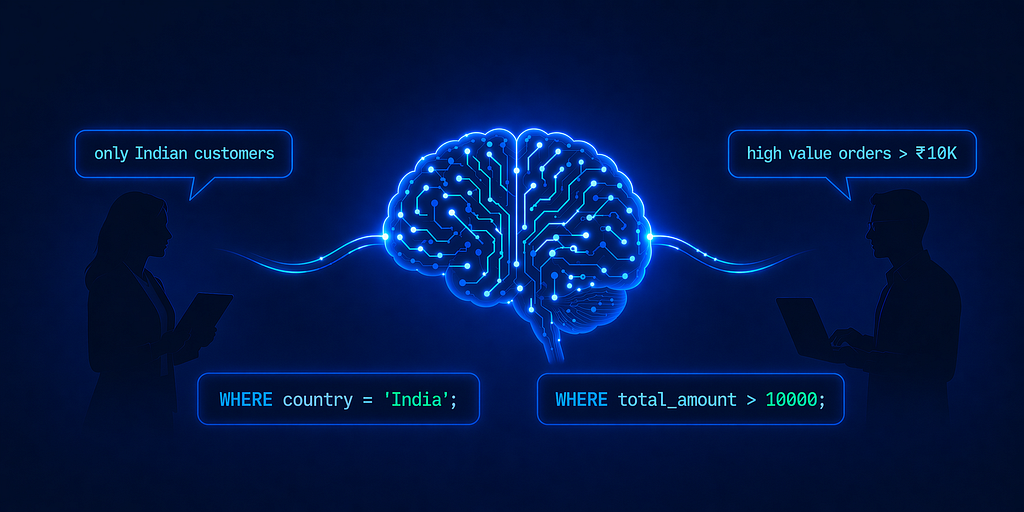
Every Text2SQL tutorial I’ve seen relies on OpenAI/Claude for the LLM, Pinecone for vectors, and some managed cloud service to glue it all together. That’s fine for a demo but the moment you’re dealing with real business data (which you might want to keep private), sending your database and employee queries to a third-party API besides being expensive, is also a non-starter for a lot of companies which deal with confidential data.
So, I built the whole thing locally. Fully open-source. Zero API keys (except HuggingFace). Zero cloud dependencies. Zero vendor lockings. The LLM runs on your machine via Ollama. The vectors live in PostgreSQL with pgvector. Embeddings come from sentence-transformers via HF. The frontend is Gradio. Everything stays on your hardware, and you own every piece of it. We have used HF for fast prototyping but the embedding model can also run locally very smoothly.
On top of that local first approach, I added another layer on top of it: long-term persistent memory. The system remembers your preferences, your terminology, your metrics across sessions, per user, with complete memory isolation. It’s inspired by the Mem0 architecture research paper, but here in this project, no official libraries/APIs are being used. Just the core principles, adapted specifically for text2SQL.
In this tutorial, I’ll walk you through the entire implementation all the components, design decision, and some prompt engineering. Let’s get into it.
Why This Needs to Exist
The main problem with traditional Text2SQL engines is that every conversation starts from scratch. Preferences, terminology, context: all gone the moment a session ends. Your AI assistant has the memory of a goldfish.
On top of this, most of them also require an OpenAI/Claude or some other fancy model’s API key and a vector DB probably in cloud. So not only does your assistant forget everything, but it’s also sending your proprietary confidential data and business queries to 3rd party servers. You’re paying per token for the privilege of zero privacy.
Think about it concretely. A sales operations manager opens her dashboard every morning and has to type “only show me customers from India” before doing anything useful. An e-commerce analyst has to re-explain that “high value order” means orders with a total amount over 10,000. Every. Single. Time. And all of that context is flowing through third-party APIs.
Long-term memory changes this completely. With it, your text2SQL agent can:
- Remember preferences across sessions automatically filtering by user-specific criteria like “only show customers from India” or “only delivered orders” without being told again and again unless you specifically delete them.
- Learn domain terminology that bridges the gap between how users talk and what the table column actually looks like for example: something like “high value order” mapping to total_amount > 10000 or "big spenders" mapping to customers whose total order value exceeds 50,000
- Maintain context over time so you can ask “How many of those were wholesale?” days later, and the system knows what “those” refers to.
- Build personalized understanding of each user’s data interests, improving relevance without explicit instruction. This is taken care by complete user memory isolation. Each user has isolated memory bank where all the preferences and terminology specific to their conversation is stored.
This project is built with an idea to make every analyst/data scientists life easy, where they can just simply ask an AI to get relevant data.
What is Mem0, and How It Inspired This Architecture
Mem0 (pronounced “mem-zero”) is a memory architecture from mem0.ai that tackles the limited context window problem through a two-phase system: extracting key information from conversations and then updating memory to maintain consistency over time.
I took this core idea and extended it with multi-user memory isolation something critical whenever more than one user is using your system. Here’s what that means:
- Complete memory isolation: Each user’s preferences are stored separately. Priya’s “only Indian customers” preference never leaks into Rahul’s queries.
- User-targeted extraction: The system identifies SQL-relevant elements like entities, preferences, terminology, metrics for every user.
- Database integration: Personalized memories connect directly to the database schema for accurate SQL generation.
The result is that a sales operations manager automatically gets her regional customer filter, an e-commerce analyst uses his specialized order terminology, and a team lead references custom metrics, all without restating anything each session.
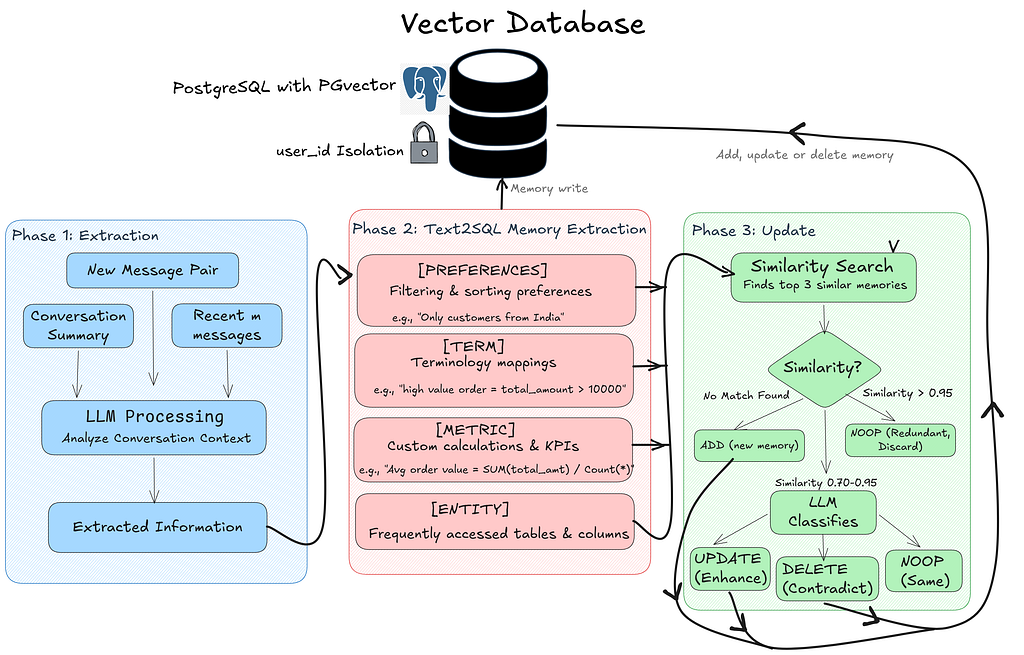
When a user sends a message, Phase 1 kicks in. The system takes the new message pair along with any conversation summary and recent messages, feeds them through the LLM, and extracts structured information. That extracted information flows into Phase 2, where it gets classified into one of four memory categories: preferences (filtering rules like “only Indian customers”), terminology (mapping user language to SQL conditions), metrics (custom KPIs and calculations), or entities (frequently accessed tables and columns). Each extracted fact then enters Phase 3, the update cycle. The system runs a similarity search against the user’s existing memories in pgvector. If there’s no match, it’s a new memory and gets added. If the similarity is above 0.95, it’s redundant and gets discarded. The interesting range is 0.70–0.95, here the LLM makes a judgment call: does the new fact enhance the existing one (UPDATE), contradict it (DELETE and replace), or say the same thing differently (NOOP)? Every write flows back up to the vector database, always scoped to that user’s user_id.
The Tech stack I used
I wanted to keep this as local as possible hence everything runs on my Acer Predator Helios with a 6 GB VRAM constraint that ruled out the bigger 70–80B models and massive embedding models, and forced every choice to fit in 6 gigs while staying fast enough for interactive use.
- LLM (SQL + memory): qwen2.5-coder:7b via Ollama.
- Text embeddings: sentence-transformers/all-MiniLM-L6-v2 via Hugginface.
- Vector database: PostgreSQL + pgvector
- Business data store: PostgreSQL
- Web interface: Gradio
No cloud, no API keys, no recurring costs, completely local in your hardware — and the output quality is quite decent for what fits on consumer hardware.
The Four Core Modules
Now that you’ve seen how the memory system *thinks*, let’s look at how the codebase is organized. I have created 4 files to do each component for this system.
- Memory Agent (memory_agent_opensource.py): Mem0-inspired extraction, storage, retrieval. Vector similarity search with user isolation.
- Text2SQL Chatbot (text2sql_chatbot.py) - Query classification, schema-grounded SQL generation, validation, JOIN stripping, fallback.
- PostgreSQL Client (postgreSQL_data_client.py): Schema introspection, foreign key discovery, query execution.
- Gradio Frontend (gradio_frontend.py): Web UI with chat, memory bank display, SQL syntax highlighting. |
Now let’s go through each one.
The SQL Generation Pipeline
Every user message flows through a strict, ordered pipeline. This is the heart of the system and understanding it will make everything else click.

Here’s the flow:
- Is this a preference statement? — A regex-based classifier checks first. If the user says “Always show me customers from India,” that’s a preference, not a query. It gets routed to the memory system, not the SQL pipeline.
- Retrieve relevant memories — Semantic search against the user’s memory store pulls up anything relevant to the current question.
- Categorize memories — Retrieved memories are split into preferences, terminology, metrics, and entities. Each type is applied differently.
- Enhance the query — User-defined terms get substituted into the natural language query before it hits the LLM.
- Generate SQL (with retry) — The enhanced query plus schema plus memory context goes to Ollama’s /api/chat endpoint.
- Validate and fix — The generated SQL is checked against the real schema. Unnecessary JOINs are stripped. Column names are verified.
- Fallback — If steps 5–6 fail, a schema-aware rule-based generator produces valid SQL.
- Execute — The validated query runs against PostgreSQL.
- Learn — Successful interactions feed back into the memory extraction pipeline.
That secondary gate in step 1 is important — if a message contains question words like “what,” “show me,” “list,” or “count,” it gets routed to the SQL pipeline even if a preference pattern matches. This prevents false positives.
How the Mem0 Memory System Works
Honestly, this is the paper which motivated me to build this text2SQL system. Let me walk through the two-phase architecture.
Phase 1 — Memory Extraction
When a user sends a message, the LLM analyzes only the user’s message to extract structured facts. The AI response is intentionally excluded — it’s often a table of SQL results, and column names would get extracted as fake memories. I learned this the hard way.
The extraction prompt instructs the model to tag facts into four categories:
You extract user preferences and custom terminology from a single user message
for a Text-to-SQL system. Output ONLY facts that represent an explicit user
preference, a custom term definition, or a custom metric definition.
Do NOT extract facts that are just column names, table names, or SQL results.

Format each fact on its own line as:
[PREFERENCE] <explicit filter the user wants applied to all future queries>
[TERM] <custom term and its definition>
[METRIC] <custom calculation or KPI definition>

If there is nothing to extract, output exactly: NONE

User message: {user_msg}

Facts (or NONE):
Output is parsed line by line, only lines containing a valid tag ([PREFERENCE], [TERM], [METRIC], [ENTITY]) with meaningful content (more than 5 characters after the tag) are accepted. I also cap it at a maximum of 2 facts per extraction call to prevent the model from over-extracting on long messages.
If there’s nothing meaningful to extract, the model outputs exactly NONE — A hard gate that prevents noise from accumulating in the memory store.
Phase 2 — Memory Update (ADD / UPDATE / DELETE / NOOP)
Each extracted fact gets compared against the user’s existing memories using cosine similarity. The system then classifies the operation:
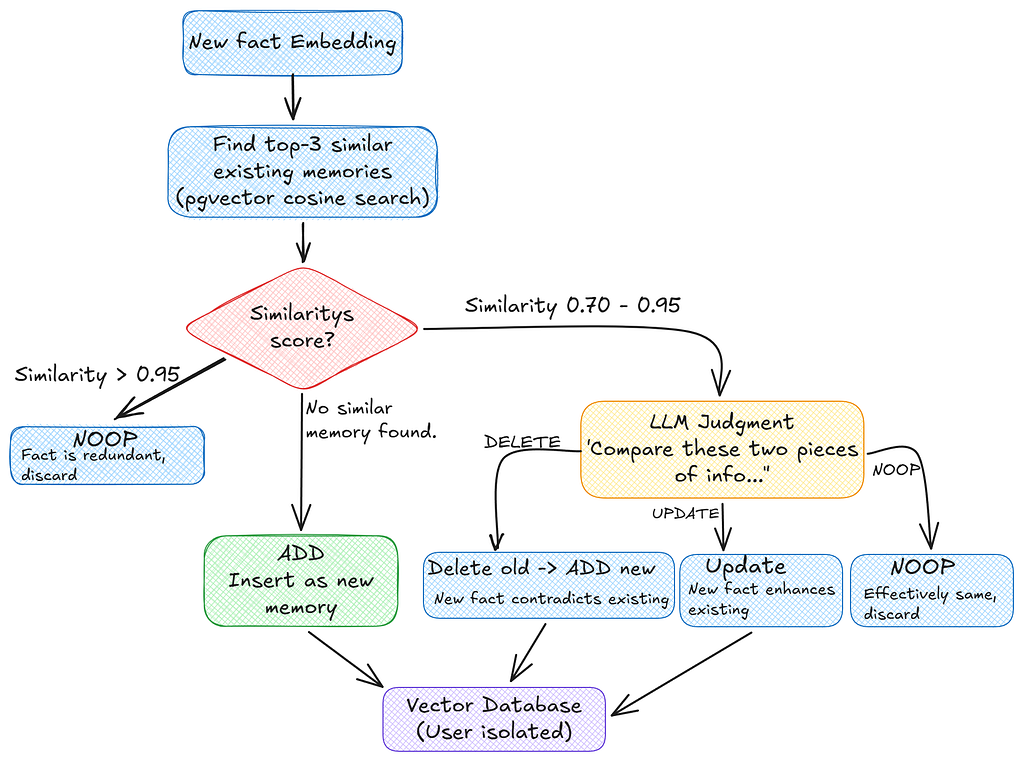
When similarity falls in that 0.70–0.95 range, the LLM is asked to classify the relationship. The prompt is intentionally minimal as we don’t want the model overthinking:
Compare these two pieces of information:
Existing: {existing_content}
New: {new_fact}

Respond with exactly one word:
- DELETE if the new information contradicts the existing one and should replace the old
- UPDATE if the new information enhances the old
- NOOP if they say the same thing

Decision:
The response is .strip().upper() and validated against the three allowed values. Anything else defaults to NOOP
This layered approach means the memory store stays accurate over time. Contradictions get resolved, redundancies get filtered, and new information integrates correctly.
Memory Retrieval at Query Time
When a user asks a question, the query is embedded and compared against their entire memory store using pgvector’s cosine similarity search, scoped to that user’s user_id. Only the top-k most semantically relevant memories surface.
cursor.execute("""
SELECT id, content, created_at, source, metadata, embedding,
       (1 - (embedding <=> %s::vector)) AS similarity
FROM memories
WHERE user_id = %s AND embedding IS NOT NULL
ORDER BY embedding <=> %s::vector
LIMIT %s;
""", (embedding_str, user_id, embedding_str, top_k))
The %s placeholder are safe value slots. At runtime, psycopg2 fills them in from the tuple.
- embedding_str : Goes into first and third %s. (that’s why passing it twice)
- user_id : into the second. (WHERE user_id statement)
- top_k : into the fourth (LIMIT statement)
The (1 - (embedding <=> %s::vector)) AS similarity formula turns a distance into a similarity score. The <=> operator is pgvector's cosine distance — it returns 0 when two vectors point in the exact same direction (identical meaning) and grows larger as they drift apart. But we want "1 = perfect match, 0 = unrelated." So, we just subtract the distance from 1 to flip it: 1 - distance = similarity. The ::vector part tells PostgreSQL to read the input string as a pgvector vector so the <=> operator knows what to do with it.
This way only memories actually relevant to the current question show up, not the entire history.
Memory Categories in Practice
This is how everything fits together when generating SQL -
A user says, “Always show me customers from India.” The system stores this as [PREFERENCE] country = 'India'.
Later, the user says, “High value order means total amount over 10000.” Stored as [TERM] high value order = total_amount > 10000.
Now when the user asks “Show me customers who have a high order value,” both memories get retrieved via semantic search. The SQL is generated with the India filter and the terminology definition pre-applied. Hence, the generated query includes WHERE c.country = 'India' AND o.total_amount > 10000. The response includes a note: "(Note: preferences applied)"
Implementing Multi-User Memory Storage
The heart of the memory system is PostgreSQL with the pgvector extension. We maintain three tables, and every single row is scoped to a user_id:
conn = psycopg2.connect(self.conn_string)
            cursor = conn.cursor()

            # Enable pgvector extension
            cursor.execute("CREATE EXTENSION IF NOT EXISTS vector;")
            conn.commit()

            # Create memories table with user isolation
            cursor.execute(f"""
                CREATE TABLE IF NOT EXISTS memories (
                    id SERIAL PRIMARY KEY,
                    user_id TEXT NOT NULL,
                    content TEXT NOT NULL,
                    created_at FLOAT NOT NULL,
                    source TEXT,
                    metadata JSONB DEFAULT '{{}}'::JSONB,
                    embedding VECTOR(384)
                );
            """)

            # Create HNSW index for fast similarity search
            # HNSW = Hierarchical Navigable Small World - efficient for high-dimensional vectors
            cursor.execute("""
                CREATE INDEX IF NOT EXISTS memories_embedding_idx
                ON memories USING hnsw (embedding vector_cosine_ops);
                """)

            # Index on user_id for efficient filtering
            cursor.execute("CREATE INDEX IF NOT EXISTS memories_user_id_idx on memories(user_id);")

            # Conversation summaries table
            cursor.execute("""
                    CREATE TABLE IF NOT EXISTS conversation_summaries (
                           id SERIAL PRIMARY KEY,
                           user_id TEXT NOT NULL,
                           summary TEXT NOT NULL,
                           updated_at TIMESTAMP DEFAULT CURRENT_TIMESTAMP
                    );
                           """)
            cursor.execute("CREATE INDEX IF NOT EXISTS summaries_user_id_idx ON conversation_summaries(user_id);")

            # Recent messages table
            cursor.execute("""
                    CREATE TABLE IF NOT EXISTS recent_messages (
                           id SERIAL PRIMARY KEY,
                           user_id TEXT NOT NULL,
                           messages TEXT NOT NULL,
                           created_at TIMESTAMP DEFAULT CURRENT_TIMESTAMP
                    );
                           """)
            cursor.execute("CREATE INDEX IF NOT EXISTS messages_user_id_idx ON recent_messages(user_id);")

            conn.commit()
            cursor.close()
            conn.close()
This code bootstraps the memory storage layer on first run. It enables the vector extension, then creates the memories, conversation_summaries, and recent_messages tables (each scoped by user_id), an HNSW index on the 384-dim embedding column for fast similarity search, and B-tree indexes on every user_id column so per-user filtering never triggers a full scan.
The memories table stores the actual content with 384-dimensional embeddings from all-MiniLM-L6-v2. The HNSW (Hierarchical Navigable Small World) index gives us fast approximate nearest-neighbor search, crucial for real-time performance.
For development or testing, the system also supports a JSON file storage fallback. It’s slower (cosine similarity has to be calculated manually in Python), but it works without any database setup. You just leave the MEMORY_DB_CONNECTION environment variable empty.
def find_similar_memories(self, embedding: List[float], user_id: str, top_k: int = 5) -> List[Tuple[Memory, float]]:
"""
Find similar memories using cosine similarity.

Since we don't have pgvector in JSON mode, we calculate similarity manually.
"""
if not embedding:
    return []

memories = self.load_memories(user_id)

similarities = []
for memory in memories:
    if memory.embedding:
        # Calculate cosine similarity
        try:
            norm1 = np.linalg.norm(embedding)
            norm2 = np.linalg.norm(memory.embedding)

            if norm1 > 0 and norm2 > 0:
                similarity = np.dot(embedding, memory.embedding) / (norm1 * norm2)
            else:
                similarity = 0.0

            similarities.append((memory, similarity))
        except Exception as e:
            print(f"Error calculating similarity for nmemory {memory.id}: {e}")
            continue

# Sort by similarity (highest first)
similarities.sort(key=lambda x: x[1], reverse=True)

return similarities[:top_k]
When PostgreSQL isn’t available, the system loads all of a user’s memories from a JSON file and computes cosine similarity in pure Python using NumPy (np.dot(a, b) / (norm(a) * norm(b))). It then sorts descending and returns the top-k. Slower than pgvector — O(n) per query but zero infrastructure to set up.
The PostgreSQL Data Client
The data client handles schema introspection, it’s how the system knows what tables, columns, and relationships exist in your database. This is critical because all SQL generation is grounded against the real schema, never hardcoded.
def __init__(self, connection_string: str):
        """
        Initialize with a PostgreSQL connection string.

        Format: postgresql://user:password@host:port/database
        """
        self.connection_string = connection_string
        self._test_connection()

    def _test_connection(self):
        """Test that we can connect to the database."""
        try:
            conn = psycopg2.connect(self.connection_string)
            conn.close()
            print("✅ Successfully connected to PostgreSQL database")
        except Exception as e:
            print(f"❌ Failed to connect to database: {e}")
            raise

    def get_schema_metadata(self, schema_name: str = 'public') -> Dict[str, Any]:
        """
        Get comprehensive schema metadata for the Text2SQL system.

        Fixed version with proper schema-qualified joins and better error handling.
        """
        metadata = {
            "database_type": "postgresql",
            "schema_name": schema_name,
            "tables": [],
            "relationships": [],
            "statistics": {}
        }

        conn = None
        try:
            conn = psycopg2.connect(self.connection_string)
            cursor = conn.cursor(cursor_factory=psycopg2.extras.DictCursor)

            # 1. Get all tables with proper schema-qualified comments
            cursor.execute("""
                SELECT
                    t.table_name,
                    obj_description(c.oid, 'pg_class') as table_comment
                FROM information_schema.tables t
                LEFT JOIN pg_class c ON c.relname = t.table_name
                LEFT JOIN pg_namespace n ON n.oid = c.relnamespace AND n.nspname = t.table_schema
                WHERE t.table_schema = %s
                AND t.table_type = 'BASE TABLE'
                ORDER BY t.table_name
            """, (schema_name,))

            tables = cursor.fetchall()

            for table in tables:
                table_info = {
                    "table_name": table['table_name'],
                    "description": table['table_comment'] or "",
                    "columns": [],
                    "primary_keys": [],
                    "foreign_keys": [],
                    "indexes": []
                }

                # 2. Get columns with proper schema-qualified comments
                cursor.execute("""
                    SELECT
                        c.column_name,
                        c.data_type,
                        c.character_maximum_length,
                        c.is_nullable,
                        c.column_default,
                        col_description(pgc.oid, c.ordinal_position) as column_comment
                    FROM information_schema.columns c
                    LEFT JOIN pg_class pgc ON pgc.relname = c.table_name
                    LEFT JOIN pg_namespace pgn ON pgn.oid = pgc.relnamespace AND pgn.nspname = c.table_schema
                    WHERE c.table_schema = %s
                    AND c.table_name = %s
                    ORDER BY c.ordinal_position
                """, (schema_name, table['table_name']))

                columns = cursor.fetchall()

                for col in columns:
                    column_info = {
                        "column_name": col['column_name'],
                        "data_type": col['data_type'],
                        "max_length": col['character_maximum_length'],
                        "nullable": col['is_nullable'] == 'YES',
                        "default": col['column_default'],
                        "description": col['column_comment'] or ""
                    }

                    # Simplify data types for LLM understanding
                    column_info['simple_type'] = self._simplify_data_type(col['data_type'])
                    table_info['columns'].append(column_info)

                # 3. Get primary keys with safer approach
                cursor.execute("""
                    SELECT a.attname as column_name
                    FROM pg_index i
                    JOIN pg_attribute a ON a.attrelid = i.indrelid
                        AND a.attnum = ANY(i.indkey)
                    JOIN pg_class c ON c.oid = i.indrelid
                    JOIN pg_namespace n ON n.oid = c.relnamespace
                    WHERE c.relname = %s
                    AND n.nspname = %s
                    AND i.indisprimary
                """, (table['table_name'], schema_name))

                pk_columns = cursor.fetchall()
                table_info['primary_keys'] = [pk['column_name'] for pk in pk_columns]

                # 4. Get foreign keys with better error handling
                cursor.execute("""
                    SELECT
                        kcu.column_name,
                        ccu.table_name AS foreign_table_name,
                        ccu.column_name AS foreign_column_name
                    FROM information_schema.table_constraints AS tc
                    JOIN information_schema.key_column_usage AS kcu
                        ON tc.constraint_name = kcu.constraint_name
                        AND tc.table_schema = kcu.table_schema
                    JOIN information_schema.constraint_column_usage AS ccu
                        ON ccu.constraint_name = tc.constraint_name
                        AND ccu.table_schema = tc.table_schema
                    WHERE tc.constraint_type = 'FOREIGN KEY'
                    AND tc.table_schema = %s
                    AND tc.table_name = %s
                """, (schema_name, table['table_name']))

                foreign_keys = cursor.fetchall()

                for fk in foreign_keys:
                    fk_info = {
                        "column": fk['column_name'],
                        "references_table": fk['foreign_table_name'],
                        "references_column": fk['foreign_column_name']
                    }
                    table_info['foreign_keys'].append(fk_info)

                    # Also add to relationships for easier access
                    metadata['relationships'].append({
                        "from_table": table['table_name'],
                        "from_column": fk['column_name'],
                        "to_table": fk['foreign_table_name'],
                        "to_column": fk['foreign_column_name'],
                        "relationship_type": "foreign_key"
                    })

                # 5. Get indexes with schema qualification
                cursor.execute("""
                    SELECT
                        i.relname as indexname,
                        pg_get_indexdef(i.oid) as indexdef
                    FROM pg_class i
                    JOIN pg_index ix ON i.oid = ix.indexrelid
                    JOIN pg_class t ON ix.indrelid = t.oid
                    JOIN pg_namespace n ON t.relnamespace = n.oid
                    WHERE t.relname = %s
                    AND n.nspname = %s
                    AND i.relname NOT LIKE '%%_pkey'
                """, (table['table_name'], schema_name))

                indexes = cursor.fetchall()
                table_info['indexes'] = [
                    {
                        "index_name": idx['indexname'],
                        "definition": idx['indexdef']
                    }
                    for idx in indexes
                ]

                metadata['tables'].append(table_info)

            # 6. Get statistics with error handling
            try:
                cursor.execute("""
                    SELECT COUNT(*) as table_count
                    FROM information_schema.tables
                    WHERE table_schema = %s AND table_type = 'BASE TABLE'
                """, (schema_name,))

                stats = cursor.fetchone()
                metadata['statistics']['table_count'] = stats['table_count'] if stats else 0

                # Count total columns
                total_columns = sum(len(t['columns']) for t in metadata['tables'])
                metadata['statistics']['total_columns'] = total_columns

                # Count relationships
                metadata['statistics']['relationship_count'] = len(metadata['relationships'])

            except Exception as e:
                print(f"Warning: Could not retrieve statistics: {e}")
                metadata['statistics'] = {"error": str(e)}

            cursor.close()

            return metadata

        except Exception as e:
            print(f"Error getting schema metadata: {e}")
            if conn:
                conn.rollback()
            raise
        finally:
            if conn:
                conn.close()
The __init__ stores the connection string and runs a smoke test by opening and immediately closing a connection (so configuration errors fail at startup, not on the first query). get_schema_metadata() then does the heavy lifting, it walks information_schema and pg_catalog to discover every table, every column with its data type and nullability, primary keys, foreign keys (which it also rolls up into a top-level relationships list), and non-PK indexes. The result is the structured dict that the SQL generator grounds every prompt against.
The modular design means you could swap this out for a Snowflake client, a Databricks client, or anything else without touching the memory architecture.
Prompt Engineering for 7B Models
This is where things get interesting. Because we’re targeting 7B-parameter local models (not GPT-5 or Opus 4.7), prompts need to be compact, unambiguous, and structured to reliably produce parseable output. Every prompt in the system was designed with this constraint in mind.
SQL Generation Prompt
We use Ollama’s /api/chat endpoint with a split system + user message structure. I actually started with /api/generate using a SQL completion trick, but instruction-tuned models like qwen2.5-coder behave fundamentally differently in completion mode versus chat mode. The chat format was essential for reliable output.
System message — sets the model’s strict output contract:
system_msg = (
            "You are a PostgreSQL expert. "
            "Output ONLY a valid SQL SELECT statement — no explanation, "
            "no markdown fences, no backticks, no comments. "
            "Raw SQL only."
        )
A four-line system prompt that hammers home a single rule: produce raw SQL, nothing else. No markdown fences, no commentary, no backticks. Keeping the contract this strict is what makes the downstream _clean_sql_response() parser reliable on a 7B model.
User message — injects schema + memory context + question:
context_parts = []
        if preferences:
            for pref in preferences[:2]:
                context_parts.append(f"- Apply filter: {pref}")
        if terminology:
            for term in terminology[:2]:
                context_parts.append(f"- Term defined: {term}")
        memory_block = "\n".join(context_parts)

user_msg = (
            f"Schema (use ONLY these tables and columns):\n{schema_block}\n\n"
            f"Rules:\n"
            f"- Output raw SQL only, nothing else.\n"
            f"- Do NOT JOIN tables unless both tables are genuinely needed "
            f"in SELECT or WHERE.\n"
            f"- Add LIMIT 20 for non-aggregate queries.\n"
            + (f"- User preferences:\n{memory_block}\n" if memory_block else "")
            + f"\nQuestion: {query}"
        )
Stitches together the four ingredients the model needs at query time: the compact one-line-per-table schema block, a short rules list (raw SQL only, avoid unnecessary JOINs, add LIMIT 20 for non-aggregates), the optional memory context block (preferences and terminology), and finally the user's natural-language question. We also take only [:2] terms or prefs at a time. More about it later. Memory context is conditionally injected only when there's something relevant to add.
Why the Schema Block is Compact
Full schema blocks with data types, nullability, descriptions, and indexes can easily exceed 2,000 tokens for a moderate schema. At 4,096 token context windows, that leaves very little room for the question, memories, and SQL output. So the schema block is deliberately compressed to one line per table table name and all column names with value hints only for status/enum columns that the model needs for correct WHERE clauses.
Decoding Parameters
SQL generation uses near-zero temperature to minimize hallucination:
"options": {
                        "temperature": 0.0,
                        "top_k": 1,
                        "top_p": 0.1,
                        "num_predict": 400,
                        "num_ctx": 4096,
                        "repeat_penalty": 1.0,
                    }
Here we set the sampling knobs on the /api/chat request to make output as deterministic as possible: temperature: 0.0 (no randomness), top_k: 1 (always pick the single most likely next token), top_p: 0.1 (nucleus sampling kept tight as a safety net), num_predict: 400 (cap output length), num_ctx: 4096 (chosen budget for hardware limitations), and repeat_penalty: 1.0 (Don't penalise on SQL legitimately repeats keywords like AND).
You can experiment with these. I found that temperature: 0.0 with top_k: 1 gives the most deterministic output for SQL. Memory extraction uses a slightly higher temperature (0.1) because that task benefits from minor paraphrase variation when generalizing facts.
The Preference Detection System
Before any message reaches the LLM, a regex-based preference detector classifies it. This avoids wasting LLM calls on messages that are clearly data queries, and correctly routes preference statements before they hit the SQL pipeline:
def _is_preference_statement(self, user_message: str) -> bool:
        """Detect if input is a preference/terminology statement rather than a query."""
        message_lower = user_message.lower().strip()

        preference_patterns = [
            r"i\s+(?:am\s+)?(?:only\s+)?(?:not\s+)?interested\s+in",
            r"i\s+(don't|do not)\s+want",
            r"i\s+want\s+to\s+see",
            r"i\s+prefer",
            r"i\s+like",
            r"i\s+need\s+to\s+see",
            r"always\s+show",
            r"never\s+show",
            r"exclude\b",
            r"include\s+only",
            r"filter\s+by",
            r"only\s+show\s+me",
            r"from\s+now\s+on",
            r"going\s+forward",
            r"let'?s\s+(call|define)",
            r"define\s+.*\s+as",
            r".*\s+means\s+.*",
            r"consider\s+.*\s+as",
            r"i\s+am\s+not\s+interested",
            r"i\s+no\s+longer",
            r"stop\s+showing",
            r"remove\s+.*\s+filter",
        ]

        for pattern in preference_patterns:
            if re.search(pattern, message_lower):
                return True

        if " means " in message_lower or " is defined as " in message_lower:
            return True

        question_words = ["what", "how", "when", "where", "which", "who", "why",
                          "show me", "list", "give me", "find", "get", "count"]
        has_question = any(word in message_lower for word in question_words)

        basic_preferences = ["i want", "i need", "i prefer", "always", "never"]
        has_preference = any(pref in message_lower for pref in basic_preferences)

        return has_preference and not has_question
Runs the lowercased user message through a list of ~20 regex patterns covering preference phrasings (“always show…”, “never show…”, “exclude…”, “from now on…”, “X means Y”, “define X as…”, etc.). If any pattern matches, the message is provisionally classified as a preference. The secondary gate then checks for question words (`what`, `how`, `show me`, `list`, `count`, …) if any are present, the classification is overridden back to “data query,” preventing false positives like “Show me what I’m interested in.”
The Gradio Web Interface
I am going to come up clean and confess that this frontend was built entirely with Claude. Reason being I don’t like investing much in fancy UIUX. I just needed a working frontend to display the components and to give my pet project an UI.
With that said, the frontend is built with Gradio. It gives you a chat panel on the left and a Memory Bank on the right that updates in real time as the system learns your preferences. The sample database underneath is an e-commerce schema with two tables:customers (name, email, city, country, segment) and orders (status, order_date, total_amount, payment_method). Linked by customer_id.
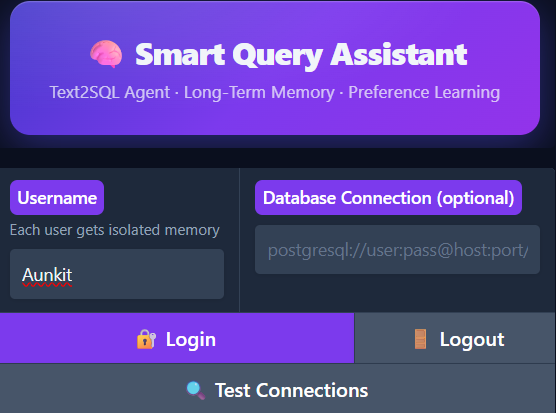
The login screen. Each username gets a completely isolated memory space, meaning Priya's preferences never affect Rahul's queries. The optional database connection field lets you point at any PostgreSQL instance.
The workflow is straightforward:
- Login — enter a username. Each username gets a completely isolated memory space.
- Load Schema — the system introspects your PostgreSQL database and builds the table/column/FK map. In this demo, it discovers customers and orders with their foreign key relationship.
- Set Preferences — teach the system what you care about. Say “Always show me customers from India” and it stores that as a preference.
- Define Terminology — bridge the gap between how you talk and what the schema looks like. Say “High value order means total amount over 10000” and the system maps that to SQL conditions.
- Ask Questions — natural language queries automatically have your preferences and terminology applied.
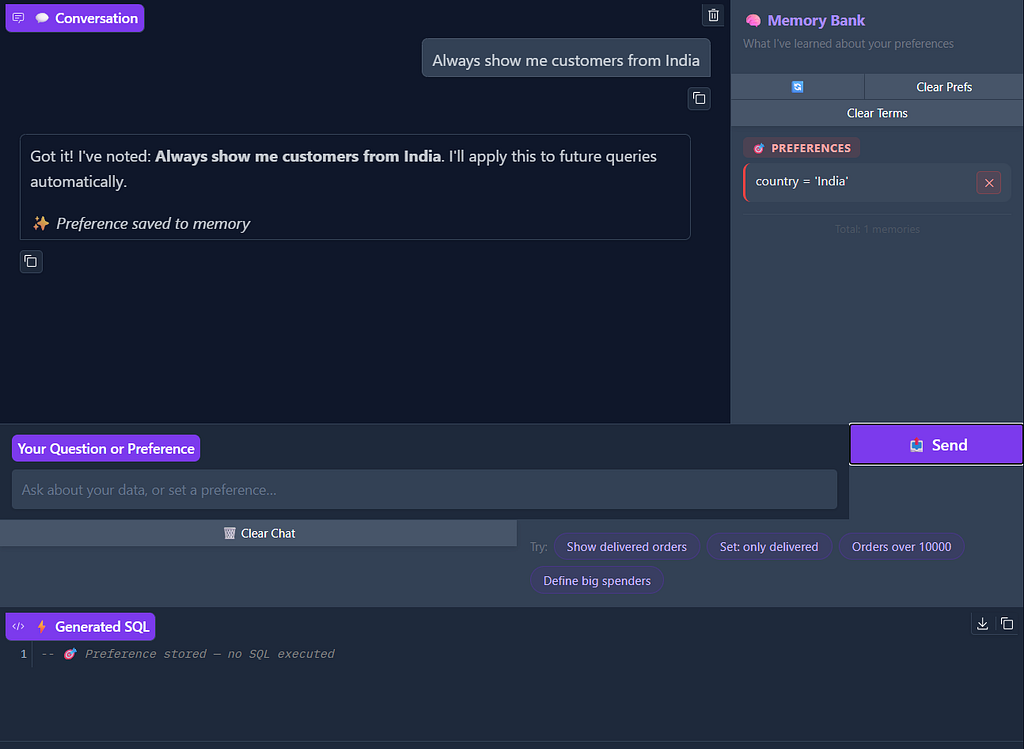
Preference capture in action. The user says, "Always show me customers from India" and the system confirms it, storing country = 'India' in the Memory Bank under PREFERENCES. The SQL panel shows "Preference stored — no SQL executed" meaning no query runs, the system just learns.
Preferences compound. The system doesn’t remember one thing for a one-time operation but instead it builds a layered understanding of what you care about.
But preferences are just half the story. The system also learns your vocabulary the domain-specific shorthand that bridges how you talk and what the database actually stores.
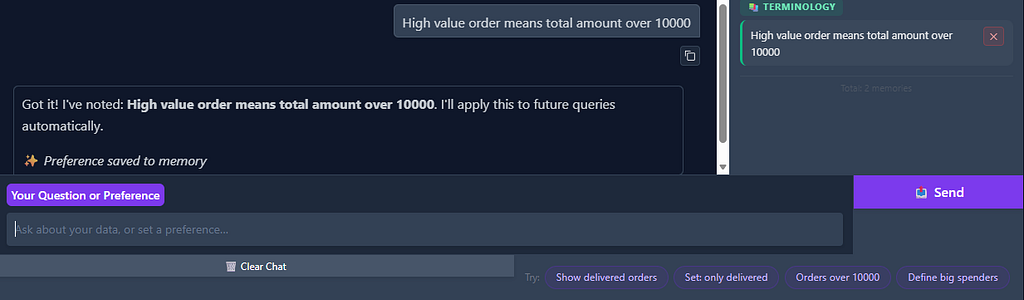
Slight bug here, it should show “terminology saved” instead of preference. But anyway, terminology definition means when the user says, "High value order means total amount over 10000", the system stores it as a TERMINOLOGY memory. Now whenever the user mentions "high value" in a query, the system knows to translate that to total_amount > 10000.
Now watch what happens when preferences and terminology combine. The user asks a natural language question using their own vocabulary, and the system applies everything it has learned, the India filter, and the “high value” definition to produce the right SQL.
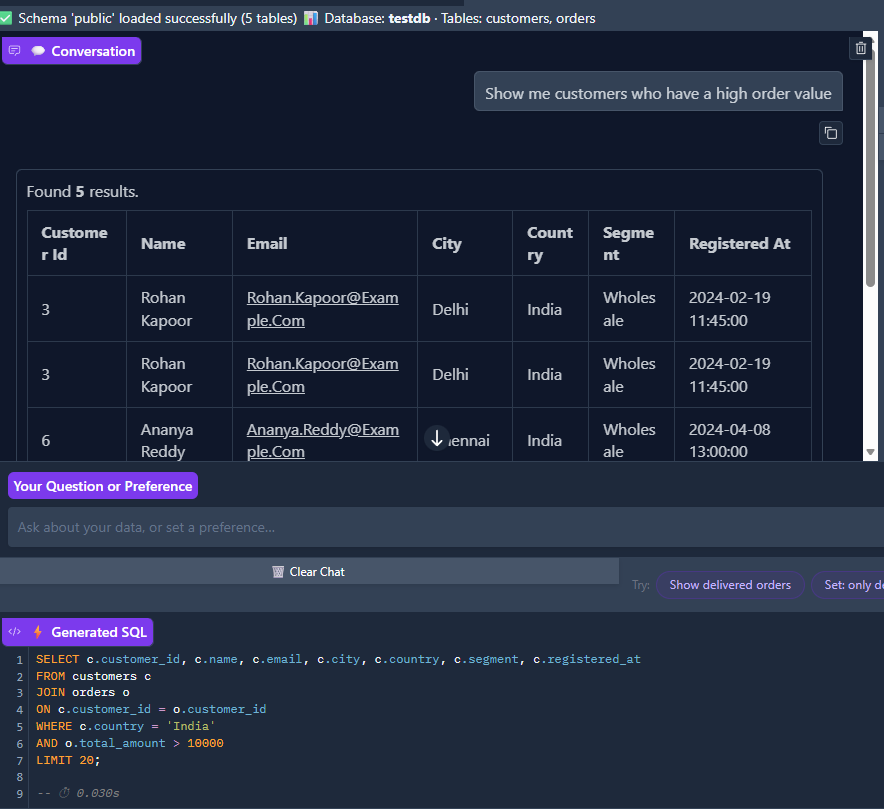
The payoff. The user asks, "Show me customers who have a high order value." The system retrieves both the terminology memory (high value order = total_amount > 10000) and the preference memory (country = 'India'), generates a JOIN query across customers and orders with WHERE c.country = 'India' AND o.total_amount > 10000, and returns the matching results: All wholesale customers from Delhi and Chennai with large orders. The schema bar at the top confirms testdb with customers, orders tables loaded. Execution time: 0.030s.
Without memory, every single one of those queries would require the user to spell out “only Indian customers” and “where total amount is greater than 10000” every time. With memory, they just say, “show me customers with high order value” and everything clicks.
Conclusion
Long-term memory transforms text2SQL agents from basic query translators into collaborative partners that actually learn from you over time. By implementing this memory system inspired by the Mem0 architecture, I built a text2SQL agent that remembers what matters — preferences, terminology, metrics, entities — and applies that knowledge automatically.
The system extracts, stores, and retrieves important facts from conversations, allowing the agent to maintain context across sessions and provide increasingly personalized experiences. And because it’s all local and open-source, your data never leaves your machine.
While I used PostgreSQL as the target database for this demonstration, the same architecture works equally well with Snowflake, Databricks, or any traditional database. The key innovation is the memory system itself, which stays consistent regardless of the underlying data platform.
Hope you liked this elaborate explanation of a pet project of mine. If you like this work, please consider upvoting!
Feel free to reach out on linkedin if you have any questions.
Happy Learning!
Aunkit Chaki
https://www.linkedin.com/in/aunkit-chaki-38807b174/
Resources
- Github link
- Mem0 research paper — [2504.19413] Mem0: Building Production-Ready AI Agents with Scalable Long-Term Memory
- pgvector extension — github.com/pgvector/pgvector
- Ollama — https://ollama.com/
- more about sentence-transformers — sentence-transformers (Sentence Transformers)
- Gradio documentation —Gradio
- qwen2.5-coder model — gsxr/one
Building a Fully Local, Open Source Text2SQL Agent with Long Term Memory — No API Keys, No Cloud. was originally published in Towards AI on Medium, where people are continuing the conversation by highlighting and responding to this story.