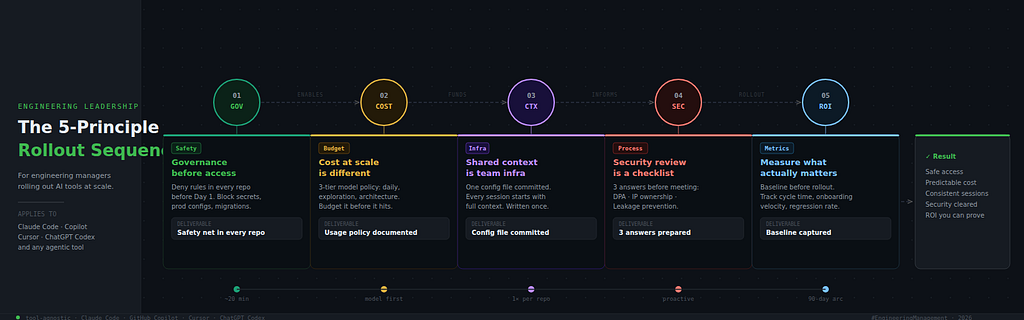
Whether your org uses Claude Code, GitHub Copilot, Cursor, ChatGPT Codex, or all of the above — these are the five principles that determine whether the rollout compounds or collapses.
“My devs are already using it. Some on personal plans, some sharing API keys, a few on the free tier. I have no visibility, no governance, no plan. What do I actually need to put in place?”
That message lands in engineering Slack/Teams channels and 1:1s every week right now. And it’s not a niche problem — it’s the moment every engineering organization hits as AI coding tools stop being experiments and start becoming infrastructure.
The question is no longer whether to adopt AI coding tools. Your team is already using them. The question is how to roll them out without creating a sprawling, ungoverned mess — and how to do it in a way that compounds value instead of just adding another tool to the pile.
This guide is tool-agnostic by design. The principles apply whether you’re standardizing on Claude Code, GitHub Copilot, Cursor, ChatGPT Codex, or running a multi-tool environment. Where it helps to get concrete, Claude Code is used as the reference implementation — it has one of the most mature permission and configuration systems in the space, which makes it a useful model even if it’s not your primary tool.
Five principles. Let’s go.
Principle 1: Governance Before Access — Build the Safety Net First
The first instinct in most orgs is: give everyone access, see what happens, govern later. This is exactly backwards with AI coding tools — especially agentic ones.
Modern AI coding tools sit on a spectrum of autonomy. At one end: in-editor completion tools like Copilot and Tabnine, which suggest code but don’t act without explicit developer approval. At the other end: agentic tools like Claude Code and Cursor’s composer mode, which read files, execute commands, manage git, and write code across multiple files in a single workflow.
The more autonomous the tool, the more consequential ungoverned access becomes. An unapproved suggestion is easy to reject. An agentic tool running without guardrails in a production-adjacent environment is a real risk.
The governance questions to answer before any rollout:
- What files and directories should AI tools never read? (secrets, production configs, regulated data)
- What actions should they never take? (destructive commands, production deployments, migration edits)
- Which environments are in scope? (local dev only? staging? CI/CD?)
- Who controls the rules, and how are they updated?
How leading tools handle this:
Most mature tools provide some form of permission or ignore configuration. The implementation differs, but the principle is the same — establish a file-level boundary before developers start using the tool in your repos.
GitHub Copilot:   .copilotignore — works like .gitignore, blocks files from AI context
Cursor:           .cursorignore + Rules for AI (project-level instructions)
ChatGPT Codex:    Sandboxed execution environment; configure via system prompt
Claude Code:      .claude/settings.json — granular allow/deny by file pattern and command type
Claude Code example — a team-wide safety baseline in settings.json:
{
  "permissions": {
    "allow": [
      "Read(**)",
      "Write(src/**)",
      "Write(tests/**)",
      "Bash(npm run test:*)",
      "Bash(git status)",
      "Bash(git diff*)",
      "Bash(git commit*)"
    ],
    "deny": [
      "Read(.env)",
      "Read(.env.*)",
      "Read(**/secrets/**)",
      "Write(migrations/**)",
      "Write(production.config.*)",
      "Bash(rm -rf*)",
      "Bash(sudo *)",
      "Bash(curl * | bash)"
    ]
  }
}
Commit this to every repo before rollout. It becomes the floor — automatic protection every developer gets from the moment they open a session.
The rule of thumb, regardless of tool: Before any developer runs an AI coding tool in a repo, that repo needs a configuration file that explicitly blocks production configs, environment secrets, migration files, and any destructive operations. This takes 20 minutes per repo and prevents the class of incidents that make security teams permanently hostile to AI tooling.
Principle 2: Cost at Scale Is a Different Problem — Model It Before It Surprises You
Individual developer cost is manageable and usually predictable. At one developer, tool costs are noise. At twenty developers running AI tools daily, it’s a line item that needs an owner and a budget.
The teams that get surprised aren’t the ones who made a bad decision — they’re the ones who approved the tool at the individual level without modeling what “everyone using it daily” actually costs.
The three variables that drive team-level cost across most AI tools:
Model / tier selection. Most tools offer tiered capabilities — faster/cheaper models for routine tasks, more powerful/expensive models for complex reasoning. The default is rarely the cheapest option. A team of 20 defaulting to the highest-capability model for all tasks is often paying 4–5x more than necessary.
Context hygiene. AI tools that maintain conversation or session history accumulate context over time. Stale context isn’t just a quality problem — it’s a cost problem. Teams that don’t actively manage session context burn tokens on history that’s no longer relevant.
Task scope. “Fix the bug in auth.js” is a focused task. “Review the security of the entire codebase” is an expensive one. Both are valid. Only one should happen without deliberate intent.
Claude Code example — a model selection policy that aligns cost with task value:
## AI Tooling — Model Usage Guidelines

### Default: Sonnet (daily development work)
Feature development, refactoring, bug fixes, code review, test generation.

### Haiku (fast + cheap - use for speed tasks)
Quick lookups, mapping unfamiliar code, repetitive generation,
CI/CD automation. Switch: --model claude-haiku-4-5-20251001

### Opus (deliberate, high-value only)
Architecture reviews, security audits, complex system design.
Rule: if the cost of a wrong decision exceeds $50, Opus is worth it.

### Cost hygiene rules
- Run /compact when context hits 50–60%
- Scope file references to what's needed, not the whole repo
- Use one-shot mode (-p) for scripted, non-interactive tasks
The principle applied to any tool: Build a tiered usage policy. Define what “everyday” work looks like versus “heavy lifting” work. Route accordingly. Add it to your team’s shared AI guidelines doc — the equivalent of your linting config, but for AI tool usage.
The real unlock on cost: Developers who understand why they’re using a particular tier — not just that they’re supposed to — make better decisions autonomously. Cost efficiency and quality aren’t a trade-off when the reasoning is clear.
Principle 3: Shared Context Is Team Infrastructure — Treat It Like Code
Here’s the hidden tax in most AI tool rollouts: every developer re-explains the same project context to the AI at the start of every session. Stack, conventions, folder structure, what not to touch, test setup, naming patterns — repeated, per person, per session, every day.
Across twenty developers running multiple sessions daily, this is thousands of context-setting prompts per month. It’s wasted tokens, wasted time, and inconsistent outputs because everyone’s context-setting is slightly different.
The solution is a shared project context file — a single source of truth that every developer loads into their AI tool sessions, automatically, without thinking about it.
How leading tools support this:
GitHub Copilot:   .github/copilot-instructions.md — repo-level custom instructions
Cursor:           .cursorrules — project-specific AI behavior rules
ChatGPT Codex:    System prompt configuration per project/environment
Claude Code:      CLAUDE.md — hierarchical, auto-loaded at session start
The format differs. The principle is identical: one file, committed to source control, that makes every AI session start with full project context.
Claude Code example — a production-ready team CLAUDE.md:
# [Project Name] — AI Context

## Stack
- Node.js 20, TypeScript 5.4, Express 4
- PostgreSQL via Prisma ORM
- Jest (unit), Supertest (integration)
- pnpm - always pnpm, never npm or yarn

## Architecture
- Routes: /src/routes - keep thin, no business logic
- Services: /src/services - all business logic lives here
- Repositories: /src/repositories - all DB queries live here

## Code Standards
- async/await only - no raw Promises or callbacks
- Named exports - no default exports
- Error handling: use AppError class from /src/utils/errors.ts
- Never console.log - use our logger from /src/utils/logger.ts

## Testing
- Run `pnpm run test:db:reset` before integration tests
- Requires Redis on localhost:6379 for integration suite

## Never Touch
- /src/config/production.ts
- /migrations - create new ones, never edit existing
- .env.production - never read, never modify
Why this is infrastructure, not a convenience:
When a new developer joins, they don’t need an AI onboarding session — they clone the repo and the context file handles it. When a convention changes, one PR updates it for every developer and every session simultaneously. When a senior developer’s hard-won knowledge about “never touch migrations” needs to survive their departure, the context file is where it lives permanently.
The cascade pattern for large codebases (Claude Code, and applicable conceptually to any tool):
CLAUDE.md                            # org-wide defaults
./payments-service/CLAUDE.md         # service-specific context
./payments-service/src/api/CLAUDE.md # subsystem rules
More specific contexts win on conflicts. A monorepo can have a dozen context files and the layering is handled automatically.
The action: If your team doesn’t have a shared AI context file yet, bootstrap one this week. In Claude Code, run > /init inside any session — Claude reads your codebase and writes a first draft you can edit and commit. For Copilot, create .github/copilot-instructions.md. For Cursor, create .cursorrules. The content is roughly the same across all of them.
Principle 4: Security Review Is a Process Problem, Not a Blocker
Security and legal teams reliably raise three questions when AI coding tools come up for enterprise adoption. Having clear, prepared answers is what separates a rollout that gets approved from one that stalls in review for months.
Question 1: “Does our code leave our environment?”
For cloud-based tools: yes, with contractual nuance. GitHub Copilot Business/Enterprise, Claude Code on paid plans, Cursor Pro, and ChatGPT Codex all have data handling agreements that address this — generally committing that inputs are not used for model training on paid tiers. The right response is to confirm your plan tier, review the vendor’s DPA, and configure your ignore/deny rules to prevent the tool from reading files your security policy requires stay local.
For on-premise options: Codeium and Tabnine both offer self-hosted deployments with no external data transmission. If data residency is a hard requirement, this is the conversation to have with your procurement team rather than blocking AI tooling entirely.
Question 2: “Who owns the AI-generated code?”
Under current terms of service for major paid plans (Copilot, Claude, Cursor, OpenAI), the developer owns the output. Your legal team should review each vendor’s current policy directly — this area is evolving — but it has been a non-issue in practice for most enterprise evaluations that have worked through it.
Question 3: “What stops accidental IP leakage?”
Three layers, applicable to any tool:
Layer 1 — File-level controls. Use your tool’s ignore or deny configuration to block proprietary algorithm files, licensed components, and sensitive business logic from being read as context.
// Claude Code settings.json example:
{
  "permissions": {
    "deny": [
      "Read(**/proprietary/**)",
      "Read(**/algorithms/core*)",
      "Read(**/licensed-components/**)"
    ]
  }
}
Layer 2 — Shared context instructions. Add explicit guidance to your shared context file: “Do not include implementation details of [core feature] in prompts or discussions.”
Layer 3 — Developer training. The same standard you apply to using any external API or sending code to a third-party service. AI tools aren’t categorically different from existing developer workflows — they just need the same deliberate rules applied.
The framing that helps security reviews move faster: AI coding tools with proper configuration are often more auditable than existing developer access patterns. The question isn’t whether to allow them — it’s whether you’ve configured them to match your security posture. That’s a solvable problem, not a fundamental blocker.
Principle 5: Measure What Actually Matters — ROI Without the Vanity Metrics
At some point someone above you will ask: “Is this actually working?” The answer you give depends entirely on what you measure.
The metrics that look good but tell you little: lines of code generated, number of AI sessions run, percentage of developers with access, developer satisfaction scores. These are adoption metrics. They measure that the tool is being used — not that it’s producing value.
The metrics that tell you whether AI tooling is compounding:
Time-to-first-commit on new features. From assignment to first working implementation committed. This captures whether AI is accelerating the part of development that matters most — getting from zero to something reviewable and testable.
Code review cycle time. If developers are using AI for a first-pass review before the PR goes to humans, review cycles should shorten. If they’re not shortening, either AI isn’t being used in the review workflow or the shared context file isn’t tight enough for AI to catch what matters to your team.
Onboarding velocity for new hires. How long before a new developer makes their first meaningful contribution? With a well-configured context file and up-to-date documentation, new developers can answer “how does this system work” questions without consuming senior developer time.
Regression rate on AI-assisted commits. Track bugs originating in AI-assisted commits separately for the first quarter. If the rate is comparable to human-only code, your governance and review workflow are working. If it’s higher, the cause is almost always insufficient test context in your shared instructions, or developers skipping the test suite before committing.
Senior developer time on high-leverage work. The hardest metric to measure and the most important. If senior developers are spending less time answering repetitive questions and reviewing boilerplate, and more time on architecture and hard problems, the tool is working at the level that matters.
A practical 90-day measurement frame:
Week 1–2:    Baseline. Capture current averages for each metric above.
             Don't skip this — you can't show ROI without a before.

Week 3–8:    Rollout with governance, shared context, and model guidelines in place.

Week 9–12:   Compare weeks 8–12 to baseline.
             Ignore weeks 3–4 - they include learning curve noise.

Leading indicators (visible within 2–4 weeks):
- Developers consulting AI before asking teammates
- PR descriptions more detailed and complete
- Test coverage increasing on new features

Lagging indicators (need 60–90 days):
- Feature cycle time improvement
- Onboarding velocity
- Regression rate stability
The teams that declare AI tooling a failure in the first month are measuring the wrong things or measuring too early. The compounding effects — the ones that show up in cycle time and onboarding velocity — take a quarter to materialize. That’s not a long time in the context of a tool you’re planning to run for years.
The Setup Order That Makes It Work
Regardless of which tool or combination of tools your org adopts, this sequence holds:
1. Governance first
   Configure ignore/deny rules in every active repo.
   Block secrets, production configs, migrations, and destructive operations.
   This is your safety net. It takes 20 minutes per repo.

2. Shared context second
   Create your shared project context file (CLAUDE.md, .cursorrules,
   copilot-instructions.md - whatever your tool supports).
   Commit it. Brief your team. Bootstrap with /init if using Claude Code.

3. Usage guidelines third
   Document your model/tier policy and cost hygiene rules.
   Add it to the shared context file or your internal dev handbook.
   This handles the cost conversation proactively.

4. Rollout fourth
   Give access with the infrastructure already in place.
   Run a 60-minute team session showing the core workflows.
   The habits developers form in week one tend to stick.

5. Baseline and measure from day one
   Capture your current cycle time, onboarding velocity, review time.
   You can't show a board or a VP that this is working without a before.
On Running Multiple Tools
Many high-output engineering teams are running more than one AI tool deliberately, not by accident.
A common pattern: Copilot for in-editor completions (low friction, deeply IDE-integrated) alongside an agentic tool like Claude Code or Cursor for complex multi-file workflows, architecture reasoning, and automated tasks. The tools aren’t competing — they’re serving different points in the development workflow.
If your team is running multiple tools, the governance and shared context principles become more important, not less. Each tool needs its own ignore configuration. Your shared context files may need to be adapted per tool. Usage guidelines need to be explicit about which tool to reach for and when.
The worst outcome isn’t running multiple tools. It’s running multiple tools without governance on any of them.
The Bottom Line
The developers on your team who are already using AI coding tools aren’t waiting for permission. They’re discovering, session by session, what the tools can do. Your job as the engineering leader in the room isn’t to slow that down — it’s to build the infrastructure that makes it safe, measurable, and compounding for the whole team.
Five principles. Governance before access. Cost modeled at scale. Shared context as team infrastructure. Security answers ready. Metrics that tell the truth.
That’s the rollout. Everything else is details.
Resources:
- Claude Code docs: docs.anthropic.com/en/docs/claude-code
- GitHub Copilot for Business: docs.github.com/en/copilot
- Cursor docs: docs.cursor.com
- Anthropic usage policy: anthropic.com/legal
The Engineering Manager’s Playbook for Rolling Out AI Coding Tools was originally published in Towards AI on Medium, where people are continuing the conversation by highlighting and responding to this story.