
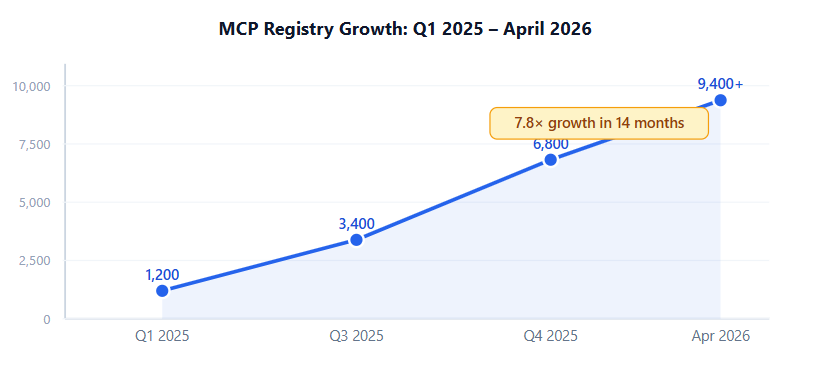
There are now 9,400+ active public MCP servers a number that grew 7.8x in just 14 months, according to the Digital Applied MCP Adoption Report (April 2026). Most articles about MCP do the same thing: list interesting servers in alphabetical order, pat you on the back, and send you home. That’s not useful. A search tool sitting next to an email tool isn’t a workflow it’s just a longer menu.
The real shift happens when you chain MCP servers together. Research feeds into competitive analysis, which feeds SEO validation, which populates your editorial calendar, which triggers a publish, which fires the newsletter. That’s a complete content operation running inside a single chat window. Very few teams have built this yet and even fewer have written it down.
This guide covers exactly that: six MCP servers that form one coherent end-to-end content workflow, the order they connect, and the specific prompts that make each step work.
TL;DR: Six MCP servers Exa (research), Firecrawl (competitor scraping), Ahrefs (SEO), Notion (editorial planning), GitHub (publishing), and Resend (newsletter) — form a complete content workflow in Claude Desktop. Companies using AI publish 42% more content per month. The stack runs for under $50/month for most small teams.
What Is MCP — and Why Does It Matter for Content Teams?
MCP (Model Context Protocol) is an open standard that lets AI models talk directly to external tools, APIs, and data sources. Instead of copying data into a chat window manually, an MCP-connected Claude can search the web, read your Notion database, commit to GitHub, and send an email — all in one conversation. According to the Digital Applied MCP Adoption Report (April 2026), 78% of enterprise AI teams already have at least one MCP-backed agent running in production.
For content teams, that matters because the bottleneck was never writing speed. It was all the work surrounding writing: finding credible sources, checking what competitors have covered, validating keyword demand, updating editorial trackers, pushing posts to the CMS, and sending newsletters. Those tasks eat three to four hours per piece. MCP lets an AI handle them.
Anthropic’s own numbers put the scale in perspective. The MCP SDK now sees 97 million+ monthly downloads across Python and TypeScript (December 2025). This is not a side project. It’s infrastructure and content workflows are one of the clearest production use cases.
9,400+Active public MCP servers (Apr 2026)
97M+Monthly SDK downloads (Dec 2025)
78%Enterprise AI teams with MCP in production
4.2 hrsMedian integration time per new server
Citation capsule: As of April 2026, 9,400+ public MCP servers exist — a 7.8x year-over-year increase from Q1 2025. Integration takes a median of 4.2 hours, compared to 18 hours with custom function-calling code. 78% of enterprise AI teams report at least one MCP-backed agent running in production. Source: Digital Applied MCP Adoption Report, April 2026.

The 6-Step Content Workflow These MCP Servers Automate
Most MCP guides treat servers as isolated widgets. This one doesn’t. The six servers below form a linear chain — the output of each step feeds the next one, and you never leave Claude Desktop to do it.
Here’s the full sequence:
The 6-Step MCP Content Chain
- Exa MCP — Research & topic discovery
- Firecrawl MCP — Competitor content extraction & gap analysis
- Ahrefs MCP — SEO keyword validation
- Notion MCP — Editorial calendar planning & brief creation
- GitHub MCP — Publishing & deployment
- Resend MCP — Newsletter distribution
1. Exa MCP — AI-Native Web Research
Exa is built differently from a standard search tool. It uses meaning-based retrieval rather than keyword matching, which means it returns cleaned, structured content passages an AI can actually work with not raw HTML to parse. The Exa MCP server exposes nine tools including web_search_exa, web_fetch_exa, and academic paper discovery. Set it up via github.com/exa-labs/exa-mcp-server.
This is where the content workflow starts. Before writing a single word, you want three things: credible statistics, what angles competitors have already taken, and which sources are worth citing. Exa handles all three in one prompt. You don’t open a browser, copy URLs, or dig through SEO overviews the AI does it and brings back structured results you can immediately act on.
According to HubSpot’s 2026 State of Marketing report, 94% of marketers plan to use AI in content creation this year. The gap between teams who use it well and teams who just use it comes down to where they plug it in. Research is where most time gets lost and where MCP pays back fastest.
Try this: “Find the 5 most-cited academic studies on B2B email open rates published after 2024, and return full summaries with URLs.”
2. Firecrawl MCP — Competitor Research & Content Extraction
Firecrawl strips everything that clutters a webpage ads, navigation, footers, cookie banners — and returns clean markdown optimized for LLM input. It handles JavaScript-rendered pages (the ones that trip up most scrapers), and it can crawl an entire site rather than a single URL. Batch-scraping five competitor articles into one structured analysis takes one prompt. Find the server at github.com/firecrawl/firecrawl-mcp-server and the docs at docs.firecrawl.dev/mcp.
In this workflow, Firecrawl runs after Exa. You’ve already found the relevant articles now you want to know what angle each one takes and what none of them covers. That gap is your content opportunity. Feed the top five ranking URLs to Firecrawl, ask for a topic coverage comparison, and you have a content brief skeleton in under two minutes.
It’s also the right tool for pulling competitor pricing pages, extracting data for comparison tables, and grabbing structured content for articles that reference multiple sources. The combination of Exa (find) and Firecrawl (extract) does what used to take a researcher half a day.
Try this: “Scrape the top 5 articles ranking for ‘AI email automation’ and summarize what topics each one covers that the others don’t.”

3. Ahrefs MCP — SEO Research & Keyword Validation
Ahrefs MCP brings live SEO data keyword volumes, difficulty scores, competitor rankings, backlink profiles into your chat window without opening the Ahrefs dashboard. It’s a remote hosted server (no local install required), so setup is a single OAuth connection. The official blog covers use cases at ahrefs.com/blog/mcp-use-cases. The catch: it requires an active Ahrefs subscription at Lite tier or above. There’s no free version.
Why does this step belong in the chain before writing? Because validating keyword demand after you’ve written 2,000 words is backwards. Drop an Exa research session and a Firecrawl gap analysis into context, ask Ahrefs MCP which keyword variations have real demand and low-enough competition, and you’re writing with a target not hoping you picked the right angle. Batch domain analysis in a single prompt is genuinely useful for teams managing more than five active topics.
The Digital Applied report found that MCP tool calls succeed at a 91% median rate with 38ms local latency fast enough that running a dozen keyword checks in sequence doesn’t feel like waiting. That’s the kind of speed that makes SEO research feel less like a separate project and more like a quick pre-flight check.
Try this: “What are the 10 lowest-competition keywords my domain could realistically rank for in the ‘AI workflow automation’ category? Include monthly search volume and keyword difficulty.”
4. Notion MCP — Content Planning & Editorial Calendar
Notion’s official MCP server exposes 22 tools for full read/write access to your workspace. Query databases with filters, create pages, append content blocks, and search across connected apps all via natural language. OAuth authorization means there’s no API key to configure; you authorize once in Claude Desktop and it’s live. Find the server at github.com/makenotion/notion-mcp-server, with guides at developers.notion.com/guides/mcp/overview.
At this point in the workflow, you’ve got research, a competitive gap, and a validated keyword. Notion MCP turns that into a content brief directly inside your editorial calendar no copy-pasting, no tab switching. A single prompt can create a new page in your Content Calendar database, populate it with the brief fields, assign a due date, and set the status to “In Progress.” That’s the planning step fully automated.
The reverse is equally useful. Ask Notion MCP to pull everything due this week, surface posts stuck at “In Review” for more than three days, or log the published URL back into your tracker after GitHub MCP pushes the post. It’s the connective tissue in the middle of the chain.
Try this: “Show me all blog posts in my Content Calendar database that are marked ‘In Progress’ and due in the next 7 days.”

5. GitHub MCP — Publishing & Deployment
Step 5: Publishing29,700 GitHub stars highest of all 6Free for public reposTeam/Enterprise for advanced securityBest for: Content publishing
GitHub MCP is the most widely adopted server in this list and possibly in the entire MCP ecosystem. According to MCP Manager’s Ahrefs data (October 2025), it receives 17,000 monthly searches, making it the third most searched MCP server globally. It gives Claude direct read/write access to your repositories, issues, pull requests, and GitHub Actions with push protection that blocks accidental secret exposure. Docs at docs.github.com/en/copilot/concepts/context/mcp.
For a content team running a static site (Gatsby, Next.js, Hugo, Astro), this is the “publish” button at the end of the pipeline. After writing and reviewing a post, one prompt commits it as a new markdown file to the /posts directory, names it with today's date, and opens a pull request for editorial review. When you merge, a GitHub Action builds and deploys the site. The whole publish step happens without opening GitHub in a browser.
This is also where 22% of marketing teams with production AI agents are operating they have three or more MCP servers connected simultaneously, and GitHub is almost always one of them. Once you’ve automated research through editorial planning, not automating the actual publish step feels like running a race and stopping before the finish line.
Try this: “Commit this blog post as a new markdown file to the /posts directory on the main branch, with today’s date in the filename, and open a PR titled ‘New post: [title]’ for review.”
6. Resend MCP — Newsletter Distribution
Resend MCP, launched March 7, 2025, handles the one step in this workflow that reaches people who don’t visit your site organically. It connects to the Resend API via natural language send campaigns, schedule broadcasts, manage audience segments, track delivery events, and handle contact lists without touching the Resend dashboard. Docs at resend.com/docs/mcp-server.
The workflow closes here. Your post is live on the site (GitHub MCP pushed it, Actions deployed it), and now Resend MCP fires the newsletter to the right audience segment on schedule. If you have multiple lists weekly digest subscribers, monthly roundup subscribers, product update subscribers you specify the segment in the prompt and Resend handles the routing. You don’t send to the wrong list, you don’t forget to schedule, and you don’t manually copy the published URL into a campaign template.
84% of marketers say AI improved the speed of content delivery (CoSchedule survey via Arvow, 2026). Resend MCP is the part that actually delivers it. Research, draft, brief, publish, broadcast one chain, one window.
Try this: “Send my ‘May newsletter’ campaign to the ‘weekly-subscribers’ audience segment, scheduled for tomorrow at 9am EST. Use the HTML template I uploaded last week.”
How Do You Connect These Servers in Claude Desktop?
Setup is faster than most guides suggest. Three of these six servers Notion, GitHub, and Ahrefs use hosted OAuth endpoints. In Claude Desktop, you navigate to Settings → Integrations, add the server URL, and authenticate with your existing account. No terminal, no config files, no API key management. Under five minutes each for the hosted ones.
The remaining three Exa, Firecrawl, and Resend require a short one-time install. For Exa and Firecrawl, the command is a single npx or uvx line that you paste into Claude Desktop's MCP config file. You'll need an API key from each service, which takes about two minutes to generate from their dashboards. Resend follows the same pattern grab your API key, add the server config, done.
4-Step Quickstart for the Full Stack
- Add each server — OAuth servers go in Claude Desktop Integrations; npm-based servers go in the MCP config JSON file with your API key.
- Grant permissions — For OAuth servers, authorize the specific workspaces and repos you want accessible. Less is more at first.
- Test with a simple prompt — For each server, run one low-stakes command: search a topic in Exa, pull a Notion page, check a GitHub repo file listing. Confirm it works before chaining.
- Chain commands — Once each server is verified individually, try a two step prompt: “Search Exa for X, then create a Notion page with the results.” Build the chain one link at a time.
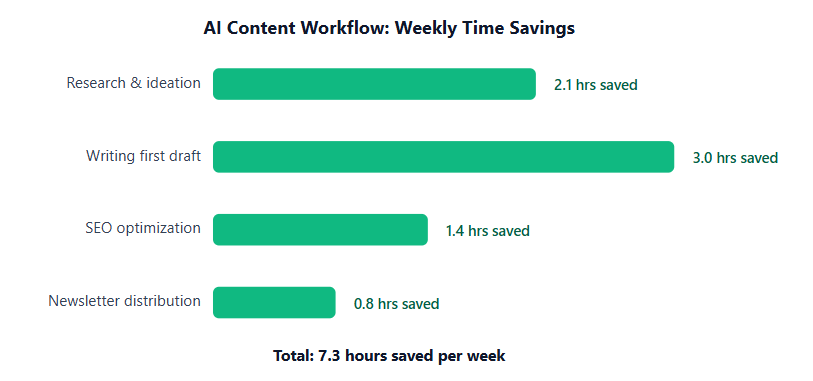
The Digital Applied report found the median integration time is 4.2 hours for teams doing this for the first time that’s the full six-server stack, not per server. That’s a reasonable afternoon of setup for a workflow that pays back at least 7 hours per week. When we set this up for a client running a weekly newsletter, the first working end-to-end run Exa research all the way through Resend newsletter send took about 40 minutes. The setup itself took longer than the actual run.
Citation capsule: Integrating a new SaaS tool via MCP takes a median of 4.2 hours, versus 18 hours with custom function-calling code a 77% reduction in setup time. For teams building multi-server chains, MCP tool calls succeed at a 91% median rate with 38ms local latency. Source: Digital Applied MCP Adoption Report, April 2026.
Pricing at a Glance What This Stack Actually Costs
The total cost of this six-server content stack depends almost entirely on one variable: whether you have an Ahrefs subscription. The other five tools have workable free tiers or very affordable entry plans. According to Kissflow via BizData360 (2026), 60% of enterprises recover their automation investment within 12 months and a stack this lean hits that threshold faster than most.
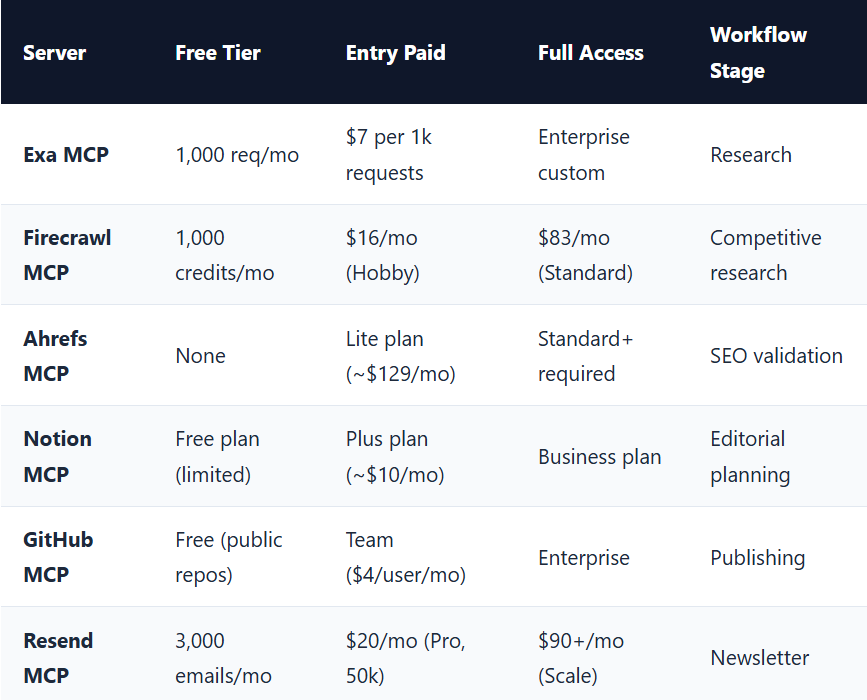
For most solo operators and small teams running one newsletter: Exa on pay-as-you-go, Firecrawl Hobby tier, Notion Plus, GitHub free, and Resend free that’s roughly $26–$36/month depending on Exa usage volume. Ahrefs is the outlier. It’s genuinely powerful, but if you’re just starting out, you can skip it and add it later when SEO validation becomes a consistent need.
What does this buy you in time? Marketers save an average of 3 hours per piece of content created with AI assistance, according to Synthesia/AutoFaceless data (2026). At four posts per month, that’s 12 hours back. At the $36/month entry-level price point, that’s under $3 per hour saved — before you count the compound effect of publishing 42% more content.
Frequently Asked Questions
Do I need to know how to code to use MCP servers?
No. The hosted OAuth servers Notion, GitHub, and Ahrefs connect in under five minutes without any CLI commands. For npm-based servers like Exa, Firecrawl, and Resend, you run one install command. Digital Applied found the median integration time is 4.2 hours for a full stack — and that’s for teams doing it for the first time, with no prior MCP experience.
Which of these 6 servers gives the fastest visible result?
Exa MCP. Run one search prompt and you’ll get clean, cited research results in seconds. Most users go from “I’ve never used MCP” to “that just replaced two hours of manual research” within their first 15 minutes. It’s the lowest-friction entry point in the chain — no paid subscription needed on the free tier, and the output quality is immediately obvious compared to a standard web search.
Can I use these servers with tools other than Claude?
Yes. MCP is an open standard, and these servers work with any MCP-compatible client: Cursor, VS Code + Copilot, Windsurf, and OpenAI’s ChatGPT (MCP support added in early 2026). The 97 million monthly SDK downloads show adoption extends well beyond Claude Desktop any agent built on the MCP SDK can use these same servers.
Is there a risk of these servers accessing data I don’t want them to?
Each MCP server only accesses what you explicitly grant. Notion MCP reads only the pages you share during OAuth authorization; GitHub MCP operates only on repos you select. Digital Applied reports a 91% tool call success rate at 38ms latency the permission model is well-tested in production, and you can revoke access from each service dashboard at any time.
Start With Two. Build From There.
The full six-server chain is the goal, not the starting point. If you’ve never connected an MCP server before, start with Exa and Notion. Run a research prompt, create a Notion page with the results, and feel how different that is from copying and pasting between browser tabs. That two step chain alone saves time. Everything else in the workflow builds on that foundation.
From there, add Firecrawl when you want competitive analysis before writing. Add GitHub when you’re ready to automate publishing. Add Resend when your newsletter is consistent enough to automate the send. Ahrefs comes in when you’re producing enough content that keyword validation becomes a weekly process rather than an occasional task.
The point isn’t to run six servers simultaneously from day one. It’s that these six tools form a coherent chain — each one has a specific job, feeds the next step, and together they cover the full content operation. Companies using AI publish 42% more content per month. The ones publishing most consistently aren’t working harder they’ve connected the right tools in the right order.
6 MCP Servers That Automate Your Entire Content Workflow was originally published in Towards AI on Medium, where people are continuing the conversation by highlighting and responding to this story.