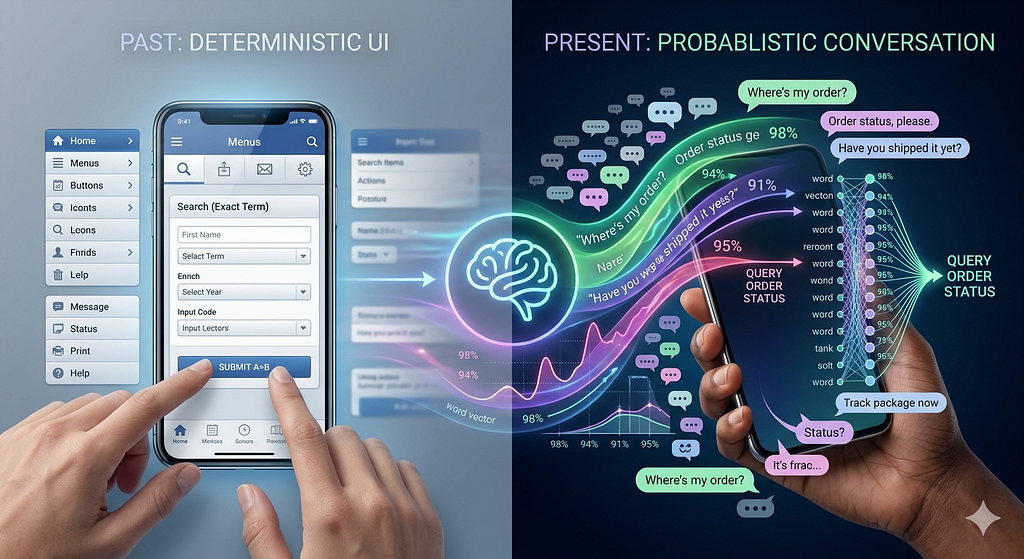
Human-machine interaction has evolved significantly over the past few years. There was a time when the user interface was one of the key determinants of how well a digital product was accepted by its audience; how clean the layout, how intuitive the navigation, how polished the visual hierarchy. But today, the centre of gravity has shifted toward something far more fluid: conversation. The baseline expectation around how users interact with your product has quietly extended to supporting natural language. And while this shift is genuinely democratising ; making digital products more accessible to people who never learned to “speak software”- it has forced developers to fundamentally rethink how software behaves. What used to be deterministic flows, where input A reliably produced output B, have become probabilistic. The same intent can arrive in a hundred different phrasings, and your system has to meet all of them. The thing with natural language is that it’s an deeply personal mode of expression. No two people ask the same question the same way.
The complete implementation of concepts demonstrated in the blog, is available in the GitHub repo if you’d like to follow along.
Hidden Tax on every LLM Request
Imagine you’re running a customer support chatbot. It’s 9 AM and your users start flooding in. The first person types: “How do I reset my password?” Your LLM churns through the full inference pipeline — tokenising, attending, decoding — and spits out a beautifully crafted answer in 4 seconds. You’re charged for every token.
Twenty minutes later, someone else asks: “I forgot my password, what should I do?”
Your system doesn’t recognise this as the same question. It runs the full inference pipeline again. Same cost. Same wait. Different words, identical intent — and your budget takes another hit.
Then: “Can you help me recover access to my account?” Again. Full inference. Again.
Cache Away — Why not?
There can be multiple ways how one can optimise the LLM cost as well as the API latency. One of the most well known method is caching. Caching the response can help reduce the calls going to LLM if the system has already encountered same query earlier. But the caveat here is “Exact Match” Cache!
Semantically identical questions dressed in different words are costing you real money — every single day.
As earlier mentioned, natural language adds an element of variability and non determinism. And systems which are primarily AI native need a better way of handling this.
As per exact match cache, which typically hashes the query string and stores the result, the two queries “What is semantic cache?” and “Explain semantic cache” are not same. But we know the user sitting behind the system asking this question has the same intent, and the response for both the queries will be more or less the same.
Especially when building conversational bots for customer support, education or developer documentation, the question space is usually bounded around similar topics.
Natural language is more fluid and is a function of intent and semantics.
With Language models being central elements of our systems, it is necessary of the components around it to also have some understanding of the semantic meaning of the query. Without semantic awareness, system suffers from wasted capacity and redundant reasoning for queries.
I spent the past weekend in studying and implementing Semantic Caching, a more meaningful and relevant way of caching the responses.
Semantic Caching
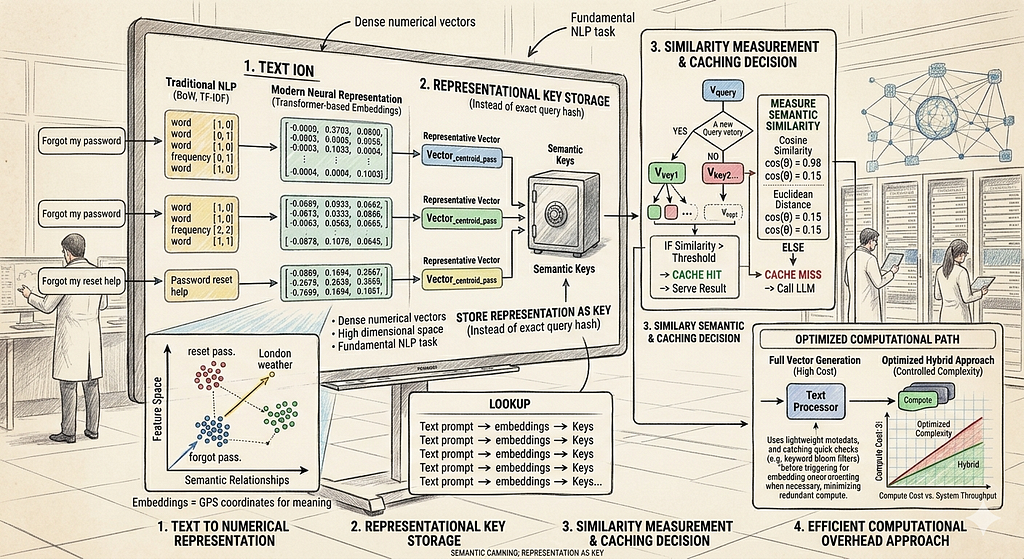
The goal of semantic cache is to store a representation as a key instead of the exact query hash. Now you may ask what do you mean by representation.
Representation is the process of converting unstructured human language into numerical machine understandable vector embeddings. It is a very fundamental task in NLP.
But we are not just talking about any representation, we are talking about semantic representation, while the traditional approaches like BoW and TF-IDF relied on word frequency, modern transformer based embeddings represent words in a continuous vector space, where words semantically similar to each other are placed closer.
Thus the core insight of semantic cache is simple yet powerful, it doesn't check if it has seen the exact query before, but if it has seen anything similar.
And, as mentioned earlier, we use mathematical embeddings or Representations. An embedding model converts a piece of text into a dense vector of numbers, which can be mapped to a point in a high dimensional space, here semantically similar texts end up closer to each other. Once we have all embeddings in place, we measure the semantic similarity between the query and cache keys, if it finds a match with high similarity, it serves the result immediately without making redundant LLM call.
Think of embeddings like GPS coordinates for meaning. “How do I reset my password?” and “I forgot my password, help!” end up at nearby coordinates. “What’s the weather in London?” ends up somewhere completely different. Semantic caching exploits this geometry.
But generating embeddings for every query adds additional computational complexity, hence we need an approach where we do not over burden the system
The Three-Layer Strategy
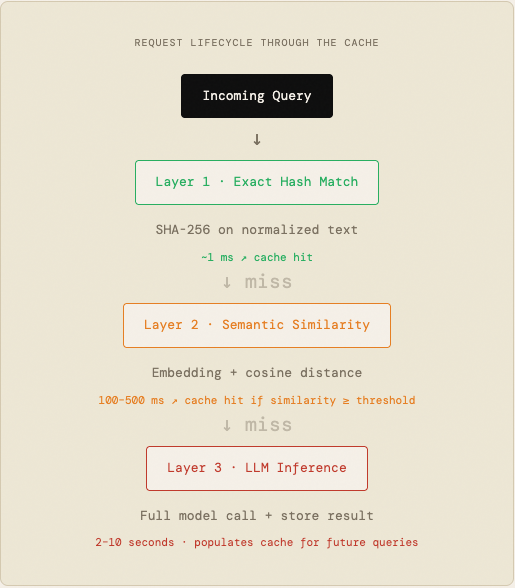
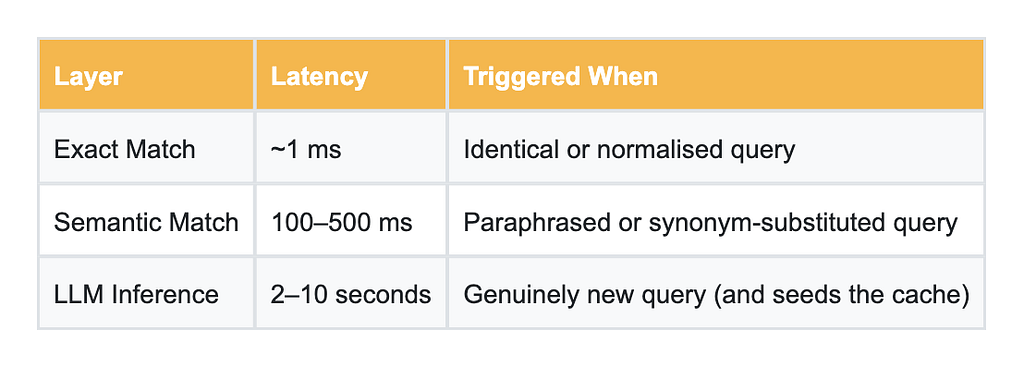
A well-designed semantic cache doesn’t jump straight to embeddings, its designed in a way that it uses a layered approach by trying cheaper methods first then bumping up the computational complexity only when needed.
It does it by following a sequence of steps.
Layer 1: Exact Match — Fast and Free
Before touching any embeddings, try the cheapest possible check: normalise the query (strip extra whitespace, lowercase) and compute a SHA-256 hash. If Redis has seen that hash, return the cached response in under a millisecond. This catches obvious duplicates and is essentially free.
def _normalise(text: str) -> str:
    """Lowercase and strip whitespace for consistent hashing."""
    return " ".join(text.strip().lower().split())


def _hash_query(text: str) -> str:
    return hashlib.sha256(_normalise(text).encode()).hexdigest()
Layer 2: Semantic Similarity — Smart and Worth It
If the exact match fails, generate an embedding for the incoming query and compare it against all cached embeddings using cosine similarity. If any cached embedding clears a configurable similarity threshold (say, 0.85), return that cached response.
Cosine similarity measures the angle between two vectors — 1.0 means identical direction (semantically equivalent), 0.0 means orthogonal (unrelated). You tune the threshold to balance recall against precision: too low and you’ll return wrong answers for loosely related queries; too high and you miss valid paraphrases.
def _cosine_similarity(a: list[float], b: list[float]) -> float:
    va = np.array(a, dtype=np.float32)
    vb = np.array(b, dtype=np.float32)
    denom = np.linalg.norm(va) * np.linalg.norm(vb)
    if denom == 0.0:
        return 0.0
    return float(np.dot(va, vb) / denom)


def _confidence(similarity: float, entry: dict) -> float:
    """
    Combine similarity and freshness into a single confidence score.

    Score = similarity x freshness_factor
    freshness_factor decays linearly from 1.0 (brand new) to 0.0 (at TTL).
    """
    created_at = int(entry.get("created_at", 0))
    ttl = int(entry.get("ttl", settings.DEFAULT_TTL))
    age = time.time() - created_at
    freshness = max(0.0, 1.0 - (age / ttl))
    return round(similarity * freshness, 4)
Layer 3: LLM Fallback — Rare, But Necessary
Only when both layers miss do we call the actual LLM. Importantly, once we have the response, we immediately store it: the query, its embedding, the response, and a TTL. Every cache miss seeds the cache for future users. Over time, your hit rate improves organically.
I personally used locally served ollama model for the sake of cost and simplicity.
def generate_llm_response(prompt: str) -> str:
    """
    Send *prompt* to the configured Ollama LLM and return the response text.

    On any network or HTTP error, returns a string beginning with
    ``[LLM Error]`` so the caller can safely detect and discard it.
    """
    url = (
        f"{settings.ollama_base_url}/api/generate"
    )

    try:
        resp = httpx.post(
            url,
            json={
                "model": settings.llm_model,
                "prompt": prompt,
                "stream": False,
            },
            timeout=120.0,
        )
        resp.raise_for_status()
        return resp.json().get("response", "").strip()
    except httpx.HTTPStatusError as exc:
        return f"[LLM Error] HTTP {exc.response.status_code}: {exc.response.text}"
    except httpx.RequestError as exc:
        return f"[LLM Error] Request failed: {exc}"
    except Exception as exc:
        return f"[LLM Error] Unexpected error: {exc}"
Putting it all together — A Complete Walkthrough
Think of this endpoint as a smart receptionist. Before bothering the expensive experts (LLM), it checks cheaper options first. Lets go through the decision process step by step
The complete code is available here. Please feel free to refer to the git repo.
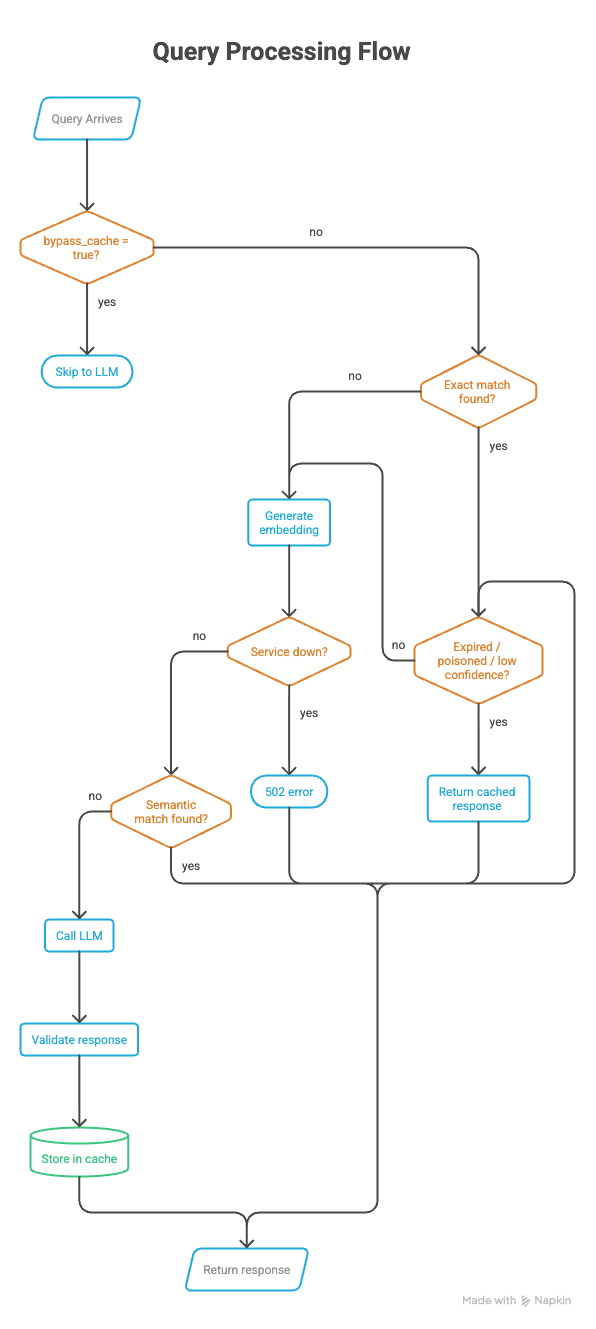
Entry Point:
'''WHEN a user sends a query:
    hold onto the query text
    prepare empty slots for: miss_reason, embedding'''

query = request.query
miss_reason: str | None = None
embedding: list[float] | None = None
Step 1: Try Cheap path first: Exact Match
'''IF the user hasn't explicitly asked to bypass the cache:

    look up the query in the cache by its exact text

    IF a cached result is found:

        REJECT it if it's expired       → mark miss_reason = "expired"
        REJECT it if it's poisoned      → mark miss_reason = "poisoned"
        REJECT it if confidence is low  → mark miss_reason = "low_confidence"

        OTHERWISE → this is a valid cache hit!
            record a cache hit in metrics
            return the cached response immediately
            (include debug info: similarity score, how it was matched, confidence)'''

   if not request.bypass_cache:
    cached = cache.search(None, exact_query=query)

    if cached is not None:
        if is_expired(cached):
            miss_reason = "expired"
        elif is_poisoned(cached):
            miss_reason = "poisoned"
        elif float(cached.get("confidence", 0.0)) < settings.CONFIDENCE_THRESHOLD:
            miss_reason = "low_confidence"
        else:
            metrics.cache_hit()
            return AskResponse(
                response=cached["response"],
                from_cache=True,
                similarity=float(cached.get("similarity", 1.0)),
                debug={
                    "hit": True,
                    "cache_path": cached.get("match_type"),
                    "similarity": float(cached.get("similarity", 1.0)),
                    "confidence": float(cached.get("confidence", 0.0)),
                },
            )
Why? — Exact matching is nearly instant — just a hash look up. There is no point of generating embedding if we already have a perfect answer sitting in cache.
Step 2: Escalate: Generate a Semantic Embedding
'''IF we're still here (exact match missed or was bypassed):

    convert the query into a vector embedding
        → this turns the meaning of the query into a list of numbers

    IF the embedding service is down:
        return a 502 error — "Embedding service unavailable"'''

if not request.bypass_cache:
    try:
        embedding = embed_text(query)
    except RuntimeError as exc:
        raise HTTPException(
            status_code=502,
            detail=f"Embedding service unavailable: {exc}",
        )
Step 3: Search by meaning, Not Words
'''Search the cache using the embedding
    (this finds responses to queries that are semantically similar,
     even if worded completely differently)

    IF a semantically similar cached result is found:

        REJECT it if it's expired       → mark miss_reason = "expired"
        REJECT it if it's poisoned      → mark miss_reason = "poisoned"
        REJECT it if confidence is low  → mark miss_reason = "low_confidence"

        OTHERWISE → semantic cache hit!
            record a cache hit in metrics
            return the cached response
            (include similarity score and confidence in debug info)

    IF nothing is found at all:
        mark miss_reason = "no_match"'''
Code already provided in the above sections
Step 4: Handle Intentional Bypasses
'''IF the user explicitly asked to skip the cache:
    mark miss_reason = "bypass"
    record a bypass in metrics'''
Step 5 : The Expensive Path: Call the LLM
'''record a cache miss in metrics
ask the LLM to generate a response to the query
record an LLM call in metrics'''

metrics.cache_miss()
response_text = generate_llm_response(query)
metrics.llm_call()
Step 6: Store Results
This is the most important step, and needs to be done carefully, as this determines how our cache will perform.
'''IF cache bypass is NOT active AND the response is safe to cache:

    IF we don't have an embedding yet (because bypass skipped Step 2):
        try to generate one now
        IF that fails: use an empty embedding
                       (exact-match caching will still work)

    store in cache:
        - the original query
        - its embedding
        - the LLM's response
        - metadata: pipeline version, LLM model name, embedding model name'''


  if not request.bypass_cache and is_safe_to_cache(response_text):
    if embedding is None:
        try:
            embedding = embed_text(query)
        except RuntimeError:
            embedding = []

    metadata = {
        "pipeline": "semantic_cache_v1",
        "model": settings.llm_model,
        "embedding_model": settings.EMBEDDING_MODEL,
    }
    cache.store(
        query=query,
        embedding=embedding,
        response=response_text,
        metadata=metadata,
    )
The poisoning guard: We never cache error messages, empty responses, or harmful content. Caching a bad response is worse than not caching at all, it would poison every future similar query.
Step 7 — Return the Fresh Response
'''return to the user:
    - the LLM's response
    - from_cache = false
    - similarity = 0  (no cache was involved)
    - debug info: why the cache was missed, what path was taken'''

return AskResponse(
    response=response_text,
    from_cache=False,
    similarity=0,
    debug={
        "hit": False,
        "match_type": None,
        "similarity": 0,
        "confidence": 0,
        "miss_reason": miss_reason,
    },
)
The Performance Picture
For a production system with 1,000 daily users averaging 10 queries each, the cost difference is stark:

Where This Works Best
Semantic caching shines wherever users ask overlapping questions in natural language, which is most real-world LLM applications:
Customer Support Bots: Password resets, billing questions, refund policies, users phrase these the same 50 ways. Cache the answer once.
↓ 70–80% inference reduction
Educational Platforms: Students ask the same conceptual questions about photosynthesis or recursion in slightly different words every single semester.
↓ 60–75% inference reduction
Developer Documentation: “How do I authenticate?” vs “What’s the auth flow?” vs “Show me the login example.” One cached answer covers all three.
↓ 65–80% inference reduction
Research Assistants: Researchers reformulate questions as they explore a topic. Semantic caching lets them iterate fast without burning tokens.
↓ 50–70% inference reduction
Two Things You’ll Want to Get Right
The Similarity Threshold Is Everything
The threshold controls how similar a query must be to a cached one before you serve the cached result. Too high (e.g., 0.97) and you miss perfectly valid paraphrases. Too low (e.g., 0.65) and you risk serving an answer to a subtly different question — which erodes user trust fast.
For most production deployments, 0.82–0.90 is a good starting range. Tune it empirically on your specific domain with real query samples. A support chatbot and a medical information bot should have very different thresholds.
Don’t Cache Bad Responses
LLMs occasionally hallucinate, generate harmful content, or simply return empty strings. Caching these is worse than not caching at all; you’d be permanently serving garbage for any semantically similar future query. Add a validation step before storage: check for minimum response length, content safety filters, and domain-specific sanity checks.
Guard before caching
if not is_poisoned(llm_response) and len(llm_response) > 20:
    cache.store(
        query=query,
        embedding=embedding,
        response=llm_response,
        ttl=settings.DEFAULT_TTL
    )
The Honest Trade-offs
Semantic caching isn’t a free lunch. Knowing its limits is as important as knowing its strengths:
Threshold tuning requires real data. You can’t guess the right similarity threshold for your domain; you need to sample actual queries and measure precision/recall. This is a real calibration exercise, not a one-time config.
Similarity search is O(N) without optimisation. Scanning all cached embeddings for every query scales linearly. For caches with tens of thousands of entries, you’ll want Approximate Nearest Neighbour search (FAISS, Annoy) to keep Layer 2 latency acceptable.
TTLs matter more than you think. A cached answer that was correct six months ago may be wrong today; especially for anything involving prices, policies, or rapidly changing products. Design your TTL strategy deliberately, and build cache invalidation endpoints you can call when your data changes.
Embeddings are model-specific. If you change your embedding model, every cached embedding is incompatible. Plan for this: version your embeddings, or build re-computation tooling before you need it under pressure.
The Bottom Line
The LLM inference pipeline is powerful but expensive. For applications with real users asking real questions, a significant fraction of that cost is pure waste; the same question answered over and over because it arrived in a slightly different shape each time.
Semantic caching is the most direct fix. By caching answers at the level of meaning rather than text, you dramatically reduce inference calls, cut latency for users who hit the cache, and make your application cheaper to operate as it scales.
The layered architecture — exact match first, semantic search second, LLM fallback last — ensures you’re always paying the minimum necessary cost for each query. Most requests never reach the LLM at all.
Resources
https://arxiv.org/abs/2603.03301
https://crimsonpublishers.com/cojra/fulltext/COJRA.000589.php
Semantic Cache: The Math of ‘Close Enough’ was originally published in Towards AI on Medium, where people are continuing the conversation by highlighting and responding to this story.