A non-engineer’s complete guide to object detection, YOLO11, and building systems that actually see the world
There is a doctor in rural Maharashtra who used to manually review hundreds of chest X-rays every day, alone, exhausted, with a backlog that never cleared.
She is not a programmer. She has never written a line of Python. She does not know what a convolutional neural network is, nor does she need to.
But her assistant does.
She deployed a computer vision model that scans every incoming X-ray before she reviews it — flagging anomalies, drawing attention boxes around suspicious regions, and triaging the queue by severity. She did this by understanding what the tool does, not how it does it at the mathematical level. She learned the right mental models, ran the right code, and shipped something real.
That’s exactly what this article is going to give you.
Not a computer science degree. Not a PhD in deep learning. A mental model, a working pipeline, and the wisdom to know where to point it once you’re done.
Let’s begin.
First — what is Computer Vision, really?
Forget the textbook definition for a moment.
Close your eyes and imagine you’re walking into a crowded train station. In less than a second, your brain does something extraordinary: it separates the background from the people, identifies faces, reads signboards, estimates distances, detects movement, and routes you toward the correct platform — all without a single conscious instruction.
That, in its essence, is computer vision.
It is the science and engineering of giving machines the same ability — to take raw visual input (pixels, in practice) and extract meaning from it. Not just store an image. Not just display it. But understand what’s in it.
Within computer vision, there are three core tasks you’ll hear about constantly:
Classification — “What is in this image?” The model looks at an image and gives you one label. A cat. A car. A tumor. It doesn’t tell you where — just what.
Detection — “What is in this image, and where?” The model finds objects and draws boxes around each one. Three people, two cars, one dog. Here’s exactly where each of them is. This is what we’ll be building today.
Segmentation — “What is in this image, where is it, and what is its precise shape?” Instead of a box, the model traces the exact outline of every object, pixel by pixel. Think of it as detection with a scalpel instead of a ruler.
Each level is more powerful — and more computationally demanding — than the last. We’ll work with detection and segmentation both, because YOLO11 handles them in the same breath.
OpenCV — the part that opens the door
Before your model can see anything, someone needs to show it the image. That’s OpenCV’s job.
OpenCV (Open Source Computer Vision Library) is a free, battle-tested toolkit that handles all the unglamorous work of visual data: opening image files, reading webcam streams, resizing frames, converting between color formats, drawing boxes, saving outputs. It’s the plumbing. It doesn’t think — it just moves visual information from the world into a form that your model can process.
Here’s what using it feels like in practice:
import cv2
# Open any image from your computer
image = cv2.imread("street.jpg")
# Show it in a window
cv2.imshow("My Image", image)
# Wait for a keypress, then close
cv2.waitKey(0)
cv2.destroyAllWindows()
Five lines. That’s genuinely it to read and display any image file on your screen.
Think of OpenCV as the person who opens the door to a room. YOLO is what walks in and tells you what’s inside the room.
What is Object Detection — intuition before code
Let me give you an image in your head before we touch any more code.
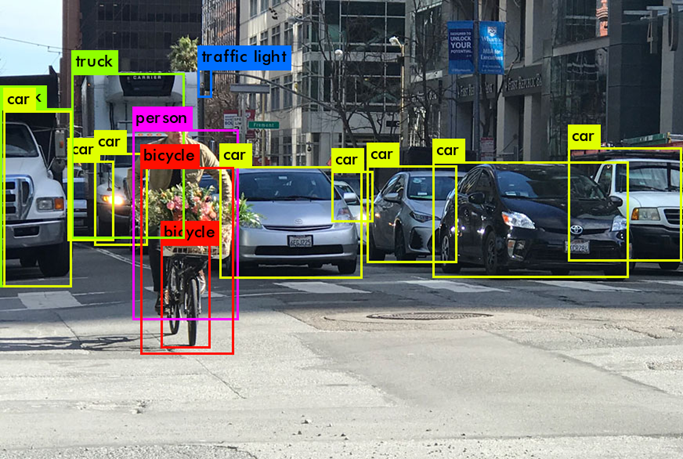
Imagine someone hands you a photograph of a busy intersection. They ask you to draw a rectangle around every car, every pedestrian, and every traffic light — and then write a label on each rectangle, along with how confident you are.
That is exactly what an object detection model does. For every frame it processes, it outputs:
- A bounding box — four numbers defining the rectangle (top-left x, top-left y, width, height)
- A class label — what the object is (“person,” “car,” “bicycle”)
- A confidence score — a number between 0 and 1, expressing how certain the model is. 0.95 means it’s extremely confident. 0.4 means it’s guessing.
When you run YOLO11 on an image, you’re getting all three of those things back — for every object it finds — in milliseconds.
The reason this is powerful is not the technology. The technology is a means. The reason this is powerful is that everything meaningful in the physical world is an object. Products on a shelf. Defects on a factory line. Faces in a crowd. Weeds among crops. Vehicles on a highway. Surgeons’ tools on a tray. Once you can detect objects in real time, you have built something that pays attention — and attention, in the physical world, is extraordinarily valuable.
Now. Let’s meet the model.
YOLO11 — how it thinks in milliseconds
YOLO stands for You Only Look Once. The name is the entire philosophy.
Older object detection systems worked in two stages: first scan the image for regions that might contain objects, then classify each region. Smart, but slow. YOLO changed the paradigm in 2015 by doing everything in a single forward pass — look at the image once, produce all detections simultaneously. The speed gains were dramatic.
YOLO11, released by Ultralytics in 2024, is the latest evolution. It is faster, more accurate, and more parameter-efficient than any of its predecessors. You can run it on a laptop. You can run it on a Raspberry Pi. You can run it on a phone.
Here is how it thinks:
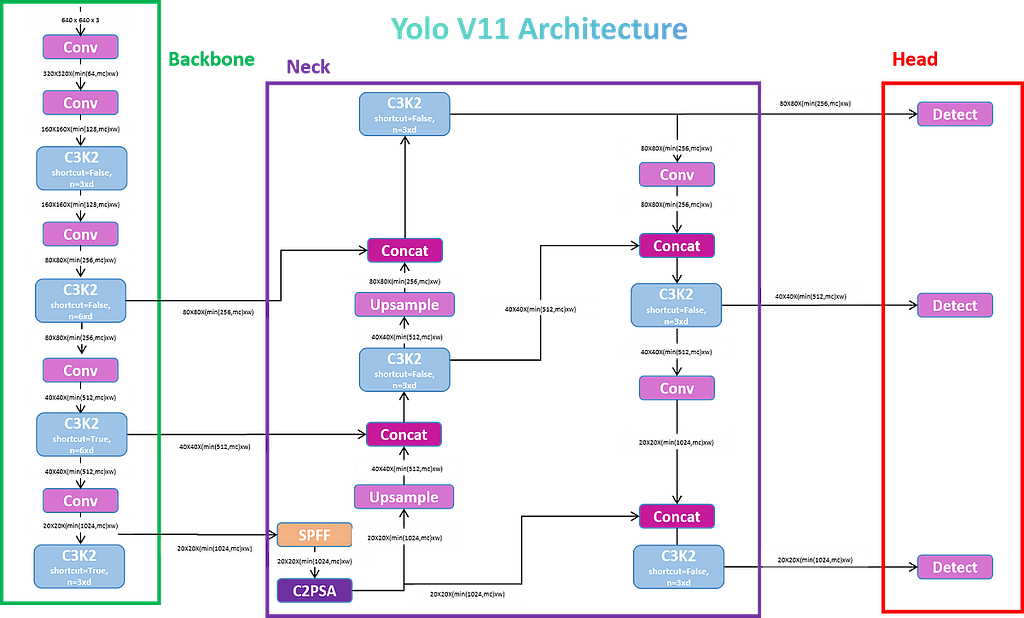
The Backbone — “What does this image contain, broadly?”
The backbone is the first part of the network the image passes through. Its job is feature extraction — it takes raw pixels and progressively transforms them into increasingly abstract representations. Early layers learn edges and textures. Middle layers learn shapes and parts. Deeper layers learn semantic concepts: “this cluster of features suggests a face.”
Think of it as your visual cortex processing a scene. You don’t consciously say “I see a horizontal line, above it a curved line, combined with two circular regions…” Your brain abstracts upward automatically until you recognize the pattern as a face. The backbone does the same thing in tensor form.
YOLO11’s backbone uses a C3k2 architecture — a more efficient variant of the CSP (Cross-Stage Partial) design — which extracts rich features while keeping computational cost low.
The Neck — “Where are things, at every scale?”
Here is a problem: a person standing 5 meters away looks very different from a person standing 50 meters away. One appears large in the frame, one appears tiny. A model that only looks at the full image at one resolution will miss small, distant objects.
The neck solves this. It takes the feature maps from the backbone at multiple scales and combines them intelligently — fusing high-level semantic understanding (“this is probably a person”) with low-level spatial precision (“and it’s located right here, in this 3×3 patch of pixels”).
YOLO11’s neck uses a SPPF (Spatial Pyramid Pooling Fast) module combined with a C2PSA attention mechanism — a newer addition that helps the model focus on relevant regions of the image, rather than treating all pixels equally. Think of it as the model learning to pay attention to what matters.
The Head — “Output the boxes, classes, and scores”
The head is where detection actually happens. It takes the rich, multi-scale features from the neck and decodes them into the final output: bounding box coordinates, class probabilities, and confidence scores.
YOLO11 uses a decoupled head — separate branches for localization (where?) and classification (what?). This design has been shown to improve accuracy compared to coupled heads that try to solve both at once.
The entire pipeline — backbone → neck → head — runs in under 10 milliseconds on a modern laptop GPU for standard-resolution images. On the nano model (yolo11n), it runs on CPU alone fast enough for real-time use.
One more thing before we build: YOLO11 comes in five sizes — n (nano), s (small), m (medium), l (large), and x (extra-large). Bigger models are more accurate but slower. For learning and prototyping, always start with nano. For production, benchmark each size against your latency requirement.
Run YOLO11 on any image — in 10 lines
Open a terminal. Install the library:
pip install ultralytics
That’s one command. Ultralytics bundles everything — the model weights, OpenCV integration, visualization utilities — into a single package.
Now create a Python file and paste this:
from ultralytics import YOLO # import the YOLO framework
# Load a pre-trained YOLO11 model (nano = fast, downloads automatically)
model = YOLO("yolo11n.pt")
# Run object detection on any image — swap the filename with yours
results = model("street.jpg")
# Show the result with bounding boxes drawn
results[0].show()
# Save the annotated image to disk
results[0].save(filename="detected_output.jpg")
Run it. Within seconds you’ll see your image returned with colored bounding boxes drawn around every detected object, each labeled with its class and confidence score.
What you’ll see: If you use a busy street photo, you’ll likely see boxes labeled person, car, motorcycle, traffic light, stop sign — each with a percentage confidence. YOLO11 is pre-trained on COCO dataset, which covers 80 common object classes.
Now switch to segmentation — one word change
from ultralytics import YOLO
# Load the segmentation model instead of detection
# The only change: "n.pt" → "n-seg.pt"
model = YOLO("yolo11n-seg.pt")
results = model("street.jpg")
results[0].show()
results[0].save(filename="segmented_output.jpg")
The output now draws pixel-precise masks instead of boxes. You’ll see the model trace the exact shape of each car, each person, each object — not a rectangle, but a silhouette. Detection boxes are tools. Segmentation masks are understanding.
Give it eyes on a live video
Every video is just images playing very fast. A standard video runs at 25–30 images per second — called frames. YOLO processes each frame independently and returns detections for it. Your job is to loop through frames, pass each to the model, and display the result.
import cv2
from ultralytics import YOLO
model = YOLO("yolo11n.pt")# Open a video file — replace with 0 to use your webcam instead
cap = cv2.VideoCapture("traffic_video.mp4")
while cap.isOpened():
    # Read the next frame from the video
    success, frame = cap.read()
    if not success:
        break  # end of video
    # Run YOLO11 on this frame
    results = model(frame)
    # Get the annotated frame (bounding boxes already drawn)
    annotated_frame = results[0].plot()
    # Display it in a window
    cv2.imshow("YOLO11 Detection", annotated_frame)
    # Press 'q' to quit
    if cv2.waitKey(1) & 0xFF == ord("q"):
        break
# Release resources
cap.release()
cv2.destroyAllWindows()
Replace "traffic_video.mp4" with 0 and you're running detection live on your webcam. Press Q to quit.
What you’ll see in real time: Boxes appearing and disappearing as objects move through the frame. Confidence scores fluctuating as viewing angles change. The model tracking every visible object — simultaneously — at every frame.
A note on tracking: Detection tells you what and where at each frame. Tracking tells you that the person in frame 1 is the same person in frame 50. If your use case requires persistent identity across frames — like monitoring whether a specific individual enters a restricted zone, or counting unique vehicles on a highway — you can add a single argument to activate ByteTrack, a state-of-the-art object tracker:*
results = model.track(frame, persist=True) # replaces model(frame)
One word. Persistent identity across frames.
Now think — where does your world become smarter?
Here is where most tutorials stop. They’ve shown you the code. They’ve given you a toy to play with. They go home.
I want to do something different.
I want to ask you a question, and I want you to sit with it:
What in your daily work requires someone to look at something, repeatedly, and make a judgment call?
That is where computer vision belongs. Not in a lab. Not in a tech company. In the specific, unglamorous, repetitive visual tasks that currently require a human pair of eyes — and therefore create bottlenecks, errors, fatigue, and cost.
Here are five thinking prompts, one for each domain. Don’t read them as examples. Read them as frameworks you can adapt.
If you work in agriculture: What changes when a drone equipped with YOLO can fly over a field and flag every plant showing signs of disease — before the damage spreads? You don’t replace the farmer. You give the farmer a report every morning that says “23 plants in section 4B need attention.” The farmer’s expertise is redirected from scanning to deciding.
If you work in retail or logistics: What changes when a camera above a warehouse shelf can detect, in real time, which products are out of stock — without a human walking the floor? The detection model doesn’t know what to do about it. But it knows where to look. Inventory management at the speed of light.
If you work in education or research: What changes when a classroom camera can track student engagement — whether students are looking at the board, interacting, or distracted — and give a teacher an aggregate attention map at the end of each session? This isn’t surveillance. It’s data that a teacher can use to redesign a lesson.
If you work in healthcare or diagnostics: What changes when every incoming scan, slide, or image gets a first pass from a model that never tires, never gets distracted, and can flag the top 5% of cases for urgent human review? The model is not the doctor. The model is the triage nurse. And a triage nurse who never sleeps changes the math of healthcare delivery entirely.
If you work in manufacturing or quality control: What changes when a camera above the production line can detect a surface defect at 60 frames per second — a defect that a human inspector, fatigued after six hours, would miss? You’ve just moved your defect detection from “end-of-line reject” to “real-time correction.” The cost difference is not marginal. It’s structural.
These are not far-future scenarios. Every single one is deployable today, with the code in this article, on hardware you already have access to.
The gap between “I ran YOLO on a street photo” and “I deployed a detection system in my organization” is not a technical gap. It is a thinking gap. It is the willingness to ask: what, in my world, would be different if someone — or something — was always watching?
The bigger picture
We are living through a quiet revolution in how the physical world becomes legible to machines.
For decades, the digital world was the only thing software could understand — structured data, text, clicks, transactions. The physical world was opaque. It happened in space, and software couldn’t see space.
Computer vision is the bridge. And models like YOLO11 — fast, open, accessible, deployable on commodity hardware — are what make that bridge available not just to deep-learning researchers, but to doctors, farmers, teachers, logistics managers, and every intelligent professional who is willing to think carefully about where vision belongs in their work.
You don’t need to understand the math of convolutional layers to use this. You don’t need to train a model from scratch. You need to understand what the tool is doing — and then have the wisdom to know where to point it.
You now have both.
What will you build?
Drop your domain in the comments — tell me what you do, and what you’d want YOLO to look at. I’ll tell you exactly how to build it.
Written by Mohit | @MOHITCREATES — I write about civilization-scale technology: what it is, how it actually works, and what it means for the people building the future.
If this article gave you a new way of thinking, follow for more. The next one goes deeper.
You Don’t Need a CS Degree to Teach Machines to See was originally published in Towards AI on Medium, where people are continuing the conversation by highlighting and responding to this story.