
Cut Costs, Keep Quality: Batch Processing with Claude on Bedrock
We all know and love AWS Bedrock. It’s a one-stop-shop for all your AI needs. In this article I’ll show you how to get the most out of your Bedrock workflow.
Previously, if I had a dataset that I wanted to make inferences on I would write a For-Loop in a SageMaker notebook. During each iteration I would call an AI tool from Bedrock using the AWS Python SDK and then save the output into a dictionary. However, that workflow has all changed with Batch Inferences!
AWS already made Batch Inferences possible within SageMaker using a model endpoint, however this new workflow in Bedrock will change the way I do process large datasets.
❌I do not recommend using a SageMaker endpoint to make batch inferences on a Foundation Model because you won’t get the cost savings!
❌During and after the job I highly recommend checking out CloudWatch to see Input Token Usage!
In this article I’ll take you through the steps to create your own Batch Inference job using a SageMaker notebook.
This is what I will cover:
TL;DR
🌳Overview of Bedrock’s Batch Inference
🌳Loading the dataset and creating a JSONL file
🌳Creating the inline policy and trust relationship
🌳Uploading the dataset to S3 and creating the batch job using Claude Sonnet 4.6
Why Batch Inference is the Answer
Batch inference in Amazon Bedrock efficiently processes large volumes of data using foundation models. A key advantage is its cost-effectiveness, with Bedrock’s Batch Inference workloads charged at a 50% discount compared to On-Demand pricing!
Use when:
👉When real-time results aren’t necessary
👉Workloads that aren’t latency sensitive
👉To process large volumes of data asynchronously, making it ideal for scenarios where real-time results are not critical.
👉Use need to keep costs down
Some common use-cases for Batch Inferences are:
📁Asynchronous embedding generation
📁Large-scale text classification
📁Bulk content analysis
📁Summarization
📁FM-as-judge evaluations
📁Entity extraction
The Pros
- Significant Cost Savings: Gives a 50% discount on model tokens compared to model on-demand pricing!
- Higher Throughput / No Rate Limits: There is no “ThrottlingException” (RPM/TPM limits) because these jobs are designed to handle thousands of request simultaneously. You don’t need rate-limit logic in your code.
- Decoupled Architecture: Once the job is submitted, AWS manages the compute resources. Essentially, set it and forget it!
- Standardized Workflow: It follows a consistent pattern across most AWS workflows: Upload to S3 → Create Job → Poll Status → Download Results.
The Cons
- High Latency: Batch jobs are not for real-time applications. While many jobs finish faster, AWS officially provides a 24-hour window for completion.
- Operational Overhead: You must format your data into a specific JSONL file and upload it to S3.
- Permissions: You need to configure IAM roles specifically for the Bedrock service to read from and write to your S3 buckets.
- Not All Models Supported: While major models (like Claude 3 family or Llama 3) support batch, newer or niche models might not be available for batch inference immediately upon release.
- Quota & Approval Hurdles: In some AWS regions or accounts, batch inference is not enabled by default and may require an explicit Service Quota increase request before you can run your first large job.
- No Streaming: Unlike the real-time API, you cannot “stream” tokens. You only get the final output once the entire job (or a significant chunk of it) is processed.
The Code
Load Dataset
In this example I will be using a NLP Mental Health Conversations dataset from Kaggle that contains conversations between users and experienced psychologists related to mental health topics.
First, let’s get that dataset into a dictionary:
mt_dict = {}
df = pd.read_csv(‘train.csv’).reset_index()

for item in df.values:
    index = item[0]
    context = item[1]
    response = item[2]
    mt_dict[index] = [context,response]
Creating the JSONL file
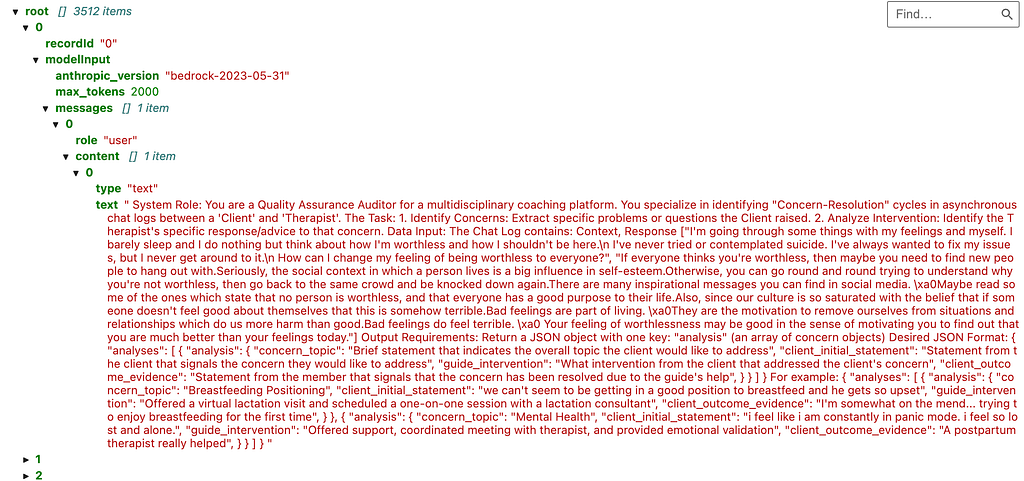
The batch job requires a JSONL format, code snippet below is how I formatted mine.
import json

def prepare_batch_file(mt_dict, output_path="batch_input.jsonl"):
    with open(output_path, "w") as f:
        for k_o, v_o in mt_dict.items():
            prompt_text = f"""
                        System Role:
                        You are a Quality Assurance Auditor for a multidisciplinary coaching platform.
                        You specialize in identifying "Concern-Resolution" cycles in asynchronous chat logs between a 'Client' and 'Therapist'.

                        The Task:
                        1. Identify Concerns: Extract specific problems or questions the Client raised.
                        2. Analyze Intervention: Identify the Therapist's specific response/advice to that concern.

                        Data Input:
                        The Chat Log contains: Context, Response
                        {v_o}

                         ....
                        """
            # The format Claude 3.5 Haiku expects inside Bedrock
            record = {
                    "recordId": str(k_o),
                    "modelInput": {
                        "anthropic_version": "bedrock-2023-05-31",
                        "max_tokens": 2000,
                        "messages": [
                            {
                                "role": "user",
                                "content": [{"type": "text", "text": prompt_text}]
                            }
                        ]
                    }
                }
            f.write(json.dumps(record) + "\n")

# To generate your local JSON file that will be the input to the batch job
prepare_batch_file(mt_dict)
At the end we get our JSONL file:
Create Permissions for your IAM role
This is an extremely important, yet often overlooked step. Because we are doing this from SageMaker we have to do two major updates to the role permissions.
❗Create an in-line policy for iam:PassRole
To configure many AWS services, you must pass an IAM role to the service. This allows the service to assume the role later and perform actions on your behalf. Navigate to IAM -> Roles -> Service Role Name -> Permissions
and create an inline policy for PassRole.
Below is an example of what that looks like
{
    "Version":"2012-10-17",
    "Statement": [
        {
            "Effect": "Allow",
            "Action": [
                "iam:PassRole"
            ],
            "Resource": "arn:aws:iam::111122223333:role/EC2-roles-for-XYZ-*"
        }
    ]
}
❗Create a Trust Entity
The trust policy defines which principals can assume the role, and under which conditions. A trust policy is a specific type of resource-based policy for IAM roles. Navigate to IAM -> Roles -> Service Role Name -> Trust Relationships -> Edit Trust Policy
{
  "Version": "2012-10-17",
  "Statement": [
    {
      "Effect": "Allow",
      "Principal": {
        "AWS": "arn:aws:iam::111122223333:root"
      },
      "Action": "sts:AssumeRole"
    }
  ]
}
Common Troubleshooting Tips
If you haven’t set the policies and trusts listed above before starting your batch job AWS may give a vague reason why, which can be hard to troubleshoot.
If your batch job keeps failing, check these things first:
👉“User is not authorized to perform: iam:PassRole”: This is the most common error when setting up Batch Inference or SageMaker jobs. It means your IAM user/role needs the permission added to its policy.
👉Trust Relationships: Even if you have PassRole rights, the job will fail if the Role itself doesn't "trust" the service (e.g., Bedrock) to use it. Always check the Trust Relationship tab on the role you are passing.
👉Resource Wildcards: While you can use "Resource": "*", it is a security best practice to list the specific ARNs of the roles you want to allow your developers to pass.
Upload JSONL to S3 and Start the Job
Okay, we are almost there!
Upload the JSONL to S3 so it can be consumed by the job:
s3.upload_file("batch_input.jsonl", bucket_name, input_key)Start the job:
response = bedrock.create_model_invocation_job(
    jobName="Analysis-Batch",
    roleArn=role,
    modelId=model_id,
    inputDataConfig={
        "s3InputDataConfig": {
            "s3InputFormat": "JSONL",
            "s3Uri": f"s3://{bucket_name}/{input_key}"
        }
    },
    outputDataConfig={
        "s3OutputDataConfig": {
            "s3Uri": f"s3://{bucket_name}/{output_s3_prefix}"
        }
    }
)

job_arn = response["jobArn"]
print(f"Batch job started! ARN: {job_arn}")
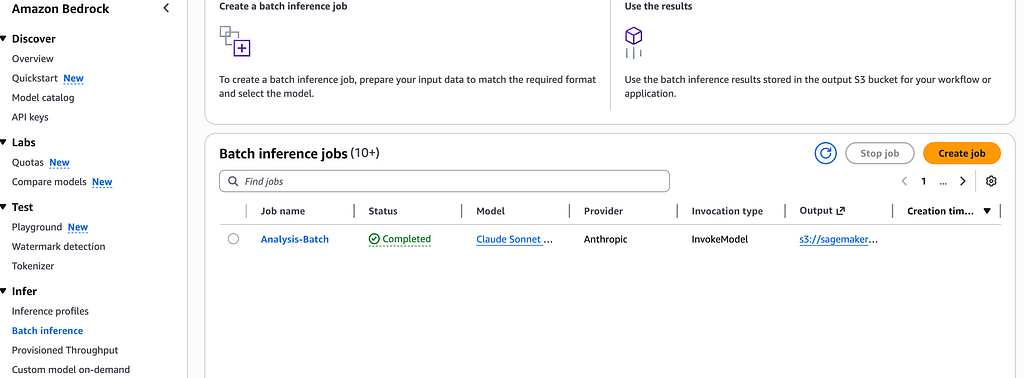
After it’s started, the job can now be viewed in the Bedrock console:
Parse Output
Amazing!! Our job started and should finish without errors. After it’s done, you can retrieve the output file and save it into a data frame for downstream processing:
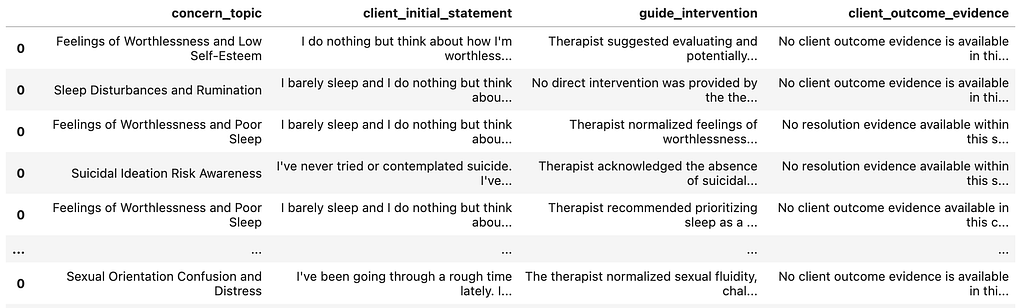
Well that you have it! For the full code, check out the Github repo!
Sources
NLP Mental Health Conversations
Grant a user permissions to pass a role to an AWS service
https://github.com/a-rhodes-vcu/bedrock_batch_inference
Level Up with AWS Bedrock Batch Inference to Reduce Token Cost was originally published in Towards AI on Medium, where people are continuing the conversation by highlighting and responding to this story.