My reflections on what it takes to move agents toward execution
I’ve been building agents long enough to stop judging them by the first demo. The first loop often feels magical. The real test starts when the agent has to do work, get human feedback, preserve progress, and leave behind something useful.
A first version often comes together fast. Give the model a goal, connect a few tools, and let it reason. That first working loop still feels a little magical.
What gets hard is everything around the model. Where does the agent do the work? How does it handle files? What happens when a run stops halfway through? How do you inspect the steps when the output is wrong?
That is why I like the latest updates that were shared in this OpenAI blog. The most important shift, at least to me, is not a new prompting trick. It is a clearer idea of where agent work should happen.
From tool calls to a workspace
A lot of earlier agent setups focused on orchestration. The model would call tools, and the application would handle the rest. That works for lightweight flows. It gets awkward once the agent needs to inspect files, run commands, save intermediate outputs, or recover from interruption.
The newer sandbox or workspace direction makes the execution layer explicit. Pair the model with a controlled place to do work.
In simple terms, the shift looks like this:
LLM + tool calls
and increasingly like this:
LLM + controlled workspace + filesystem + shell + durable state
That difference matters because many useful enterprise agents are not just chat workflows. They are workflows that need a controlled workspace, with a model reasoning over it.
Why the sandbox workspace matters
Many agents need more than a prompt and a tool router. They need a place where they can:
- inspect repos, documents, and datasets
- run commands, tests, or scripts
- create and modify artifacts
- preserve state and resume after interruption
A few obvious examples:
- Coding agent: opens a repo, edits files, runs tests, applies patches, and summarizes what changed.
- Document review agent: scans a folder of materials, compares artifacts, identifies gaps, and writes up a report.
- Data analysis agent: reads files, writes scripts, runs analysis, saves outputs, and iterates after feedback.
Teams could build all of this before, of course. The problem was that they usually had to build a lot of the execution layer themselves: file mounting, shell wrappers, repo staging, artifact capture, sandbox lifecycle, and recovery logic.
That is often where a nice agent demo starts to break down.
A useful mental model: harness vs workspace
One framing that helped me is to separate the harness from the workspace.
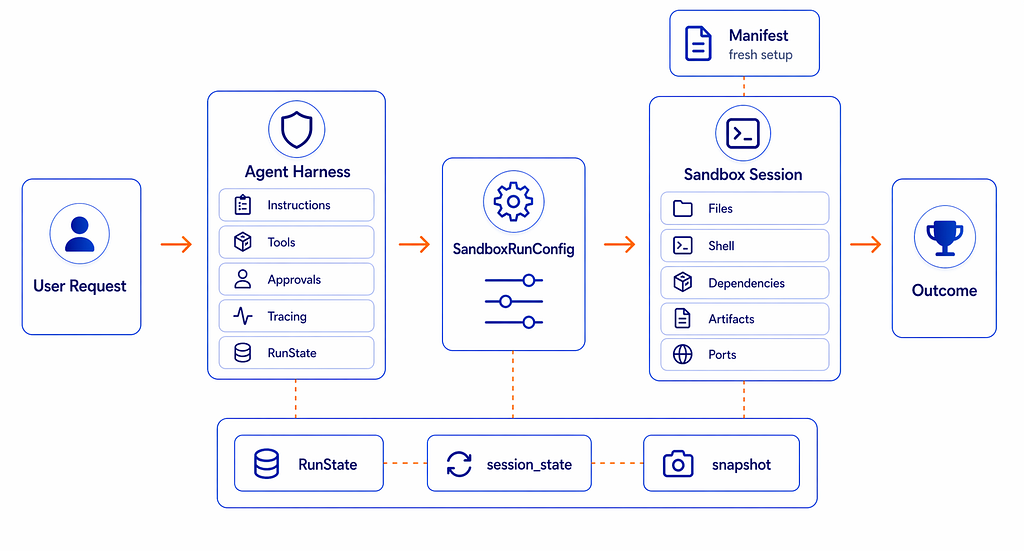
- Harness: instructions, approvals, tracing, guardrails, state and resume logic, UX
- Workspace: files, shell, dependencies, patches, artifacts
This is not just “put the agent in Docker.” Docker might be one implementation choice. The bigger idea is that the agent has a clear contract with its working environment.
Example use case: “Dear Diary”
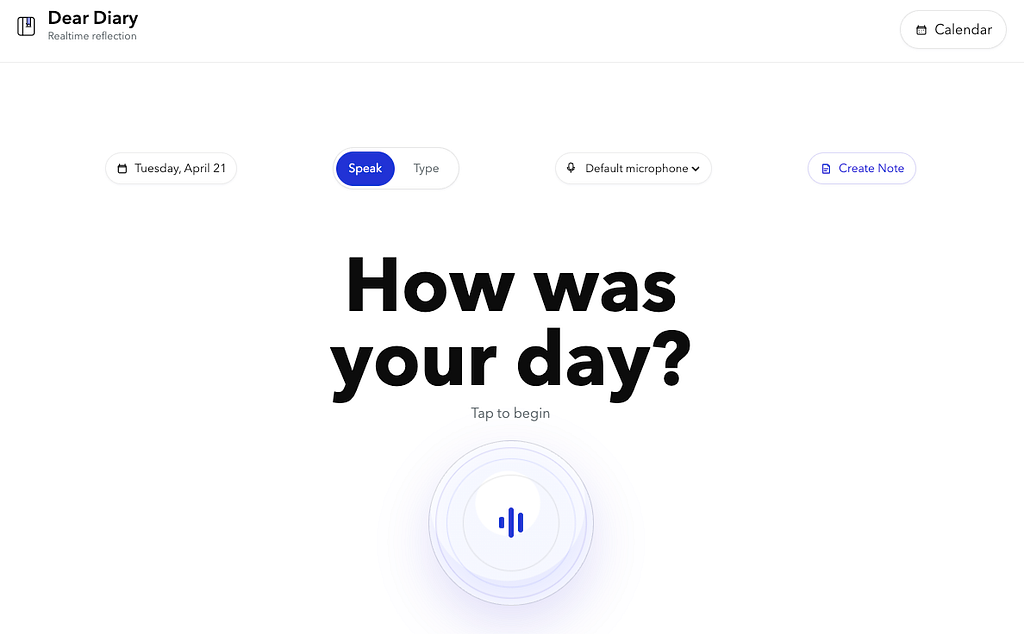
Last year I had built a small personal agent called Dear Diary. The idea was simple: at the end of the day, I wanted to talk for 5 to 10 minutes, not fill out a form. The agent would guide a natural reflection, ask a few follow ups, and turn the conversation into a structured markdown note I could approve and revisit later.
That part used familiar agent primitives: instructions, tool calls, structured extraction, guardrails, realtime voice, and tracing.
What got more interesting was the step after approval.
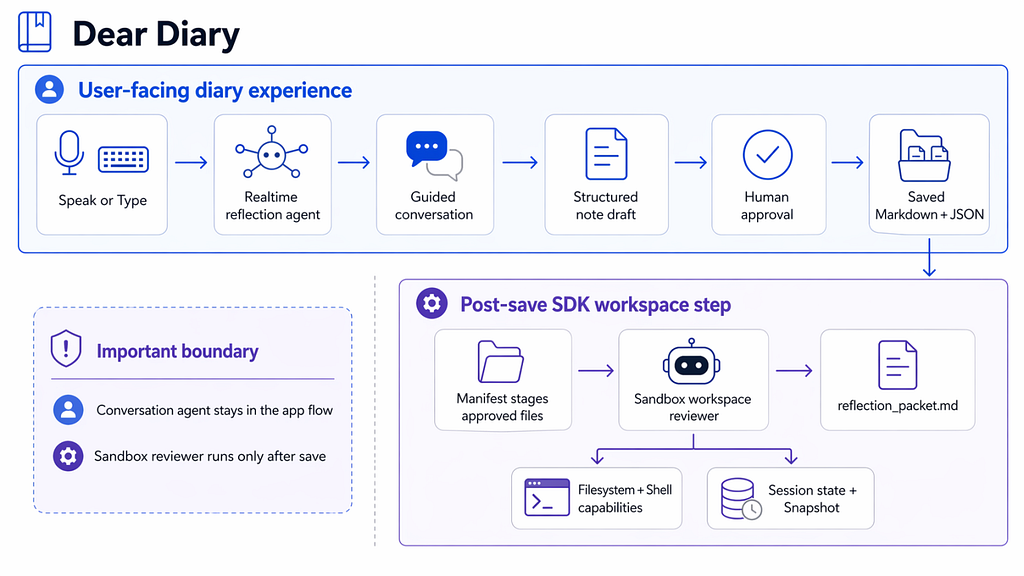
With the new approach, once the final markdown entry was saved, I added a sandbox-backed workspace step. The app creates a small workspace containing:
- the approved diary entry as JSON
- the approved diary entry as Markdown
- the conversation transcript
- a task file describing what the workspace agent should inspect
- an output folder for generated artifacts
Then a sandbox-aware agent can inspect those files, use filesystem and shell capabilities, and write a review packet back into the workspace.
The core flow and the post-save Sandbox driven flow looked like this:
That separation turned out to be useful.
The app still owns the product logic: the conversation UX, approval flow, final note schema, local storage, and delete or replace behavior. I would not move all of that into a sandbox.
But the execution layer, meaning the part where an agent needs a real place to inspect files, run commands, produce artifacts, and preserve state, became much cleaner with the newer SDK sandbox primitives.
In the older style, I needed to wire more of this myself: create temp directories, copy files into place, enforce path boundaries, run shell commands, collect outputs, persist artifacts, and decide how to resume later.
With the workspace-oriented approach, those concepts are clearer:
- Manifest describes what files the agent starts with.
- SandboxRunConfig connects the run to a sandbox session or resumable state.
- Sandbox session state preserves the workspace connection.
- Snapshots preserve the filesystem state for future runs.
- Capabilities make filesystem and shell access part of the declared execution environment.
In Dear Diary, that means the final note is not just a blob of generated text. It sits inside a small, inspectable workspace with inputs, outputs, durable state, and a review artifact.
That is a modest example, but it made the broader shift feel real to me. The model did not suddenly become smarter. The improvement was that the SDK gave it a clearer place to work.
Older pattern: the app owns the workspace plumbing.
with TemporaryDirectory() as tmp:
    workspace = Path(tmp)
    (workspace / "entry.md").write_text(markdown)
    (workspace / "transcript.txt").write_text(transcript)
    subprocess.run(["wc", "-w", "entry.md"], cwd=workspace, check=True)
    packet = build_review_packet(workspace)
    (final_dir / "reflection_packet.md").write_text(packet)
    save_snapshot(workspace, final_dir / "workspace.tar")
Newer pattern: the SDK run gets an explicit workspace.
manifest = Manifest(
    entries={
        "input/entry.md": File(content=markdown.encode()),
        "input/transcript.txt": File(content=transcript.encode()),
        "output": Dir(),
    }
)
agent = SandboxAgent(
    name="Diary Workspace Reviewer",
    instructions="Inspect input files and write output/reflection_packet.md.",
    capabilities=[Filesystem(), Shell()],
)
result = await Runner.run(
    agent,
    "Create the reflection packet.",
    run_config=RunConfig(
        sandbox=SandboxRunConfig(
            client=sandbox_client,
            manifest=manifest,
            snapshot=LocalSnapshotSpec(base_path=snapshot_dir),
        )
    ),
)
NOTE: The snippets below are simplified to show the shape of the implementation, not intended as complete reference code.
The product logic did not disappear. Approval, note schema, and storage still belonged in the app. What changed was that the agent’s execution environment became a first-class part of the run instead of a pile of custom filesystem and subprocess code.
Why this matters for enterprise teams
For enterprise IT leaders, the question is not only whether the model can reason. It is whether the system around the model can support real work.
The questions get practical quickly:
- Can the agent operate in a controlled environment?
- Can it access the right files, and only the right files?
- Can it produce artifacts a person can inspect?
- Can runs resume after failure?
The sandbox and workspace pattern does not make agents production-ready on its own. Teams still need careful design around data access, security, permissions, governance, evaluation, and user experience.
But it does remove one recurring piece of plumbing: building controlled, resumable workspaces for agents that operate over files, commands, dependencies, and artifacts.
Conclusion
The shift I find most important is from LLM + tool calls to LLM + controlled workspace + filesystem + shell + durable state.It does not remove the hard work of product design, governance, security, or evaluation.But it gives builders a better starting point for agents that need to do real work, not just describe it.
Python package: https://pypi.org/project/openai-agents/
This article reflects my personal views. They do not necessarily represent any official position of any organization.
The Gentle Shift in How Agents Get Built was originally published in Towards AI on Medium, where people are continuing the conversation by highlighting and responding to this story.