Two similarity score formulas. One silent assumption. A ~270× discrepancy waiting to bite you.
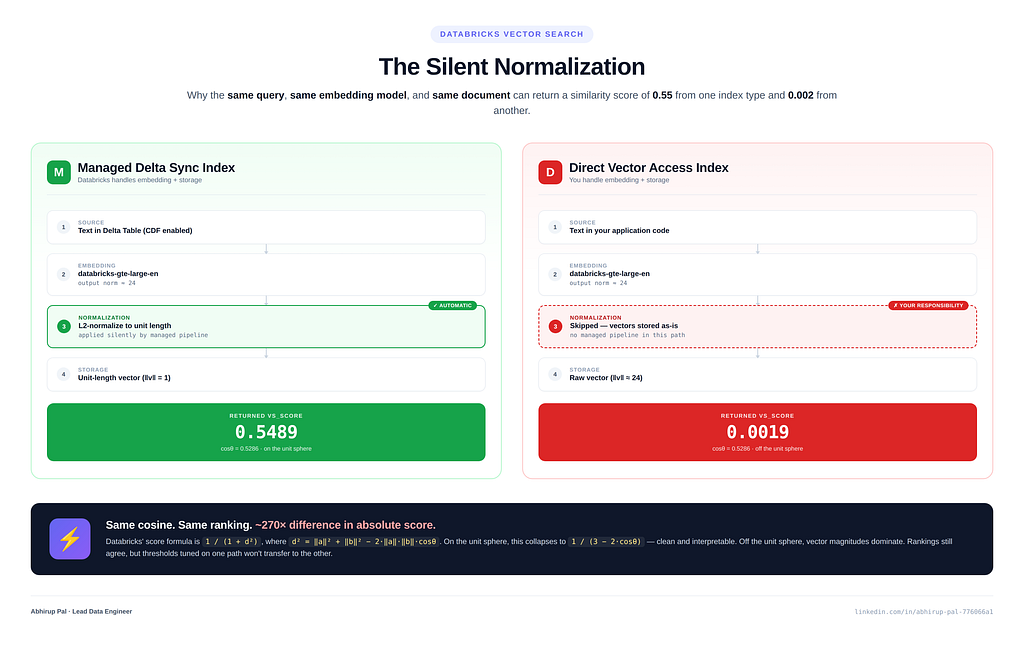
If you’ve read the Databricks Vector Search documentation, you’ve probably come across two similarity score formulas:
- Cosine-form: score = 1 / (3 − 2·cosθ)
- Euclidean-form: score = 1 / (1 + d²)
On the surface, they look like two different scoring conventions — one for when you’ve declared similarity_metric = "COSINE", another for "L2". Read a little closer and they both appear under a single unified scoring section. Are they the same formula written two ways? Or two genuinely different scores?
The answer turns out to depend on a single, completely invisible step: whether your stored vectors are unit-length or not.
On the Managed Delta Sync Index path, Databricks silently normalizes your embeddings before storing them. The two formulas produce identical numbers, and both match what similarity_search() returns.
On the Direct Vector Access Index path, that normalization doesn’t happen for free. If you forget to normalize client-side, your manual score calculations will say 0.55, and Vector Search will return 0.0019 — a ~270× discrepancy on the same pair of vectors. Neither number is wrong. They're measuring similarity on different geometries.
This article walks through the full experiment — dataset, code, measurements, algebra — so you can see exactly where the silent normalization happens and why it matters. If you’re building a RAG pipeline on Databricks, moving between index types, or comparing scores across retrieval backends (Pinecone, MongoDB Atlas, pgvector), understanding this mechanic will save you a bad afternoon of debugging.
The TL;DR
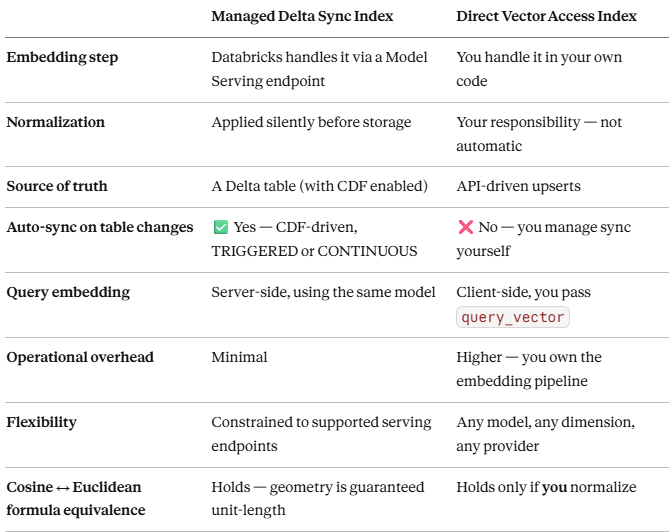
The rest of this article is the experiment that proves every row of this table.
Part 1 — The Setup
Dataset
Ten product descriptions across five categories — laptops, smartphones, tablets, headphones, and smartwatches. Small enough to reason about by hand, realistic enough to produce meaningful semantic rankings.
documents = [
    {"id": 1,  "category": "laptop",     "content": "The UltraBook Pro features a 15-inch OLED display, 32GB RAM, and 1TB NVMe SSD. Battery life lasts up to 18 hours."},
    {"id": 2,  "category": "laptop",     "content": "The BudgetBook Air is a lightweight laptop with Intel i5 processor, 16GB RAM, and 512GB SSD, ideal for everyday tasks."},
    {"id": 3,  "category": "smartphone", "content": "The Galaxy X20 comes with a 6.7-inch AMOLED screen, 200MP camera, and 5000mAh battery. Supports 5G connectivity."},
    {"id": 4,  "category": "smartphone", "content": "The PocketPro Mini is a compact 5.4-inch smartphone with a Snapdragon 8 Gen 2 chip and 48MP dual-camera system."},
    {"id": 5,  "category": "tablet",     "content": "The SlateMax 12 is a 12.9-inch tablet with M2 chip, 256GB storage, and optional LTE. Great for creative professionals."},
    {"id": 6,  "category": "tablet",     "content": "The KidsPad is a durable 8-inch tablet with parental controls and 10-hour battery, designed for children aged 4-12."},
    {"id": 7,  "category": "headphones", "content": "The SoundElite ANC headphones offer 40-hour battery life, active noise cancellation, and Hi-Res audio certification."},
    {"id": 8,  "category": "headphones", "content": "The SportsEar wireless earbuds are IPX5 water-resistant with 8-hour playback and secure-fit ear hooks for workouts."},
    {"id": 9,  "category": "smartwatch", "content": "The FitTrack Pro monitors heart rate, SpO2, sleep quality, and has built-in GPS with 7-day battery life."},
    {"id": 10, "category": "smartwatch", "content": "The StyleWatch Ultra features an always-on AMOLED display, ECG sensor, and supports contactless payments."},
]
Test query
"device with long battery life" — a semantic query that doesn't match any exact phrase but has obvious candidates (the 18-hour UltraBook, the 40-hour SoundElite, the 7-day FitTrack).
Embedding model
databricks-gte-large-en — the built-in Foundation Model serving endpoint that ships with every Databricks workspace. Outputs 1024-dimensional vectors. Deterministic.
A small but critical fact to remember
The databricks-gte-large-en serving endpoint returns un-normalized vectors. This is verifiable by calling it directly:
SELECT ai_query("databricks-gte-large-en", "hello world") AS vThe resulting vector has a norm of approximately 24, not 1. Hold onto this fact — it’s the pivot point of the entire article.
Part 2 — The Managed Delta Sync Path
Architecture
A Managed Delta Sync Index wraps a Delta table. You enable Change Data Feed (CDF) on the source table, point the index at a text column, and name a serving endpoint. From that moment:
- Databricks reads text from your table
- Sends it to the serving endpoint for embedding
- Stores the resulting vectors in the index
- Embeds your queries server-side when you call similarity_search(query_text=...)
- Keeps the index in sync as rows change
You never touch a vector. Which is exactly the convenience people want — and exactly what makes the normalization step invisible.
Step-by-step code
# Step 0 — Install dependencies
%pip install databricks-vectorsearch --upgrade -q
dbutils.library.restartPython()

# Step 1 - Config
CATALOG        = "<YOUR_CATALOG>"
SCHEMA         = "<YOUR_SCHEMA>"
TABLE_NAME     = "product_docs"
FULL_TABLE     = f"{CATALOG}.{SCHEMA}.{TABLE_NAME}"
VS_ENDPOINT    = "vs_endpoint_demo"
INDEX_NAME     = f"{CATALOG}.{SCHEMA}.{TABLE_NAME}_index"
EMBEDDING_MODEL_ENDPOINT = "databricks-gte-large-en"
SOURCE_TEXT_COL          = "content"
PRIMARY_KEY_COL          = "id"
Create the Delta table with CDF enabled — this is non-negotiable. Delta Sync Index relies on CDF to propagate inserts, updates, and deletes into the index automatically:
from pyspark.sql import SparkSession
from pyspark.sql.types import StructType, StructField, IntegerType, StringType

spark = SparkSession.builder.getOrCreate()
schema = StructType([
    StructField("id",       IntegerType(), False),
    StructField("category", StringType(),  True),
    StructField("content",  StringType(),  True),
])
df = spark.createDataFrame(documents, schema=schema)
(df.write
   .format("delta")
   .mode("overwrite")
   .option("overwriteSchema", "true")
   .option("delta.enableChangeDataFeed", "true")   # required for Delta Sync
   .saveAsTable(FULL_TABLE))
Create the endpoint and index:
from databricks.vector_search.client import VectorSearchClient

vsc = VectorSearchClient(disable_notice=True)
# Create endpoint (idempotent)
existing = [ep["name"] for ep in vsc.list_endpoints().get("endpoints", [])]
if VS_ENDPOINT not in existing:
    vsc.create_endpoint_and_wait(name=VS_ENDPOINT, endpoint_type="STANDARD")
# Create Delta Sync Index with managed embeddings
index = vsc.create_delta_sync_index_and_wait(
    index_name=INDEX_NAME,
    endpoint_name=VS_ENDPOINT,
    primary_key=PRIMARY_KEY_COL,
    source_table_name=FULL_TABLE,
    pipeline_type="TRIGGERED",
    embedding_source_column=SOURCE_TEXT_COL,
    embedding_model_endpoint_name=EMBEDDING_MODEL_ENDPOINT,
)
# Trigger the first sync
index.sync()
Query:
results = index.similarity_search(
    query_text="device with long battery life",
    columns=["id", "category", "content"],
    num_results=3,
)

for row in results["result"]["data_array"]:
    print(f"id={row[0]}  category={row[1]}  score={row[-1]:.4f}")
Output:
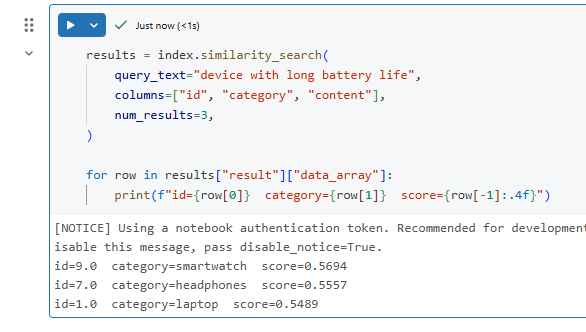
id=9  category=smartwatch  score=0.5694
id=7  category=headphones  score=0.5557
id=1  category=laptop      score=0.5489
Verifying that the Managed path normalizes — the dual-formula proof
Here’s the elegant part. Both Databricks-documented formulas should agree on a unit-sphere geometry. If the stored vectors are unit-length, running them two ways should give the same number. Let’s verify.
Method 1 — Cosine-form check:
import numpy as np

df = spark.sql("""
SELECT
  ai_query("databricks-gte-large-en", "device with long battery life")        AS emb_query,
  ai_query("databricks-gte-large-en",
           "The FitTrack Pro monitors heart rate, SpO2, sleep quality, "
           "and has built-in GPS with 7-day battery life.")                    AS emb_fittrack,
  ai_query("databricks-gte-large-en",
           "The SoundElite ANC headphones offer 40-hour battery life, "
           "active noise cancellation, and Hi-Res audio certification.")       AS emb_soundelite,
  ai_query("databricks-gte-large-en",
           "The UltraBook Pro features a 15-inch OLED display, 32GB RAM, "
           "and 1TB NVMe SSD. Battery life lasts up to 18 hours.")             AS emb_ultrabook
""")

row = df.collect()[0]

emb_query      = np.array(row["emb_query"])
emb_fittrack   = np.array(row["emb_fittrack"])
emb_soundelite = np.array(row["emb_soundelite"])
emb_ultrabook  = np.array(row["emb_ultrabook"])

def cosine(a, b):
    return float(np.dot(a, b) / (np.linalg.norm(a) * np.linalg.norm(b)))

def databricks_score(cos):
    return 1.0 / (3.0 - 2.0 * cos)

candidates = [
    ("FitTrack Pro   (id=9, smartwatch)", emb_fittrack),
    ("SoundElite ANC (id=7, headphones)", emb_soundelite),
    ("UltraBook Pro  (id=1, laptop)",     emb_ultrabook),
]

print(f"{'Candidate':40s}  {'cosine':>8s}  {'dbx_score':>10s}")
print("-" * 64)
for name, emb in candidates:
    c = cosine(emb_query, emb)
    s = databricks_score(c)
    print(f"{name:40s}  {c:8.4f}  {s:10.4f}")
Output:

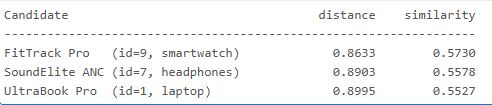
Method 2 — Euclidean-form check:
import math

def normalize(vec):
    norm = math.sqrt(sum(x * x for x in vec))
    return [x / norm for x in vec]

def euclidean_distance(a, b):
    return math.sqrt(sum((a[i] - b[i]) ** 2 for i in range(len(a))))

def databricks_similarity_euclid(a, b):
    d = euclidean_distance(a, b)
    return 1.0 / (1.0 + d * d)

# Reuse the embeddings from Method 1 — re-normalize before Euclidean comparison
emb_query_norm = normalize(emb_query.tolist())

candidates_raw = [
    ("FitTrack Pro   (id=9, smartwatch)", emb_fittrack.tolist()),
    ("SoundElite ANC (id=7, headphones)", emb_soundelite.tolist()),
    ("UltraBook Pro  (id=1, laptop)",     emb_ultrabook.tolist()),
]

print(f"{'Candidate':40s}  {'distance':>10s}  {'similarity':>12s}")
print("-" * 66)
for name, vec in candidates_raw:
    vec_norm = normalize(vec)
    d = euclidean_distance(emb_query_norm, vec_norm)
    s = databricks_similarity_euclid(emb_query_norm, vec_norm)
    print(f"{name:40s}  {d:10.4f}  {s:12.4f}")
Output:
Cross-check against what Vector Search actually returned:
vs_results = index.similarity_search(
    query_text="device with long battery life",
    columns=["id", "category", "content"],
    num_results=3,
)

print(f"{'id':>4s}  {'category':12s}  {'vs_score':>10s}")
print("-" * 36)
for r in vs_results["result"]["data_array"]:
    # row layout: [id, category, content, score]
    print(f"{int(r[0]):>4}  {r[1]:12s}  {r[-1]:10.4f}")
Output:

The result on the Managed path
When you run both methods against the Managed Delta Sync Index scores:
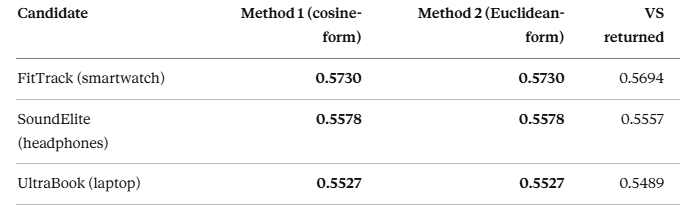
Two observations:
- Method 1 and Method 2 match to 4 decimals. That’s algebra, not luck. For unit vectors, ‖a − b‖² = 2(1 − cosθ), which means 1/(1 + d²) = 1/(3 − 2·cosθ) exactly. Same number, two formulas.
- VS scores are ~0.003 lower than manual scores. That’s fp16 quantization in the index’s stored representation — Databricks stores vectors in reduced precision for memory efficiency. Rankings are preserved; absolute scores drift by ~0.3%.
What this proves: The stored vectors must be unit-length, because that’s the only geometry where Method 1 and Method 2 produce identical numbers. But the serving endpoint returns vectors with norm ~24. Therefore, something between the serving endpoint and the index is normalizing silently — and that something is the managed embedding pipeline.
Part 3 — The Direct Vector Access Path
Architecture
A Direct Vector Access Index is not backed by a Delta table. You declare a schema, upsert records via the API, and manage everything yourself — including generating the embeddings. This is the same operational model as Pinecone, Weaviate, MongoDB Atlas Vector Search, or pgvector: you compute vectors, you push them in.
The cost of that control: no free normalization, no auto-sync, no managed embedding pipeline.
Step-by-step code (with the normalization question left open)
%pip install databricks-vectorsearch mlflow --upgrade -q
dbutils.library.restartPython()

# Config
CATALOG         = "<YOUR_CATALOG>"
SCHEMA          = "<YOUR_SCHEMA>"
VS_ENDPOINT     = "vs_endpoint_demo"
INDEX_NAME      = f"{CATALOG}.{SCHEMA}.product_docs_direct_index"
EMBEDDING_DIM   = 1024
PRIMARY_KEY_COL = "id"
EMBEDDING_COL   = "embedding"
EMBEDDING_ENDPOINT = "databricks-gte-large-en"
The embed() function — the critical design decision:
from mlflow.deployments import get_deploy_client

_client = get_deploy_client("databricks")
def embed(texts: list[str]) -> list[list[float]]:
    """
    WARNING: databricks-gte-large-en returns UN-normalized vectors.
    This function returns them as-is. See Part 4 for why that matters.
    """
    response = _client.predict(
        endpoint=EMBEDDING_ENDPOINT,
        inputs={"input": texts},
    )
    return [item["embedding"] for item in response["data"]]
Create the Direct Access Index:
from databricks.vector_search.client import VectorSearchClient
import time

vsc = VectorSearchClient(disable_notice=True)
# Endpoint (idempotent)
existing = [ep["name"] for ep in vsc.list_endpoints().get("endpoints", [])]
if VS_ENDPOINT not in existing:
    vsc.create_endpoint_and_wait(name=VS_ENDPOINT, endpoint_type="STANDARD")
# Direct Access Index - no _and_wait variant, so we poll manually
vsc.create_direct_access_index(
    endpoint_name=VS_ENDPOINT,
    index_name=INDEX_NAME,
    primary_key=PRIMARY_KEY_COL,
    embedding_dimension=EMBEDDING_DIM,
    embedding_vector_column=EMBEDDING_COL,
    schema={
        PRIMARY_KEY_COL: "int",
        "category":       "string",
        "content":        "string",
        EMBEDDING_COL:    "array<float>",
    },
)
# Poll for ONLINE state
while True:
    idx = vsc.get_index(endpoint_name=VS_ENDPOINT, index_name=INDEX_NAME)
    state = idx.describe().get("status", {}).get("detailed_state", "UNKNOWN")
    print(f"State: {state}")
    if state.startswith("ONLINE"):
        break
    time.sleep(20)
index = vsc.get_index(endpoint_name=VS_ENDPOINT, index_name=INDEX_NAME)
Upsert — this is where the normalization decision is cast in stone:
texts   = [doc["content"] for doc in documents]
vectors = embed(texts)   # un-normalized, norm ~24

records = [{**doc, EMBEDDING_COL: vec} for doc, vec in zip(documents, vectors)]
# Upsert in batches (API limit: 100 per call)
BATCH_SIZE = 50
for start in range(0, len(records), BATCH_SIZE):
    index.upsert(records[start : start + BATCH_SIZE])
Query:
query_vector = embed(["device with long battery life"])[0]   # also un-normalized

results = index.similarity_search(
    query_vector=query_vector,
    columns=["id", "category", "content"],
    num_results=5,
)
for r in results["result"]["data_array"]:
    print(f"id={int(r[0])}  category={r[1]}  vs_score={r[-1]:.4f}")
The output that stops you in your tracks
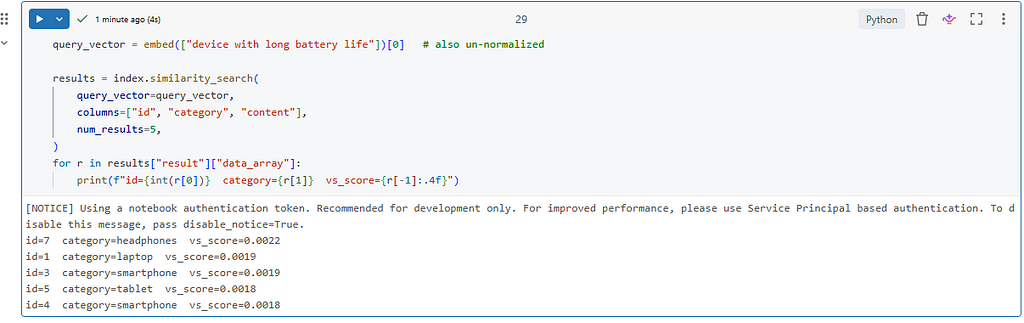
id=7  category=headphones  vs_score=0.0022
id=1  category=laptop      vs_score=0.0019
id=3  category=smartphone  vs_score=0.0019
id=5  category=tablet      vs_score=0.0018
id=4  category=smartphone  vs_score=0.0018
Scores of ~0.002. On the Managed path with the same model and same query, we saw scores of ~0.55. What’s happening?
Verifying that Direct Access does not normalize — the full geometric reveal
Re-embed each returned document, normalize both query and doc to unit length, compute the cosine, and the Databricks unit-sphere score. Print the actual stored vector magnitudes along the way:
import numpy as np

def l2_normalize(v):
    v = np.asarray(v, dtype=np.float64)
    n = np.linalg.norm(v)
    return v / n if n > 0 else v
q_raw       = embed(["device with long battery life"])[0]
q_norm      = l2_normalize(q_raw)
q_magnitude = np.linalg.norm(q_raw)
vs_results = index.similarity_search(
    query_vector=q_raw,
    columns=["id", "category", "content"],
    num_results=5,
)
print(f"Query vector norm ‖q‖ = {q_magnitude:.4f}\n")
print(f"{'id':>4s}  {'‖doc‖':>8s}  {'vs_score':>10s}  {'cosine':>8s}  {'dbx_score':>10s}")
print("-" * 60)
for r in vs_results["result"]["data_array"]:
    content  = r[2]
    vs_score = float(r[-1])
    doc_raw  = embed([content])[0]
    doc_mag  = np.linalg.norm(doc_raw)
    doc_norm = l2_normalize(doc_raw)
    cos = float(np.dot(q_norm, doc_norm))
    dbx = 1.0 / (3.0 - 2.0 * cos)
    print(f"{int(r[0]):>4d}  {doc_mag:8.4f}  {vs_score:10.4f}  {cos:8.4f}  {dbx:10.4f}")
The result

Query vector norm ‖q‖ = 24.2250

  id     ‖doc‖    vs_score    cosine   dbx_score
------------------------------------------------------------
   7   23.9674      0.0022    0.6036      0.5578
   1   24.1355      0.0019    0.5519      0.5274
   3   24.0307      0.0019    0.5479      0.5251
   5   24.0438      0.0018    0.5315      0.5163
   4   23.7944      0.0018    0.5183      0.5093
Every document vector has a norm of ~24. Not 1. The vectors are sitting at their raw databricks-gte-large-en magnitudes.
The math that explains the 270× collapse
For two vectors of norm N at cosine angle θ:
d² = ‖a‖² + ‖b‖² − 2·‖a‖·‖b‖·cosθ
For the UltraBook row — ‖q‖ = 24.2250, ‖doc‖ = 24.1355, cosθ = 0.5519:
d² = 24.2250² + 24.1355² − 2·24.2250·24.1355·0.5519
   = 586.8506 + 582.5224 − 645.3937
   = 523.9793

vs_score = 1 / (1 + 523.9793) = 0.00191   ✓  (matches VS: 0.0019)
Meanwhile the unit-sphere score on the same cosine:
dbx_score = 1 / (3 − 2·0.5519) = 0.5274
Both scores are correct. They’re just measuring similarity on different geometries — the real one VS stored, and the hypothetical unit-sphere one. The managed pipeline puts you on the unit sphere for free. Direct Access leaves you wherever your embedding function leaves you.
The fix
Normalize inside your embed() function:
import math

def _l2_normalize(vec: list[float]) -> list[float]:
    norm = math.sqrt(sum(x * x for x in vec))
    return [x / norm for x in vec] if norm > 0 else vec
def embed(texts: list[str]) -> list[list[float]]:
    response = _client.predict(
        endpoint=EMBEDDING_ENDPOINT,
        inputs={"input": texts},
    )
    return [_l2_normalize(item["embedding"]) for item in response["data"]]
Re-create the Direct Access Index with this updated embed() and the two paths converge. Rankings align. Absolute scores line up with the Managed path to within fp16 quantization noise.
Part 4 — Benefits and Limitations
Managed Delta Sync Index
Benefits
- Zero-effort ingestion: ship text to a Delta table, the index catches up via CDF. No embedding pipeline to build or maintain.
- Auto-sync with CDF: inserts, updates, and deletes propagate automatically. pipeline_type="TRIGGERED" for batch, "CONTINUOUS" for streaming.
- Server-side query embedding: pass query_text, done. No round-trip to a serving endpoint from your application.
- Silent normalization: the geometry is guaranteed unit-length. Both scoring formulas work. Scores are directly interpretable.
- Operationally simple: governance, lineage, and access control all flow through Unity Catalog on the source table.
Limitations
- Constrained model choice: you pick from the serving endpoints available in your workspace. If you need a specific open-source model, a custom fine-tune, or an external provider (OpenAI, Cohere), you can’t use this path directly.
- Dimension locked to model: no Matryoshka truncation, no dimension reduction tricks. Whatever the endpoint produces is what you store.
- Requires a Delta table: you cannot drive the index from an external system without landing the data in Delta first.
- CDF overhead: Change Data Feed has storage and write amplification costs. Usually negligible, but worth knowing at high write volumes.
- Opaque preprocessing: normalization happens without a knob. If you want different geometry, you can’t get it on this path.
Direct Vector Access Index
Benefits
- Any embedding model: OpenAI, Cohere, Voyage, sentence-transformers, a self-hosted model, a fine-tuned checkpoint — anything that produces a vector.
- Any dimension: 384 for MiniLM, 1024 for GTE-Large, 3072 for text-embedding-3-large, or truncated via MRL. You declare it at index creation.
- Full control over preprocessing: tokenization choices, truncation strategy, normalization, query-vs-document prompting — all in your code.
- Architecturally familiar: same operational model as Pinecone, Weaviate, MongoDB Atlas Vector Search, pgvector. Your existing RAG code patterns apply.
- No Delta table dependency: upsert from any source — a notebook, a streaming job, an application, an MCP server.
Limitations
- No auto-sync: you own the ingestion pipeline. New data, updates, and deletes are all explicit upsert() / delete() calls.
- No managed embedding: you own the model lifecycle, versioning, and cost.
- Client-side query embedding: you must embed queries before calling similarity_search(query_vector=...). An extra hop in the request path.
- Normalization is your problem (the whole point of this article): skip it and scores collapse geometrically.
- Higher engineering overhead: more code, more things to monitor, more failure modes. Traded for flexibility.
Part 5 — When to Use Which
Reach for Managed Delta Sync when:
- Your source of truth is already a Delta table, or can be.
- databricks-gte-large-en, databricks-bge-large-en, or another Foundation Model endpoint is good enough for your use case.
- You want auto-sync — new rows should show up in the index without you doing anything.
- You want server-side query embedding and the simplest possible client code.
- You’re optimizing for time-to-production.
Reach for Direct Vector Access when:
- You need a specific embedding model the Foundation Models API doesn’t offer.
- You want dimension control — truncating MRL embeddings to 256 or 512 dims to trade recall for latency/cost.
- Your data lives outside Databricks and you don’t want to land it in Delta first.
- You’re already running a Pinecone/Weaviate/Mongo-shaped pipeline and want a drop-in replacement inside the lakehouse.
- You need explicit control over every preprocessing step — including whether normalization happens and when.
There’s no wrong choice. But they are genuinely different tools with different operating characteristics, and scoring semantics is one place where the difference manifests concretely.
Part 6 — What This Means for Cross-Backend Comparisons
If you’re benchmarking Databricks Vector Search against Pinecone, Weaviate, or MongoDB Atlas Vector Search — which is a reasonable thing to do when choosing a backend — absolute similarity scores are not comparable out of the box.
- Pinecone defaults to cosine similarity and stores dot products directly. A score of 0.85 there means cosθ = 0.85.
- MongoDB Atlas Vector Search returns cosine, Euclidean, or dot-product scores depending on the similarity setting declared at index creation, with a documented mapping for each.
- Databricks returns 1 / (1 + d²) where d is the actual Euclidean distance on whatever geometry you stored.
On the Managed Delta Sync path, that formula happens to collapse to a clean function of cosine, because vectors are unit-length. On the Direct Access path, it’s a function of cosine and the vector magnitudes.
For ranking, this almost never matters — cosine, Euclidean, and Databricks’ score all agree on ordering when norms are uniform (as they are within a single embedding model’s outputs). For absolute thresholds — “only return results with score ≥ 0.7” — it matters a lot. A threshold calibrated on a Managed index won’t transfer to a Direct Access index without normalization, and it certainly won’t transfer to Pinecone without a conversion.
The safe move when tuning thresholds: always convert to cosine first, tune the threshold there, and derive backend-specific thresholds as a function of the underlying cosine.
Closing Thoughts
The two Databricks similarity score formulas are the same formula — conditional on your vectors being unit-length. The Managed Delta Sync Index guarantees that condition. The Direct Vector Access Index leaves it to you.
This isn’t a bug or a gotcha, and it isn’t a design flaw. It’s a reasonable split of responsibility between two products that serve different needs. The Managed path optimizes for convenience and handles the full lifecycle so you don’t have to think about it. The Direct Access path optimizes for control and gives you the same primitive that Pinecone, Weaviate, and Atlas Vector Search have always given you — with the same responsibilities attached.
The actionable takeaway, if you only remember one thing from this article: if you’re using Direct Vector Access, L2-normalize your vectors before upsert. One function call. No performance cost. Makes every scoring formula in the documentation actually mean what it appears to mean.
And if you’re using Managed Delta Sync: the silent normalization is one of the quiet reasons “it just works.” Appreciate it, and know that it’s there.
All code tested on Databricks Runtime with databricks-gte-large-en Foundation Model endpoint and databricks-vectorsearch >= 0.40. Placeholders <YOUR_CATALOG> and <YOUR_SCHEMA> should be replaced with your workspace's Unity Catalog catalog and schema names.
If you find this article useful, connect with me on LinkedIn: linkedin.com/in/abhirup-pal-776066a1 | Medium: Abhirup Pal. I am a Lead Data Engineer and Architect specializing in Databricks lakehouse architectures, Data Engineering and AI/ML pipelines. I write about data engineering, cloud platforms, and practical AI implementations.
Managed vs Direct Vector Search in Databricks: The Hidden Normalization That Changes Everything was originally published in Towards AI on Medium, where people are continuing the conversation by highlighting and responding to this story.