
Last year, the AI hype train left the station, and everyone on our team jumped aboard. We were going to build the future. We were going to automate the entire software development lifecycle — from requirements to deployment, fully AI-driven.
No more grunt work. No more copy-paste.
We built 40 different model context protocols (MCPs), connecting to every platform we could find — Jira, Confluence, GitHub, ServiceNow, databases, you name it. Each one did a specific job. One fetched tickets. Another read repos. A third scanned audit logs.
And then reality hit.
These 40 tools didn’t talk to each other. They were islands.
You’d run one, get an output, manually feed it into another, pray the context survived, and then spend more time stitching results together than it would have taken to do the task by hand.
The outputs were fragmented. Hallucinations ran wild because no single tool had the full picture. If you wanted context, you copied-pasted chunks of code, pasted Confluence pages, wrote novella-length prompts, and hoped for the best.
We had built a machine that made us slower. That stung.
TL;DR: I built a multi-agent orchestration system for my team using GitHub Copilot’s agent mode. It connects to 150+ GitHub repos and 70+ Confluence pages in real time, routes user queries between 65+ specialized sub-agents, and has been adopted by 60–80 people in our team, with other teams now asking for their own instances. This is the story of how we got here.
Disclaimer: This story was written with the assistance of AI, because even agent builders need a hand sometimes.
The RAG trap
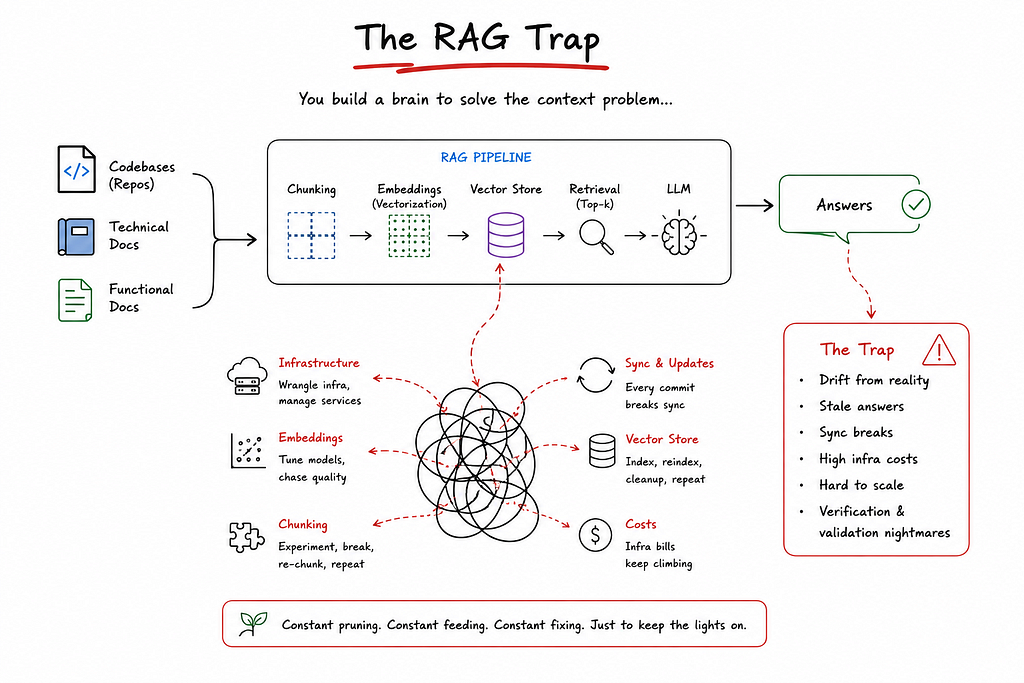
To solve the context problem, my first instinct was RAG — that’s how everyone starts, right? Build a “brain.” Feed it codebases, technical docs, and functional docs. Let the AI retrieve what it needs.
I spent months on this. Months. I had to wrangle infrastructure, tune embeddings, manage chunking strategies, and deal with the endless pain of keeping the vector store in sync with live code. Every time someone pushed a commit, the RAG brain drifted a little further from reality. The sync broke. The answers got stale. The infrastructure bills piled up.
Other teams in the enterprise were building similar “brains.” Some got them working for a single repo. None of them scaled. Verification and validation became nightmares.
The whole thing felt like gardening: constant pruning, constant feeding, constant fixing, just to keep the lights on. But I always thought there had to be a simpler way.
Agents and sources— Two files changed everything
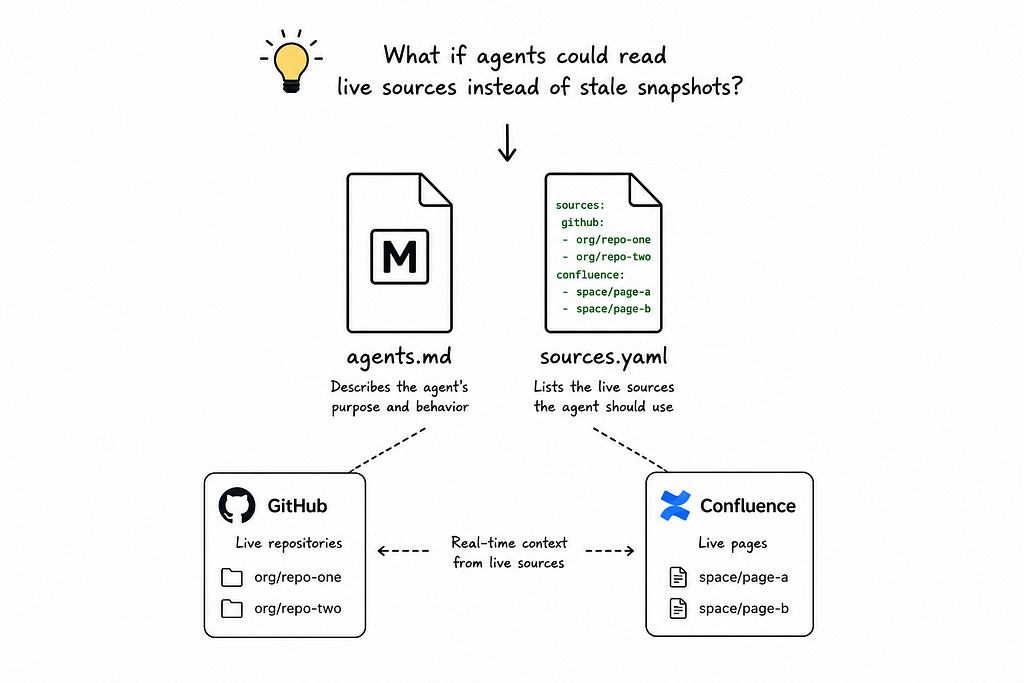
I started experimenting with something low-fi. No vector databases. No sync jobs. No infrastructure.
Just two files: agents.md and sources.yaml.
The idea was stupidly simple. If I could point an agent directly at live GitHub repositories and live Confluence pages, it could pull context in real time instead of relying on a stale snapshot.
So I created my first agent with an agents.md file describing its purpose, and a sources.yaml file listing the GitHub repos and Confluence pages it should know about.
I set it up inside VS Code, powered by GitHub Copilot. I opened a new chat, asked a question about our codebase, and the agent fetched the answer from the actual source. Not a cached embedding. The real code.
It worked. It actually worked.
I remember sitting there thinking, “Wait, that’s it?” No months of RAG tuning. No broken syncs. Just live connections to the sources of truth.
Scaling to 65 sub-agents
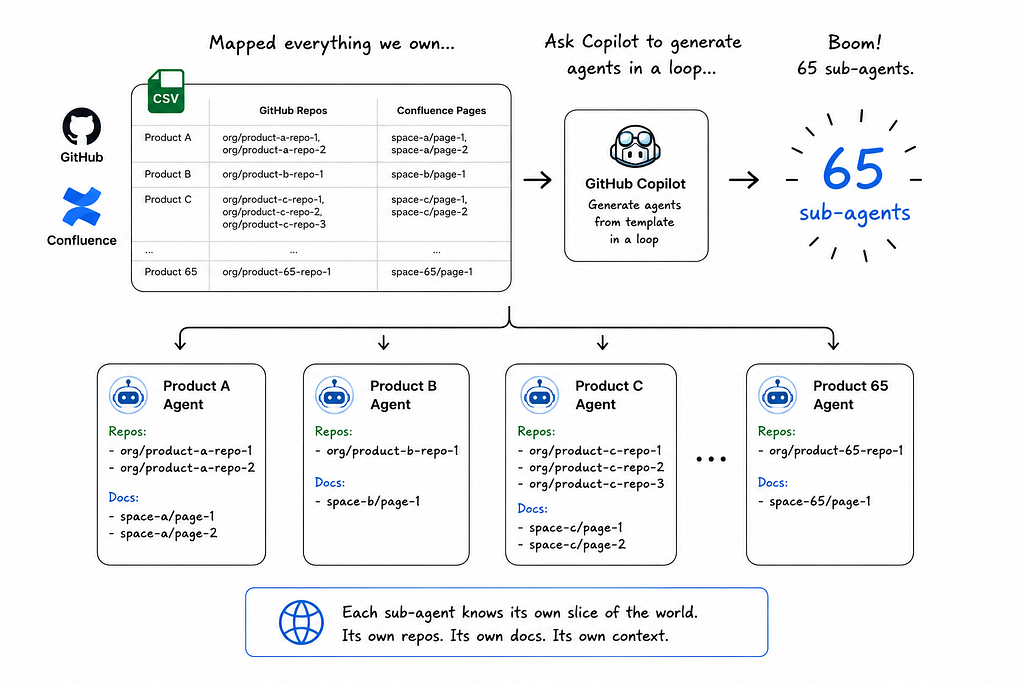
Once the proof of concept clicked, I mapped out every product our team owned. The repositories behind them. The Confluence pages documenting them. I dumped it all into a CSV and asked Copilot to generate agents in a loop, one sub-agent per product, each referencing the same template I’d built.
Boom! 65 sub-agents. Each knew its own slice of the world. Each had its own repos, its own docs, its own context.
But knowledge alone isn’t enough. We also needed people.
Not literal people. Agent personas. I built task-based agents replicating roles across the SDLC: a business analyst agent that writes and reviews user stories, a quality analyst agent that creates test scenarios and reviews them, an architect agent for impact analysis, and so on.
So now we had two flavors of sub agents —
- Knowledge agents — know specific products, repos, docs
- Task-based/ persona agents — perform SDLC roles
The master orchestrator
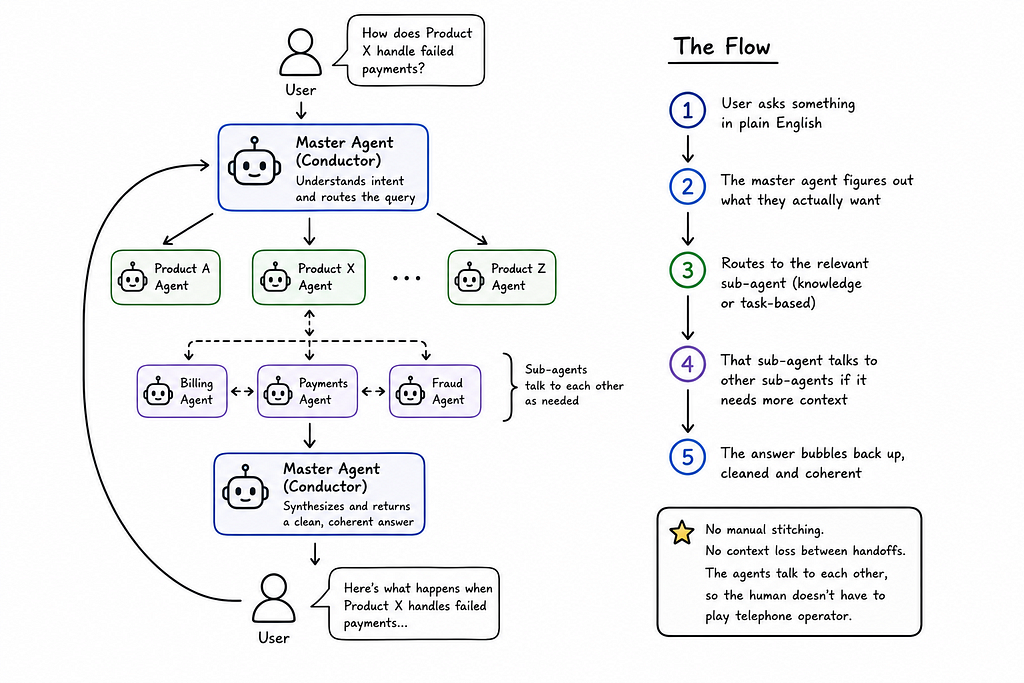
With 65+ agents running around, we needed a conductor. I built a master agent that sits in front of the user, interprets intent, and routes queries to the right sub-agent.
The flow looks like this:
- User asks something in plain English
- The master agent figures out what they actually want
- Routes to the relevant sub-agent (knowledge or task-based)
- That sub-agent talks to other sub-agents if it needs more context
- The answer bubbles back up, cleaned and coherent
No manual stitching. No context loss between handoffs. The agents talk to each other, so the human doesn’t have to play telephone operator.
50+ skills and three types of tools

Agents need to do things, not just know things. So I built skills next.
Over time, I ended up with more than 50 skills across three categories:
- Instruction-based skills are basically templates with guardrails. “How to write a user story” includes our team’s format, acceptance criteria rules, validation checks, and common pitfalls to avoid. Same for architecture documents, impact analysis, epics, implementation plans, and functional specs.
- Connector skills wrap our enterprise MCPs. We have MCPs for Jira, Confluence, and internal databases. The skills know how to invoke the right MCP tool with the right parameters, so the agent doesn’t have to guess.
- Direct-connected skills skip the MCP entirely. For example, our ServiceNow skill has its own sub-skills and Python scripts that let the agent query incidents and changes directly. No middleware. No extra hops.
The agents call these skills on demand. It’s real-time. It’s specific. And because the skills are version-controlled alongside the agents, they evolve with the team instead of rotting in a separate system.
Memory, onboarding, and tracking usage
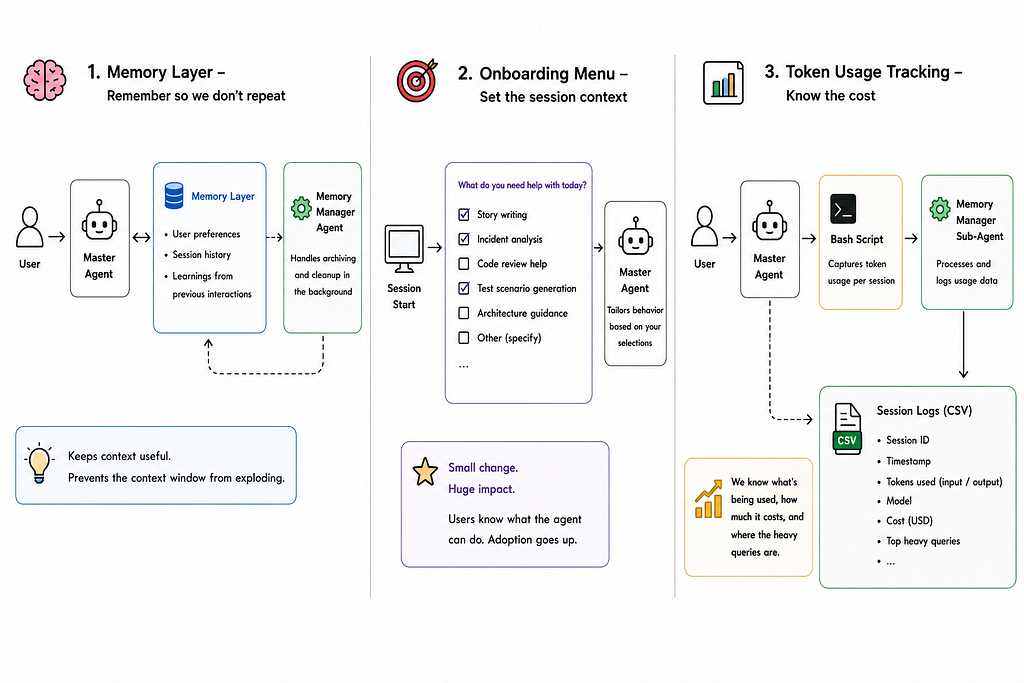
I added a memory layer because nobody wants to repeat themselves.
The memory captures user preferences, session history, and learnings from previous interactions. A separate memory manager agent handles archiving and cleanup in the background so the context window doesn’t explode.
I also added an onboarding menu that pops up at the start of every session. Users check what they need: story writing, incident analysis, code review help, test scenario generation, etc. The agent tailors its behavior accordingly. It sounds small, but it makes a huge difference for adoption.
People actually know what the thing can do instead of guessing.
Recently, I added token usage tracking because that cost was something everyone was interested in knowing. Now, a bash script combined with a memory manager sub-agent ensures every session gets logged to a CSV inside the agent. We know what’s being used, how much it costs, and where the heavy queries are.
Observability with OpenTelemetry and ELK
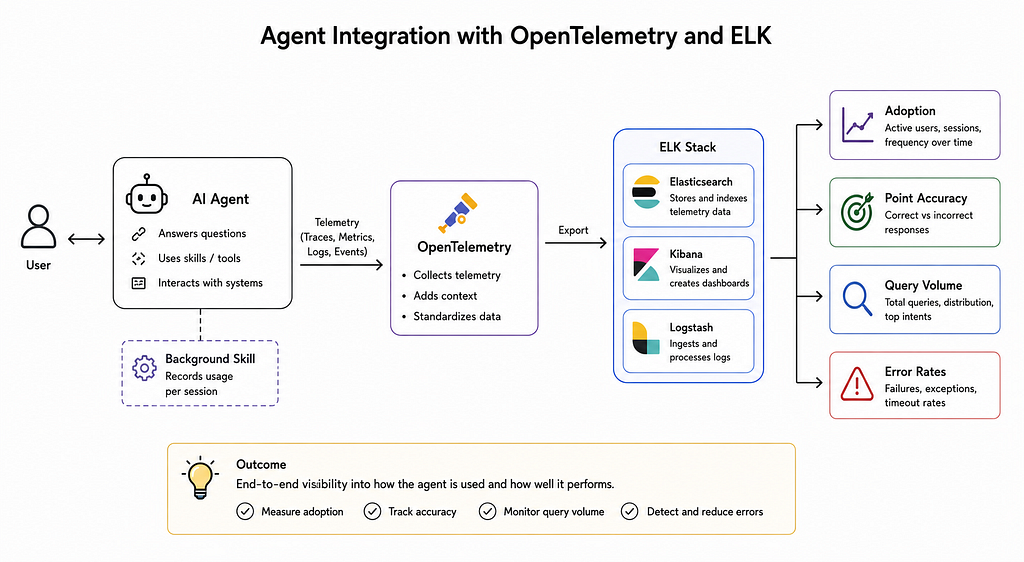
Building the agent was only half the battle. We needed to see how it was performing. Adoption was something every leader is keen to see.
So, next, I integrated OpenTelemetry and piped the telemetry into ELK logs. A background skill records usage per session. From ELK, we can measure adoption, point accuracy, query volume, and error rates.
This matters because without metrics, you’re flying blind. We can now see which agents get used, which skills fail, and where the answers go wrong. It’s not perfect, but it’s a lot better than “seems fine, nobody complained.”
Draw.io - diagrams humans can edit
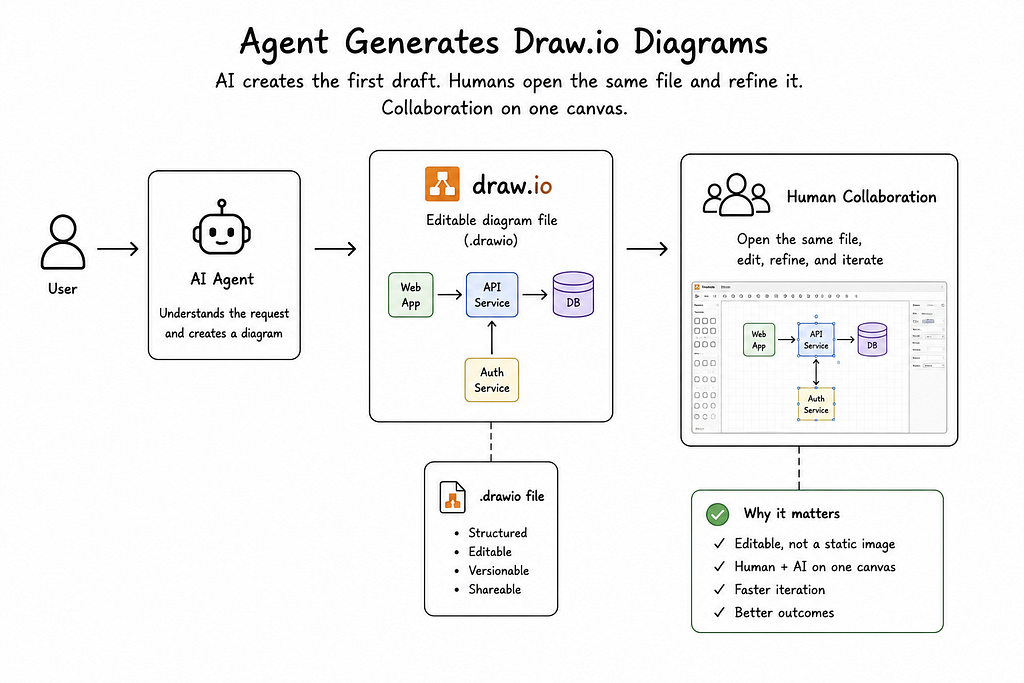
One feature I’m oddly proud of: the agent can generate Draw.io diagrams.
Why Draw.io? Because they’re editable. The AI draws the first draft, then a human can open the same file and tweak it. It’s collaboration on one canvas. The agent doesn’t just throw a static PNG at you and walk away. It gives you a starting point you can actually work with.
We’ve used this for architecture diagrams, flow charts, and system maps. Huge time saver.
What we can do now
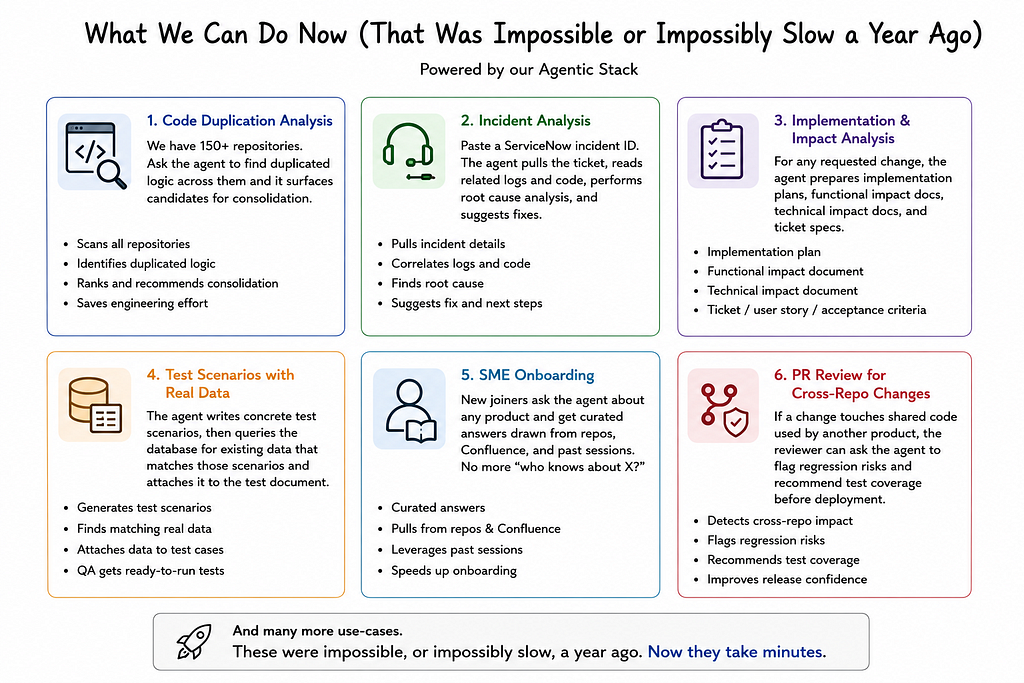
With this stack in place, the use cases we handle feel almost unfair compared to a year ago.
Code duplication analysis
We have 150+ repositories. Ask the agent to find duplicated logic across them and it surfaces candidates for consolidation.
Incident analysis
Paste a ServiceNow incident ID. The agent pulls the ticket, reads related logs and code, performs root cause analysis, and suggests fixes.
Implementation and impact analysis
For any requested change, the agent prepares implementation plans, functional impact docs, technical impact docs, and ticket specs.
Test scenarios with real data
The agent writes concrete test scenarios, then queries the database for existing data that matches those scenarios and attaches it to the test document. QA engineers get ready-to-run tests with actual data.
SME onboarding
New joiners ask the agent about any product and get curated answers drawn from repos, Confluence, and past sessions. No more “who knows about X?”
PR review for cross-repo changes
If a change touches shared code used by another product, the reviewer can ask the agent to flag regression risks and recommend test coverage before deployment.
And many more use-cases.
These were impossible, or impossibly slow, a year ago. Now they take minutes.
What’s next: controlled development
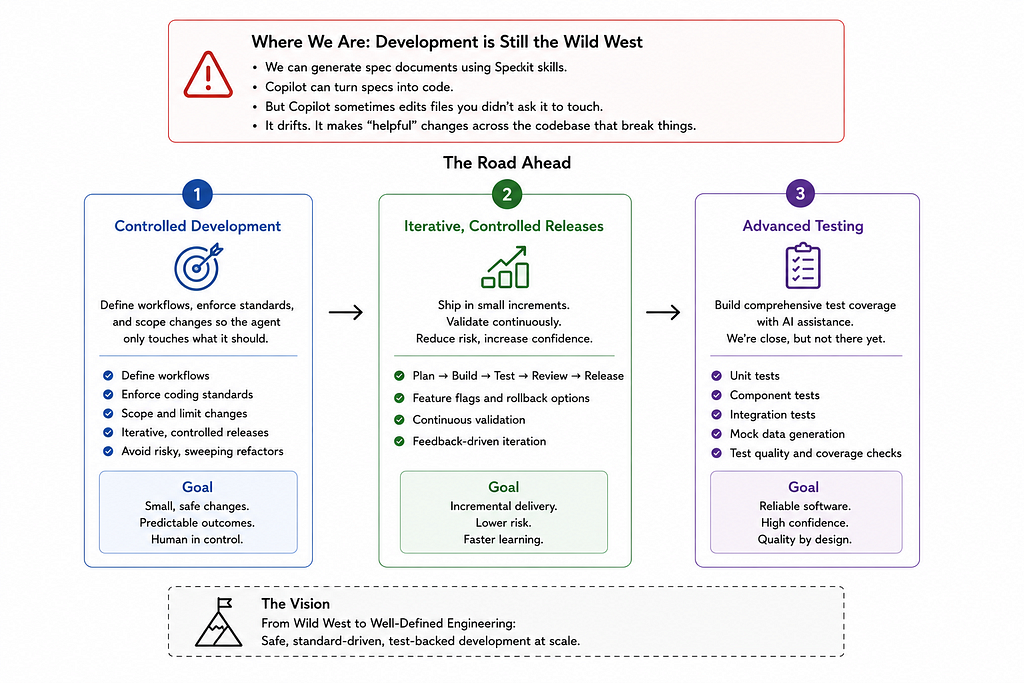
We haven’t solved everything. Development is still the wild west.
We can generate spec documents using Speckit skills now, and Copilot can turn specs into code. But Copilot sometimes edits files you didn’t ask it to touch. It drifts. It makes “helpful” changes across the codebase that break things.
So the next frontier is controlled development. We want to define workflows, enforce standards, and scope changes so the agent only touches what it should. Iterative, controlled releases instead of one big bang where the AI decides to refactor half your monorepo because it thought it saw a pattern.
After that comes testing: unit tests, component tests, integration tests, and mock data generation. We’re close, but not there yet.
The real lesson

If I had to summarize this whole journey in one thought: start simple and stay close to the source of truth.
We over-engineered at first. RAG brains. Vector stores. Sync pipelines. Infrastructure we didn’t need. The solution that actually worked was two files, live connections, and a lot of agent orchestration.
The other lesson? Adoption is a product problem, not a technology problem. The onboarding menu, the memory layer, the token tracking, the ELK observability, those aren’t core AI research. They’re product polish.
And they matter just as much as the model.
I genuinely don’t know how I feel about what comes next. Controlled development feels like the final boss. If we crack it, the shape of how software gets built inside large enterprises changes. If we don’t, we’re still saving hours every day on everything else.
Either way, building this has been the most fun I’ve had at work in years.
If you’re trying something similar, my advice is simple: don’t build a brain. Build a team of agents that know where to look, and let them talk to each other.
You’ll be surprised how far that gets you.
I Built an Autonomous Agent For My Team, and 80 People Use It Every Day. was originally published in Towards AI on Medium, where people are continuing the conversation by highlighting and responding to this story.