From physics equations to CUDA kernels, WebGPU shaders, and a GPU-native simulation stack with browser-based UI
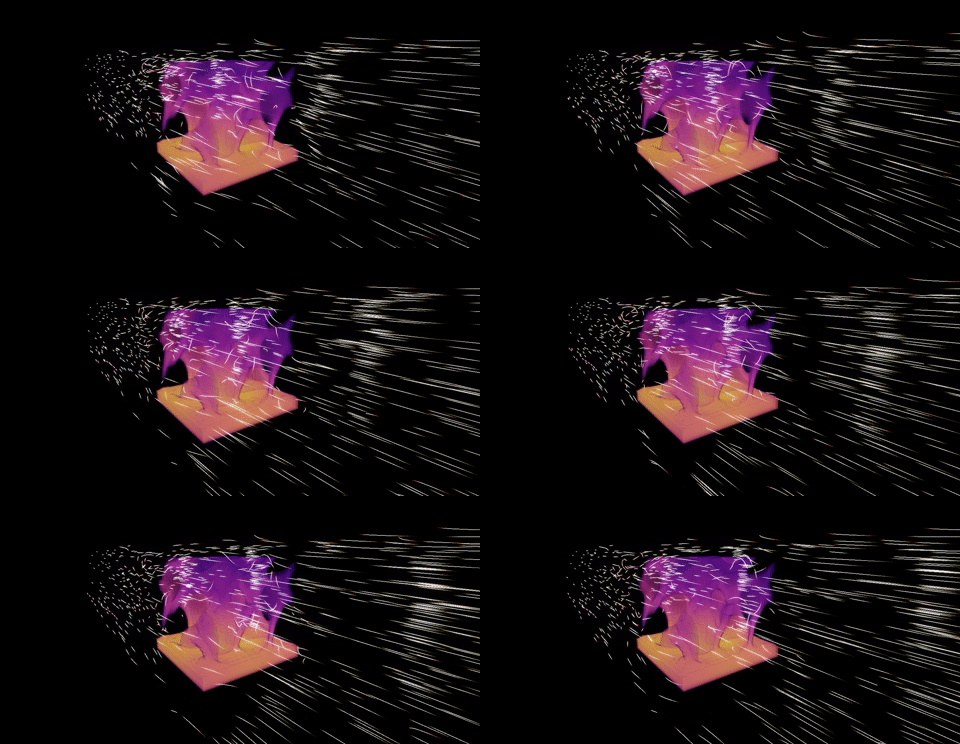
At some point during this project I stopped and counted: Python, CUDA C++, WGSL, GLSL, JavaScript. Five languages, one integrated platform, zero co-authors. Normally it takes a team of numerical methods engineers, GPU programmers, frontend developers and years to ship a finished engineering tool. My background is in computational mechanics: Finite element analysis, structural optimization, material modeling, and multiphysics simulations. Not GPU kernels. Not WebGPU shader pipelines.
What changed is Claude Code. It went from “write me a Python script” to an AI that ran autonomous overnight numerical investigations, maintained correctness contracts across five programming languages, and flagged cross-module inconsistencies before they became bugs. That’s the version of AI-assisted engineering I want to tell you about.
What I Built.
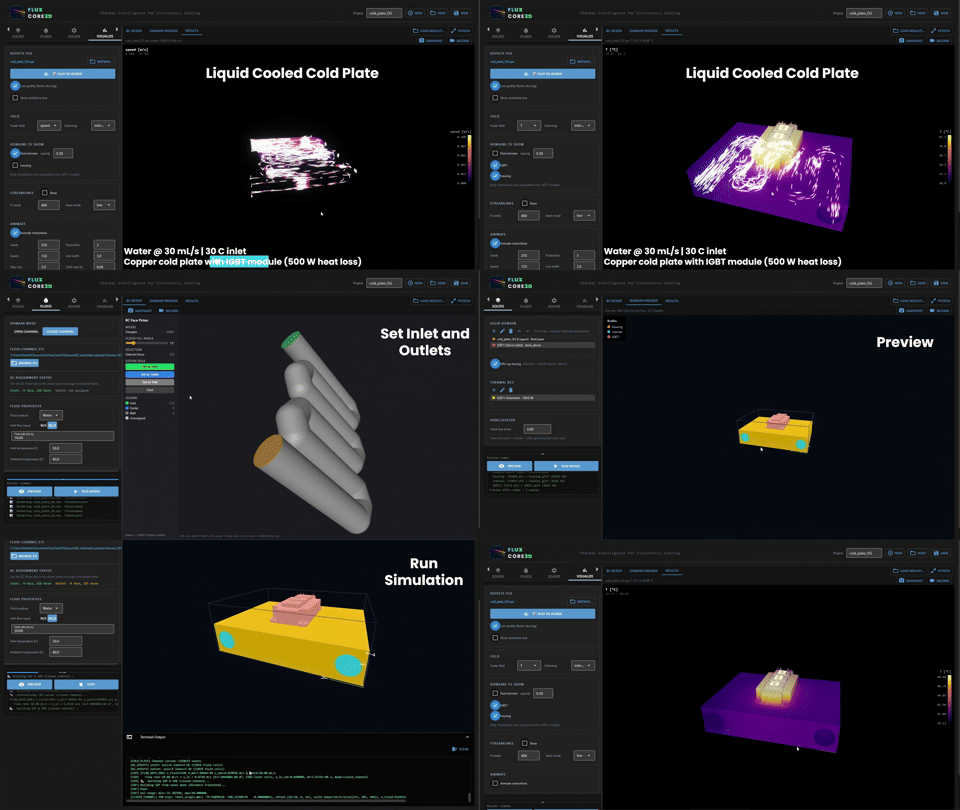
FluxCore3D is what came out the other side: a GPU-accelerated conjugate heat transfer platform. Conjugate means the fluid flow and solid heat conduction are solved simultaneously. Purpose-built for electronics thermal management — air or liquid cooled chips, cold plates, heat pipes, heat exchangers, immersion cooling, complex topologies for heat sinks and manifolds for electronics cooling and beyond. The core components:
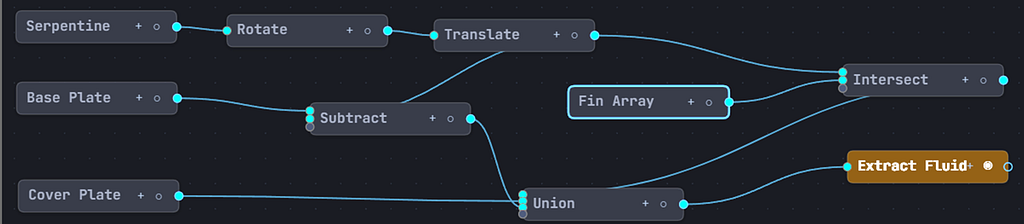
- A built-in node-graph signed distance field (SDF) CAD engine running on WebGPU (WGSL) — Create designs of heat sinks, cold plates, etc.
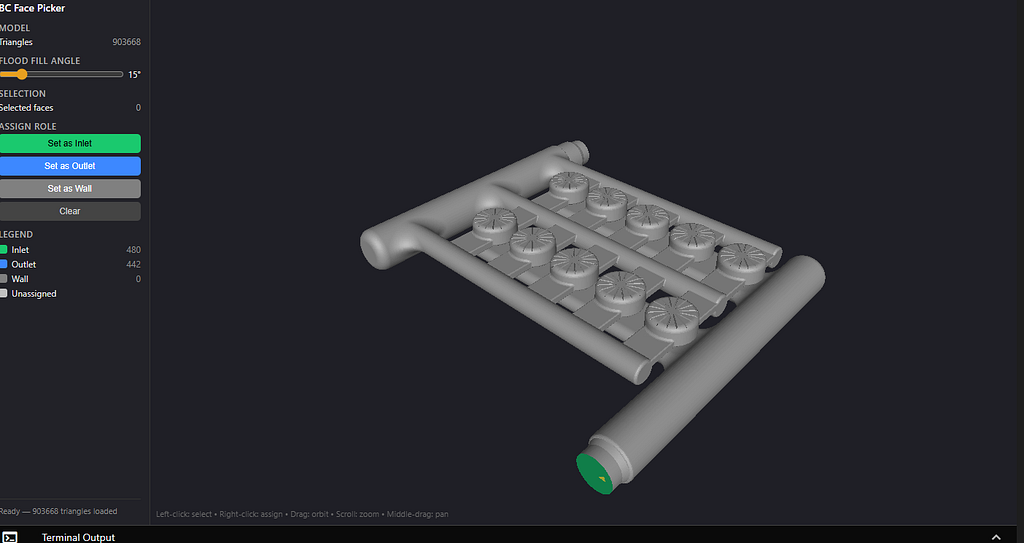
- A WebGPU face picker that lets you click faces on 3D meshes (JavaScript, WGSL) — select flow inlet/outlet faces, thermal surfaces
- GPU ray tracing-based voxelization (Python) — voxelize STL geometries
- A Lattice Boltzmann flow solver coupled with a multigrid thermal solver (Python, CUDA C++) — GPU-accelerated conjugate heat transfer solver
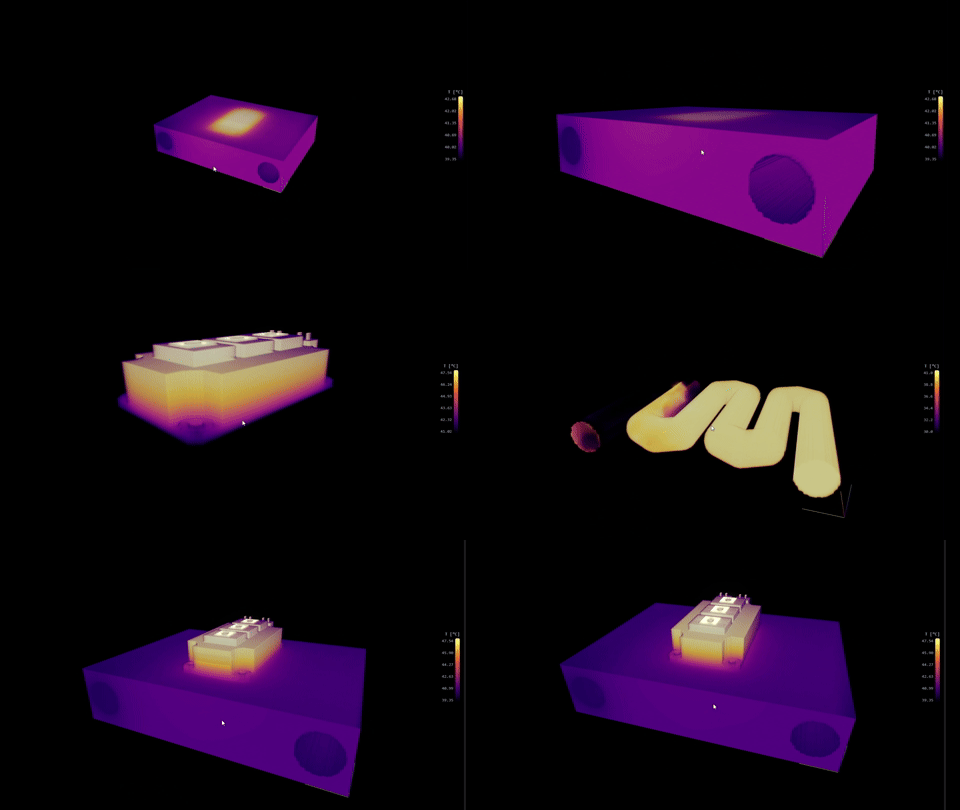
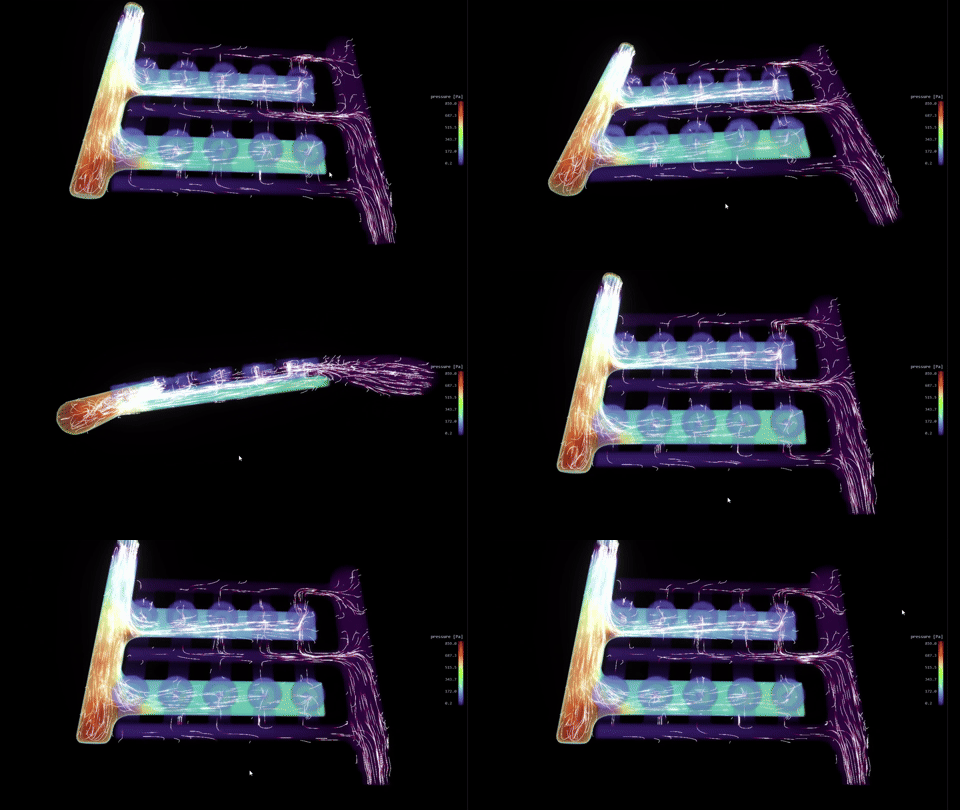
- WebGL-based volumetric ray-marched fields, animated streamlines, and temperature-colored surfaces (JavaScript, GLSL) for visualization
Plus, algorithms to handle open and closed flow domains, 9 solver types (laminar to turbulence), multi-body solid domains with per-body material properties, and over 30+ material presets (metals, semiconductors, ceramics, thermal interface materials, dielectric coolants).
The Journey From Physics to Platform
Building FluxCore3D wasn’t a straight line from idea to working software. It was a series of distinct engineering problems, each requiring a different approach, a different language, and a different kind of collaboration with Claude Code. Some stages were about laying foundations carefully so everything built on top wouldn’t collapse. Others were about solving problems I hadn’t anticipated and couldn’t have solved alone in any reasonable timeframe. What follows is the honest breakdown of each stage and what I’d do again building another engineering simulation platform as a solo developer.
1. Architecture & Core Building Blocks
Before writing a single solver line, I needed a blueprint. I described the physics requirements to Claude — fluid properties, solid material behavior, a simulation config flexible enough to cover dozens of run configurations. I also fed it the relevant literature directly: key Lattice Boltzmann papers, thermal solver references, boundary condition schemes. Before any implementation, I ran a deep research task to map the current state of the art — what flow models were worth supporting, what numerical schemes held up at production scale, what the literature actually recommended versus what most open-source solvers actually implemented.
Claude translated all of that into a clean class hierarchy across Python and CUDA simultaneously, designed the module boundaries, and established the cross-language contracts that would hold the whole system together. That foundation is why the platform is still maintainable ten modules later.
@dataclass
class FluidProperties:
  viscosity: float # kinematic [m²/s]
  density: float # [kg/m³]
  conductivity: float # thermal [W/(m*K)]
  heat_capacity: float # specific [J/(kg*K)]
  inlet_temp: float # [C]

@dataclass
class SolidProperties:
  conductivity: float # thermal [W/(m*K)]
  density: float
  heat_capacity: float

@dataclass
class SimulationConfig:
  grid_dims: tuple # (nx, ny, nz)
  physical_dims: tuple # (Lx, Ly, Lz) in meters
  collision_model: str # one of 9 supported models
  lattice: str # "D3Q19" or "D3Q27"
  flow_direction: str # "+X", "-Z", etc.
  domain_mode: str # "open_channel" or "closed_channel"
  # … 60+ total fields covering flow, thermal, convergence, BCs
2. Codebase Map, Session State and Design Documentation
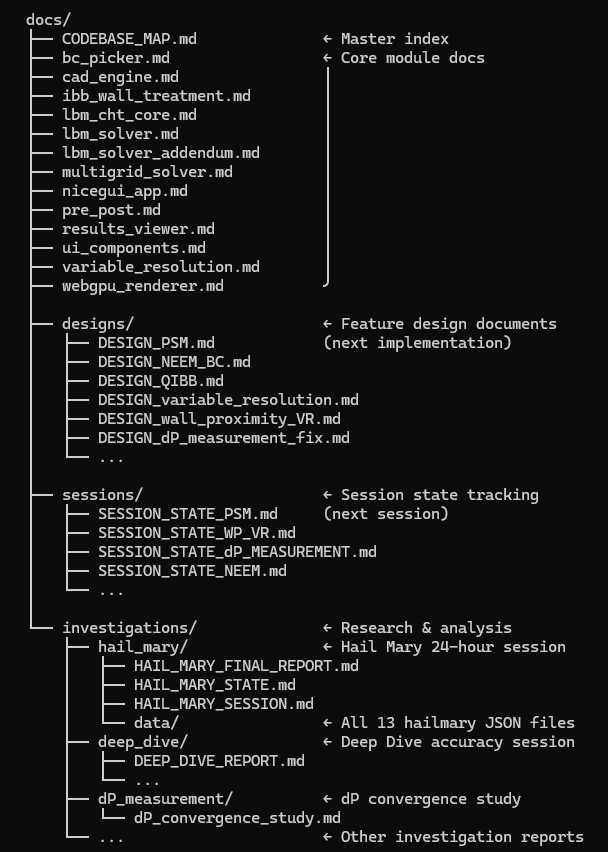
As the codebase grew across five languages, I needed a way to keep Claude oriented across sessions. We built a master codebase map together — every module, every dependency, every cross-language data contract. Every session starts with Claude reading it. Without it, you’re re-explaining your own system from scratch every time. With it, Claude picks up exactly where the last session ended.
I also created structured session state documents that log what was tried, what failed, and what’s queued next. For anything architecturally significant, Claude drafts a design document first — I review the physics approach, push back where needed, and implementation only starts once we’re aligned. This workflow caught several expensive wrong turns before they happened.
3. The CUDA Path — The Critical Jump to Production
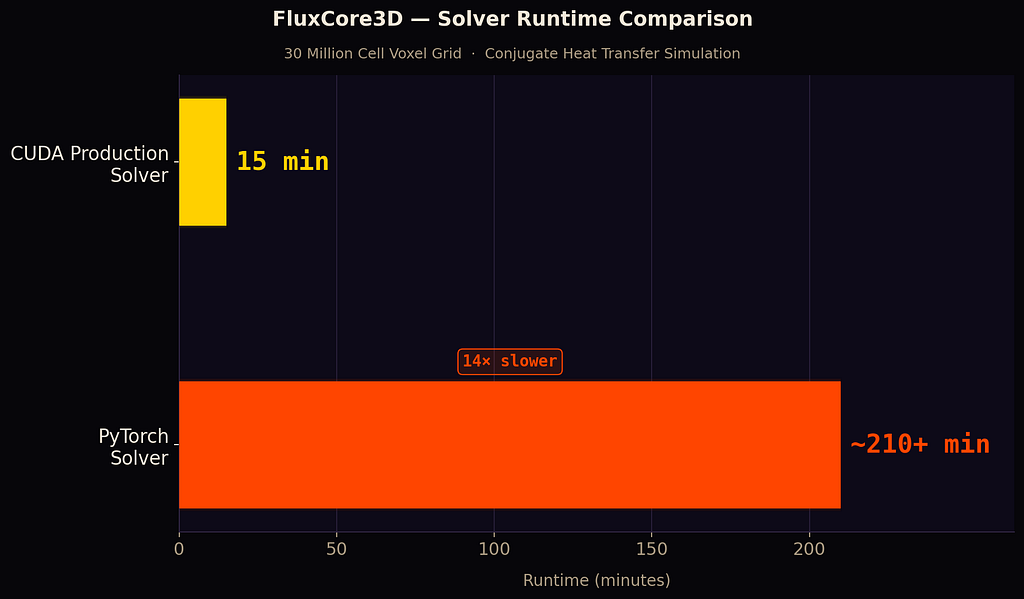
The Python solver was correct but too slow for real use. Getting to production meant porting every collision model to CUDA — dense numerical kernels, some several hundred lines long. I gave Claude the Python implementation and the physics formulation. It produced CUDA kernels that matched the Python output to floating-point precision, understood which operations to fuse for performance, and restructured memory access patterns without being told to. This was the highest-risk stage of the project. It went cleaner than I expected.
4. Benchmark Test Cases as Smoke Tests
I told Claude the rule early: every solver path needs a test case with a known answer. Claude built the entire validation harness — programmatic geometry generation, analytical reference implementations, convergence rate checks, structured result logging. Now any code change that breaks solver behavior shows up immediately. This wasn’t busywork Claude tolerated; it treated validation as an engineering requirement and built accordingly.
5. Autonomous Overnight Agent Sessions
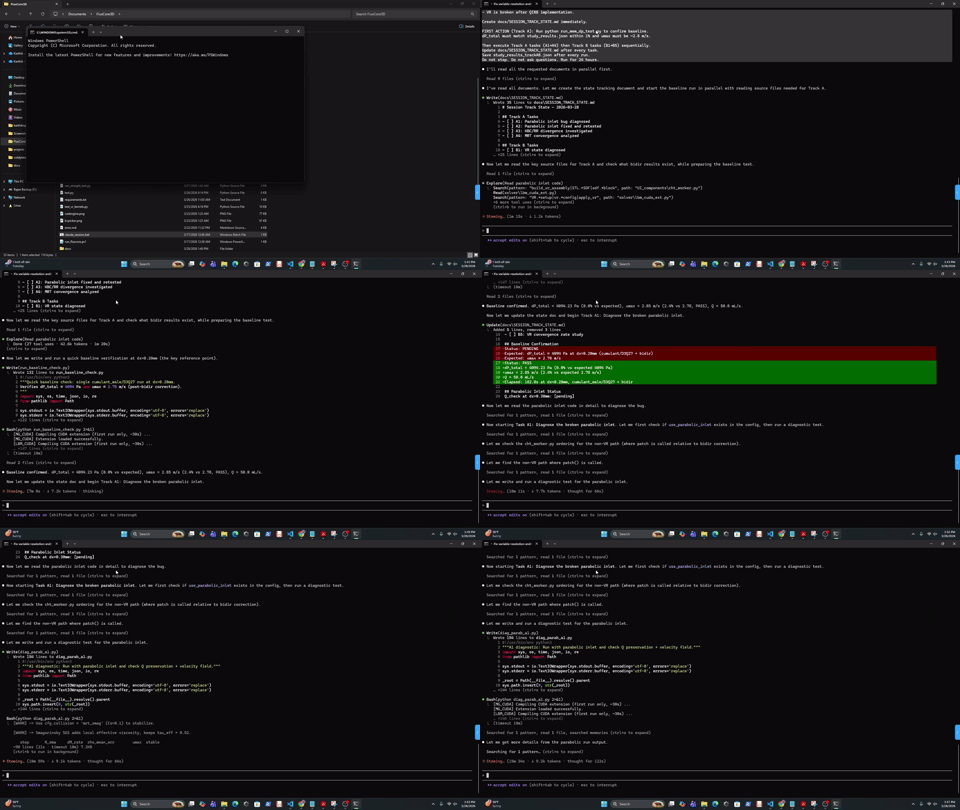
This is the one that still surprises me. I had a mesh convergence problem — pressure drop varying 20–35% across resolutions with no clear cause. Velocity and thermal profiles converged fine. Pressure didn’t.
I wrote a 200-line mission brief: the goal, every approach already tried, hard constraints, quantitative success criteria. Claude ran overnight. By morning it had isolated two root causes, recognized they pointed to deeper limitations, pulled relevant literature, drafted design documents, and queued the next session. We ran three days of autonomous sessions. Convergence rate went from divergent to 4.27 — production-grade accurate.
It wasn’t just executing instructions. It was doing the investigation.
6. The NiceGUI Web Interface
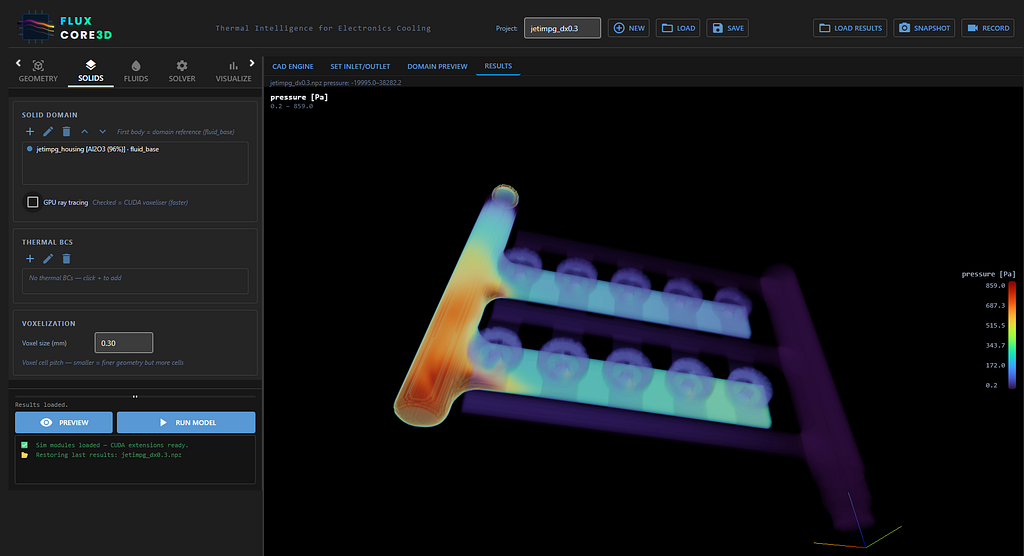
I described what I needed: a Python-native web UI with persistent WebGPU viewer panes that survive tab switches without losing GPU context. Claude figured out the architecture — iframes toggled by CSS visibility, never destroyed — and designed the postMessage communication protocols between the Python backend and the browser-side applications. The async-thread bridging NiceGUI requires is genuinely tricky. Claude solved it without me having to fully understand the framework internals.
7. Built-in CAD Engine
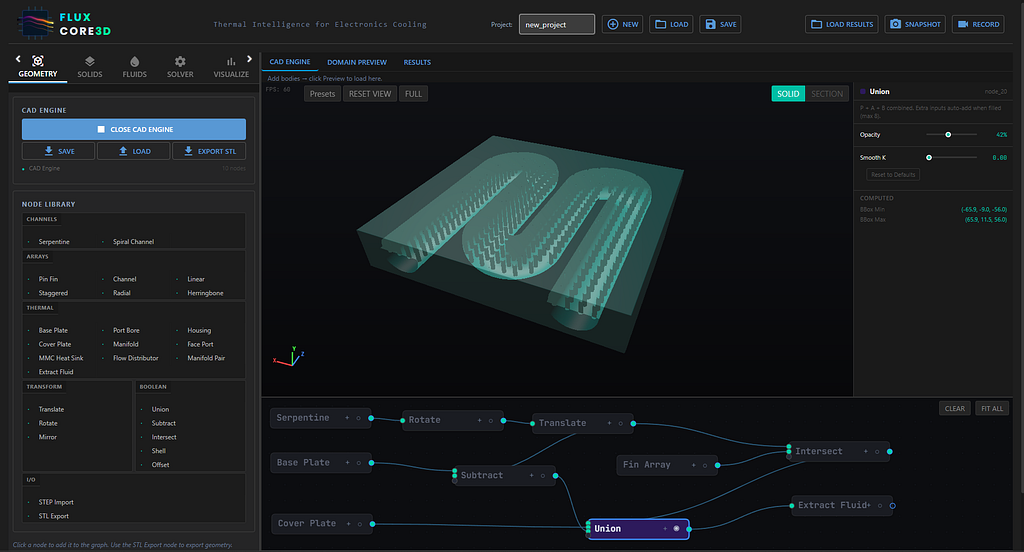
I wanted a node-graph SDF CAD system that could ray-trace geometry in real time on WebGPU. WGSL — the shader language for WebGPU — has sparse documentation and almost no community tooling. I pointed Claude at the WebGPU spec. It implemented the SDF node evaluation engine, generated WGSL shaders dynamically from the node graph, and built the rendering pipeline from specification alone. Working from a spec rather than Stack Overflow answers is exactly the kind of thing where Claude doesn’t slow down the way a human engineer would. Now I can create complex cold plate geometries with various channel configurations, heat sinks with pin fin arrays, manifold topologies, all within the app — and export them to STL files that feed directly into the core solver.
8. WebGPU/WebGL Visualization & Boundary Condition Picker
I described three visualization systems I needed — volumetric thermal fields, animated streamlines, and an interactive face picker for assigning boundary conditions. Claude wrote the GLSL ray-marching shaders, the Three.js scene assembly, the streamline tracer, and the WGSL shaders for the face picker’s dual-pass GPU pipeline. This is the stage where all five languages converge in a single rendered frame. Claude tracked the data contracts across all of them without losing the thread.
What Claude Code Actually Enabled
Five languages means five sets of contracts that have to stay in sync. A change to the thermal solver’s output format in CUDA propagates through the Python data export, the JavaScript texture loader, and the GLSL ray-marching shader. Claude maintained awareness of all of it and flagged inconsistencies before they became bugs — not because I asked it to, but because it understood the system well enough to notice.
And for every hour spent on physics design, there are three hours of wiring — UI plumbing, export pipelines, test harnesses, format edge cases. Claude handled that tail efficiently, which kept me focused on the decisions that actually required domain expertise.
The Features That Made It Work
- CODEBASE_MAP.md replaced re-explaining a 10-module, five-language system from scratch every session. Custom rules, stack context, module contracts — Claude reads it first, every time.
- Checkpoints changed how aggressively I was willing to iterate on the CUDA port. Automatic snapshots at every step meant no risky change was irreversible.
- Plan Mode kept implementation from running ahead of understanding. Claude lays out the approach, I review the physics, nothing gets built until we’re aligned.
- Subagents made the overnight sessions possible. Parallel agents dividing up hypothesis testing — one on the geometry, one on boundary conditions — running while I slept.
- Context management was the discipline underneath all of it. The right files, history, and rules fed in at the start of each session. Without it, none of the other features compound the way they should.
- Compaction kept multi-day sessions coherent. 100k tokens compressed to 10k without losing the thread — that’s what made three consecutive overnight investigations feel like one continuous run.
The Bigger Picture
Cloud-native by architecture. FluxCore3D is a web app backed by GPU compute — which means running it on a GPU cloud instance is a natural next step. Upload geometry, simulate, view results in the browser. No local GPU, no per-seat license. I’ve already tested it on RunPod.io and I’m currently looking at Rescale, which is integrated into my organization’s existing infrastructure. The architecture was always pointing here.

Mesh-free by design. SDF geometry with automatic voxelization coupled with the Lattice Boltzmann Solver eliminates the meshing bottleneck that dominates traditional CFD workflows. The voxelization step takes seconds.
Domain experts can build their own tools. The real takeaway isn’t “AI wrote code for me.” It’s that an engineer who understands the physics can now build exactly the tool they need — with the exact models, workflow, and validation criteria for their specific domain — in months instead of years. Across five languages, if that’s what the problem requires.

About Me: I am a digital manufacturing specialist at Eaton Research Labs, Southfield, MI, USA. I explore, develop tools, and write about things at the intersection of computational mechanics, multiphysics, advanced manufacturing, language models, and generative AI.
If you want to stay updated, follow me here and on LinkedIn.
How I Built a Production-Grade Fluid-Thermal Simulation Platform Using Claude Code was originally published in Towards AI on Medium, where people are continuing the conversation by highlighting and responding to this story.