A practical comparison of CrewAI, LangChain, LlamaIndex, Google ADK, Microsoft Agent Framework, and AutoGPT
The Problem with Choosing an AI Framework
If you’re building AI agents in 2026, you’ve faced this dilemma: Which framework should I use?
With dozens of agentic frameworks emerging, each claiming to be the “best”, making an informed choice feels overwhelming. Documentation tells you what each framework can do, but not how they compare when solving the same real-world problems.
The Experiment
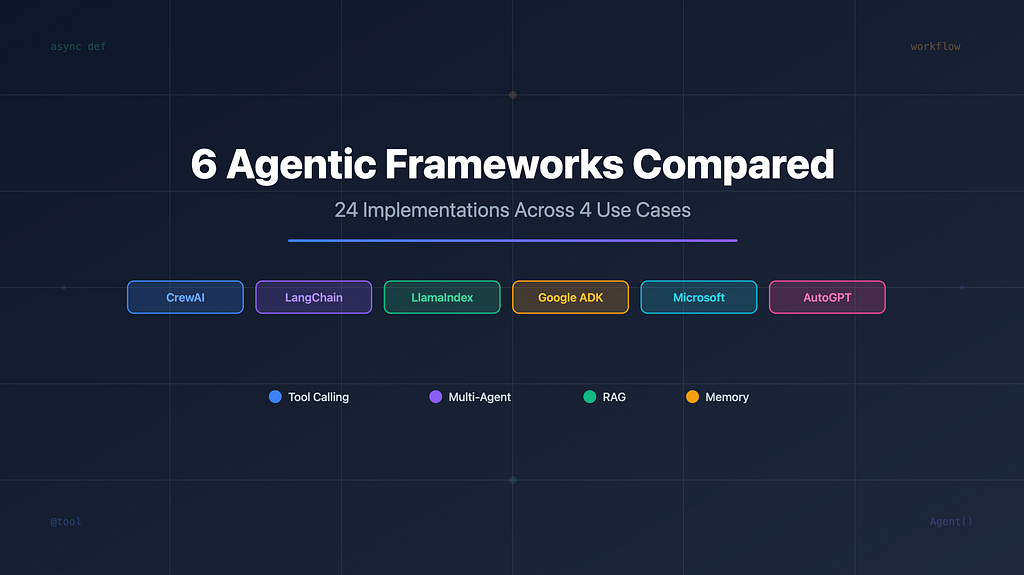
I implemented 4 identical use cases across 6 popular frameworks to see how they truly differ.
Use Cases:
- Tool Definition: Basic agent with external API integration
- Multi-Agent Orchestration: 3 specialized agents collaborating on travel planning
- RAG Implementation: Product Q&A with vector database retrieval
- Memory Management: Shopping assistant with persistent context
Frameworks:
- AutoGPT: Autonomous agent with command-based architecture
- CrewAI: Role-based multi-agent orchestration
- Google ADK: Gemini-native agent development kit
- LangChain/LangGraph: Modular components with graph-based workflows
- LlamaIndex: RAG-optimized with workflow management
- Microsoft Agent Framework: Multi-provider enterprise framework
What I Discovered
1. Tool Definition: Three Competing Philosophies
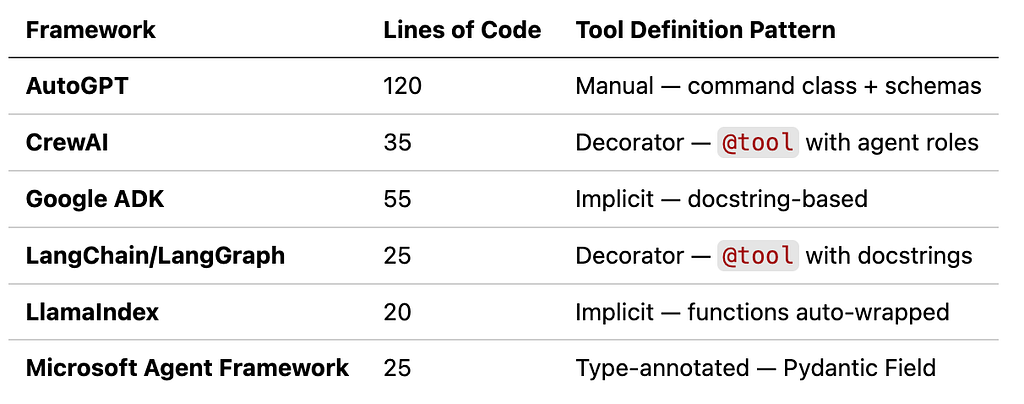
The way frameworks handle tool definitions reveals fundamentally different design philosophies:
CrewAI & LangChain: Decorator-based (@tool)
@tool
def get_weather(city: str) -> str:
    return f"Weather in {city}: Sunny, 72°F"
Microsoft Agent Framework: Type-annotated with Pydantic
def get_weather(city: Annotated[str, Field(description="City name")]) -> str:
    return f"Weather in {city}: Sunny, 72°F"
Google ADK & LlamaIndex: Implicit wrapping
def get_weather(city: str) -> str:
    return f"Weather in {city}: Sunny, 72°F"
# Function automatically becomes a tool
Key Insights:
- Complexity: LlamaIndex (20 lines) vs AutoGPT (120 lines) for identical functionality
- Three philosophies: Implicit wrapping (LlamaIndex, Google ADK), decorator-based (LangChain, CrewAI), type-annotated (Microsoft)
- Industry trend: Modern frameworks favor implicit tool detection over manual schemas; less boilerplate, faster development
2. Multi-Agent Orchestration: Different Approaches to the Same Problem
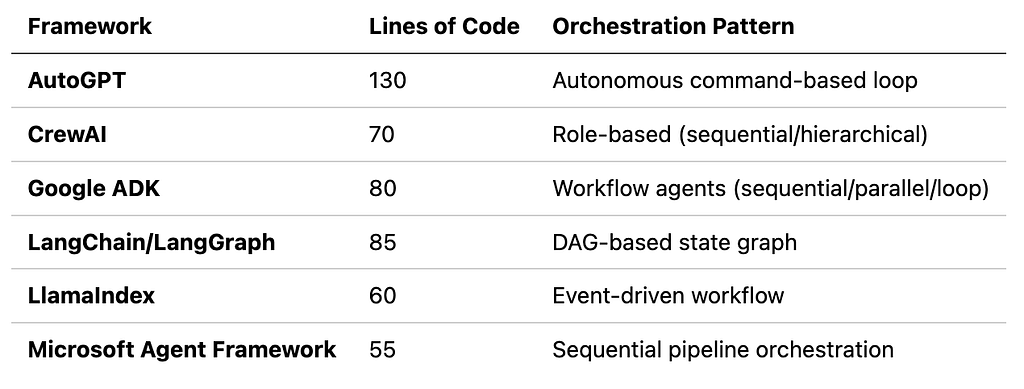
Multi-agent coordination reveals stark differences in how frameworks handle complexity and control:
AutoGPT focuses on autonomous, long-running agents:
- Command-based architecture
- No built-in workflow orchestration library
- Manual agent chaining through sequential function calls
# NOTE: AutoGPT does not have a built-in workflow orchestration library.

from autogpt.agents import SimpleAutoGPTAgent

researcher_agent = SimpleAutoGPTAgent(
    api_key=api_key,
    system_message="You are a travel researcher"
)

research = researcher_agent.chat(
    "Research Paris and provide recommendations"
)

booking_agent = SimpleAutoGPTAgent(
    api_key=api_key,
    system_message="You book travel based on research"
)

# AutoGPT agents must be orchestrated manually through sequential function calls.
bookings = booking_agent.chat(
    f"Based on this research: {research}, find bookings"
)
CrewAI excels here with intuitive role → task mapping:
- Clear separation: agents have roles, tasks have objectives
- Built-in orchestration modes (sequential, hierarchical)
# CrewAI: Declarative agent + task definition
researcher = Agent(
    role="Travel Researcher",
    goal="Find best destinations",
    backstory="Expert travel researcher"
)

research_task = Task(
    description="Research travel options for Paris",
    agent=researcher
)

crew = Crew(
    agents=[researcher, booking_agent, planner],
    tasks=[research_task, booking_task, planning_task],
    process=Process.sequential
)
result = crew.kickoff()
Google ADK uses async runners with session management:
- SequentialAgent for declarative multi-agent workflows
- Built-in state sharing with output_key mechanism
- Async Runner with automatic session management
from google.adk.agents import LlmAgent, SequentialAgent
from google.adk.runners import Runner

# Define agents with output_key for state sharing
researcher = LlmAgent(
    model="gemini-2.0-flash",
    instruction="Research travel destinations",
    output_key="research_output"  # Built-in state sharing
)

booking_agent = LlmAgent(
    model="gemini-2.0-flash",
    instruction="Find bookings based on {research_output}",  # Access previous output
    output_key="booking_output"
)

planner = LlmAgent(
    model="gemini-2.0-flash",
    instruction="Create itinerary using {research_output} and {booking_output}",
    output_key="final_plan"
)

# Built-in SequentialAgent orchestrates the workflow
workflow = SequentialAgent(
    name="TravelPlannerWorkflow",
    sub_agents=[researcher, booking_agent, planner]  # Executes in order
)

# Built-in Runner manages execution and sessions
runner = Runner(agent=workflow)

async for event in runner.run_async(
    user_id="user123",
    session_id="session456",
    new_message="Plan a Paris trip"
):
print(event)
LangChain/LangGraph offers more control but requires graph thinking:
- Built on LangChain agents with LangGraph orchestration
- TypedDict state shared across workflow nodes
- Graph-based control flow (edges, conditional routing, cycles)
# LangChain/LangGraph: Agents + Graph workflow
from langchain_openai import ChatOpenAI
from langchain.agents import create_agent
from langchain_core.tools import tool
from langgraph.graph import StateGraph, END

# LangChain: Define tools and agents
@tool
def search_destinations(destination: str) -> str:
    """Search for travel information"""
    return f"Info about {destination}"

llm = ChatOpenAI(model="gpt-3.5-turbo")
researcher = create_agent(llm, tools=[search_destinations])

# LangGraph: Define state and workflow
class TravelState(TypedDict):
    destination: str
    research_output: str
    final_plan: str

def research_node(state: TravelState):
    result = researcher.invoke({"messages": [("human", f"Research {state['destination']}")]})
    state["research_output"] = result["messages"][-1].content
    return state

# LangGraph: Build graph workflow
graph = StateGraph(TravelState)
graph.add_node("researcher", research_node)
graph.add_node("planner", planner_node)
graph.add_edge("researcher", "planner")
graph.add_edge("planner", END)

app = graph.compile()
result = app.invoke({"destination": "Paris", ...})
LlamaIndex uses workflows for orchestration:
- Async-first agent architecture with Context management
- Manual sequential orchestration (no built-in workflow)
- Clean async/await patterns with tool integration
# LlamaIndex: Async agents with manual orchestration
from llama_index.core.agent.workflow import FunctionAgent
from llama_index.core.workflow import Context
from llama_index.llms.openai import OpenAI

# Define agents with tools
research_agent = FunctionAgent(
    name="ResearchAgent",
    llm=OpenAI(model="gpt-3.5-turbo"),
    tools=[search_destinations]
)

booking_agent = FunctionAgent(
    name="BookingAgent",
    llm=OpenAI(model="gpt-3.5-turbo"),
    tools=[check_availability]
)

# Manual sequential orchestration with Context
research_ctx = Context(research_agent)
research = await research_agent.run(
    user_msg="Research Paris",
    ctx=research_ctx
)

booking_ctx = Context(booking_agent)
bookings = await booking_agent.run(
    user_msg=f"Check availability. Research: {research}",
    ctx=booking_ctx
)
Microsoft Agent Framework uses typed agents with multi-provider support:
- Built-in SequentialBuilder for multi-agent pipelines
- Type-safe tool definitions with Pydantic annotations
- Multi-provider LLM support (OpenAI, Azure, etc.)
# Microsoft: Built-in sequential workflow orchestration
from agent_framework import SequentialBuilder, WorkflowOutputEvent
from agent_framework.openai import OpenAIChatClient
from typing import Annotated
from pydantic import Field

# Type-safe tool definitions
def search_destinations(
    destination: Annotated[str, Field(description="The destination")]
) -> str:
    """Search for travel information"""
    return f"Info about {destination}"

# Create chat client
chat_client = OpenAIChatClient(model_id="gpt-3.5-turbo")

# Create agents with tools
researcher = chat_client.as_agent(
    instructions="You research travel destinations",
    name="researcher",
    tools=[search_destinations]
)

booking_agent = chat_client.as_agent(
    instructions="You find the best bookings",
    name="booking",
    tools=[check_availability]
)

# Built-in SequentialBuilder orchestrates workflow
workflow = SequentialBuilder().participants([
    researcher,
    booking_agent,
    planner
]).build()

# Execute workflow with streaming
async for event in workflow.run_stream("Plan a Paris trip"):
    if isinstance(event, WorkflowOutputEvent):
        print(event.data)
Key Insight:
- Workflow orchestration divide: Google ADK, LangChain/LangGraph, CrewAI, and Microsoft Agent Framework provide built-in workflow orchestration; AutoGPT and LlamaIndex require manual agent chaining
- Complexity spectrum: CrewAI simplest (role-based declarations) → Microsoft/Google ADK (sequential builders) → LangGraph (graph-based control) → AutoGPT/LlamaIndex (manual orchestration)
- Choose by orchestration needs: LangGraph for complex DAGs with conditionals, CrewAI for rapid team-based prototyping, Google ADK/Microsoft for sequential/parallel pipelines, AutoGPT/LlamaIndex for simple manual control
3. RAG Implementation: How Each Framework Handles RAG
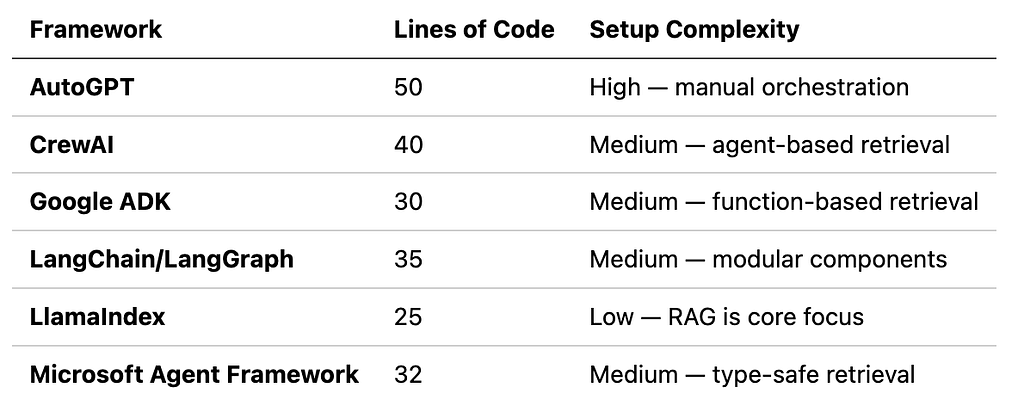
All frameworks can do RAG, but implementation complexity differs dramatically:
AutoGPT requires manual orchestration for RAG:
- Two-Agent Pattern: KB Agent (retrieval function) + Support Agent (LLM orchestration)
- LangChain Integration: Uses LangChain’s FAISS wrapper for vector store management
- Modern Tools API: OpenAI’s tools parameter (not deprecated functions)
# AutoGPT: Manual RAG orchestration
from langchain_community.vectorstores import FAISS

# Load FAISS index
vectorstore = FAISS.load_local("faiss_index", embeddings)

# KB Agent retrieves from vector store
def search_product_kb(query):
    docs = vectorstore.as_retriever().invoke(query)
    return docs

# Support Agent manually handles retrieval
response = client.chat.completions.create(tools=[search_product_kb])

# Manual two-step: detect tool call → execute → call again
if response.tool_calls:
    context = search_product_kb(query)
    final = client.chat.completions.create(messages=[...context...])
CrewAI uses agent-based retrieval patterns:
- Vector Search with FAISS: Uses shared FAISS index for semantic retrieval
- Agent-Based Retrieval: KB search wrapped as a tool via @tool decorator
- Role Separation: Clear agent roles (support agent uses KB tool)
- Simple Orchestration: Crew handles agent-task coordination automatically
# CrewAI: Agent-based RAG with FAISS vector search
from crewai import Agent, Task, Crew
from crewai.tools import tool
from langchain_community.vectorstores import FAISS

# Load shared FAISS index
vectorstore = FAISS.load_local("faiss_index", embeddings)
retriever = vectorstore.as_retriever(search_kwargs={"k": 3})

# KB Agent tool
@tool
def search_knowledge_base(query: str) -> str:
    """Search using vector similarity"""
    docs = retriever.invoke(query)
    return "\n\n".join([doc.page_content for doc in docs])

# Support Agent with KB tool
support_agent = Agent(
    role="Customer Support",
    goal="Answer customer questions accurately",
    tools=[search_knowledge_base]
)

# Crew executes task
task = Task(description="Answer: What are the iPhone 15 specs?", agent=support_agent)
crew = Crew(agents=[support_agent], tasks=[task])
result = crew.kickoff()
Google ADK integrates RAG with function-based tools:
- Function-Based Retrieval: KB search as a simple function (not agent abstraction)
- FAISS Vector Search: Uses shared FAISS index for semantic retrieval
- Gemini Integration: Google’s Gemini model for response generation
- Manual Two-Step: Retrieve context, then pass to Gemini for generation
# Google ADK: Function-based RAG with FAISS
import google.generativeai as genai
from langchain_community.vectorstores import FAISS

# Load shared FAISS index
vectorstore = FAISS.load_local("faiss_index", embeddings)
retriever = vectorstore.as_retriever(search_kwargs={"k": 3})

# KB Agent: Retrieval function
def kb_agent_search(query: str) -> str:
    """Search using vector similarity"""
    docs = retriever.invoke(query)
    return "\n\n".join([doc.page_content for doc in docs])

# Configure Gemini
genai.configure(api_key=api_key)
model = genai.GenerativeModel("gemini-2.5-flash")

# Support Agent: Uses KB result with Gemini
kb_result = kb_agent_search(query)
prompt = f"Use this info to answer:\n\n{kb_result}\n\nQuestion: {query}"
response = model.generate_content(prompt)
LangChain offers modular components for flexible RAG pipelines:
- Modular Components: Separate retriever, prompt, LLM, and output parser
- LCEL Chains: LangChain Expression Language for pipeline composition (| operator)
- FAISS Vector Search: Uses shared FAISS index for semantic retrieval
- Clean Abstractions: Built-in support for RAG patterns
# LangChain: Modular RAG with LCEL
from langchain_openai import ChatOpenAI, OpenAIEmbeddings
from langchain_community.vectorstores import FAISS
from langchain_core.prompts import ChatPromptTemplate
from langchain_core.output_parsers import StrOutputParser

# Load shared FAISS index
vectorstore = FAISS.load_local("faiss_index", embeddings)
retriever = vectorstore.as_retriever(search_kwargs={"k": 3})

# KB Agent: Retrieval function
def kb_agent_search(query: str) -> str:
    docs = retriever.invoke(query)
    return "\n\n".join([doc.page_content for doc in docs])

# Support Agent: LCEL chain
support_prompt = ChatPromptTemplate.from_messages([
    ("system", "Use this KB info:\n\n{kb_result}"),
    ("human", "{query}")
])
support_agent = support_prompt | llm | StrOutputParser()

# Execute two-agent workflow
kb_result = kb_agent_search(query)
response = support_agent.invoke({"kb_result": kb_result, "query": query})
LlamaIndex is purpose-built for RAG with minimal boilerplate:
- Hybrid Approach: Uses LangChain FAISS retriever + LlamaIndex LLM
- Global Settings: Settings.llm and Settings.embed_model for configuration
- Shared FAISS Index: Loads the pre-built index used by all frameworks
- Simple Integration: Wraps LangChain retriever for LlamaIndex compatibility
# LlamaIndex: RAG with shared FAISS index
from llama_index.core import Settings
from llama_index.llms.openai import OpenAI
from langchain_community.vectorstores import FAISS

# Configure LlamaIndex settings
Settings.llm = OpenAI(model="gpt-3.5-turbo")
Settings.embed_model = OpenAIEmbedding(model="text-embedding-3-small")

# Load shared FAISS index
vectorstore = FAISS.load_local("faiss_index", embeddings)
retriever = vectorstore.as_retriever(search_kwargs={"k": 3})

# KB Agent: Retrieval function
def kb_agent_search(query: str) -> str:
    docs = retriever.invoke(query)
    return "\n\n".join([doc.page_content for doc in docs])

# Support Agent: LlamaIndex LLM
kb_result = kb_agent_search(query)
prompt = f"Use this info to answer:\n\n{kb_result}\n\nQuestion: {query}"
response = Settings.llm.complete(prompt)
Microsoft Agent Framework provides type-safe RAG implementations:
- Type-Safe Retrieval: Pydantic Field annotations for tool parameters
- FAISS Vector Search: Uses shared FAISS index for semantic retrieval
- Direct OpenAI Integration: Uses OpenAI client for chat completions
- Clean Two-Step Pattern: Retrieve context, then pass to LLM
# Microsoft: Type-safe RAG with FAISS
from openai import OpenAI
from langchain_community.vectorstores import FAISS
from typing import Annotated
from pydantic import Field

# Load shared FAISS index
vectorstore = FAISS.load_local("faiss_index", embeddings)
retriever = vectorstore.as_retriever(search_kwargs={"k": 3})

# KB Agent: Type-safe retrieval function
def kb_agent_search(
    query: Annotated[str, Field(description="Search query")]
) -> str:
    """Search using vector similarity"""
    docs = retriever.invoke(query)
    return "\n\n".join([doc.page_content for doc in docs])

# Support Agent: OpenAI chat completion
client = OpenAI()
kb_result = kb_agent_search(query)
messages = [
    {"role": "system", "content": "Use KB info to answer"},
    {"role": "user", "content": f"KB: {kb_result}\n\nQuestion: {query}"}
]
response = client.chat.completions.create(model="gpt-3.5-turbo", messages=messages)
Key Insights:
- All frameworks use shared FAISS index: Semantic vector search with consistent retrieval across all implementations
- Complexity spectrum: LlamaIndex simplest (RAG-native, 25 lines) → LangChain (modular LCEL, 35 lines) → Google ADK/Microsoft (function-based, 30–32 lines) → CrewAI (agent-based, 40 lines) → AutoGPT (manual orchestration, 50 lines)
- Choose by RAG focus: LlamaIndex for RAG-first applications, LangChain for modular RAG pipelines, CrewAI for agent-based retrieval, Google ADK/Microsoft for function-based patterns, AutoGPT for learning fundamentals
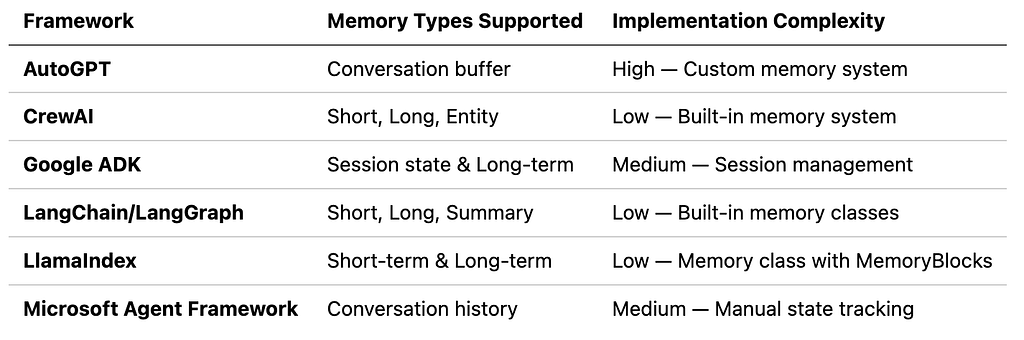
4. Memory Management: Persistent Context Across Conversations
Keeping context across multiple interactions is crucial for conversational agents. Each framework handles memory differently:
AutoGPT uses conversation buffer with manual persistence:
- Short-term: Conversation buffer (in-memory list)
- Long-term: Manual JSON file persistence
- Control: Developer explicitly saves/loads memory
- Pattern: Simple append-to-buffer, no automatic summarization
# AutoGPT: Manual memory management with JSON persistence
import json
from openai import OpenAI

class PersistentAutoGPT:
    def __init__(self, api_key: str):
        self.client = OpenAI(api_key=api_key)
        self.conversation_history = []  # Short-term memory

    def chat(self, message: str) -> str:
        # Add to buffer
        self.conversation_history.append({"role": "user", "content": message})

        # Include history in context
        response = self.client.chat.completions.create(
            model="gpt-3.5-turbo",
            messages=self.conversation_history
        )
        reply = response.choices[0].message.content
        self.conversation_history.append({"role": "assistant", "content": reply})
        return reply

    def save_memory(self, filename: str):
        """Save to long-term memory."""
        with open(filename, "w") as f:
            json.dump(self.conversation_history, f)

    def load_memory(self, filename: str):
        """Load from long-term memory."""
        with open(filename, "r") as f:
            self.conversation_history = json.load(f)

# Usage
agent = PersistentAutoGPT(api_key=api_key)
agent.chat("I like blue shoes")
agent.save_memory("customer_profile.json")

# Later session
agent.load_memory("customer_profile.json")
response = agent.chat("What do I like?")  # Recalls "blue shoes"
CrewAI requires custom memory implementation:
- Short-term: Manual conversation buffer (developer maintains list)
- Long-term: Custom tools with JSON file persistence
- Control: Memory agent uses tools to save/recall data
- Pattern: Tool-based memory, no built-in memory management
# CrewAI: Custom memory with tools
import json
from crewai import Agent, Task, Crew
from crewai.tools import tool

@tool
def save_preference(preference: str) -> str:
    """Save customer preference to long-term memory."""
    with open("customer_profile.json", "r+") as f:
        profile = json.load(f)
        profile["preferences"].append(preference)
        f.seek(0)
        json.dump(profile, f)
    return f"Saved: {preference}"

@tool
def recall_preferences() -> str:
    """Recall customer preferences."""
    with open("customer_profile.json", "r") as f:
        profile = json.load(f)
    return f"Preferences: {profile['preferences']}"

# Agent 1: Memory Manager
memory_agent = Agent(
    role="Memory Manager",
    goal="Track customer preferences",
    tools=[save_preference, recall_preferences]
)

# Agent 2: Shopping Assistant
shopping_agent = Agent(
    role="Shopping Assistant",
    goal="Help customer shop using their preferences"
)

# Manual orchestration for memory
save_task = Task(
    description="Save that customer likes blue shoes",
    agent=memory_agent
)

recall_task = Task(
    description="What does the customer like?",
    agent=memory_agent
)

crew = Crew(agents=[memory_agent, shopping_agent], tasks=[save_task, recall_task])
result = crew.kickoff()
Google ADK uses session-based memory:
- Short-term: Context dict passed to agent function
- Long-term: Automatic persistence via session_id
- Control: Same session_id = automatic memory retrieval
- Pattern: Built-in session management, no manual save/load
# Google ADK: Session-based persistence
from google.genai import adk

# Sessions maintain context automatically
@adk.agent(model="gemini-2.0-flash")
async def shopping_assistant(message: str, context: dict) -> str:
    """Shopping assistant with memory."""
    # Access previous context
    preferences = context.get("preferences", [])

    # Update context
    if "like" in message.lower():
        preferences.append(message)
        context["preferences"] = preferences

    return f"I remember: {preferences}"

runner = adk.Runner()

# Same session_id maintains memory
async for event in runner.run_async(
    user_id="user123",
    session_id="session456",
    new_message=shopping_assistant("I like blue shoes", {})
):
    print(event.content)

# Later conversation - remembers due to session_id
async for event in runner.run_async(
    user_id="user123",
    session_id="session456",
    new_message=shopping_assistant("What do I like?", {})
):

print(event.content)  # "I remember: ['I like blue shoes']"
LangChain has the most comprehensive built-in memory support:
- Short-term: ConversationBufferMemory() (built-in class)
- Long-term: ConversationSummaryMemory() (automatic compression)
- Persistence: Built-in memory classes handle storage automatically
- Pattern: Rich abstractions, multiple memory types available
- Other options: ConversationBufferWindowMemory, ConversationEntityMemory, VectorStoreRetrieverMemory
# LangChain: Rich memory abstractions
from langchain.memory import ConversationBufferMemory, ConversationSummaryMemory
from langchain_openai import ChatOpenAI
from langchain.chains import ConversationChain

# Short-term: Buffer memory
buffer_memory = ConversationBufferMemory()

# Long-term: Summary memory
llm = ChatOpenAI(model="gpt-3.5-turbo")
summary_memory = ConversationSummaryMemory(llm=llm)

# Use in conversation
conversation = ConversationChain(
    llm=llm,
    memory=buffer_memory
)

# Memory persists across calls
response1 = conversation.predict(input="I like blue shoes")
response2 = conversation.predict(input="What color do I like?")
# Agent remembers: "You like blue"
LlamaIndex uses workflow context for memory persistence:
- Short-term: Workflow context (ctx.data) persists across steps
- Long-term: Context-based state management within workflow
- Control: ctx.data dictionary stores and retrieves data
- Pattern: Workflow-scoped memory, automatic persistence during workflow execution
# LlamaIndex: Context-based memory
from llama_index.core.workflow import Workflow, Context

class ShoppingWorkflow(Workflow):
    @step
    async def remember_preference(self, ctx: Context, preference: str):
        # Store in context
        ctx.data["preferences"] = ctx.data.get("preferences", [])
        ctx.data["preferences"].append(preference)
        return preference

    @step
    async def recall_preferences(self, ctx: Context):
        # Retrieve from context
        preferences = ctx.data.get("preferences", [])
        return f"Your preferences: {preferences}"

workflow = ShoppingWorkflow()

# Context persists across steps
await workflow.run(preference="blue shoes")
result = await workflow.run()  # Recalls "blue shoes"
Microsoft Agent Framework requires manual conversation history tracking:
- Short-term: Manual list of message dictionaries
- Long-term: Custom MemoryManager class with JSON persistence
- Control: Developer must explicitly save/load conversation history
- Pattern: No built-in memory, requires custom implementation
# Microsoft: Manual conversation history
from azure.ai.projects.agentic import ChatAgent
from typing import List, Dict
import json

class MemoryManager:
    def __init__(self):
        self.conversation_history: List[Dict] = []

    def add_message(self, role: str, content: str):
        self.conversation_history.append({"role": role, "content": content})

    def save_to_file(self, filename: str):
        with open(filename, "w") as f:
            json.dump(self.conversation_history, f)

    def load_from_file(self, filename: str):
        with open(filename, "r") as f:
            self.conversation_history = json.load(f)

memory = MemoryManager()
agent = ChatAgent(
    chat_client=chat_client,
    instructions="You are a shopping assistant who remembers preferences"
)

# Manually track memory
user_input = "I like blue shoes"
memory.add_message("user", user_input)
response = await agent.run(user_input)
memory.add_message("assistant", response.content)

# Save long-term
memory.save_to_file("customer_profile.json")

# Later conversation - reload memory
memory.load_from_file("customer_profile.json")
response = await agent.run("What do I like?")
Key Insights:
- Built-in vs. manual: LangChain and Google ADK offer low-complexity built-in memory systems, while AutoGPT, CrewAI, and Microsoft require custom implementations
- Memory types: LangChain provides richest abstractions (Buffer/Window/Summary/Entity/Vector), Google ADK uses automatic session-based context, LlamaIndex uses workflow context (ctx.data)
- Persistence approaches: Google ADK uses automatic session-based memory, Microsoft and AutoGPT offer manual conversation history tracking for full control, CrewAI uses tool-based access
Try It Yourself
All 24 implementations (4 scenarios × 6 frameworks) are open source with ready-to-run examples:
The Bottom Line
The best way to choose is to experiment yourself with the frameworks that match your use case. Each framework has distinct strengths, and hands-on experience will reveal which fits your needs.
That said, if you’re looking for a starting point, LangChain offers a solid foundation due to its evolving ecosystem and significant footprint in the industry. Its mature tooling and extensive community support make it a practical choice for getting started.
Ultimately, there’s no single “best” framework — just the right one for your specific requirements.
What’s your experience with agentic frameworks? Share your insights in the comments.
6 Agentic Frameworks Compared: 24 Implementations Across 4 Use Cases was originally published in Towards AI on Medium, where people are continuing the conversation by highlighting and responding to this story.