Claude Code launched in February 2025 as a terminal chatbot that could edit files and run bash commands. Today, it’s an extensible platform with six distinct extension points.
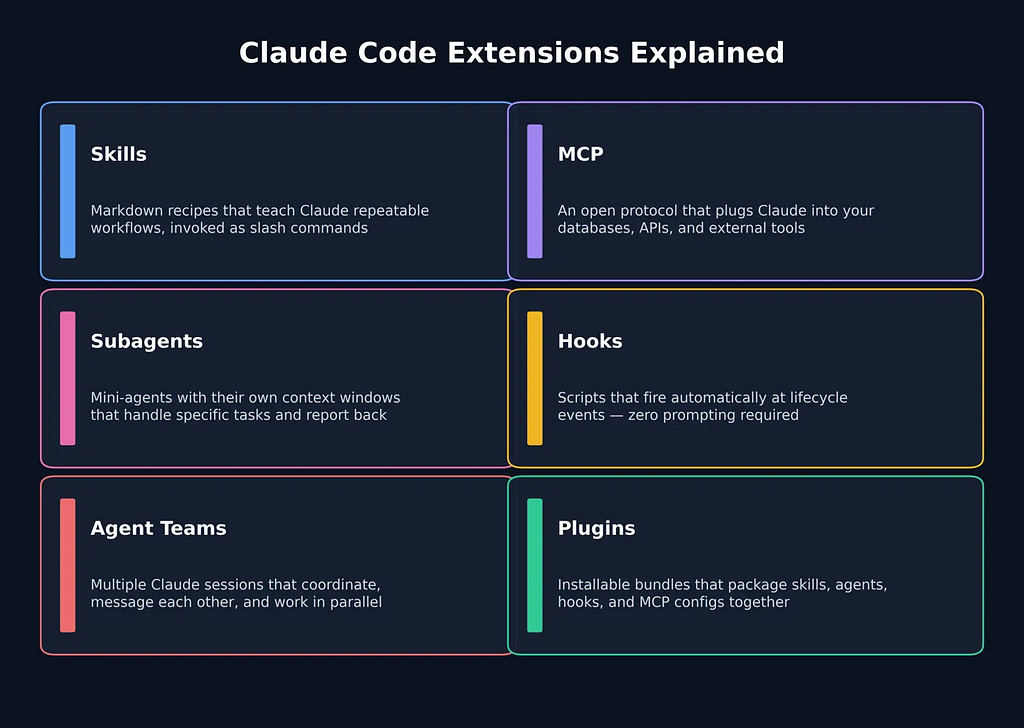
The challenge? Knowing which extension point to use for what. They sound similar, but each solves a very different problem.
The Timeline
Before we dive in — here’s when each capability went public:
MCP — Nov 2024 · Subagents — Jul 2025 · Hooks — Sep 2025 · Plugins — Oct 2025 · Skills — Oct 2025 · Agent Teams — Feb 2026
Now let’s break each one down: what it is, what problem it solves, how to set it up, and how you actually invoke it.
1. Skills — Your Reusable Recipes
The one-liner: Markdown files that teach Claude repeatable workflows, invoked as slash commands.
Think of skills like macros. Instead of pasting the same 200-word prompt every time you want a code review, you write a SKILL.md once, and call /review-component forever. Claude follows the steps inside. Consistent, token-efficient, and context-aware.
Without skills, developers copy-paste long prompts constantly. Skills kill that duplication. They keep heavy instructions out of the conversation until needed, and Claude can even auto-activate them when it detects a relevant task — no slash command required.
Setup:
- Drop a SKILL.md into ~/.claude/skills/ (personal) or .claude/skills/ (repo-level)
- Add YAML frontmatter with name and description — the name becomes your slash command
- Supports argument placeholders ($ARGUMENTS), optional scripts, and isolated subagent contexts
- Old .claude/commands/ files auto-convert to skills
Example — a simple skill that echoes its argument:
# ~/.claude/skills/echo/SKILL.md
---
name: echo
description: Echoes back the user input.
---
Write back exactly what the user said. Preserve all words.
Invoke with /echo Hello Claude! — Claude responds: "Hello Claude!"
2. MCP — Giving Claude Real-World Access
The one-liner: An open protocol that plugs Claude into your databases, APIs, and external tools.
MCP answers a simple question: what can Claude actually access? Without it, Claude is trapped inside its context window. With it, Claude can query your Postgres database, read GitHub issues, create PRs, and call any API — using real data instead of hallucinations.
Think of it as USB-C for AI. One standard protocol, hundreds of connectors. You install an MCP server, and Claude can call it by name. The ecosystem now has thousands of servers and has been adopted by OpenAI, Google, and Microsoft.
Setup:
claude mcp add --transport http github https://mcp.github.com/mcp \
  --header "Authorization: Bearer $GITHUB_TOKEN"
Once configured, MCP tools are always available — no explicit invocation needed. Just ask in natural language and Claude picks the right tool:
"Get recent bug reports from Jira"  # Natural language — Claude picks the right tool
/mcp                                # List connected servers and available tools
3. Subagents — Focused Specialists, Isolated Contexts
The one-liner: Mini-agents with their own context windows that handle specific tasks and report back.
Your main Claude session gets cluttered fast during complex work. Subagents solve this by spinning up separate AI instances — each with its own system prompt, tool permissions, and even a different model. A “code-reviewer” agent reads diffs. An “explorer” agent searches a massive repo. They work in isolation, then hand back a summary.
This isn’t just about organization. It’s about parallelism. Claude can spawn multiple subagents concurrently, each grinding on a different chunk of work while your main session stays focused.
Setup: Create a markdown file in ~/.claude/agents/:
---
name: code-reviewer
description: Reviews code for style and bugs.
---
You are an assistant that reads code diffs and reports issues.
Focus on maintainability.
Customize model, tools, permissions, memory, and hooks via frontmatter. Use /agents to create them interactively.
You can invoke subagents through natural language or the interactive menu. Claude also auto-delegates based on the agent’s description:
"Use the code-reviewer agent to inspect the latest commit"  # Natural language
/agents                                                     # Interactive menu
One constraint: subagents cannot spawn other subagents — no infinite recursion.
Key distinction from Agent Teams: Subagents report back to the parent. They can’t talk to each other. For that, you need Agent Teams.
4. Agent Teams — The Multi-Agent War Room (Experimental)
The one-liner: Multiple independent Claude sessions that coordinate, message each other, and divide work in parallel.
This is the newest and most ambitious extension point, launched February 5, 2026 alongside Opus 4.6. Where subagents are isolated workers reporting to a boss, Agent Teams are a collaborative squad. One Claude is the lead, the others are teammates — and they can talk to each other directly, self-assign tasks from a shared list, and challenge each other’s findings.
In Anthropic’s own demo, 16 agents built a 100,000-line C compiler in Rust over two weeks. Total cost: ~$20,000 in tokens.
The tradeoff is real: agent teams consume significantly more tokens than a single session. Use them only when parallel exploration and cross-checking genuinely help.
Setup:
export CLAUDE_CODE_EXPERIMENTAL_AGENT_TEAMS=1
claude
Then just prompt Claude to create a team, and use keyboard shortcuts to manage it:
"Create a team with 3 agents: Security Analyst, Perf Engineer, Tester.
Task: Review the payment module."  # Prompt-initiatedShift+T                    # Toggle team view
Shift+Up/Down                      # Cycle teammates
Ctrl+T                             # Shared task list
Each teammate runs in its own tmux pane. You can message individuals directly without going through the lead.
Unlike Subagents; where you define system prompts and tool permissions in YAML config files; Agent Teams are configured through the prompt itself. You describe the roles and task, and the lead agent handles orchestration. Teammates inherit the lead’s permissions and MCP connections, though you can fine-tune behavior via hooks or teams.json.
5. Hooks — Deterministic Guardrails, Zero Prompting
The one-liner: Scripts that fire automatically at lifecycle events — before or after tool calls, on session start/end, and more.
Hooks are the odd one out. They’re not about AI intelligence. They’re about deterministic control. Want to auto-lint every file Claude writes? Block rm -rf before it executes? Send a Slack notification when Claude finishes? Hooks make it happen without any prompting.
Think Git hooks, but for Claude Code. You define the event, the matcher, and the action.
Setup: Configure in settings.json or use /hooks interactively:
{
  "hooks": {
    "PostToolUse": [{
      "matcher": "Write",
      "hooks": [{"type": "command", "command": "npm run lint"}]
    }]
  }
}
Use /hooks to set them up interactively:
/hooks # Interactive setup menu
But here’s the key: you never manually invoke hooks. They fire automatically on matching events. That’s the entire point.
6. Plugins — Ship It All as One Package
The one-liner: Installable bundles that combine skills, agents, hooks, and MCP configs into a single distributable unit.
Plugins solve the “works-on-my-machine” problem. Instead of every team member manually setting up their .claude/ folders, you package everything into a plugin with a manifest. One install command, identical tooling for everyone.
Skills get namespaced (/pluginName:skillName) to avoid collisions. Versioning is built-in. The marketplace lets you discover and share community extensions.
Install and run plugins from the CLI:
claude plugin add --path ./my-plugin     # Install locally
claude plugin install my-plugin          # From marketplace
/my-plugin:hello                         # Run a namespaced skill
Once installed, all components activate automatically on session start. Priority if names collide: enterprise > user > project > plugin.
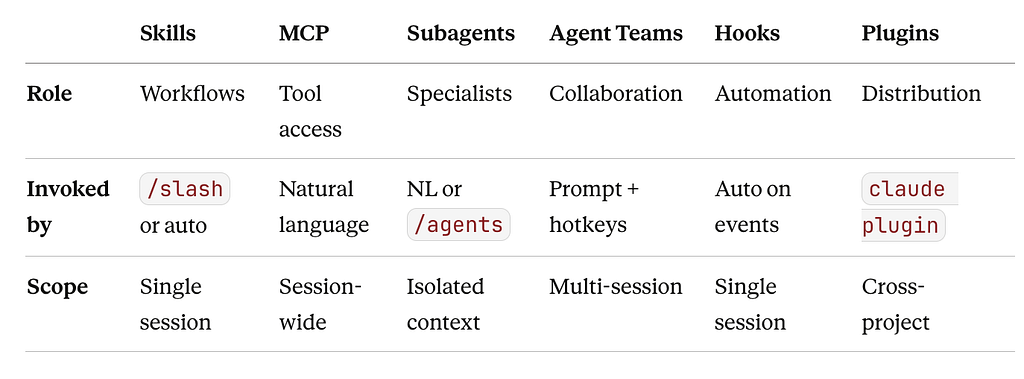
Quick Reference
The Adoption Playbook
Don’t try to use all six on day one. Layer up:
- Skills + MCP → Cover 80% of workflows.
- Hooks → Automate the boring stuff: linting, tests, guardrails.
- Subagents → Delegate when context gets heavy.
- Agent Teams → Go parallel when agents need to coordinate.
- Plugins → Package everything for your team.
The Bottom Line
Claude Code’s real strength is not any single extension point; it’s how they layer together. Skills define what to do, MCP provides the data, Subagents and Agent Teams handle the delegation, Hooks enforce the rules, and Plugins package it all for your team. Master the basics first, then add complexity only when you need it.
Claude Code Extensions Explained: Skills, MCP, Hooks, Subagents, Agent Teams & Plugins was originally published in Towards AI on Medium, where people are continuing the conversation by highlighting and responding to this story.