Your RAG Agent Forgets Everything After One Message - Here’s How I Fixed It with Databricks Lakebase
Building a context-aware RAG system end-to-end: from PDF parsing to multi-turn conversations that actually remember
Most RAG tutorials show you how to build a system that answers questions from documents. You parse some PDFs, chunk them, embed them, retrieve relevant context, and feed it to an LLM. Works great — until the user asks a follow-up question.
“How does it handle overheating?”
It? What’s “it”? Your agent has no idea, because the previous turn where the user asked about Orion’s motion controller was stored in InMemorySaver() — which is gone the moment your Model Serving endpoint processes the next request.
This is the gap between a demo and a production RAG system. In this article, I’ll walk through the complete build — from parsing multimodal PDFs to deploying a context-aware agent that maintains conversation history across turns using Databricks Lakebase (Postgres).
The Architecture
Here’s what we’re building:
PDFs (text + images + diagrams)
    ↓ ai_parse_document() (Version 2.0)
Parsed elements (text, tables, figure descriptions)
    ↓ RecursiveCharacterTextSplitter
Chunks table (Delta, with Change Data Feed)
    ↓ Delta Sync + GTE-Large
Vector Search Index
    ↓ VectorSearchRetrieverTool
LangChain Agent + PostgresSaver
    ↓                    ↓
LLM (Foundation Model)   Lakebase (conversation memory)
    ↓
Model Serving Endpoint (MLflow ResponsesAgent)
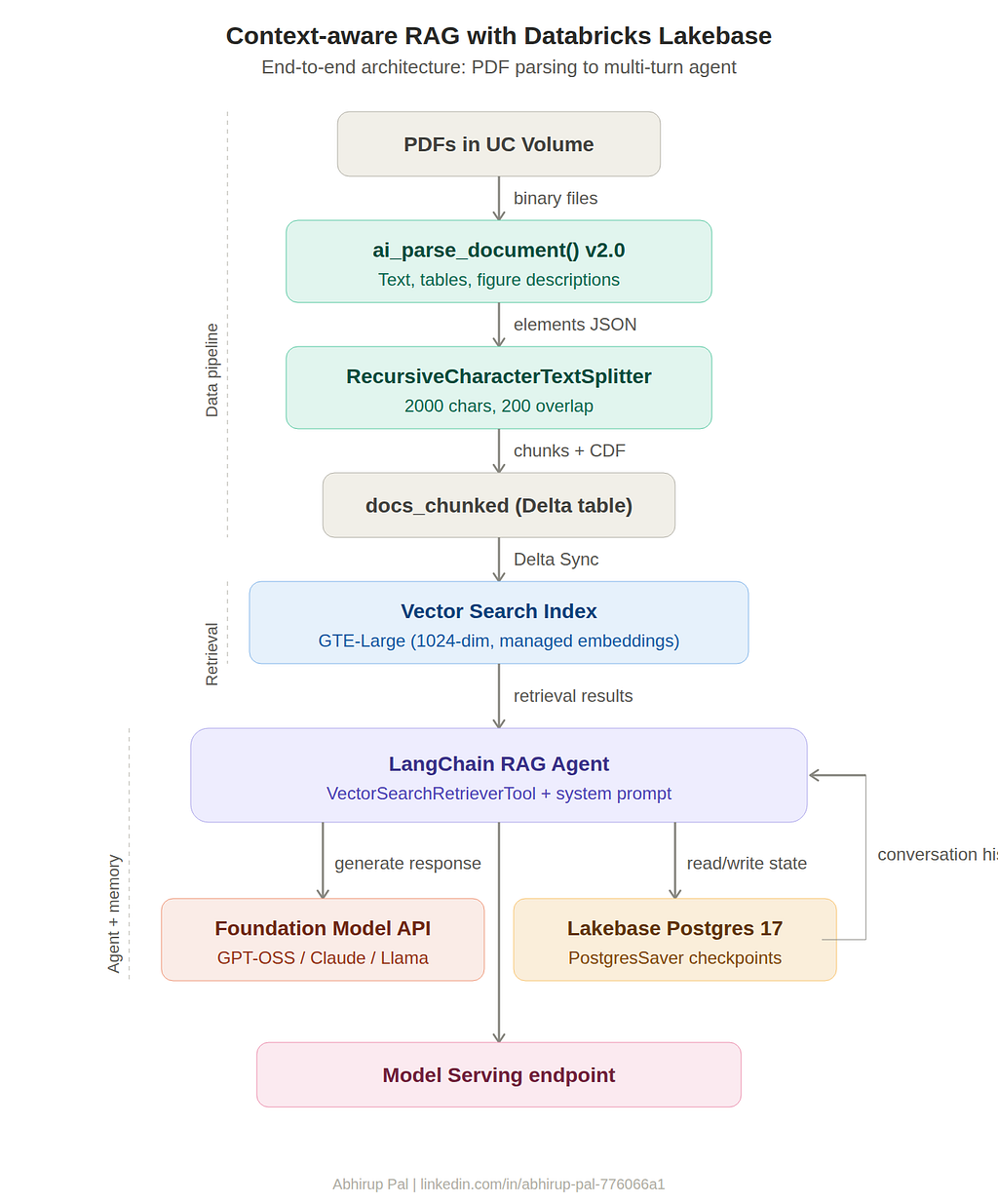
Key components:
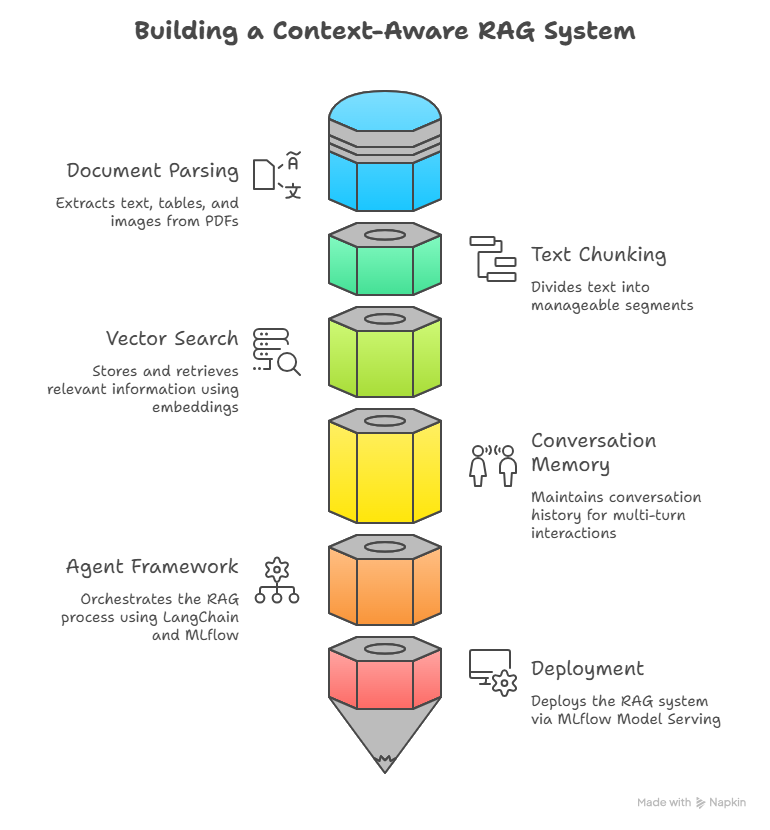
- Document parsing: ai_parse_document() (Version 2.0) — Databricks' built-in multimodal parser
- Embeddings: databricks-gte-large-en — 1024-dim, 8192-token context window
- Vector store: Databricks Vector Search (Delta Sync, managed embeddings)
- Conversation memory: Lakebase Autoscaling (managed Postgres 17)
- Agent framework: LangChain + LangGraph + MLflow ResponsesAgent
- Deployment: Model Serving via agents.deploy()
Let’s build it step by step.
Step 1: Parse Documents with ai_parse_document()
Our source documents are PDFs stored in a Unity Catalog Volume — they contain text, tables, images, and architecture diagrams. The ai_parse_document() function (version 2.0) handles all of this in a single call. It extracts text, renders tables as HTML, and generates AI descriptions for figures.
from pyspark.sql.functions import expr

# Volume path where PDFs are stored
docs_path = "/Volumes/<YOUR_CATALOG>/<YOUR_SCHEMA>/source_docs/"
# Read all files as binary
docs_df = spark.read.format("binaryFile").load(docs_path)
# Parse each document using ai_parse_document v2.0
parsed_df = docs_df.withColumn(
    "parsed_content",
    expr(f"""ai_parse_document(content, map(
        "version", "2.0",
        "imageOutputPath", "{docs_path}/parsed_images/"
    ))""")
)
# Drop binary content (too large to display)
parsed_df = parsed_df.drop("content")
# Save to Delta table
output_table = "<YOUR_CATALOG>.<YOUR_SCHEMA>.docs_parsed"
parsed_df.write.format("delta").mode("overwrite").saveAsTable(output_table)
print(f"✅ Parsed results saved to: {output_table}")
The output is a VARIANT column with structured elements — each element has a type (text, table, figure, section_header, etc.), content, and optionally a description (for figures). This is significantly better than PyPDF2 or Unstructured for complex enterprise PDFs with mixed content.
Step 2: Clean, Transform, and Chunk
The parsed JSON needs to be converted into clean text and then chunked for retrieval. I used two approaches:
Fast Plain Text Extraction
Concatenate all text elements into a single string with == page == tokens separating pages:
from pyspark.sql import functions as F

# Convert VARIANT to JSON string, then extract text content
safe_json_col = F.coalesce(
    F.to_json(F.col("parsed_content")),
    F.col("parsed_content").cast("string")
)
plain_text_df = parsed_df.withColumn(
    "plain_text",
    extract_contents_udf()(safe_json_col)  # Custom UDF to join text elements
)
Chunk with LangChain
from langchain_text_splitters import RecursiveCharacterTextSplitter
from pyspark.sql.types import StructType, StructField, StringType
import pandas as pd

CHUNK_SIZE = 2000
CHUNK_OVERLAP = 200
splitter = RecursiveCharacterTextSplitter(
    chunk_size=CHUNK_SIZE,
    chunk_overlap=CHUNK_OVERLAP,
    separators=["\n== page ==\n", "== page ==", "\n\n", "\n", " ", ""]
)
schema = StructType([
    StructField("path", StringType(), True),
    StructField("chunk", StringType(), True),
])
def split_rows(iterator):
    for pdf in iterator:
        out = []
        for _, row in pdf.iterrows():
            path, text = row["path"], row["plain_text"]
            if isinstance(text, str) and text.strip():
                for c in splitter.split_text(text):
                    if c and c.strip():
                        out.append((path, c))
        yield pd.DataFrame(out, columns=["path", "chunk"])
df_chunks = (
    plain_text_df.select("path", "plain_text")
    .mapInPandas(split_rows, schema=schema)
)
# Add unique IDs and save
df_chunks = df_chunks.withColumn("id", F.monotonically_increasing_id())
chunked_table = "<YOUR_CATALOG>.<YOUR_SCHEMA>.docs_chunked"
df_chunks.write.format("delta") \
    .mode("overwrite") \
    .option("mergeSchema", "true") \
    .saveAsTable(chunked_table)
Step 3: Build Vector Search
Enable Change Data Feed
Vector Search Delta Sync requires CDF enabled on the source table:
ALTER TABLE <YOUR_CATALOG>.<YOUR_SCHEMA>.docs_chunked
SET TBLPROPERTIES (delta.enableChangeDataFeed = true);
Create the Delta Sync Index
from databricks.vector_search.client import VectorSearchClient

vsc = VectorSearchClient(disable_notice=True)
index_name = "<YOUR_CATALOG>.<YOUR_SCHEMA>.docs_chunked_index"
vsc.create_delta_sync_index_and_wait(
    endpoint_name="<YOUR_VS_ENDPOINT>",
    index_name=index_name,
    source_table_name="<YOUR_CATALOG>.<YOUR_SCHEMA>.docs_chunked",
    primary_key="id",
    embedding_source_column="chunk",
    embedding_model_endpoint_name="databricks-gte-large-en",
    pipeline_type="TRIGGERED",
)
With managed embeddings, Databricks automatically handles embedding computation during both indexing (reads chunk, sends to GTE-Large, stores the 1024-dim vectors) and query time (auto-embeds your search string). You never call the embedding model directly.
Test Retrieval
index = vsc.get_index(index_name=index_name)

results = index.similarity_search(
    query_text="How does the system prevent overheating?",
    columns=["path", "chunk"],
    num_results=5,
)
display(results)
Step 4: Set Up Lakebase for Conversation Memory
This is where most RAG tutorials stop. They plug in InMemorySaver() and call it a day. But InMemorySaver means:
- State lost between requests — every Model Serving invocation starts fresh
- No multi-turn conversations — the agent can’t resolve “it”, “that”, “the one you mentioned”
- No session persistence — kernel restart = amnesia
Lakebase (Databricks’ managed Postgres 17, GA on AWS since early 2026) solves this. We’ll use langgraph-checkpoint-postgres to swap InMemorySaver with a Postgres-backed checkpointer.
Provision a Lakebase Autoscaling Project
- Click Apps → Lakebase Postgres in your workspace
- Select Autoscaling → New project
- Name it (e.g., my-agent-memory), select Postgres 17
- Takes about 1 minute to provision
Get Connection Details Programmatically
from databricks.sdk import WorkspaceClient

w = WorkspaceClient()
project_id = "<YOUR_PROJECT_NAME>"
# Get branch and endpoint
branches = list(w.postgres.list_branches(parent=f"projects/{project_id}"))
branch_name = branches[0].name
endpoints = list(w.postgres.list_endpoints(parent=branch_name))
ep = endpoints[0]
HOST = ep.status.hosts.host
ENDPOINT = ep.name
USERNAME = "<YOUR_DATABRICKS_EMAIL>"
print(f"Host: {HOST}")
print(f"Endpoint: {ENDPOINT}")
Important: Lakebase Autoscaling uses w.postgres.* API, not w.database.* (which is for legacy Provisioned instances). The docs still mix these — don't get tripped up.
Test the Connection
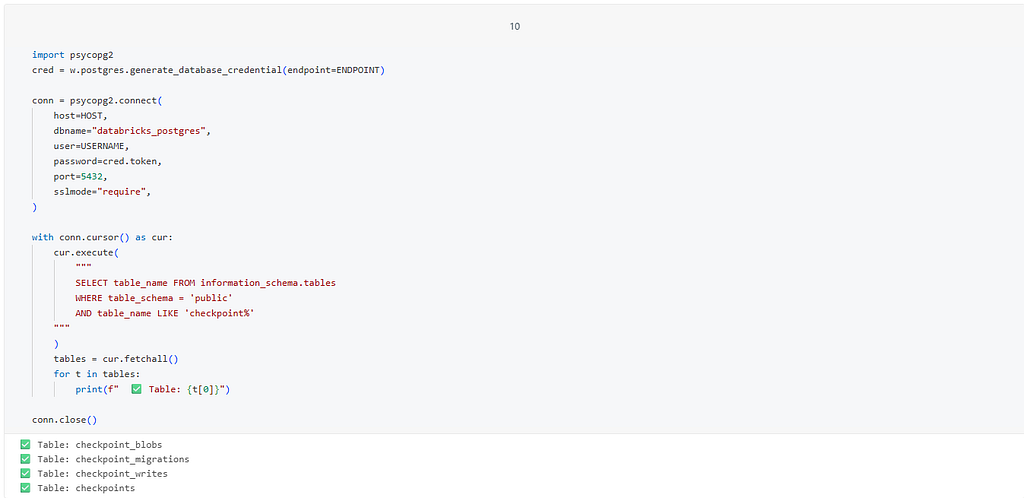
import psycopg2

cred = w.postgres.generate_database_credential(endpoint=ENDPOINT)
conn = psycopg2.connect(
    host=HOST,
    dbname="databricks_postgres",
    user=USERNAME,
    password=cred.token,
    port=5432,
    sslmode="require"
)
with conn.cursor() as cur:
    cur.execute("SELECT version()")
    print(cur.fetchone()[0])
conn.close()
print("✅ Connected to Lakebase!")
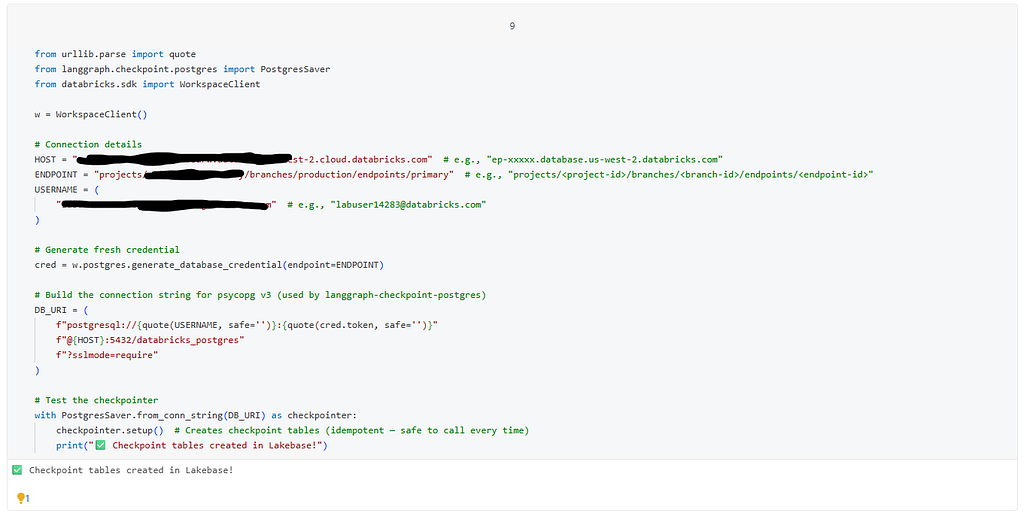
Create Checkpoint Tables
from urllib.parse import quote
from langgraph.checkpoint.postgres import PostgresSaver

cred = w.postgres.generate_database_credential(endpoint=ENDPOINT)
DB_URI = (
    f"postgresql://{quote(USERNAME, safe='')}:{quote(cred.token, safe='')}"
    f"@{HOST}:5432/databricks_postgres"
    f"?sslmode=require"
)
with PostgresSaver.from_conn_string(DB_URI) as checkpointer:
    checkpointer.setup()
    print("✅ Checkpoint tables created!")
Gotcha: If your Databricks username contains @ (e.g., user@company.com), you must use urllib.parse.quote() to URL-encode it. Otherwise the @ is parsed as the URI separator between credentials and host, and the connection fails silently.
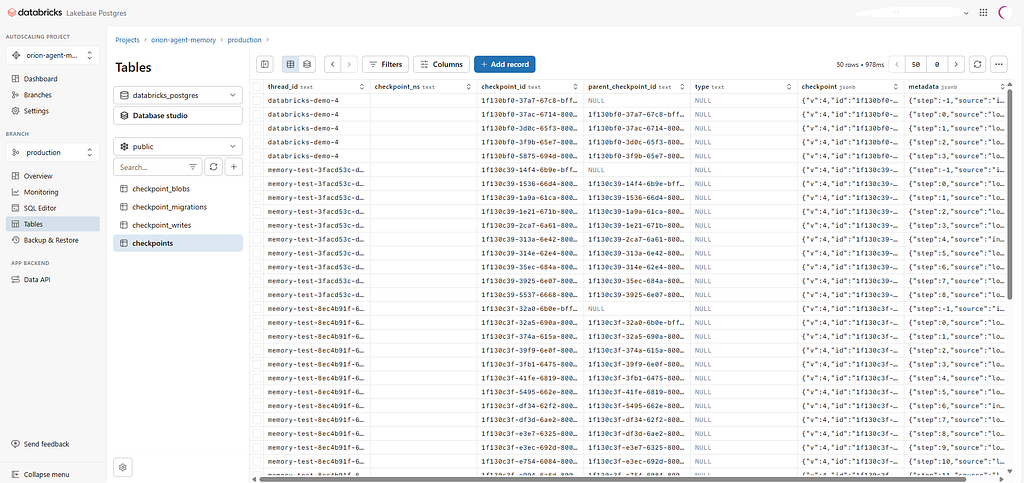
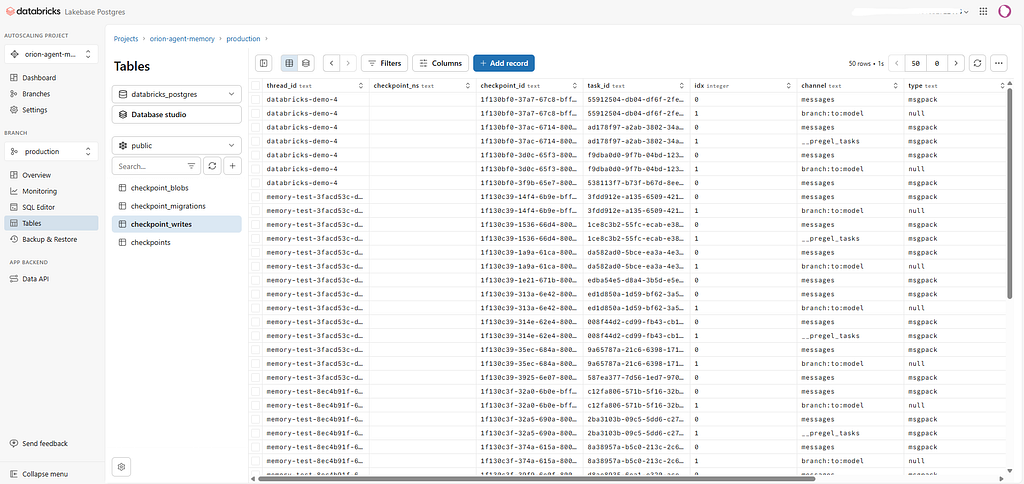
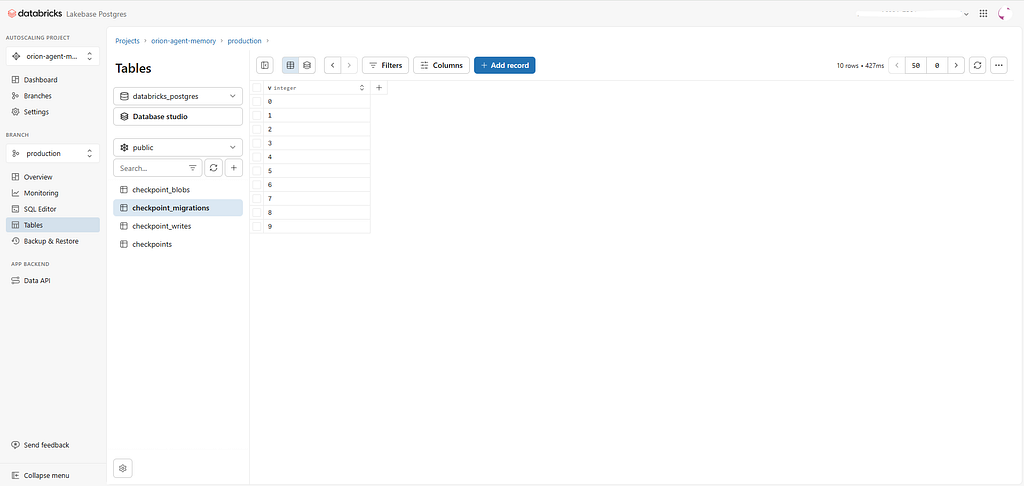
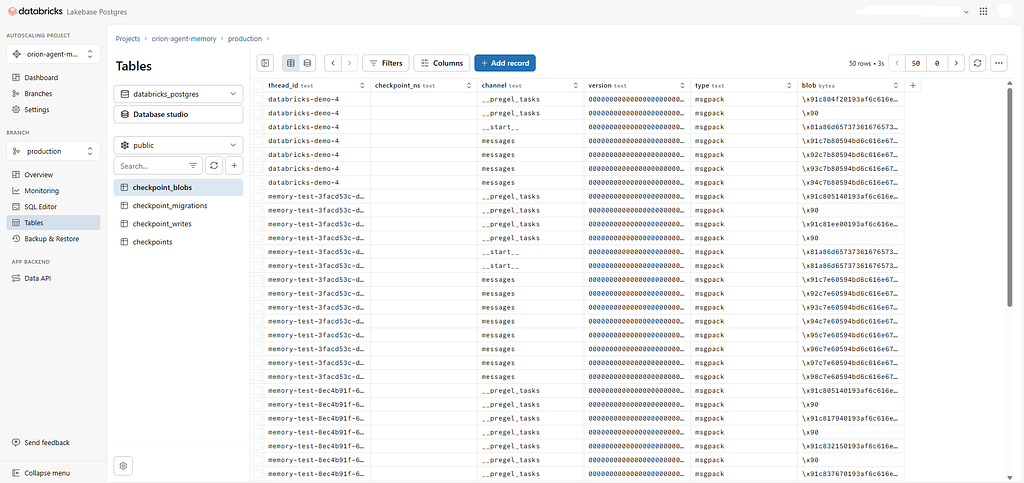
This creates four tables in Lakebase: checkpoints, checkpoint_writes, checkpoint_blobs, and checkpoint_migrations.
Step 5: Build the Context-Aware Agent
Now the critical swap — replace InMemorySaver with a Postgres-backed checkpointer in the agent.
Interactive Agent (Notebook)
from urllib.parse import quote
from langchain.agents import create_agent
from databricks_langchain import ChatDatabricks, VectorSearchRetrieverTool
from langgraph.checkpoint.postgres import PostgresSaver
from databricks.sdk import WorkspaceClient
import psycopg
from psycopg.rows import dict_row

def get_lakebase_checkpointer(host: str, endpoint: str, username: str):
    """Create a PostgresSaver backed by Lakebase Autoscaling."""
    w = WorkspaceClient()
    cred = w.postgres.generate_database_credential(endpoint=endpoint)
    db_uri = (
        f"postgresql://{quote(username, safe='')}:{quote(cred.token, safe='')}"
        f"@{host}:5432/databricks_postgres"
        f"?sslmode=require"
    )
    # IMPORTANT: Use psycopg.connect directly, not from_conn_string
    # from_conn_string returns a context manager, not a persistent instance
    conn = psycopg.connect(db_uri, autocommit=True, row_factory=dict_row)
    checkpointer = PostgresSaver(conn=conn)
    checkpointer.setup()
    return checkpointer

def build_agent(llm_endpoint: str, index_name: str, num_results: int = 3):
    model = ChatDatabricks(endpoint=llm_endpoint, max_tokens=500)
    vs_tool = VectorSearchRetrieverTool(
        name="knowledge_search",
        index_name=index_name,
        description="Search knowledge base for relevant information",
        num_results=num_results,
    )
    # Lakebase-backed checkpointer instead of InMemorySaver
    checkpointer = get_lakebase_checkpointer(HOST, ENDPOINT, USERNAME)
    system_prompt = """You are a Knowledge Assistant. Respond in a clear,
    professional tone. Use only verified information from the provided documents.
    If the answer cannot be found, clearly state that."""
    return create_agent(
        model=model,
        tools=[vs_tool],
        system_prompt=system_prompt,
        checkpointer=checkpointer,
    )
Test Multi-Turn Conversation
agent = build_agent("<YOUR_LLM_ENDPOINT>", "<YOUR_INDEX_NAME>", 3)

# STABLE thread_id - this is what enables context awareness
config = {"configurable": {"thread_id": "demo-session-001"}}
# Turn 1
r1 = agent.invoke(
    {"messages": [{"role": "user", "content": "What is the Orion system?"}]},
    config=config
)
print("Turn 1:", r1['messages'][-1].content)
# Turn 2 - agent should know "it" = Orion
r2 = agent.invoke(
    {"messages": [{"role": "user", "content": "How does it handle overheating?"}]},
    config=config
)
print("Turn 2:", r2['messages'][-1].content)
The magic is in the stable thread_id. With InMemorySaver, each Model Serving request gets a new UUID — no memory. With PostgresSaver and a consistent thread_id, the agent retrieves the full conversation history from Lakebase before generating a response.
Step 6: Production Agent Code (agent.py)
For deployment, the agent code lives in a standalone Python file using MLflow’s “agent as code” pattern:
# agent.py
import os
from uuid import uuid4
from typing import Any, Dict, List
from urllib.parse import quote

import yaml
import mlflow
import psycopg
from psycopg.rows import dict_row
from mlflow.pyfunc import ResponsesAgent
from mlflow.types.responses import ResponsesAgentRequest, ResponsesAgentResponse
from langchain.agents import create_agent
from databricks_langchain import ChatDatabricks, VectorSearchRetrieverTool
from langgraph.checkpoint.postgres import PostgresSaver
from databricks.sdk import WorkspaceClient

def _load_config(path: str = "agent-config.yaml") -> Dict[str, Any]:
    if not os.path.exists(path):
        raise FileNotFoundError(f"Config file not found at '{path}'")
    with open(path, "r", encoding="utf-8") as f:
        cfg = yaml.safe_load(f) or {}
    llm_endpoint = cfg.get("llm_endpoint_name")
    vs = cfg.get("vector_search", {}) or {}
    index_name = vs.get("index_name")
    num_results = int(vs.get("num_results", 3))
    lakebase = cfg.get("lakebase", {}) or {}
    return {
        "llm_endpoint_name": llm_endpoint,
        "vs_index_name": index_name,
        "vs_num_results": num_results,
        "lakebase_host": lakebase.get("host"),
        "lakebase_endpoint": lakebase.get("endpoint"),
        "lakebase_user": lakebase.get("user"),
    }

def get_lakebase_checkpointer(host, endpoint, user):
    w = WorkspaceClient()
    cred = w.postgres.generate_database_credential(endpoint=endpoint)
    db_uri = (
        f"postgresql://{quote(user, safe='')}:{quote(cred.token, safe='')}"
        f"@{host}:5432/databricks_postgres?sslmode=require"
    )
    conn = psycopg.connect(db_uri, autocommit=True, row_factory=dict_row)
    checkpointer = PostgresSaver(conn=conn)
    checkpointer.setup()
    return checkpointer

def build_agent(llm_endpoint, index_name, num_results,
                lakebase_host, lakebase_endpoint, lakebase_user):
    model = ChatDatabricks(endpoint=llm_endpoint, max_tokens=500)
    vs_tool = VectorSearchRetrieverTool(
        name="knowledge_search",
        index_name=index_name,
        description="Search knowledge base for relevant information",
        num_results=num_results,
    )
    checkpointer = get_lakebase_checkpointer(
        lakebase_host, lakebase_endpoint, lakebase_user
    )
    system_prompt = (
        "You are a Knowledge Assistant. Respond in a clear, professional tone. "
        "Use only verified information from the provided documents. "
        "If the answer cannot be found, clearly state that."
    )
    return create_agent(
        model=model, tools=[vs_tool],
        system_prompt=system_prompt, checkpointer=checkpointer,
    )

def _last_user_text(messages):
    user_msgs = [m for m in messages if m.get("role") == "user"]
    return str(user_msgs[-1].get("content", "")) if user_msgs else ""

class LangChainResponsesAgent(ResponsesAgent):
    def __init__(self):
        cfg = _load_config()
        self._agent = build_agent(
            cfg["llm_endpoint_name"], cfg["vs_index_name"],
            cfg["vs_num_results"], cfg["lakebase_host"],
            cfg["lakebase_endpoint"], cfg["lakebase_user"],
        )
    def predict(self, request: ResponsesAgentRequest) -> ResponsesAgentResponse:
        msgs = [m.model_dump() for m in request.input]
        custom_inputs = dict(request.custom_inputs or {})
        thread_id = custom_inputs.get("thread_id", f"session-{uuid4()}")
        result = self._agent.invoke(
            {"messages": msgs},
            config={"configurable": {"thread_id": thread_id}},
        )
        try:
            text = result["messages"][-1].content
        except Exception:
            text = str(result)
        return ResponsesAgentResponse(
            output=[self.create_text_output_item(text, str(uuid4()))],
            custom_outputs={"thread_id": thread_id},
        )

AGENT = LangChainResponsesAgent()
mlflow.models.set_model(AGENT)
Configuration (agent-config.yaml)
llm_endpoint_name: <YOUR_LLM_ENDPOINT>
vector_search:
  index_name: <YOUR_CATALOG>.<YOUR_SCHEMA>.docs_chunked_index
  num_results: 3
lakebase:
  host: <YOUR_LAKEBASE_HOST>
  endpoint: projects/<YOUR_PROJECT>/branches/production/endpoints/primary
  user: <YOUR_DATABRICKS_EMAIL>
Step 7: Log, Register, and Deploy
Log to MLflow
import mlflow
from importlib.metadata import version as get_version
from mlflow.models.resources import DatabricksVectorSearchIndex, DatabricksServingEndpoint

resources = [
    DatabricksVectorSearchIndex(index_name="<YOUR_CATALOG>.<YOUR_SCHEMA>.docs_chunked_index"),
    DatabricksServingEndpoint(endpoint_name="<YOUR_LLM_ENDPOINT>"),
]
with mlflow.start_run():
    mlflow.set_tags({
        "model_type": "retrieval_agent",
        "framework": "langchain",
        "memory": "lakebase_autoscaling",
    })
    logged_agent_info = mlflow.pyfunc.log_model(
        name="knowledge_assistant",
        python_model="agent.py",
        code_paths=["agent-config.yaml"],
        input_example={"input": [{"role": "user", "content": "What is Orion?"}]},
        pip_requirements=[
            f"databricks-vectorsearch=={get_version('databricks-vectorsearch')}",
            f"databricks-langchain=={get_version('databricks-langchain')}",
            f"langchain=={get_version('langchain')}",
            f"mlflow=={get_version('mlflow')}",
            "langgraph-checkpoint-postgres",
            "psycopg[binary]",
            "databricks-sdk>=0.89.0",
        ],
        resources=resources,
    )
    model_uri = logged_agent_info.model_uri
Register to Unity Catalog
mlflow.set_registry_uri("databricks-uc")
UC_MODEL_NAME = "<YOUR_CATALOG>.<YOUR_SCHEMA>.knowledge_assistant"

uc_info = mlflow.register_model(model_uri=model_uri, name=UC_MODEL_NAME)
print(f"✅ Registered: {UC_MODEL_NAME} v{uc_info.version}")
Deploy
from databricks import agents

deployment = agents.deploy(
    model_name=UC_MODEL_NAME,
    model_version=uc_info.version,
    scale_to_zero_enabled=True,
)
print(f"✅ Endpoint: {deployment.query_endpoint}")
The Result
With the agent deployed, multi-turn conversations work exactly as you’d expect:
ws = WorkspaceClient()
client = ws.serving_endpoints.get_open_ai_client()

session = "user-session-042"
# Turn 1
r1 = client.responses.create(
    model="knowledge_assistant",
    input=[{"role": "user", "content": "What is the Orion motion controller?"}],
    extra_body={"custom_inputs": {"thread_id": session}}
)
# Turn 2 - "it" resolves correctly to Orion
r2 = client.responses.create(
    model="knowledge_assistant",
    input=[{"role": "user", "content": "How does it prevent overheating?"}],
    extra_body={"custom_inputs": {"thread_id": session}}
)
And in Lakebase, you can see the checkpoint data accumulating across conversation threads — each thread preserving the full message history for context-aware follow-ups.
Quick Check for Validating Memory Persistence:
import json
from uuid import uuid4

thread_id = f"memory-test-{uuid4()}"

# --- 1. Use custom input instead of input_example ---
custom_input = {
    "input": [{"role": "user", "content": "What are the main components of Orion?"}],
    "custom_inputs": {"thread_id": thread_id},
}

print("=" * 50)
print("TEST 1: Custom input (no input_example needed)")
print("=" * 50)

# Use output_path to capture results (without it, mlflow.models.predict returns None)
mlflow.models.predict(
    model_uri=model_uri,
    input_data=custom_input,
    env_manager="uv",
    output_path="/tmp/result_1.json",
)

with open("/tmp/result_1.json", "r") as f:
    result_1 = json.load(f)

thread_id_1 = result_1["custom_outputs"]["thread_id"]
response_1 = result_1["output"][0]["content"][0]["text"]
print(f"Thread ID: {thread_id_1}")
print(f"Response: {response_1[:300]}...")

# --- 2. Test memory persistence with same thread_id ---
follow_up_input = {
    "input": [
        {
            "role": "user",
            "content": "Can you elaborate more on the first component you mentioned?",
        }
    ],
    "custom_inputs": {"thread_id": thread_id},  # Reuse same thread
}

print("\n" + "=" * 50)
print("TEST 2: Follow-up on same thread (memory test)")
print("=" * 50)

mlflow.models.predict(
    model_uri=model_uri,
    input_data=follow_up_input,
    env_manager="uv",
    output_path="/tmp/result_2.json",
)

with open("/tmp/result_2.json", "r") as f:
    result_2 = json.load(f)

thread_id_2 = result_2["custom_outputs"]["thread_id"]
response_2 = result_2["output"][0]["content"][0]["text"]
print(f"Thread ID: {thread_id_2}")
print(f"Response: {response_2[:300]}...")

# --- 3. Verify memory with actual conditions ---
print("\n" + "=" * 50)
print("MEMORY CHECK")
print("=" * 50)

# Check 1: Thread IDs match
if thread_id_1 == thread_id_2:
    print(f"✅ Thread ID match: {thread_id_1}")
else:
    print(f"❌ Thread ID mismatch! Call 1: {thread_id_1}, Call 2: {thread_id_2}")

# Check 2: Follow-up response references context from the first response
follow_up_lower = response_2.lower()
if len(response_2) > 50 and any(
    keyword in follow_up_lower
    for keyword in [
        "motion",
        "vision",
        "cognition",
        "communication",
        "subsystem",
        "component",
    ]
):
    print(
        "✅ Follow-up response references components from the first answer — memory is intact!"
    )
else:
    print(
        "⚠️ Follow-up response may not reference the first answer. Manual review recommended."
    )
    print(f"   Follow-up preview: {response_2[:200]}")

print(
    "\n✅ Lakebase Postgres checkpointing is working correctly!"
    if thread_id_1 == thread_id_2
    else "\n❌ Memory persistence test FAILED."
)
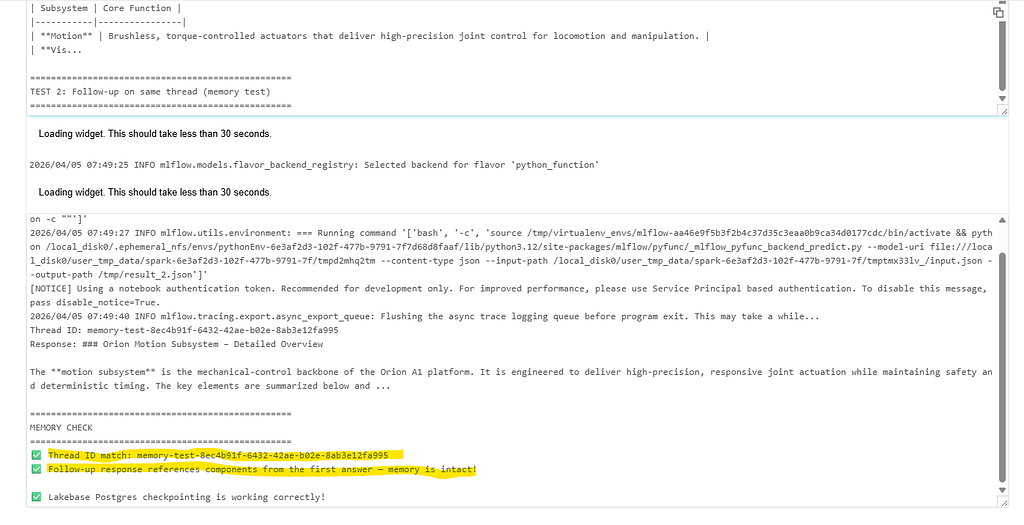
You can see memory persistence working.
Screenshots Of Lakebase Postgres CheckPoint Tables:
Gotchas I Hit Along the Way
1. Lakebase Autoscaling vs Provisioned — completely different APIs. If you create a Lakebase project via the UI today, you get an Autoscaling project (the new default since March 2026). But most notebook examples in the docs use w.database.* — that's the Provisioned API. For Autoscaling, use w.postgres.*. I burned 30 minutes on NotFound: Resource not found before figuring this out.
2. PostgresSaver.from_conn_string() returns a context manager, not an instance. If you try checkpointer = PostgresSaver.from_conn_string(uri) and then call .setup(), you get AttributeError: '_GeneratorContextManager' object has no attribute 'setup'. The fix: use psycopg.connect() directly with autocommit=True and row_factory=dict_row, then pass the connection to PostgresSaver(conn=conn).
3. URL-encode your username. Databricks emails contain @, which breaks PostgreSQL connection URIs. Always use urllib.parse.quote(username, safe='').
4. The ep.host path is wrong. When inspecting Lakebase endpoint objects from the SDK, the host is at ep.status.hosts.host, not ep.host or ep.hosts.host.
5. OAuth tokens expire after 60 minutes. w.postgres.generate_database_credential() returns a token that's valid for one hour. For long-running endpoints, implement token rotation or regenerate on each agent initialization.
What Changed from a Standard RAG Agent
The entire modification boils down to a small set of surgical changes:
Component Standard RAG Context-Aware RAG Checkpointer InMemorySaver() PostgresSaver(conn=conn) thread_id Random UUID per request Stable ID from custom_inputs custom_outputs Pass-through Returns thread_id for session continuity Config LLM + Vector Search + Lakebase host, endpoint, user Dependencies Base LangChain + langgraph-checkpoint-postgres, psycopg[binary]
Everything else — parsing, chunking, Vector Search, system prompt, tool wiring, MLflow logging, deployment — stays identical.
Wrapping Up
The difference between a RAG demo and a production RAG system often comes down to state management. Databricks now provides every piece of this puzzle natively: ai_parse_document() (version 2.0) for multimodal PDF parsing, Vector Search with managed GTE-Large embeddings, Lakebase for conversation persistence, and the Agent Framework for deployment.
The key architectural decision is using Lakebase for conversation state while keeping Vector Search for document retrieval — each optimized for what it does best. Lakebase gives you a fully managed Postgres with scale-to-zero, so you’re only paying for compute when your agent is actively handling conversations.
If you’re building RAG on Databricks and your agent can’t handle “What did I just ask?”, this is the fix.
If you found this walkthrough useful, connect with me on LinkedIn or follow on Medium — I regularly publish deep-dives on Databricks, Lakehouse architecture, Data Engineering patterns and AI Agents. I’m always happy to discuss the real-world tradeoffs behind these decisions.
References:
- Databricks AI Agent Memory Documentation
- Lakebase Autoscaling Getting Started
- Lakebase Autoscaling API Guide
- ai_parse_document Function Reference
- Vector Search Documentation
- langgraph-checkpoint-postgres
- Databricks Agent Templates
#Databricks #RAG #Lakebase #PostgreSQL #GenAI #LangChain #VectorSearch #DataEngineering #AI
Your RAG Agent Forgets Everything After One Message - Here’s How I Fixed It with Databricks… was originally published in Towards AI on Medium, where people are continuing the conversation by highlighting and responding to this story.