Adding content staleness tracking, CDC-based updates, and recency-weighted retrieval to a Databricks RAG pipeline
You built a RAG system. It parses PDFs, chunks them, embeds them, retrieves relevant context. It even remembers conversations across turns (if you read my previous article on Lakebase-backed memory).
But there’s a subtler problem hiding in plain sight.
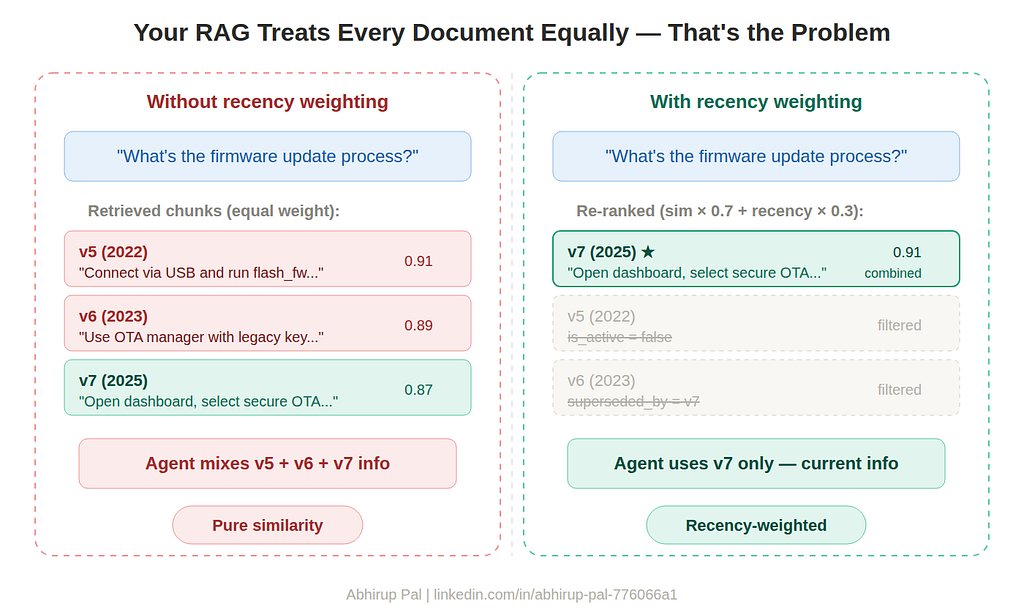
Your Vector Search index treats every chunk equally. A firmware guide from 2022 and a hotfix bulletin from last Tuesday have the same retrieval weight — as long as they’re semantically similar to the query. The agent has no concept of “this document was superseded” or “prefer the newer version.”
In production, this creates real issues: users get outdated compliance procedures, deprecated API references, or old troubleshooting steps that no longer apply. The agent confidently delivers stale information because it simply doesn’t know any better.
This article covers the three pieces needed to fix it, all integrated into a Databricks pipeline with Vector Search and Delta Sync.
The Three Problems (and Their Layers)
These look like one problem but they’re actually three distinct challenges at different layers of the pipeline:
1. CDC for new content — How do new or updated documents flow into the Vector Search index without a full rebuild?
2. Staleness tracking — How does the system know which chunks are current, outdated, or superseded?
3. Recency-weighted retrieval — How does the agent prefer newer content when relevance scores are similar?
Let’s tackle each one.
Problem 1: CDC for New Content
If you’re using Databricks Vector Search with Delta Sync (which you should be), you already have the infrastructure for incremental updates. Delta Sync watches the Change Data Feed on your source table and propagates inserts, updates, and deletes to the index.
The key decision is the pipeline type:
# Manual control — you decide when to sync
vsc.create_delta_sync_index(
    ...
    pipeline_type="TRIGGERED",
)

# After appending new chunks:
index = vsc.get_index(index_name="<YOUR_INDEX>")
index.sync()  # Only processes CDF deltas, not full re-index
# Automatic — syncs within minutes of table changes
vsc.create_delta_sync_index(
    ...
    pipeline_type="CONTINUOUS",
)
# No manual sync() calls needed
For most production setups, TRIGGERED gives you more control — you can batch document ingestion and sync once, rather than triggering index updates on every individual row.
The ingestion flow for new or updated documents:
from pyspark.sql import functions as F
from pyspark.sql.functions import expr

def ingest_new_documents(volume_path, chunked_table, parsed_table, doc_version="2.0"):
    """Parse new PDFs, chunk them, append to the chunks table.
    Existing chunks from updated docs are soft-deleted first."""

    # Read new files - binaryFile gives us modificationTime
    new_docs_df = spark.read.format("binaryFile").load(volume_path)

    # Check which files already exist in the table
    existing_paths = (
        spark.read.table(chunked_table)
        .filter("is_active = true")
        .select("path").distinct().collect()
    )
    existing_set = {row["path"] for row in existing_paths}

    all_paths = [r["path"] for r in new_docs_df.select("path").distinct().collect()]
    updated_paths = [p for p in all_paths if p in existing_set]

    # Soft-delete chunks from updated documents
    if updated_paths:
        path_list = ", ".join([f"'{p}'" for p in updated_paths])
        spark.sql(f"""
            UPDATE {chunked_table}
            SET is_active = false, superseded_by = '{doc_version}'
            WHERE path IN ({path_list}) AND is_active = true
        """)

    # Parse with ai_parse_document v2.0
    parsed_df = new_docs_df.withColumn(
        "parsed_content",
        expr(f"""ai_parse_document(content, map(
            "version", "2.0",
            "imageOutputPath", "{volume_path}/parsed_images/"
        ))""")
    ).drop("content")

    # ... your chunking logic here (RecursiveCharacterTextSplitter) ...
    # produces df_chunks with [path, chunk]

    # Enrich with ACTUAL file modification time (not current_timestamp!)
    mod_times_df = parsed_df.select("path", "modificationTime").distinct()

    df_chunks_enriched = (
        df_chunks
        .join(mod_times_df, on="path", how="left")
        .withColumn("id", F.monotonically_increasing_id()
                    + spark.read.table(chunked_table).count())
        .withColumn("ingested_at", F.current_timestamp())
        .withColumn("source_modified_at", F.col("modificationTime"))
        .withColumn("doc_version", F.lit(doc_version))
        .withColumn("is_active", F.lit(True))
        .withColumn("superseded_by", F.lit(None).cast("string"))
        .drop("modificationTime")
    )

    # Append - CDF picks up the changes automatically
    df_chunks_enriched.write.mode("append").saveAsTable(chunked_table)

    return df_chunks_enriched
Notice the source_modified_at column. This isn't current_timestamp() — it's the actual filesystem modification time from the binaryFile reader. This distinction matters enormously for recency scoring: a document modified three months ago should score differently than one modified yesterday, regardless of when you ran the ingestion pipeline.
Problem 2: Staleness Tracking
Pure similarity search has no concept of “this chunk is outdated.” You need metadata columns on your chunks table to track content lifecycle.
The Schema
Your chunks table grows from three columns to eight:
id | path | chunk | ingested_at | source_modified_at | doc_version | is_active | superseded_by
- ingested_at — when the chunk entered the pipeline (audit trail)
- source_modified_at — when the source file was actually modified (for recency scoring)
- doc_version — version tag for the document
- is_active — soft-delete flag (false = excluded from retrieval)
- superseded_by — which newer document replaced this one
Adding to an Existing Table
If you already have a docs_chunked table (like I did), you can add these columns non-destructively and backfill source_modified_at from the actual file timestamps in your docs_parsed table:
parsed_table = f"{catalog}.{schema}.docs_parsed"
chunked_table = f"{catalog}.{schema}.docs_chunked"

# Add columns
spark.sql(f"""
    ALTER TABLE {chunked_table}
    ADD COLUMNS (
        ingested_at TIMESTAMP,
        source_modified_at TIMESTAMP,
        doc_version STRING,
        is_active BOOLEAN,
        superseded_by STRING
    )
""")
# Backfill source_modified_at from actual file timestamps
# docs_parsed has modificationTime from the binaryFile reader
spark.sql(f"""
    MERGE INTO {chunked_table} AS chunks
    USING (
        SELECT DISTINCT path, modificationTime
        FROM {parsed_table}
    ) AS parsed
    ON chunks.path = parsed.path
    WHEN MATCHED AND chunks.ingested_at IS NULL THEN
        UPDATE SET
            chunks.ingested_at = current_timestamp(),
            chunks.source_modified_at = parsed.modificationTime,
            chunks.doc_version = '1.0',
            chunks.is_active = true,
            chunks.superseded_by = null
""")
Document Lifecycle Operations
With these columns, managing content freshness is straightforward SQL:
# Soft-delete an outdated document
spark.sql(f"""
    UPDATE {chunked_table}
    SET is_active = false
    WHERE path LIKE '%Firmware_Guide_v5%'
""")

# Supersede v6 with v7
spark.sql(f"""
    UPDATE {chunked_table}
    SET is_active = false, superseded_by = 'Firmware_Guide_v7.pdf'
    WHERE path LIKE '%Firmware_Guide_v6%' AND is_active = true
""")
# Staleness report
display(spark.sql(f"""
    SELECT path, doc_version, source_modified_at,
        datediff(current_date(), source_modified_at) as age_days,
        CASE
            WHEN datediff(current_date(), source_modified_at) < 30
                THEN '🟢 Fresh'
            WHEN datediff(current_date(), source_modified_at) < 90
                THEN '🟡 Aging'
            ELSE '🔴 Stale'
        END as freshness
    FROM {chunked_table}
    WHERE is_active = true
    ORDER BY source_modified_at DESC
"""))
Rebuild the Vector Search Index
After adding columns, rebuild the index to sync the new metadata:
vsc.create_delta_sync_index_and_wait(
    endpoint_name="<YOUR_VS_ENDPOINT>",
    index_name="<YOUR_INDEX>",
    source_table_name=chunked_table,
    primary_key="id",
    embedding_source_column="chunk",
    embedding_model_endpoint_name="databricks-gte-large-en",
    pipeline_type="TRIGGERED",
    columns_to_sync=[
        "id", "chunk", "path",
        "ingested_at", "source_modified_at",
        "doc_version", "is_active", "superseded_by"
    ],
)
Now Vector Search knows about all your freshness metadata and can filter on is_active at query time.
Problem 3: Recency-Weighted Retrieval
This is the most interesting part. Even with staleness tracking, you’re still doing pure similarity search among active chunks. A compliance doc from 2023 and an updated one from last month — both marked is_active = true — get equal treatment.
The fix: over-fetch, re-rank with recency, return the top results.
The Scoring Math
I use exponential decay with a configurable half-life:
import math
from datetime import datetime

def recency_score(timestamp_str, half_life_days=90):
    """
    Exponential decay scoring based on content age.
    - Age 0 days → score 1.0
    - Age = half_life → score 0.5
    - Age = 2× half_life → score 0.25
    """
    try:
        if isinstance(timestamp_str, str):
            parsed_ts = datetime.fromisoformat(
                timestamp_str.replace("Z", "+00:00")
            )
        else:
            parsed_ts = timestamp_str
        age_days = (datetime.now(parsed_ts.tzinfo) - parsed_ts).days
        return math.exp(-0.693 * age_days / half_life_days)
    except Exception:
        return 0.5
The half_life_days parameter is the key tuning knob. Set it based on your domain: 30 days for fast-moving content (release notes, incident reports), 90 days for moderate (technical docs), 365 days for slow-moving (architecture specs, compliance standards).
The Custom Retrieval Tool
Replace VectorSearchRetrieverTool with a custom LangChain tool that wraps the recency logic:
from langchain.tools import tool
from databricks.vector_search.client import VectorSearchClient

@tool
def knowledge_search(query: str) -> str:
    """Search knowledge base with recency-weighted ranking.
    Newer documents are prioritized over older ones."""

    vsc = VectorSearchClient(disable_notice=True)
    index = vsc.get_index(index_name="<YOUR_INDEX>")

    # Over-fetch: get 15 results for re-ranking
    results = index.similarity_search(
        query_text=query,
        columns=["chunk", "path", "source_modified_at", "doc_version"],
        filters={"is_active": True},  # Only active chunks
        num_results=15,
    )

    data = results.get("result", {}).get("data_array", [])
    if not data:
        return "No relevant documents found."

    # Re-rank: combined = 70% similarity + 30% recency
    scored = []
    for row in data:
        chunk, path, modified_at, version, similarity = (
            row[0], row[1], row[2], row[3], row[4]
        )
        recency = recency_score(modified_at, half_life_days=90)
        combined = similarity * 0.7 + recency * 0.3
        scored.append({
            "chunk": chunk, "path": path,
            "doc_version": version, "combined_score": combined,
        })

    scored.sort(key=lambda x: x["combined_score"], reverse=True)

    # Return top 5 with source attribution
    parts = []
    for r in scored[:5]:
        parts.append(
            f"[Source: {r['path']} | Version: {r['doc_version']}]\n{r['chunk']}"
        )
    return "\n\n---\n\n".join(parts)
Then plug it into your agent:
agent = create_agent(
    model=model,
    tools=[knowledge_search],  # Custom tool instead of VectorSearchRetrieverTool
    system_prompt=system_prompt,
    checkpointer=checkpointer,
)
Making It Configurable via YAML
Rather than hardcoding the weights, put them in your agent-config.yaml:
llm_endpoint_name: databricks-gpt-oss-120b
vector_search:
  index_name: <catalog>.<schema>.docs_chunked_index
lakebase:
  host: <your-lakebase-host>
  endpoint: projects/<project>/branches/production/endpoints/primary
  user: <your-email>
retrieval:
  overfetch_count: 15
  final_count: 5
  similarity_weight: 0.7
  recency_weight: 0.3
  half_life_days: 90
Domain-specific presets I’ve found useful:
# Release notes / changelogs (fast-changing)
retrieval:
  similarity_weight: 0.5
  recency_weight: 0.5
  half_life_days: 30
# Architecture / compliance docs (slow-changing)
retrieval:
  similarity_weight: 0.85
  recency_weight: 0.15
  half_life_days: 365
# Mixed knowledge base (balanced)
retrieval:
  similarity_weight: 0.7
  recency_weight: 0.3
  half_life_days: 90
How It All Fits Together
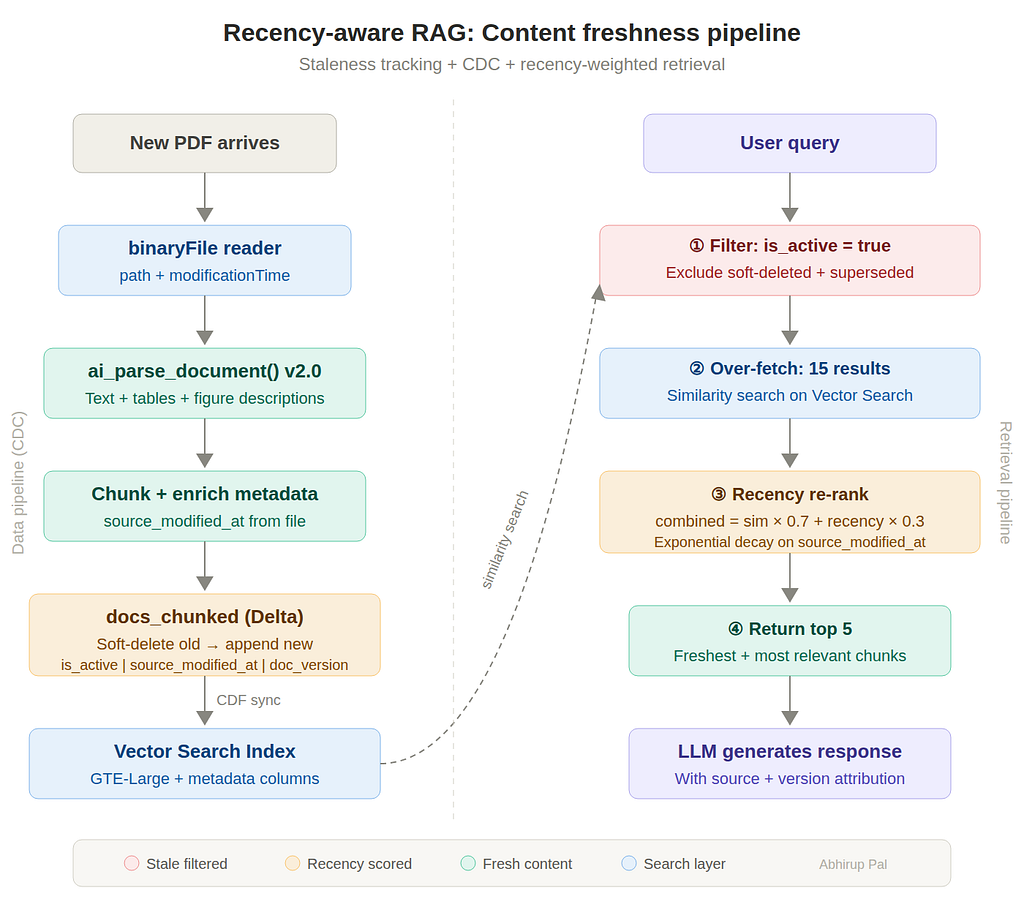
The data flow with all three layers integrated:
New PDF arrives in UC Volume → ingest_new_documents() reads it with binaryFile (captures modificationTime) → ai_parse_document() v2.0 extracts text, tables, figures → RecursiveCharacterTextSplitter chunks it → Old chunks from same path soft-deleted (is_active = false) → New chunks appended with real source_modified_at timestamp → index.sync() propagates via Change Data Feed
User queries the agent → Custom tool calls Vector Search with filters={"is_active": True} → Over-fetches 15 results → Re-ranks with combined = similarity × 0.7 + recency × 0.3 → Returns top 5 to the LLM with source + version attribution → LLM generates response preferring newer content
Admin manages content lifecycle → UPDATE SET is_active = false to retire outdated docs → UPDATE SET superseded_by = 'v7.pdf' to track version chains → Staleness report shows content age distribution
The Difference in Practice
Before recency weighting, a query like “What’s the firmware update procedure?” might return chunks from three different versions of the firmware guide — all semantically relevant, but only the latest one has the current procedure. The agent would potentially mix information from v5, v6, and v7 into a single response.
After recency weighting with is_active filtering and source_modified_at scoring:
- v5 chunks: is_active = false, filtered out before retrieval
- v6 chunks: is_active = false, superseded_by = v7, filtered out
- v7 chunks: is_active = true, highest recency score, returned to LLM
The agent now gives a clean answer from the current version, with source attribution showing exactly which document it drew from.
Key Takeaways
Use source_modified_at, not current_timestamp(). The binaryFile reader gives you the actual filesystem timestamp. A document modified three months ago should score as three months old, not "just ingested today" because you happened to run the pipeline this morning.
Soft-delete, don’t hard-delete. Marking is_active = false lets you audit what was removed and when. Hard deletes lose history.
Tune the half-life to your domain. 30 days for incident reports, 90 for technical docs, 365 for architecture specs. There’s no universal default — it depends on how fast your content changes.
The retrieval weights are the easy part. The hard part is getting source_modified_at correct and establishing a consistent document lifecycle (who decides when a doc is superseded, how versions are tracked, when to run the staleness report). The code is straightforward; the process around it is what makes it work in production.
This is a follow-up to my previous article on building context-aware RAG with Databricks Lakebase (https://medium.com/@abhirup.pal93/your-rag-agent-forgets-everything-after-one-message-heres-how-i-fixed-it-with-databricks-2f0f80466b4f). That article covers conversation memory (multi-turn context). This one covers content freshness (temporal relevance). Together they address the two main gaps between a RAG demo and a production RAG system.
If you found this walkthrough useful, connect with me on LinkedIn or follow on Medium — I regularly publish deep-dives on Databricks, Lakehouse architecture, Data Engineering patterns and AI Agents. I’m always happy to discuss the real-world tradeoffs behind these decisions.
References:
- Vector Search Delta Sync Documentation
- ai_parse_document Function Reference
- Change Data Feed Documentation
- Vector Search Retrieval Quality Guide
#Databricks #RAG #VectorSearch #DataEngineering #GenAI #LangChain #DeltaLake #CDC #AI
Your RAG Treats a 3-Year-Old Doc the Same as Yesterday’s — Here’s How to Fix It was originally published in Towards AI on Medium, where people are continuing the conversation by highlighting and responding to this story.