Vector Search Done Right: Best Practices, Qwen3 Dimension Control, and Why Reranking Is Non-Negotiable
Three things your RAG pipeline on Databricks needs to get right — and why most pipelines get at least one of them wrong.
The Problem With “Good Enough” Retrieval
RAG pipelines fail quietly. When your agent gives an incomplete or wrong answer, the LLM gets the blame — but more often the problem is upstream. The wrong context was retrieved. The index was built with defaults that prioritise convenience over performance. The reranker was skipped because it seemed optional.
This post covers three topics that directly determine retrieval quality on Databricks Mosaic AI Vector Search: the official best practices, a concrete limitation on embedding dimension control with Qwen3, and why the built-in reranker is not a nice-to-have.
Part 1: Five Best Practices for Vector Search
Databricks has published explicit guidance on building high-quality vector search indexes. Here is what it says and why each point matters in practice.
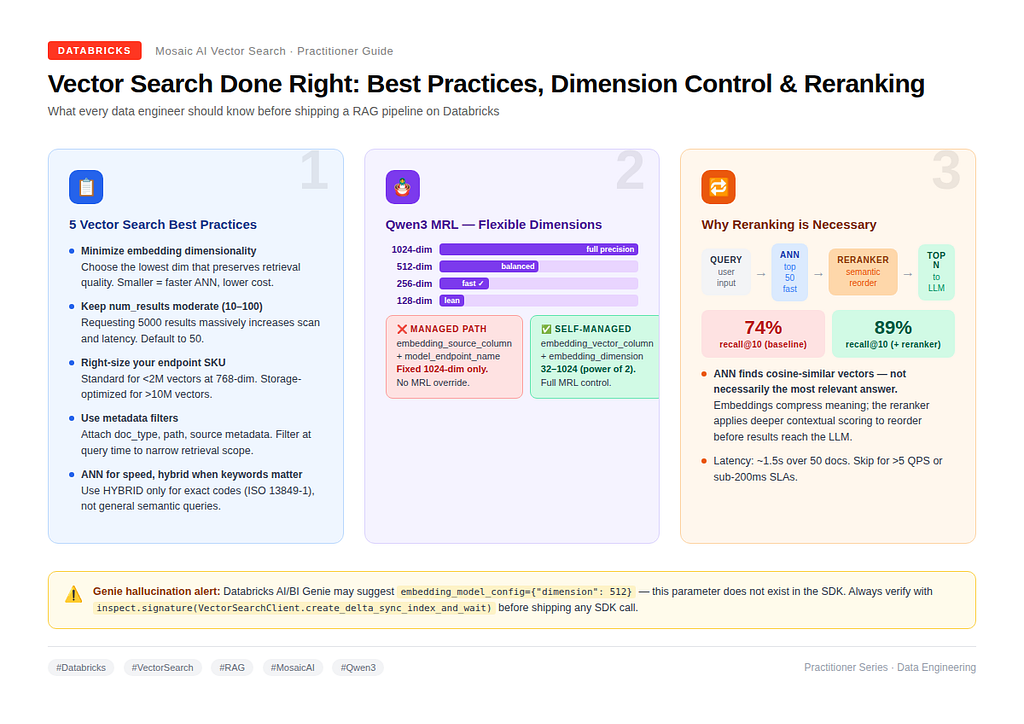
1. Minimise Embedding Dimensionality Where Possible
Higher-dimensional embeddings (1024–1536) may capture more semantic nuance, but they come at a real cost: larger ANN scan surface, higher memory footprint, and reduced query throughput. The recommendation is to choose the lowest dimensionality that preserves retrieval quality for your domain.
This is not about sacrificing accuracy — it is about testing empirically. If a 384-dim model achieves the same recall@10 on your dataset as a 1024-dim model, you should prefer the 384-dim variant for every query from that point forward.
2. Keep num_results Moderate (10–100)
Requesting 5000 results from a vector index does not give you better answers — it gives you a much slower query. The HNSW scan cost scales with num_results. Databricks recommends staying in the 10–100 range unless your downstream application genuinely consumes that volume.
A good default: num_results=50 if you are using the reranker (which processes exactly 50 candidates), and num_results=10 if you are not.
3. Select the Right Endpoint SKU and Size Your Index Appropriately
Databricks Vector Search offers two endpoint types:
- Standard — optimised for low latency, suited for up to roughly 2 million vectors at 768 dimensions.
- Storage-Optimized — designed for up to 1 billion embeddings, lower cost per vector, higher latency per query.
The wrong SKU is not just a cost issue — it directly affects query latency and index build time. For storage-optimised endpoints, embedding dimension must be divisible by 16, and only Triggered sync mode is supported.
4. Use Metadata and Filters to Narrow Retrieval Scope
Every document in your index should carry structured metadata: source system, document type, date range, department, or any other attribute relevant to your use case. Attaching these as columns in your source Delta table costs nothing at index time but enables powerful filtering at query time.
Instead of scanning your entire index for “maintenance interval,” a filter like {"document_type": "manual"} restricts the ANN scan to only the relevant subset. This improves both precision and performance.
5. Prefer ANN for Speed; Use Hybrid Search Only When Keyword Precision Matters
Approximate Nearest Neighbor (ANN) retrieval is the default for good reasons: highest QPS, lowest latency, and purely semantic understanding. Hybrid search (vector + BM25 keyword) adds overhead and should only be enabled when your queries involve exact terminology that semantic search may miss — regulatory codes like ISO 13849–1, product SKUs, or legal citation numbers.
For general “how do I” queries, ANN is the right choice.
Part 2: Qwen3-Embedding-0.6B — MRL Dimensions and a Critical Limitation
Why Qwen3 Is the Right Model for Dimension Control
databricks-gte-large-en and databricks-bge-large-en are fixed-dimension models — they output 1024-dimensional vectors, always. If you want a smaller representation, you need a different model, which means re-embedding and re-indexing everything.
Qwen3-Embedding-0.6B solves this through Matryoshka Representation Learning (MRL). The model is trained to concentrate the most important semantic signal in the earliest dimensions of the output vector. This means you can safely truncate it to any power-of-2 dimension between 32 and 1024 — and the truncated embedding is genuinely useful, not just a corrupted slice.
The dimensions field is passed at embedding generation time:
response = requests.post(
    f"{WORKSPACE_URL}/serving-endpoints/databricks-qwen3-embedding-0-6b/invocations",
    headers={"Authorization": f"Bearer {TOKEN}"},
    json={"input": ["your text here"], "dimensions": 256},
)
The Critical Limitation: Managed Embeddings Cannot Use MRL Dimensions
This is where many engineers run into trouble. The most common way to create a VSI is the managed embeddings path:
vsc.create_delta_sync_index_and_wait(
    endpoint_name=vector_search_endpoint,
    index_name=index_name,
    source_table_name=docs_table,
    primary_key="id",
    embedding_source_column="chunk",
    embedding_model_endpoint_name="databricks-qwen3-embedding-0-6b",
    pipeline_type="TRIGGERED",
)
This works — but it will always produce a 1024-dimensional index. Databricks calls the model internally during sync, and there is no mechanism in the managed path to pass the dimensions override. The embedding_dimension parameter exists in the SDK, but it is only valid on the self-managed path (when you provide pre-computed vectors).
Genie will sometimes suggest a parameter like embedding_model_config={"dimension": 512}. This parameter does not exist. Verify the actual signature before using any suggested parameter:
import inspect
from databricks.vector_search.client import VectorSearchClient
print(inspect.signature(VectorSearchClient.create_delta_sync_index_and_wait))
To Use MRL Dimensions: The Self-Managed Path
Pre-compute embeddings at your target dimension and store them in the source Delta table:
TARGET_DIM = 256  # power of 2, between 32 and 1024

@F.udf(returnType=ArrayType(FloatType()))
def embed_udf(text):
    resp = requests.post(
        f"{WORKSPACE_URL}/serving-endpoints/databricks-qwen3-embedding-0-6b/invocations",
        headers={"Authorization": f"Bearer {TOKEN}"},
        json={"input": [text], "dimensions": TARGET_DIM},
    )
    return resp.json()["data"][0]["embedding"]
docs_df = spark.table(docs_table)
docs_df.withColumn("chunk_embedding", embed_udf(F.col("chunk"))) \
       .write.format("delta").mode("overwrite").saveAsTable(docs_table)
Then create the VSI pointing at the vector column:
vsc.create_delta_sync_index_and_wait(
    endpoint_name=vector_search_endpoint,
    index_name=index_name,
    source_table_name=docs_table,
    primary_key="id",
    embedding_vector_column="chunk_embedding",  # pre-computed
    embedding_dimension=TARGET_DIM,             # must match generation dim
    pipeline_type="TRIGGERED",
)
At query time, embed your query at the same dimension and pass the vector directly:
query_vec = requests.post(
    f"{WORKSPACE_URL}/serving-endpoints/databricks-qwen3-embedding-0-6b/invocations",
    headers={"Authorization": f"Bearer {TOKEN}"},
    json={"input": ["your query"], "dimensions": TARGET_DIM},
).json()["data"][0]["embedding"]

results = index.similarity_search(query_vector=query_vec, num_results=10, columns=["id", "chunk"])
For production: use ai_query() with batch inference instead of a UDF for large-scale embedding jobs. The UDF approach is simple for prototyping but not efficient at scale.
Part 3: Why the Reranker Is Non-Negotiable
The Fundamental Problem With ANN-Only Retrieval
ANN retrieval answers one question: which document vectors are closest to this query vector in embedding space? This is extremely fast and works well at scale. But it has a structural limitation: cosine similarity in embedding space does not perfectly correlate with semantic relevance to a specific query.
Embeddings compress meaning into a fixed-size vector. A chunk about “sensor calibration frequency” and a chunk about “recalibration intervals for safety-critical actuators” may be close in embedding space but differ significantly in their relevance to a specific user question. ANN retrieval cannot distinguish between them — it returns both and ranks them purely by vector distance.
The LLM then receives whichever of those chunks happens to rank highest — not necessarily the most useful one.
What the Reranker Does
The Databricks Reranker takes the top 50 ANN candidates and applies a compound AI system with deeper contextual understanding to re-evaluate each one against the original query text. It is a second-stage scorer that asks: given this specific query, which of these candidates is actually most relevant?
The numbers are meaningful. On Databricks enterprise benchmarks:
- Baseline (ANN only): 74% recall@10
- With reranker: 89% recall@10 — a 15-percentage-point improvement
It also outperforms leading cloud alternatives by 10 percentage points on the same benchmarks.
How to Enable It
One parameter addition to your existing similarity_search call:
results = index.similarity_search(
    query_text="How do I configure sensor recalibration intervals?",
    num_results=5,
    columns=["id", "chunk", "doc_summary"],
    reranker={
        "model": "databricks_reranker",
        "parameters": {
            "columns_to_rerank": ["chunk", "doc_summary"]  # order matters
        }
    }
)
columns_to_rerank gives the reranker access to metadata beyond the main chunk text. The reranker processes columns in order and considers the first 2000 characters it encounters — so put your most semantically rich column first.
When to Skip It
The reranker adds approximately 1.5 seconds of latency. Skip it when:
- Your application requires sub-200ms end-to-end latency
- Your QPS exceeds 5 without additional scaling
- You are running a search bar, not a RAG agent (where LLM generation already dominates latency)
For all other RAG agent use cases, enable it by default.
Putting It All Together
The three topics in this post are connected. Best practice #1 (minimise dimensionality) is only achievable with MRL — and MRL with Qwen3 requires the self-managed embedding path. The reranker, combined with a smaller, faster ANN index, gives you both the throughput improvement from lower dimensions and the precision improvement from semantic reranking.
A well-tuned production pipeline on Databricks looks like this:
Component Choice Reason Embedding model Qwen3-Embedding-0.6B MRL + multilingual + 32K context Embedding dimension 256 (self-managed path) Smaller index, faster ANN Index type Delta Sync, Triggered Automatic sync with source table Retrieval ANN (HNSW) Highest QPS Second stage Databricks Reranker +15pts recall@10 Metadata doc_type, summary, section Passed via columns_to_rerank
The retrieval layer is where RAG agents win or lose. It deserves more careful attention than most teams give it.
Code examples use databricks-vectorsearch Python SDK. Qwen3-Embedding-0.6B and the Databricks Reranker are currently in Public Preview — verify regional availability before production deployment.
If you found this walkthrough useful, connect with me on LinkedIn or follow on Medium — I regularly publish deep-dives on Databricks, Lakehouse architecture, Data Engineering patterns and AI Agents. I’m always happy to discuss the real-world tradeoffs behind these decisions.
#Databricks #VectorSearch #RAG #MosaicAI #DataEngineering #Qwen3 #EmbeddingModels #GenerativeAI
Vector Search Done Right: Best Practices, Qwen3 Dimension Control, and Why Reranking Is… was originally published in Towards AI on Medium, where people are continuing the conversation by highlighting and responding to this story.