A complete setup walkthrough with real code, real gotchas, and honest trade-offs on when SQL-based vector storage wins — and when it doesn’t
🗺️ The Vector Database Landscape in 2025
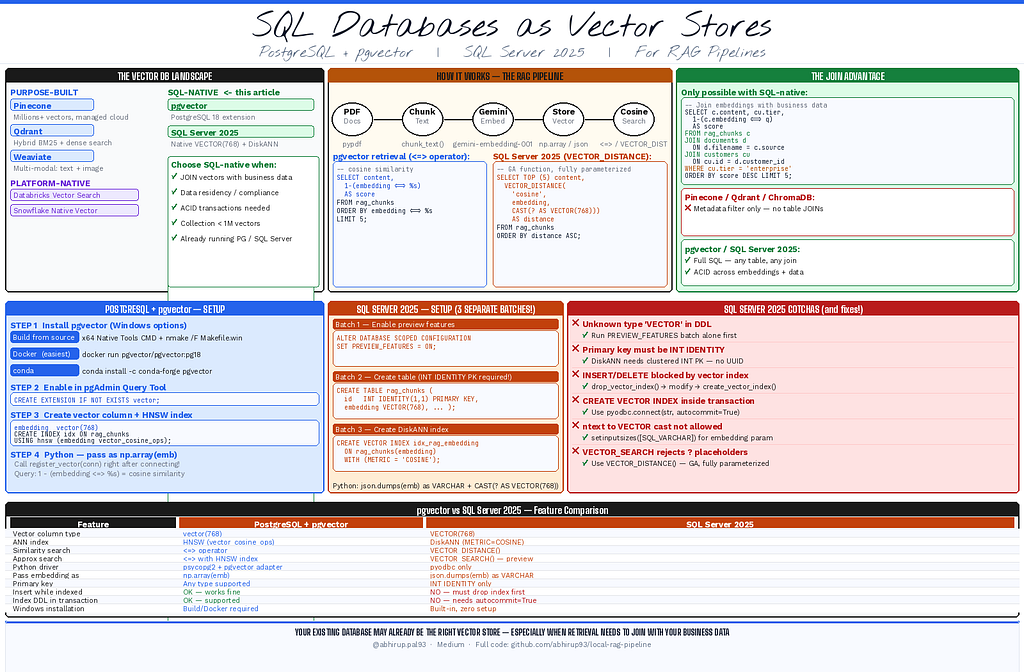
The options for storing and searching embeddings have never been richer. You can choose from purpose-built vector databases like Pinecone, Qdrant, and Weaviate. You can use platform-native solutions like Databricks Vector Search or Snowflake’s native vector support. Or you can reach for the relational databases you already run — PostgreSQL with pgvector, or SQL Server 2025 with its new native VECTOR type.
Each of these is a legitimate choice. None of them is universally correct.
This article focuses on the relational database path — not because it is always the right answer, but because it is a genuinely powerful option that deserves a thorough, honest walkthrough. Both PostgreSQL + pgvector and SQL Server 2025 support:
- 🔢 Native vector column types
- ⚡ Approximate nearest-neighbor indexes
- 🔍 Cosine similarity search
- 🔗 JOINs with your existing relational data
That last point is the one no dedicated vector database can match — and we will demonstrate it concretely. But first, the honest trade-offs.
Where dedicated vector DBs and platform-native solutions win:
- 🚀 Collections exceeding several million vectors — purpose-built ANN engines like Pinecone, Qdrant, and Weaviate are optimized for high-throughput search at extreme scale
- 🖼️ Multi-modal search — text, image, and audio vectors in one index (Weaviate, Qdrant)
- 🔀 Hybrid search — BM25 keyword + dense vectors combined in one query (Qdrant, Elasticsearch)
- ☁️ Already on Databricks or Snowflake — use their native vector support, it is the natural fit for that ecosystem
- 🔧 Zero-infrastructure local prototyping — ChromaDB requires no setup at all
Where SQL-based vector stores win:
- 🔗 Your RAG queries need to JOIN embeddings with relational business data in a single query
- 🔐 Data residency or compliance requirements prevent sending data to cloud vector DB APIs
- ⚖️ You need ACID transactions across embeddings and relational data simultaneously
- 🏗️ You already run PostgreSQL or SQL Server — no new systems to license, monitor, or secure
- 📦 Your collection is under a few million vectors — exact cosine search is sub-millisecond at this scale
The JOIN advantage is worth demonstrating concretely. This query is impossible in any dedicated vector database:
-- Find the most relevant chunks, but only from documents
-- belonging to enterprise-tier customers — a single SQL query
SELECT c.content, 1 - (c.embedding <=> query_vec) AS score
FROM rag_chunks c
JOIN documents d ON d.filename = c.source
JOIN customers cu ON cu.id = d.customer_id
WHERE cu.tier = 'enterprise'
ORDER BY score DESC
LIMIT 5;
Dedicated vector databases offer metadata filtering, but they cannot reach into your business tables. With a SQL-native vector store, retrieval is just a SELECT — and it can touch any table in your database.
The code throughout this article is production-thinking: chunk-level CDC, staleness tracking, recency-weighted retrieval, and conversation memory — all persisted in database tables, not JSON sidecar files.
🏗️ The Full Stack
Component Tool PDF parsing pypdf Embeddings Gemini gemini-embedding-001 (free, MTEB #1) Vector DB (Option A) PostgreSQL 18 + pgvector extension Vector DB (Option B) SQL Server 2025 native VECTOR type LLM openai/gpt-oss-20b via HuggingFace + Groq (free) Memory Conversation history in database tables CDC Chunk-level change data capture Recency Exponential decay re-ranking.
Part 1 — PostgreSQL 18 + pgvector
🔧 Installing pgvector on Windows
This is the part most tutorials skip. pgvector is a PostgreSQL extension — you need to install its binary on the OS before you can CREATE EXTENSION vector in SQL.
The hard truth: pgvector on Windows has no official pre-built installer. The only options are:
Option A — Build from source (requires Visual Studio)
Open the x64 Native Tools Command Prompt for VS 2022 as Administrator and run:
set "PGROOT=C:\Program Files\PostgreSQL\18"
cd %TEMP%
git clone --branch v0.8.0 https://github.com/pgvector/pgvector.git
cd pgvector
nmake /F Makefile.win
nmake /F Makefile.win install
Option B — Docker (cleanest path)
docker run -d -p 5432:5432 -e POSTGRES_PASSWORD=postgres --name pgvector pgvector/pgvector:pg18
This image ships with pgvector pre-installed. Connect pgAdmin to localhost:5432.
Option C — conda-forge (if Anaconda/Miniconda is installed)
conda install -c conda-forge pgvector
🏗️ Creating Tables in pgAdmin
Once pgvector is installed, open pgAdmin 4 → right-click your database → Query Tool → run all at once:
-- Enable the pgvector extension
CREATE EXTENSION IF NOT EXISTS vector;

-- Main chunks table with VECTOR(768) column
CREATE TABLE IF NOT EXISTS rag_chunks (
    id           UUID        PRIMARY KEY DEFAULT gen_random_uuid(),
    source       TEXT        NOT NULL,
    chunk_index  INTEGER     NOT NULL,
    content      TEXT        NOT NULL,
    file_hash    TEXT,
    ingested_at  TIMESTAMPTZ DEFAULT NOW(),
    embedding    vector(768)  -- pgvector native type
);

-- HNSW index for approximate cosine similarity search
CREATE INDEX IF NOT EXISTS idx_rag_chunks_embedding
    ON rag_chunks USING hnsw (embedding vector_cosine_ops);

-- Source filter index
CREATE INDEX IF NOT EXISTS idx_rag_chunks_source
    ON rag_chunks (source);

-- Staleness registry
CREATE TABLE IF NOT EXISTS rag_staleness (
    doc_name    TEXT        PRIMARY KEY,
    file_hash   TEXT        NOT NULL,
    chunk_count INTEGER,
    ingested_at TIMESTAMPTZ DEFAULT NOW(),
    version     INTEGER     DEFAULT 1
);

-- CDC chunk registry
CREATE TABLE IF NOT EXISTS rag_chunk_registry (
    doc_name    TEXT NOT NULL,
    chunk_hash  TEXT NOT NULL,
    chunk_id    TEXT NOT NULL,
    PRIMARY KEY (doc_name, chunk_hash)
);

-- Conversation sessions
CREATE TABLE IF NOT EXISTS rag_sessions (
    session_id  TEXT        PRIMARY KEY,
    created_at  TIMESTAMPTZ DEFAULT NOW(),
    updated_at  TIMESTAMPTZ DEFAULT NOW(),
    model       TEXT,
    embed_model TEXT,
    turn_count  INTEGER     DEFAULT 0
);

-- Conversation turns
CREATE TABLE IF NOT EXISTS rag_turns (
    id          SERIAL      PRIMARY KEY,
    session_id  TEXT        REFERENCES rag_sessions(session_id) ON DELETE CASCADE,
    role        TEXT        NOT NULL CHECK (role IN ('user','assistant')),
    content     TEXT        NOT NULL,
    sources     TEXT[],
    created_at  TIMESTAMPTZ DEFAULT NOW()
);

CREATE INDEX IF NOT EXISTS idx_rag_turns_session
    ON rag_turns (session_id, created_at);
The key element is vector(768) — this is pgvector's native column type. The USING hnsw (embedding vector_cosine_ops) creates an HNSW (Hierarchical Navigable Small World) index for approximate nearest-neighbor search using cosine distance.
📦 Python Dependencies
uv add google-genai pypdf pgvector psycopg2-binary python-dotenv huggingface_hub
⚙️ Connection Setup (Cell 2)
import psycopg2
from pgvector.psycopg2 import register_vector

PG_HOST     = "localhost"
PG_PORT     = 5432
PG_DB       = "postgres"
PG_USER     = "postgres"
PG_PASSWORD = os.environ.get("PG_PASSWORD", "postgres")

def get_pg_conn():
    """Returns a fresh PostgreSQL connection with pgvector registered."""
    conn = psycopg2.connect(
        host=PG_HOST, port=PG_PORT,
        dbname=PG_DB, user=PG_USER, password=PG_PASSWORD
    )
    register_vector(conn)   # tells psycopg2 how to handle vector type
    return conn
The register_vector(conn) call is critical — without it, psycopg2 doesn't know how to serialize Python lists into PostgreSQL's vector binary format.
🗄️ Storing Embeddings (Cell 6)
import numpy as np

def store_in_postgres(chunks, embeddings, doc_name) -> int:
    conn = get_pg_conn()
    cur  = conn.cursor()
    for i, (chunk, emb) in enumerate(zip(chunks, embeddings)):
        cur.execute("""
            INSERT INTO rag_chunks (source, chunk_index, content, embedding)
            VALUES (%s, %s, %s, %s)
        """, (doc_name, i, chunk, np.array(emb)))  # np.array → pgvector handles serialization
    conn.commit()
    conn.close()
    return len(chunks)
Embeddings are passed as np.array(emb) — pgvector's psycopg2 adapter handles the binary serialization automatically after register_vector().
🔍 Retrieval with Cosine Similarity (Cell 6 continued)
def retrieve_context(query: str) -> list[dict]:
    query_embedding = embed_query(query)
    conn = get_pg_conn()
    cur  = conn.cursor()

    cur.execute("""
        SELECT
            content,
            source,
            chunk_index,
            ingested_at,
            1 - (embedding <=> %s) AS cosine_score  -- <=> is cosine distance
        FROM rag_chunks
        ORDER BY embedding <=> %s                    -- sort ascending (smallest distance first)
        LIMIT %s
    """, (np.array(query_embedding), np.array(query_embedding), TOP_K))
    rows = cur.fetchall()
    conn.close()
    return [{"text": r[0], "source": r[1], "chunk_index": r[2],
             "ingested_at": str(r[3]) if r[3] else "",
             "score": round(float(r[4]), 4)} for r in rows]
The <=> operator is pgvector's cosine distance. 1 - distance converts it to cosine similarity where 1.0 = identical and 0.0 = unrelated. The HNSW index makes this query approximate but extremely fast.
🔄 CDC with pgvector — Upsert pattern
The staleness registry uses PostgreSQL’s native upsert syntax:
cur.execute("""
    INSERT INTO rag_staleness (doc_name, file_hash, chunk_count, version)
    VALUES (%s, %s, %s, 1)
    ON CONFLICT (doc_name) DO UPDATE SET
        file_hash   = EXCLUDED.file_hash,
        chunk_count = EXCLUDED.chunk_count,
        ingested_at = NOW(),
        version     = rag_staleness.version + 1;
""", (doc_name, file_hash, chunk_count))
ON CONFLICT DO UPDATE is PostgreSQL's upsert — if the document already exists, bump the version counter and update the hash. This is cleaner than the MERGE statement required by SQL Server.
Part 2 — SQL Server 2025 (Native Vector)
✅ Why SQL Server 2025 Needs No Extension
Unlike pgvector (which is a third-party extension), SQL Server 2025 has native vector support built into the engine. No installation, no compilation, no Docker required. You just need to enable a preview flag.
🔧 Setup in SSMS
Step 1 — Create a dedicated database
Right-click Databases in SSMS Object Explorer → New Database → name it local_rag.
Step 2 — Enable preview features (run alone first)
-- Batch 1: Run this first — must commit before vector objects are recognized
ALTER DATABASE SCOPED CONFIGURATION SET PREVIEW_FEATURES = ON;
Step 3 — Create all tables (run as separate batch)
-- Batch 2: Create all tables
CREATE TABLE rag_chunks (
    id           INT              IDENTITY(1,1) PRIMARY KEY CLUSTERED,
    source       NVARCHAR(500)    NOT NULL,
    chunk_index  INT              NOT NULL,
    content      NVARCHAR(MAX)    NOT NULL,
    file_hash    NVARCHAR(64),
    ingested_at  DATETIME2        DEFAULT GETUTCDATE(),
    embedding    VECTOR(768)      -- native SQL Server 2025 type
);

CREATE INDEX idx_rag_source ON rag_chunks(source);

CREATE TABLE rag_staleness (
    doc_name    NVARCHAR(500)   PRIMARY KEY,
    file_hash   NVARCHAR(64)    NOT NULL,
    chunk_count INT,
    ingested_at DATETIME2       DEFAULT GETUTCDATE(),
    version     INT             DEFAULT 1
);

CREATE TABLE rag_chunk_registry (
    doc_name    NVARCHAR(500)   NOT NULL,
    chunk_hash  NVARCHAR(64)    NOT NULL,
    chunk_id    NVARCHAR(64)    NOT NULL,
    PRIMARY KEY (doc_name, chunk_hash)
);

CREATE TABLE rag_sessions (
    session_id  NVARCHAR(100)   PRIMARY KEY,
    created_at  DATETIME2       DEFAULT GETUTCDATE(),
    updated_at  DATETIME2       DEFAULT GETUTCDATE(),
    model       NVARCHAR(200),
    embed_model NVARCHAR(200),
    turn_count  INT             DEFAULT 0
);

CREATE TABLE rag_turns (
    id          INT             IDENTITY(1,1) PRIMARY KEY,
    session_id  NVARCHAR(100)   NOT NULL REFERENCES rag_sessions(session_id),
    role        NVARCHAR(20)    NOT NULL CHECK (role IN ('user','assistant')),
    content     NVARCHAR(MAX)   NOT NULL,
    sources     NVARCHAR(MAX),
    created_at  DATETIME2       DEFAULT GETUTCDATE()
);

CREATE INDEX idx_rag_turns_session ON rag_turns(session_id, created_at);
Step 4 — Create the DiskANN vector index (run as separate batch)
-- Batch 3: Must run AFTER Batch 2 commits
-- Cannot run inside a transaction — this is a known SQL Server 2025 preview constraint
CREATE VECTOR INDEX idx_rag_embedding
    ON rag_chunks(embedding)
    WITH (METRIC = 'COSINE');
⚠️ Why 3 separate batches? SQL Server’s parser validates VECTOR syntax at parse time, before execution. If ALTER DATABASE SCOPED CONFIGURATION SET PREVIEW_FEATURES = ON and CREATE VECTOR INDEX are in the same batch, the parser rejects the vector syntax before the feature is even enabled. The GO separator in SSMS forces a batch boundary and full commit between statements.
📦 Python Dependencies
uv add google-genai pypdf pyodbc python-dotenv huggingface_hub fpdf2
No pgvector package needed — pyodbc communicates with SQL Server via ODBC.
⚙️ Connection Setup (Cell 2)
import pyodbc

SQL_SERVER   = "YOUR_SERVER_NAME"   # from SSMS title bar
SQL_DATABASE = "local_rag"
SQL_CONN_STR = (
    f"DRIVER={{ODBC Driver 17 for SQL Server}};"
    f"SERVER={SQL_SERVER};"
    f"DATABASE={SQL_DATABASE};"
    f"Trusted_Connection=yes;"    # Windows Authentication - no password needed
)

def get_conn():
    return pyodbc.connect(SQL_CONN_STR)

def get_conn_autocommit():
    """Required for CREATE/DROP VECTOR INDEX - cannot run inside a transaction."""
    return pyodbc.connect(SQL_CONN_STR, autocommit=True)
The get_conn_autocommit() function is not optional — you will need it for every vector index operation. More on this in the gotchas section.
🗄️ Storing Embeddings (Cell 6)
Embeddings are passed to SQL Server as JSON array strings and cast to VECTOR(768):
import json

def vec_to_json(embedding: list[float]) -> str:
    return json.dumps(embedding)   # '[0.12, 0.34, ...]'

def store_in_sqlserver(chunks, embeddings, doc_name) -> int:
    drop_vector_index()    # must drop before any INSERT

    conn = get_conn()
    cur  = conn.cursor()

    sql = """
        INSERT INTO rag_chunks (source, chunk_index, content, embedding)
        VALUES (?, ?, ?, CAST(? AS VECTOR(768)))
    """
    for i, (chunk, emb) in enumerate(zip(chunks, embeddings)):
        cur.setinputsizes([
            (_pyodbc.SQL_WVARCHAR, 500, 0),
            _pyodbc.SQL_INTEGER,
            (_pyodbc.SQL_WVARCHAR, 0,   0),
            (_pyodbc.SQL_VARCHAR,  0,   0),   # ← must be VARCHAR, not NTEXT
        ])
        cur.execute(sql, (doc_name, i, chunk, vec_to_json(emb)))

    conn.commit()
    conn.close()
    create_vector_index()   # recreate after all inserts
    return len(chunks)
🔍 Retrieval with VECTOR_DISTANCE (Cell 6 continued)
def retrieve_context(query: str) -> list[dict]:
    query_embedding = embed_query(query)
    query_vec_json  = vec_to_json(query_embedding)

    conn = get_conn()
    cur  = conn.cursor()

    cur.setinputsizes([(_pyodbc.SQL_VARCHAR, 0, 0)])   # force VARCHAR for vector param

    cur.execute(f"""
        SELECT TOP ({TOP_K})
            content, source, chunk_index, ingested_at,
            VECTOR_DISTANCE('cosine', embedding, CAST(? AS VECTOR(768))) AS distance
        FROM rag_chunks
        ORDER BY distance ASC;
    """, (query_vec_json,))

    rows = cur.fetchall()
    conn.close()
    return [{"text": r[0], "source": r[1], "chunk_index": r[2],
             "ingested_at": str(r[3]) if r[3] else "",
             "score": round(1 - float(r[4]), 4)} for r in rows]
VECTOR_DISTANCE('cosine', ...) returns cosine distance (0 = identical). We convert to cosine similarity with 1 - distance, matching the pgvector convention for consistency.
🚧 SQL Server 2025 Vector Gotchas — Every One We Hit
This is the section most articles don’t write. We hit every one of these in production and the error messages are not always obvious.
Gotcha 1 — Unknown object type ‘VECTOR’ in CREATE statement
Error:
Msg 343, Level 15: Unknown object type 'VECTOR' used in CREATE, DROP, or ALTER statement.
Cause: PREVIEW_FEATURES was not enabled before the vector index DDL, or was in the same batch as the DDL.
Fix: Run ALTER DATABASE SCOPED CONFIGURATION SET PREVIEW_FEATURES = ON as a completely separate batch — its own execution before any other vector-related SQL.
Gotcha 2 — Primary key must be a single 4-byte INT column
Error:
Msg 42217: Table must have a clustered primary key on a single 4 byte INT column to create a vector index.
Cause: We originally used UNIQUEIDENTIFIER (UUID) as the primary key, which is standard practice for distributed systems.
Fix: Change to INT IDENTITY(1,1) PRIMARY KEY CLUSTERED. This is a hard requirement for the DiskANN vector index in SQL Server 2025 preview — no workaround exists.
-- ❌ Does not work with vector index
id  UNIQUEIDENTIFIER PRIMARY KEY DEFAULT NEWID()

-- ✅ Required
id  INT IDENTITY(1,1) PRIMARY KEY CLUSTERED
Gotcha 3 — Cannot INSERT/DELETE/UPDATE while vector index exists
Error:
Msg 42231: Data modification statement failed because table 'rag_chunks' has a vector index on it.
Cause: SQL Server 2025 preview blocks all data modification (INSERT, UPDATE, DELETE) on a table that has a vector index. This applies to both initial load and CDC delete operations.
Fix: Drop the index before any modification, recreate after. This must be done on every write operation:
def drop_vector_index():
    conn = get_conn_autocommit()   # autocommit required
    conn.cursor().execute("""
        IF EXISTS (
            SELECT 1 FROM sys.indexes
            WHERE name = 'idx_rag_embedding'
            AND object_id = OBJECT_ID('rag_chunks')
        )
        DROP INDEX idx_rag_embedding ON rag_chunks;
    """)
    conn.close()

def create_vector_index():
    conn = get_conn_autocommit()   # autocommit required
    conn.cursor().execute("""
        CREATE VECTOR INDEX idx_rag_embedding
            ON rag_chunks(embedding)
            WITH (METRIC = 'COSINE');
    """)
    conn.close()
Gotcha 4 — CREATE VECTOR INDEX cannot run inside a transaction
Error:
Msg 574: CREATE VECTOR INDEX statement cannot be used inside a user transaction.
Cause: pyodbc opens an implicit transaction by default on every connection. CREATE VECTOR INDEX is a DDL statement that SQL Server 2025 requires to run outside any transaction context.
Fix: Always use a separate autocommit=True connection for index creation and deletion:
# ❌ Fails — implicit transaction
conn = pyodbc.connect(SQL_CONN_STR)
conn.cursor().execute("CREATE VECTOR INDEX ...")

# ✅ Works - no transaction wrapper
conn = pyodbc.connect(SQL_CONN_STR, autocommit=True)
conn.cursor().execute("CREATE VECTOR INDEX ...")
Gotcha 5 — Explicit conversion from ntext to vector is not allowed
Error:
Msg 529: Explicit conversion from data type ntext to vector is not allowed.
Cause: pyodbc sends Python strings as nvarchar/ntext (Unicode) by default. SQL Server's CAST(? AS VECTOR(768)) only accepts varchar (ASCII) — it cannot cast from Unicode string types.
Fix: Use setinputsizes to force the embedding parameter as SQL_VARCHAR before every execute:
cur.setinputsizes([
    (_pyodbc.SQL_WVARCHAR, 500, 0),  # source — Unicode fine
    _pyodbc.SQL_INTEGER,              # chunk_index
    (_pyodbc.SQL_WVARCHAR, 0,   0),  # content — Unicode fine
    (_pyodbc.SQL_VARCHAR,  0,   0),  # embedding ← must be ASCII VARCHAR
])
cur.execute(sql, (doc_name, i, chunk, vec_to_json(emb)))
Gotcha 6 — VECTOR_SEARCH does not accept ? parameter placeholders
Error:
Msg 102: Incorrect syntax near '('.Cause: VECTOR_SEARCH() (the approximate DiskANN search function) does not accept pyodbc ? placeholders for the query vector parameter. The SQL parser rejects parameterized vectors in this context.
Fix: Use VECTOR_DISTANCE() instead, which is GA (not preview-only) and fully supports parameterized queries:
-- ❌ VECTOR_SEARCH with parameter placeholder — fails
FROM VECTOR_SEARCH(
    TABLE = rag_chunks USING VECTOR INDEX idx_rag_embedding,
    SIMILAR_TO = CAST(? AS VECTOR(768)),  -- pyodbc cannot pass ? here
    ...
)

-- ✅ VECTOR_DISTANCE - fully parameterized, GA, works perfectly
SELECT TOP (5)
    content,
    VECTOR_DISTANCE('cosine', embedding, CAST(? AS VECTOR(768))) AS distance
FROM rag_chunks
ORDER BY distance ASC;
For typical RAG collections (tens of thousands of chunks), VECTOR_DISTANCE exact search is sub-millisecond and the precision difference vs approximate search is meaningless.
📊 PostgreSQL vs SQL Server — Side by Side
PostgreSQL + pgvector SQL Server 2025 Vector column vector(768) VECTOR(768) Index type HNSW DiskANN Distance search <=> operator VECTOR_DISTANCE() Approximate search <=> with HNSW index VECTOR_SEARCH() (preview) Python driver psycopg2 + pgvector adapter pyodbc Embedding format np.array(emb) json.dumps(emb) as VARCHAR Primary key requirement Any type INT IDENTITY only (for DiskANN) Insert while indexed ✅ Works fine ❌ Must drop index first Transaction for index DDL ✅ Works inside transaction ❌ Must use autocommit Upsert syntax ON CONFLICT DO UPDATE MERGE Windows installation Requires compilation or Docker Built-in, zero setup License Free, open source Developer Edition free Production maturity Very mature Preview (GA coming)
🧠 What Both Databases Add That ChromaDB Cannot
The moment your RAG pipeline needs to touch other data in your system, relational databases win unconditionally:
-- PostgreSQL: Find chunks from documents belonging to a specific customer
SELECT c.content, 1 - (c.embedding <=> query_vec) AS score
FROM rag_chunks c
JOIN documents d ON d.filename = c.source
JOIN customers cu ON cu.id = d.customer_id
WHERE cu.tier = 'enterprise'
ORDER BY score DESC
LIMIT 5;
-- SQL Server: Same query, T-SQL syntax
SELECT TOP 5
    c.content,
    1 - VECTOR_DISTANCE('cosine', c.embedding, CAST(? AS VECTOR(768))) AS score
FROM rag_chunks c
JOIN documents d ON d.filename = c.source
JOIN customers cu ON cu.id = d.customer_id
WHERE cu.tier = 'enterprise'
ORDER BY score DESC;
This is impossible in ChromaDB, Pinecone, or Qdrant. They have metadata filtering, but they cannot join against your business tables. With a SQL-native vector store, your retrieval query is just a SELECT — and it can touch any table in your database.
🏁 Conclusion
Both PostgreSQL + pgvector and SQL Server 2025 are production-ready vector stores for RAG workloads up to a few million chunks. They give you:
- ✅ Native vector column types and ANN indexes
- ✅ Cosine similarity search with full SQL expressiveness
- ✅ JOINs with existing business data — the key differentiator
- ✅ ACID transactions across embeddings and relational data
- ✅ No new infrastructure if you already run these databases
SQL Server 2025 is the simpler path on Windows — zero installation, just enable preview features. PostgreSQL requires pgvector installation but is more mature and has no data-modification-with-index restrictions.
The gotchas with SQL Server 2025 are real but all solvable. The pattern is consistent: drop index → modify data → recreate index, always on autocommit connections for DDL.
Full code for both notebooks is available on GitHub: 👇
- https://github.com/abhirup93/local-rag-pipeline/blob/main/local_rag_postgres.ipynb
- https://github.com/abhirup93/local-rag-pipeline/blob/main/local_rag_sqlserver.ipynb
If this article saved you time or helped you avoid one of those SQL Server gotchas, please give it a clap 👏 — it genuinely helps more practitioners find it. Follow me for more hands-on data engineering and RAG content. I write from the practitioner’s perspective — real code, real errors, real fixes.
Find me on LinkedIn: linkedin.com/in/abhirup-pal-776066a1
🗄️ PostgreSQL + pgvector and SQL Server 2025 as Vector Stores for RAG — A Practitioner’s Guide was originally published in Towards AI on Medium, where people are continuing the conversation by highlighting and responding to this story.