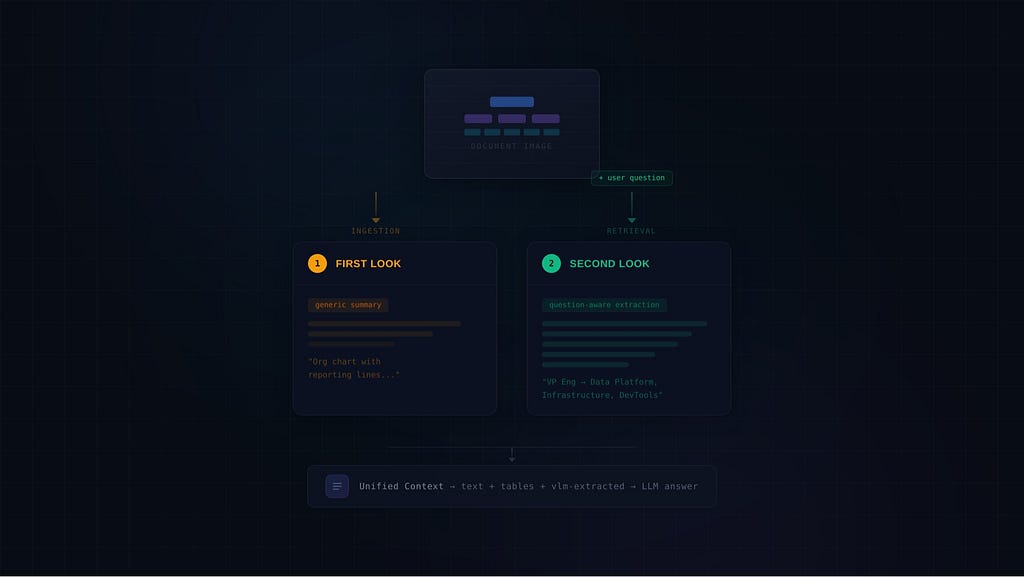
Once at ingestion to make them findable. Again at retrieval to actually answer the question.
Here’s the standard advice for building a multimodal RAG system: take your PDF, extract images, run them through a vision model, store the summaries as text chunks, and move on. Every image gets one shot at being understood, and that understanding happens before a single user question has been asked.
This works fine until it doesn’t. And in production, it stops working exactly when it matters most.
I spent days building a multimodal RAG system for large financial document analysis. Hundreds of pages, dense tables, org charts, flow diagrams, trend graphs. The kind of documents where a single image might contain the answer to 15 completely different questions, and a generic summary captures maybe two of them.
What I ended up building uses two separate vision language models (VLMs) at two different stages of the pipeline. A lightweight VLM generates summaries during ingestion for indexing and retrieval. A more powerful VLM re-reads the actual image at retrieval time, with the user’s question in hand, to extract exactly the information that matters. The VLM output then gets injected as text into the same context window as all the text and table chunks, so a single text LLM makes the final answer with the full picture.
This article walks through why this pattern exists, how it works architecturally, what the trade-offs are, and where it actually makes a difference.
The Problem with Ingestion-Time Image Summaries
Let me give you a concrete example. Imagine a large company’s annual report with an organizational chart on page 12. It shows the CEO at the top, connected to various department heads via reporting lines, with teams and sub-teams branching off each one.
During ingestion, a VLM looks at this chart and produces something like:
“Organizational chart showing CEO at the top with reporting lines to several department heads including VP Engineering, VP Sales, VP Operations, Chief Financial Officer. Each department has teams and sub-teams below them.”
That’s a perfectly reasonable summary. It captures the visual type, the main entities, and the general structure. It would be helpful if someone asked “what departments does the company have?” or “what kind of chart is on page 12?”
But now consider these questions:
- “Which teams directly report to the VP of Engineering?”
- “Does the CFO have oversight over any operations-related teams?”
- “Trace the reporting path from the Data Platform team to the CEO.”
The ingestion summary doesn’t answer any of these. It mentions the VP of Engineering by name but doesn’t list what’s below them. It doesn’t mention the Data Platform team at all. The summary is too high-level because, at ingestion time, there was no way to know which specific connections and entities would matter.
This is the fundamental issue: ingestion-time summaries are question-agnostic, but good answers are question-specific.
The same problem shows up with financial tables rendered as images, trend charts with data points, process flow diagrams, and basically any visual element where the density of information exceeds what a single generic prompt can reasonably extract.
The Standard Approaches and Where They Fall Short
The multimodal RAG space has been moving fast. ColPali, VisRAG, and similar approaches treat document pages as images and embed them directly using vision-language models, skipping text extraction entirely. These are exciting for retrieval, but they still need a VLM to generate the final answer from the retrieved page images.
For document-heavy enterprise RAG systems, the landscape roughly breaks into three patterns:
Pattern 1: Text grounding at ingestion. Convert everything to text during ingestion. Images become summaries, tables become markdown, charts become descriptions. The entire index is text. This is the approach NVIDIA recommends as an “architectural backbone” for multimodal RAG, and it’s the most production-proven pattern. The downside is the information loss I described above. You’re compressing a 2D visual structure into a 1D text description, and you only get one chance to decide what matters.
Pattern 2: Multimodal embeddings. Use a model like voyage-multimodal-3 or CLIP-based embeddings to encode images and text into the same vector space. At retrieval time, a text query can match against image embeddings directly. This solves the retrieval problem, but you still need to actually read the image at generation time, and most implementations just pass the raw image to the generator without question-aware extraction.
Pattern 3: Page-level VLM generation. Retrieve relevant page images via ColPali or similar, then feed the page images directly to a large VLM for answer generation. This preserves all visual information, but it’s expensive at inference time (you’re sending full page images through a VLM for every question) and requires a VLM capable of reasoning across multiple pages simultaneously.
What I found missing was a pattern that combines the efficiency of text grounding with the accuracy of question-aware image reading. That’s the gap the dual-VLM approach fills.
The Dual-VLM Architecture
The core idea is straightforward: use two VLMs at two different stages, with two different jobs.
VLM #1: The Ingestion Summarizer
During ingestion, a smaller, faster VLM looks at every extracted image and produces a structured summary. This summary serves two purposes:
- It becomes the content field of the image chunk that gets indexed alongside text and table chunks.
- It provides the text that gets embedded into a vector for retrieval.
The prompt for this VLM is generic and structured. It asks for a title, visual type, relevance tag, contextual summary, and a transcription of all visible text, numbers, and labels. The instruction is broad: extract everything you can see. If the image is blank or meaningless, return a sentinel value so it gets filtered out.
This VLM doesn’t need to be the most powerful model available. It needs to be fast (because it processes every image in the document) and good enough to produce a summary that will match relevant search queries. In my system, this was a 90B parameter vision-instruct model.
The key design decision here: the summary is for retrieval, not for answering. It needs to contain enough keywords and semantic signal that when someone asks about “compensation committee reporting structure,” the image chunk with the org chart shows up in the search results. It does not need to contain the precise answer.
VLM #2: The Retrieval-Time Reader
When a user asks a question, the retrieval pipeline runs: query expansion, hybrid search, dedup, ranking. The top hits come back as a mix of text chunks, table chunks, and image chunks.
Here’s where it gets interesting. When the context builder encounters an image chunk in the ranked results, it doesn’t just include the ingestion summary. Instead, it:
- Downloads the original image (from object storage or local disk)
- Sends it to a second, more powerful VLM along with the user’s actual question
- Gets back a focused, question-aware extraction
- Injects that extracted text into the context alongside the text and table chunks
The prompt for this VLM is completely different from the ingestion prompt. It says: “Look at this image carefully and extract ALL information relevant to the question.” It has specific instructions for different visual types: for org charts, trace every line from the mentioned entity and list all connected items; for tables, extract all rows and columns with exact numbers; for charts, describe data points and trends.
This VLM needs to be more capable than the ingestion VLM because its job is harder: it has to understand the question, understand the visual structure, and extract the specific subset of information that matters. In my system, this was a 17B parameter mixture-of-experts model that punched well above its weight class.
If the VLM determines the image isn’t relevant to the question, the result gets dropped and the pipeline moves on. This is important because the ingestion summary might have been a good enough semantic match to surface the image in search results, but the actual visual content might not contain what the user needs.
The Unified Context
This is the part most people skip, but it’s arguably the most important architectural decision.
The retrieval-time VLM output does not go directly to the user as an answer. Instead, it gets injected into a unified context string alongside text chunks and table chunks, with a metadata header marking it as VLM-extracted content:
[text | page 11 | section: Corporate Structure]
The company operates through four primary divisions, each led by a VP...
[table | page 45 | Table 3]
| Metric | 2024 | 2023 |
|--------|------|------|
| Total Revenue | $8,412M | $7,953M |
[image | page 12 | vlm-extracted]
The organizational chart shows the following reporting structure:
CEO → VP Engineering
  → Data Platform Team
  → Infrastructure Team
...
A single text LLM then reads this entire combined context and produces the final answer.
Why does this matter? Because it gives the text LLM a second opinion on the VLM output. The VLM might hallucinate a committee name that doesn’t exist. If the text chunks from surrounding pages don’t mention that committee, the text LLM can catch the inconsistency. The VLM might miss a data point. If a table chunk in the same context has the number, the text LLM can fill the gap.
This cross-referencing between image-derived and text-derived evidence is something you cannot get if the VLM output goes directly to the user, and it’s something you cannot get if you only use ingestion-time summaries.
Implementation Details That Matter
Image Storage and Path Resolution
When you’re running VLM reads at retrieval time, the original images need to be accessible. During ingestion, every cropped image gets uploaded to object storage (or saved locally), and the chunk’s path field stores a reference. At retrieval time, the system needs to resolve that path, download the bytes, base64-encode them, and send them to the VLM.
This sounds simple, but in practice it means your retrieval pipeline needs access to the same storage backend as your ingestion pipeline. If you’re running ingestion on your local machine and retrieval in a container, path resolution becomes a real concern. My system handles this with a prefix convention: paths starting with a specific prefix signal remote storage and trigger a download, while local paths go through a host-to-container path mapping.
Capping VLM Reads
VLM calls at retrieval time are expensive, both in latency and cost. Each one takes several seconds (depending on the model and image size). You need a hard cap.
In my system, the cap is 3 images per question. The context builder processes chunks in score order. When it hits an image chunk, it fires the VLM call. If the VLM returns useful content, the image counts toward the cap. If it returns empty or signals irrelevance, the image is skipped and the cap isn’t decremented. This means the system might attempt more than 3 VLM calls per question, but it never injects more than 3 image readings into the context.
The cap also interacts with two other limits: a total character budget for the context (to stay within the text LLM’s useful context window) and a total chunk count. Whichever limit is hit first stops the assembly.
Parallelizing VLM Reads
Here’s a production optimization that’s easy to miss. In the basic implementation, the context builder processes chunks in score order and fires VLM calls inline. That means if three image chunks appear in the ranked results, the pipeline waits 5–7 seconds for the first VLM call, then 5–7 seconds for the second, then 5–7 seconds for the third. That’s 15–21 seconds of sequential waiting on network I/O, and the calls are completely independent of each other.
The fix is to restructure context assembly into two phases:
Phase 1: Parallel pre-fetch. Before assembling context, scan the ranked hits for image candidates. Collect more candidates than you need (roughly 2x your image cap) to absorb VLM failures and irrelevant results. Fire all VLM calls in parallel using a thread pool. VLM inference calls are I/O-bound network requests, so threads give you real concurrency even in Python. Collect the results into a dictionary keyed by image path.
Phase 2: Sequential assembly. Iterate hits in the original score order, exactly as before. Text and table chunks get included directly. When you encounter an image chunk, look up the result in the pre-fetched dictionary instead of blocking on a live API call. If the VLM returned useful content, include it. If it returned empty or flagged irrelevance, skip it. The assembly logic is identical to the sequential version, it just never blocks.
The timing improvement depends on how many images show up and your worker cap:
- 3 images, 2 workers: ~12 seconds instead of ~18 seconds
- 1 image: ~6 seconds either way (no gain, no penalty)
- 6 candidates pre-fetched, 3 relevant: ~18 seconds instead of potentially ~36 seconds
Two things to watch out for. First, keep the worker count low. In my experience, capping at 2 concurrent VLM calls is the sweet spot. Some VLM APIs (especially hosted models behind shared inference endpoints) throw concurrency errors when you push beyond that. Second, over-fetching means you’ll sometimes fire VLM calls on images that never make it into the context because text and table chunks filled the character budget first. This is a cost trade-off: you’re paying for a few extra VLM calls per question to shave seconds off the image-heavy case. With a 2x over-fetch factor and a cap of 3, that’s at most 6 VLM calls per question, which is a bounded and predictable cost.
This optimization matters most for the 20–30% of questions where images actually contribute to the answer. For the rest, the pre-fetch phase finishes instantly (no image chunks in the top hits) and the assembly runs exactly as before.
Why Two Different Models?
You might wonder: why not use the same VLM for both ingestion and retrieval? There are two practical reasons.
Throughput vs. quality trade-off. Ingestion processes every image in the document. For a 300-page annual report, that’s 30–80 images. Each VLM call during ingestion takes a few seconds. Using a heavyweight model would turn a 30-minute ingestion into a 2-hour ingestion. The ingestion VLM needs to be fast and good enough, not best-in-class.
Retrieval, on the other hand, processes at most 3 images per question. The latency budget is larger because the user is waiting for a single answer, not batch-processing a document. You can afford to use a slower, more capable model.
Generic vs. targeted prompting. The ingestion prompt asks “describe everything you see.” The retrieval prompt asks “extract everything relevant to this specific question.” These are fundamentally different tasks. A model that’s excellent at broad visual description might not be the best at targeted information extraction, and vice versa. Using two models lets you pick the best tool for each job.
In my experience, the ingestion VLM was a large dense vision-instruct model optimized for comprehensive image description, while the retrieval VLM was a mixture-of-experts model (128 experts, 17B active parameters per forward pass) that excelled at instruction following and structured extraction. The MoE architecture made retrieval-time inference fast while delivering better accuracy on the targeted extraction task.
The Question-Aware Advantage, Concretely
Let’s walk through what actually happens differently with this architecture for a few common scenarios.
Scenario: Trend Chart
A line chart shows “Quarterly Revenue” over 5 years with two lines (actual vs. forecast).
Ingestion summary: “Line chart showing Quarterly Revenue trends from 2020–2024 with actual and forecast values. Actual line shows upward trend. Forecast line shows slight increase.”
Retrieval-time read for “What was the quarterly revenue in Q4 2024 vs Q4 2023?”: “The chart shows Quarterly Revenue: Q4 2024 actual = $2.18B, Q4 2023 actual = $2.04B. The year-over-year increase was approximately $140M or 6.9%.”
The ingestion summary captures the shape but not the numbers. The retrieval-time read, guided by the question about specific years, extracts the exact data points.
Scenario: Organizational Chart
Ingestion summary: “Organizational chart showing CEO with reporting lines to department heads.”
Retrieval-time read for “Which teams report to the VP of Engineering?”: “Tracing from the VP of Engineering node, three teams are directly connected: Data Platform, Infrastructure, and Developer Tools. All three show solid reporting lines (not dotted advisory lines).”
The ingestion summary is a 10,000-foot view. The retrieval-time read traces specific connections because the question told the VLM exactly which node to focus on.
Scenario: Complex Table Rendered as Image
Some tables in complex documents are rendered as images rather than extractable HTML/markdown (merged cells, colored headers, footnote markers that break parsers).
Ingestion summary: “Table showing product defect rates by category with multiple columns for different quarters and product lines.”
Retrieval-time read for “Which product category shows no reported defects?”: “In the Product Quality table, the ‘Digital Services’ category shows ‘N/A’ values for defect count in both the Q3 and Q4 2024 columns. All other categories have numeric values.”
Without the question, the VLM had no reason to focus on n/a values. With the question, it knew exactly what to look for.
Trade-Offs and When Not to Use This Pattern
This isn’t a universally superior approach. Here are the honest trade-offs.
Latency. Every VLM call at retrieval time adds seconds. Parallelizing the calls (as described above) helps significantly for the multi-image case, but even a single VLM call adds 5–7 seconds to the response time. If most of your questions are answered by text and table chunks (which they are, in financial documents), those VLM calls often fire on images that turn out to be not relevant. You pay the latency cost before knowing whether the image was useful.
Cost. Retrieval-time VLM calls happen for every question, not once during ingestion. If you have high query volume, the cost multiplies. Ingestion-time summarization amortizes the VLM cost across all future queries.
Complexity. You now have two VLMs to manage, two sets of prompts to tune, and an image storage layer that needs to be accessible from the retrieval path. This is meaningful operational overhead compared to a text-only retrieval pipeline.
When ingestion-time summaries are probably enough:
- Your images are simple (single charts, product photos, diagrams with one clear message)
- Your questions are predictable and narrow
- The VLM summary captures 90%+ of what users will ask about
- Latency requirements are strict (sub-2-second responses)
When retrieval-time reading is worth the cost:
- Images are information-dense (org charts, complex tables, multi-panel figures)
- Questions are unpredictable and varied
- Accuracy matters more than speed (financial analysis, legal review, medical imaging)
- You need cross-referencing between visual and textual evidence
- Ingestion-time summaries keep missing the specific details users ask about
Making It Work in Production
A few practical lessons from running this in production.
Keep both the summary and the original image. Store the ingestion summary as the chunk’s content (for retrieval), and store the image path as a separate field (for retrieval-time reading). Don’t throw away the summary just because you’re doing retrieval-time reads. The summary is what makes the image findable in the first place.
Use the ingestion summary for relevance filtering. Before firing an expensive VLM call, you can check whether the ingestion summary has any keyword overlap with the question. If the summary is about a “revenue breakdown pie chart” and the question is about “governance structure,” you might skip the VLM call entirely.
Set aggressive caps and measure. Start with a cap of 2–3 images per question and measure how often images actually contribute to the final answer. In my experience, for financial document analysis, roughly 20–30% of questions benefit from image context. The rest are answered entirely from text and table chunks. Those 20–30% are the questions where this architecture makes the difference between a correct answer and a partial one.
Test with the worst-case image, not the average one. Dense org charts, multi-page tables rendered as images, overlapping annotations. The simple charts will work fine with any approach. The complex visuals are where you discover the real failure modes.
The unified context is non-negotiable. The temptation is to return the VLM output directly as the answer when the VLM seems confident. Don’t do it. VLMs hallucinate, especially on dense financial documents. The text LLM acting as a final arbiter, with access to both VLM-extracted and text-extracted evidence, catches errors that would otherwise reach the user.
The Broader Pattern
Zooming out, the dual-VLM approach is really an instance of a more general principle: cheap models for indexing, expensive models for answering.
This principle already exists in text RAG. We use small, fast embedding models to index documents, and large, expensive LLMs to generate answers. Nobody suggests using GPT-4 to generate embeddings.
The multimodal RAG space hasn’t fully internalized this separation yet. Most tutorials and frameworks treat image processing as a one-shot ingestion step, using whatever VLM is available to produce a summary, and then never looking at the image again. The dual-VLM pattern applies the same indexing-vs-answering separation to visual content.
As VLMs continue to get faster and cheaper, the cost argument against retrieval-time reading weakens. And as documents get more complex (multi-modal reports, interactive dashboards exported to PDF, slide decks with embedded animations rendered as static images), the accuracy argument in favor of question-aware reading only gets stronger.
If you’re building multimodal RAG for any domain where images carry dense, structured information, and where users ask unpredictable questions, it’s worth considering whether your pipeline should look at those images twice.
If you found this useful, I write about production RAG engineering, agentic systems, and LLM architecture. Follow along if these topics interest you.
Your Multimodal RAG Pipeline Should Look at Images Twice was originally published in Towards AI on Medium, where people are continuing the conversation by highlighting and responding to this story.