Coding agents are getting smarter, but they still waste most of their tokens reading irrelevant code. Here is how AST-based semantic search, LSP, and a lightweight CLI can change that. We built an embedded lightweight semantic code search tool for coding agents that is complementary to LSP and this is what we’ve learned.
https://github.com/cocoindex-io/cocoindex-code
The Problem: Coding Agents Are Flying Blind
If you have used Claude Code, Cursor, Codex, or any AI coding agent recently, you have probably noticed something: these tools spend a lot of time and tokens just trying to understand your codebase. They grep through files, read entire directories, and often pull in far more context than they actually need. The result? Slow completions, bloated context windows, and wasted API costs.
The fundamental issue is that grep and basic text search do not understand code structure. When an agent searches for “authentication logic,” grep returns every line containing the word “auth” — comments, variable names, import statements, test mocks — all mixed together with no sense of what is actually relevant. This is where techniques like the Language Server Protocol (LSP) and semantic search come in, each solving a different slice of the problem.
What Is LSP and When Does It Help?
The Language Server Protocol (LSP) was originally created by Microsoft to standardize how code editors communicate with language-specific tooling. It provides features like go-to-definition, find-all-references, autocompletion, and diagnostics through a JSON-RPC based protocol. Any editor that speaks LSP can instantly get rich language support without building custom integrations for each language.
LSP excels at precise, structural operations: jumping to where a function is defined, finding every place a class is used, or renaming a symbol across the entire project. These are deterministic queries with exact answers. If you know the name of the symbol you are looking for, LSP is unbeatable.
But LSP has a fundamental limitation: it requires you to already know what you are looking for. If a developer (or an AI agent) is exploring an unfamiliar codebase and wants to understand “how are user sessions managed” or “where is the payment processing logic,” LSP cannot help. It does not do fuzzy matching or conceptual search. It operates on exact symbols and references within a fully compiled or parsed project.
When Semantic Search Fills the Gap
Semantic search takes a completely different approach. Instead of matching exact text, it uses embedding models to understand the meaning of code. You ask “how are database connections pooled?” and it finds the relevant connection manager class, even if the word “pool” never appears in the code. It works by converting code chunks into vector embeddings and performing similarity search against a natural language query.
The key insight is that AST (Abstract Syntax Tree) parsing makes semantic search dramatically better for code. Rather than chunking code by arbitrary line counts, AST-aware chunking splits code along structural boundaries — functions, classes, methods, modules. This means each chunk is a meaningful unit of code, and the embedding captures its actual purpose rather than a random slice of text.
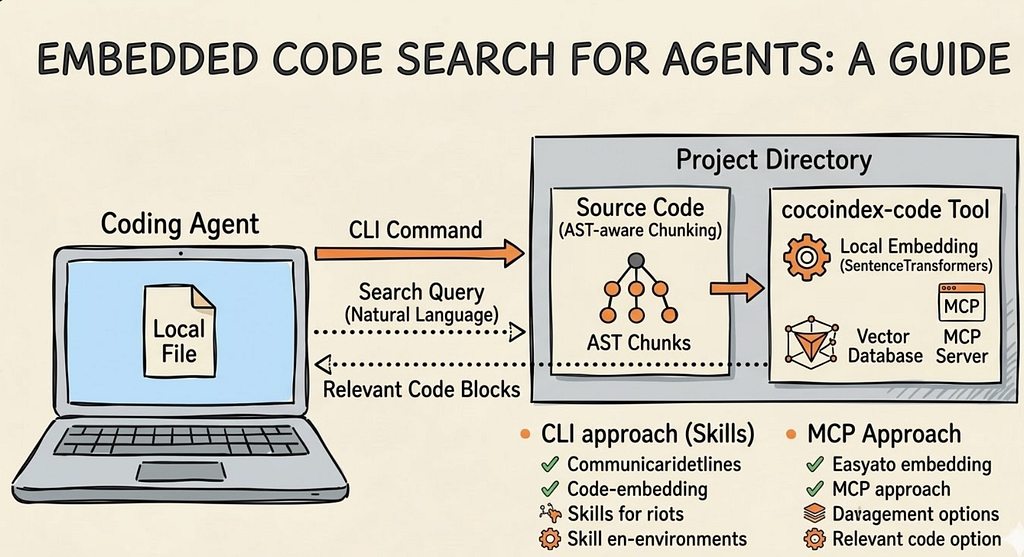
This is exactly the approach taken by CocoIndex Code, an open-source project I recently launched. It is a lightweight, AST-based semantic code search engine that pairs with any coding agent. The tool parses your codebase using tree-sitter for multi-language AST support, generates embeddings (locally by default with SentenceTransformers, no API key needed), and stores them in an embedded database. When a coding agent needs to find relevant code, it queries by meaning rather than by exact text match.
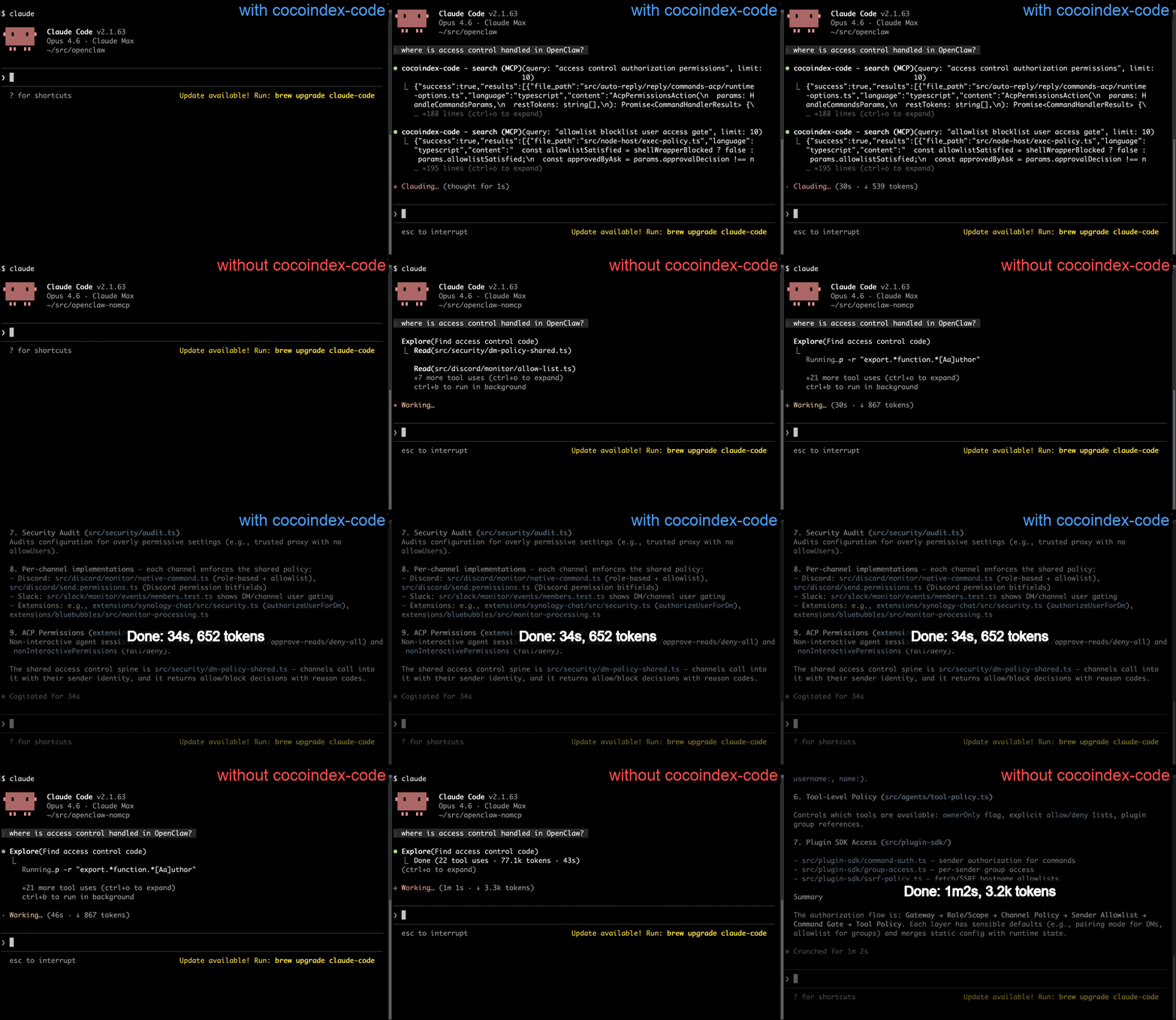
The result? About 70% token savings. Instead of feeding your agent entire files, you feed it only the structurally relevant code chunks that match the query. This translates directly to faster completions and lower API costs.
Zero Config Setup: Getting Started in One Minute
One of the design goals of CocoIndex Code is radical simplicity. Install it and go — zero configuration needed. The recommended approach is to install the skill for your coding agent:
pipx install cocoindex-code
npx skills add cocoindex-io/cocoindex-code
That is it. No init commands, no configuration files. The skill teaches the agent to handle initialization, indexing, and searching on its own. It keeps the index up to date as you work. It integrates seamlessly with Claude Code, Codex, Cursor, OpenCode, and more.
CLI vs MCP: Two Ways to Connect Your Agent
CocoIndex Code supports two integration modes: CLI (via Skills) and MCP (Model Context Protocol). Both serve the same purpose — giving your coding agent access to semantic code search — but they have different tradeoffs worth understanding.
The CLI Approach (Skills — Recommended)
The CLI approach uses Skills, a system where the agent learns how to use the tool through a description file rather than through a persistent protocol connection. When you install the ccc skill, it provides the agent with instructions on when and how to invoke the CLI commands (ccc init, ccc index, ccc search). The agent then shells out to the CLI as needed.
Pros of the CLI approach:
- Universal compatibility: CLI works with any agent that can execute shell commands. No special protocol support required. This makes it the most portable option.
- - Simplicity: There is no persistent server process to manage for the protocol layer. The background daemon handles indexing, but the search interface is just a command.
- - Transparency: You can run ccc search directly in your terminal to inspect results, debug queries, or verify the index is working correctly.
- - Composability: CLI tools are inherently composable with other Unix tools. You can pipe, filter, and script them.
- - Having a comeback moment: As the X post announcing the launch put it, CLI is having a comeback. In a world of AI agents that fundamentally operate by executing commands, CLI is the most natural interface.
Cons of the CLI approach:
- The agent needs to parse CLI output (text-based), which can be less structured than a protocol response.
- - Each invocation spawns a new process, adding slight overhead compared to a persistent connection.
- - Requires the agent to have shell execution capabilities, which some sandboxed environments may restrict.
The MCP Approach
MCP (Model Context Protocol) is a standardized protocol for AI agents to communicate with external tools. Instead of shelling out to a CLI, the agent maintains a persistent connection to an MCP server that exposes tools like semantic_search as structured JSON-RPC calls. CocoIndex Code can run as an MCP server via ccc mcp, integrating with Claude Code, Codex, Cursor, and other MCP-compatible agents.
Pros of the MCP approach:
- Structured responses: The agent gets JSON-formatted results with typed fields, making it easier to programmatically process search results.
- - Persistent connection: No process startup overhead per query. The MCP server stays running and responds instantly.
- - Standardized discovery: MCP allows agents to discover available tools dynamically, so the agent knows what capabilities are available without hardcoded knowledge.
- - Ecosystem momentum: MCP is becoming a standard for AI tool integration, with growing support across major agent platforms.
Cons of the MCP approach:
- More complex setup: You need to configure the MCP server in your agent’s settings file, specifying the command and arguments.
- - Less portable: Not all agents support MCP yet. CLI is universally available wherever shell access exists.
- - Harder to debug: Since the communication happens over a protocol, it is less transparent than running a CLI command and reading the output.
- - Server management: You have an additional long-running process to manage, though CocoIndex Code handles this gracefully with its daemon architecture.
In practice, the CocoIndex Code team recommends the Skill/CLI approach for most users because of its simplicity and universal compatibility. MCP is a great option if your agent platform has strong MCP support and you want the cleanest possible integration.
Why This Matters for the Future of Coding Agents
The context engineering problem is one of the biggest bottlenecks in AI-assisted development today. Models are getting better, context windows are getting larger, but feeding the right information to the model at the right time remains an unsolved challenge. Tools that combine structural code understanding (via AST parsing) with semantic similarity search represent a pragmatic middle ground between the precision of LSP and the flexibility of full-text search.
The shift we are seeing is significant: coding agents are moving from brute-force file reading to intelligent, indexed retrieval. And the interface for that retrieval is increasingly the humble CLI — a tool that has been around for decades but is finding a new purpose as the native language of AI agents.
Try It Out
CocoIndex Code is open source under the Apache-2.0 license. You can find it on GitHub at https://github.com/cocoindex-io/cocoindex-code. It supports Python, JavaScript, TypeScript, Rust, Go, Java, C/C++, and 20+ more languages out of the box. The default embedding model runs entirely locally, so there is no API key and no cost to get started.

If you find it useful, give it a star on GitHub — it helps more developers discover the project. And if you are working on large enterprise codebases, CocoIndex also supports shared indexes across teams for even more efficiency.
Why Your Coding Agent Needs More Than Grep: LSP, Semantic Search, and the Rise of the CLI was originally published in Towards AI on Medium, where people are continuing the conversation by highlighting and responding to this story.