Why AI Agents Fail in Production: Lessons from Shipping 7 Agents Across Healthcare, Logistics, and Fintech

The 5 architecture failure patterns we encountered across 7 enterprise deployments — and the production code that fixed each one.
In February 2025, we deployed an AI agent for a logistics company to replace a three-person dispatch coordination team. The agent handled route optimization, driver assignment, delivery window negotiation, and customer notification — all orchestrated through a single LLM-powered pipeline connected to six APIs.
The demo was flawless. The CEO watched it process twelve orders in under a minute, send driver confirmations via SMS, and update the customer portal in real time. He signed the contract that afternoon.
Three weeks later, the agent assigned the same driver to two overlapping routes 400 kilometers apart, sent confirmation messages to the wrong customers, and — when the operations manager tried to intervene — the agent cheerfully acknowledged the correction and then repeated the exact same mistake in the next batch.
The failure wasn’t a bug. The model was working exactly as designed. The architecture around it was not.
That logistics agent was one of seven AI agents our team shipped to production between January 2025 and March 2026 — across healthcare, e-commerce, financial services, and supply chain. Every single one of them broke in production. Not because the models were bad, but because production environments expose failure modes that no development environment can simulate.
The numbers tell the story: Gartner projects that 40% of enterprise applications will embed AI agents by the end of 2026, up from less than 5% in 2025. Yet industry data shows that 88% of AI agent projects fail before reaching production. The agentic AI market has surged past $9 billion — and most of that investment is producing demos, not deployments.
This article documents the five failure patterns we encountered across those seven deployments and the architectural decisions that resolved each.
The 5 AI Agent Failure Patterns at a Glance
Before diving into the details, here is a summary of every production failure pattern, its root cause, and the architecture fix that resolved it:
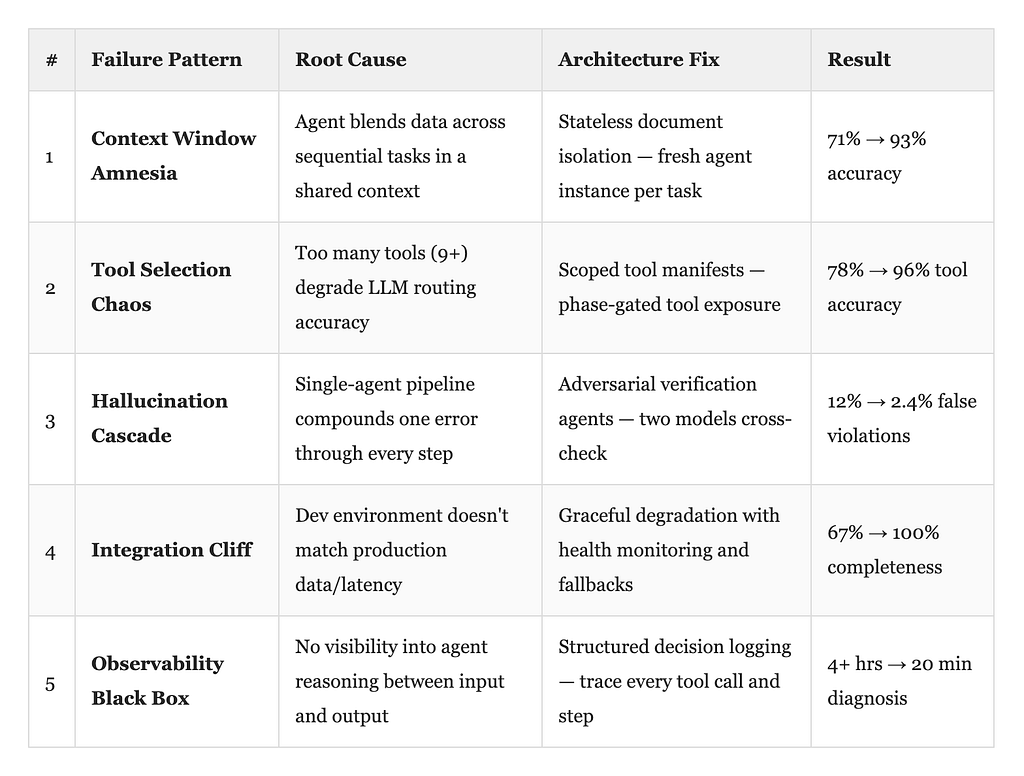
Now let’s break down each one.
Why Do AI Agents Break Differently Than Traditional Software?
Traditional software fails predictably. A null pointer exception crashes the same way every time. A database timeout returns the same error code. You can write tests for these failures because they’re deterministic.
AI agents fail stochastically. The same input can produce different outputs. A failure in step three can manifest as a confident, well-formatted, completely wrong output in step seven. And the agent will never tell you something went wrong — it will present fabricated data with the same confidence as verified data.
This is the fundamental challenge:
- You’re not debugging code — you’re debugging reasoning. Traditional debugging tools don’t apply when the system’s failure mode is “it sounds right but isn’t.”
- Failures are silent. A wrong output in the correct format passes every validation check you built for traditional software.
- Errors compound. In a multi-step pipeline, each step trusts the previous step’s output. One wrong assumption becomes an unshakeable “fact” by step three.
- Reproduction is unreliable. The same prompt, same data, same model — different result. You cannot reliably reproduce stochastic failures.
Here are the five patterns we learned the hard way.
Failure Pattern 1: Context Window Amnesia
Context Window Amnesia occurs when an AI agent processes multiple independent tasks within a single context window and begins blending data across them. The agent doesn’t forget — it cross-contaminates.
Where we saw it: Healthcare document processing agent (home health intake automation)
What happened: Our agent processed patient intake documents — insurance cards, prior authorization forms, clinical notes — and structured the extracted data into EHR-compatible records. During testing with individual documents, extraction accuracy was 94%. In production, accuracy dropped to 71% when the agent processed batches of 15 or more documents in sequence.
The root cause: The agent was processing documents within a single context window, carrying forward the extraction context from previous documents. By document twelve, the context window was saturated with residual information from documents one through eleven. The agent started blending patient data — pulling an insurance ID from patient A and attaching it to patient B's clinical notes.
This isn’t a hallucination in the traditional sense. The data was real. It was just from the wrong patient. And because it was real data in the correct format, no validation rule caught it.
How we fixed it — Stateless Document Isolation:
async def process_document_batch(documents: list[Document]) -> list[ExtractedRecord]:
    """Each document gets its own fresh context — no cross-contamination."""
    results = []

    for doc in documents:
        # Fresh agent instance per document — no carried state
        agent = create_extraction_agent(
            system_prompt=EXTRACTION_PROMPT,
            tools=[ocr_tool, terminology_lookup, schema_validator],
            max_context_tokens=8192  # Constrained window forces focus
        )

        # Extract with isolated context
        raw_extraction = await agent.run(doc.content)

        # Cross-reference validation OUTSIDE the agent
        validated = await validate_against_source(
            extraction=raw_extraction,
            original_document=doc,
            check_fields=["patient_id", "insurance_id", "date_of_birth"]
        )

        results.append(validated)
        # Agent instance is discarded — context cannot leak

    return results
The principle: Never let an agent accumulate context across independent tasks. Each task gets a fresh agent instance. Validation occurs outside the agent’s reasoning loop, using deterministic code to compare outputs against source documents.
Result: We went from 71% accuracy back to 93% overnight. The remaining 7% were genuine OCR-quality issues, not architectural failures.
Failure Pattern 2: Tool Selection Chaos
Tool Selection Chaos occurs when an AI agent has access to too many tools simultaneously, causing it to spend more reasoning tokens deciding which tool to use than actually solving the problem.
Where we saw it: Enterprise workflow automation agent (logistics dispatch system)
What happened: The dispatch agent had access to nine tools: route optimizer, driver availability checker, weather API, delivery window calculator, SMS sender, email sender, CRM updater, order management writer, and exception logger. During the first week of production, we noticed the agent was calling the route optimizer an average of 4.2 times per order — even when the route was already cached and valid.
Worse, when the weather API returned a timeout (which happened during peak hours), the agent would sometimes route around the failure by skipping weather data entirely, or by calling the exception logger and halting the entire workflow. Same timeout. Different responses. No pattern we could predict.
The root cause: Tool overload degrades routing accuracy. Research from Berkeley’s BAIR lab has shown that LLM tool-selection accuracy drops measurably when agents have access to more than 7–8 tools simultaneously. Our agent had nine, with overlapping descriptions (the SMS sender and email sender had nearly identical tool descriptions — “send a notification to the specified recipient”). The agent was spending more reasoning tokens deciding which tool to use than actually solving the dispatch problem.
How we fixed it — Scoped Tool Manifests:
Instead of giving the agent all nine tools at once, we created phase-specific tool manifests that expose only the tools relevant to the current step.
TOOL_MANIFESTS = {
    "route_planning": {
        "tools": [route_optimizer, weather_api, delivery_window_calculator],
        "description": "Calculate optimal route considering weather and time constraints"
    },
    "driver_assignment": {
        "tools": [driver_availability_checker, route_optimizer],
        "description": "Match available drivers to planned routes"
    },
    "notification": {
        "tools": [sms_sender, email_sender],
        "description": "Notify drivers and customers of assignments",
        "selection_rule": "SMS for drivers, email for customers — never ask the model to choose"
    },
    "system_update": {
        "tools": [crm_updater, order_management_writer, exception_logger],
        "description": "Persist decisions to downstream systems"
    }
}

async def dispatch_order(order: Order):
    """Phase-gated execution — agent sees only relevant tools at each step."""

    # Phase 1: Plan the route (3 tools visible)
    route = await agent.run(
        task=f"Plan delivery route for order {order.id}",
        tools=TOOL_MANIFESTS["route_planning"]["tools"],
        timeout=30
    )

    # Phase 2: Assign driver (2 tools visible)
    assignment = await agent.run(
        task=f"Assign best available driver for route {route.id}",
        tools=TOOL_MANIFESTS["driver_assignment"]["tools"],
        context={"route": route}
    )

    # Phase 3: Notify — deterministic, not agent-decided
    await sms_sender.send(driver=assignment.driver, route=route)
    await email_sender.send(customer=order.customer, eta=route.eta)

    # Phase 4: Update systems — deterministic
    await crm_updater.log(order=order, assignment=assignment)
    await order_management_writer.update(order_id=order.id, status="dispatched")
The principle: Reduce the agent’s decision surface at every step. Anything that can be deterministic should be deterministic. The agent should only make decisions where reasoning is actually required — route planning and driver matching. Everything else is code.
Result: Tool-call accuracy went from 78% to 96%. The redundant route optimizer calls dropped from 4.2 to 1.1 per order.
Failure Pattern 3: The Hallucination Cascade
A Hallucination Cascade is what happens when a single AI agent’s incorrect output in one step becomes the unquestioned input for every subsequent step — compounding one small error into a chain of logically consistent but factually wrong conclusions.
Where we saw it: Financial services compliance agent (regulatory document analysis)
What happened: The agent reviewed loan applications against regulatory requirements and flagged potential compliance issues. In one case, the agent misidentified a borrower’s income verification document as a “stated income” declaration (a specific regulatory category with different rules). Based on that misclassification, it applied the wrong compliance checklist, triggering three false violations and resulting in a regulatory hold recommendation that froze a $2.3 million commercial loan for six days.
Every step after the initial misclassification was logically correct. The agent followed the right process for the wrong category. And because each subsequent step validated the previous one’s output as context, the error compounded with increasing confidence.
The root cause: Single-agent pipelines have no checkpoint, no second opinion, no moment where the system asks, “Does this actually make sense?” A hallucination in step one becomes an assumption in step two and a fact in step three.
How we fixed it — Adversarial Verification Agents:
async def review_loan_application(application: LoanApplication):
    """Two-agent architecture: classifier + verifier with explicit disagreement handling."""

    # Agent 1: Primary classification
    primary_agent = create_agent(
        role="Document Classifier",
        prompt="Classify this income document. State your classification AND the "
               "specific evidence from the document that supports it.",
        model="claude-sonnet-4-6"
    )
    classification = await primary_agent.run(application.income_docs)

    # Agent 2: Adversarial verification — different prompt, different model
    verifier_agent = create_agent(
        role="Classification Auditor",
        prompt="""You are reviewing a colleague's document classification.
        Your job is to find errors. Check:
        1. Does the cited evidence actually appear in the source document?
        2. Does the evidence support the stated classification?
        3. Are there alternative classifications that fit the evidence equally well?
        Be skeptical. Disagreement is valuable.""",
        model="claude-haiku-4-5"  # Different model reduces correlated errors
    )

    verification = await verifier_agent.run({
        "original_document": application.income_docs,
        "proposed_classification": classification,
    })

    if verification.agrees:
        return apply_compliance_checklist(classification.category)
    else:
        # Escalate to human reviewer with both perspectives
        return escalate_to_human(
            document=application.income_docs,
            primary_opinion=classification,
            verifier_objection=verification.reasoning,
            priority="high"
        )
The principle: Never let a single agent’s output flow unchallenged into a high-stakes decision. Use a second agent — ideally a different model — whose explicit job is to find errors in the first agent’s reasoning. When they disagree, escalate to a human. This is not inefficiency. This is the cost of reliability.
Result: False violation rate dropped from 12% to 2.4%. The remaining 2.4% were genuine edge cases that correctly triggered human review.
Failure Pattern 4: The Integration Cliff
The Integration Cliff is the gap between the environment in which you built your AI agent and the environment in which you deploy it. Your agent works perfectly against 12,000 records with 45ms latency — then meets 340,000 records with 1,200ms spikes in production.
Where we saw it: E-commerce product recommendation agent
What happened: The recommendation agent worked beautifully in our development environment, where the product catalog had 12,000 SKUs and API response times averaged 45ms. In the client’s production environment, the catalog had 340,000 SKUs, and API response times averaged 380ms under normal load, spiking to 1,200ms during evening traffic peaks.
The agent started timing out mid-recommendation, returning partial results. Because the agent’s output was a ranked list of products, partial results looked like valid recommendations — just shorter lists. The frontend displayed them without error. Customers saw three recommendations instead of twelve. Conversion dropped 23% before anyone realized the agent was silently failing.
The root cause: The agent was designed for a data environment that didn’t match production. It’s not a code bug. It’s an assumption failure. And it’s the most common reason AI agents that “work in dev” silently degrade in production.
How we fixed it — Graceful Degradation with Health Signals:
class RecommendationPipeline:
    """Production-aware recommendation with explicit health monitoring."""

    def __init__(self, catalog_client, agent, cache):
        self.catalog = catalog_client
        self.agent = agent
        self.cache = cache
        self.health = HealthMonitor(
            expected_result_count=12,
            max_latency_ms=500,
            min_confidence_threshold=0.7
        )

    async def get_recommendations(self, user_context: dict) -> RecommendationResult:
        start = time.monotonic()

        # Layer 1: Try agent-powered personalization
        try:
            agent_result = await asyncio.wait_for(
                self.agent.recommend(user_context),
                timeout=2.0  # Hard timeout — never let the agent think forever
            )

            # Validate completeness
            if len(agent_result.items) >= self.health.expected_result_count:
                self.health.record_success(latency=time.monotonic() - start)
                return agent_result
            else:
                # Partial result — log degradation, supplement from cache
                self.health.record_degradation(
                    expected=self.health.expected_result_count,
                    actual=len(agent_result.items)
                )
                cached = await self.cache.get_popular_items(
                    category=user_context.get("category"),
                    exclude=agent_result.item_ids,
                    limit=self.health.expected_result_count - len(agent_result.items)
                )
                return agent_result.merge(cached, source="cache_supplement")

        except asyncio.TimeoutError:
            self.health.record_timeout()
            # Layer 2: Full fallback to cached recommendations
            return await self.cache.get_personalized_fallback(user_context)
The principle: Every AI agent in production needs three things: a hard timeout, a fallback path, and a health monitor that alerts you before users notice degradation. The agent is not the system. The agent is one component of a system that must remain reliable even when the agent itself isn't.
Result: Recommendation completeness went from 67% (during peak hours) back to 100%, with 84% served by the agent and 16% supplemented or served from cache. Conversion recovered within 48 hours.
Failure Pattern 5: The Observability Black Box
The Observability Black Box is the absence of visibility into an AI agent’s reasoning process — you can see inputs and outputs, but the decision-making in between is invisible.
Where we saw it: Every single deployment. All seven.
What happened: When things went wrong — and they always did — our first question was “what did the agent actually do?” And for the first three deployments, we couldn’t answer that question. We had logs showing inputs and outputs, but the reasoning in between — why the agent chose tool A over tool B, what context it was working with when it made a decision, where in its chain of thought it diverged from the correct path — was invisible.
Debugging an AI agent without observability is like debugging a distributed system without tracing. You can see that a request was submitted, but the wrong answer came back. Everything in between is a black box.
The root cause: We treated the agent like a function: input → output. But an agent is not a function. It’s a decision-making system with branching logic, tool calls, intermediate states, and probabilistic reasoning. You need to trace it all.
How we fixed it — Structured Decision Logging:
class ObservableAgent:
    """Every decision the agent makes is logged with full context."""

    def __init__(self, agent, trace_store):
        self.agent = agent
        self.traces = trace_store

    async def run(self, task: str, **kwargs) -> AgentResult:
        trace_id = generate_trace_id()

        # Wrap every tool call with decision logging
        wrapped_tools = [
            self._wrap_tool(tool, trace_id) for tool in kwargs.get("tools", [])
        ]

        # Capture the full reasoning chain
        result = await self.agent.run(
            task=task,
            tools=wrapped_tools,
            callbacks=[
                self._log_reasoning_step(trace_id),
                self._log_token_usage(trace_id),
            ]
        )

        # Store complete trace
        await self.traces.store({
            "trace_id": trace_id,
            "task": task,
            "input_context": kwargs,
            "reasoning_steps": self._get_steps(trace_id),
            "tool_calls": self._get_tool_calls(trace_id),
            "output": result,
            "total_tokens": self._get_token_count(trace_id),
            "latency_ms": result.latency,
            "confidence": result.confidence_score,
            "timestamp": datetime.utcnow().isoformat()
        })

        return result

    def _wrap_tool(self, tool, trace_id):
        original_fn = tool.function
        async def traced_fn(*args, **kwargs):
            call_start = time.monotonic()
            result = await original_fn(*args, **kwargs)
            await self.traces.log_tool_call(
                trace_id=trace_id,
                tool_name=tool.name,
                input={"args": args, "kwargs": kwargs},
                output=result,
                latency=time.monotonic() - call_start
            )
            return result
        tool.function = traced_fn
        return tool
The principle: Instrument everything. Every tool call, every reasoning step, every decision point. When the agent makes a mistake (and it will), you need to replay the exact chain of reasoning that led to that mistake. Without this, you’re not engineering — you’re guessing.
Result: Mean time to diagnosis dropped from 4+ hours to under 20 minutes across all seven deployments. Most issues could be identified from the trace alone without reproducing the failure.
What I’d Tell Any Team Starting Today
After shipping these seven agents, here’s what I wish someone had told us before the first one:
1. The model is the easy part. Choosing between GPT-4, Claude, or Gemini matters far less than the architecture you wrap around whichever one you pick. We’ve swapped models mid-deployment twice across enterprise AI projects. We’ve never swapped architectures without a significant rebuild.
2. Treat every agent output as untrusted. Not because the model is unreliable, but because production data is messy, context windows have limits, and confidence scores do not reflect correctness. Validate downstream. Always.
3. Design for graceful degradation, not perfect performance. Your agent will fail. The question is whether it fails silently (bad) or fails observably with a fallback path (good). Every AI system in production needs a non-AI fallback.
4. Keep the agent’s decision surface small. If a decision can be made with deterministic code, don’t give it to the agent. Reserve the agent for tasks that genuinely require reasoning. Everything else is if/else.
5. Build observability from day one. Not after the first production incident. Not after the second. From the first line of code. You will need traces. You will need them sooner than you think.
None of these is a revolutionary insight. They’re engineering discipline applied to a new kind of system — one that fails in ways we’re still learning to anticipate. The teams that ship reliable AI agents are not the ones with the best models. They’re the ones with the best architecture around those models.
Pratik K Rupareliya is Head of Strategy at Intuz, where he leads AI agent architecture and deployment for enterprise clients. He writes about what actually works — and what breaks — in production AI systems.
If you found this useful, you might also like: Multi-Agent AI Systems: Architecture Patterns for Enterprise Deployment and LangGraph vs CrewAI vs AutoGen: Which Framework Should Your Enterprise Use in 2026?
Why AI Agents Fail in Production: Lessons from Shipping 7 Agents Across Healthcare, Logistics, and… was originally published in Towards AI on Medium, where people are continuing the conversation by highlighting and responding to this story.