
There’s a spectrum here, and it matters where you land on it. We covered this in detail in the previous article, but here’s the short version. A workflow is fixed steps in a fixed order — fetch data, process it, respond. The developer decides everything at build time. A smart workflow adds an LLM to one of those steps — maybe it classifies user intent or generates a natural language response. But the paths are still hardcoded. The LLM is a component, not the decision-maker.
An agent is different. It’s a loop. The LLM observes the current situation, reasons about what to do, picks an action, observes the result, and decides what’s next. The developer defines capabilities. The LLM decides how and when to use them.
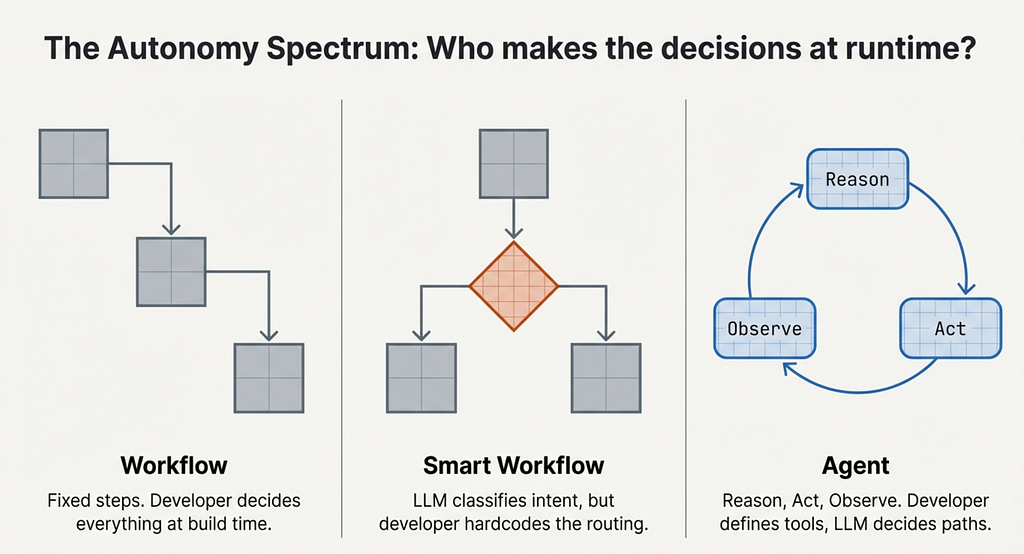
In a previous article, we built PortfolioBuddy — a stock portfolio assistant on Telegram using LangGraph. We called it an agent. Honestly? It was a smart workflow. The LLM classified user intent, but every path after that was hardcoded. “Portfolio query? Go to fetch_portfolio. Stock analysis? Also fetch_portfolio. Everything else? Skip to generate_response.” The LLM was a passenger.
This time, we cross the line into actual agency. You don’t need to have read the previous article — everything here stands on its own. But if you want the backstory, it’s there.
Three Things That Make an Agent an Agent
Strip away the buzzwords and three properties separate a real agent from a workflow wearing an LLM hat.
Autonomy. Can it decide which tools to use? A workflow is a vending machine — you press B4, you get B4. Every time. An agent is a barista — you say “something strong, not too sweet” and they figure out the rest. The input is ambiguous. The agent resolves it.
Memory. Can it remember what happened before? An agent without memory is like talking to a goldfish — every lap around the bowl, the world is brand new. You tell it your portfolio, it helps you, and five minutes later it asks “so what stocks do you own?” Memory is what turns a goldfish into a colleague.
Resilience. Can it handle failure without falling apart? A workflow hitting a broken API is like a cashier whose register crashes — they just stare at you. An agent is the cashier who says “system’s down, let me check the price manually” and keeps going.
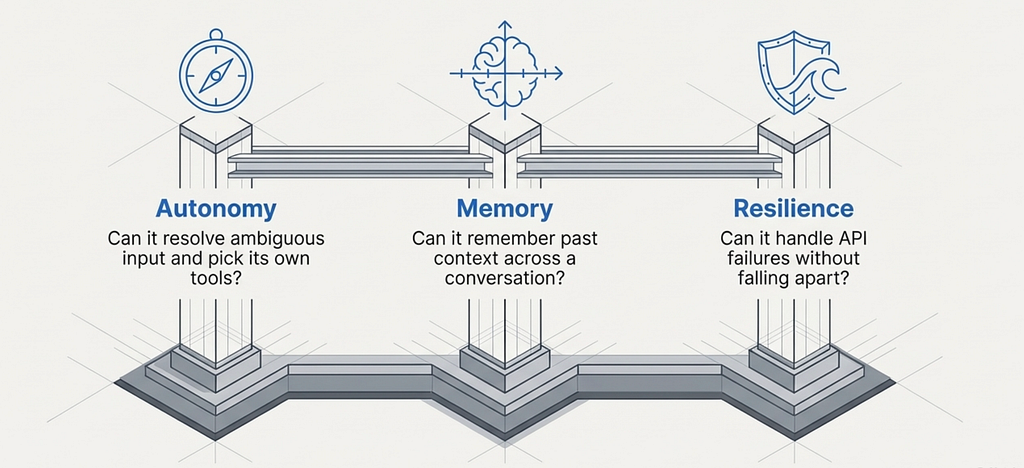
PortfolioBuddy v1 failed all three. Fixed routing. No persistent memory. Crashes on API failures. Time to fix each one.
Autonomy — Let the LLM Pick Its Tools
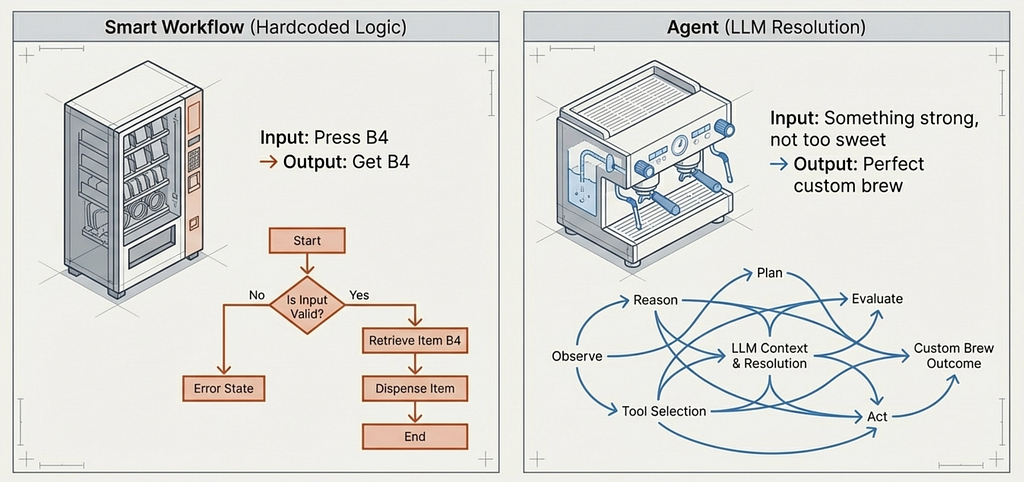
Here’s the routing logic from PortfolioBuddy v1:
def _should_fetch_portfolio(self, state):
    if state["user_context"].get("requires_portfolio", False):
        return "fetch_portfolio"
    elif state["user_context"].get("intent") in ["portfolio_query", "stock_analysis"]:
        return "fetch_portfolio"
    else:
        return "generate_response"
We wrote this routing. The LLM classified intent into categories, but we decided what happens for each category. Want to add stock comparison? Write another branch. Want the agent to fetch news before analyzing? Rewrite the edges. Every new capability requires changing the routing code.
This is the pattern you’ll see in most LangGraph tutorials. It works. But it’s not agentic — the developer is making every decision at build time.
The alternative: tool-calling with the ReAct pattern. Instead of hardcoding paths, define tools with descriptions, hand them to the LLM, and let it decide.
from langgraph.prebuilt import create_react_agent
from langgraph.checkpoint.sqlite.aio import AsyncSqliteSaver
async def create_agent(db_path="portfoliobuddy_memory.db"):
    llm = ChatGoogleGenerativeAI(model="gemini-2.5-flash-lite", temperature=0.3)
    memory = AsyncSqliteSaver(await aiosqlite.connect(db_path))
    await memory.setup()
    return create_react_agent(
        model=llm,
        tools=ALL_TOOLS,  # 9 tools — LLM picks which to call
        checkpointer=memory,
        prompt=SYSTEM_PROMPT,
    )
ALL_TOOLS is a list of seven functions decorated with @tool. The LLM reads each tool's name, type signature, and docstring to decide when to call it. Here's one of them:
@tool
def add_stock(symbol: str, quantity: float, avg_cost: float) -> str:
      """Add a new stock to the user's portfolio or update quantity
      if it already exists. Use when the user says they bought a stock
      or wants to add a holding."""
      symbol = symbol.upper().strip()
      existing = _get_holding(symbol)  # SQLite lookup
      if existing:
          old_total = existing["quantity"] * existing["avg_cost"]
          new_total = quantity * avg_cost
          combined_qty = existing["quantity"] + quantity
          new_avg = round((old_total + new_total) / combined_qty, 2)
          _upsert_holding(symbol, combined_qty, new_avg)
          return f"Updated {symbol}. New position: {combined_qty} shares @ ${new_avg} avg."
      _upsert_holding(symbol, quantity, avg_cost)
      return f"Added {symbol}: {quantity} shares @ ${avg_cost}."
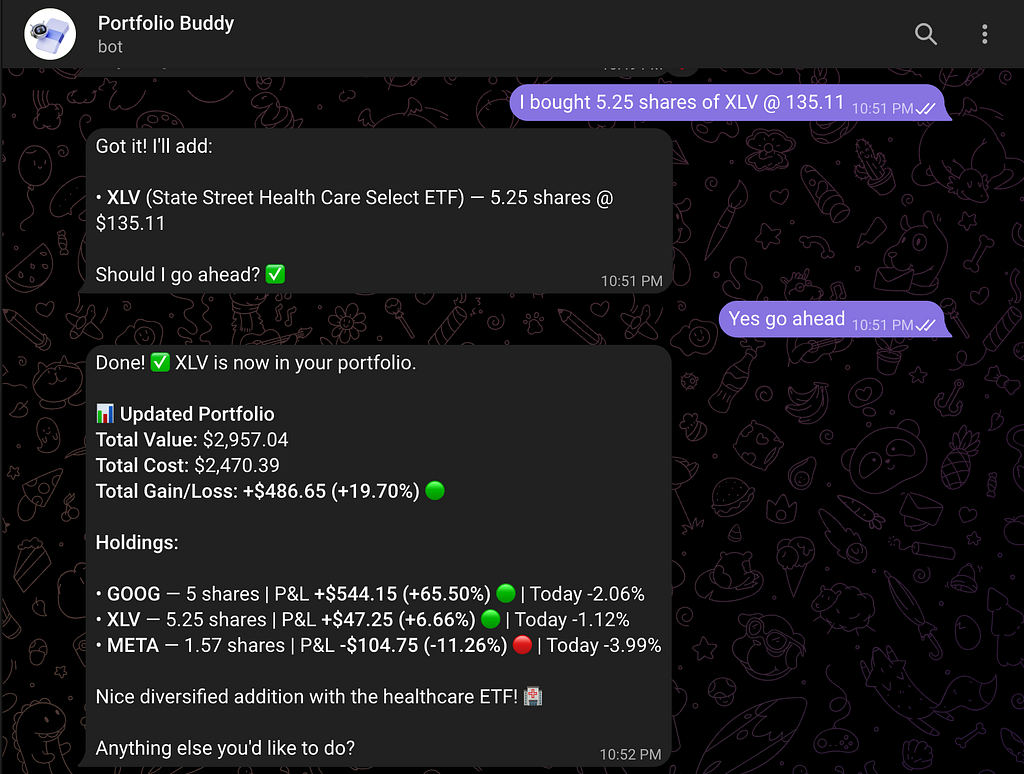
Notice the pattern: the docstring describes when to use the tool, the function does the work, and it returns a string the LLM can read. That docstring is doing real work — the LLM reads “Use when the user says they bought a stock” and matches it against the user’s message. When someone says “I just bought 20 shares of AMD at $150”, the LLM parses the intent, picks add_stock, extracts the parameters, and calls it. No routing code. No intent classifier. The tool description is the routing.
The ReAct pattern — Reason, Act, Observe, repeat — is also planning in its simplest form. The LLM doesn’t always pick one tool and respond. It can chain: fetch portfolio, notice NVDA is down, fetch NVDA news for context, then respond with the full picture. Each observation informs the next action. That’s not a hardcoded sequence — the LLM decided it on the fly. More advanced planning patterns like Plan-and-Execute exist, and we’ll explore them in Article 3.
We went from a flowchart with 4 hardcoded nodes to a loop with 7 tools the LLM composes freely. The developer defines capabilities. The LLM decides when to use them.
Memory — Conversations, Not Queries
Without memory, every message is message #1. The user says “how does it compare to AAPL?” and the agent has no idea what “it” refers to. There’s no conversation — just a series of isolated queries.
Agent memory comes in two forms. Short-term memory tracks context within a conversation — what the user asked three messages ago, what data was fetched. Long-term memory persists across sessions — the user closes Telegram, comes back tomorrow, and the agent still knows their portfolio and past questions.
LangGraph’s checkpointer handles both. After every step in the graph, the full state — messages, tool calls, results — gets saved. When the user sends a new message, state is restored from the checkpoint. The setup is four lines:
memory = AsyncSqliteSaver(await aiosqlite.connect(db_path))
await memory.setup()
# Each Telegram user gets their own persistent thread
config = {"configurable": {"thread_id": str(user_id)}}
Each Telegram user gets a unique thread ID. Their conversation history lives in SQLite, survives bot restarts, and accumulates over time. The LLM sees the full thread when generating its next response — it knows what was discussed, what tools were called, and what the results were.
This changes what users can ask. “Tell me about NVDA” followed by “how does it compare to AAPL?” works because the agent knows “it” means NVDA. “What did we talk about last time?” works because the thread persists. The user stops managing context and starts having a conversation.
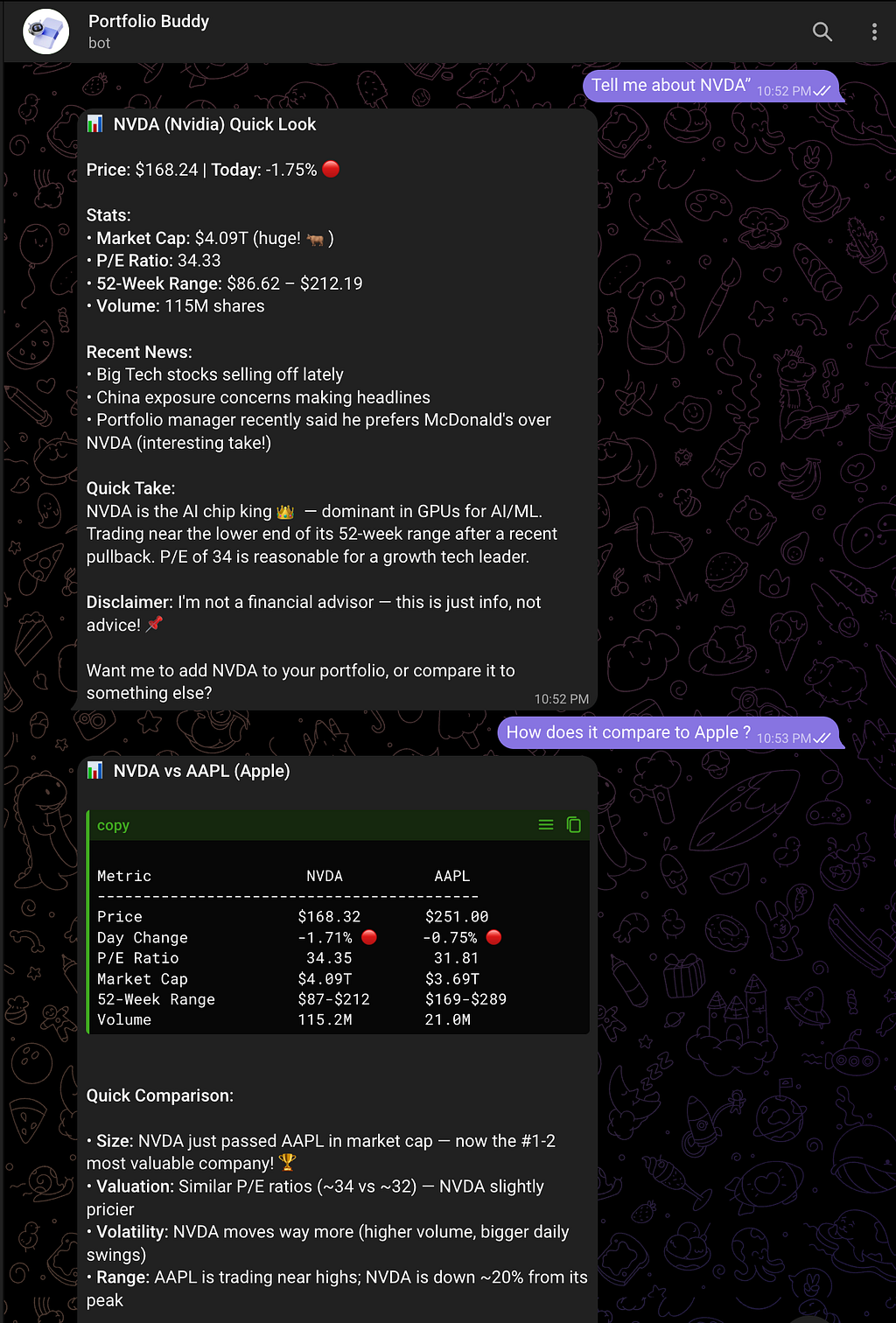
Memory changes what questions users can ask. Without it, they repeat context every message. With it, they talk naturally.
Resilience — Failing Gracefully
External APIs fail. Yahoo Finance times out. Rate limits kick in. Invalid ticker symbols return nothing. The question isn’t whether your agent will encounter failures — it’s what happens when it does.
Three levels of error handling exist in practice:
Level 0 is a crash. The user sees a stack trace or a hung bot. Level 1 catches the exception and returns a generic “something went wrong, please try again.” Better, but the response is the same regardless of what actually broke. Level 2 returns a descriptive error to the LLM — “Could not fetch data for XYZFAKE. Symbol may be invalid.” — and lets it reason about the failure.
PortfolioBuddy v2 uses two layers. First, a retry decorator handles transient failures — Yahoo Finance being temporarily slow, a network hiccup:
def retry(max_attempts=3, delay=1.0):
    def decorator(fn):
        @wraps(fn)
        def wrapper(*args, **kwargs):
            last_err = None
            for attempt in range(1, max_attempts + 1):
                try:
                    return fn(*args, **kwargs)
                except Exception as e:
                    last_err = e
                    if attempt < max_attempts:
                        time.sleep(delay * attempt)
            raise last_err
        return wrapper
    return decorator
Second, every tool wraps its core logic in try/except and returns error strings instead of raising exceptions. When _fetch_market_data("XYZFAKE") returns None, the tool doesn't crash — it returns "Could not fetch data for XYZFAKE. Symbol may be invalid." The LLM reads this, understands the problem, and responds in context. It might suggest checking the ticker symbol. It might offer to analyze a different stock instead. The response fits the situation because the LLM is doing the reasoning, not a hardcoded error handler.
The difference between Level 1 and Level 2 is who reasons about the failure. In Level 1, your code returns a canned message. In Level 2, the LLM reads the error and responds in context.
The Full Picture
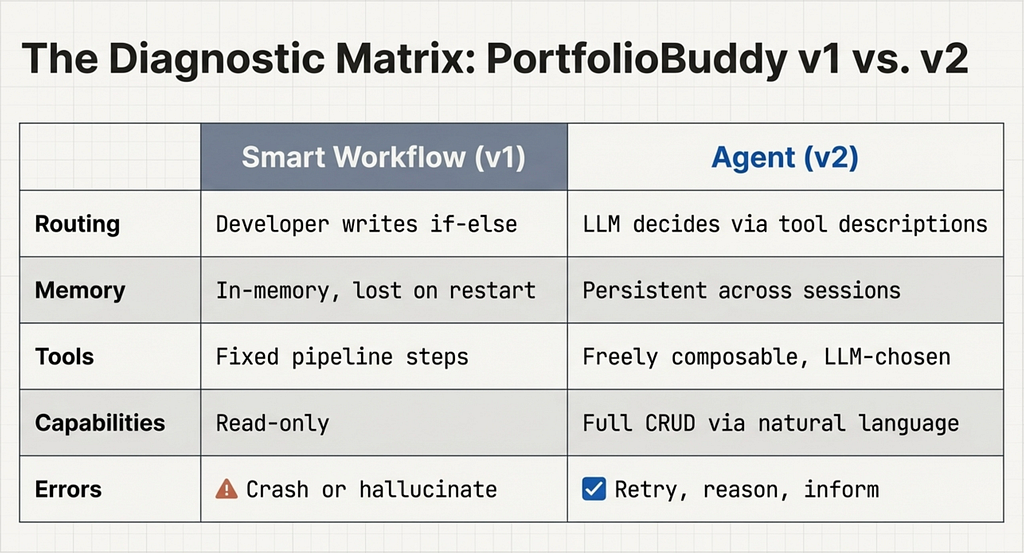
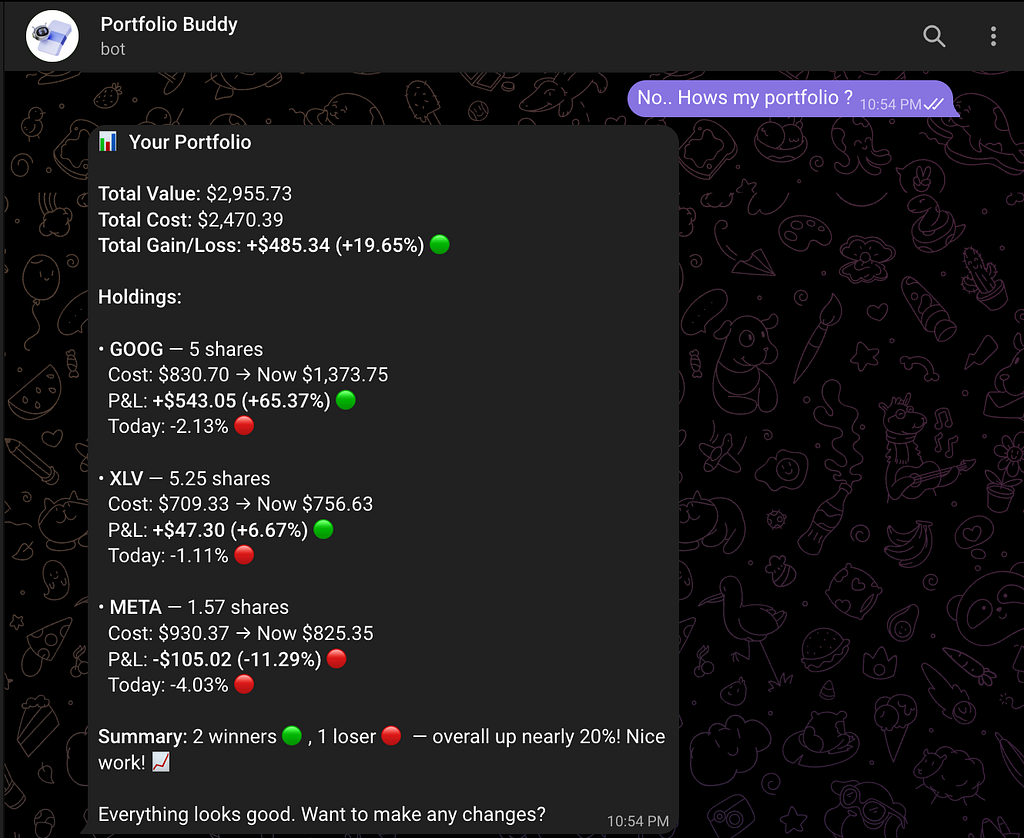
PortfolioBuddy v2 has seven tools the LLM picks from freely — portfolio summary, stock analysis, stock comparison, add/remove/update holdings, and news lookup. Conversations persist in SQLite. Failures get retried or reported intelligently. The user just talks naturally: “How’s my portfolio?”, “Compare TSLA and MSFT”, “I sold all my BABA.”
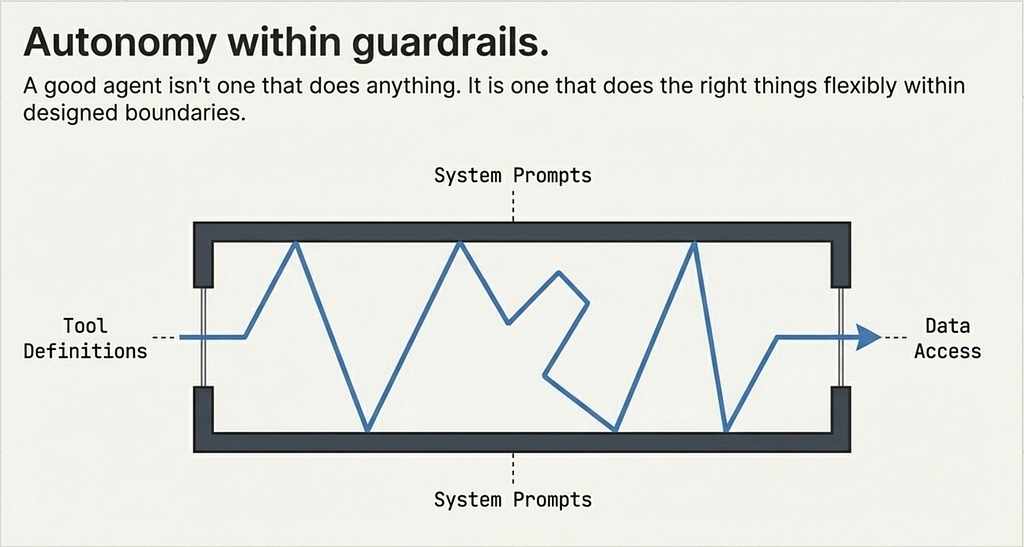
Is it fully autonomous? No. It operates within guardrails — the system prompt, the tool definitions, the data sources it can access. That’s by design. A good agent isn’t one that does anything. It’s one that does the right things, flexibly.
Break It, Bend It, Make It Yours
The best way to internalize these concepts is to modify the agent and see what changes. The full code is at github.com/gupta-ujjwal/PortfolioAgents-LangGraph. A few starting points:
- Add a new tool. Write a get_crypto_price tool using any free crypto API. The agent will start answering crypto questions without any routing changes — just add the tool to the list.
- Change the system prompt. Make it aggressive (“always recommend buying the dip”) or conservative (“never recommend buying anything”). Watch how the same tools produce wildly different behavior.
- Break the memory on purpose. Remove the checkpointer and try having a multi-turn conversation. You’ll feel the goldfish problem immediately.
- Add a tool that calls another tool. Write a portfolio_health_check that internally calls analyze_stock for every holding and summarizes. See how the LLM chains it.
- Make error recovery smarter. When a stock symbol isn’t found, have the tool suggest similar valid symbols instead of just saying “not found.”
Each experiment reinforces a different concept — autonomy, memory, resilience.
What’s Next
We’ve gone from workflow to agent. But it’s still one LLM doing everything — research, portfolio management, news, analysis. That works for a personal assistant. But what happens when the job gets too complex for a single agent?
You split it. One agent researches. Another manages risk. Another executes. Coordination, delegation, specialization. That’s multi-agent systems — and that’s Article 3.
References
- Article 1: AI Agents from First Principles — the PortfolioBuddy origin story
- Repository: PortfolioAgents-LangGraph — full source code
- LangGraph Documentation — framework docs
- LangGraph ReAct Agent Guide — how create_react_agent works
- Telegram BotFather — create your bot token
What Makes an AI Agent Actually Agentic? Building Beyond the Basics with LangGraph was originally published in Towards AI on Medium, where people are continuing the conversation by highlighting and responding to this story.