A version of this article originally appeared on X.
Someone asked me at a hacker event last week: “Can anyone actually tell me what a harness really is?”
It was said with real skepticism. The kind of skepticism that says we all use the word “Harness” in the industry, but nobody actually knows what it is.
Fair question. Let me try.
More of a visual learner?
What a harness is not
I respect Akshay Pachaar immensely, but I deeply disagree with his recent article on X about the anatomy of an agent harness. More specifically, his post is confusing to the industry given it calls LangGraph a harness.
LangChain is not a harness. LangGraph is not a harness.
These are frameworks designed for humans to build agents. They give you abstractions, configuration options, and a lot of rope. You wire together chains, define state graphs, pick your retriever, and configure your memory. Dozens of knobs. Dozens of ways to get it wrong.
The fundamental assumption is that a human architect will configure these pieces correctly.
To stoke the fire Akshay quotes the langchain team “If you’re not the model, you’re the harness.”
What does that even mean?
It is a weak argument to cover the earlier 1.0 agent frameworks in the new harness terminology.
What an agent harness is
A harness starts from the opposite direction.
The modern harness was not designed top-down from abstractions. It was born bottom-up out of coding agents, solving real-world problems with working agents. Cursor, Claude Code, Windsurf, and Codex are all harnesses.
These products started with a concrete problem: make an LLM write and edit real code across real repositories. In solving that problem, they independently converged on remarkably similar architectures. A while loop that calls tools. A context manager that compresses history. A permission layer that keeps things safe. The same patterns, discovered separately, over and over again. We arrived at a number of similar architecture decisions building Alyx, our in-product agent for Arize Ax Observability and Evals platform, over the last two years (also coming to Arize Phoenix, our OSS). Different domain, same bones.
The abstractions that define these common architectures are what we call a harness.
A harness is the current architecture, born out of general purpose agents, designed to solve a wide swath of problems out of the box.
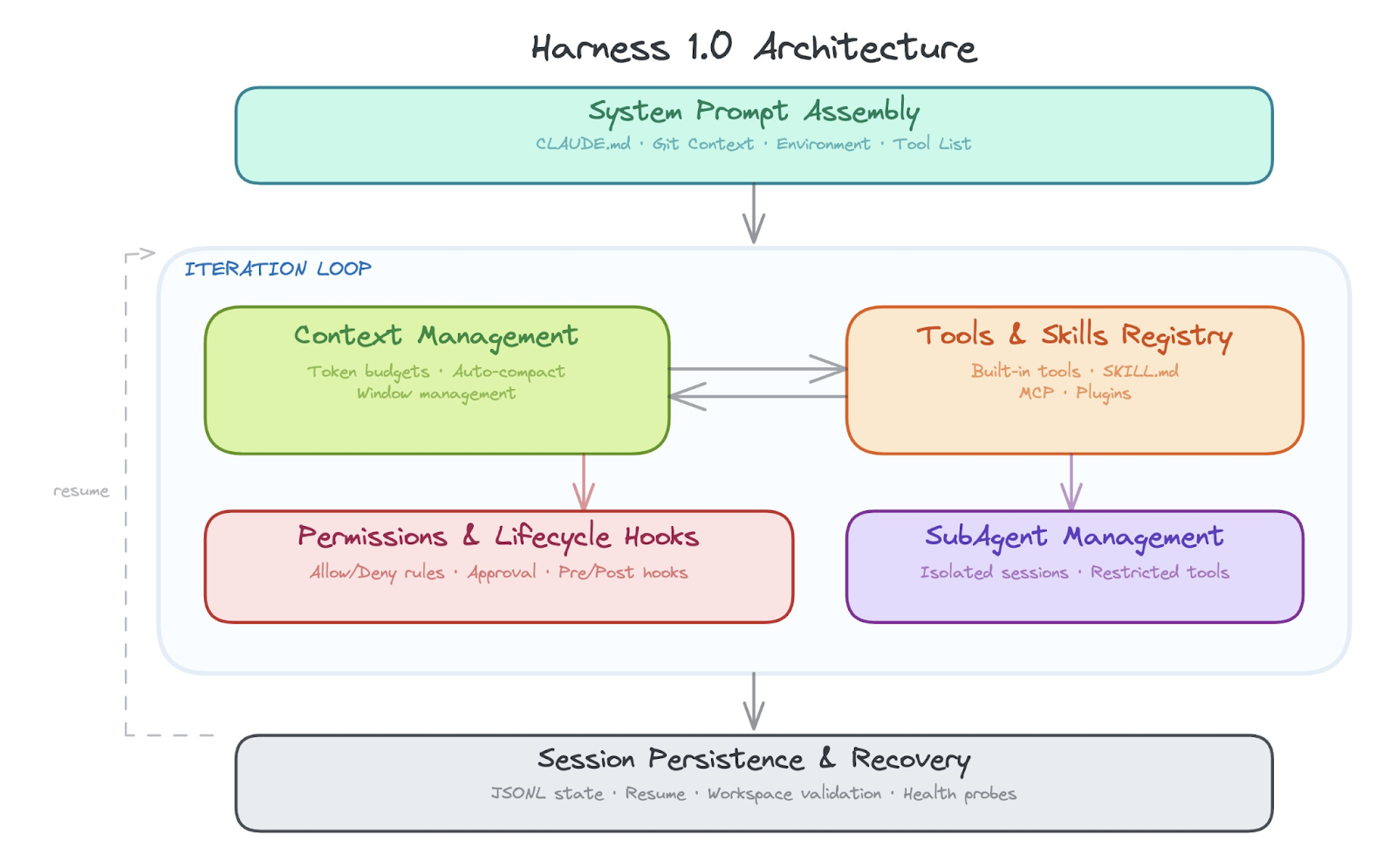
Two things make a harness fundamentally different from a framework:
- A harness works out of the box. You don’t configure a harness into existence. It ships as a working agent with a fixed architecture: the iteration loop, the context management, the tool registry, and the permission layer. All wired together, all already running. There is no assembly step.
- A harness is not designed for humans to build agents. A harness is designed for the agent to accomplish almost any task. The model reads instruction files and learns your project. It discovers available tools and composes them. It writes its own skills to extend what it can do. It spawns subagents when the task gets too big. The human provides the goal. The harness figures out the rest.
The components of a modern harness
Just as computer architectures matured in the 1980s, we expect harness architectures to mature over the next couple years. Components for the harness 1.0 architecture fall into the following areas:
- Outer iteration loop
- Context management & context compression
- Managing Agent Skills and tools
- Managing subagents
- Built in and prepackaged skills
- Session persistence and recovery
- System prompt assembly and project context injection
- Lifecycle hooks
- Permission & safety layer
Outer iteration loop
The core architectural foundation of a modern harness is the while loop. The way it works is the model uses the system prompt and decides, based upon the data, what tools to call. It iterates on tools until it is finished. The while loop is the core foundation of the harness 1.0 architecture.
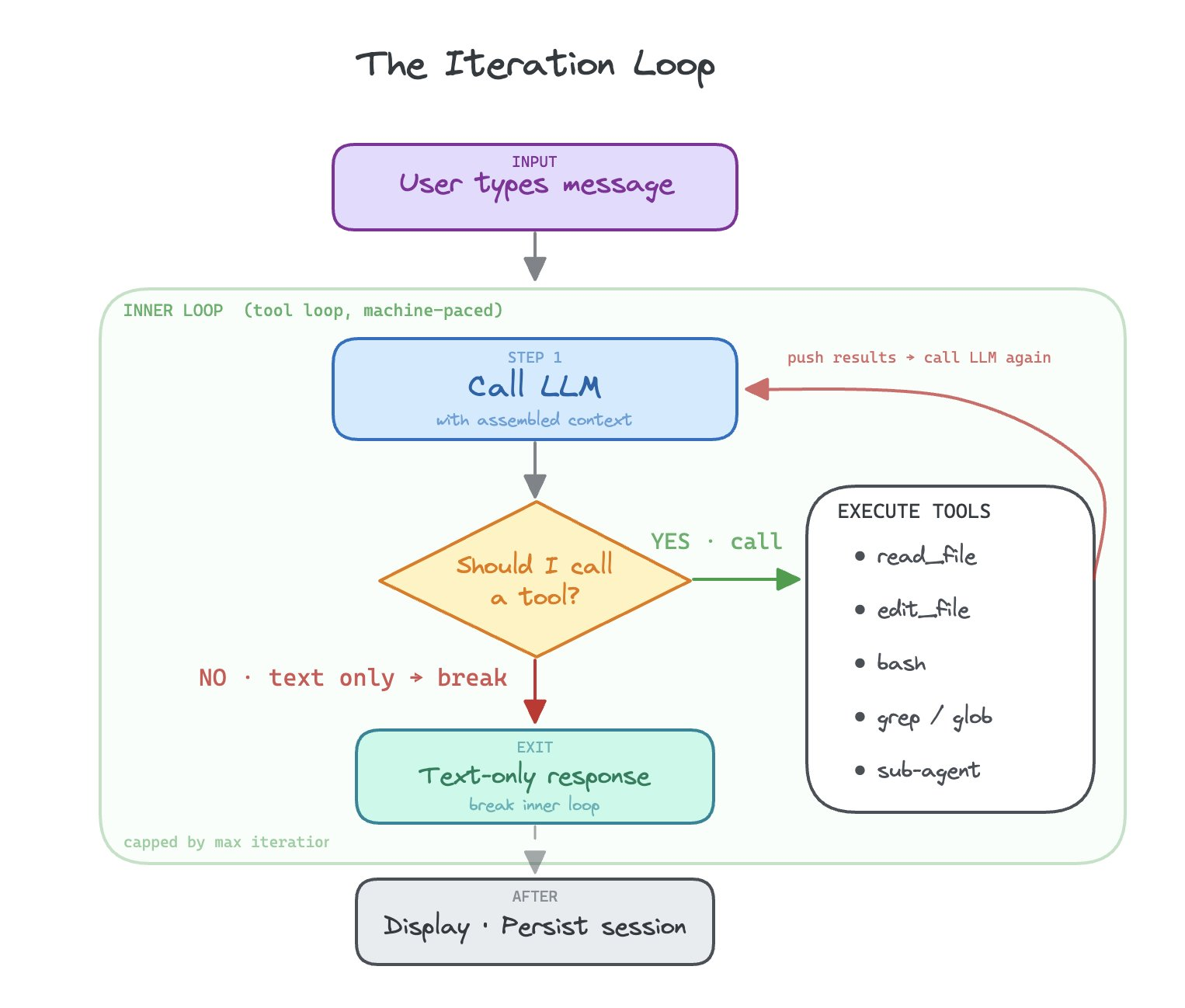
Based on the system prompt, the LLM is pushed to find tools to use to finish its job. It will compose these tools together, tool after tool, execution after execution, until its job is done.
The main core architectural component of the harness, a loop over tools that attempts to accomplish any task, is not the core idea behind LangGraph. It is a human configured state graph.
Context management and context compression
How do you decide what to pull into context? How do you decide what to simplify in your context or compress, and how you decide how to represent large data in a simplified fashion are all about context management.
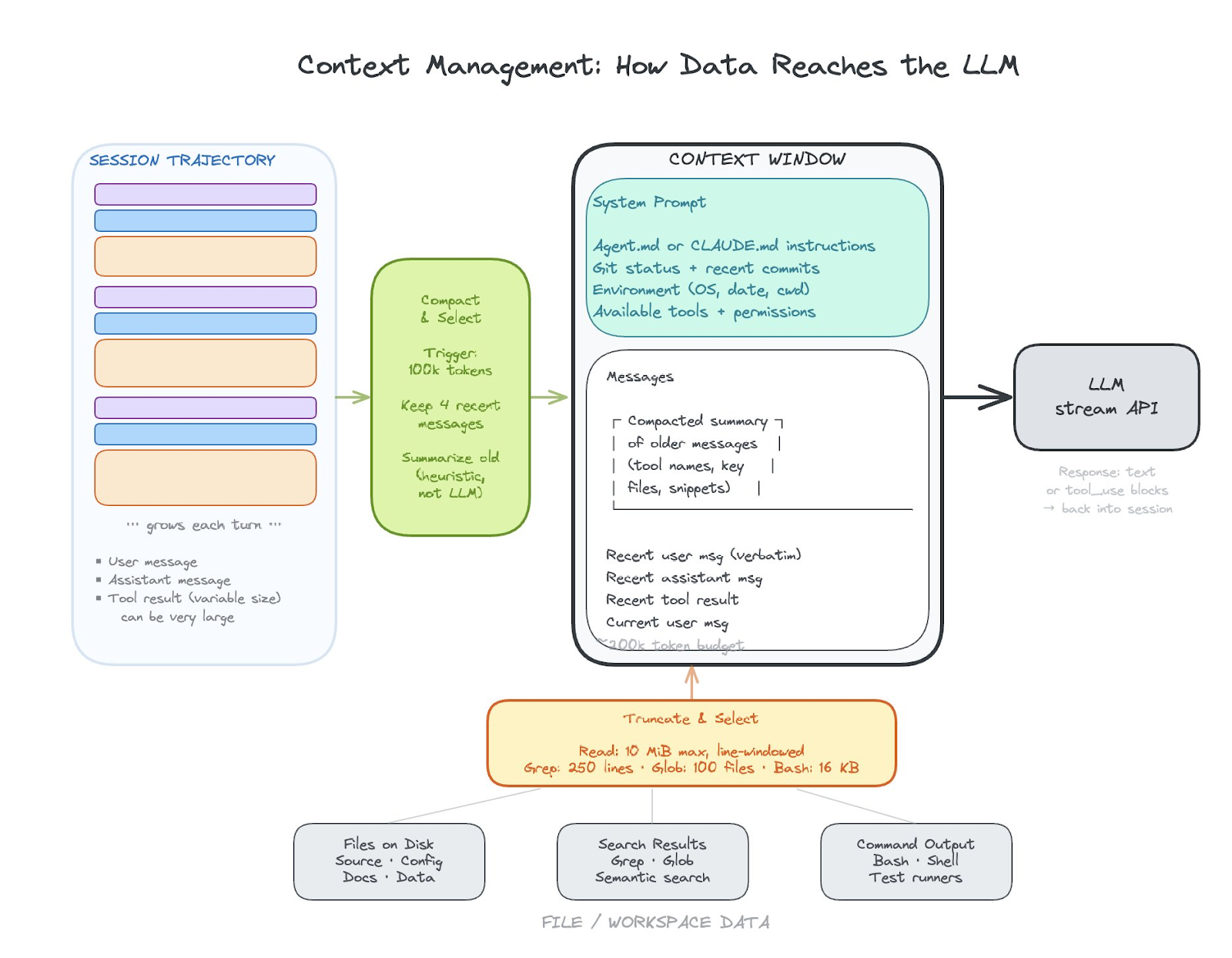
Other challenges revolve around how to pass data to skill or tool calls, what data those skill or tool calls have access to, and how data is returned and used in context from those skill and tool calls.
Managing Agent Skills and tools
Skills and tools management is a set of structures that allows teams to build skills, manage what skills are available, add new skills, and execute skills.
Every harness ships with a registry of built-in tools: read a file, edit a file, run a shell command, search code. These are the primitives. The harness needs to know what tools exist, what permissions each tool requires, and how to dispatch a tool call from the model to the right execution path. When the model says “I want to run grep,” the harness looks up that tool’s spec, checks permissions, executes it, and feeds the result back into context.
Skills are a layer on top of tools. The harness discovers these skill files from well-known directories, and the model can invoke them by name. This is where organizational knowledge gets encoded. Tools are universal. Skills are specific to your team and your workflow.
Managing subagents
At some point a task gets too big or too parallel for a single conversation thread. Subagent management is how the harness spawns child agents that work in isolation and report results back.
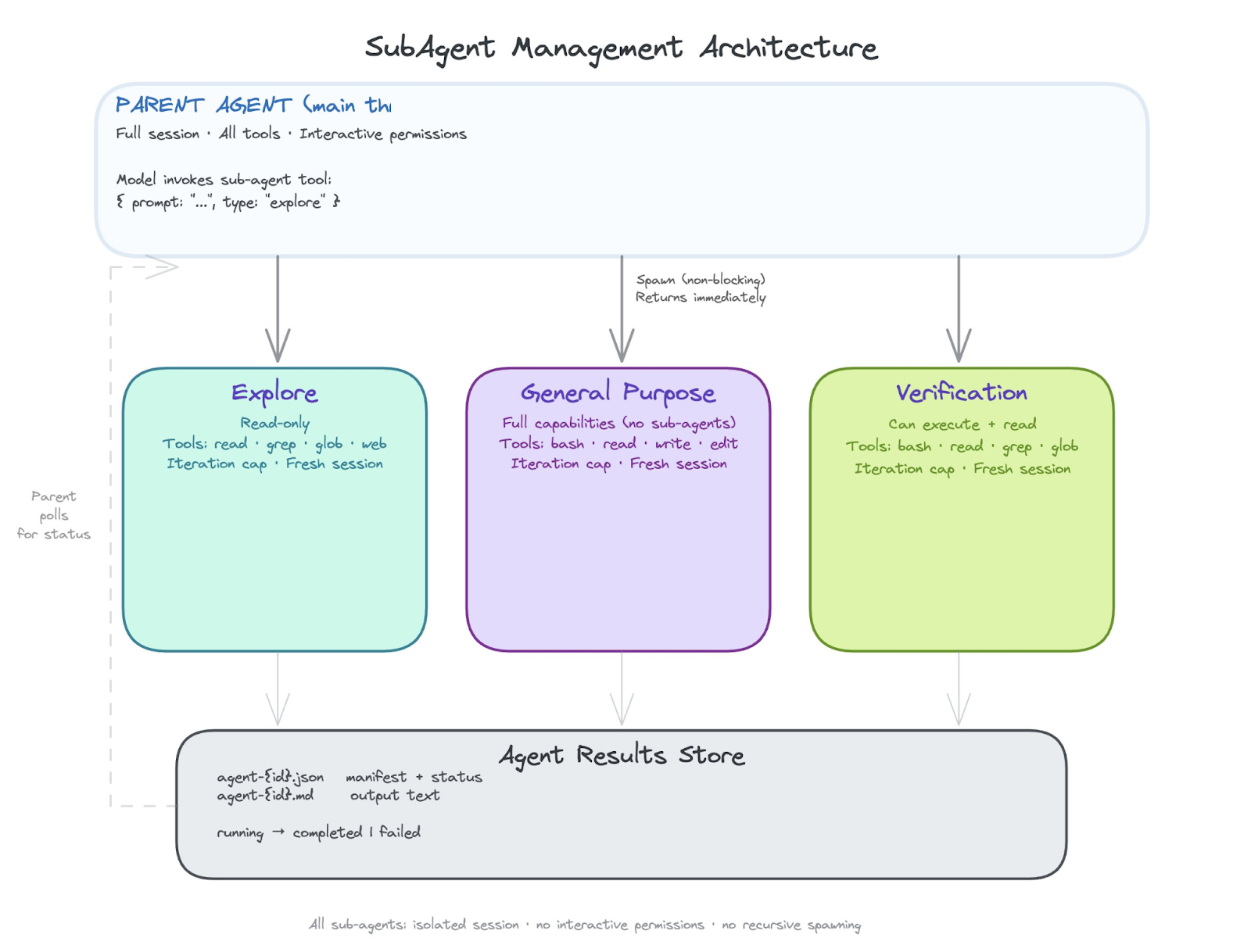
Each subagent gets its own conversation session, its own restricted set of tools, and a focused system prompt that says “you are a background agent working on this specific task.” The parent agent delegates, the sub-agent works, and results come back either in-memory or through on-disk manifests. The key architectural decision is isolation: a sub-agent should not be able to corrupt the parent’s context or run tools the parent didn’t authorize.
Today most harnesses run subagents as threads with isolated sessions. Tomorrow we expect subagents to run in fully isolated sandboxes or even on separate machines. The pattern is the same either way: spawn, restrict, execute, collect results.
Built in, prepackaged Agent Skills
Every harness ships with a baseline set of capabilities that work out of the box. File operations (read, write, edit, search). Shell execution. Code navigation (grep, glob, semantic search). These are non-negotiable. If the agent cannot read and edit files, it is not a coding agent.
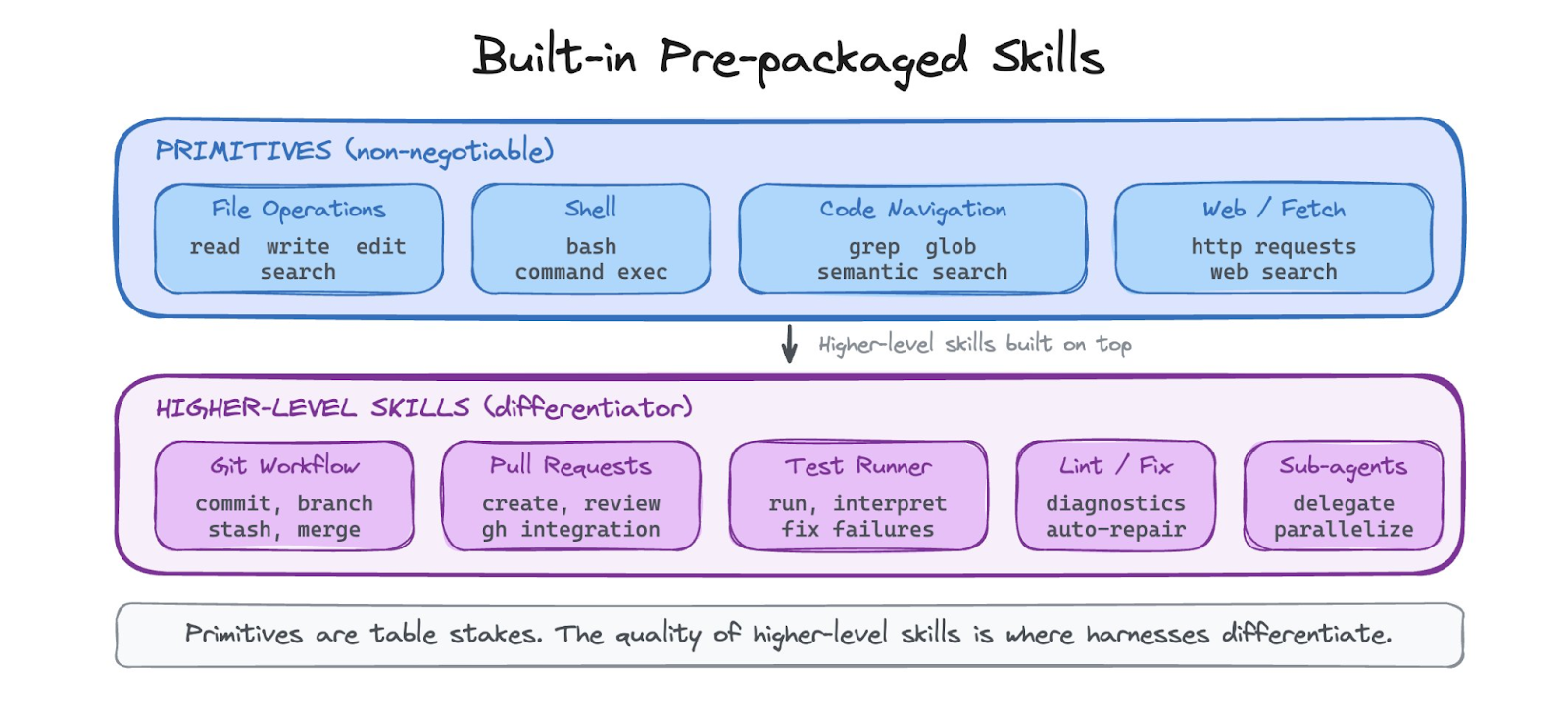
Beyond the primitives, harnesses increasingly ship with higher-level built-in skills: how to make a git commit, how to create a pull request, how to run tests and interpret the output. These are the skills that the harness vendor has already figured out so teams do not have to. The quality of these built-in skills is a major differentiator between harnesses today.
Session persistence and recovery
A long-running agent session is stateful. If the process crashes, you lose everything unless the harness persists session state to disk. Modern harnesses write session data incrementally, typically as append-only JSONL files: each message, each tool result, each compaction event gets a line. This means you can resume a session exactly where you left off.
System prompt assembly and project context injection
The system prompt is how the harness tells the model who it is, what it can do, and what it is working on. This is not a static string. Modern harnesses assemble the system prompt dynamically from multiple sources.
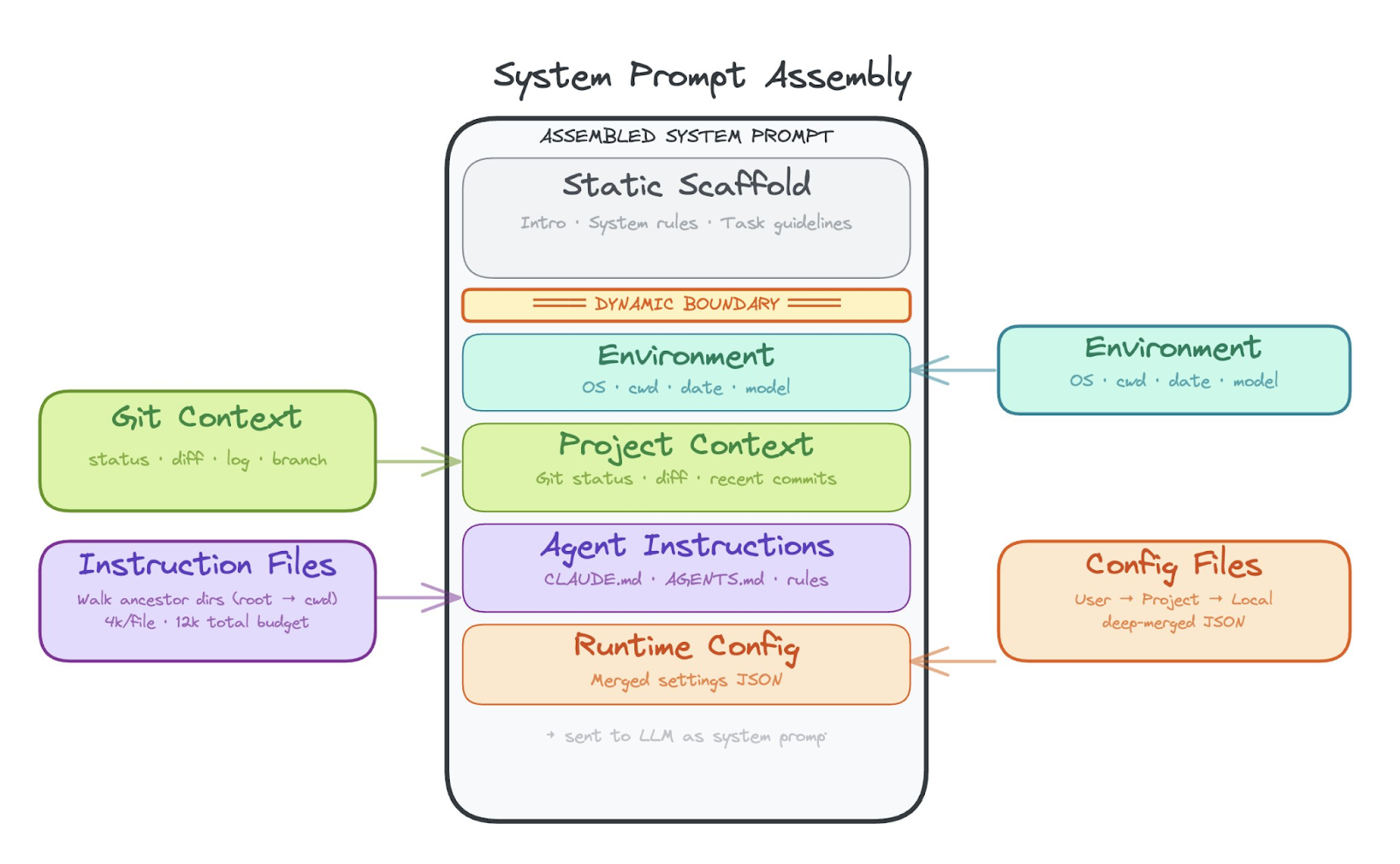
The harness walks ancestor directories looking for instruction files (like CLAUDE.md or AGENTS.md), injects current git status and recent commits, adds environment metadata (OS, date, working directory), and appends the list of available tools and their permissions. All of this gets stitched together with character/token budgets so the system prompt does not blow out the context window before the conversation even starts.
Lifecycle hooks
Hooks are the extensibility seam of the harness. They let organizations inject custom logic before or after tool execution without forking the harness itself.
A pre-tool hook fires before the agent runs a tool. It receives the tool name, the input, and can allow, deny, or modify the execution. A post-tool hook fires after and can inspect the result. Hooks communicate via a structured protocol: JSON on stdin, exit codes for allow/deny. This means hooks can be written in any language and can enforce arbitrary policy: “never run rm -rf,” “log all file writes to our audit system,” “require approval for any bash command that touches production.”
Hooks are how enterprises adopt harnesses. The harness vendor provides the architecture. Hooks let each organization layer their own safety, compliance, and workflow rules on top.
Permission & safety layer
This is the component that makes the difference between a useful tool and a dangerous one. The permission layer defines what the agent is allowed to do and enforces those boundaries at every tool execution.
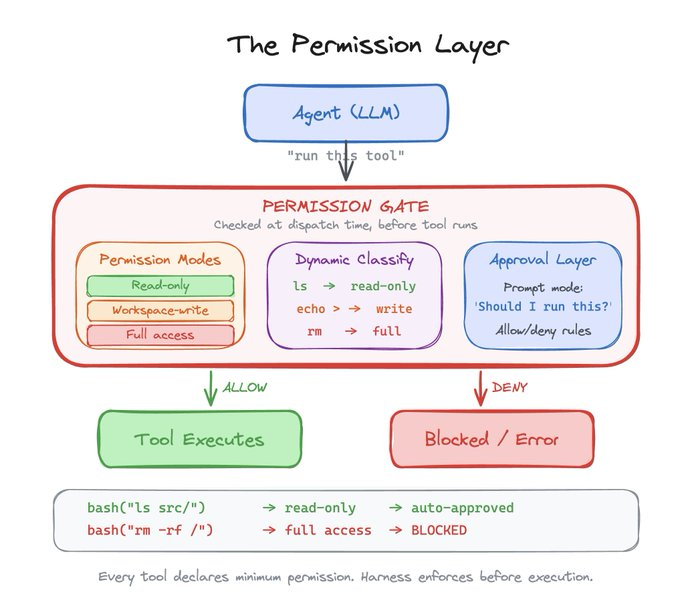
Modern harnesses define a hierarchy of permission modes: read-only, workspace-write, and full access. Each tool declares the minimum permission level it requires. The harness enforces this at dispatch time, before the tool ever runs. For tools like bash, the harness even classifies the command dynamically: “ls” is read-only, “rm” requires full access, and the harness can figure this out by parsing the command string.
On top of static permissions, the harness supports interactive approval. In prompt mode, the agent pauses and asks the human “should I run this?” before executing anything dangerous. Declarative allow/deny rules from configuration files let teams pre-authorize known-safe patterns and block known-dangerous ones. This is the layer that makes it possible to hand an LLM real tools and still sleep at night.
Take this with you
These nine components are not a wishlist. They are what every successful harness converged on independently. That convergence is the signal.
The deeper pattern is where the decisions live. Early harnesses hardcoded everything: fixed truncation limits, static permission rules, predetermined context budgets. The harnesses that are winning now push decisions to the model. Not sure what to keep in context? Let the LLM decide. Not sure which files matter? Let the LLM search. Not sure when to compact? Let the LLM manage its own memory.
The harness provides the feedback scaffolding to make intelligence work with a model. Without a harness a model is open loop, with a harness the model can act on feedback, take action and extend its skills. It is designed in a way that actually works where the original REACT loops did not.
A model on its own is a one-shot text generator. It answers and stops. A model inside a harness can read a file, edit it, run the tests, see them fail, read the error, fix the code, and run the tests again. That closed loop—act, observe, adjust—is what turns a language model into an agent. The harness gives the model the ability to act on what it knows, see the consequences, and keep going until the problem is actually solved.
The next generation of tough technical problems in artificial intelligence are AI engineering systems problems. And we are solving them right now.
The post What is an agent harness? appeared first on Arize AI.