
You’ve used CoCo to write SQL. Now learn how it thinks — and how to make it think like your team.
Introduction
Most Snowflake users interact with Cortex Code (CoCo) as a chat box: ask a question, get an answer. That works. But it’s like driving a sports car in first gear.
Under the surface, CoCo is a multi-layered agent system — with a planning loop, a toolkit of specialized capabilities, persistent memory through AGENTS.md, built-in domain skills, and the ability to run your own custom skills that encode your team’s specific workflows.
This article peels back the layers. No code to copy-paste — just the architecture, the mental models, and the art of the possible so you can see where CoCo fits into your data engineering, governance, and analytics workflows.
For the hands-on implementation, follow the companion Quickstart Guide <Git Link>where we build everything step by step.
The Three Layers of CoCo Customization
Think of CoCo as having three concentric layers, each adding more specificity to how the agent behaves:
- Core (The Agent) — The foundation. CoCo’s planning loop, reasoning engine, and toolkit of tools like SQL execution, object search, file read/write, and Snowflake documentation search. This is what you get out of the box — a general-purpose agent that can interpret your intent, create a plan, call tools, validate results, and respond with artifacts.
- Layer 1: AGENTS.md : Your persistent instruction set. A markdown file at the root of your workspace that CoCo reads automatically in every conversation. It shapes the agent’s defaults: naming conventions, SQL style, environment preferences, cost guardrails. Without it, every conversation starts from zero. With it, every conversation starts from your baseline.
- Layer 2: Built-in Skills :Snowflake’s pre-packaged domain expertise. These are specialized knowledge modules maintained by Snowflake’s feature teams — covering cost intelligence, data governance, data quality, lineage, machine learning, Cortex AI functions, dbt, notebooks, and more. They activate automatically when CoCo detects a matching intent in your prompt.
- Layer 3: Custom Skills : Your team’s playbook. SKILL.md files you create in your workspace that encode your specific workflows — data quality checklists, deployment gates, schema audits, incident runbooks, onboarding walkthroughs. This is where CoCo stops being a generic assistant and becomes your team’s assistant.
Each layer builds on the previous one. The core agent is powerful on its own. AGENTS.md shapes its defaults. Built-in skills give it domain depth. Custom skills make it yours. The layers compose — when a custom skill runs, it inherits both the built-in skill knowledge and the AGENTS.md conventions.
The Core: How the Agent Thinks
CoCo isn’t a chatbot that generates text and hopes for the best. It’s an autonomous agent that plans, executes, validates, and self-corrects.
The Agent Loop
Every time you send a message, CoCo runs through a structured five-step loop:

This loop is what makes CoCo fundamentally different from a text completion model. It doesn’t just suggest code — it runs it, checks it, and fixes it.
The Toolkit
CoCo’s power comes from the tools it can call during execution. Each tool is a specialized capability:
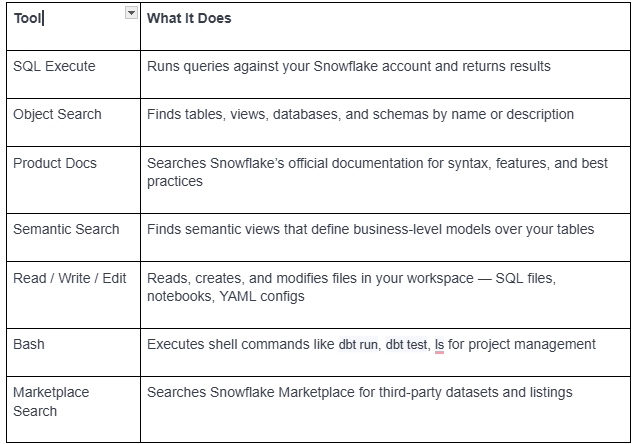
A single user prompt can trigger multiple tools in parallel. For example, asking “What’s in my SALES schema and who has access?” fires off object search, SQL execution, and the governance skill simultaneously. The agent orchestrates these calls, merges the results, and presents a unified answer.
Understanding the toolkit matters because it defines the boundaries of what CoCo can do — and what you can instruct it to do in your custom skills. Every step in a custom skill ultimately maps to one or more tool calls
Context Awareness
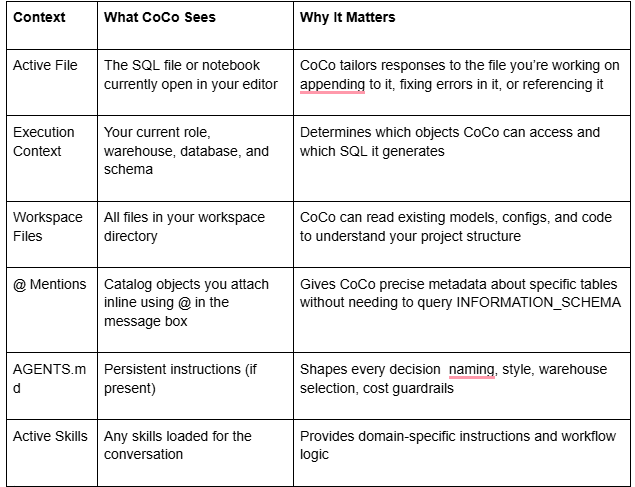
Layer 1: AGENTS.md — Persistent Instructions
The Problem It Solves
Without AGENTS.md, every conversation starts from scratch. You find yourself repeating the same instructions:
- “Use DEV_WH, not COMPUTE_WH”
- “Follow our stg_ / fct_ / dim_ naming convention”
- “Never use SELECT *”
- “Always use fully qualified table names”
This isn’t just annoying — it’s expensive. CoCo is billed on token consumption. Every time we repeat the same instructions, it is kind of unnecessary usage. Tokens go, credits go, and honestly time also gets wasted.
What It Is
AGENTS.md is a markdown file placed at the root of your workspace. CoCo reads it automatically at the start of every conversation — before it interprets your first message, before it creates a plan, before it calls any tools. Think of it as your team’s persistent system prompt that shapes every interaction.
How It Flows Into the Agent
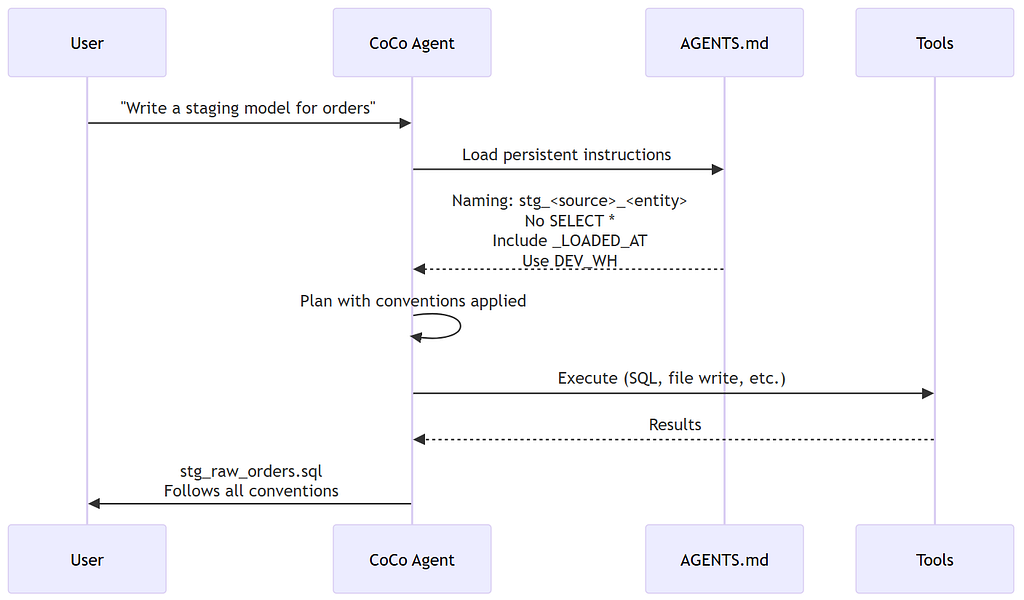
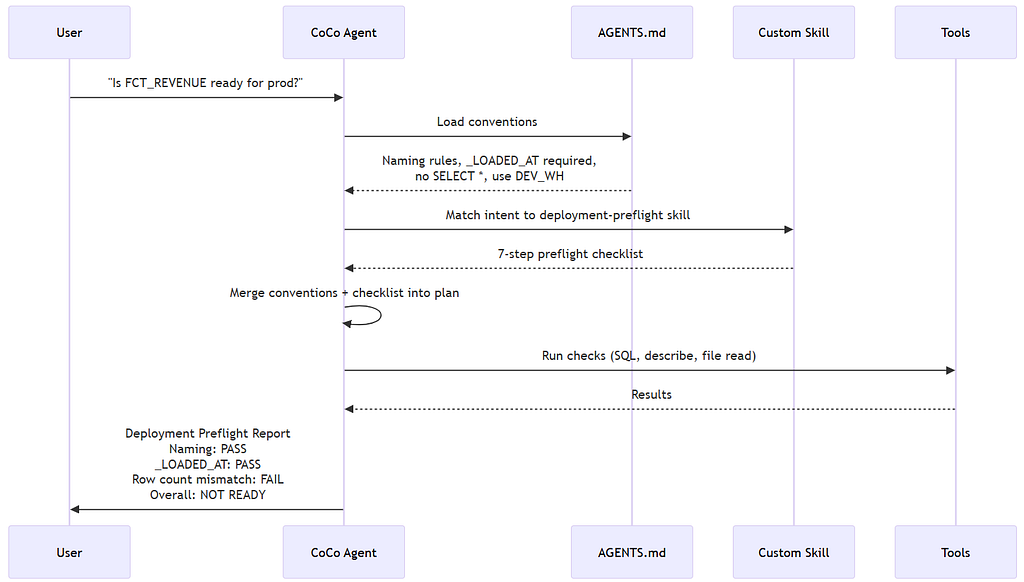
The key insight: AGENTS.md is injected before the agent plans. This means every decision the agent makes already reflects your team’s standards
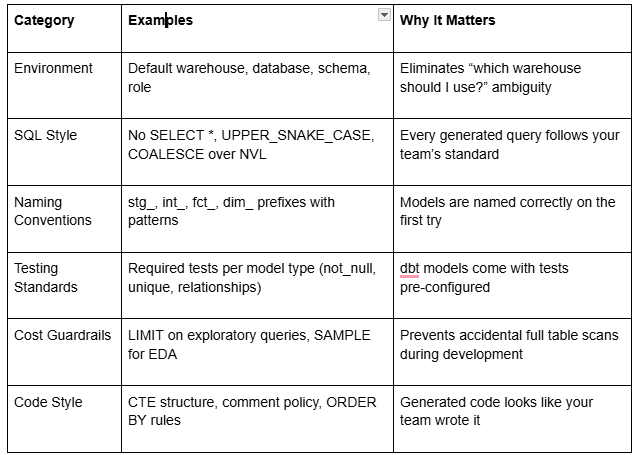
What Belongs in AGENTS.md
The most effective AGENTS.md files are concise, actionable, and organized by category. Here’s what works:
Layer 2: Built-in Skills — Snowflake’s Domain Expertise

If CoCo picks the wrong skill, you can be explicit: “Use the data quality skill to check the health of ANALYTICS_DB.STAGING.”
Layer 3: Custom Skills — Your Team’s Playbook
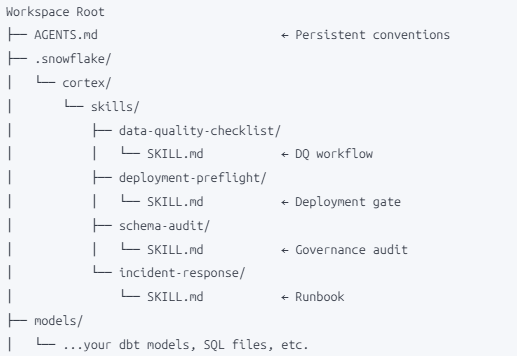
Custom skills live in your workspace under .snowflake/cortex/skills/. Each skill is a directory containing a SKILL.md file:
How AGENTS.md and Skills Work Together
Real-World Scenarios: The Art of the Possible
Scenario 1: New Team Member Onboarding
“Hey, I just joined the team….. can you walk me through how our data platform works?”
Without customization: CoCo gives a generic Snowflake overview — what databases are, how schemas work. Technically correct, entirely useless for getting productive on your platform.
With AGENTS.md + an onboarding-walkthrough skill: AGENTS.md provides the environment context — which databases exist, which schemas matter, which warehouses to use, which role to start with. The custom skill guides the new member through a structured walkthrough: inventory the key schemas, describe the most important tables, explain the naming conventions, show how to run tests, point to the right people for access requests. The new analyst is productive in hours, not weeks. And every new hire gets the same consistent onboarding.
Scenario 2: Morning Data Health Check
“Run the morning check”
Without customization: CoCo asks “What do you mean by morning check?” because it has no concept of your team’s daily routine.
With a morning-healthcheck skill: The skill encodes your team’s daily checklist — freshness checks on all staging tables, row count deltas from yesterday, review of failed DMF monitors, cost anomalies in the last 24 hours. A single prompt replaces 20 minutes of manual SQL execution and dashboard clicking. And because it’s a skill, the check is identical every morning — no steps forgotten on a busy day.
Scenario 3: Pre-Release Validation Gate
“Is FCT_REVENUE v2 ready for production?”
Without customization: CoCo might describe the table. Maybe run a COUNT(*). It has no concept of what “ready for production” means to your team.
With AGENTS.md and a deployment-preflight skill, things become more structured. It will check naming first, then see if required columns like _LOADED_AT are present. After that it runs the DQ checks, compares row counts with source, and also looks for things like SELECT * in the model.
Finally, it gives a simple summary — whether things look fine or still need some fixes before moving to production.
Scenario 4: Incident Response
“ORDERS data looks stale — investigate”
With an incident-response skill, it more or less follows the usual steps your team would take. It checks the latest load time, tries to trace where the data is coming from, looks at whether the task actually ran, and also verifies if the warehouse was available.
Based on all this, it gives a quick summary of what might be wrong and what can be checked next. Something which usually takes 20–30 mins manually, here you get a rough direction in just couple of minutes.
Scenario 5: Keeping metrics consistent across the team
“What’s our monthly recurring revenue?”
With a metric-definitions skill: The skill encodes the exact SQL formula for MRR — including which tables to join, which filters to apply, which edge cases to handle (refunds, prorations, trial periods). Every analyst on the team gets the same number, every time. No more “my MRR doesn’t match yours” conversations that waste hours reconciling different calculation methods.
Scenario 6: Compliance Audit Preparation
“Prepare for the quarterly access review”
With an access-review skill, it becomes much easier to run these checks.
It will list out roles and their grants, highlight users with higher access like ACCOUNTADMIN, and also point out roles which haven’t been used for some time. It even checks if there are any direct grants bypassing the usual role setup. In the end, you get a report which is quite close to what your audit team usually looks for.
Something which earlier used to take quite some time manually, now you can get a good starting point in just few minutes.
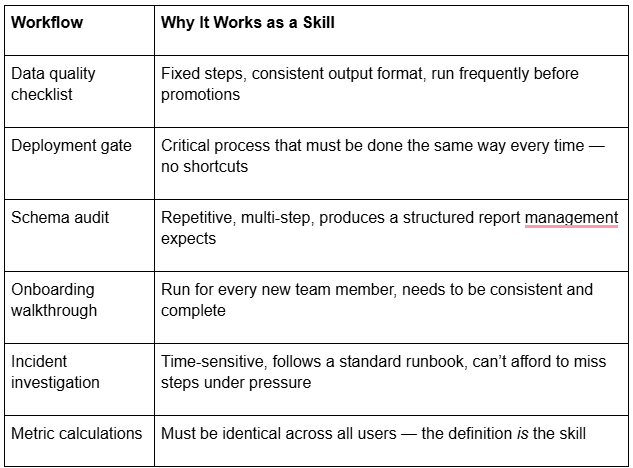
Good Skill Candidates
Key Takeaways
- CoCo is more like an agent than a normal chatbot. It doesn’t just generate output and stop there. It tries something, checks it, and improves if needed. Understanding this loop actually helps in writing better prompts.
- AGENTS.md is probably the most useful starting point. It sets the base for how CoCo behaves in your workspace. Once this is in place, you don’t have to repeat the same instructions again and again, which anyway adds to cost and time.
- Built-in skills already cover a lot of ground. Things like cost, governance, data quality — you don’t have to define all this from scratch. CoCo already knows how to handle most of it.
- Custom skills are where it starts becoming more useful for your team. Any repeated workflow — checks, validations, audits — can be defined once and reused. That’s where the real value comes in.
- AGENTS.md and skills work together in the background. You don’t have to connect them manually. But when both are there, the output feels much closer to how your team would actually do things.
What’s Next?
Ready to build? The companion Quickstart Guide <Git Link>walks you through:
- Creating an AGENTS.md file with real team conventions
- Building three custom skills end-to-end (Data Quality Checklist, Deployment Preflight, Schema Audit)
- Testing and iterating on your skills in a live workspace
- Combining AGENTS.md + skills in a real workflow
References:
- Cortex Code in Snowsight : https://docs.snowflake.com/en/user-guide/cortex-code/cortex-code-snowsight
- Cortex Code Overview : https://docs.snowflake.com/en/user-guide/cortex-code/cortex-code
- CLI Agent Tools Reference : https://docs.snowflake.com/en/user-guide/cortex-code/tools
If you are exploring Snowflake Cortex Code (CoCo) or planning to enable it for your team, happy to connect and exchange thoughts.
I’ve been working closely on Snowflake and modern data platforms, and always open to discuss real-world use cases, challenges, or even different approaches that are working across teams.
Feel free to reach out on LinkedIn : https://www.linkedin.com/in/rahul-sahay-8573923/
Unlocking Cortex Code: The Agent Architecture, AGENTS.md, and Custom Skills was originally published in Towards AI on Medium, where people are continuing the conversation by highlighting and responding to this story.