SBERT, also known as Sentence-Bert, is a widely used approach for obtaining sentence embeddings that aim to retain the contextual information within the sentences. However, generating these embeddings can be slow when dealing with large amounts of data. To address this, one option is to utilize batch-based encoding to accelerate the inference. However, this may not necessarily reduce the inference time. In this Medium blog post, we will explore the application of the ONNX (Open Neural Network Exchange) framework and how it aids in reducing the inference time of the model.

P.S. This article does not delve into the internal workings of ONNX. For more in-depth information, please consult the official ONNX documentation.
Let’s begin by installing the import libraries. We can use pip for the installation of ONNX
pip install onnx
pip install onnxruntime-gpu
pip install transformers
pip install torch
Once ONNX is installed we verify it using the below snippet
import onnx
print(onnx.__version__)
In order to obtain sentence embeddings, we will utilize the IMDB dataset sourced from Kaggle. Specifically, we will focus on the “Overview of Movie” column to generate embeddings using SBERT. The time needed to create embeddings will be determined for the 1000 sentences present in the dataset.
We will perform two experiments here on both CPU and GPU
- Inference time for 1000 sentences using Vanilla SBERT (CPU).
- Inference time for 1000 sentences using ONNX converted SBERT (CPU).
- Inference time for 1000 sentences using Vanilla SBERT (GPU).
- Inference time for 1000 sentences using ONNX converted SBERT (GPU).
The Sentence BERT model that we would consider here is all-MiniLM-L6-v2
We can invoke the Sentence BERT model from the Hugging Face Library and the Sentence Transformer Library. The output embeddings from both the library will be the same. For our experiments, we will use the Hugging Face library. Remember that when we use the Hugging Face library after obtaining the embeddings, additional post-processing could be needed such as Pooling or Normalization. The different steps can be obtained from the model page on Hugging Face. Perform those steps to get final sentence embeddings.
Let's first convert the model to ONNX format.
# # Load pretrained model and tokenizer
from transformers import AutoModel, AutoTokenizer

model_name = "sentence-transformers/all-MiniLM-L6-v2"

tokenizer = AutoTokenizer.from_pretrained(model_name,
                                          do_lower_case=True )

model = AutoModel.from_pretrained(model_name )

#Mean Pooling - Take attention mask into account for correct averaging
def mean_pooling(model_output, attention_mask):
    token_embeddings = model_output[0] #First element of model_output contains all token embeddings
    input_mask_expanded = attention_mask.unsqueeze(-1).expand(token_embeddings.size()).float()
    temp =  torch.sum(token_embeddings * input_mask_expanded, 1) / torch.clamp(input_mask_expanded.sum(1),
                                                                               min=1e-9)
    return F.normalize(temp, p=2, dim=1)


# Get the first example data to run the model and export it to ONNX

sample = ['Hey, how are you today?']
inputs = tokenizer(sample,
                   padding=True,
                   truncation=True,
                   return_tensors="pt"
                   )

## Convert Model to ONNX Format
import os
import torch
device = torch.device("cpu")

# Set model to inference mode, which is required before exporting
# the model because some operators behave differently in
# inference and training mode.
model.eval()
model.to(device)

output_dir = os.path.join(".", "onnx_models")

if not os.path.exists(output_dir):
    os.makedirs(output_dir)

export_model_path = os.path.join(output_dir, 'all_MiniLM_L6-v2.onnx')


with torch.no_grad():
    symbolic_names = {0: 'batch_size', 1: 'max_seq_len'}
    torch.onnx.export(model,                                            # model being run
                      args=tuple(inputs.values()),                      # model input (or a tuple for multiple inputs)
                      f=export_model_path,                              # where to save the model (can be a file or file-like object)
                      opset_version=11,                                 # the ONNX version to export the model to
                      do_constant_folding=True,                         # whether to execute constant folding for optimization
                      input_names=['input_ids',                         # the model's input names
                                    'attention_mask',
                                    'token_type_ids'],
                      output_names=['start', 'end'],                    # the model's output names
                      dynamic_axes={'input_ids': symbolic_names,        # variable length axes
                                    'attention_mask' : symbolic_names,
                                    'token_type_ids' : symbolic_names,
                                    'start' : symbolic_names,
                                    'end' : symbolic_names})
    print("Model exported at ", export_model_path)
Now that we have converted the Sentence BERT Model. Let’s get the stats for the models.
Vanilla SBERT (CPU)
The inference time obtained for the Vanilla SBERT model on the CPU can be found using the snippet below.
import time
import pandas as pd
import numpy as np

from tqdm import tqdm

df = pd.read_csv('./imdb_top_1000.csv', usecols=['Overview'])

total_samples = len(df)

latency = []
outputs_cpu = []
with torch.no_grad():
    for i in tqdm(range(total_samples)):

        data = [df.loc[i, "Overview"]]

        inputs = tokenizer(data,
                            padding=True,
                            truncation=True,
                            return_tensors="pt"
                            )

        start = time.time()
        outputs_cpu.append(mean_pooling(model(**inputs),
                                        inputs['attention_mask']
                                       ).cpu().detach().numpy())

        latency.append(time.time() - start)

print("\n")
print("PyTorch {} Inference time = {} ms".format(device.type,
                                                 np.round(np.average(latency)*1000, 4)))
100%|██████████| 1000/1000 [00:36<00:00, 27.62it/s]
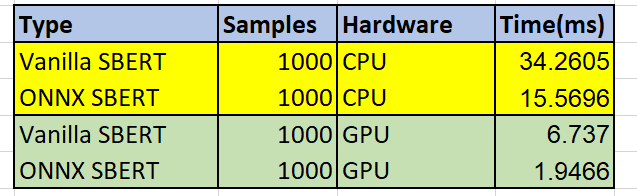
PyTorch cpu Inference time = 34.2605 ms
ONNX Converted SBERT (CPU)
The inference time obtained for the ONNX SBERT model on the CPU can be found using the below snippet.
import onnxruntime
import numpy as np

sess_options = onnxruntime.SessionOptions()

session = onnxruntime.InferenceSession(export_model_path,
                                       sess_options,
                                       providers=['CPUExecutionProvider'])

latency = []
ort_outputs_cpu = []

for i in tqdm(range(total_samples)):

    data = [df.loc[i, "Overview"]]

    inputs = tokenizer(data,
                       padding=True,
                       truncation=True,
                       return_tensors="pt"
                       )

    ort_inputs = {k:v.cpu().numpy() for k, v in inputs.items()}

    start = time.time()
    op = session.run(None, ort_inputs)
    op = torch.from_numpy(op[0])
    ort_outputs_cpu.append(mean_pooling([op],
                                        inputs['attention_mask']
                                       ).cpu().detach().numpy())
    latency.append(time.time() - start)

print("\n")
print("OnnxRuntime {} Inference time = {} ms".format(device.type,
                                                     np.round(np.average(latency)*1000, 4)))
100%|██████████| 1000/1000 [00:16<00:00, 60.80it/s]
OnnxRuntime cpu Inference time = 15.5696 ms
Outputs
outputs_cpu[0][:,:10]    ## Vanilla SBERT CPU Output

array([[-0.06326339, 0.0414625 , -0.04707527, -0.03361899, -0.02562934,
         0.03499832, 0.00804075, -0.05042004, 0.00215668, -0.03816812]],
dtype=float32)
ort_outputs_cpu[0][:,:10]   ## Onnx SBERT CPU Output

array([[-0.06326343,  0.04146247, -0.04707528, -0.033619  , -0.02562926,
         0.03499835,  0.0080408 , -0.05042008,  0.00215669, -0.03816817]],
      dtype=float32)
Vanilla SBERT (GPU)
The inference time obtained for the Vanilla SBERT model on the GPU can be found using the snippet below.
device = torch.device("cuda")

# Set model to inference mode, which is required before exporting
# the model because some operators behave differently in
# inference and training mode.

model.eval()
model.to(device)

total_samples = len(df)

latency = []
outputs_gpu = []
with torch.no_grad():
    for i in tqdm(range(total_samples)):

        data = [df.loc[i, "Overview"]]

        inputs = tokenizer(data,
                           padding=True,
                           truncation=True,
                           return_tensors="pt"
                          ).to(device)

        start = time.time()
        outputs_gpu.append(mean_pooling(model(**inputs),
                                        inputs['attention_mask']).cpu().detach().numpy())
        latency.append(time.time() - start)

print("\n")
print("PyTorch {} Inference time = {} ms".format(device.type,
                                                 np.round(np.average(latency)*1000, 4)))
100%|██████████| 1000/1000 [00:07<00:00, 135.29it/s]
PyTorch cuda Inference time = 6.737 ms
ONNX Converted SBERT (GPU)
The inference time obtained for the ONNX SBERT model on the GPU can be found using the snippet below.
import onnxruntime
import numpy as np

sess_options = onnxruntime.SessionOptions()

session = onnxruntime.InferenceSession(export_model_path,
                                       sess_options,
                                       providers=['CUDAExecutionProvider'])

latency = []
ort_outputs_gpu = []
for i in tqdm(range(total_samples)):

    data = [df.loc[i, "Overview"]]

    inputs = tokenizer(data,
                       padding=True,
                       truncation=True,
                       return_tensors="pt"
                      ).to(device)


    ort_inputs = {k:v.cpu().numpy() for k, v in inputs.items()}

    start = time.time()
    op = session.run(None, ort_inputs)
    op = torch.from_numpy(op[0])
    ort_outputs_gpu.append(mean_pooling([op],
                                        inputs['attention_mask'].cpu()).cpu().detach().numpy())
    latency.append(time.time() - start)

print("\n")
print("OnnxRuntime {} Inference time = {} ms".format(device.type,
                                                     np.round(np.average(latency)*1000, 4)))
100%|██████████| 1000/1000 [00:02<00:00, 373.49it/s]
OnnxRuntime cuda Inference time = 1.9466 ms
Outputs
outputs_gpu[0][:,:10]   ## Vanilla SBERT GPU

array([[-0.06326333,  0.04146247, -0.0470753 , -0.03361904, -0.02562935,
         0.03499833,  0.00804079, -0.05042002,  0.00215669, -0.03816818]],
      dtype=float32)
ort_outputs_gpu[0][:,:10]  ## ONNX SBERT GPU

array([[-0.06326336,  0.04146249, -0.04707528, -0.03361899, -0.02562931,
         0.03499832,  0.0080408 , -0.05042004,  0.00215668, -0.03816817]],
      dtype=float32)
Summary Table
Conclusion
Based on the results obtained we can see that the ONNX-converted model takes significantly less time to get the sentence embedding without any loss in the data. The experiments were conducted on Google Colab with T4 GPU. Similar or better results can be expected from other hardware as well.
In ONNX, we can also have a Quantised version of SBERT. The quantized version would have int8 dtype. One can explore that as well. The Jupyter notebook for the complete experiments is added in the GitHub repo below for further reference.
References
- https://onnxruntime.ai/
- https://huggingface.co/sentence-transformers/all-MiniLM-L6-v2
- https://github.com/microsoft/onnxruntime/tree/main
— — — — — — — — — — — — — — — — — — — — — — — — — — — — — — — — —
If this was useful, consider giving it a clap, it really helps. I write about ML, AI, and technology. Follow me here on Medium so you don’t miss the next one.
📌 More from me:
→ Keras Implementation of LE-NET
→ AlexNet: Pioneering the Path to Modern Deep Learning
→ Smoothening noisy GNSS dataONN
Unleashing the Power of ONNX for Speedier SBERT Inference was originally published in Towards AI on Medium, where people are continuing the conversation by highlighting and responding to this story.