Calling an LLM API is not an architecture. Here’s what actually is.
There’s a conversation I keep seeing play out on engineering teams right now, and it goes something like this.
A tech lead gets pulled into a demo. The AI feature looks incredible - it answers questions fluently, sounds confident, handles edge cases like a champ. Everyone’s impressed. Someone says “let’s ship it.” And they do.
Three weeks later, the support tickets start rolling in. Users complain the bot feels “dumb”. It keeps forgetting what they said two messages ago. It confidently gives wrong answers. It can’t access anything specific to the company’s actual data. The team scrambles. Nobody’s sure what to fix because nobody’s sure what they actually built.
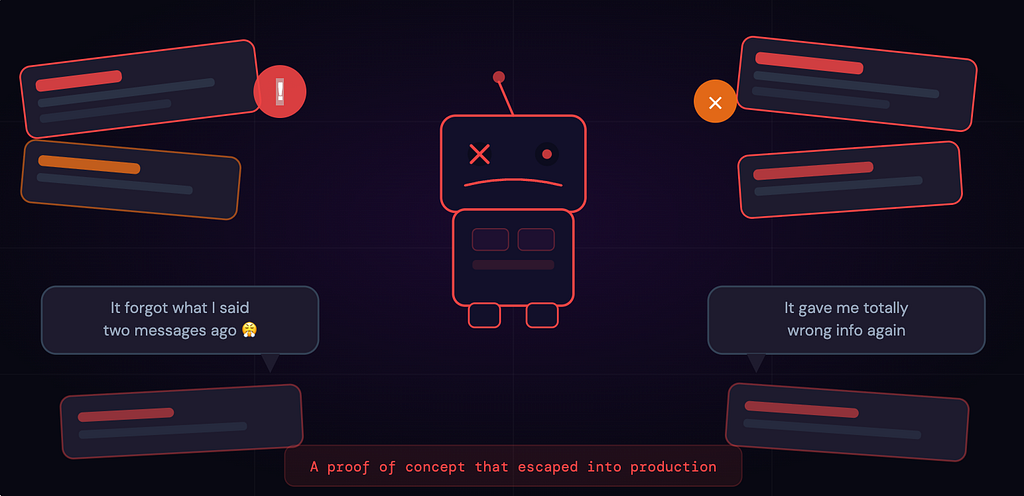
What they built was a prompt. Wrapped in a UI. Connected to an API.
That’s not a product. That’s a proof of concept that escaped into production.
The model itself wasn’t the problem. The model was fine. The system around it didn’t exist.
The Mental Model most teams are working with (and why it’s wrong)
Ask most developers how an AI app works, and they’ll describe something like this:
User types something → you send it to OpenAI/Gemini/Claude → you get text back → done.
That’s not wrong exactly. But it’s like describing a web app as “user clicks button → server does stuff → page updates.” Technically true. Completely useless as architecture.
A real AI product is a stack — multiple layers, each with a distinct job, each one capable of being the weak link that breaks the whole experience. Just like you wouldn’t ship a production web app without thinking about your database, your caching layer, your auth system — you can’t ship a real AI product without thinking through each of these five layers.
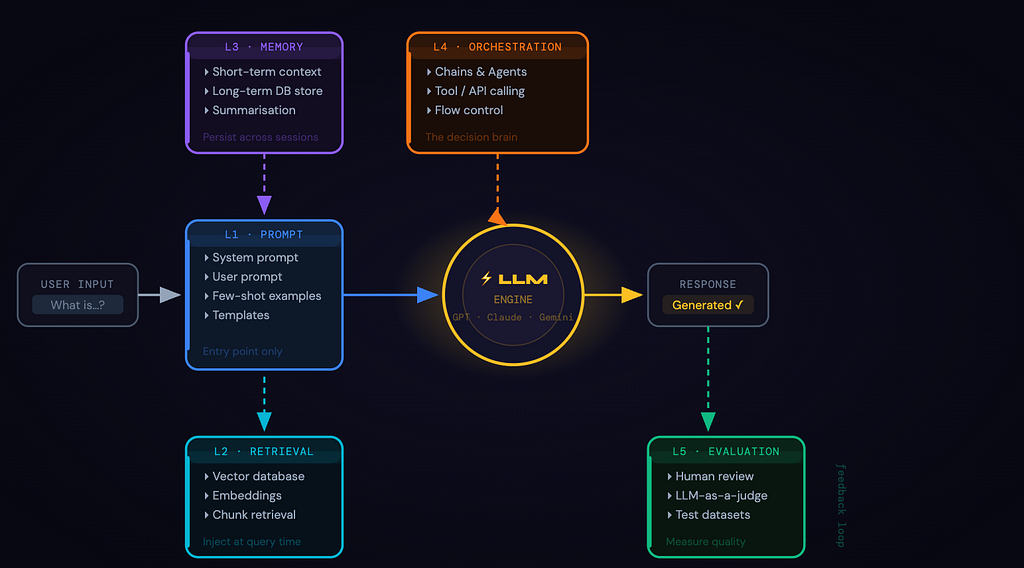
Layer 1: The Prompt Layer (where everyone Starts and Stops)
The prompt layer is the most visible part of your AI system. It’s how your application communicates intent to the model:
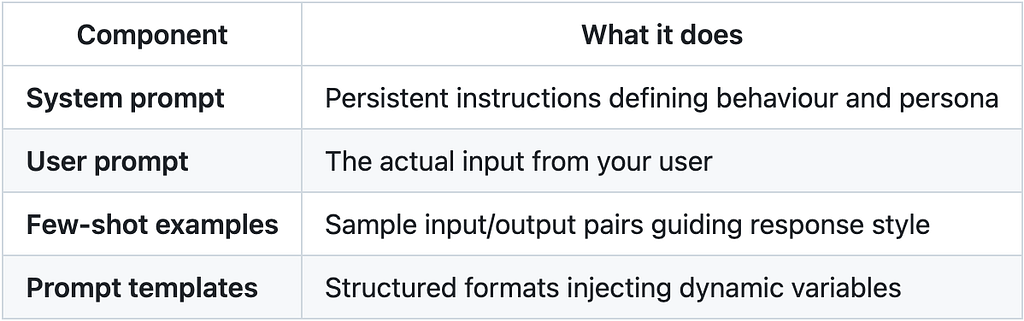
But most teams make their first architectural mistake here: they treat the prompt layer as the whole system.
They spend weeks tuning prompts, A/B testing phrasings, trying to coax better answers out of the model and wonder why the product still feels broken. The prompt layer is the entry point. It is not the architecture.
Layer 2: The Retrieval Layer (RAG - giving the model a brain)
LLMs know a lot. But they do not know your stuff i.e. your internal documentation, product specs, support history, proprietary data. They’re trained on a snapshot of the internet up to some cutoff date. Everything else is invisible to them.
RAG (Retrieval Augmented Generation) fixes this. Instead of relying on what the model learned during training, you retrieve relevant information at query time and inject it into the prompt.
What most teams think RAG is: We dump our docs into a vector DB and the AI reads them.
What RAG actually requires you to decide:
- Which vector DB? (Pinecone, Weaviate, pgvector on Postgres — each with real tradeoffs)
- What’s your chunking strategy? Chunk too large and retrieval is noisy. Too small and context is lost.
- Which embedding model? And does it match the one you used at index time?
- How do you keep the knowledge base in sync as documents change?
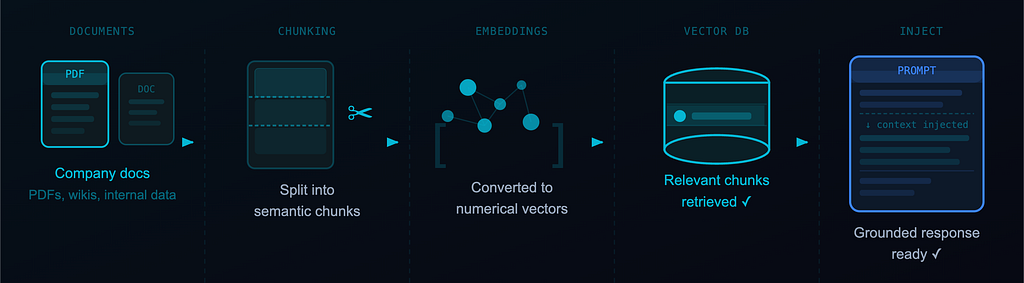
These aren’t prompt engineering questions. They’re system design questions. And they have real consequences.
One more thing RAG does: it reduces hallucinations. Not eliminates — reduces. Grounding responses in retrieved context is meaningfully better than asking the model to rely on training memory it may or may not have.
Layer 3: The Memory Layer (The one that makes or breaks UX)
Every call to an LLM API is stateless. The model has no idea what happened in the previous turn unless you explicitly send it back. So for that “conversation” your user is having with your AI, you’re rebuilding the entire context from scratch on every single request. This for short interactions is manageable but for real products used over time it is a UX disaster.
Memory breaks down into two types:
Short-term memory is your current conversation context — what goes into the context window right now. You’re deciding which messages to keep, which to trim, which to summarise.
Long-term memory is what persists across sessions. User preferences, past decisions, things they’ve told the system that should still be relevant three weeks from now. This lives in a real database, gets retrieved when relevant, gets injected back in.
Context windows are getting larger — genuinely useful — but larger isn’t infinite, and it isn’t free. Stuffing everything in is not a memory strategy. It’s a cost and latency problem waiting to surface.
Teams that get this right treat memory management as a first-class engineering concern. Teams that don’t? Their users describe the AI as “feeling dumb”, not because the model is dumb but because it keeps forgetting.
Layer 4: The Orchestration Layer (where AI becomes a system)
Orchestration is the logic that separates chatbots from products. It controls which model to call (and when), what tools or APIs to invoke, how to chain multiple steps together, how to handle errors and retries, and when to ask for clarification versus when to proceed.
Two main patterns:
Chains are linear sequences — Step 1, then Step 2, then Step 3. Predictable, auditable, easy to debug. If your use case has a well-defined flow, chains are often the right call.
Agents are dynamic. The model itself decides what action to take next based on current state. You give it tools — search the web, query a database, call an API — and it figures out the sequence. More powerful, significantly harder to control.

Most production systems use a hybrid: structured outer orchestration defining the overall flow, with agents handling specific sub-tasks that require dynamic decision-making.
Frameworks like LangChain, LlamaIndex, and LangGraph exist to help here. They’re worth evaluating carefully. Understanding what they abstract is more important than picking the trendiest one.
Layer 5: The Evaluation Layer (The most underrated part of the stack)
Most teams can’t answer this question honestly: “How do you know your AI is actually working?”
Not “does it return something.” Not “did the demo look good.” How do you measure quality in a way that’s systematic, repeatable, and honest?
Eval is genuinely hard. There’s rarely a single correct answer, output quality is partially subjective, hallucinations can be subtle — factually adjacent to truth, confidently stated — and performance degrades gradually as your data changes.
The methods that actually work:
Human evaluation — real people rating outputs against defined criteria. Expensive to scale, irreplaceable for calibration.
LLM-as-a-judge — a separate model scores outputs from your primary one. Scales well and surprisingly effective when your evaluation prompt is tight.
Custom metrics + test datasets — you define what “good” looks like for your specific use case, build a representative dataset, run automated checks against every new version.
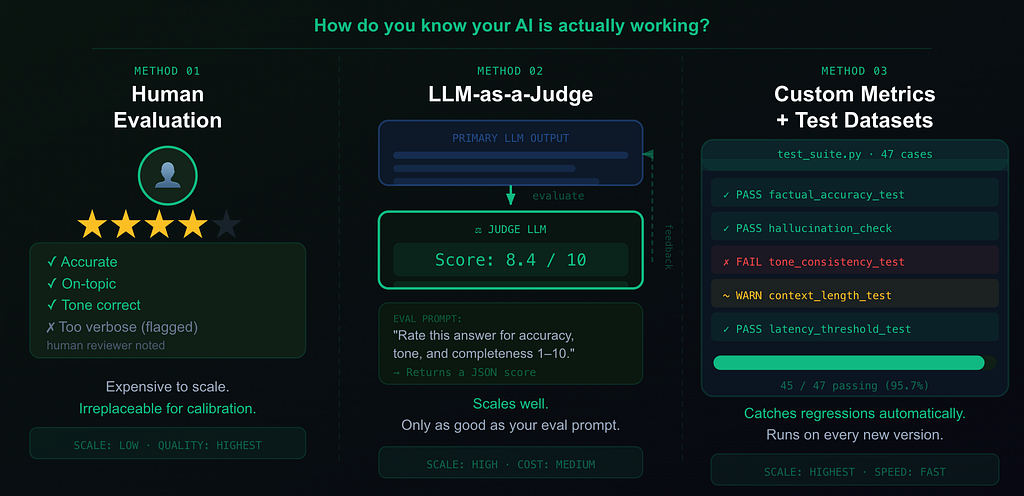
Teams that invest in eval early can confidently ship improvements, detect regressions before users do, and tell the difference between a prompt change that helped and one that quietly hurt.
Teams that skip it are flying blind. They just don’t know it until something goes visibly wrong.
Conclusion
LLMs are remarkable. The rate of capability improvement in the last two years has been hard to process, even for people paying close attention.
But here’s what all that capability doesn’t change: The model is the engine. The product is the system around it.
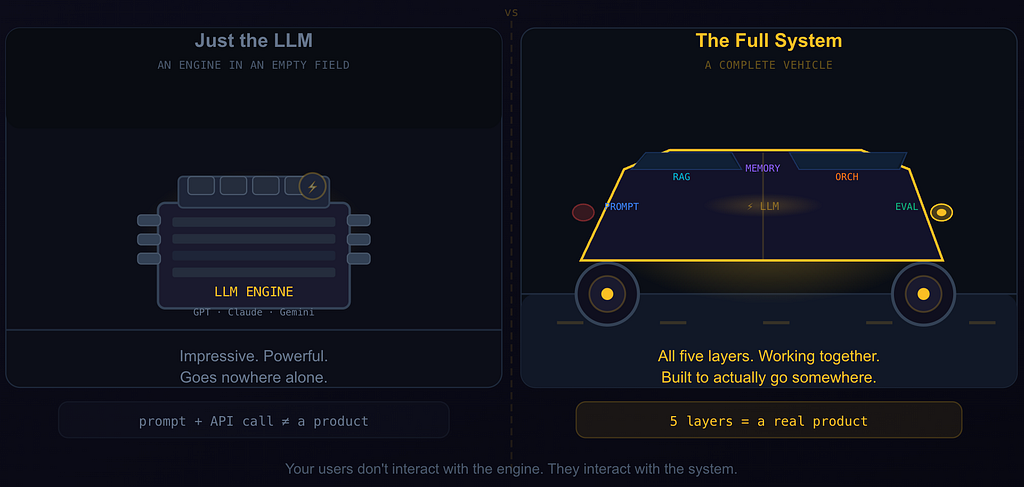
An engine sitting in a field is not a car. You need the chassis, the steering, the fuel system, the brakes, all of it working together before you have something people can actually use. GPT-4, Claude, Gemini are incredible engines but your users don’t interact with the engine. They interact with the system.
So what this means for you is to stop treating a prompt and an API call as an architecture decision.
Audit what you have against these five layers. The useful questions to ask are:
- What happens when the model needs knowledge that wasn’t in its training data?
- What does a user experience after their 10th session? Does the system know anything about them?
- Who owns the orchestration layer, and can anyone actually draw it on a whiteboard?
- How do you catch a quality regression before users file a ticket about it?
The real AI stack isn’t complicated once you see it clearly. But you have to actually look.
If this gave you a new perspective on AI, feel free to clap so others can discover it — and let’s connect on LinkedIn to keep the conversation going.
Understanding the Real AI Stack Beyond LLM APIs was originally published in Towards AI on Medium, where people are continuing the conversation by highlighting and responding to this story.