Comparing LoRA, QLoRA, & full fine-tuning approaches with cost analysis!
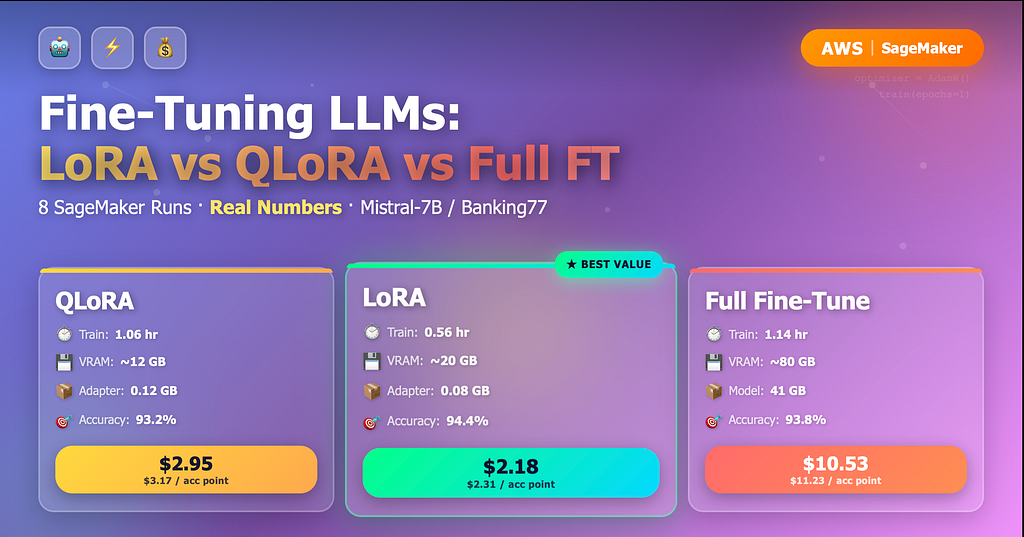
The present & future of LLMs is more towards Specialization instead of Generalization. Even though there are many LLMs available, in most of the cases, you cannot use them, because either they are license-based (incur cost & data leakage issue), or they are open source, providing not up to the mark performance. The unacceptable performance is expected in the cases when you have your own data, which can be of any use case, but since it's specific data, you cannot expect any model to be an expert on that. Hence, we need Fine-tuning as the solution.
In this blog, we will discuss Fine-Tuning, its major types, the implementation of each type, & their comparison (including cost comparisons), as well as the proper use-cases for each type, which will make you an expert in this field.
Let’s begin!
Understanding Fine Tuning & its types!
What is Fine-Tuning?
Fine-tuning is the process of being better continuously in a field by understanding & adapting the details of that field, even though you are already good at many fields. In AI terminology, it will be to make a general LLM specialized in a particular field by repeatedly training that model on the data available for that particular field.
Real-World Analogy: Improcing yourself as a Chef in preparing North Indian Food even though you know how to cook multi-cuisine.
Now, it's time to discuss the major types of fine-tuning being used to fine-rtune LLMs.
Full Fine Tuning! 🥇
This is the most expensive process as it will update all parameters of the LLM during the process. It’s like instead of renovating an office, you are rebuilding all the infrastructure, rewiring all the electric circuits, etc.
For reference to one of the models used in this blog, Llama2–7B, it has 7 billion parameters. In full Fine Tuning, all 7 billion parameters will be updated. Hence, this process is most expensive in terms of time & cost.
What will be the Process for full fine-tuning?
- Load all the parameters of the pre-trained LLM, for example, LLama2–7B.
- Feed training data to the LLM, which is the forward pass, so that the model can understand the patterns.
- Calculate gradients for all the 7B parameters in the backward pass.
- Update all 7B parameters based on the gradients.
- Repeat the process for the defined number of epochs. (More epochs means more time and money spent, and generally better performance, which will saturate after some epochs, which will vary based on many things)
Use-cases
- When you are not constrained by the resources (cost & time)
- You want to rewire the model completely
- When you cannot compromise on accuracy even slightly
- When there are Specific compliance requirements from some companies/industries/government.
LoRA (Low Rank Adaptation)! 🥈
This method is categorized under Parameter-Efficient Fine-Tuning (PEFT). It is like a revolution in the LLM Fine Tuning to save cost & time.
It works on the foundations of Matrix Decomposition.
In Technical terminology, LoRA will decompose the updates into smaller matrices instead of updating the full weight matrix for LLM.
In real-world terminology, it’s like creating a recipe to update an image in low rank decomposition instead of updating the image by updating every pixel.
Weight update equations
Normal Equation: W(new) = W(Original) + weight_update
LoRA Equation: W(new) = W(Original) + BxA
For Example: If the weight_update matrix shape is 2048*2048 = 4 Million Parameters, LoRA, will insert 2 low level matrices (B & A) which will be of shape (2048 * 4) & (4 * 2048) respectively, when we multiply them, we get the same original shape based on matrix multiplication rule, however, total parameters to be updated will be (2048 * 4) + (2048 * 4), which is around 16K parameters.
This is around 96% reduction in trainable parameters. This is the power of LoRA.
What will be the Process for LoRA fine-tuning?
- It will freeze the original weights of the LLM, i.e., W(Original) will be fixed.
- Small decomposed matrices (B & A) are added to the existing layers.
- Decomposed matrices will be updated.
- Create W(New) by merging the W(Original) & the decomposed matrices (B&A) on the fly.
Use-cases
- You need massive training resources savings (cost, GPU, time); however, you are ready to make a slight compromise on accuracy as compared to Full Fine Tuning.
- You want to preserve the general knowledge of the LLM, but want to make it specialized in some data/field/domain.
- You are fine with a slight inference dealy which will be caused by the computation of decomposed matrices (unless these are merged finally into the weights).
QLoRA (Quantized LoRA)! 🥉
This is exactly LoRA with different representations of weights to save memory.
Generally, weights are stored in 32 bits (4 bytes), using the Float32 data type. However, QLoRA, as the name suggests, quantized weights in QLoRA are represented in a 4-bit Normal Float (NF4) data type. Hence, it provides 8x memory savings.
For Example:
Weight in LoRA (32 bits): 0.117346519115546875
Weight in QLoRA (4 bits): 0.12
Properties of the Quantization schema of QLoRA
- A special quantization, which is highly optimized for neural networks, is used.
- This technique allocates comparatively more precision when the weights are near zero (dense region).
- For outliers, less precision is allocated.
- Precision of 4 bits is obtained with a slight accuracy loss.
- It can be slower than LoRA because it uses Gradient Checkpointing to reduce memory usage. It trades compute for memory. Additionally, it uses dequantization on every forward & backward pass, which creates another overhead. This also leads to slow training with QLoRA.
Use-cases
- When you have very high resource constraints.
- When you want to create a baseline model/quick prototype to check what results we are getting, this will give an idea of whether you can proceed ahead with LoRA or Full Fine Tuning if required.
- When LLM research has to be democratized.
- When the applications are non-critical, a slight decrease in accuracy is acceptable.
That is about the Fine tuning approces that we will use for the LLMs.
Datasets & Models!
The dataset used in this project will be “Banking77,” which is an open-source dataset available from the Finance sector, which is one of the best use cases for LLM Fine Tuning.
Models utilized for the comparison in this project are as follows:
- Llama-2-7B(Since this is a gated model, you will require the Hugging Face token for this, & also youalso have to request access to this model if you don’t already have it.)
- Mistral7B-v0.1
- GPT-NeoX-20B
Implementation!
This section will explain the complete implementation of the Project. For the fine-tuning, let’s prepare our dataset first.
Dataset Preparation!
The dataset being used in the project is “Banking77,” which is related to the Finance Sector. Here is the link to the dataset on HuggingFace: https://huggingface.co/datasets/PolyAI/banking77
The script given below will prepare the dataset for the fine-tuning of LLMs. This script will create a directory named “data” (containing the prepared dataset) inside the directory from where you will execute it.
Now that we have the data with us, let’s upload it to S3 for the Fine-tuning of LLMs.
S3 Setup!
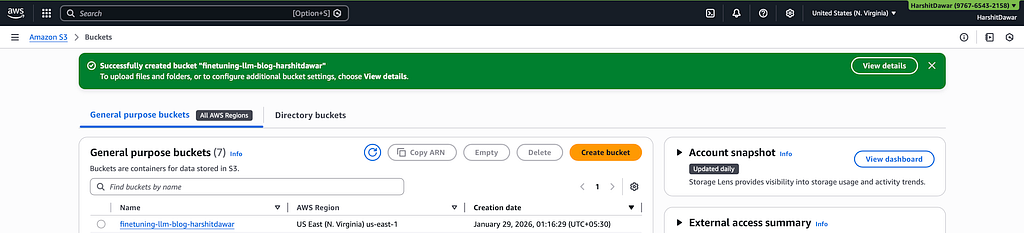
Create an S3 Bucket with a unique name. I have created one with the name “finetuning-llm-blog-harshitdawar”.
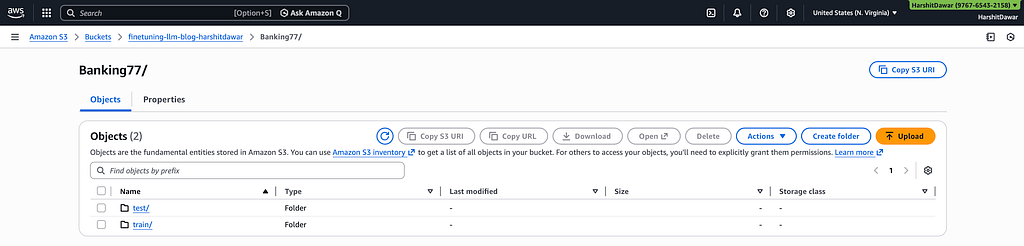
Create a folder with the name “Banking77”, & “train” & “test” inside “Banking77”.
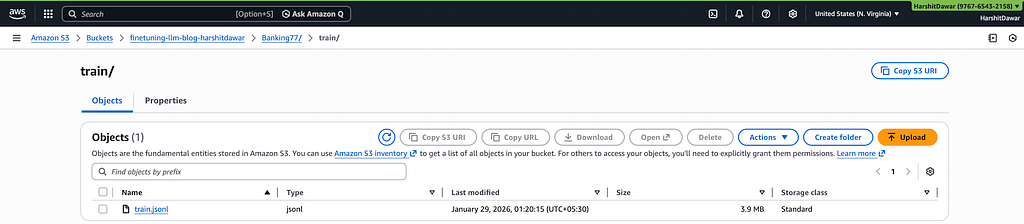
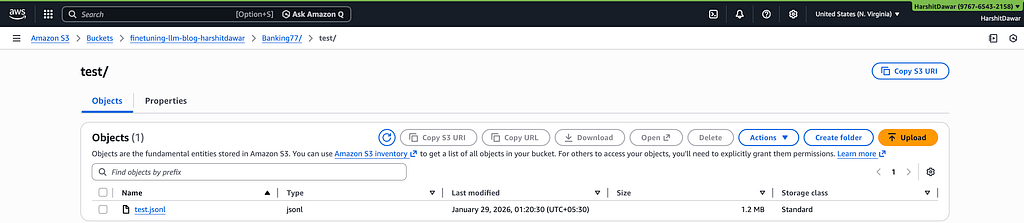
Upload “train.jsonl” in the “train” folder, “test.jsonl” in the “test” folder, respectively. The .jsonl files are prepared by the script executed in the 1st step above in this section.
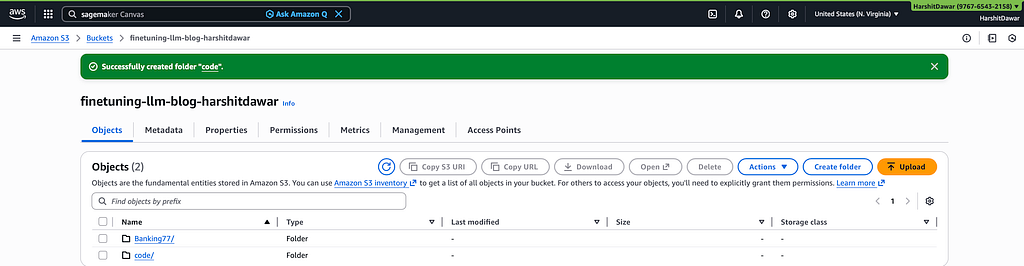
Create a folder named “code” in the same S3 Bucket.
Create a file named “requirements.txt” with the code mentioned below. This file contains all the libraries required for the project.
Create another file named “training_script.py” with the code mentioned below. This file is a universal script that will be used to fine-tune all the models with all the approaches mentioned in the above sections of this blog.
This script will require the following parameters for the fine-tuning of the model, which will be configured in the SageMaker Job:
- model_name
- approach
- epochs
- batch_size (optional, default value is 8)
- learning_rate (optional, default values are set based on the type of fine-tuning)
- hf_token (required to access gated models)
Create a compressed tar file for these files using the command mentioned below:
tar -czf training-scripts.tar.gz training_script.py requirements.txt
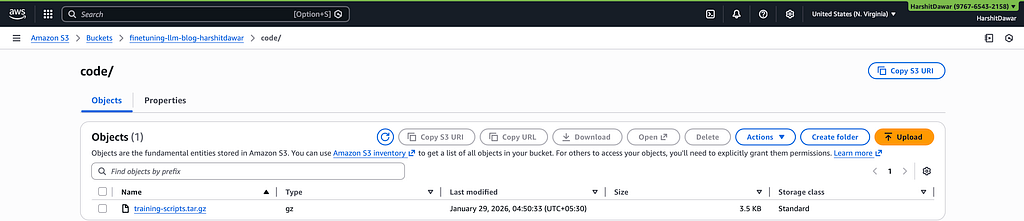
Upload the compressed file into the S3 Bucket’s “code” folder.
Go to the Bucket you are working in -> Permissions tab -> Bucket policy, ideally it should be blank. Add the policy mentioned below to allow AWS Sagemaker access to your bucket. (Remember to replace the bucket name & the IAM Role ARN mentioned below with the one you are working with)
{
    "Version": "2012-10-17",
    "Statement": [
        {
            "Effect": "Allow",
            "Principal": {
                "Service": "sagemaker.amazonaws.com"
            },
            "Action": [
                "s3:GetObject",
                "s3:PutObject",
                "s3:ListBucket"
            ],
            "Resource": [
                "arn:aws:s3:::finetuning-llm-blogs-harshitdawar/*",
                "arn:aws:s3:::finetuning-llm-blogs-harshitdawar"
            ]
        },
        {
            "Effect": "Allow",
            "Principal": {
                "AWS": "arn:aws:iam::976765432158:role/service-role/AmazonSageMakerAdminIAMExecutionRole"
            },
            "Action": [
                "s3:GetObject",
                "s3:PutObject",
                "s3:DeleteObject",
                "s3:ListBucket"
            ],
            "Resource": [
                "arn:aws:s3:::finetuning-llm-blogs-harshitdawar/*",
                "arn:aws:s3:::finetuning-llm-blogs-harshitdawar"
            ]
        }
    ]
}
S3 setup is completed. Now, we will proceed with the Sagemaker setup, which is the core part of Fine Tuning.
SageMaker Setup!
Go to the AWS Sagemaker homepage, which looks as mentioned in the image below.
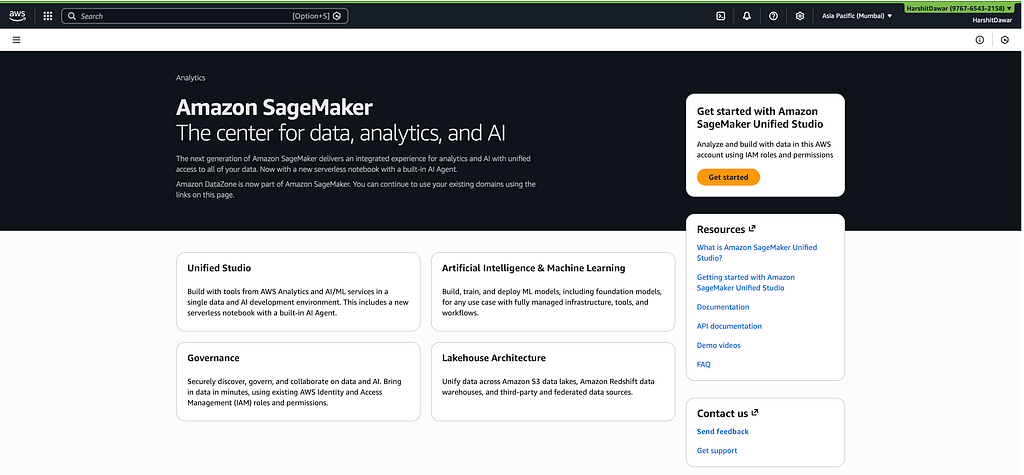
Click on “Get Started”, & you will see a screen as mentioned below.
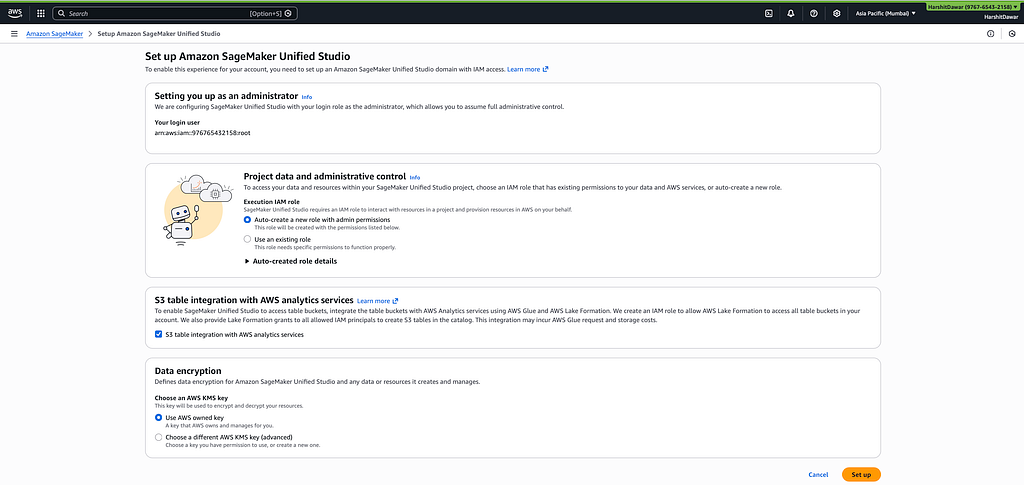
Leave everything as it is, & click on “Set up”. This will set up the SageMaker Unified Studio for you. It can take a few minutes; hence, please wait for its completion. Once it's done, click on “Open”. It will present the screen shown below to you.
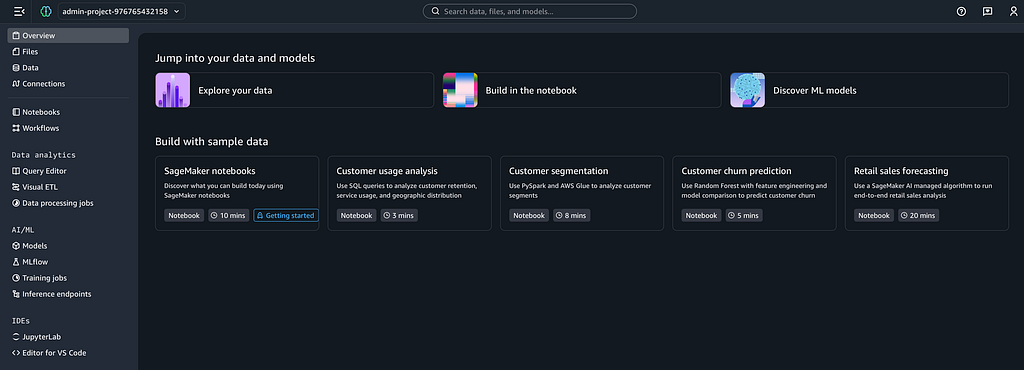
Now, the domain is set up. Visit the link mentioned below to open the “Sagemaker Console/Dashboard” from where we can run the fine-tuning jobs.
https://console.aws.amazon.com/sagemaker/
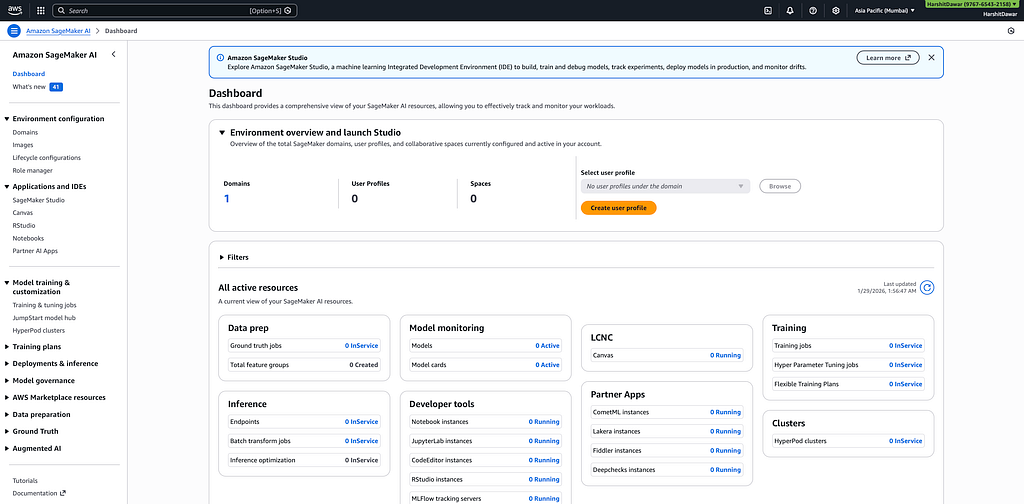
Click on “Training & tuning jobs” under “Model training & customization”, & you will be landed on the screen shown below.
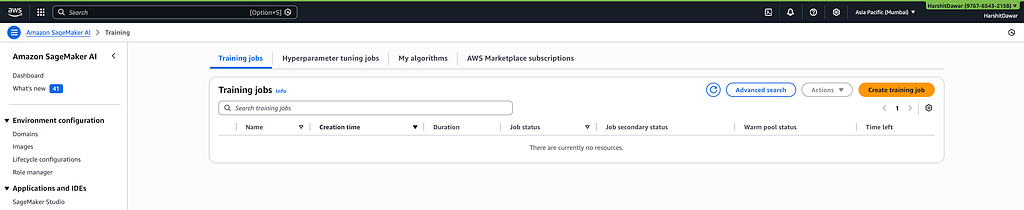
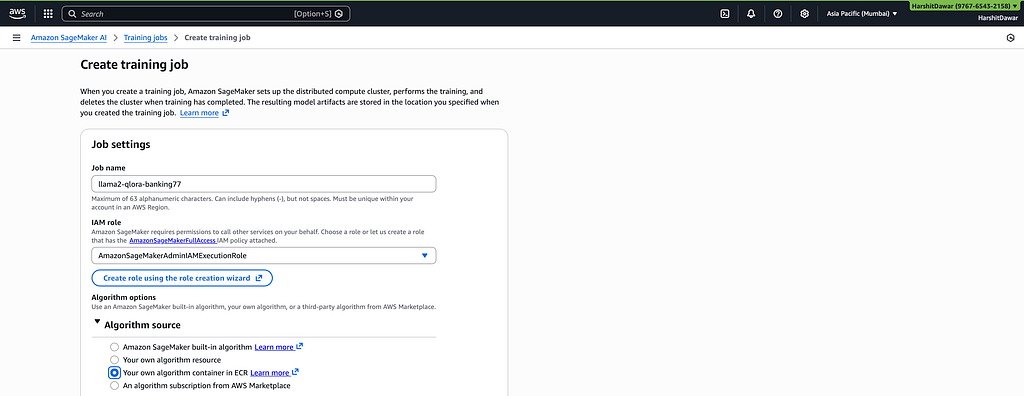
Click on “Create training job,” & you will be prompted to fill in the job details. Fill in the job name as per your requirement. I have added “llama2-qlora-banking77” because in this job, I will be fine-tuning the “Llama2” Model based on the QLoRA Approach on the Banking77 Dataset.
Additionally, select “Your own algorithm container in ECR” under “Algorithm source”. This will allow running a custom image for training based on the custom script mentioned above.
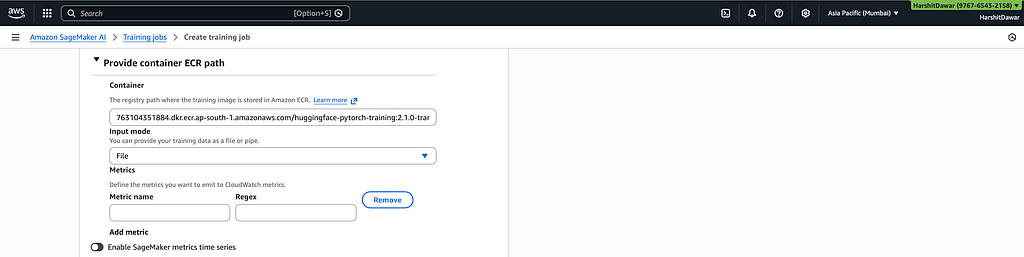
Add the URL in the Container registry path under the “Provide container ECR path” section. Make sure to replace the region based on your requirement. Since I am running SageMaker in the “ap-south-1” region, I have added that. If you are using another region, make sure to add that & replace the one mentioned.
Keep the rest of the settings as they are in this section, though if you want, you can add metric names that you would like to be tracked by AWS CloudWatch.
763104351884.dkr.ecr.ap-south-1.amazonaws.com/huggingface-pytorch-training:2.1.0-transformers4.36.0-gpu-py310-cu121-ubuntu20.04
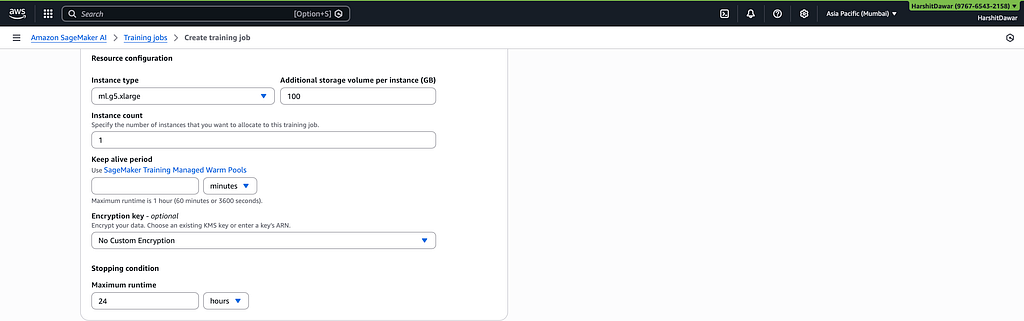
Select at least “ml.g5.xlarge” instance for GPU access & fine-tuning with the other settings as shown in the image below. If you are using bigger datasets, scale accordingly.
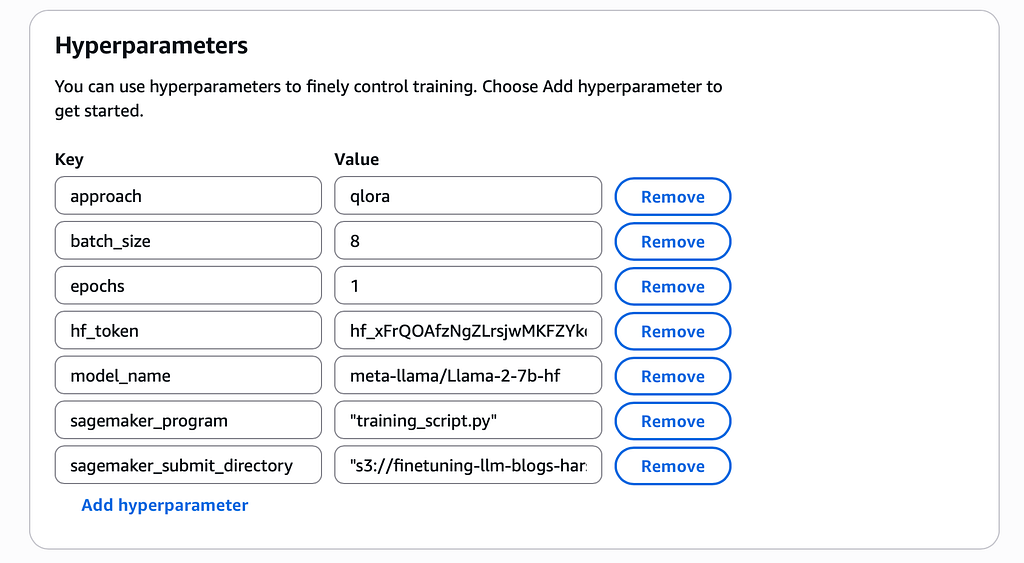
Configure the hyperparameters as per your S3 URI of the objects & as per the image shown below. 7 total hyperparameters are configured, which are as per the “training_script.py” script & are as follows:
- sagemaker_program (Automatically referenced): To mention the program that Sagemaker has to execute
- sagemaker_submit_directory (Automatically referenced): S3 Directory containing the program
- model_name: Model to fine-tune by AWS SageMaker
- approach: The fine-tuning approach to use
- epochs: Number of epochs fine-tuning should run
- batch_size: Number of records to pass in 1 batch in a forward pass for Fine Tuning
- hf_token: To access the Gated models (given that you have access to them)
Add the configuration for “Input Data Configuration” for training by mentioning the S3 URI of the train directory we configured:
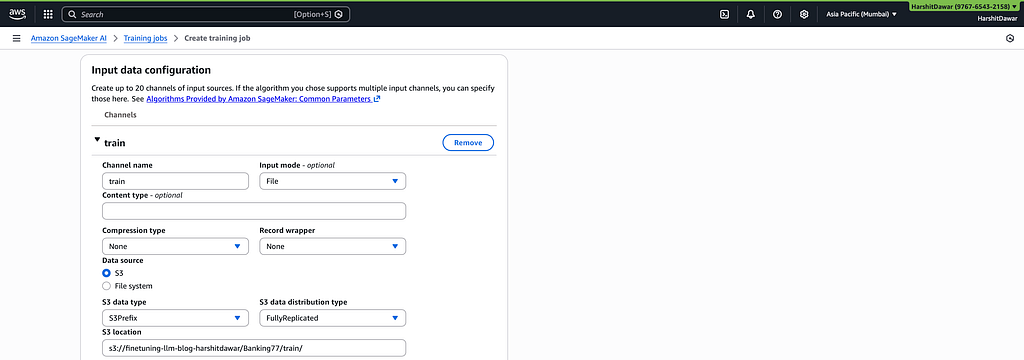
Now click on “Add Channel” & create another channel with the name “test” for providing the testing data input. Add the S3 URI for the test data.
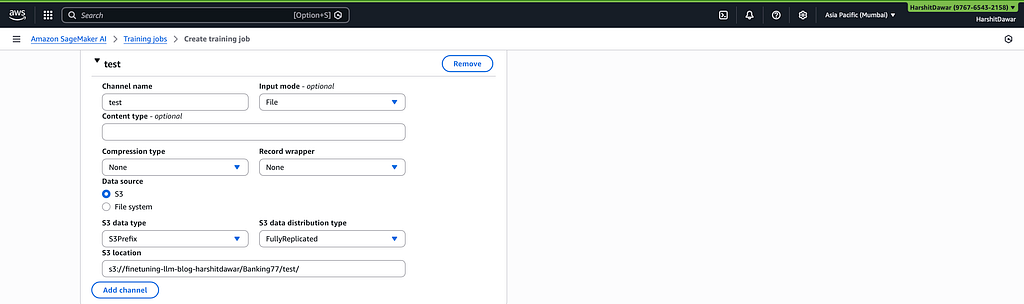
Create a specific S3 folders/directories structure in the same S3 Bucket we have used to store the output of fine-tuning. For this run, the directory structure created based on the model & fine-tuning strategy is as follows:
finetuning-llm-blog-harshitdawar/models/llama2-qlora
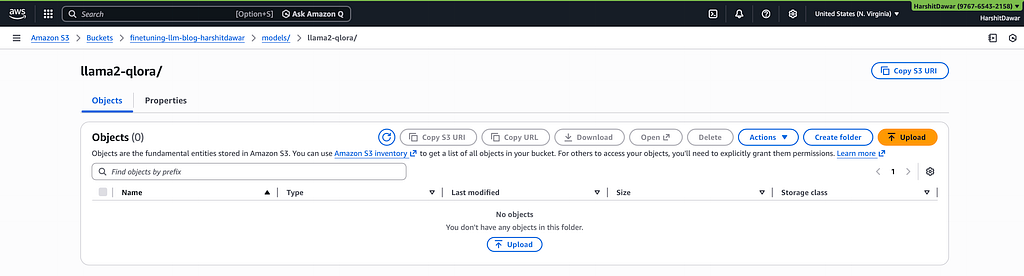
Add the output S3 URI created above in the “Output data configuration” section of the SageMaker Job.
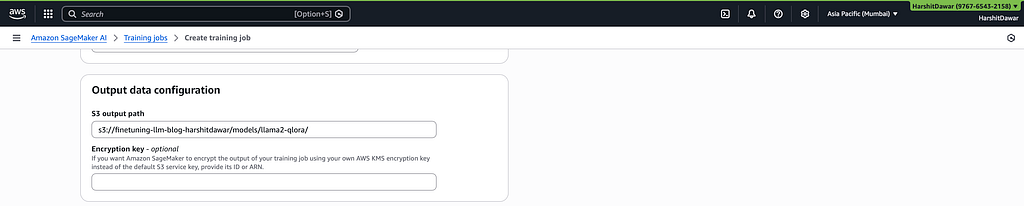
If you want, you can utilize Spot instances for training. I am keeping them default, leave the other settings as default as well & click on “Create training job”.
Note: Before clicking on “Create training job”, just verify that the role AWS Sagemaker is using generally it will be named as “AmazonSageMakerAdminIAMExecutionRole”, has the access to AWS S3 or not, if not then the job will fail because of access issues to the data present in S3. To check got to AWS IAM -> Roles, search for Roles, & verify the Permissions, if S3 permissions are missing, then add either FullAccess to S3 or atleast read access for the proper functioning.
Note: Make sure to leave Network settings blank. otherwise, if you want to run in a specific VPC, you should S3 endpoint for VPC for secure connectivity.
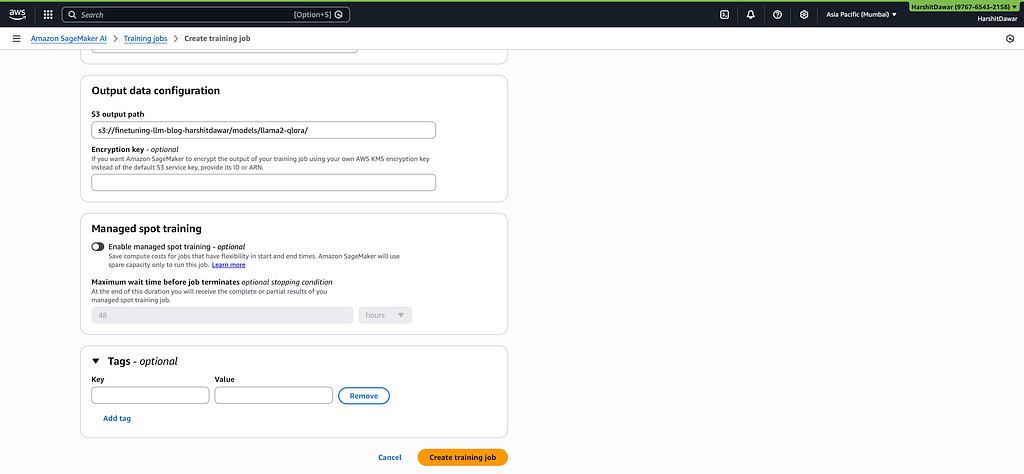
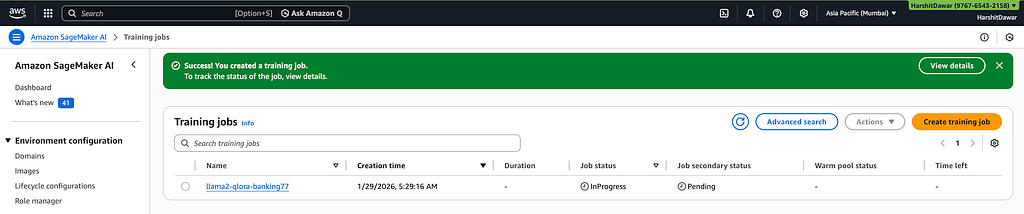
As soon as you click “Create training job”, a new training job will be created as shown below.
Make sure you have the access to “ml.g5.xlarge” instance in the particular region you are working, otherwise, job creation will fail. In that case, you have to request for the particular instance in AWS Sagemaker, that you can do from “AWS Service Quotas”. Generally, the request gets approved instantly.
Using a similar way, you can configure a fine-tuning job for all the LLMs specified in the blog with each fine-tuning approach. Given below is the list of LLMs with different fine-tuning approaches combinations & the recommended AWS Instance with batch size as well.
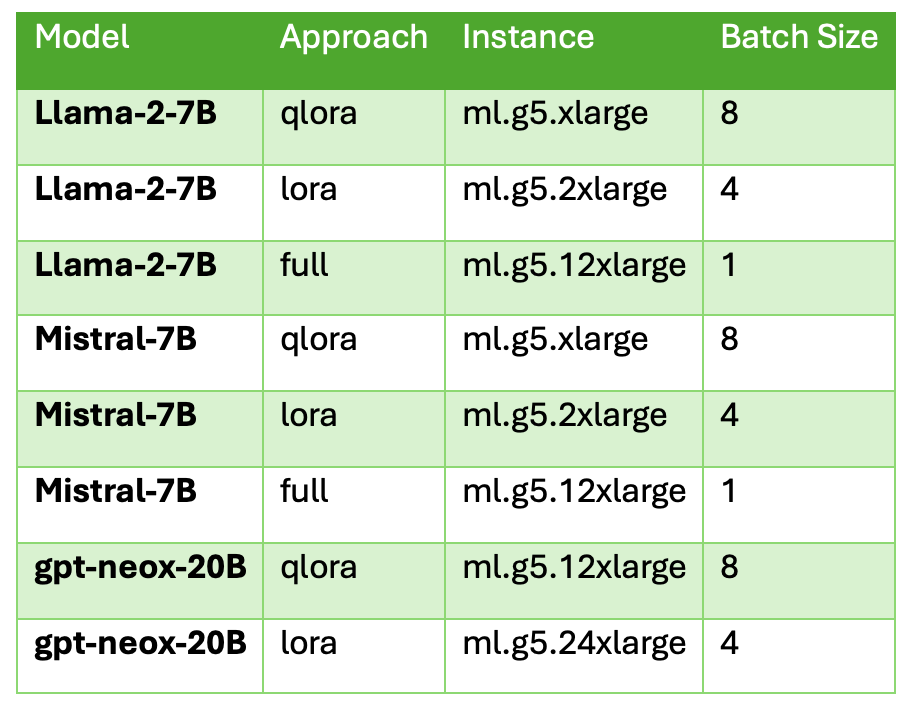
Note: You should have access to all the Instance sizes mentioned in the above table (if not, then you can raise the request with AWS service qouta, it will mostly be approved immediately). Make sure you have AWS Credits while you perform this practical, otherwsie, there will be a huge bill. Get a cost estimate before running any job, only run when you are fine with the cost (if no credits are there with you). Though I have given a cost estimate in the next section of “Results & Analysis”.
Note2: GPT-Neox-20B with full Fine-Tuning is kept out of scope because of cost & timing constraints for this blog. However, if you are interested in doing the same, do connect with me. I will guide you on the same for sure.
Results & Analysis!
This section has a detailed comparison among many factors, which not only helps in understanding the cost, but also explains how the utilization of the resources varies across different models & instace sizes. This section will lay the foundation for choosing the correct approach for any of the use cases.
This section will be further divided into 3 sub-sections, on which the comparative study is showcased & they are as follows:
- Performance Metrics
- Cost Analysis
- Resources Requirements
Let’s Begin!
The comparative study with results & analysis showcased below is highly important, as it took a lot of cost, time, effort, & determination to create it.
Note: The Inference from every LLM is made on the same 500 records from the test.jsonl file we created above (to save some cost & time, as already this blog became the most expensive blog, more than 200 USD I spent to provide this quality content).
Note 2: The script used to evaluate the models is mentioned at the end of this section below.
Performance Metrics
The image shown below represents the detailed comparison of all the LLMs’ performance. Metrics used to compare them are:
- Rouge1
- Rouge2
- RougeL
- Bert Score F1
- Intent Accuracy (Intents present in the Banking77 Dataset)
- Intent Parse Rate (judges the correct formatting of the Intent generated by each LLM; if there is even a slight mistake, then parsing will fail for that output)
- Inference Seconds

Cost Analysis
The image shown below showcases the following things for each combination of the LLMs Fine-Tuned:
- Training Time Comparison
- Instance Costs Breakdown for Training Job & Inferencing
- Inference Time per record
- Inference Cost (calculated as, Total Samples tested * (Inference seconds per sample/3600) * Inference Notebook cost per hour)
- Intent Accuracy
- Cost per Performance Point

Why does QLoRA cost more than LoRA?
This happens because of the following reasons:
- QLoRA has dequantization overhead for each forward pass to dequantize the weights from 4-bit to bf16 for matmul.
- By default, gradient checkpointing is enabled, which trades around 25% wall-clock timing for 45% activation memory savings.
- QLoRA uses the “paged_adam_8bit” optimizer that adds some CPU-paging latency as compared to LoRA’s “adamw_torch” optimizer.
Resources Requirements!
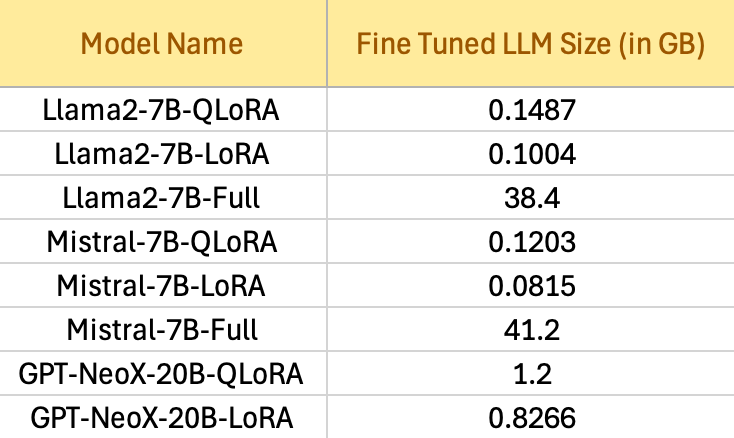
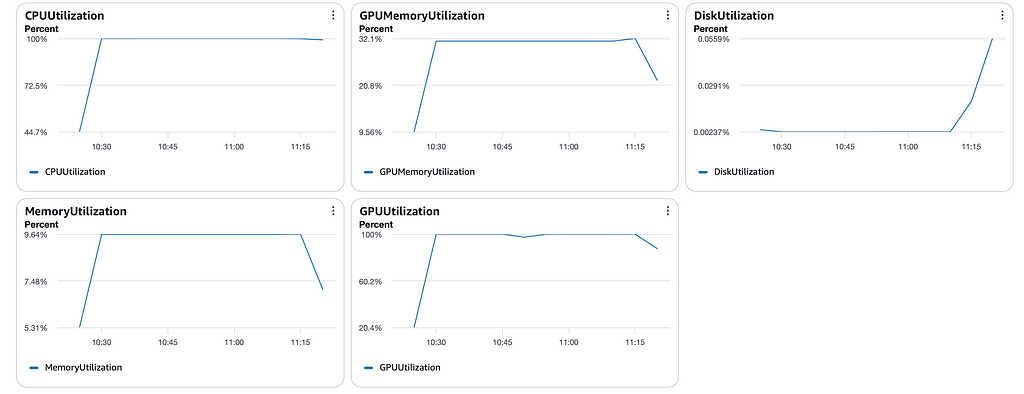
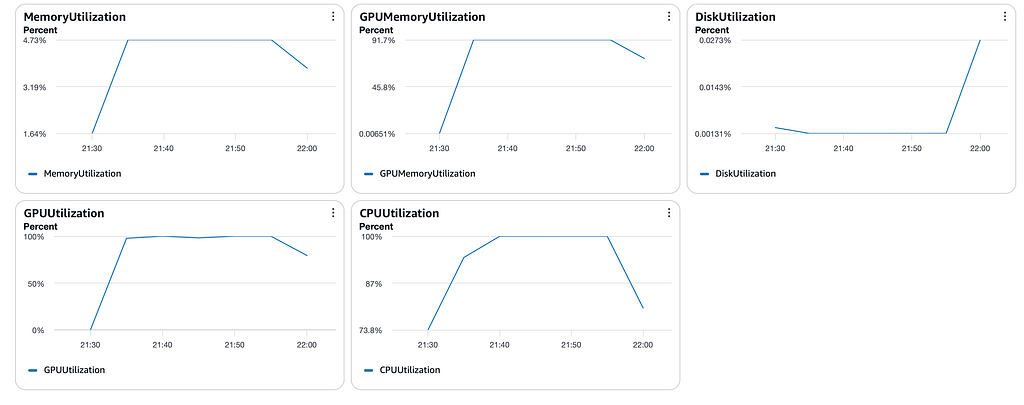
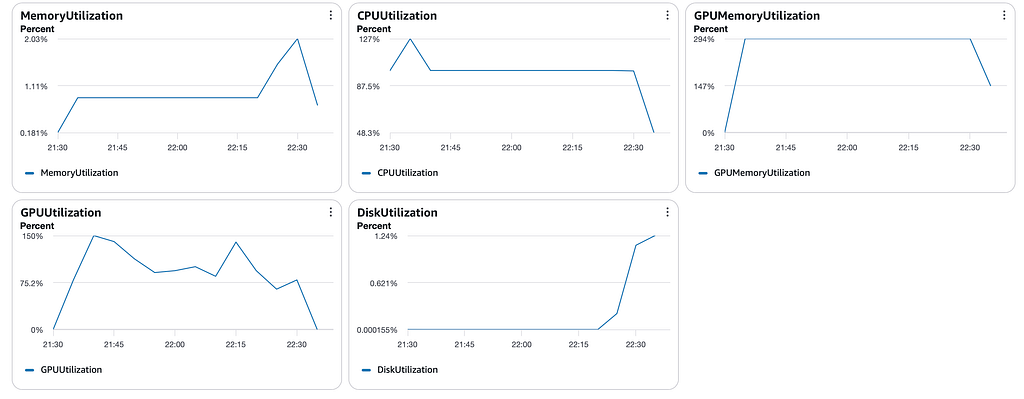
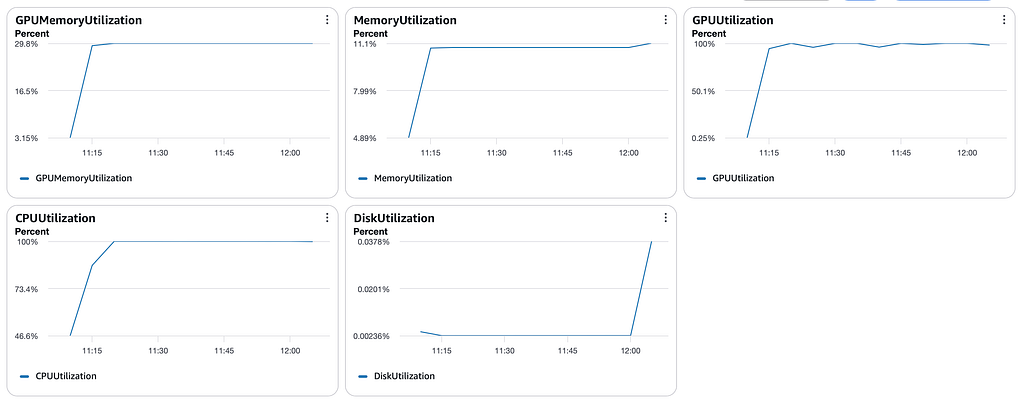
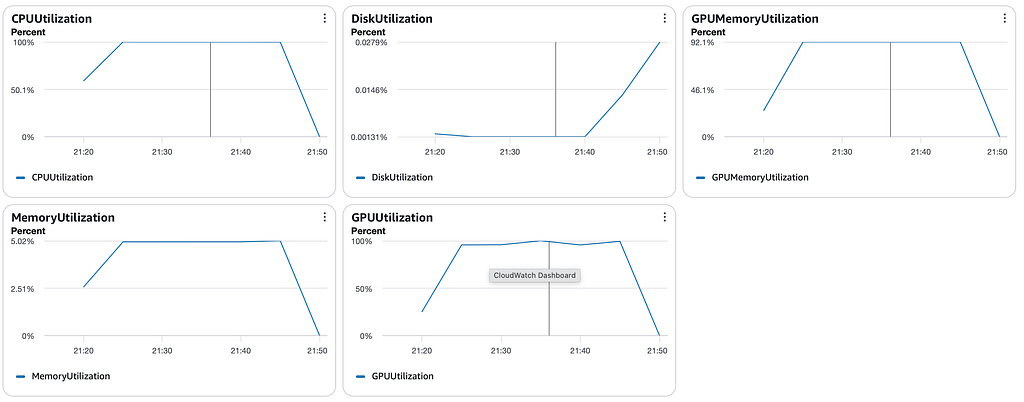
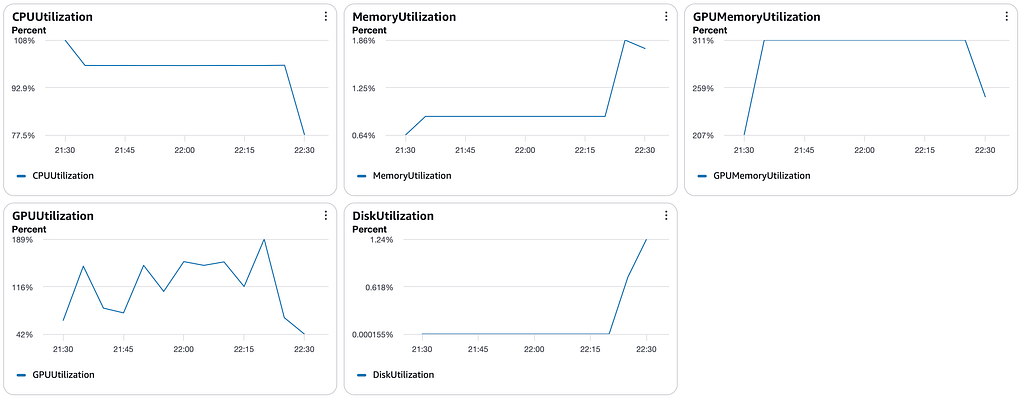
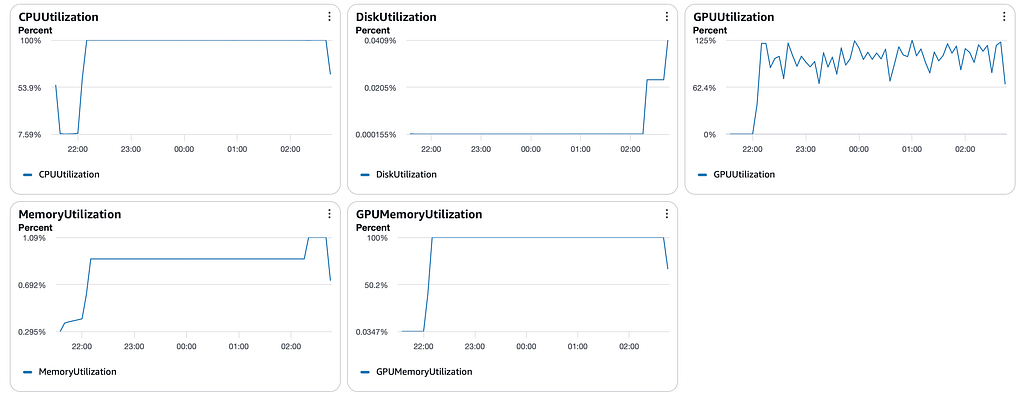
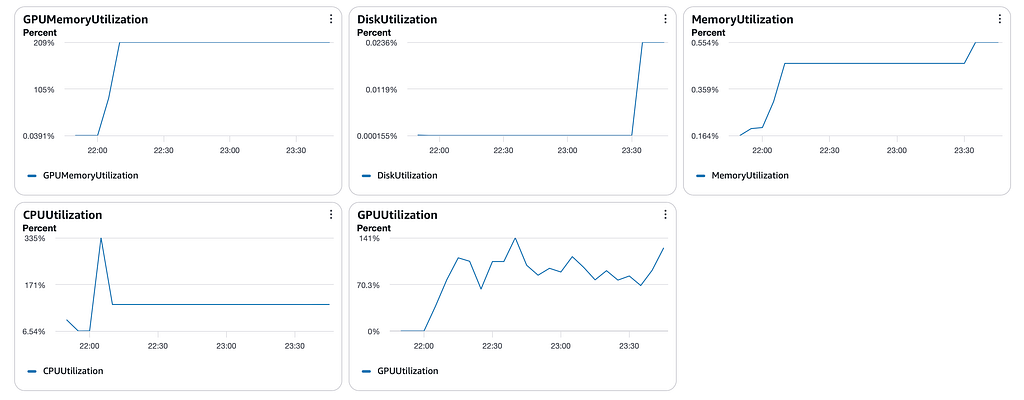
This section will showcase the Fine-Tuned LLM’s size in GB, & all the graphs (GPU Utilization, GPU Memory Utilization, Disk Utilization, CPU Utilization, & Memory Utilization) for each Fine-Tuned LLM.
Script used for the Evaluation!
Conclusion & Recommendations!
Here are the most informative conclusions/myth busters/surprises from the results obtained:
- QLoRA is not the default approach in modern GenAI to fine-tune & deploy your LLM: across all the different LLMs fine-tuned, it can be observed that the QLoRA results are worse than LoRA results in all aspects, whether it be accuracy, cost per performance point, training time, inference point, or cost. LoRA is 24% cheaper. QLoRA value is in to fine-tune when the resources are highly limited, especially the VRAM of the GPU.
- Bigger model + light approach beats smaller model + heavy approach: It can be observed that when GPT-NeoX-20B is fine-tuned using LoRA beats the performance of Llama-2–7B fine-tuned using Full fine-tuning.
- Full Fine-tuning is not best for niche tasks with limited data: It can be observed from the results of both LLama2 & Mistral, when fine-tuned using LoRA, they performed better as compared to Full Fine-tuning, which also saved 5x training cost. The primary reason for this behaviour is Catastrophic Forgetting, as Full fine-tuning tries to change the complete learning of the LLM.
- Only optimizing the hourly rate is a bad Idea: When we fine-tune using LoRA on a bigger instance (even though it costs more per hour, 1.44x, but it runs quickly 2.6x), as compared to QLoRA on a smaller instance, the overall cost is less. It can be seen clearly from the GPT-NeoX-20B results. Hence, optimization for fine-tuning should be done on “hourly rate of fine-tuning * wall clock seconds”.
- Mistral beats Llama2 consistently: From the observations, it's clear that Mistral is a better choice than Llama2, as it either outperforms Llama2 or matches its performance across all fine-tuning approaches, except Llama2-Full has a slightly better bertscore than Mistral-Full, even though their intent_accuracy remains the same.
- Model size (approx 380x – 505x) advantage can supercharge the entire lifecycle: The size of Mistral or Llama2, which are fine-tuned using LoRA, is 382x — 505x smaller than the ones fine-tuned using Full fine-tuning. This highly reduced size will take just a few GBs for storing some task-specific variants of these models, as compared to full fine-tuning ones, which will take TBs of storage. Additionally, loading time will be so much quicker. In case of some hotfixes as well, small size will entirely rule the complete dynamics.
- Full Fine-tuning is faster than the LoRA & QLoRA: The reason behind this is adapters in LoRA & QLoRA, which are used in the forward pass, & they add matmul overhead for every layer involved in the fine-tuning process. But, very important, the results are generated where QLoRA & LoRA adapters are not merged; if they are merged before inference, then their inference time will decrease as well.
This marks the end of this tremendous blog. Congratulations on reaching here. Now, you are supercharged with this detailed LLM understanding.
I wish you the best of luck!
✨ Where to go from here?
You have come this far, which really means a lot. The further steps are as follows:
- 🎊 Appreciate yourself for deciding to read this blog, which has exponentially enhanced your knowledge.
- 🎉 Follow me on Medium (It’s free) & opt-in for email notifications to stay updated with my latest articles on multi-tech (Complete AIOPS).
- 🎯 Follow me on LinkedIn (It’s free) to get the latest tech dose & tips & tricks.
- 😍 Want to connect with me 1:1? Click here.
- ❤️ Check out my Udemy Courses.
- 💬 I’d love to hear your thoughts! Drop a comment below or connect with me on LinkedIn/Twitter to discuss and exchange ideas.
The Ultimate Guide to Fine-Tuning Foundation Models on AWS Sagemaker was originally published in Towards AI on Medium, where people are continuing the conversation by highlighting and responding to this story.