What nobody tells you about running GenAI at scale!
The Hook Nobody Wants to Hear
Anyone can call an API. Almost no one can run GenAI reliably at scale.
I know that sounds harsh. But after spending two years deploying self-hosted large language models for a platform serving tens of thousands of users — with privacy constraints that ruled out every managed API on the planet — I mean every word of it.
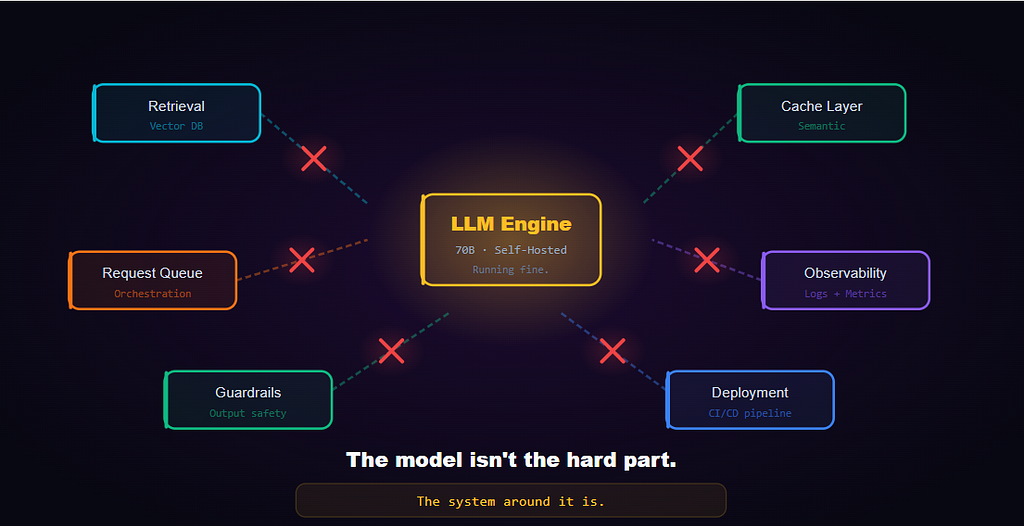
The hardest part of GenAI isn’t the model. It’s everything that comes after the demo works. The numbers back this up. BCG’s research found that 74% of companies struggle to generate tangible value from AI, with only 26% seeing real results.
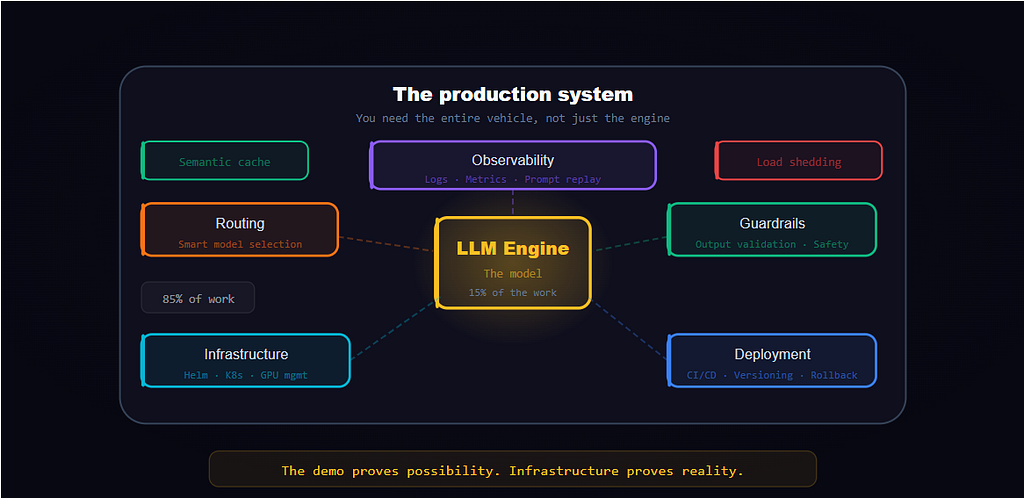
And yet, most of the conversation in our industry still orbits around model benchmarks, prompt tricks, and which foundation model is “the best.” That stuff matters. But McKinsey’s research on AI high performers found that models account for only about 15% of total project costs. The remaining 85% goes to integration, orchestration, and ongoing operations.
The Illusion: “It Works on My Laptop”
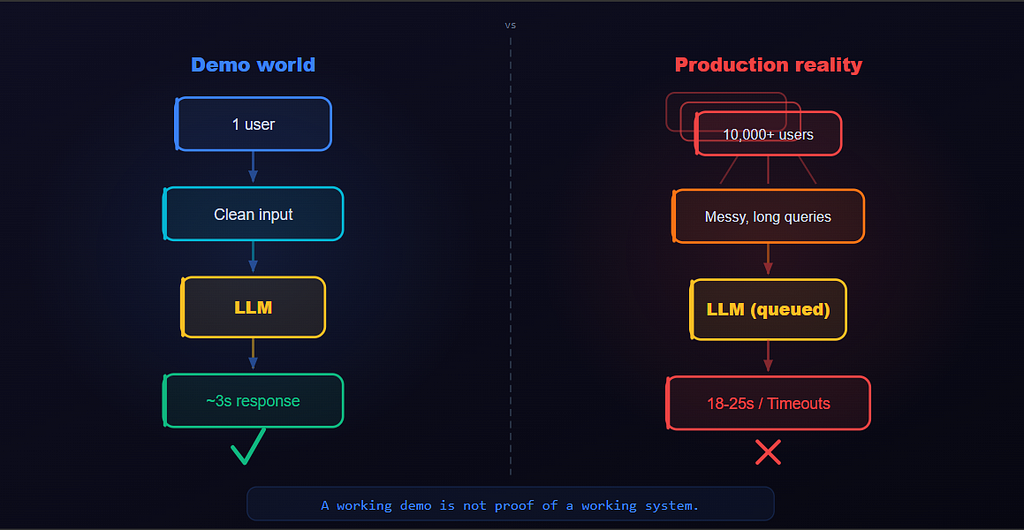
You build a prototype. A RAG pipeline with a vector store, a retrieval step, and a self-hosted 70B parameter model. You feed it a clean query. Beautiful, well-structured answer in about four seconds. You demo it to leadership. Everyone loses their minds. Roadmap gets rewritten. Ship date: six weeks.
Here’s what that demo didn’t test: concurrency, messy real-world inputs, latency under load, or what that single inference call actually cost in GPU-hours.
S&P Global reported that the average organization scrapped 46% of AI proof-of-concepts before reaching production — and 42% of companies abandoned most of their AI initiatives in 2025, up from 17% the prior year.
Why Prompts ≠ Production Systems
I’ve lost count of how many times I’ve seen people treat prompt engineering as the entire AI strategy. Write a good prompt, chain a few of them together with LangChain and ship it.
A prompt is one layer of a system that needs dozens of layers to run reliably. They break under scale (retrieval context shifts under load), edge cases (users will input things you never imagined), and long contexts (the “lost in the middle” problem is real). And most prompt setups have no versioning, no observability, and no rollback.
The Real Bottlenecks
Here is what actually bites you when you try to scale GenAI.
A. GPU Memory and Model Constraints
We run self-hosted models. Privacy requirements dictate that data cannot leave our infrastructure. Everything runs on our metal.
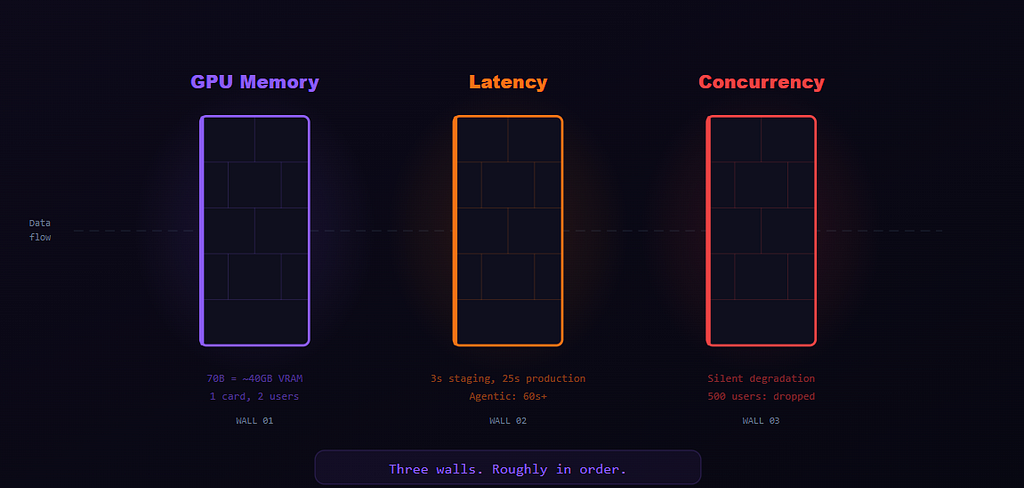
Here’s what most people don’t internalize: a 70B parameter model, even after compression, still needs roughly 35-40GB of GPU memory just to load. That’s before you process a single token. Now add the memory that grows with every token (KV Cache) in your context window, the longer the conversation or document, the more memory it eats. Run a 32K-token context? You’re easily burning another 8-16GB per request.
IDC’s AI infrastructure tracker shows organizations spent 166% more on AI compute infrastructure year-over-year in 2025; largely because scaling GPU capacity is brutally expensive.
B. Latency: The Biggest UX Killer
I had a RAG-powered assistant deployed for an internal knowledge base which worked great in staging. Then I opened it to 100 users. Response times went from 3-4 seconds to 18-25 seconds.The LLM inference itself was 4-6 seconds which was still acceptable.
The problem was the full pipeline stacking up:
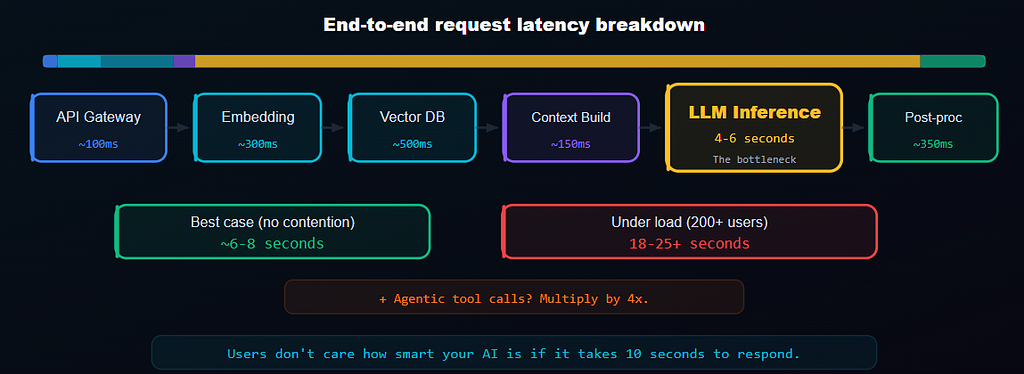
- API Gateway : auth, rate limiting. ~100ms.
- Embedding : converting the query into a vector. ~200–400ms.
- Vector DB retrieval : fetching relevant documents. ~300–800ms.
- Context assembly : building the prompt, counting tokens, trimming. ~100–200ms.
- LLM inference : the actual model thinking. 4–6 seconds.
- Post-processing : parsing, safety filtering, formatting output. ~200–500ms.
That’s 6–8 seconds on a good run. Add concurrency pressure and you’re at 15–20 seconds. Add agentic workflows where the model calls tools and reasons in multiple steps? Best case: 20 seconds. Worst case: over a minute.
C. Concurrency: The Silent System Killer
LLM inference is expensive. Each request hogs GPU memory and holds compute for seconds, not milliseconds. Ideally you can’t just spin up more GPUs on demand (till now) — provisioning takes hours and costs a fortune.
When you try load testing systems. First few requests are fine, then queue wait times spike and connections drop. No errors in the logs with health checks green but users getting timeouts. Silently. No error message. No retry. Nothing.
This tracks with what BCG calls the “10–20–70 principle” — AI success is 10% algorithms, 20% data and technology, and 70% people, processes, and infrastructure. The silent failures we experienced were entirely in that 70%.
What Actually Makes GenAI Work in Production
Here’s what we should be doing and what I’d tell anyone building a GenAI system today.
A. System Design > Model Choice
The single biggest shift in our thinking should be stop optimizing the model and start optimizing the system.
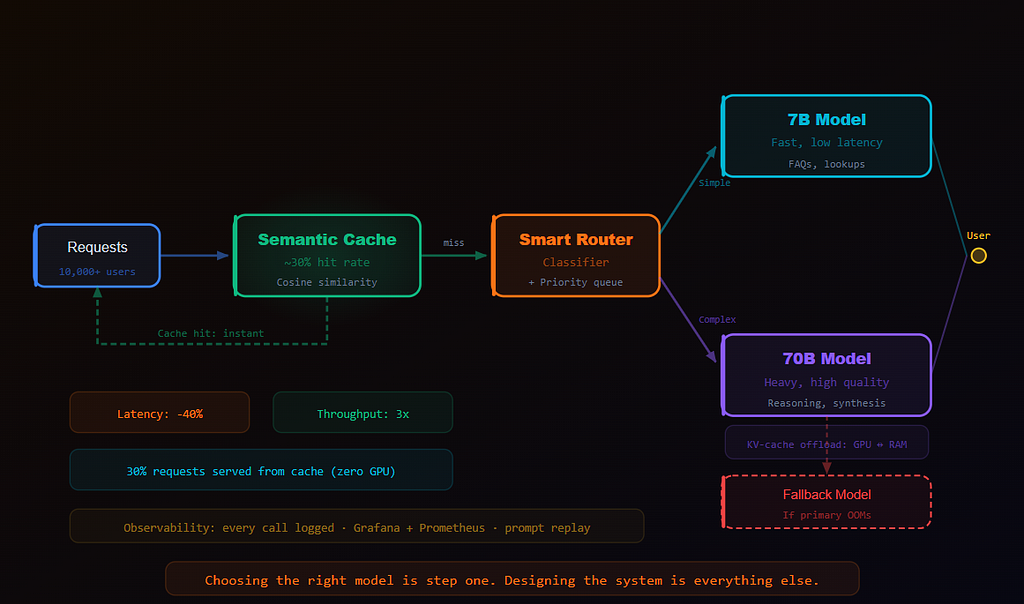
Smart routing. Building a lightweight classifier that routes simple queries (FAQs, lookups, formatting) to a smaller, faster model, and complex queries (multi-step reasoning, synthesis) to the large model will cut down the average latency by approximately 40% and tripled throughput as nt every question needs your most powerful model.
Note: Hosting both a 70B and a smaller 8B model requires dedicating specific GPU nodes to the smaller model to prevent VRAM contention, but the throughput gains are worth the hardware split.
- Aggressive semantic caching. If a new query is similar enough to a recent one, we serve the cached response. Let us say if about 30% of the queries were close enough to cache, that’s 30% of requests that never touch the GPU. So it becomes a win for both latency and cost.
- Request prioritization and load shedding. Interactive user-facing queries should get priority whereas batch jobs should get queued. Under heavy load, we could gracefully drop low-priority requests rather than letting everything degrade for everyone.
- Memory offloading. This is a game changer for our concurrency ceiling. Here’s the problem in plain terms: when a model processes a long document or conversation, it stores a running memory of everything it has read so far. That running memory (called the KV-cache in technical circles) is the single biggest memory hog after the model itself — on a long request, it can eat 8-16GB of GPU memory per user. The solution? Instead of holding all of that memory on the GPU, you spill the inactive portions to your server’s RAM (NVMe), and pull them back to the GPU only when needed. Frameworks like vLLM and TensorRT-LLM support this out of the box. You take a small latency hit — maybe 50-200ms per swap — but the tradeoff is massive. You could potentially go from 2 concurrent long-context requests per GPU to 6-8. It’s not magic, you need enough system RAM to absorb the spill, and you need to tune when and how aggressively you swap. So for self-hosted deployments at scale, this is one of the highest-leverage optimizations to make.
B. Observability
If you’re running GenAI in production without proper observability, you’re flying blind in a thunderstorm. Here’s what to track for every request:
- The full prompt (or a hash of it, for privacy). What did the model actually see?
- The full output. What did it produce?
- Token counts. Input and output. This is how you catch cost explosions early.
- Latency breakdown. Per-stage, not just total. Where exactly is the time going?
- Failure modes. Did the model refuse? Make something up? Time out? Return garbage?
- User feedback signals. Thumbs up/down, regeneration requests, abandoned sessions.
Build a dashboard (Grafana + Prometheus) and a prompt replay system to pull the exact prompt, context, and output for debugging. That replay system is a lifesaver. Trying to debug a hallucination without it is like trying to fix an engine with a blindfold on.
C. Iteration Loops: You Never “Ship and Forget”
GenAI systems are living systems. They are not static software you deploy and walk away from.
Every week, we tune something:
- Prompts. Real user queries reveal failure patterns you never anticipated.
- Retrieval. The knowledge base gets re-indexed as the source documents change, search strategies get adjusted and relevance thresholds get tweaked.
- Output guardrails. Validators that catch hallucination patterns, malformed responses, and answers that don’t actually address the question.
- Model versions. How output behavior changes. Prompts that worked on v1 might need adjustment for v2.
Infrastructure Learnings: Where GenAI meets Reality
Running GenAI in production looks a lot less like prompt engineering and a lot more like managing distributed systems.
- Deployment consistency matters enormously. Model-serving infrastructure should be templated, versioned, and reproducible — whether you use Helm, Terraform, or something else. When a model update causes output regressions at 2 AM (and it will), the ability to roll back in minutes instead of hours is the difference between a minor incident and a full-blown outage.
- Staging ≠ Production, especially for AI. A model that performs well on smaller hardware in staging can behave very differently on production-grade GPUs due to different compression behavior, batch scheduling, and memory allocation. The safest approach is a “shadow production” environment that mirrors real traffic patterns before anything goes live.
- CI/CD for AI services is different. Traditional deployment pipelines need an extra layer: evaluation gates. The deployment shouldn’t proceed unless the new model version passes a suite of regression tests against known good outputs. Automated evals aren’t a luxury - they’re the safety net that keeps bad models from reaching users.
- Multi-model fallback is non-negotiable. Primary model goes down — OOM, GPU failure, whatever? Requests should automatically route to a smaller fallback model. The responses might be less sophisticated, but users still get a response. Uptime beats perfection.
The Cost Angle Nobody Wants to Talk About
Quick sidebar on cost, because this catches teams off guard constantly.
Self-hosting means your cost is per-GPU-hour, not per-token. An A100 instance runs $3–$5 per hour, 24/7. That’s $2,200–$3,600 per month. Per GPU. And you probably need more than one. McKinsey’s infrastructure analysis projects that data centers will require $6.7 trillion in global investment by 2030 to keep up with AI compute demand — $5.2 trillion of that for AI workloads alone. The cost pressure is real and it’s only getting worse.
The Big Takeaway
If you’ve read this far, here’s what I want you to walk away with:
GenAI is not an API problem. It’s a systems problem.
The model is the engine. But an engine without a chassis, wheels, transmission, and brakes is just an expensive piece of metal on a bench. You need the entire vehicle.
That means:
Designing for latency from day one, not as an afterthought.
- Building observability into every layer of your pipeline.
- Treating concurrency as a first-class architectural concern.
- Squeezing every drop out of your GPUs - memory offloading, smart routing, semantic caching.
- Investing in infrastructure - deployment, versioning, rollback, monitoring - with the same seriousness you invest in the model itself.
- Accepting that this is a living system that demands continuous tuning.
The demo proves possibility. Infrastructure proves reality.
And the real challenge of AI isn’t intelligence. It’s reliability.
If this resonated and you want to go deeper on the technical side — architecture decisions, infra tradeoffs, the stuff that’s too detailed for a blog post — connect with me on LinkedIn. I’m always up for a good conversation about the unglamorous reality of building AI systems that actually work.
The Model Is Not the Problem. The System Around It Is. was originally published in Towards AI on Medium, where people are continuing the conversation by highlighting and responding to this story.