You call create_agent() every day. Do you know what graph it builds internally? Most developers don't.
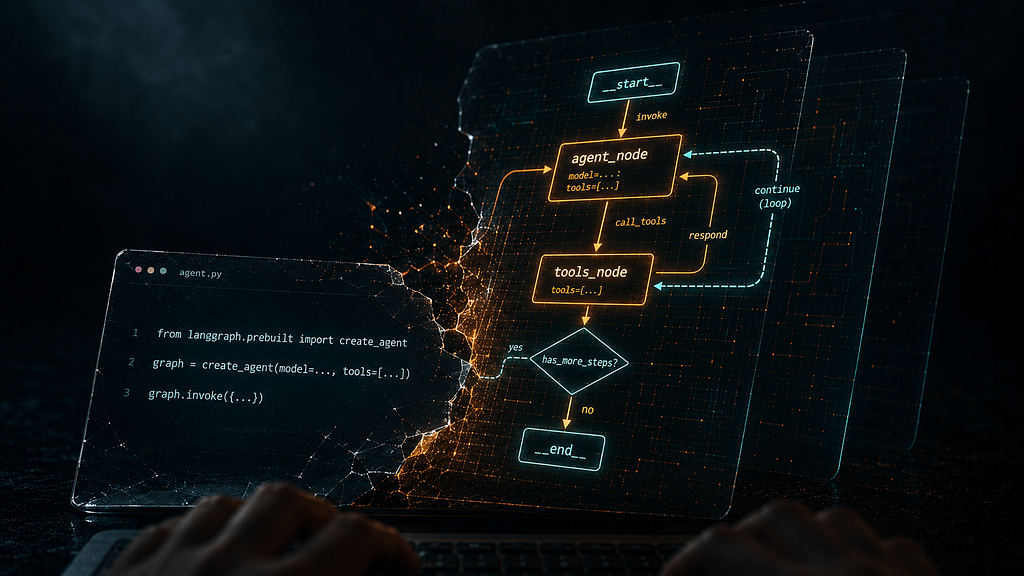
You have probably seen the tutorials. Paste some imports, call create_agent()Watch the chatbot respond, feel good about it. Then two weeks later, when your agent starts hallucinating tool arguments, loses conversation history after a restart, or burns through your token budget in a single session, you open the LangChain docs and realize you have no idea what is actually running underneath your code.
That gap is not a skill problem. It is a mental model problem. And it is the one thing most tutorials never fix.
This blog is not a tutorial. It is an explanation of the engineering decisions that produced the current LangChain ecosystem - what problem each layer was built to solve, how the layers relate to each other, and when you should use each one. By the end, you should be able to draw this stack on a whiteboard and explain, from memory, why it exists.
The code comes later. The mental model comes first.
The Problem That Started Everything
Picture a developer in late 2022. They want to build a customer support bot. They have the OpenAI API key. They start coding.
Week one goes fine. They write something like this:
import openai

def get_response(user_message: str, history: list) -> str:
    messages = [
        {"role": "system", "content": "You are a helpful customer support agent."}
    ]
    # Manually re-construct history every call
    for turn in history:
        messages.append({"role": "user", "content": turn["user"]})
        messages.append({"role": "assistant", "content": turn["assistant"]})
    messages.append({"role": "user", "content": user_message})

    response = openai.ChatCompletion.create(
        model="gpt-3.5-turbo",
        messages=messages
    )
    return response.choices[0].message["content"]
Fine. It works. But then things start accumulating.
They need to pull answers from a knowledge base, so they add a retrieval step, and now they have to manually concatenate the retrieved text into the prompt with f-strings. They need structured output so they can route based on the model’s response, so they start writing regex to parse the model’s reply, which breaks the moment the model changes its phrasing. The API rate-limits them at 3 AM, with no retry logic, so the whole bot crashes silently. Their company wants to evaluate Anthropic, so they discover that switching providers means rewriting every single API call because the SDKs have different interfaces.
None of these problems is interesting. They are all the same problem: every LLM application has the same repeating structure, but there was no standard way to express it.
That structure is
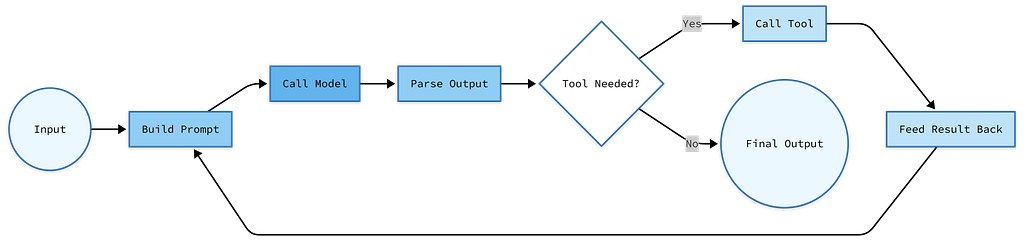
This is not unique to customer support bots. It is not unique to any particular use case. It is the loop that every LLM-powered application runs. LangChain’s original bet was simple: if we standardize this loop as a composable pipeline, we can eliminate 80% of the boilerplate that every developer is writing from scratch. Separately, we can make every component in the pipeline swappable, so switching from OpenAI to Anthropic means changing one line rather than rewriting half your codebase.
That bet paid off. LangChain became one of the fastest-growing open source projects in history. But success created its own problem. By 2024, the framework had grown to cover every possible use case: chains, agents, memory, tools, parsers, retrievers, and document loaders. The API surface was enormous, inconsistent, and increasingly confusing.
LangChain 1.0 is the response to that success. It is not a new framework. It is a focused rewrite of the same framework, rebuilt around one core question: What do developers actually use this for?
The Three-Layer Stack
The answer to that question is: developers use LangChain to build agents. Not data pipelines. Not simple completion calls. Agent systems where an LLM can reason, call tools, observe results, and decide what to do next.
Once you accept that, the current ecosystem makes sense. The 2026 LangChain ecosystem is three layers, each solving a different level of complexity:
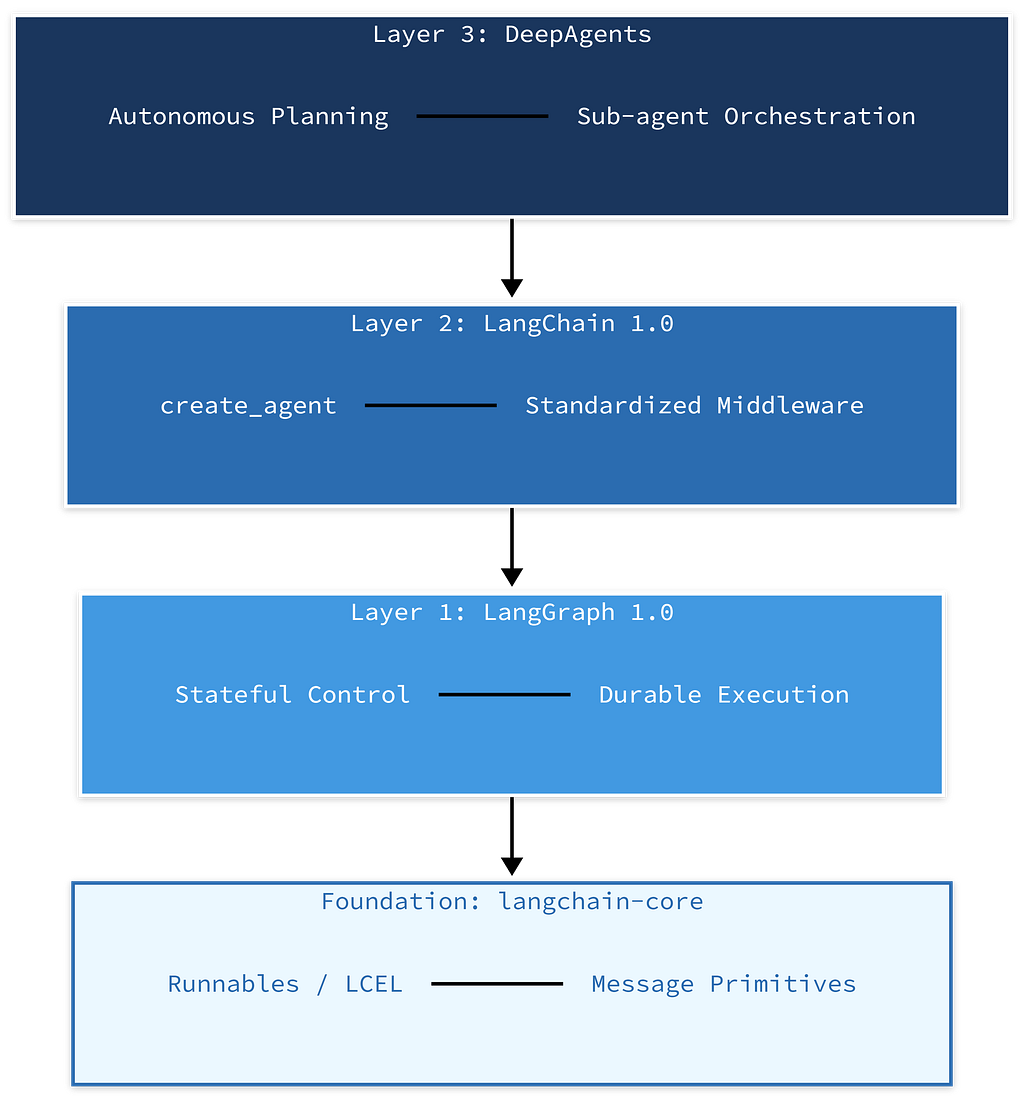
Here is the architecture diagram with data flow:
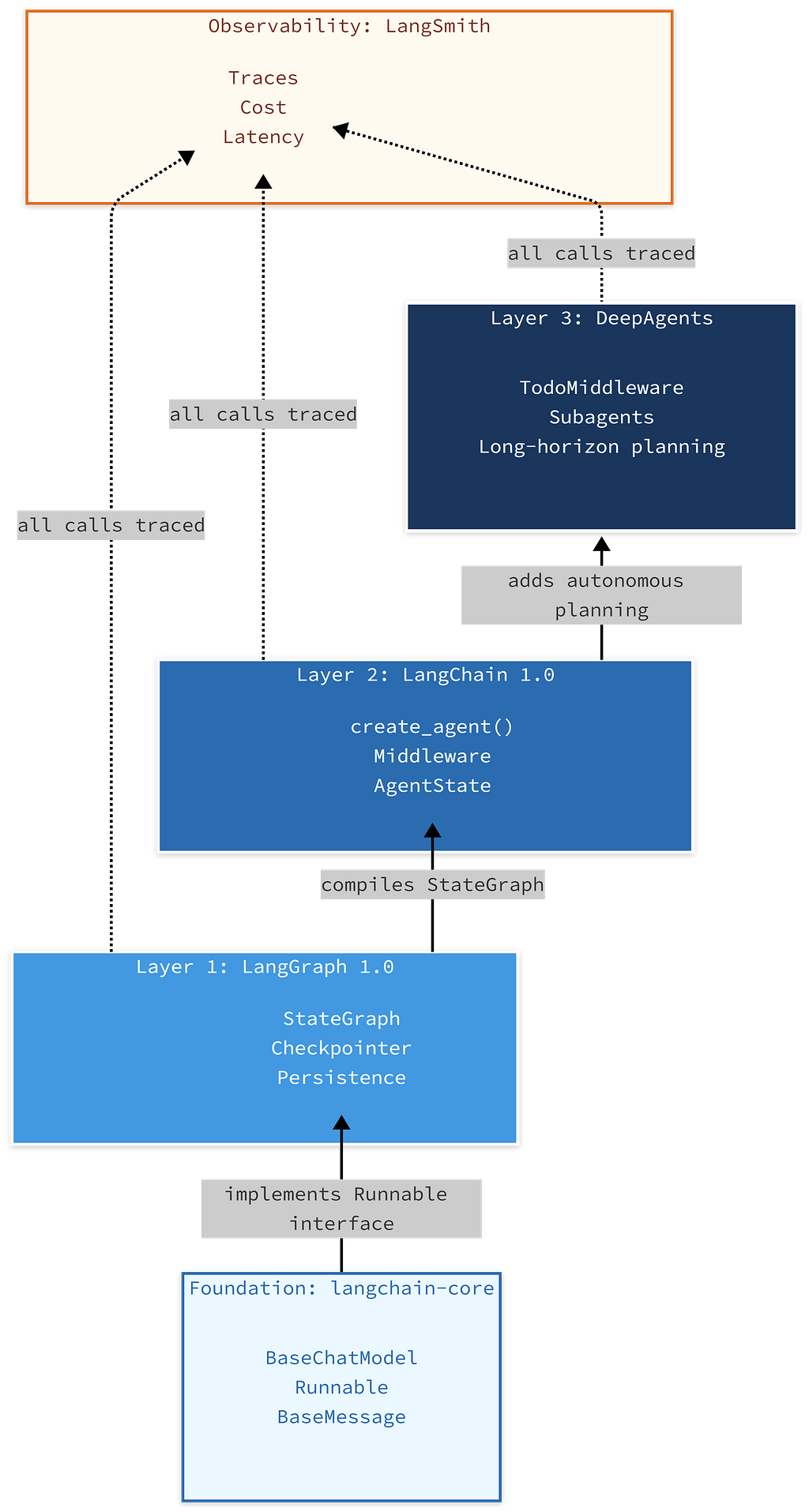
Read this diagram from bottom to top. Each layer builds on the one below it. LangSmith sits outside the stack, observing every layer.
The critical insight most people miss: LangChain 1.0 is powered by LangGraph under the hood. When you call, create_agent()you are not calling some separate execution engine. You are building a LangGraph StateGraph with sensible defaults. LangGraph is always the runtime. The only question is how much of it you are controlling directly.
Think of it like web servers. FastAPI is fine for a simple REST API. Add Celery when you need background task queues. Add Kubernetes when you need distributed, stateful job scheduling. You do not use Kubernetes to serve a static website. You do not try to run a distributed data pipeline with bare FastAPI. The right tool depends on the complexity of the job, not on personal preference, and not on which one you learned first.
The same logic applies here. A customer support agent who looks up a knowledge base and answers questions? create_agent() in LangChain. A multi-day research workflow that must survive server restarts, require human approval before sending emails, and spawn sub-agents to handle parallelizable research tracks? LangGraph directly, maybe with DeepAgents on top. Usingcreate_agent() the second case is like trying to run a distributed job with a single FastAPI endpoint.
Interview checkpoint If someone asked you right now: “What is the relationship between LangChain and LangGraph?” could you answer it in two sentences? If not, re-read the section above before continuing.
langchain-core: The Foundation That Never Dies
Every senior developer who has watched frameworks come and go knows to ask one question before they invest time in a new tool: which parts are stable?
For the LangChain ecosystem, the answer is langchain-core.
langchain-core contains the abstract base classes and protocols that every component in the ecosystem implements. ChatOpenAI, ChatAnthropic, ChatGoogleGenerativeAI They all implement BaseChatModel from langchain-core. PromptTemplate, ChatPromptTemplatethey implement BasePromptTemplate. Every retriever, every output parser, every chain in the ecosystem implements one common interface.
That interface is Runnable.
The Runnable Interface
Runnable is the type contract that makes the entire ecosystem composable. Any object that implements Runnable supports these methods.
class Runnable:
    def invoke(self, input, config=None)           # synchronous, single input
    def batch(self, inputs, config=None)           # synchronous, list of inputs
    async def ainvoke(self, input, config=None)    # async single input
    def stream(self, input, config=None)           # generator, yields chunks
    async def astream(self, input, config=None)    # async generator
Why does this matter? Because the calling code does not care what it is calling.
# This works with any Runnable — model, retriever, parser, tool
def run_component(component: Runnable, input_data: dict):
    return component.invoke(input_data)
Want to swap your LLM provider from OpenAI to Anthropic? The calling code does not change, because both implement Runnable. Want to mock a retriever in tests? Write a FakeRetriever that implements Runnable and returns fixed documents. The test code does not change. Want to stream a response instead of waiting for the whole thing? Call .stream() instead of the .invoke() same object, different method.
This is the interface that makes LangChain modular in a way that actually holds up under refactoring. BeforeRunnable, swapping components meant rewriting call sites. After Runnableswapping components is a one-line change.
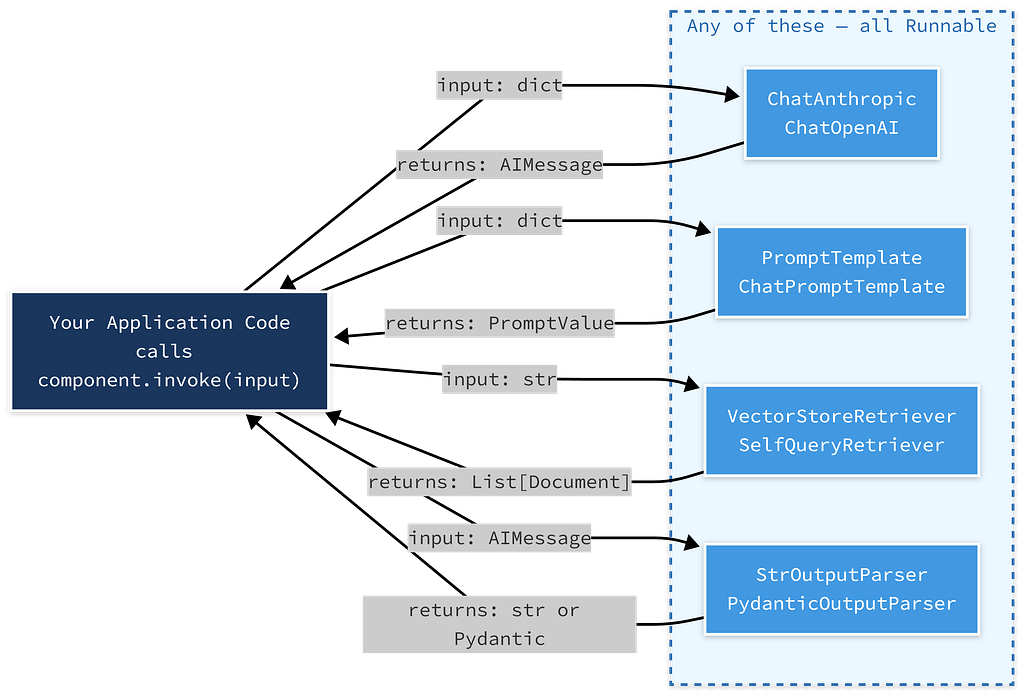
Trace any arrow. The input type and return type are different for each Runnable, but the method signature (.invoke()) is always the same. That is the contract.
The Pipe Operator: What It Was and Why It Changed
If you have used LangChain 0.x, you have seen this pattern:
# Old pattern — LCEL pipe syntax (deprecated in LangChain 1.0)
chain = prompt | llm | StrOutputParser()
result = chain.invoke({"question": "What is RAG?"})
This is called LCEL: LangChain Expression Language. The | pipe operator chains Runnables so the output of each feeds as input to the next. It was elegant for simple chains.
The problem was of medium complexity. Three steps - fine. Seven steps with branching logic and middleware injection, you ended up with chains that were unreadable and impossible to debug. Adding a logging step in the middle required rethinking the whole pipe structure. Error handling was non-obvious. And when the pipe pattern met agents (which are loops, not pipelines), it started to break down conceptually.
LangChain 1.0 moved to create_agent() and explicit middleware for the agent use case. The Runnable interface still exists; it is in langchain-core and it is used everywhere inside LangGraph nodes. But the chain-as-pipe pattern is no longer the primary API. You will still see it in older code and in some retrieval setups. Understand it when you encounter it. Do not build new agent architecture on top of it.
The pipe operator is deprecated in LangChain 1.0. The Runnable interface it was built on is not. That distinction matters more than most tutorials acknowledge.
Content Blocks — The New Reality of Model Responses
Before LangChain 1.0, every model response came back as a string. You called .invoke(), you got anAIMessage, and it message.content was a string. Simple.
In 2025, modern models return structured content: text blocks, tool-use blocks, reasoning tokens (from models that expose chain-of-thought), citations, and image outputs. A single response might contain a reasoning block, then a text block, then a tool use block. Treating this as a flat string loses the structure.
LangChain 1.0 standardized this with content_blocks:
# Old world (still works for simple cases):
response = llm.invoke("What is 2+2?")
print(response.content)  # returns "4" as a string

# New world — multi-modal, multi-block responses:
response = llm.invoke("Analyze this data and call the chart tool.")
for block in response.content_blocks:
    if block.type == "thinking":
        # Extended thinking block — model's internal reasoning
        # Only present if thinking is enabled in model config
        print(f"Model reasoned: {block.thinking}")
    elif block.type == "text":
        print(f"Response text: {block.text}")
    elif block.type == "tool_use":
        # The model wants to call a tool
        print(f"Tool call: {block.name}, args: {block.input}")
This matters most if you are working with Anthropic’s extended thinking, with multi-modal models that generate images, or with any provider that returns citation metadata. If you are writing a wrapper around model responses and you assume .content is always a string, you will get [{'type': 'text', 'text': '...'}] Back when you expected "...". That bug is subtle and annoying. Know that content_blocks exists.
Interview checkpoint If someone asked you right now: “Why does the Runnable interface exist and what problem does it solve?" could you answer it in two sentences? If not, re-read the section above before continuing.
LangChain 1.0: The Fast Path to Agents
LangChain 0.3 tried to be a general-purpose LLM toolkit. Chains for everything. Memory modules for everything. Dozens of agent types. The result was a framework with a massive, confusing API surface where six different ways to do the same thing existed simultaneously, and the docs never quite told you which one was current.
The 1.0 rewrite started from a different question: what does every developer actually build?
Agents. Almost always agents. Some form of “take user input, let the model reason, call tools as needed, return a useful response.”
So LangChain 1.0 stripped down to a clean core and focused on one thing: making it fast and correct to build agents, with a clear customization path when the defaults are not enough.
What create_agent() Actually Builds
from langchain.agents import create_agent
from langchain_anthropic import ChatAnthropic

agent = create_agent(
    model="anthropic:claude-sonnet-4-20250514",
    tools=[web_search, calculator],
    system_prompt="You are a helpful research assistant.",
)

response = agent.invoke({
    "messages": [("user", "What is the current GDP of India?")]
})
Before you run this, understand each argument:
- model: accepts either a string identifier ("provider:model-id") or a BaseChatModel instance. The string format auto-resolves the provider and model. "anthropic:claude-sonnet-4-20250514" is equivalent to passing ChatAnthropic(model="claude-sonnet-4-20250514").
- tools: a list of Python functions decorated with@tool, or StructuredTool instances. When the model decides to call one of these, the agent loop handles the execution and feeds the result back automatically.
- system_prompt: injected as a system message before every model call in the loop. If you need this to be dynamic, injecting per-user context, for example, that is exactly where middleware comes in. More on that shortly.
What create_agent() actually builds? It compiles a StateGraph a LangGraph construct with this structure:
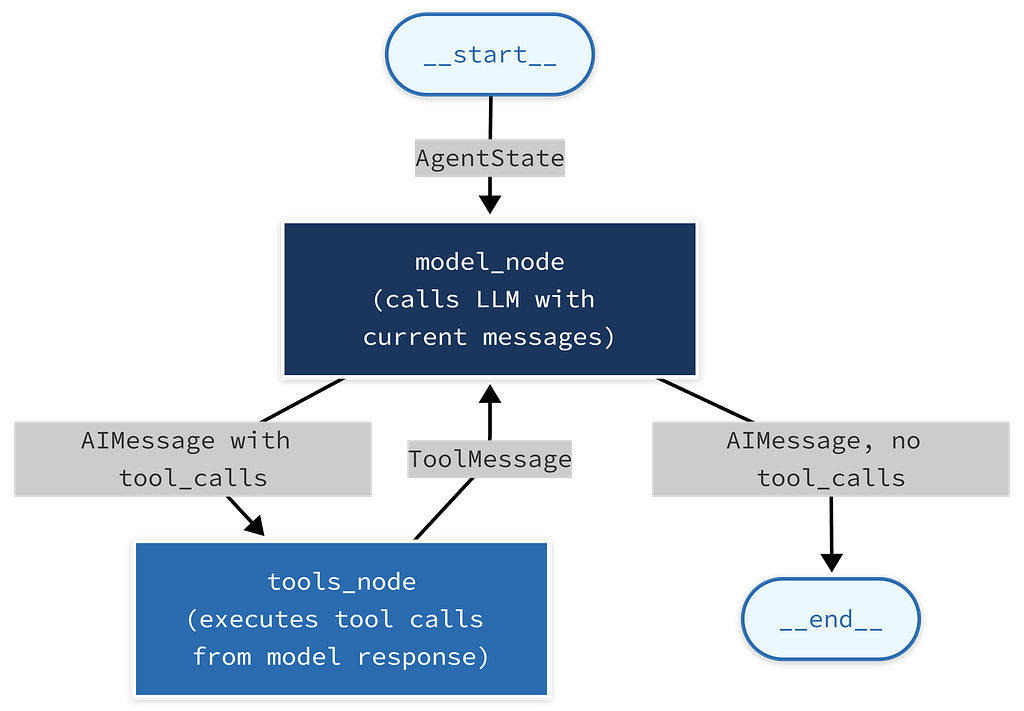
Follow the loop: model → tools → model → tools → model → end. This is the ReAct loop — reason, act, observe, repeat, formalized as a directed graph.
The conditional edge coming out of model_node is the key: if the model's response contains tool calls, route to tools_node. If not, route to __end__. The loop exits when the model decides it has enough information to answer.
This graph is compiled with a MemorySaver Checkpointer by default, which means, within a single session, conversation history is automatically persisted across invocations. You do not manage the message list manually.
AgentState - Why the Messages Field Has an Annotation
# AgentState is what flows through every node in the graph
from typing import Annotated
from langchain_core.messages import BaseMessage
from langgraph.graph.message import add_messages

class AgentState(TypedDict):
    messages: Annotated[list[BaseMessage], add_messages]
    # The annotation is not documentation. It is a reducer.
    # add_messages tells LangGraph: when a node returns new messages,
    # append them to this list rather than replacing the whole list.
The add_messages annotation is not cosmetic. It is functional. In LangGraph, when a node returns a value for a state field, the default behavior is to overwrite the field. If model_node returned {"messages": [new_message]}You would lose your entire conversation history.
add_messages is a reducer - it tells LangGraph to merge by appending, not overwriting. This is how tool call results, model responses, and user messages all accumulate in the same list across every loop iteration without manual management.
If you ever build a custom StateGraph and your messages keep getting wiped between nodes, this is why. Check your annotation.
Interview checkpoint If someone asked you: “What happens between the model_node and the tools_node in a create_agent() graph?" could you trace through it? If not, re-read the diagram above and the AgentState explanation before continuing.
The Middleware System: Context Engineering, Not Just Hooks
Here is the wall that every agent framework eventually hits.
You start with create_agent(). Results are good. You demo it internally, get positive feedback, and move toward production. Then the edge cases start showing up. The model starts making poor tool decisions when the conversation gets long. It calls the wrong tool when three tools have similar descriptions. It runs away with tool calls and burns through your budget on a single bad request.
The instinct is to blame the model. Ninety percent of the time, the real problem is that the context going into the model is too long, has irrelevant history, includes tool descriptions for tools that are not relevant to this particular request, or lacks user-specific information the model needs.
The old solution was to subclass the agent class and override internal methods. That worked until the framework updated, and your subclass broke. It coupled your application logic to framework internals in a fragile way.
Middleware is the clean solution to this problem.
How Middleware Executes
The execution model is identical to Express.js middleware. Sequential on the way in, reverse sequential on the way out:
User input
    ↓
[Middleware 1: before_model]   e.g. summarize old messages if token count > threshold
[Middleware 2: before_model]   e.g. inject user preferences from database
[Middleware 1,2: modify_model_request]   e.g. select relevant tools only, add cache headers
    ↓
LLM call
    ↓
[Middleware 2: after_model]   e.g. validate structured output schema
[Middleware 1: after_model]   e.g. check if human approval needed for this tool call
    ↓
Response
If you have ever used Flask or Express, you already understand this. The middleware stack is declared once when you build the agent. Every LLM call in every loop iteration runs through it.
The Three Hooks
from langchain.agents import AgentState
from langchain.agents.middleware import AgentMiddleware

class AgentMiddleware:
    def before_model(self, state: AgentState, runtime) -> AgentState:
        # Runs before LLM is called.
        # Receives the full agent state — including all messages so far.
        # Returns a (potentially modified) AgentState.
        # You can: trim messages, inject context, redirect to another node.
        ...

    def modify_model_request(self, request: ModelRequest) -> ModelRequest:
        # Runs right before the API call, after before_model.
        # Receives the actual request object about to be sent to the provider.
        # You can change: tools, system_prompt, messages, model, temperature,
        # output format, cache headers — anything in the request.
        # This is the most powerful hook for context engineering.
        ...

    def after_model(self, state: AgentState, runtime) -> AgentState:
        # Runs after the LLM responds.
        # Receives the updated state with the new AIMessage appended.
        # You can: inspect tool calls, pause for human approval,
        # validate output structure, update custom state fields.
        ...
Three hooks because there are three distinct moments in every LLM call where you need to intervene: before the state is finalized for the call, at the exact API request level, and after the response comes back. The distinction between before_model and modify_model_request matters. before_model works with the agent's state as a whole. modify_model_request works with the raw API parameters, the exact tools list, the exact system prompt, and the exact temperature. If you want to dynamically change which tools the model sees, you do it in modify_model_request.
The Built-in Middleware
LangChain 1.0 ships with these middleware classes out of the box:
- SummarizationMiddleware compresses old messages when the token count exceeds a configurable threshold. Runs in before_model.
- HumanInTheLoopMiddleware pauses execution when the model produces a tool call, surfaces it for human approval via a configurable callback.
- AnthropicPromptCachingMiddlewareadds cache_control headers to long system prompts. Reduces cost significantly on Anthropic models when the system prompt is large and stable.
- ModelCallLimitMiddlewareenforces a hard cap on total LLM calls per invocation. Prevents runaway agents.
- ToolCallLimitMiddlewareenforces a hard cap on tool calls specifically.
- PIIRedactionMiddlewarescans messages for PII patterns and redacts them before they reach the model.
- TodoMiddlewaregives the agent an internal scratchpad for planning steps. Used internally by DeepAgents; available standalone.
- ToolSelectorMiddleware uses a smaller, cheaper LLM to pre-filter the full tool list down to the relevant subset before the main model call. Reduces token cost and reduces the chance of tool confusion when you have many tools.
- ToolRetryMiddleware automatically retries failed tool executions with exponential backoff.
- ModelFallbackMiddlewarefalls back to a configured alternate model on provider errors or rate limits.
A Custom Middleware in Practice
Say every user of your application has a preference profile, preferred response length, topics they care about, and communication style. You want the agent to be aware of this without hard-coding it into the system prompt (because it is different per user).
from langchain.agents.middleware import AgentMiddleware

class UserContextMiddleware(AgentMiddleware):
    def __init__(self, user_id: str, preferences: dict):
        self.user_id = user_id
        self.preferences = preferences

    def modify_model_request(self, request):
        # Inject user-specific context into the system prompt.
        # This runs right before the API call — not once at agent creation,
        # but every single LLM call in the loop.
        user_context = (
            f"\n\nUser profile for {self.user_id}:\n"
            f"Preferred response length: {self.preferences.get('length', 'medium')}\n"
            f"Topics of interest: {', '.join(self.preferences.get('topics', []))}"
        )
        request.system_prompt = (request.system_prompt or "") + user_context
        return request

# Using it:
user_prefs = {"length": "brief", "topics": ["finance", "technology"]}
agent = create_agent(
    model="anthropic:claude-sonnet-4-20250514",
    tools=[web_search],
    middleware=[UserContextMiddleware(user_id="u_1234", preferences=user_prefs)],
)
What the model receives on every call: the base system prompt fromcreate_agent(), followed by the user's preference context, appended by modify_model_request. The agent object itself has no hard-coded user preferences. You instantiate a new agent (or a new middleware stack) per user session.
This is context engineering. Not prompt engineering that is about the words you choose. Context engineering is about the architecture of what the model sees, and when.
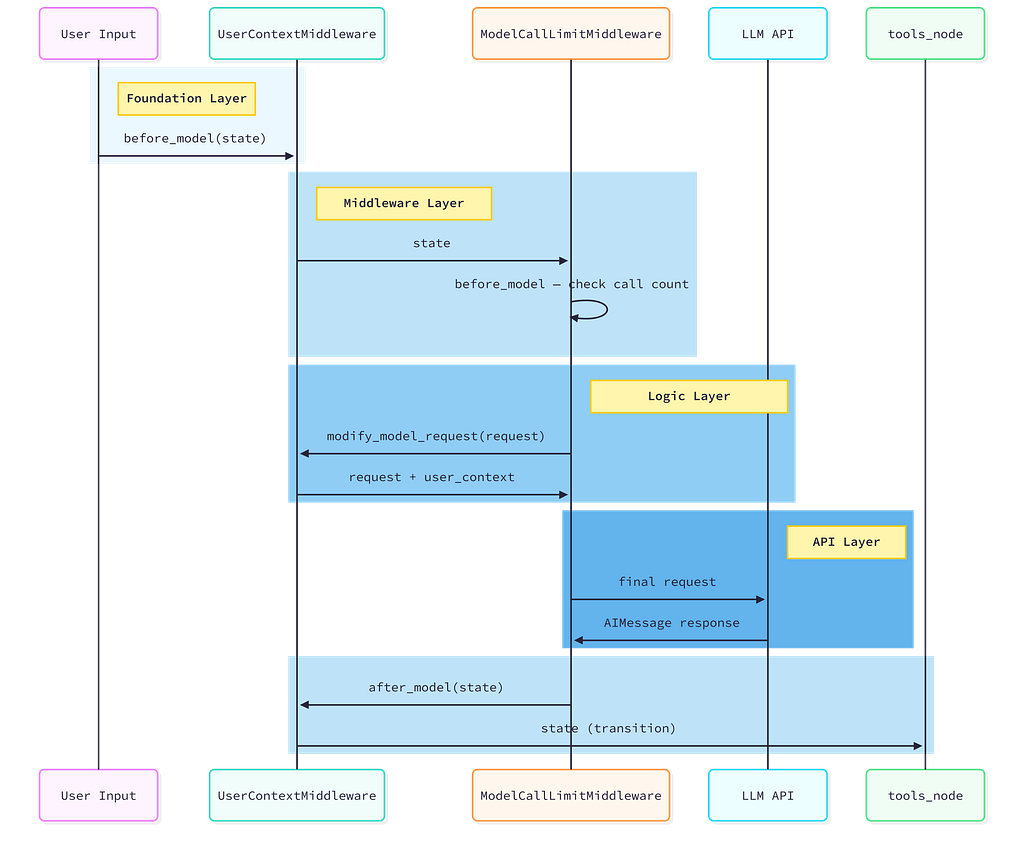
Read this sequence top to bottom. Notice that before_model and after_model run for each middleware in order, but modify_model_request runs in reverse order. The middleware closest to the LLM in the chain gets to make the final modification to the request.
The Limitation: Middleware Is Not a Graph
Middleware runs sequentially, in a defined order, on every LLM call. It cannot branch to different nodes. It cannot pause execution indefinitely while waiting for an external event. It cannot conditionally skip steps based on graph state.
If you find yourself wanting middleware that routes to different sub-graphs based on complex conditions, or middleware that needs to persist its own state across multiple agent invocations independently from the agent state, you have outgrown middleware. You are building a LangGraph workflow, and create_agent() is the wrong abstraction.
That transition is not a failure. It is the correct evolution.
Interview checkpoint If someone asked you: “What is the difference between before_model and modify_model_request?" could you explain it clearly? If not, re-read the three hooks section above.
LangGraph 1.0 vs LangChain 1.0: The Honest Decision Tree
Every few weeks, someone asks: “Should I be using LangChain or LangGraph for this?” The answer is always: it depends on how much control you need over the graph structure.
Here is the honest answer
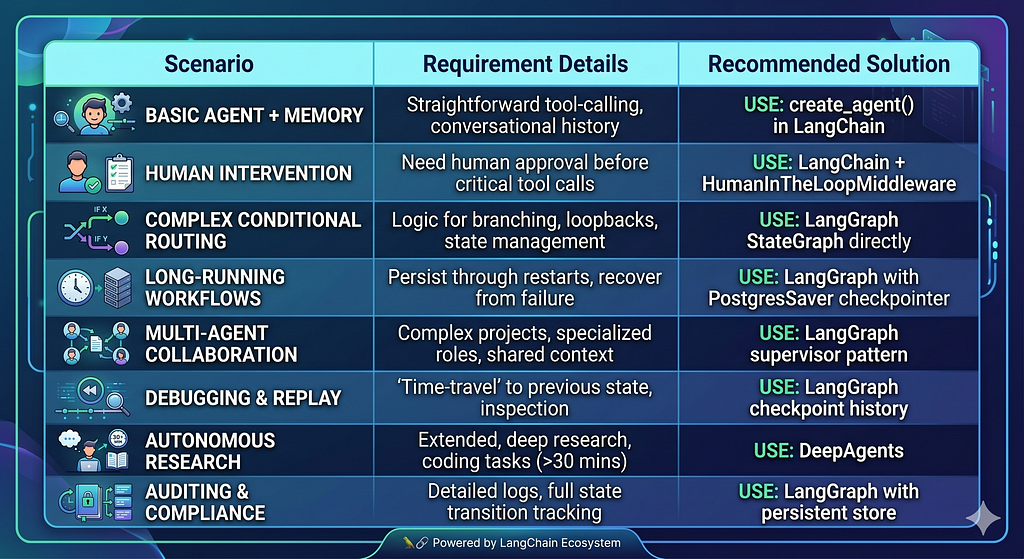
The column on the right is not a recommendation. It is a boundary. When your use case falls in the left column, using LangGraph directly means writing graph boilerplate that create_agent() would have been handled for you. When your use case falls in the right column, using create_agent() means fighting the abstraction.
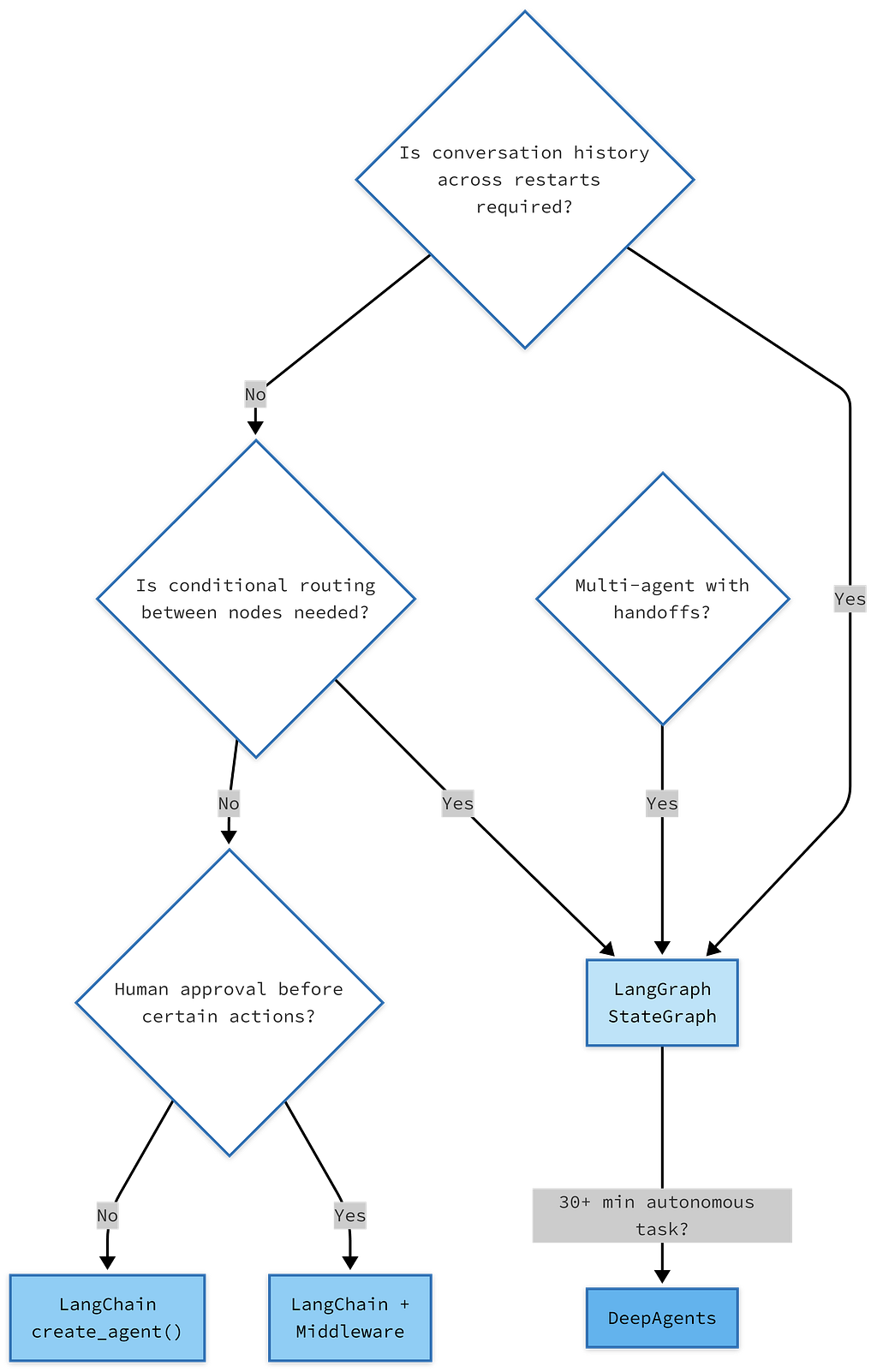
Start at the top and follow the decisions. The rightmost nodes are not worse options — they are the correct tools for those specific requirements.
One more thing. LangGraph’s killer feature that create_agent() does not expose is time travel. Because LangGraph persists every state transition as a checkpoint, you can replay any execution from any previous point in time. For debugging a production agent that made a wrong decision three tool calls into a session, this is invaluable. LangChain’s MemorySaver gives you in-memory state for the current session. LangGraph's PostgresSaver gives you permanent, queryable state across all sessions, all time.
If you are building anything production-grade, understand what PostgresSaver gives you. We will go deep on the checkpoint lifecycle in Blog 3.
LangSmith: Non-Optional in Production
There is a version of this blog where LangSmith gets a footnote. This is not that version.
Here is the reality: a LangChain agent running in production without LangSmith is a black box. You know it returned an answer. You do not know which tools it called, how many tokens it used, what the full prompt looked like when it reached the model, whether the middleware ran correctly, or why it sometimes gives worse answers at 2x the cost. You are guessing.
LangSmith records a trace for every execution. A trace is a tree: at the root, the full agent invocation. Branching into it: middleware calls, model calls (with the full rendered prompt), tool calls (with inputs and outputs), nested sub-calls. Every node in the trace has: inputs, outputs, latency, token count, and cost.
The setup is four lines. Do this before you write any agent code:
import os

os.environ["LANGCHAIN_TRACING_V2"] = "true"
os.environ["LANGCHAIN_API_KEY"] = "your-langsmith-api-key"
os.environ["LANGCHAIN_PROJECT"] = "my-agent-project"
# That's it. No instrumentation. No decorators.
# Every LangChain/LangGraph call is now automatically traced.
No code changes. No decorators. No wrappers. Once those three environment variables are set, the entire LangChain and LangGraph runtime traces automatically. The trace data appears in the LangSmith web UI within seconds.
📹 What this looks like in motion: Open the LangSmith UI while your agent is running. You will see a trace entry appear as soon as the invocation starts. It expands in real time: the middleware calls appear first, then the model call populates with the full rendered system prompt and message list — exactly what the model received. When the model returns tool calls, a child node appears for the tool execution. As the loop continues, the tree grows. By the time the agent returns a final response, you have a complete audit of every decision, every token, every tool result. If something goes wrong, you can find exactly which hop caused it in under a minute.
What LangSmith is not: a production monitoring platform for SLA tracking or alerting. For that, you still need standard observability tooling (Datadog, Grafana, whatever your stack uses). LangSmith is specifically for LLM application debugging, understanding why an agent made the decisions it made.
Use LangSmith for development. Use it for production tracing. Use it to build evaluation datasets (you can flag traces and export them as test cases). Use it to compare prompt versions. It is the tool that transforms “I think my agent is working” into “I know exactly what my agent is doing.”
What You Now Understand
After reading this blog, you now understand:
Why LangChain 1.0 is a focused rewrite, not a new framework, and why the focus on agents specifically was the right call.
That create_agent() compiles a LangGraph StateGraph internally, you are always on LangGraph's runtime, always running the ReAct loop, just with varying levels of visibility into the graph structure.
That langchain-core is the stable foundation, the Runnable interface and message types are what make every component in the ecosystem swappable, and they are not going anywhere.
That middleware is context engineering; the real leverage is not in writing better prompts but in dynamically controlling what the model sees on every call, based on the state of the conversation.
That the LangChain/LangGraph/DeepAgents split is a decision tree, not a preference, and now you have the criteria to make that decision correctly.
That LangSmith is not optional in production, and setting it up costs four lines of code.
What Comes Next
You now have the mental model. You can draw the stack. You can explain why the three layers exist. You understand the Runnable contract, what create_agent() builds, and why middleware solves a real problem that subclassing never solved cleanly.
The next blog goes one level deeper: memory. Specifically, the distinction between in-context memory (the messages the model sees right now), checkpoint-based memory (conversation history that persists across sessions), and long-term memory (facts about a user that should inform responses months from now). These are three fundamentally different mechanisms. Most developers conflate them. The conflation causes the most common class of production agent bugs.
Knowing which type of memory your use case needs and why is what Blog 2 is about.
This blog is part of a six-part series: Learning LangChain 1.0 by building real systems. If something is wrong, imprecise, or could be explained better, tell me in the comments — I am learning publicly, and corrections are welcome.
References
Everything in this blog is grounded in official documentation and release announcements. If you want to go deeper into any section, these are the primary sources.
LangChain 1.0: Official Announcements
LangChain Team. LangChain & LangGraph 1.0 Alpha Releases (September 2, 2025). The original announcement of the 1.0 rewrite, including the reasoning behind the create_agent() redesign and the introduction of content_blockshttps://blog.langchain.com/langchain-langchain-1-0-alpha-releases/
LangChain Team. LangChain 1.0 Now Generally Available (October 29, 2025). The stable release announcement covers the middleware system, structured output improvements, and the langchain-classic package for backwards compatibility. https://changelog.langchain.com/announcements/langchain-1-0-now-generally-available
LangChain Team. LangGraph 1.0 Now Generally Available (October 22, 2025). Covers durable execution, built-in persistence, and the promotion of langgraph.prebuilt functionality intolangchain.agents. https://changelog.langchain.com/announcements/langgraph-1-0-is-now-generally-available
Official Documentation
LangChain Docs. LangChain Overview : create_agent() quickstart and core concepts. https://docs.langchain.com/oss/python/langchain/overview
LangChain Docs. Memory and Persistence: Checkpointers, InMemorySaver, PostgresSaver, and cross-session state. https://docs.langchain.com/oss/python/langgraph/add-memory
LangChain Reference. langchain-core checkpoint API : BaseCheckpointSaverserialization protocols, checkpoint data structures. https://reference.langchain.com/python/langgraph/checkpoints
Source Repositories
LangChain AI. langchain-ai/langchain : GitHub. Source for langchain-core, langchain, and langchain-classic packages. The releases tab is the most reliable way to track what changed between versions. https://github.com/langchain-ai/langchain
LangChain AI. langchain-ai/langgraph: GitHub. Source for StateGraph, all checkpointer implementations, and the LangGraph runtime. https://github.com/langchain-ai/langgraph
LangChain AI. langchain-ai/deepagents: GitHub. Source for TodoMiddleware, the filesystem backend, and subagent spawning. https://github.com/langchain-ai/deepagents
LangSmith
LangChain. LangSmith: Agent Engineering Platform. Tracing setup, evaluation tooling, and production observability for LangChain and LangGraph applications. https://www.langchain.com/langsmith
The LangChain Ecosystem in 2026: Why Three Frameworks Exist (And When to Use Each) was originally published in Towards AI on Medium, where people are continuing the conversation by highlighting and responding to this story.