Structuring Chaos: Leveraging Firebase AI Logic and Gemini 1.5 to Transform Unstructured Data into Deterministic Android UI
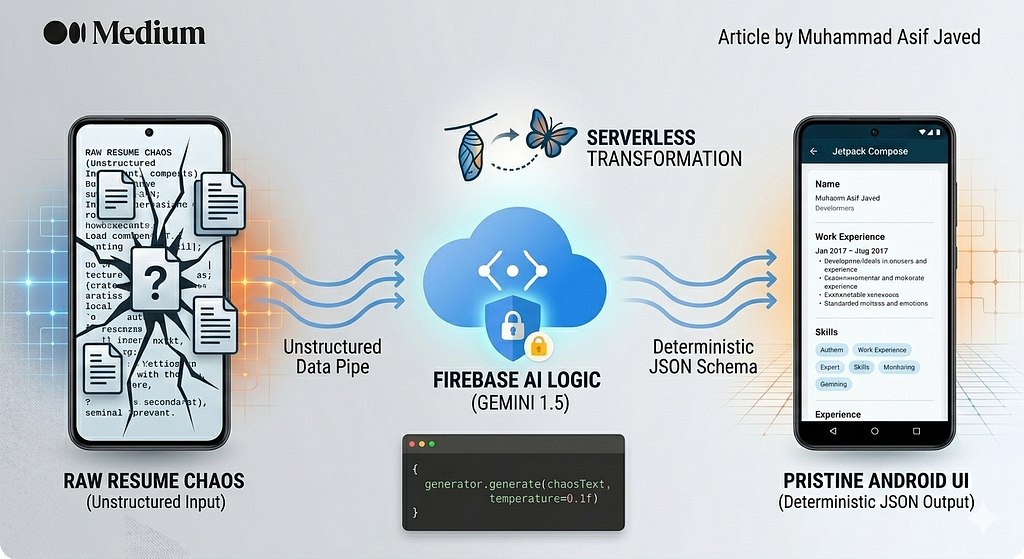
The “Data Entry Wall” and the User Experience Crisis
Think about the worst customer experience (CX) you can have on a mobile device. For many users, it’s the “Data Entry Wall” — that moment of friction where they are forced to manually type out an entire work history, educational background, and specific skill sets on a tiny virtual keyboard just to generate a professional profile.
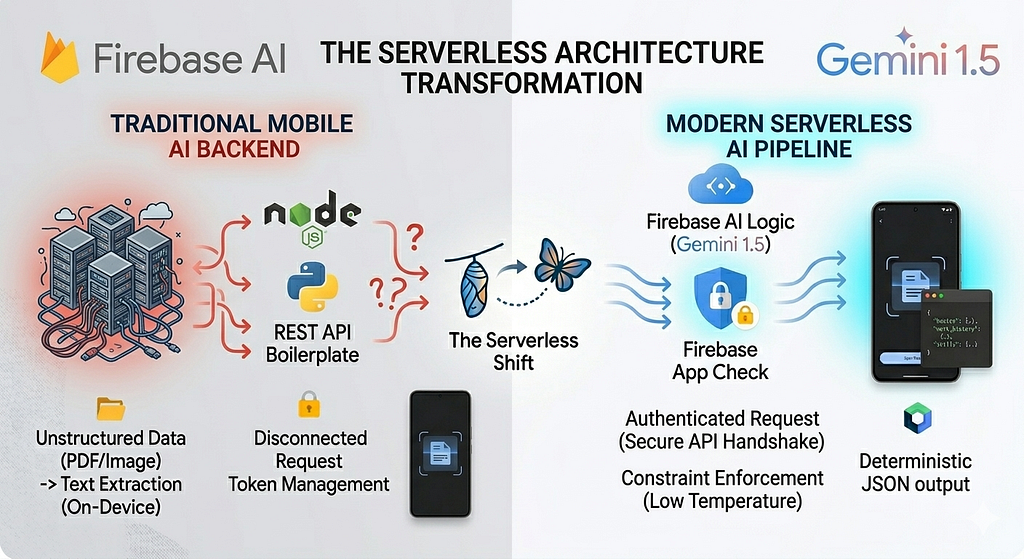
In the traditional mobile architecture, solving this required a “Heavy Backend” approach. You would force the user to upload a PDF, route that binary to a custom Node.js or Python server, and pray that a cluster of brittle, hand-written regex parsers or expensive third-party OCR SDKs could make sense of the text. It was a slow, expensive, and fragile process. If a user uploaded a resume with a non-standard two-column layout or a stylized font, the parser would break, the data would truncate, and user trust would evaporate.
But what if the user could simply upload a messy, unstructured paper resume and an AI could instantly reformat it into a pristine Android UI?
The true superpower of modern AI lies not in its ability to chat, but in its ability to reason through unstructured chaos.
This is the exact experience I built in my new AI-Powered Resume Builder app. The “secret sauce” wasn’t writing thousands of lines of parsing code; it was leveraging Firebase AI Logic as a deterministic, serverless routing layer.
1. What is Firebase AI Logic?
When most developers think of Large Language Models (LLMs), they think of conversational chatbots. However, the real value for mobile engineers is the semantic engine — the ability of the model to understand the meaning of text regardless of its formatting.
Bypassing the Backend Bottleneck
Firebase AI Logic acts as a secure, serverless bridge. It allows you to leverage generative models securely directly from your Android client. Normally, calling an LLM from a mobile device is a security nightmare that requires:
- Proxy Servers: Spinning up a backend just to hide your API keys.
- Token Management: Handling complex authentication handshakes.
- Scaling Infrastructure: Managing the compute load for high-traffic apps.
By utilizing Firebase App Check, you replace this entire infrastructure with an enterprise-grade pipe. It validates that the request is coming from your specific, uncompromised Android app before ever touching the model.
2. The Implementation: Prototyping in Hours
The beauty of this architecture is simplicity. We start by bringing in the Firebase SDKs using the BoM (Bill of Materials) to ensure all libraries work in perfect harmony:
dependencies {
    // Import the BoM for the Firebase platform
    implementation(platform("com.google.firebase:firebase-bom:33.7.0"))
    // Add the dependency for the Firebase AI Logic library
    implementation("com.google.firebase:firebase-ai")
}
📝 A Note on Prototyping vs. Production The architecture diagrams in this article illustrate the ideal production-ready setup using Firebase Vertex AI and Firebase App Check to secure your API quota. However, to make the open-source GitHub Repository completely free and easy to run locally, the provided code uses the free Google AI Studio SDK (com.google.ai.client).
Next, we initialize the Gemini model natively within the Android app. Depending on whether you are prototyping or building for production, the initialization looks slightly different.
The Prototyping Snippet (Free Google AI Studio SDK)
This snippet shows how developers can quickly test the model locally by passing API keys directly into the configuration.
// 1. Prototyping Approach (Free Google AI API)
// ⚠️ WARNING: Hardcoding API keys is for local testing only!
import com.google.ai.client.generativeai.GenerativeModel

val generousModel = GenerativeModel(
    modelName = "gemini-1.5-flash",
    apiKey = BuildConfig.GEMINI_API_KEY, // Exposing key directly
    generationConfig = generationConfig {
        temperature = 0.1f
        responseModalities = listOf(TEXT)
    },
    systemInstruction = content {
        text("You are an expert backend validation layer. Your task is to extract " +
             "data from the provided text dump and respond ONLY with a valid " +
             "JSON object matching the requested schema. No conversation.")
    }
)
The Production Snippet (Firebase Vertex AI + App Check)
This snippet emphasizes the serverless, secure architecture highlighted in your article’s diagrams, perfectly reflecting “The Death of the Middleware.”
// 2. Production Approach (Firebase Vertex AI)
// ✅ SECURE: No API keys. Firebase App Check verifies the Android device instantly.
import com.google.firebase.Firebase
import com.google.firebase.vertexai.vertexAI

val generousModel = Firebase.vertexAI.generativeModel(
    modelName = "gemini-1.5-flash", // Optimized for speed and low latency
    generationConfig = generationConfig {
        temperature = 0.1f // Extremely low to ensure deterministic data extraction
        responseModalities = listOf(TEXT)
    },
    systemInstruction = content {
        text("You are an expert backend validation layer. Your task is to extract " +
             "data from the provided text dump and respond ONLY with a valid " +
             "JSON object matching the requested schema. No conversation.")
    }
)
3. The Pipeline: From Chaos to JSON
The core of the app relies on a five-step pipeline that transforms raw document data into a strictly-typed Jetpack Compose UI.
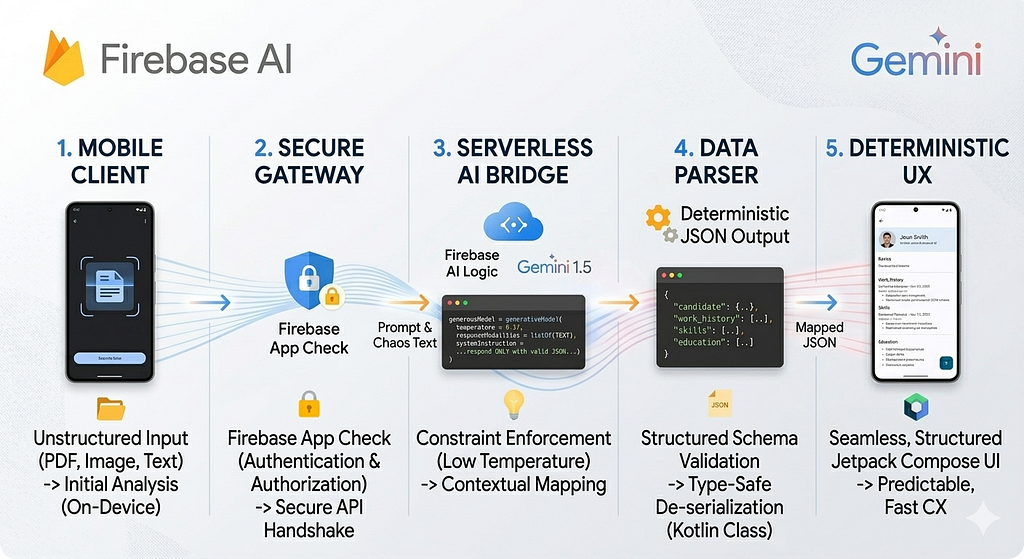
The Workflow Breakdown:
- On-Device Extraction: The app uses local OCR or PDF tools to dump raw, unscrambled text. This happens privately on the device.
- Secure Gateway: Firebase App Check validates the request, ensuring no “man-in-the-middle” or unauthorized bot can drain your API quota.
- The Constrained Prompt: We pass the raw chaos to Gemini, combined with a strict systemInstruction and a target JSON schema (e.g., fields for work_experience, skills, and education).
- Deterministic Output: Gemini ignores the “noise” (like upside-down tables or weird fonts) and maps the data directly to the JSON keys.
- Jetpack Compose UI: The app deserializes the JSON into a Kotlin Data Class and paints the screen in milliseconds.
4. Advanced Capabilities: Beyond Simple Parsing
Firebase AI Logic isn’t just a text-in, text-out service. The native SDK unlocks a multimodal future for Android apps:
- Function Calling: You can define specific functions (e.g., saveToDatabase() or MapsToEditor()) that the AI can "call" if it detects a specific user intent.
- Grounding with Google Search: By connecting the model to real-time search, you can prevent hallucinations and ensure that company names or skill certifications are factually accurate.
- Code Execution: For complex algorithmic or mathematical problems found within documents, the model can generate and run Python code internally to find a precise answer.
5. The Serverless CX Advantage
Building this app using traditional architectures would have required a dedicated microservice team. By going serverless, I gained:
- Prompt over Parser: I spent my time refining the instructions to the AI rather than fighting with thousands of lines of fragile RegEx logic.
- Lightning Responsiveness: Without a middleman server adding “Proxy Lag,” the transformation feels instantaneous to the user.
- Safety Through Architecture: Sensitive personal data moves through a secure, encrypted pipe directly to Google’s infrastructure, never sitting on a third-party server where it could be leaked.
Conclusion
Firebase AI Logic proves that AI inference can — and should — be serverless. Multimodal AI is no longer a “backend problem”; it is an Android-level concern. Just like ML Kit changed the game for barcode scanning years ago, this tool is set to redefine how we handle unstructured data in mobile apps.
Further Reading & Resources
If you want to dive deeper into the architecture and tools used in this project, here are some excellent resources to get you started:
- Official Firebase AI Logic Documentation: The best starting point to understand how the Firebase SDK securely connects Android clients directly to the Gemini API.
- Protecting your API with Firebase App Check: A deep dive into how App Check prevents unauthorized clients from accessing your backend resources and draining your quota.
- Build AI features with Vertex AI for Firebase: The official Android Developer guide detailing the architecture, setup, and best practices for integrating the Vertex AI Firebase SDK securely into your Kotlin applications.
- Firebase Pricing Overview: A detailed breakdown of the Blaze (Pay-as-you-go) pricing plan, explaining how Vertex AI for Firebase is billed by token usage when moving to production.
- Gemini API: Structured Outputs (JSON): Learn more about enforcing JSON constraints on the Gemini model to ensure deterministic, strictly-typed responses.
🔗 Explore the open-source code: AI Resume Builder on GitHub
The Death of the Middleware: How I Built a Serverless AI Resume Parser on Android was originally published in Towards AI on Medium, where people are continuing the conversation by highlighting and responding to this story.