Master ETL, data lakes, stream processing, and more — the way an experienced engineer would actually explain them
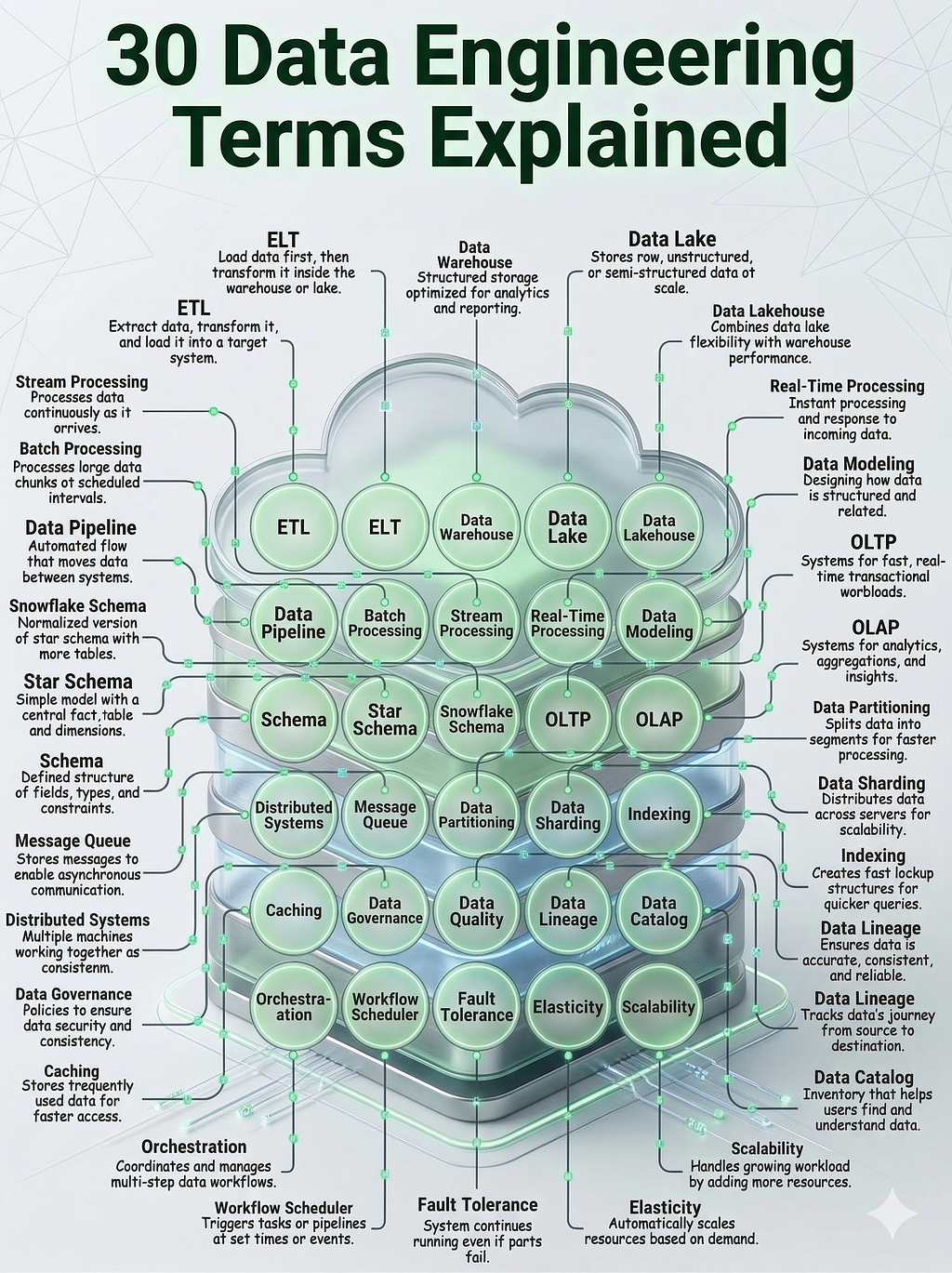
Look, I’ve been in data engineering long enough to know that most “terminology guides” are either too academic or too shallow. They either overwhelm you with theory or give you definitions so generic they’re practically useless.
This isn’t that.
The bridge between raw, messy data and actionable business intelligence isn’t built with just code; it is built with a deep understanding of architecture. In 2026, as AI and real-time analytics become the standard for every industry ; from fintech to healthcare, the role of the Data Engineer has shifted from “pipeline builder” to “architect of trust.”
Whether you are preparing for a senior-level interview, migrating a legacy system to a modern Data Lakehouse, or managing a scaling data team, mastering the vocabulary is your first step toward technical leadership. But definitions alone aren’t enough. To truly operationalize these concepts, you need to understand how they interact within a live production environment.
In this guide, I break down the 30 foundational terms of the modern data stack. We will move beyond the buzzwords to explore practical use cases in retail, banking, and streaming services, ensuring you can explain the “why” behind every architectural choice.
Here is everything you need to know about the movement, storage, and governance of data in the modern era.
Let’s get into it.
Part I: Moving Data (Without Losing Your Mind)
ETL vs. ELT: The Great Debate
Here’s the thing about ETL (Extract, Transform, Load) — it made perfect sense in 2005. You pulled data from various sources, cleaned it up on some beefy transformation server, and then loaded the pristine result into your data warehouse. Clean. Controlled. Expensive.
Think about a retail chain with 500 stores. Every night, they extract sales data, convert everything to USD (because Store #247 in Tokyo still reports in yen), apply business rules, and load it into the central warehouse for the executive dashboard. That transformation server? It’s doing all the heavy lifting before anything touches the warehouse.
Then cloud computing happened, and someone had a revelation: “Wait, why are we spending money on transformation servers when our warehouse is basically a supercomputer?”
Enter ELT (Extract, Load, Transform). Same letters, different order, completely different philosophy. Now you dump everything into the warehouse first — raw, messy, all of it — and let the warehouse’s processing power handle the transformations.
A fintech startup I worked with takes raw application logs, dumps them straight into BigQuery, and then uses SQL to filter suspicious transactions. No transformation layer. No extra servers. Just load and query. The warehouse is the transformation engine.
Which should you use? Honestly, it depends. ETL when you need tight control and data validation before storage. ELT when you want speed and your warehouse can handle the compute. I’ve used both. They each have their place.
Data Pipelines: Your New Obsession
A data pipeline is exactly what it sounds like — an automated series of steps that moves data from point A to point B. But like actual pipes, they can leak, get clogged, or explode spectacularly at the worst possible moment.
Picture an e-commerce site tracking every click, every cart addition, every abandoned checkout. That data flows through a pipeline every hour, transforming raw clickstream data into actionable insights for the marketing team. When it works, it’s invisible. When it breaks, your Slack is on fire.
Batch vs. Stream: Timing Is Everything
Batch processing is the workhorse. You collect data, let it accumulate, then process it all at once. Banks do this with checks — every deposit throughout the day gets processed in one massive batch at midnight. It’s predictable, efficient, and perfectly fine when you don’t need instant answers.
Stream processing is the adrenaline junkie. Data is processed the millisecond it arrives. Uber tracking your driver’s location? That’s stream processing. Those GPS coordinates hit the system and are instantly calculated into an ETA. No waiting. No batching. Just continuous, real-time flow.
I’ve seen companies try to force batch processing into real-time scenarios. It never ends well. Use the right tool for the job.
Part II: Where You Actually Keep All This Data
The Classic: Data Warehouses
A data warehouse is structured, organized, and optimized for one thing: answering business questions fast. It’s the librarian who knows exactly where every book is because they organized the entire collection themselves.
Global logistics companies love warehouses. “How did our shipping costs this quarter compare to the last five years?” That query runs in seconds because the warehouse was built specifically for this kind of historical analysis. Every table is optimized. Every index is purposeful.
But warehouses are picky. They want clean data, in a specific format, following a predefined schema. Which brings us to…
The Wild West: Data Lakes
A data lake is where you throw everything and ask questions later. Raw genomic sequences? Sure. Doctor’s handwritten notes? Yep. X-ray images? Why not. It’s structured, semi-structured, and unstructured data all swimming together in one massive repository.
Healthcare research facilities live here. They dump everything into the lake because they don’t always know what questions they’ll ask next year. Maybe that weird data format from 2019 becomes crucial for an AI model in 2026. The lake keeps it all, in its original form, just in case.
The downside? Finding anything is like searching for a specific fish in the ocean. Which is why smart people invented…
The Best of Both: Data Lakehouses
A data lakehouse combines the cheap, flexible storage of a lake with the performance and structure of a warehouse. It’s the compromise nobody asked for that turned out to be exactly what everyone needed.
Netflix (and companies like them) store raw video viewing logs in a lakehouse. The data stays in its native format, keeping costs down, but they can still run fast SQL queries to see which shows are trending in real-time. Lake-level storage costs, warehouse-level performance. It’s genuinely clever.
Part III: How Data Is Organized (And Why It Matters)
Schema: The Blueprint
Your schema is the contract. It’s the definition of what data looks like, where it lives, and what type it is. A library database schema says: “Books have an ISBN (number), a Title (text), and an Author (text).” No exceptions.
Break the schema, break the database. It’s that simple.
Star Schema: Simplicity Wins
The star schema is beautiful because it’s obvious. One central fact table (the metrics — sales, revenue, clicks) surrounded by dimension tables (the context — products, stores, dates, customers).
Draw it out, and it literally looks like a star. The sales table in the middle tracks the total price. The surrounding tables tell you what product, which store, and what date. Clean. Intuitive. Fast to query.
Snowflake Schema: When You’re Feeling Fancy
A snowflake schema takes the star and breaks those dimension tables into even smaller pieces. Instead of storing “Store City” directly, you link to a separate City table, which links to a State table, which links to a Country table.
It reduces data redundancy (you don’t store “California” a thousand times), but every query now requires more joins. It’s a trade-off. Sometimes worth it, sometimes not.
OLTP: The Transactional Workhorse
OLTP (Online Transactional Processing) systems are built for speed and volume. Thousands of tiny, fast transactions happening simultaneously. Your ATM withdrawal? That’s OLTP. It needs to record the transaction and update your balance right now, not in five minutes.
OLAP: The Analytical Powerhouse
OLAP (Online Analytical Processing) is the opposite. It’s designed for complex questions across multiple dimensions. “Which age group in the Northern region bought the most electronics in Q3, and how does that compare to last year?”
OLTP handles the day-to-day operations. OLAP handles the “let’s understand what’s actually happening” queries.
Part IV: Making Things Fast (Because Slow Is Expensive)
Data Partitioning: Divide and Conquer
Partitioning means splitting a massive table into smaller chunks based on some logical division — usually date or region. A social media platform might store 2024 posts in one partition and 2025 posts in another.
When someone searches for posts from January 2025, the database only looks at one partition instead of scanning years of data. It’s like organizing your email into folders instead of keeping everything in one inbox.
Data Sharding: Spreading the Load
Sharding takes partitioning a step further by putting those pieces on completely different servers. A gaming company might shard their user database geographically — European players on one server, Asian players on another.
It’s powerful for scaling, but it introduces complexity. Ever tried to run a query across sharded data? It’s not fun.
Indexing: The Speed Hack
An index is like the index in a textbook. Without it, finding information means reading every single page. With it, you flip directly to page 247.
Searching for a customer by ID in a million-row table? Instant if that column is indexed. Hours if it’s not. Indexes are magic, but they also take up space and slow down writes. Everything’s a trade-off.
Caching: Keep the Hot Stuff Close
Caching means storing frequently accessed data in super-fast temporary storage (usually RAM) so you don’t have to fetch it from the database repeatedly.
When a breaking news story drops and millions of people hit refresh simultaneously, the website doesn’t crash — because that headline is cached. The database serves it once, the cache serves it a million times.
Part V: The Infrastructure That Holds Everything Together
Distributed Systems: Many Acting as One
A distributed system is multiple computers pretending to be one. Google Search isn’t running on a single server in a closet somewhere — it’s thousands of machines working in concert to deliver your results in milliseconds.
The coordination required is mind-boggling. Which is why distributed systems are both incredibly powerful and incredibly complex.
Message Queues: Asynchronous Communication
A message queue lets systems communicate without waiting for each other. An order comes in, the system drops a “New Order” message in the queue, and moves on. The warehouse system picks it up whenever it’s ready.
It’s the difference between a phone call (synchronous — both parties need to be available) and email (asynchronous — respond when you can).
Orchestration: The Conductor
Orchestration is about making sure everything happens in the right order. Your daily report can’t run until the data cleanup finishes and the new data loads. Orchestration ensures that sequence.
Tools like Airflow have made this manageable, but trust me — dependency graphs can still get complicated fast.
Workflow Schedulers: The Alarm Clock
A workflow scheduler triggers tasks based on time or events. “Run the payroll script every Monday at 8 AM.” “Generate the monthly report on the first day of each month.”
It’s simple in concept, critical in practice.
Part VI: Keeping Everything Running (Even When Things Break)
Fault Tolerance: Expecting Failure
Fault tolerance means designing systems that keep working even when components fail. If one server in your three-server cluster dies, the other two pick up the slack automatically.
Because here’s the truth: things will fail. Hard drives die. Networks hiccup. The question isn’t if, but when. Fault tolerance is planning for that inevitability.
Elasticity: Flexing With Demand
Elasticity is the ability to scale resources automatically based on demand. During a major concert ticket release, an online seller spins up additional servers. Once the rush is over, those servers disappear.
You’re only paying for what you need, when you need it. Cloud computing made this practical.
Scalability: Room to Grow
Scalability is about building systems that can grow. You design for 100 users today but architect for 1,000,000 users tomorrow. When growth happens (and if you’re lucky, it will), you don’t need to rebuild everything — just add more resources.
Horizontal scaling (more machines) vs. vertical scaling (bigger machines) is its own debate, but the principle remains: plan for growth.
Part VII: Governance and Quality (The Unsexy Stuff That Matters)
Data Governance: The Rules of the Road
Data governance is the policies and standards that control how data is used. “Only HR can access social security numbers.” “PII must be encrypted.” “Data retention is 7 years.”
It sounds bureaucratic until you get audited or breached. Then you’re very glad someone set up proper governance.
Data Quality: Garbage In, Garbage Out
Data quality measures how trustworthy your data is. Accuracy, completeness, consistency — it all matters. A data quality check might flag a customer record showing an age of 250 years.
Bad data leads to bad decisions. I’ve seen entire analytics projects collapse because nobody validated the source data.
Data Lineage: Following the Trail
Data lineage traces data’s journey from origin to destination. Where did this number come from? What transformations happened? Who touched it?
Financial auditors love lineage. So do data engineers trying to debug why a report is suddenly showing different numbers.
Data Catalog: The Map
A data catalog is an organized inventory of all your data assets. It’s how a data scientist finds the “Customer Churn” dataset without Slacking five different people.
In large organizations, the catalog becomes critical infrastructure. Without it, people don’t even know what data exists.
Real-Time Processing: Instant Answers
Real-time processing means handling data the moment it arrives. A credit card company blocking a fraudulent transaction instantly — that’s real-time processing.
It requires different architecture, different tools, and different mindsets than batch processing. But when you need it, nothing else will do.
Data Modeling: Thinking Before Building
Data modeling is creating a visual representation of how data connects before you actually build anything. How do Customers relate to Orders? How do Orders connect to Products?
Get the model right, and development is smooth. Get it wrong, and you’re refactoring six months later while everything is on fire.
The Truth About These Terms
Here’s what I wish someone had told me earlier: these concepts aren’t isolated checkboxes to learn and move on from. They’re interconnected pieces of a larger system, and you’ll use them in combination constantly.
You’ll build pipelines (there’s #3) that use both batch and stream processing (#4 and #5) to move data into a lakehouse (#8) where you’ve carefully designed your schema (#9) with proper partitioning (#14) for performance, all orchestrated (#20) by a workflow scheduler (#21) that ensures fault tolerance (#22).
The terminology isn’t the destination — it’s the vocabulary you need to have informed conversations, make architectural decisions, and debug problems at any time.
You don’t need to be an expert in all 30 of these concepts today. But knowing they exist and understanding when to reach for each tool? That’s what separates engineers who struggle from engineers who build systems that actually work.
And that’s worth more than any certification.
What term on this list surprised you most, or which one do you find yourself explaining to others constantly? I’d genuinely love to hear about your experiences in the comments.
The Data Engineer’s Essential Vocabulary: 30 Terms That Actually Matter was originally published in Towards AI on Medium, where people are continuing the conversation by highlighting and responding to this story.