I used to have seven tabs open every time I coded. Now I have one. Here’s exactly how.
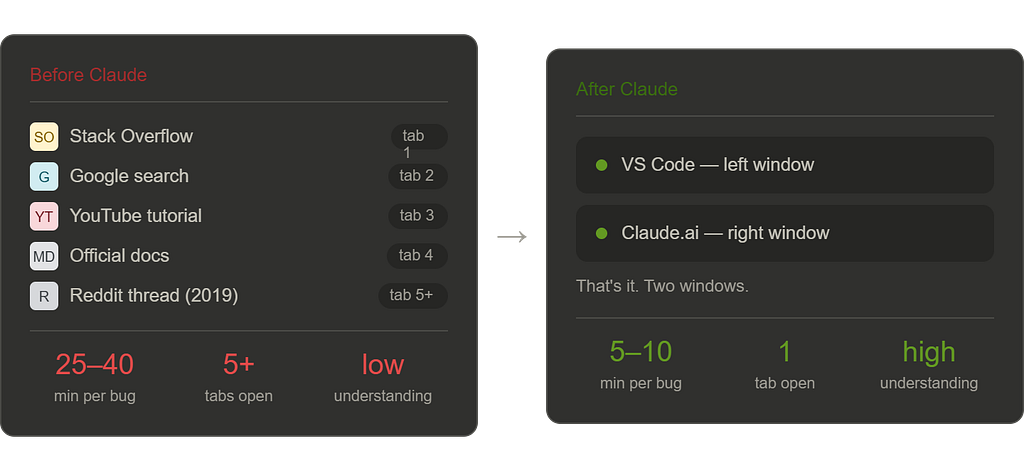
Not long ago, my coding workflow looked like most developers’ and students’ workflows. A problem would come up and I’d open Stack Overflow in one tab, the official docs in another, a YouTube tutorial in a third, maybe a Reddit thread in a fourth where someone had a similar issue from 2019 and the top answer was “just use library X” with no further explanation. I’d spend twenty minutes reading, cross-referencing, getting slightly more confused, and eventually cobble together a solution I half understood.
Sound familiar?
I’m a full-stack web developer — React on the front end, Node on the back — and that multi-tab chaos was just the accepted cost of doing business. It’s how everyone I knew worked. It felt normal.
Then I started using Claude seriously. Not as a novelty, not to generate boilerplate I’d paste without thinking — but as the actual center of my development workflow. And over the course of a few weeks, tab by tab, the old stack quietly fell away.
This is exactly how I work now. Including the prompts.
The Before: What the Old Stack Actually Cost
Before getting into the workflow, it’s worth being honest about what the old approach was really like.
Stack Overflow is incredible and I owe a lot of solved bugs to it. But it has real limitations as a primary development resource. Answers go stale. Solutions are context-free — they work for the person who asked the question in 2018 with their specific setup, and may or may not work for yours. The top-voted answer isn’t always the best answer for modern codebases. And perhaps most importantly, Stack Overflow gives you solutions without necessarily helping you understand why they work.
Google + documentation is similar. Great for finding things, less great for understanding them. Official documentation assumes a baseline of context you don’t always have. And the time cost of navigating between sources, reading, re-reading, and synthesizing is enormous — often ten to twenty minutes for something that should take two.
What I was really missing wasn’t information. The internet has infinite information. What I was missing was a knowledgeable collaborator who understood my specific context and could give me a direct, reasoned answer.
That’s exactly what Claude is.
The Setup
Nothing exotic here. This is intentional — I wanted a workflow that required zero additional cost and zero additional tooling.
- Editor: VS Code
- AI: Claude on the web (claude.ai) — free tier works, Pro is worth it for heavy use
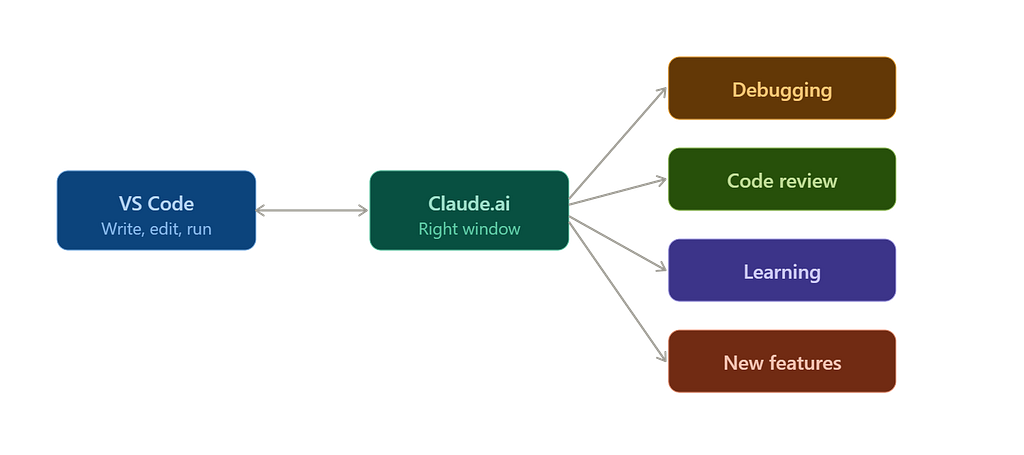
- Workflow: Two windows side by side. VS Code on the left, Claude on the right.
That’s it. No extensions required. No API keys. No configuration. Just a browser tab running alongside your editor, which means this workflow is available to anyone reading this, right now, for free.
The magic isn’t the setup. It’s the prompting.
The Exact Prompts: Before and After
This is the section worth screenshotting. The difference between mediocre AI output and genuinely useful AI output is almost entirely in how you ask.
Situation 1: Debugging
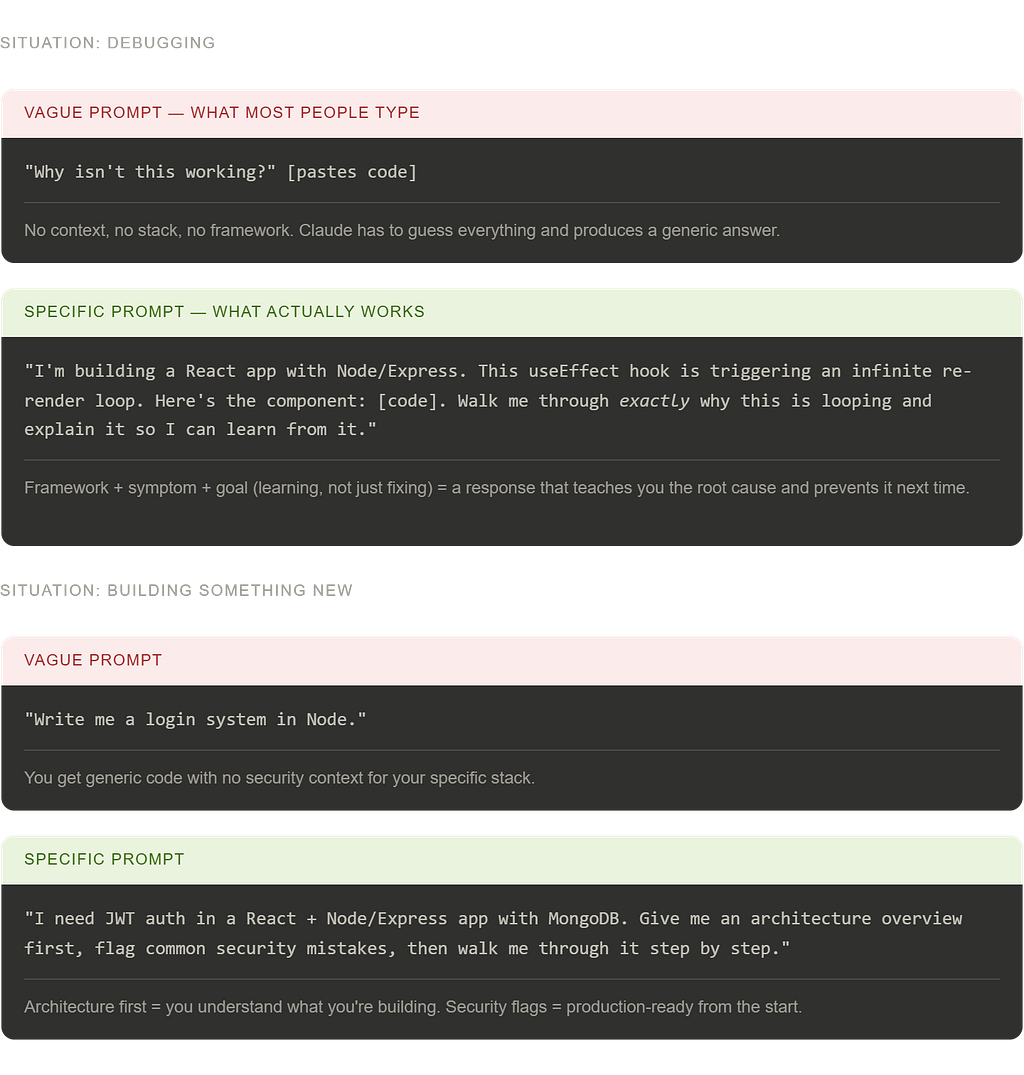
🔴 What most people type:
“Why isn’t this working?” (pastes code)
🟢 What actually works:
“I’m building a React app with Node/Express backend. This useEffect hook is supposed to fetch user data on component mount and update state, but it’s triggering an infinite re-render loop. Here’s the component: [code]. The dependencies array looks right to me — walk me through exactly why this is looping and what the fix is, with an explanation I can actually learn from.”
✅ What changes: Instead of getting a one-line fix you paste and forget, you get a clear explanation of the root cause — in this case, likely an object or array in the dependency array causing reference inequality on every render — plus the fix, plus the mental model to prevent it next time. You actually learn. The bug doesn’t come back in a different form three weeks later.
Situation 2: Understanding Unfamiliar Code
🔴 What most people type:
“Explain this code”
🟢 What actually works:
“I’m a full-stack developer comfortable with React and Node but less experienced with [specific concept — e.g. middleware chains / WebSockets / JWT auth flow]. Here’s a piece of code I need to work with but don’t fully understand: [code]. Explain what it’s doing line by line, flag anything that could cause issues in a production environment, and tell me what I’d need to understand conceptually before modifying it safely.”
✅ What changes: You get a layered explanation tuned to your actual level, production-relevant warnings you wouldn’t get from documentation, and a clear picture of what you need to know before touching it. Fifteen minutes of documentation reading compressed into ninety seconds.
Situation 3: Building Something New
🔴 What most people type:
“Write me a login system in Node”
🟢 What actually works:
“I’m building a full-stack app with React frontend and Node/Express backend. I need to implement JWT-based authentication — registration, login, protected routes, and token refresh. My database is MongoDB with Mongoose. I want to understand the architecture before writing any code, so first give me an overview of how the pieces fit together, flag any common security mistakes I should avoid from the start, and then walk me through building it step by step.”
✅ What changes: You don’t just get code — you get an architectural overview first, which means you understand what you’re building before you build it. The security flags alone are worth it. Claude will catch things like storing tokens in localStorage, missing httpOnly flags on cookies, or not hashing passwords with sufficient salt rounds — things that documentation mentions but doesn’t emphasize the way a senior developer would.
Situation 4: Code Review
🔴 What most people type:
“Is this code good?”
🟢 What actually works:
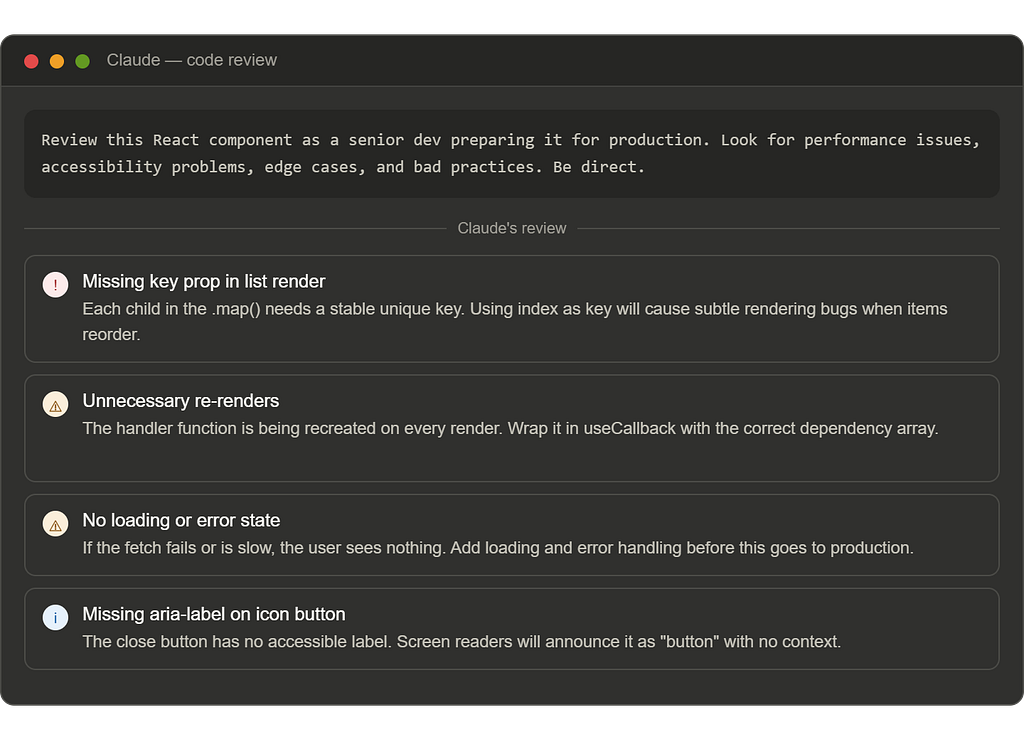
“Review this React component as if you’re a senior developer preparing it for a production codebase. Look for: performance issues, accessibility problems, edge cases I haven’t handled, anything that would cause problems at scale, and anything that’s technically functional but considered bad practice in modern React. Be direct — I want honest feedback, not reassurance.”
✅ What changes: The “be direct” instruction matters more than it sounds. Without it, Claude tends toward diplomatic. With it, you get the kind of feedback that actually improves your code — missing key props, unnecessary re-renders, components doing too much, prop drilling that should be context, missing error boundaries. A real code review in thirty seconds.
Situation 5: When You’re Completely Stuck
🔴 What most people type:
“I don’t know what’s wrong”
🟢 What actually works:
“I’ve been stuck on this for [time]. Here’s what I’m trying to do: [goal]. Here’s what’s actually happening: [behaviour]. Here’s what I’ve already tried: [attempts]. Here’s the relevant code: [code]. I don’t need you to just fix it — I need you to help me understand what category of problem this is, what I’m likely misunderstanding conceptually, and what the debugging process should look like from here.”
✅ What changes: This prompt does something Stack Overflow almost never does — it gives you a debugging framework, not just a fix. Claude will often identify that you’re dealing with an async timing issue, or a closure problem, or a CSS specificity conflict, or a state management misunderstanding — and explain the class of problem so you can solve this one and recognize the next one.
The Before vs. After: Honestly
I want to be concrete about this because vague productivity claims are everywhere and mostly meaningless.
Before: A debugging session for a non-trivial bug averaged 25–40 minutes. Most of that time was reading, cross-referencing sources, and trying solutions I didn’t fully understand.
After: The same category of bug averages 5–10 minutes. The time saved isn’t just in finding the answer — it’s in understanding it, which means I implement it correctly the first time instead of creating new bugs while fixing old ones.
Before: Starting a new feature in an unfamiliar area — say, adding WebSocket support to an existing Node app — meant 45–60 minutes of documentation, tutorials, and stitching together examples before writing a line of code.
After: I give Claude the architecture of my existing app and ask it to walk me through how the new feature fits in. I’m writing code in ten minutes with a clear mental model already in place.
Before: Code review meant either skipping it entirely, or asking a peer who may or may not have time and may or may not catch everything.
After: Every piece of code I write gets reviewed before it ships. Not by a peer, but by something that has read more code than any individual ever could and will never be too busy to look.
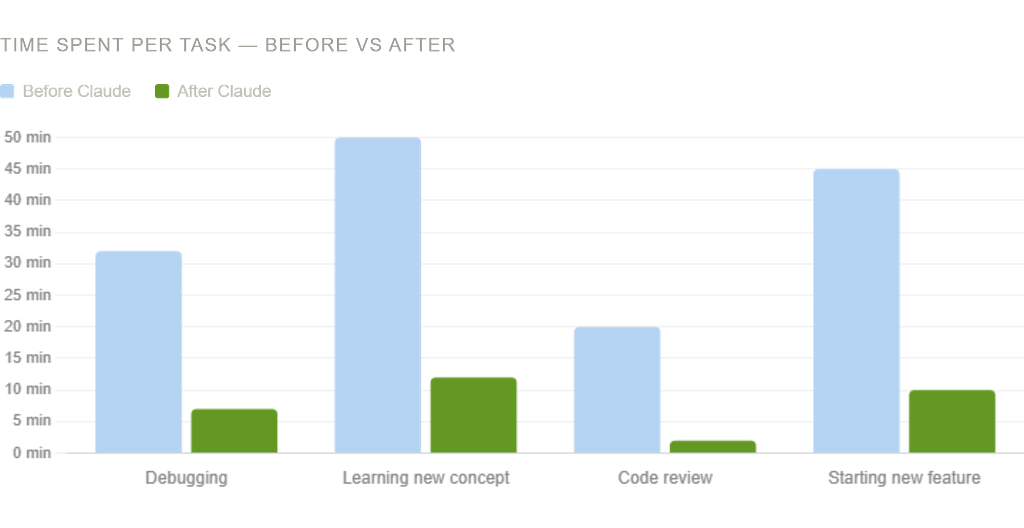
The cumulative effect of these changes over weeks and months is significant. Not just in speed, but in the quality of what I’m building and — perhaps more importantly — in how much I’m actually learning. Because Claude explains, I understand more than I did when I was copying Stack Overflow answers. My mental model of how things work is genuinely better.
What I Still Use Other Tools For
Honesty matters here. Claude didn’t replace everything.
Official documentation still has a place — particularly for checking exact syntax, API references, and version-specific details. Claude occasionally confuses library versions or has slightly outdated knowledge of rapidly-changing frameworks. When precision matters, verify in the docs.
GitHub is obviously irreplaceable for version control, collaboration, and reading real-world codebases.
The browser DevTools are still where I live for front-end debugging. Claude can help me interpret what I see there, but it can’t see my screen.
Other developers are still the best resource for architecture decisions on complex, opinionated problems where context and experience really matter.
But for the everyday cognitive load of development — the debugging, the learning, the reviewing, the unsticking — Claude has genuinely replaced the fragmented multi-tab workflow I used to depend on. And the replacement is better in almost every way.
The Honest Caveat
I want to end with something important, because I’ve written about this before and I believe it.
This workflow makes you faster. It should also make you better, if you use it right. The prompts I’ve shared above are designed to extract understanding, not just answers. Use them that way. Read the explanations. Push back when something doesn’t make sense. Let Claude teach, not just deliver.
The risk of any powerful coding assistant is that you start shipping code you don’t understand. That’s a short-term gain and a long-term liability. Your goal is to come out of every Claude interaction knowing something you didn’t know before — not just having code that works.
Used that way, this workflow doesn’t just make you more productive. It makes you a better developer.
And that’s worth more than any stack of browser tabs ever was.
Follow for more on AI workflows, full-stack development, and honest takes on building things as a student.
The Claude Workflow That Replaced 80% of My Coding Stack was originally published in Towards AI on Medium, where people are continuing the conversation by highlighting and responding to this story.