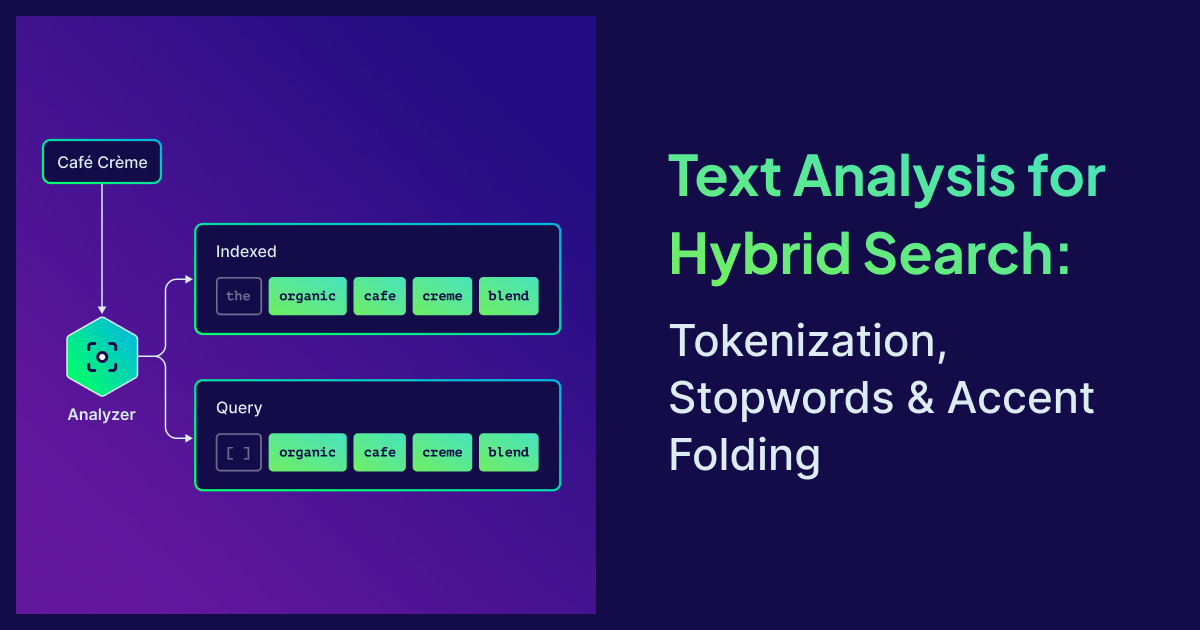
Hybrid search in a vector database has two halves: vector similarity for meaning, BM25 for exact tokens. The vector half gets all the attention. The BM25 half, and the tokenization that feeds it, quietly fails when the analyzer is wrong, and no amount of embedding tuning will save you. Drop the wrong character, split a word that shouldn't be split, and BM25 has nothing useful to match. The keyword side becomes noise and drags the search quality down with it.
That sounds like an edge case until you ship a multilingual catalog. Suddenly "café crème" returns nothing for a French e-commerce store, the Polish team can't find "Łódź", and your support agent's RAG pipeline misses every query that uses an accented word. The tokenizer was right there the whole time. Nobody could see what it was doing.
Weaviate v1.37 made the tokenizer an observable and multilingual-friendly part of the database. This post will help improve your search quality and covers the following topics:
- Hybrid search 101 - How tokenization shapes recall in hybrid search
- Tokenization methods - Picking the right tokenizer for your data
- Accent folding for multilingual search
- Per-property stopwords - Per-language stopwords without reindexing
- The
tokenizeendpoint - Verifying the result with a single API call
Hybrid search 101
Hybrid search combines two signals: vector similarity (semantic, meaning-based) and BM25 keyword scoring (exact-match, lexical). The two are fused at query time, so a query like "product launch April 2026" recovers both relevant news articles (vector) and exact date mentions (keyword).
BM25 doesn't operate on text. It operates on tokens, the discrete units the analyzer produced when each document was indexed. This is the same tokenization concept you've seen in NLP, but the stakes are different: there's no model layer that can paper over a wrong token. If your tokenizer dropped the punctuation in "v1.37", lower-cased "USA" to "usa", or treated naïve and naive as different tokens, BM25 can't recover. The keyword half of your hybrid score becomes noise, and your fusion is fighting itself.
This is why a great embedding model on top of a careless tokenizer often loses to pure-vector search. So BM25 vs semantic search isn't really the question. They answer different things, and hybrid search is supposed to combine them. The real question is whether your tokens make BM25 useful at all. The tokenizer is the entry point to the inverted index, and it sets the ceiling for keyword recall.
Whether you're building hybrid search for RAG, classic keyword search, or a multilingual catalog, the analyzer is the part that decides what BM25 can score. If you're new to hybrid retrieval mechanics, our earlier post on hybrid search fusion walks through the scoring math. This post focuses on the analyzer that feeds it.
Tokenization methods
Weaviate exposes four general-purpose tokenization methods that cover the vast majority of production use cases:
| Method | Pick this when… | Example token output for "User_42 - café" |
|---|---|---|
word | Articles, descriptions, names, FAQs (the default) | user, 42, café |
lowercase | Code identifiers, email addresses, hash IDs | user_42, -, café |
whitespace | Acronyms, case-sensitive entity names | User_42, -, café |
field | Exact-match identifiers (URLs, UUIDs) | User_42 - café (one token) |
The word tokenizer is forgiving. It lower-cases, strips most punctuation, and usually does the right thing for prose. The other three preserve more of the original string, which matters when meaningful symbols (_, -, :) carry information.
If you are not sure, the word tokenizer is probably the way to go. The other three look more flexible on paper, but the only honest reason to reach for them is that you ran a real query and saw a wrong result. Picking lowercase or whitespace upfront because they "preserve more" tends to lock in tokens you didn't actually want, and you find out months later when a query goes sideways.
You set the method per property, not per collection. That's important: real apps mix prose, identifiers, and code in a single collection.
import weaviate
from weaviate.classes.config import Property, DataType, Tokenization, Configure

client = weaviate.connect_to_local()

tkn_options = [
    Tokenization.WORD,
    Tokenization.LOWERCASE,
    Tokenization.WHITESPACE,
    Tokenization.FIELD,
]

properties = [
    Property(
        name=f"text_{tokenization.replace('.', '_')}",
        data_type=DataType.TEXT,
        tokenization=tokenization,
    )
    for tokenization in tkn_options
]

client.collections.create(
    name="TokenizationDemo",
    properties=properties,
    vector_config=Configure.Vectors.self_provided(),
)
For non-whitespace-delimited languages, Weaviate also ships language-specific tokenizers that are opt-in via environment variables: gse (Japanese), gse_ch (Chinese), kagome_ja (Japanese morphological), and kagome_kr (Korean). A trigram tokenizer is also built-in (always available, no env flag) and produces 3-character n-grams for fuzzy and substring matching — handy when you need partial-token recall over short identifiers. For Japanese, Korean, or Chinese content, point a property at the appropriate language tokenizer:
Property(
    name="description_ja",
    data_type=DataType.TEXT,
    tokenization=Tokenization.KAGOME_JA,
)
Accent folding for multilingual search
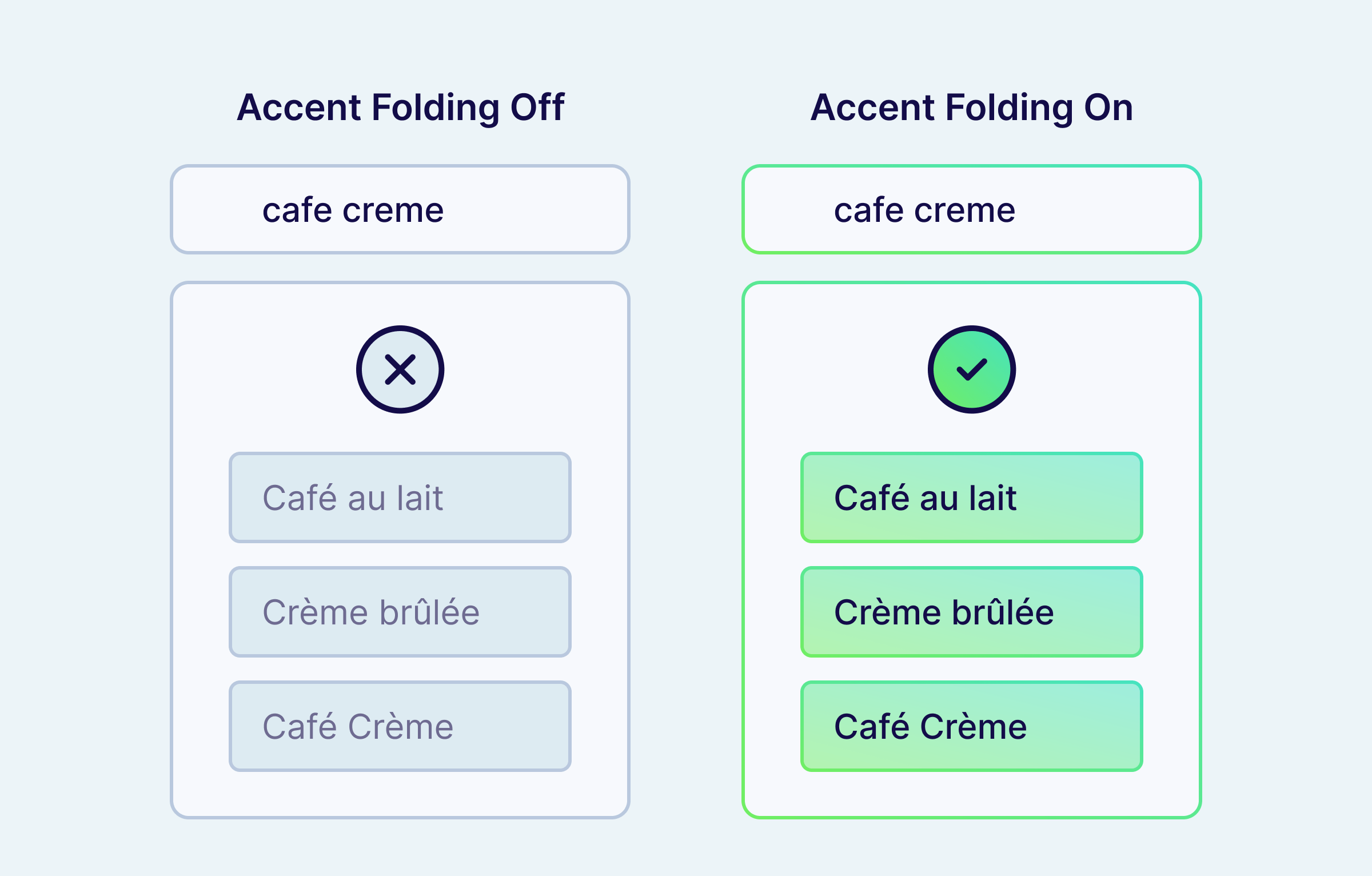
The single most painful tokenization bug in production is accent mismatch. Users type cafe. Documents store café. BM25 sees two different tokens, returns nothing, and your hybrid score collapses to whatever the vector search came up with.
To match accented characters in search, enable accent folding on the property. The fix is one line of schema.
The example below sets up three properties side-by-side: text_default as the unfolded baseline, text_folded with full ASCII folding, and text_folded_keep_e showing how to exempt a specific character (é) from folding:
import weaviate
from weaviate.classes.config import Property, DataType, Tokenization, Configure

client = weaviate.connect_to_local()

client.collections.create(
    name="AccentFoldingDemo",
    properties=[
        Property(
            name="text_default",
            data_type=DataType.TEXT,
            tokenization=Tokenization.WORD,
        ),
        Property(
            name="text_folded",
            data_type=DataType.TEXT,
            tokenization=Tokenization.WORD,
            text_analyzer=Configure.text_analyzer(ascii_fold=True),
        ),
        Property(
            name="text_folded_keep_e",
            data_type=DataType.TEXT,
            tokenization=Tokenization.WORD,
            text_analyzer=Configure.text_analyzer(
                ascii_fold=True, ascii_fold_ignore=["é"]
            ),
        ),
    ],
    vector_config=Configure.Vectors.self_provided(),
)
Under the hood, textAnalyzer.asciiFold uses Unicode NFD decomposition plus an explicit replacement table for single-codepoint letters that don't decompose (ł, æ, ø, ð, þ, đ, ß, and more). That covers 20+ Latin-script languages by default, including French, German, Spanish, Polish, Czech, Turkish, Vietnamese, and Scandinavian languages.
Folding runs at both index and query time, so "Café Crème" → cafe creme in the inverted index, and a user query of cafe creme (or café creme, or Cafe Crème) all hit the same row. Text filter operators like Equal and Like also run through the analyzer, so Filter.by_property("text").equal("cafe") matches a stored value of "Café" once folding is on, with no special-case handling at the query layer.
If you need to preserve specific accents (for example, a brand name where the accent distinguishes two SKUs), use the asciiFoldIgnore array to exempt individual characters. The exemption is immutable after the property is created (changing it would change which tokens are written to disk), so plan it once.
Per-property stopwords
Stopwords are short, high-frequency words (the, a, and) that BM25 typically drops to make scoring more robust. Many search stacks default to one stopword list per language and apply it to every text field. That works until you have a brand called "The North Face", and dropping the quietly destroys recall on the brand.
Weaviate solves this two ways. First, you can declare named stopword presets at the collection level. Each preset is a flat list of words to drop. A preset name that matches a built-in (en, none) replaces the built-in for this collection. If you want to extend a built-in with additions/removals rather than replace it, use the legacy invertedIndexConfig.stopwords field — stopwordPresets only accepts flat word lists.
import weaviate
from weaviate.classes.config import Property, DataType, Tokenization, Configure

client = weaviate.connect_to_local()

client.collections.create(
    name="StopwordsDemo",
    inverted_index_config=Configure.inverted_index(
        stopword_presets={
            "fr": ["le", "la", "les", "un", "une", "des", "du", "de", "et"],
        },
    ),
    properties=[
        Property(
            name="name_en",
            data_type=DataType.TEXT,
            tokenization=Tokenization.WORD,
            text_analyzer=Configure.text_analyzer(stopword_preset="en"),
        ),
        Property(
            name="name_fr",
            data_type=DataType.TEXT,
            tokenization=Tokenization.WORD,
            text_analyzer=Configure.text_analyzer(stopword_preset="fr"),
        ),
    ],
    vector_config=Configure.Vectors.self_provided(),
)
In this example, en is a built-in preset that ships with Weaviate, while fr is a user-defined preset registered via stopword_presets. Built-in presets can be referenced from text_analyzer.stopword_preset without registering them at the collection level.
Search the name_fr property for "la tasse bleue et le bol" and the analyzer keeps tasse, bleue, bol and drops la, et, le — exactly the noise reduction BM25 needs. The same words against name_en aren't filtered, because they aren't English stopwords.
Second, you can override the stopword behavior per property via textAnalyzer.stopwordPreset. So in a single collection, description_en can use English stopwords, description_fr can use a French preset, and brand_name can use none, all sharing the same hybrid query path.
One constraint to know about: textAnalyzer.stopwordPreset is only honoured on properties with word tokenization.
Stopwords are still indexed. They're only filtered at query time. That means changing a stopword preset takes effect immediately on the next query, with no reindex.
Stopwords are removed from the query side, not from the index. They don't contribute query-term weight to the BM25 score, but because they remain in the inverted index, document length and term-frequency stats can still shift the ranking of two otherwise similar documents. The token is still in the index, so an exact-phrase filter on it still matches.
For a tutorial-style walkthrough with searches and filters, see the tokenization tutorial.
The tokenize endpoint
If your keyword search is returning fewer results than expected, or returning nothing at all, the analyzer is the first place to look. The hardest part of tuning a text analyzer used to be seeing what it actually did. Most search stacks force you to delete the index, reconfigure, reingest, run queries, and squint at log output. By the time you have a feedback loop, you've forgotten what hypothesis you were testing.
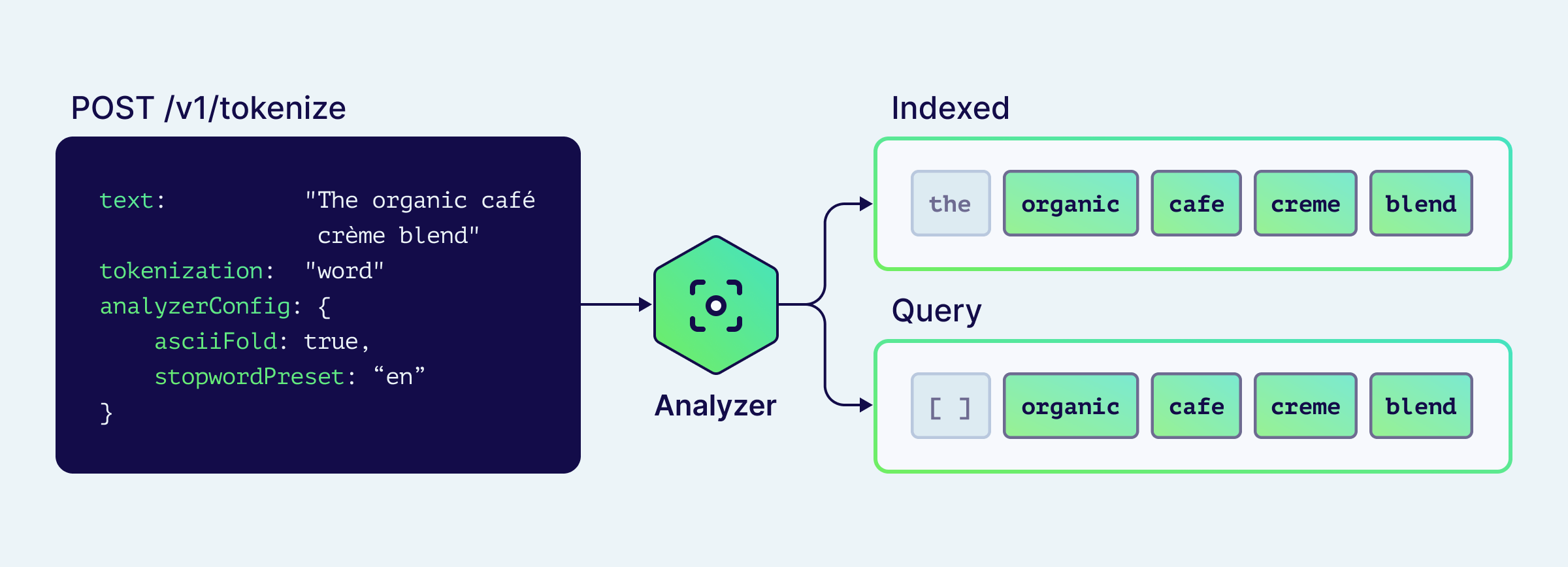
Weaviate v1.37 exposes two REST endpoints that turn the analyzer into a sandboxed, callable function:
POST /v1/tokenize: run any tokenizer + analyzer config against arbitrary text. No schema mutation, no reingest.POST /v1/schema/{className}/properties/{propertyName}/tokenize: apply an existing property's exact configuration.
Both return a structured response that separates indexed tokens (what goes into the inverted index) from query tokens (what BM25 actually scores after stopword filtering):
import weaviate
from weaviate.classes.config import Tokenization, Configure

client = weaviate.connect_to_local()

result = client.tokenization.text(
    text="The organic café crème blend",
    tokenization=Tokenization.WORD,
    analyzer_config=Configure.text_analyzer(
        ascii_fold=True,
        stopword_preset="en",
    ),
)

print(f"indexed: {result.indexed}")
print(f"query:   {result.query}")
indexed: ['the', 'organic', 'cafe', 'creme', 'blend']
query:   ['organic', 'cafe', 'creme', 'blend']
The indexed / query distinction shows you exactly where the stopword preset kicked in. If the shows up in query, you forgot to apply the preset. If cafe is missing, accent folding isn't on.
The property-scoped variant takes the property's full config (tokenizer, accent folding, stopword preset, ignore list), so you can verify a real production property without copying its config into the request. It also resolves collection aliases and accepts class and property names case-insensitively.
Both endpoints work with every tokenizer Weaviate ships, including word, lowercase, whitespace, field, and trigram, and the language-specific ones (gse, gse_ch, kagome_ja, kagome_kr) work when they're enabled at server start.
Treat it like a linter for your search analyzer.
Use cases
Multilingual e-commerce catalog
A catalog with French descriptions, English SKUs, and product names containing accents. Configure the collection so each property gets the right analyzer:
properties=[
    Property(name="title_fr", data_type=DataType.TEXT,
             tokenization=Tokenization.WORD,
             text_analyzer=Configure.text_analyzer(
                 ascii_fold=True,
                 stopword_preset="fr")),
    Property(name="sku", data_type=DataType.TEXT,
             tokenization=Tokenization.FIELD),
    Property(name="brand", data_type=DataType.TEXT,
             tokenization=Tokenization.WORD,
             text_analyzer=Configure.text_analyzer(stopword_preset="none")),
]
Three different analyzers in one collection, all sharing the same hybrid query path. The brand property keeps the in "The North Face". The SKU property treats every code as one exact-match token. The French title property folds accents and filters French stopwords.
Technical documentation RAG
Code identifiers like weaviate.connect_to_local shouldn't be split by underscores. Use lowercase tokenization on a code_snippet property and word on the surrounding prose. The Query Agent (or any RAG pipeline) gets clean tokens for exact-symbol matching alongside semantic recall over the explanation.
Multi-tenant SaaS with mixed locales
Each tenant lives in its own multi-tenant shard, but the schema is shared. Define multiple stopword presets at the collection level (en, fr, de, ja) and override per-property at the tenant onboarding step based on the tenant's primary language. No schema migration, no reindex when a new language onboards.
Summary
Tokenization is the entry point to the keyword half of hybrid search, and the keyword half is what makes hybrid retrieval robust on multilingual text and case-sensitive identifiers. Most vector database tokenization stories stop at "we accept text and return embeddings." Weaviate v1.37 makes the analyzer observable and per-property granular, so the keyword half of your vector database stays useful in any language.
Pick the tokenizer per field: word for prose (lower-cases, strips punctuation), whitespace for case-sensitive identifiers, lowercase for code-like strings where symbols carry meaning, field for exact-match identifiers like SKUs and URLs, and trigram for fuzzy substring matching. Configure stopwords per language at the collection level via invertedIndexConfig.stopwordPresets, then override per property through textAnalyzer.stopwordPreset. Stopword presets can change without reindexing because they're filtered at query time, not index time. For non-Latin scripts, the language-specific tokenizers (gse, gse_ch, kagome_ja, kagome_kr) cover the cases where whitespace splitting falls apart. And when something looks wrong, call POST /v1/tokenize and read what the analyzer actually produced.
To go deeper:
- The tokenization tutorial
- The accent folding concepts page
- The keyword search concepts page for how BM25 uses the analyzer pipeline
- The
/v1/tokenizereference - Related blog posts: Hybrid search explained and Searching in non-English languages
Ready to start building?
Check out the Quickstart tutorial, or build amazing apps with a free trial of Weaviate Cloud (WCD).
Don't want to miss another blog post?
Sign up for our bi-weekly newsletter to stay updated!
By submitting, I agree to the Terms of Service and Privacy Policy.