Agentic AI Project: Build an AI-powered YouTube assistant using Streamlit, FAISS, BM25, and OpenAI that answers questions with clickable timestamps.

Introduction
You’re watching a 1-hour YouTube video packed with value… but you only have 5 minutes.
So what do you do?
Skip randomly?
Scrub the timeline?
Give up?
What if you could just ask:
“Summarize this video”
“Where does it talk about X?”
and instantly jump to the exact moment with the answer?
YouTube is already experimenting with features like “Ask”.
Let’s build our own YouTube Video Chat Assistant and understand what’s happening behind the scenes.
Using Streamlit, FAISS, BM25, and OpenAI, we’ll turn any video into a searchable, interactive experience with AI-powered answers and clickable timestamps.
What this project does
YT Chat lets you:
- Paste a YouTube URL
- Fetch and index the video transcript
- Ask questions about the video
- Receive answers grounded in the transcript
- Click timestamp citations to jump to the exact part of the video
The system supports multiple loaded videos in the session and uses a hybrid retrieval strategy to balance recall and precision.
Architecture Overview
To keep the system simple, scalable, and easy to reason about, each component is designed with a single responsibility.
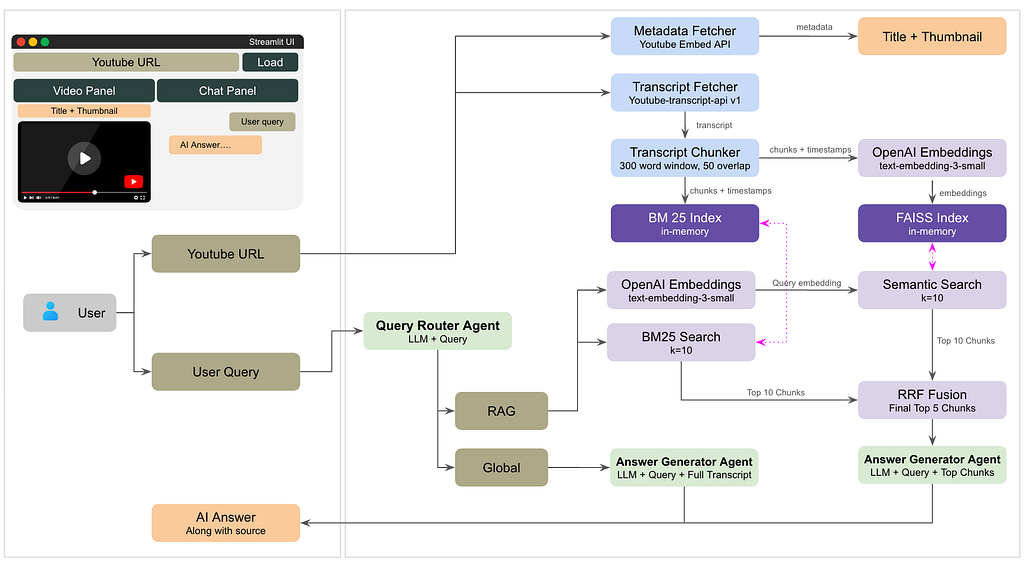
At a high level, the application is composed of the following layers:
Core Components
- Frontend (Streamlit) — app.py
Handles the user interface: video input, chat interaction, and rendering responses with clickable timestamps using Streamlit. - Transcript Ingestion — transcript.py
Fetches and normalizes YouTube transcripts using youtube-transcript-api, including language fallback support. - Embedding + Vector Search (FAISS) — embedder.py
Converts transcript chunks into embeddings using OpenAI’s text-embeeding-small model and stores them in a fast similarity index powered by FAISS. - Keyword Search (BM25) — keyword_index.py
Builds a lightweight keyword-based retrieval system using BM25 for precise term matching. - Hybrid Retrieval (RRF) — retrieval_fusion.py
Combines semantic and keyword search results using Reciprocal Rank Fusion to improve both recall and precision. - LLM Layer (OpenAI) — chat.py
Handles query understanding, routing, and response generation using OpenAI models.
Here is the flow:
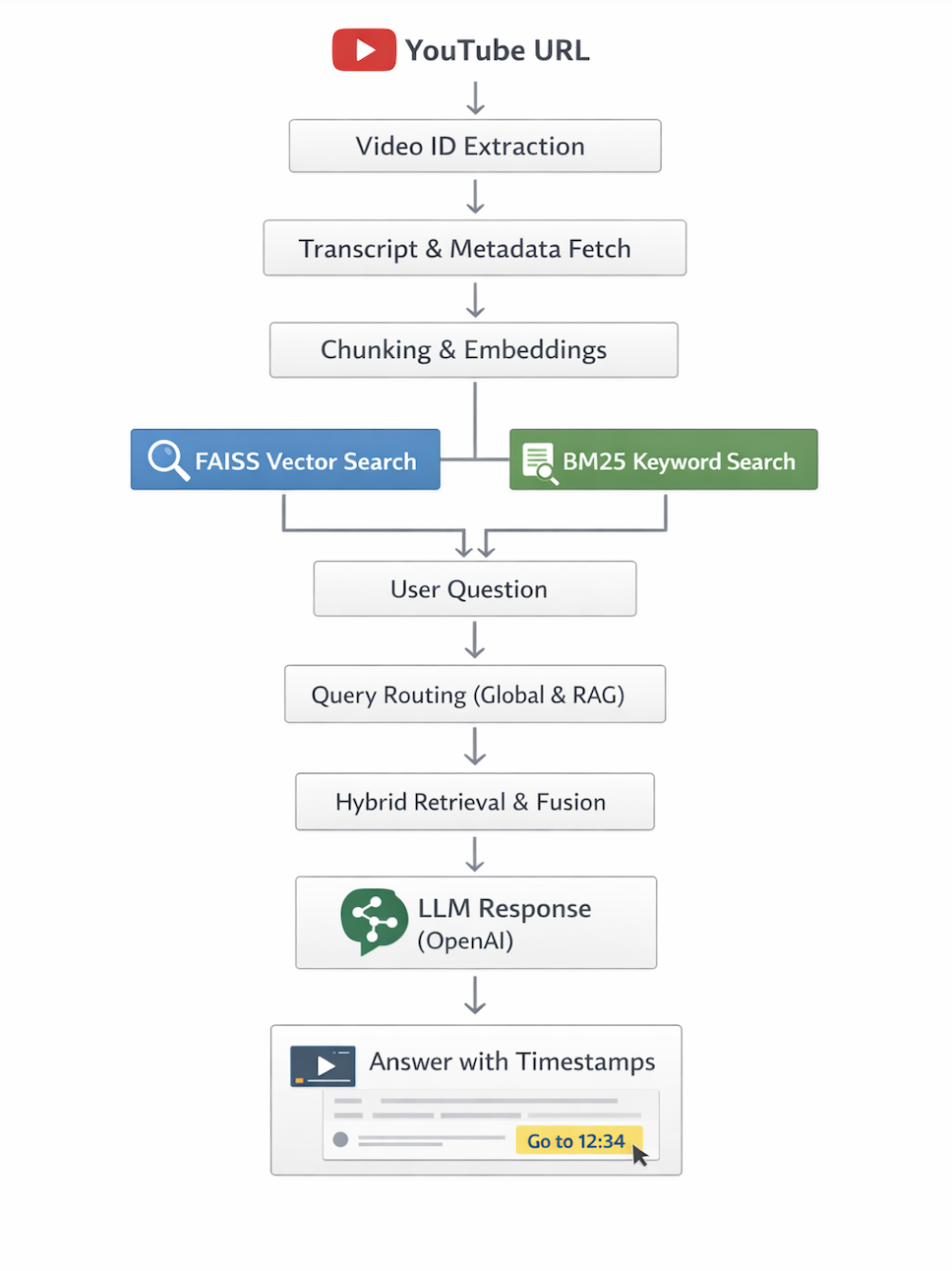
Let’s get our hands dirty now.
The complete code repo can be accessed here:
Setup:
- Create and Activate Virtual Environment
For macOS/Linux:
python3 -m venv .venv
source .venv/bin/activate
For Windows (Command Prompt):**
python -m venv .venv
.venv\Scripts\activate
2. Install dependencies from requirements.txt
streamlit>=1.35.0
openai>=1.30.0
python-dotenv>=1.0.0
youtube-transcript-api>=0.6.2
faiss-cpu>=1.8.0
numpy>=1.26.0
requests>=2.31.0
rank-bm25>=0.2.2
#terminal
pip install requirements.txt
3. Create .env file with your OPENAI_API_KEY
Let’s move ahead.
Step 1: Fetching Transcript and Chunking
1.1 Extracting the YouTube video ID
The first step is easy but critical. The app supports multiple URL formats using a regex matcher in `transcript.py`:
def extract_video_id(url: str) -> str | None:
    patterns = [
        r"(?:v=|\/)([0-9A-Za-z_-]{11}).*",
        r"(?:youtu\.be\/)([0-9A-Za-z_-]{11})",
        r"(?:embed\/)([0-9A-Za-z_-]{11})",
        r"^([0-9A-Za-z_-]{11})$",
    ]
    for pattern in patterns:
        match = re.search(pattern, url)
        if match:
            return match.group(1)
    return None
This function handles standard YouTube links, shortened `youtu.be` links, embedded links, and raw IDs.
1.2: Fetching the transcript
Transcript ingestion uses youtube-transcript-api in transcript.py.
The implementation tries English first and falls back to any available language:
fetched = api.fetch(video_id, languages=['en'])
If no English transcript exists, it discovers available languages and retries.
The output shape is normalized to:
[{"text": …, "start": …, "duration": …}, …]This gives us the raw text and the timestamps needed for citation.
1.3: Chunking the transcript with timestamps
Rather than embedding each sentence, the app builds overlapping chunks from the transcript.
That happens in transcript.py:
def chunk_transcript(transcript: list[dict], chunk_size: int = 300, overlap: int = 50) -> list[dict]:
    chunks = []
    words_buffer = []
    word_timestamps = []

    for entry in transcript:
        words = entry['text'].split()
        start = entry['start']
        duration = entry.get('duration', 2.0)
        for i, word in enumerate(words):
            t = start + (duration * i / max(len(words), 1))
            words_buffer.append(word)
            word_timestamps.append(t)

    step = chunk_size - overlap
    i = 0
    while i < len(words_buffer):
        end_idx = min(i + chunk_size, len(words_buffer))
        chunk_words = words_buffer[i:end_idx]
        chunk_times = word_timestamps[i:end_idx]

        chunks.append({
            "chunk_id": chunk_id,
            "text": " ".join(chunk_words),
            "start_time": chunk_times[0],
            "end_time": chunk_times[-1],
        })
        i += step
This sliding window design preserves context across chunk boundaries and keeps timestamps aligned to the original video timing.
Here is complete transcript.py
"""
transcript.py - Fetch and parse YouTube transcripts with timestamps
Compatible with youtube-transcript-api v1.x
"""

from youtube_transcript_api import YouTubeTranscriptApi
from youtube_transcript_api._errors import (
    NoTranscriptFound, TranscriptsDisabled, VideoUnavailable,
    CouldNotRetrieveTranscript,
)
import re


def extract_video_id(url: str) -> str | None:
    """Extract video ID from various YouTube URL formats."""
    patterns = [
        r"(?:v=|\/)([0-9A-Za-z_-]{11}).*",
        r"(?:youtu\.be\/)([0-9A-Za-z_-]{11})",
        r"(?:embed\/)([0-9A-Za-z_-]{11})",
        r"^([0-9A-Za-z_-]{11})$",
    ]
    for pattern in patterns:
        match = re.search(pattern, url)
        if match:
            return match.group(1)
    return None


def fetch_transcript(video_id: str) -> list[dict]:
    """
    Fetch transcript for a YouTube video.
    Returns list of {text, start, duration} dicts.
    Compatible with youtube-transcript-api v1.x (instance-based API).
    """
    api = YouTubeTranscriptApi()

    # Try English first
    try:
        fetched = api.fetch(video_id, languages=['en'])
        return [{"text": s.text, "start": s.start, "duration": s.duration} for s in fetched]
    except TranscriptsDisabled:
        raise ValueError("Transcripts are disabled for this video.")
    except VideoUnavailable:
        raise ValueError("Video is unavailable or private.")
    except (NoTranscriptFound, CouldNotRetrieveTranscript):
        pass  # Will try other languages below
    except Exception:
        pass  # Will try other languages below

    # Fallback: discover all available languages, use the first one
    try:
        transcript_list = api.list(video_id)
        available = [t.language_code for t in transcript_list]
        if not available:
            raise ValueError("No transcripts available for this video.")
        fetched = api.fetch(video_id, languages=available)
        return [{"text": s.text, "start": s.start, "duration": s.duration} for s in fetched]
    except TranscriptsDisabled:
        raise ValueError("Transcripts are disabled for this video.")
    except VideoUnavailable:
        raise ValueError("Video is unavailable or private.")
    except ValueError:
        raise
    except Exception as e:
        raise ValueError(f"Could not fetch transcript: {str(e)}")


def chunk_transcript(transcript: list[dict], chunk_size: int = 300, overlap: int = 50) -> list[dict]:
    """
    Chunk transcript into overlapping windows, preserving timestamps.
    Each chunk: {text, start_time, end_time, chunk_id}
    """
    chunks = []
    words_buffer = []
    word_timestamps = []

    # Flatten transcript into word-level with timestamps
    for entry in transcript:
        words = entry['text'].split()
        start = entry['start']
        duration = entry.get('duration', 2.0)
        for i, word in enumerate(words):
            t = start + (duration * i / max(len(words), 1))
            words_buffer.append(word)
            word_timestamps.append(t)

    # Slide window
    step = chunk_size - overlap
    chunk_id = 0
    i = 0
    while i < len(words_buffer):
        end_idx = min(i + chunk_size, len(words_buffer))
        chunk_words = words_buffer[i:end_idx]
        chunk_times = word_timestamps[i:end_idx]

        chunk_text = " ".join(chunk_words)
        start_time = chunk_times[0]
        end_time = chunk_times[-1]

        chunks.append({
            "chunk_id": chunk_id,
            "text": chunk_text,
            "start_time": start_time,
            "end_time": end_time,
        })
        chunk_id += 1
        i += step
        if end_idx == len(words_buffer):
            break

    return chunks


def format_timestamp(seconds: float) -> str:
    """Convert seconds to MM:SS or HH:MM:SS string."""
    seconds = int(seconds)
    h = seconds // 3600
    m = (seconds % 3600) // 60
    s = seconds % 60
    if h > 0:
        return f"{h}:{m:02d}:{s:02d}"
    return f"{m}:{s:02d}"


def make_youtube_link(video_id: str, seconds: float) -> str:
    """Create a deep-link YouTube URL at a specific timestamp."""
    t = int(seconds)
    return f"https://www.youtube.com/watch?v={video_id}&t={t}s"
We also have metadata.py which extracts the thumbnail and title of the video.
"""
metadata.py - Fetch YouTube video metadata (title, thumbnail, duration, channel)
"""

import requests
import json
import re


def fetch_metadata(video_id: str) -> dict:
    """
    Fetch video metadata using YouTube oEmbed API + noembed fallback.
    Returns dict with title, author, thumbnail_url, duration_str.
    """
    # Try YouTube oEmbed (no API key needed)
    oembed_url = f"https://www.youtube.com/oembed?url=https://www.youtube.com/watch?v={video_id}&format=json"
    try:
        resp = requests.get(oembed_url, timeout=8)
        if resp.status_code == 200:
            data = resp.json()
            thumbnail = f"https://img.youtube.com/vi/{video_id}/mqdefault.jpg"
            return {
                "title": data.get("title", "Unknown Title"),
                "author": data.get("author_name", "Unknown Channel"),
                "thumbnail_url": thumbnail,
                "video_id": video_id,
                "url": f"https://www.youtube.com/watch?v={video_id}",
            }
    except Exception:
        pass

    # Fallback: minimal info
    return {
        "title": f"Video ({video_id})",
        "author": "Unknown",
        "thumbnail_url": f"https://img.youtube.com/vi/{video_id}/mqdefault.jpg",
        "video_id": video_id,
        "url": f"https://www.youtube.com/watch?v={video_id}",
    }
Step 2: Embedding the Transcript
2.1: Embedding and FAISS indexing
The semantic retrieval backbone is in embedder.py.
Key points:
- Uses OpenAI `text-embedding-3-small`
- Embeds transcript chunks in batches
- Normalizes embeddings for cosine similarity
- Stores them in a FAISS `IndexFlatIP`
The embedding pipeline looks like this:
embeddings = get_embeddings(texts, client)
norms = np.linalg.norm(embeddings, axis=1, keepdims=True)
embeddings = embeddings / (norms + 1e-10)
index = faiss.IndexFlatIP(dim)
index.add(embeddings)
And vector search is implemented with:
def search_index(query, index, chunks, client, top_k=5):
    response = client.embeddings.create(model=EMBEDDING_MODEL, input=[query])
    q_emb = np.array([response.data[0].embedding], dtype=np.float32)
    q_emb = q_emb / (np.linalg.norm(q_emb) + 1e-10)
    scores, indices = index.search(q_emb, top_k)
This gives a fast way to find the transcript chunks most semantically related to the question.
2.2: Building a keyword index with BM25
Semantic search is powerful, but keyword search still helps for precise phrase matching.
The project adds a local BM25 index in keyword_index.py:
self.tokenized_corpus = [self._tokenize(text) for text in self.corpus]
self.bm25 = BM25Okapi(self.tokenized_corpus)
Query search is just:
query_tokens = self._tokenize(query)
scores = self.bm25.get_scores(query_tokens)
Then top chunks are returned based on BM25 ranking.
Here is the complete embedder.py
"""
embedder.py - Embed transcript chunks and build a FAISS index
"""

import numpy as np
import faiss
import pickle
import os
from openai import OpenAI


EMBEDDING_MODEL = "text-embedding-3-small"
EMBED_BATCH_SIZE = 64


def get_embeddings(texts: list[str], client: OpenAI) -> np.ndarray:
    """Embed a list of texts using OpenAI embeddings in batches."""
    all_embeddings = []
    for i in range(0, len(texts), EMBED_BATCH_SIZE):
        batch = texts[i:i + EMBED_BATCH_SIZE]
        response = client.embeddings.create(model=EMBEDDING_MODEL, input=batch)
        batch_embeddings = [item.embedding for item in response.data]
        all_embeddings.extend(batch_embeddings)
    return np.array(all_embeddings, dtype=np.float32)


def build_index(chunks: list[dict], client: OpenAI) -> tuple[faiss.Index, list[dict]]:
    """
    Build a FAISS flat L2 index from transcript chunks.
    Returns (index, chunks) — chunks are stored as metadata alongside index.
    """
    texts = [c["text"] for c in chunks]
    embeddings = get_embeddings(texts, client)

    # Normalize for cosine similarity
    norms = np.linalg.norm(embeddings, axis=1, keepdims=True)
    embeddings = embeddings / (norms + 1e-10)

    dim = embeddings.shape[1]
    index = faiss.IndexFlatIP(dim)  # Inner product = cosine after normalization
    index.add(embeddings)

    return index, chunks


def search_index(
    query: str,
    index: faiss.Index,
    chunks: list[dict],
    client: OpenAI,
    top_k: int = 5,
) -> list[dict]:
    """
    Search the FAISS index for chunks most relevant to query.
    Returns top_k chunks with similarity scores.
    """
    response = client.embeddings.create(model=EMBEDDING_MODEL, input=[query])
    q_emb = np.array([response.data[0].embedding], dtype=np.float32)
    # Normalize
    q_emb = q_emb / (np.linalg.norm(q_emb) + 1e-10)

    scores, indices = index.search(q_emb, top_k)

    results = []
    for score, idx in zip(scores[0], indices[0]):
        if idx < len(chunks):
            chunk = chunks[idx].copy()
            chunk["score"] = float(score)
            results.append(chunk)
    return results
Here is compelte keyword_index.py file:
"""
keyword_index.py — BM25 keyword indexing and retrieval for transcript chunks.

Provides efficient keyword-based search as complement to semantic vector search.
"""

from rank_bm25 import BM25Okapi
from typing import List, Dict


class KeywordIndex:
    """Build and search a BM25 keyword index from transcript chunks."""

    def __init__(self, chunks: List[Dict]):
        """
        Initialize BM25 index from chunks.

        Args:
            chunks: List of chunk dicts with 'text', 'start_time', 'end_time' keys
        """
        self.chunks = chunks
        self.corpus = [chunk["text"] for chunk in chunks]
        # Tokenize: split on whitespace, lowercase, simple punctuation removal
        self.tokenized_corpus = [self._tokenize(text) for text in self.corpus]
        self.bm25 = BM25Okapi(self.tokenized_corpus)

    @staticmethod
    def _tokenize(text: str) -> List[str]:
        """Simple tokenization: lowercase, split on whitespace."""
        import re
        # Convert to lowercase, split on whitespace, remove punctuation
        tokens = re.findall(r'\w+', text.lower())
        return tokens

    def search(self, query: str, top_k: int = 5) -> List[Dict]:
        """
        Search BM25 index for chunks matching query.

        Args:
            query: Search query string
            top_k: Number of top results to return

        Returns:
            List of chunks with 'bm25_score' added; sorted by score descending
        """
        query_tokens = self._tokenize(query)

        # BM25 returns scores for each document in corpus
        scores = self.bm25.get_scores(query_tokens)

        # Sort by score descending, get top_k indices
        top_indices = sorted(
            range(len(scores)),
            key=lambda i: scores[i],
            reverse=True
        )[:top_k]

        results = []
        for idx in top_indices:
            if idx < len(self.chunks):
                chunk = self.chunks[idx].copy()
                chunk["bm25_score"] = float(scores[idx])
                results.append(chunk)

        return results


def build_keyword_index(chunks: List[Dict]) -> KeywordIndex:
    """
    Convenience function to build a BM25 index from chunks.

    Args:
        chunks: List of chunk dicts

    Returns:
        KeywordIndex instance ready for search
    """
    return KeywordIndex(chunks)
Step 3: Hybrid retrieval with RRF fusion
To combine the strengths of semantic and keyword search, the app uses Reciprocal Rank Fusion (RRF) in retrieval_fusion.py.
How it works:
- Retrieve top candidates from BM25 and vector search
- Score each candidate by rank using RRF
- Merge duplicates and sort by fused score
- Return the final top-k list
The formula is:
score = sum(1 / (rank + k))
Here k is taken as 60.
This keeps results that are strong in either retrieval technique while avoiding over-reliance on one method.
Step 4: Query routing — global vs specific
The assistant classifies each user question as either:
- global: requires understanding the full video
- rag: requires specific, localized transcript evidence
In chat.py, a lightweight router prompt sends the question to GPT:
response = client.chat.completions.create(
    model=MODEL,
    messages=[
        {"role": "system", "content": ROUTER_PROMPT},
        {"role": "user", "content": user_message},
    ],
)
If the answer is global, the app builds context from the full transcript. If it is rag, it builds a smaller context from the retrieved chunks.
Here is compelte retrieval_fusion.py
"""
retrieval_fusion.py — Reciprocal Rank Fusion (RRF) for hybrid search.

Merges keyword (BM25) and semantic (vector) results into a single ranked list.
Uses reciprocal rank fusion formula: score = sum(1 / (rank + k))
"""

from typing import List, Dict, Tuple


def reciprocal_rank_fusion(
    keyword_results: List[Dict],
    vector_results: List[Dict],
    k: int = 60,
) -> List[Dict]:
    """
    Merge and rank results from keyword and vector searches using RRF.

    RRF formula for each result:
        score = sum(1 / (rank_keyword + k) + 1 / (rank_vector + k))

    Where rank is 0-indexed position in each result list.
    Results appearing in both lists get scores from both; results in one list only
    contribute their single score.

    Args:
        keyword_results: List of chunks from BM25 search (with 'bm25_score' field)
        vector_results: List of chunks from vector search (with 'score' field for cosine similarity)
        k: RRF parameter; higher k diminishes effect of rank position
           Default 60 is standard; tune based on result quality

    Returns:
        List of unique chunks sorted by fused RRF score (descending)
        Each chunk has 'rrf_score', 'keyword_rank', 'vector_rank' fields added
    """

    # Build ranking maps: chunk_id -> (rank, original_chunk_dict)
    # Using (start_time, end_time) as unique chunk ID
    keyword_ranks: Dict[Tuple, Tuple[int, Dict]] = {}
    vector_ranks: Dict[Tuple, Tuple[int, Dict]] = {}

    for rank, chunk in enumerate(keyword_results):
        chunk_id = (chunk.get("start_time"), chunk.get("end_time"))
        keyword_ranks[chunk_id] = (rank, chunk)

    for rank, chunk in enumerate(vector_results):
        chunk_id = (chunk.get("start_time"), chunk.get("end_time"))
        vector_ranks[chunk_id] = (rank, chunk)

    # Compute RRF scores for all unique chunks
    rrf_scores: Dict[Tuple, float] = {}
    all_chunks: Dict[Tuple, Dict] = {}
    chunk_metadata: Dict[Tuple, Dict] = {}  # Track rank info

    # Process keyword results
    for chunk_id, (rank, chunk) in keyword_ranks.items():
        rrf_scores[chunk_id] = 1.0 / (rank + k)
        all_chunks[chunk_id] = chunk
        chunk_metadata[chunk_id] = {"keyword_rank": rank, "vector_rank": None}

    # Process vector results
    for chunk_id, (rank, chunk) in vector_ranks.items():
        vector_contribution = 1.0 / (rank + k)
        if chunk_id in rrf_scores:
            rrf_scores[chunk_id] += vector_contribution
            chunk_metadata[chunk_id]["vector_rank"] = rank
        else:
            rrf_scores[chunk_id] = vector_contribution
            all_chunks[chunk_id] = chunk
            chunk_metadata[chunk_id] = {"keyword_rank": None, "vector_rank": rank}

    # Sort by RRF score descending
    sorted_chunks = sorted(
        all_chunks.items(),
        key=lambda item: rrf_scores[item[0]],
        reverse=True
    )

    # Build result list with metadata
    results = []
    for chunk_id, chunk in sorted_chunks:
        result_chunk = chunk.copy()
        result_chunk["rrf_score"] = rrf_scores[chunk_id]
        result_chunk["keyword_rank"] = chunk_metadata[chunk_id]["keyword_rank"]
        result_chunk["vector_rank"] = chunk_metadata[chunk_id]["vector_rank"]
        results.append(result_chunk)

    return results


def fuse_and_get_top_k(
    keyword_results: List[Dict],
    vector_results: List[Dict],
    top_k: int = 5,
    rrf_k: int = 60,
) -> List[Dict]:
    """
    Convenience function: fuse results and return top_k.

    Args:
        keyword_results: BM25 search results
        vector_results: Vector search results
        top_k: Number of results to return from fused list
        rrf_k: RRF parameter

    Returns:
        Top k chunks from fused ranking
    """
    fused = reciprocal_rank_fusion(keyword_results, vector_results, k=rrf_k)
    return fused[:top_k]
Step 6: Constructing the prompt
For global questions, the system prompt is designed to:
- use the full transcript
- produce structured answers
- cite timestamps inline in Markdown
For rag questions, the prompt is stricter:
- answer only from the provided excerpts
- cite 1–3 timestamps inline
- say explicitly when the answer is not found in the video
Example timestamp requirement from chat.py:
[MM:SS](https://www.youtube.com/watch?v={video_id}&t=Xs)This ensures every link is consistent and clickable.
We use gpt-4o-mini from OpenAI API.
Here is complete chat.py
"""
chat.py — LLM-routed chat with inline timestamp citations.

Router:  one fast GPT call → "global" | "rag"
Global:  full transcript passed as context (up to 80k tokens)
RAG:     hybrid retrieval (BM25 keyword + vector semantic) with RRF fusion,
         LLM cites 1-2 timestamps inline in answer
"""

from openai import OpenAI
from embedder import search_index
from keyword_index import build_keyword_index
from retrieval_fusion import fuse_and_get_top_k
from transcript import format_timestamp, make_youtube_link
import faiss
import json

MODEL = "gpt-4o-mini"
MAX_FULL_TRANSCRIPT_WORDS = 60_000


# ── System prompts ─────────────────────────────────────────────────────────────

ROUTER_PROMPT = """You are a query classifier for a YouTube video Q&A assistant.

Classify the user's question as one of two types:

"global"  — The question requires understanding the ENTIRE video.
            Examples: summarize, overview, main topics, key takeaways,
            chapters, structure, what is this video about, full recap.

"rag"     — The question is about a SPECIFIC fact, moment, person, concept,
            or timestamp in the video. Examples: when did X happen,
            what did the speaker say about Y, explain concept Z.

Reply with ONLY a JSON object: {"route": "global"} or {"route": "rag"}
No explanation. No other text."""


GLOBAL_SYSTEM_PROMPT = """You are an intelligent video assistant. You have been given the COMPLETE transcript of a YouTube video with timestamps.

Instructions:
- Answer the user's question using the full transcript comprehensively.
- For summaries: cover ALL major sections, not just the beginning.
- For "main sections/topics": identify distinct topic shifts and list each with its start timestamp.
- Cite timestamps inline using this EXACT markdown format: [MM:SS](https://www.youtube.com/watch?v={video_id}&t=Xs)
  where X is the timestamp in seconds. Always include the 's' suffix after the number. Example: &t=315s not &t=315
- Be well-structured — use numbered lists or clear sections.
- Only cite timestamps that are genuinely relevant to that point.
"""

SPECIFIC_SYSTEM_PROMPT = """You are an intelligent video assistant. You have been given relevant excerpts from a YouTube video transcript.

Instructions:
- Answer the question based ONLY on the provided transcript excerpts.
- Cite 1 to 3 timestamps INLINE in your answer using this EXACT markdown format:
  [MM:SS](https://www.youtube.com/watch?v={video_id}&t=Xs)
  where X is the timestamp in seconds. Always include the 's' suffix. Example: &t=315s not &t=315
- Only cite a timestamp when it directly supports the specific sentence you are writing.
- Do NOT list all timestamps at the end — weave them naturally into the answer.
- If the answer spans multiple parts of the video, show each part as a numbered point with its own inline timestamp.
- If the context does not contain the answer, say: "I couldn't find information about that in this video."
- Never make up information not present in the provided context.
"""


# ── LLM Router ────────────────────────────────────────────────────────────────

def classify_query(user_message: str, client: OpenAI) -> str:
    """
    Ask GPT-4o-mini to classify the query as 'global' or 'rag'.
    Falls back to 'rag' on any error.
    """
    try:
        response = client.chat.completions.create(
            model=MODEL,
            messages=[
                {"role": "system", "content": ROUTER_PROMPT},
                {"role": "user", "content": user_message},
            ],
            temperature=0,
            max_tokens=20,
        )
        raw = response.choices[0].message.content.strip()
        parsed = json.loads(raw)
        route = parsed.get("route", "rag")
        return route if route in ("global", "rag") else "rag"
    except Exception:
        return "rag"  # safe default


# ── Context builders ──────────────────────────────────────────────────────────

def build_full_transcript_context(all_chunks: list[dict]) -> str:
    """Concatenate ALL chunks sorted by time, capped at MAX_FULL_TRANSCRIPT_WORDS."""
    sorted_chunks = sorted(all_chunks, key=lambda c: c["start_time"])
    parts = []
    words_so_far = 0
    for chunk in sorted_chunks:
        chunk_words = len(chunk["text"].split())
        if words_so_far + chunk_words > MAX_FULL_TRANSCRIPT_WORDS:
            parts.append("[... transcript truncated for length ...]")
            break
        ts = format_timestamp(chunk["start_time"])
        parts.append(f"[{ts}] {chunk['text']}")
        words_so_far += chunk_words
    return "\n".join(parts)


def build_rag_context(chunks: list[dict]) -> str:
    """Format retrieved chunks into a timestamped context block."""
    parts = []
    for chunk in chunks:
        ts = format_timestamp(chunk["start_time"])
        end_ts = format_timestamp(chunk["end_time"])
        parts.append(f"[{ts} - {end_ts}]\n{chunk['text']}")
    return "\n\n---\n\n".join(parts)


# ── Source extractor (parses inline links from LLM reply) ────────────────────

def extract_sources_from_reply(reply: str, video_id: str) -> list[dict]:
    """
    Parse timestamp markdown links that the LLM wrote inline.
    Matches patterns like [4:32](https://...&t=272s)
    Returns deduplicated list of {timestamp, seconds, link}.
    """
    import re
    # Match [MM:SS] or [H:MM:SS] followed by a YouTube URL with &t=Xs
    # s suffix is optional — LLM sometimes writes &t=315 not &t=315s
    pattern = r'\[([\d]{1,2}:\d{2}(?::\d{2})?)\]\((https://www\.youtube\.com/watch\?v=[\w-]+&t=(\d+)s?)\)'
    matches = re.findall(pattern, reply)
    seen = set()
    sources = []
    for ts_label, url, seconds_str in matches:
        seconds = int(seconds_str)
        if seconds not in seen:
            seen.add(seconds)
            sources.append({
                "timestamp": ts_label,
                "seconds": float(seconds),
                "link": url,
            })
    return sources


# ── Main chat function ────────────────────────────────────────────────────────

def chat_with_video(
    user_message: str,
    conversation_history: list[dict],
    index: faiss.Index,
    chunks: list[dict],
    video_id: str,
    client: OpenAI,
    top_k: int = 5,
    keyword_index=None,
) -> tuple[str, list[dict]]:
    """
    1. Classify query → global | rag
    2. Build context accordingly
    3. For 'rag': use hybrid retrieval (BM25 + semantic with RRF fusion)
    4. Call GPT-4o-mini with inline-timestamp instructions
    5. Parse timestamps from reply for UI chips

    Args:
        user_message: User's query
        conversation_history: Previous messages in conversation
        index: FAISS vector index
        chunks: All transcript chunks
        video_id: YouTube video ID
        client: OpenAI client
        top_k: Number of results to return after fusion
        keyword_index: KeywordIndex instance for BM25 search (optional)

    Returns:
        Tuple of (reply_text, sources)
    """

    # ── Step 1: Route ──────────────────────────────────────────────────────
    route = classify_query(user_message, client)

    # ── Step 2: Build context ──────────────────────────────────────────────
    if route == "global":
        context = build_full_transcript_context(chunks)
        system_prompt = GLOBAL_SYSTEM_PROMPT.replace("{video_id}", video_id)
        context_label = "FULL VIDEO TRANSCRIPT (with timestamps):"
        max_tokens = 1800
    else:
        # ── Hybrid retrieval: BM25 keyword + semantic vector with RRF fusion ──
        # Retrieve top 10 from each method, then fuse to top_k
        vector_results = search_index(user_message, index, chunks, client, top_k=10)

        if keyword_index is not None:
            keyword_results = keyword_index.search(user_message, top_k=10)
            # Fuse using Reciprocal Rank Fusion
            retrieved = fuse_and_get_top_k(
                keyword_results,
                vector_results,
                top_k=top_k,
                rrf_k=60
            )
        else:
            # Fallback: use vector search only if keyword index not available
            retrieved = vector_results[:top_k]

        context = build_rag_context(retrieved)
        system_prompt = SPECIFIC_SYSTEM_PROMPT.replace("{video_id}", video_id)
        context_label = "RELEVANT TRANSCRIPT EXCERPTS (hybrid keyword + semantic search):"
        max_tokens = 900

    # ── Step 3: Call LLM ───────────────────────────────────────────────────
    messages = [
        {"role": "system", "content": system_prompt},
        {"role": "system", "content": f"{context_label}\n\n{context}"},
    ]
    messages.extend(conversation_history)
    messages.append({"role": "user", "content": user_message})

    response = client.chat.completions.create(
        model=MODEL,
        messages=messages,
        temperature=0,
        max_tokens=max_tokens,
    )
    reply = response.choices[0].message.content

    # ── Step 4: Extract inline timestamp links as UI chips ─────────────────
    sources = extract_sources_from_reply(reply, video_id)

    return reply, sources
Step 7: Extracting sourced timestamps
After the assistant replies, the app parses inline markdown timestamp links so it can render clickable buttons.
That logic is in extract_sources_from_reply():
pattern = r'\[([\d]{1,2}:\d{2}(?::\d{2})?)\]\((https://www\.youtube\.com/watch\?v=[\w-]+&t=(\d+)s?)\)'
The app turns each cited timestamp into a UI chip that jumps the embedded YouTube player.
Step 8: Streamlit UI and session state
The UI is implemented entirely inside app.py.
Key elements:
- Topbar and URL input
- Load progress bar
- Embedded YouTube iframe
- Video metadata panel
- Chat message bubbles
- Suggested starter questions
- Timestamp jump buttons
- Clear chat button
The app keeps state in st.session_state for:
- loaded videos
- active video ID
- conversation history
- pending question text
- processing state
This allows the app to maintain multiple videos and ongoing chat history in one browser session.
Here is complete style.css used in our project:
@import url('https://fonts.googleapis.com/css2?family=Google+Sans:wght@400;500;600&family=Roboto:wght@300;400;500&display=swap');

/* Reset & base */
html, body, [class*="css"] {
    font-family: 'Roboto', sans-serif;
    margin: 0; padding: 0;
}

.stApp {
    background: #0f0f0f;
    color: #f1f1f1;
}

/* Hide streamlit chrome */
#MainMenu, footer, header { visibility: hidden; }
[data-testid="stSidebar"] { display: none; }
.block-container {
    padding: 0 !important;
    max-width: 100% !important;
}

/* ── TOP NAV BAR ── */
.topbar {
    display: flex;
    align-items: center;
    justify-content: space-between;
    background: #0f0f0f;
    border-bottom: 1px solid #272727;
    padding: 10px 20px;
    position: sticky;
    top: 0;
    z-index: 100;
}
.topbar-left {
    display: flex;
    align-items: center;
    gap: 12px;
}
.yt-logo {
    font-size: 1.3rem;
    font-weight: 700;
    color: #fff;
    letter-spacing: -0.5px;
}
.yt-logo span { color: #ff0000; }
.url-input-wrap {
    flex: 1;
    max-width: 600px;
    margin: 0 24px;
}

/* ── MAIN TWO-PANEL LAYOUT ── */
.main-panels {
    display: flex;
    height: calc(100vh - 57px);
    overflow: hidden;
}

/* Left: video panel */
.video-panel {
    flex: 1;
    background: #000;
    display: flex;
    flex-direction: column;
    overflow: hidden;
}
.video-embed-wrap {
    position: relative;
    width: 100%;
    padding-top: 56.25%; /* 16:9 */
    background: #000;
    flex-shrink: 0;
}
.video-embed-wrap iframe {
    position: absolute;
    top: 0; left: 0;
    width: 100%; height: 100%;
    border: none;
}
.video-info {
    padding: 16px 20px;
    border-top: 1px solid #272727;
    background: #0f0f0f;
    flex-shrink: 0;
}
.video-title {
    font-family: 'Roboto', sans-serif;
    font-size: 1.1rem;
    font-weight: 500;
    color: #f1f1f1;
    margin: 0 0 4px 0;
    line-height: 1.4;
}
.video-channel {
    font-size: 0.82rem;
    color: #aaa;
    margin: 0;
}

/* Right: chat panel */
.chat-panel {
    width: 400px;
    min-width: 340px;
    max-width: 420px;
    background: #212121;
    border-left: 1px solid #272727;
    display: flex;
    flex-direction: column;
    overflow: hidden;
    height: 100%;
}

.chat-header {
    padding: 14px 18px 12px;
    border-bottom: 1px solid #333;
    flex-shrink: 0;
    background: #212121;
}
.chat-header-top {
    display: flex;
    align-items: center;
    justify-content: space-between;
    margin-bottom: 2px;
}
.chat-title {
    font-family: 'Roboto', sans-serif;
    font-size: 1rem;
    font-weight: 500;
    color: #f1f1f1;
    margin: 0;
}
.gemini-star {
    font-size: 1.1rem;
    margin-right: 6px;
}
.chat-subtitle {
    font-size: 0.75rem;
    color: #aaa;
    margin-top: 2px;
}

/* Suggested questions */
.suggestions {
    padding: 14px 16px 8px;
    border-bottom: 1px solid #2d2d2d;
    flex-shrink: 0;
}
.suggestions-label {
    font-size: 0.78rem;
    color: #aaa;
    margin-bottom: 8px;
}
.suggestion-chips {
    display: flex;
    flex-direction: column;
    gap: 6px;
}
.suggestion-chip {
    background: transparent;
    border: 1px solid #3d3d3d;
    border-radius: 18px;
    padding: 7px 14px;
    font-size: 0.8rem;
    color: #c8c8c8;
    cursor: pointer;
    text-align: right;
    width: fit-content;
    align-self: flex-end;
    transition: background 0.15s, border-color 0.15s;
    line-height: 1.3;
}
.suggestion-chip:hover {
    background: #2d2d2d;
    border-color: #555;
    color: #f1f1f1;
}

/* Chat messages area */
.chat-messages {
    flex: 1;
    overflow-y: auto;
    padding: 16px;
    display: flex;
    flex-direction: column;
    gap: 14px;
    scrollbar-width: thin;
    scrollbar-color: #3d3d3d #212121;
}
/* Thinking dots */
@keyframes thinking-pulse {
    0%, 80%, 100% { opacity: 0.2; transform: scale(0.8); }
    40% { opacity: 1; transform: scale(1.1); }
}
.thinking-dot {
    display: inline-block;
    width: 7px; height: 7px;
    border-radius: 50%;
    background: #666;
    animation: thinking-pulse 1.2s ease-in-out infinite;
}

/* Timestamp dropdown chip — pure CSS, no JS */
.ts-dropdown {
    position: relative;
    display: inline-block;
    vertical-align: middle;
    margin: 0 2px;
}
.ts-chip {
    display: inline-flex;
    align-items: center;
    gap: 3px;
    background: linear-gradient(180deg, #1c2a3a 0%, #142233 100%);
    border: 1px solid #2a3f5a;
    border-radius: 5px;
    padding: 1px 8px;
    font-size: 0.78rem;
    font-family: 'Roboto Mono', monospace;
    color: #8ab4f8;
    cursor: pointer;
    user-select: none;
    white-space: nowrap;
    transition: background 0.12s;
    box-shadow: 0 1px 4px rgba(0,0,0,0.35);
}
.ts-chip:hover { background: #253549; color: #b0ccff; }
.ts-menu {
    display: none;
    position: absolute;
    bottom: 100%;
    margin-bottom: 6px;
    left: 0;
    background: #141a24;
    border: 1px solid #2b3a52;
    border-radius: 8px;
    min-width: 210px;
    z-index: 9999;
    overflow: hidden;
    box-shadow: 0 10px 24px rgba(0,0,0,0.55);
}
.ts-dropdown:hover .ts-menu,
.ts-dropdown:focus-within .ts-menu {
    display: block;
}
.ts-menu::after {
    content: "";
    position: absolute;
    bottom: -6px;
    left: 0;
    width: 100%;
    height: 6px;
}
.ts-option {
    display: block;
    padding: 9px 14px;
    font-size: 0.82rem;
    color: #cfd8ea;
    text-decoration: none;
    cursor: pointer;
    transition: background 0.12s;
    white-space: nowrap;
}
.ts-option:hover { background: #223248; color: #fff; }
.ts-option + .ts-option { border-top: 1px solid #2d3a50; }
.chat-messages::-webkit-scrollbar { width: 4px; }
.chat-messages::-webkit-scrollbar-track { background: #212121; }
.chat-messages::-webkit-scrollbar-thumb { background: #3d3d3d; border-radius: 2px; }

/* Message bubbles */
.msg-user {
    align-self: flex-end;
    background: #2d2d2d;
    border-radius: 18px 18px 4px 18px;
    padding: 10px 14px;
    max-width: 85%;
    font-size: 0.87rem;
    color: #f1f1f1;
    line-height: 1.5;
    word-wrap: break-word;
}
.msg-ai-wrap {
    align-self: flex-start;
    max-width: 95%;
    display: flex;
    flex-direction: column;
    gap: 6px;
}
.msg-ai-label {
    font-size: 0.72rem;
    color: #888;
    display: flex;
    align-items: center;
    gap: 4px;
    margin-bottom: 2px;
}
.msg-ai {
    background: transparent;
    font-size: 0.87rem;
    color: #e0e0e0;
    line-height: 1.6;
    word-wrap: break-word;
}
.msg-ai a {
    color: #8ab4f8;
    text-decoration: none;
}
.msg-ai a:hover { text-decoration: underline; }

/* Timestamp source chips */
.source-chips {
    display: flex;
    flex-wrap: wrap;
    gap: 5px;
    margin-top: 4px;
}
.inline-ts {
    display: inline-flex;
    align-items: center;
    gap: 3px;
    background: #1e2a3a;
    border: 1px solid #2a3f5a;
    border-radius: 5px;
    padding: 1px 7px;
    font-size: 0.78rem;
    font-family: 'Roboto Mono', monospace;
    color: #8ab4f8;
    cursor: pointer;
    transition: background 0.12s, transform 0.1s;
    user-select: none;
    white-space: nowrap;
    vertical-align: middle;
    margin: 0 2px;
}
.inline-ts:hover { background: #253549; color: #b0ccff; transform: translateY(-1px); }
.inline-ts:active { transform: translateY(0); background: #2a3f5a; }

/* Chat input area */
.chat-input-area {
    padding: 10px 14px 8px;
    border-top: 1px solid #2d2d2d;
    background: #212121;
    flex-shrink: 0;
}
.chat-disclaimer {
    text-align: center;
    font-size: 0.67rem;
    color: #666;
    padding: 4px 0 0;
}

/* Streamlit input overrides */
.stTextInput > div > div > input {
    background: #2d2d2d !important;
    border: 1px solid #3d3d3d !important;
    border-radius: 22px !important;
    color: #f1f1f1 !important;
    font-size: 0.87rem !important;
    padding: 10px 18px !important;
    font-family: 'Roboto', sans-serif !important;
}
.stTextInput > div > div > input:focus {
    border-color: #555 !important;
    box-shadow: none !important;
    outline: none !important;
}
.stTextInput > div > div > input::placeholder { color: #888 !important; }

.stButton > button {
    background: transparent;
    border: none;
    color: #8ab4f8;
    font-size: 0.85rem;
    font-weight: 500;
    padding: 6px 12px;
    border-radius: 4px;
    cursor: pointer;
    font-family: 'Roboto', sans-serif;
    transition: background 0.15s;
}
.stButton > button:hover { background: #2d2d2d; color: #c0d4ff; }

/* Empty / loading states */
.empty-state {
    flex: 1;
    display: flex;
    flex-direction: column;
    align-items: center;
    justify-content: center;
    text-align: center;
    padding: 32px 24px;
    color: #888;
}
.empty-icon { font-size: 2rem; margin-bottom: 10px; }
.empty-text { font-size: 0.85rem; line-height: 1.6; }

/* Top URL bar inputs */
div[data-testid="stHorizontalBlock"] .stTextInput > div > div > input {
    background: #121212 !important;
    border: 1px solid #303030 !important;
    border-radius: 22px !important;
    color: #f1f1f1 !important;
    font-size: 0.88rem !important;
    padding: 9px 16px !important;
}

/* Spinner */
.stSpinner > div { border-top-color: #aaa !important; }

/* Chips (suggestion buttons) styled via st.button with key trick */
div[data-suggestion="true"] .stButton > button {
    background: transparent !important;
    border: 1px solid #3d3d3d !important;
    border-radius: 18px !important;
    color: #c8c8c8 !important;
    font-size: 0.8rem !important;
    padding: 7px 14px !important;
    width: 100% !important;
    text-align: right !important;
    justify-content: flex-end !important;
}
Here is complete app.py
"""
app.py - YouTube AI Chat — Streamlit frontend
Two-panel layout: embedded video left, chat right
"""
import streamlit as st
import streamlit.components.v1 as components
from openai import OpenAI
import time
import os
from dotenv import load_dotenv
load_dotenv()
OPENAI_API_KEY = os.getenv("OPENAI_API_KEY", "")
from transcript import extract_video_id, fetch_transcript, chunk_transcript, format_timestamp, make_youtube_link
from metadata import fetch_metadata
from embedder import build_index
from keyword_index import build_keyword_index
from chat import chat_with_video
# ── Page config ────────────────────────────────────────────────────────────────
st.set_page_config(
page_title="YT Chat",
page_icon="🎬",
layout="wide",
initial_sidebar_state="collapsed",
)
# ── Custom CSS ─────────────────────────────────────────────────────────────────
def load_local_css(filename: str):
css_path = os.path.join(os.path.dirname(__file__), filename)
if os.path.exists(css_path):
with open(css_path, "r", encoding="utf-8") as f:
st.markdown(f"<style>{f.read()}</style>", unsafe_allow_html=True)
else:
st.warning(f"Missing CSS file: {css_path}")
load_local_css("style.css")
# ── Query param handler is already set up above ──────────────────────────────────────
# ── Session state ──────────────────────────────────────────────────────────────
def init_state():
defaults = {
"videos": {},
"active_video_id": None,
"conversations": {},
"client": None,
"pending_input": "",
"awaiting_answer": "", # question waiting for LLM response
"processing_answer": False,
}
for k, v in defaults.items():
if k not in st.session_state:
st.session_state[k] = v
init_state()
# Handle jump-to-timestamp from HTML button click
if "jump_to" in st.query_params:
try:
jump_seconds = st.query_params.get("jump_to")
if jump_seconds:
st.session_state.jump_to_seconds = int(jump_seconds)
# Clear the param to avoid re-triggering
params = dict(st.query_params)
del params["jump_to"]
st.query_params.clear()
for k, v in params.items():
st.query_params[k] = v
except Exception as e:
print(f"Error handling jump_to param: {e}")
def get_client():
return st.session_state.client
def active_video():
vid = st.session_state.active_video_id
if vid and vid in st.session_state.videos:
return st.session_state.videos[vid]
return None
def active_conversation():
vid = st.session_state.active_video_id
if vid and vid not in st.session_state.conversations:
st.session_state.conversations[vid] = []
if vid:
return st.session_state.conversations[vid]
return []
# ── TOP NAV ────────────────────────────────────────────────────────────────────
st.markdown("""
<div class="topbar">
<div style="font-size:1.25rem;font-weight:700;color:#fff;letter-spacing:-0.3px;">
<span style="color:#ff0000;">▶</span> YT Chat
</div>
</div>
""", unsafe_allow_html=True)
# Controls row below topbar
ctrl_col1, ctrl_col2, ctrl_col3 = st.columns([4, 1, 1])
with ctrl_col1:
yt_url = st.text_input(
"url", placeholder="Paste YouTube URL...",
label_visibility="collapsed", key="url_input"
)
with ctrl_col2:
load_btn = st.button("Load Video", use_container_width=True)
with ctrl_col3:
# Show loaded videos selector if multiple
if len(st.session_state.videos) > 1:
video_options = {v["meta"]["title"][:28] + "…": k
for k, v in st.session_state.videos.items()}
selected_label = st.selectbox(
"Switch", list(video_options.keys()),
label_visibility="collapsed"
)
st.session_state.active_video_id = video_options[selected_label]
elif len(st.session_state.videos) == 1:
st.markdown(
f'<div style="font-size:0.75rem;color:#888;padding:8px 0;">1 video loaded</div>',
unsafe_allow_html=True
)
# Handle load
if load_btn:
url_val = yt_url.strip()
if not OPENAI_API_KEY:
st.error("OPENAI_API_KEY not found in .env file.")
st.stop()
elif not url_val:
st.error("Paste a YouTube URL.")
else:
if not st.session_state.client:
st.session_state.client = OpenAI(api_key=OPENAI_API_KEY)
video_id = extract_video_id(url_val)
if not video_id:
st.error("Couldn't parse a video ID from that URL.")
elif video_id in st.session_state.videos:
st.session_state.active_video_id = video_id
st.success("Already loaded — switched to it.")
st.rerun()
else:
prog = st.progress(0, text="Fetching metadata...")
try:
meta = fetch_metadata(video_id)
prog.progress(15, text="Fetching transcript...")
raw = fetch_transcript(video_id)
prog.progress(40, text="Chunking transcript...")
chunks = chunk_transcript(raw)
prog.progress(60, text=f"Embedding {len(chunks)} chunks...")
index, chunks = build_index(chunks, get_client())
prog.progress(80, text="Building keyword index...")
keyword_index = build_keyword_index(chunks)
prog.progress(95, text="Almost done...")
st.session_state.videos[video_id] = {
"meta": meta, "chunks": chunks,
"index": index, "keyword_index": keyword_index,
"chunk_count": len(chunks),
}
st.session_state.active_video_id = video_id
st.session_state.conversations[video_id] = []
prog.progress(100, text="Ready!")
time.sleep(0.3)
prog.empty()
st.rerun()
except ValueError as e:
prog.empty()
st.error(str(e))
except Exception as e:
prog.empty()
st.error(f"Error: {e}")
st.markdown("<div style='height:1px;background:#272727;margin:0;'></div>", unsafe_allow_html=True)
# ── MAIN TWO-PANEL LAYOUT ──────────────────────────────────────────────────────
video = active_video()
if not video:
# Empty state
st.markdown("""
<div style="display:flex;align-items:center;justify-content:center;
height:calc(100vh - 120px);flex-direction:column;
text-align:center;color:#555;gap:12px;">
<div style="font-size:3rem;">▶</div>
<div style="font-size:1rem;color:#888;font-weight:500;">Paste a YouTube URL above to get started</div>
<div style="font-size:0.82rem;color:#555;max-width:380px;line-height:1.6;">
Chat with any video — answers grounded in the transcript with clickable timestamps
</div>
</div>
""", unsafe_allow_html=True)
else:
meta = video["meta"]
chunks = video["chunks"]
index = video["index"]
video_id = meta["video_id"]
conversation = active_conversation()
# ── Two columns: video | chat ──────────────────────────────────────────────
left_col, right_col = st.columns([1.15, 0.85], gap="small")
# ── LEFT: Video embed + info ───────────────────────────────────────────────
with left_col:
origin = "http://localhost:8501"
# Create placeholder for video panel to allow re-rendering on jump
video_placeholder = st.empty()
# Check if we need to update start time
start_time = 0
if hasattr(st.session_state, 'jump_to_seconds') and st.session_state.jump_to_seconds:
start_time = st.session_state.jump_to_seconds
st.session_state.jump_to_seconds = None # Reset for next jump
with video_placeholder.container():
st.markdown(f"""
<div class="video-panel">
<div class="video-embed-wrap">
<iframe
id="yt-player"
name="yt-player"
src="https://www.youtube.com/embed/{video_id}?rel=0&modestbranding=1&enablejsapi=1&autoplay=1&start={start_time}&origin={origin}"
allow="accelerometer; autoplay; clipboard-write; encrypted-media; gyroscope; picture-in-picture; web-share"
allowfullscreen>
</iframe>
</div>
<div class="video-info">
<div class="video-title">{meta['title']}</div>
<div class="video-channel">{meta['author']}</div>
<div class="meta-row" style="display:flex;align-items:center;gap:12px;">
<span class="badge">{video['chunk_count']} chunks indexed</span>
<a class="yt-link" href="{meta['url']}" target="_blank">↗ Open on YouTube</a>
</div>
</div>
</div>
""", unsafe_allow_html=True)
# ── RIGHT: Chat panel ──────────────────────────────────────────────────────
with right_col:
# Clear input field if flag is set from previous submission
if st.session_state.get("should_clear_input", False):
st.session_state.chat_input = ""
st.session_state.should_clear_input = False
# Chat header
st.markdown("""
<div style="background:#212121;border:1px solid #2d2d2d;border-radius:10px;
overflow:hidden;display:flex;flex-direction:column;">
<div style="padding:14px 18px 10px;border-bottom:1px solid #2d2d2d;">
<div style="display:flex;align-items:center;gap:6px;">
<span style="font-size:1rem;">💬</span>
<span style="font-size:0.95rem;font-weight:500;color:#f1f1f1;">Ask about this video</span>
</div>
<div style="font-size:0.73rem;color:#777;margin-top:2px;">
Answers grounded in transcript · click timestamps to jump
</div>
</div>
</div>
""", unsafe_allow_html=True)
# Suggested questions + chat container
# Height shrinks when suggestions are visible so input stays on screen
suggestions = [ "Summarize this video", "What are the main topics discussed?", "What are the key takeaways?", ]
if st.session_state.get("processing_answer"):
st.markdown(
"<style>div[data-suggestion='true']{display:none !important;}</style>",
unsafe_allow_html=True
)
if not conversation:
is_thinking = bool(st.session_state.get("processing_answer"))
chat_container = st.container(height=230)
with chat_container:
if is_thinking:
question_text = st.session_state.get("awaiting_answer", "")
st.markdown(f"""
<div style="display:flex;justify-content:flex-end;margin:6px 0;">
<div style="background:#2d2d2d;border-radius:18px 18px 4px 18px;
padding:10px 14px;max-width:88%;font-size:0.86rem;
color:#f1f1f1;line-height:1.5;word-wrap:break-word;">
{question_text}
</div>
</div>
<div style="padding:8px 4px;">
<div style="font-size:0.7rem;color:#777;margin-bottom:6px;">✦ AI Assistant</div>
<div style="display:flex;align-items:center;gap:6px;">
<span class="thinking-dot"></span>
<span class="thinking-dot" style="animation-delay:.2s"></span>
<span class="thinking-dot" style="animation-delay:.4s"></span>
<span style="margin-left:4px;font-size:0.8rem;color:#555;">Thinking...</span>
</div>
</div>
""", unsafe_allow_html=True)
else:
st.markdown('<div data-suggestion="true">', unsafe_allow_html=True)
st.markdown("""
<div style="font-size:0.76rem;color:#888;margin-bottom:8px;padding:2px 2px 0;">
Not sure what to ask? Choose something:
</div>
""", unsafe_allow_html=True)
for i, s in enumerate(suggestions):
if st.button(s, key=f"suggestion_{i}", use_container_width=True):
st.session_state.pending_input = s
st.rerun()
st.markdown("""
<div style="text-align:center;color:#444;font-size:0.8rem;
padding:14px 16px 4px;line-height:1.7;">
Hello! Curious about what you're watching?<br>I'm here to help.
</div>
""", unsafe_allow_html=True)
st.markdown("</div>", unsafe_allow_html=True)
else:
# Conversation active — full height container, no suggestions
chat_container = st.container(height=420)
with chat_container:
for turn_idx, turn in enumerate(conversation):
if turn["role"] == "user":
st.markdown(f"""
<div style="display:flex;justify-content:flex-end;margin:6px 0;">
<div style="background:#2d2d2d;border-radius:18px 18px 4px 18px;
padding:10px 14px;max-width:88%;font-size:0.86rem;
color:#f1f1f1;line-height:1.5;word-wrap:break-word;">
{turn['content']}
</div>
</div>
""", unsafe_allow_html=True)
else:
import re as _re
reply_raw = turn["content"]
ts_pattern = r'\[([\d]{1,2}:[\d]{2}(?::[\d]{2})?)\]\((https://www\.youtube\.com/watch\?v=[\w-]+&t=(\d+)s?)\)'
def _timestamp_to_seconds(label: str) -> int:
parts = [int(p) for p in label.split(":")]
if len(parts) == 2:
return parts[0] * 60 + parts[1]
return parts[0] * 3600 + parts[1] * 60 + parts[2]
def _extract_timestamps(text: str):
extracted = []
# 1) Markdown links: [12:34](https://www.youtube.com/watch?v=...&t=754s)
for m in _re.finditer(ts_pattern, text):
extracted.append({"label": m.group(1), "seconds": m.group(3)})
cleaned = _re.sub(ts_pattern, '', text)
# 2) Plain timestamps: (12:34), 12:34, or 1:02:33
plain_ts_pattern = r'(?<!\d)(\d{1,2}:[0-5]\d(?::[0-5]\d)?)(?!\d)'
for m in _re.finditer(plain_ts_pattern, cleaned):
label = m.group(1)
seconds = str(_timestamp_to_seconds(label))
extracted.append({"label": label, "seconds": seconds})
# Remove parenthesized plain timestamps from text once captured.
cleaned = _re.sub(r'\(\s*\d{1,2}:[0-5]\d(?::[0-5]\d)?\s*\)', '', cleaned)
# Deduplicate while preserving order.
deduped = []
seen = set()
for item in extracted:
key = (item["label"], item["seconds"])
if key in seen:
continue
seen.add(key)
deduped.append(item)
return cleaned.strip(), deduped
def _format_block(text: str) -> str:
block = _re.sub(r'\*\*(.+?)\*\*', r'<strong>\1</strong>', text)
block = _re.sub(r'(?m)^\s*(\d+)[.)]\s+', lambda mm: f'<strong>{mm.group(1)}.</strong> ', block)
block = _re.sub(r'(?m)^\s*[-•]\s+', '• ', block)
return block.replace('\n', '<br>')
paragraphs = [p for p in reply_raw.split('\n\n') if p.strip()]
parsed_sections = []
for para in paragraphs:
numbered_starts = list(_re.finditer(r'(?m)^\s*\d+[.)]\s+', para))
# If paragraph contains multiple numbered items, split it into
# per-item sections so each item can get its own timestamp row.
if len(numbered_starts) >= 2:
intro_text = para[:numbered_starts[0].start()].strip()
if intro_text:
intro_display, intro_timestamps = _extract_timestamps(intro_text)
parsed_sections.append({
"text": intro_display,
"timestamps": intro_timestamps,
"is_timestamp_only": bool(intro_timestamps) and not intro_display,
})
for i, match in enumerate(numbered_starts):
start = match.start()
end = numbered_starts[i + 1].start() if i + 1 < len(numbered_starts) else len(para)
item_text = para[start:end].strip()
item_display, item_timestamps = _extract_timestamps(item_text)
parsed_sections.append({
"text": item_display,
"timestamps": item_timestamps,
"is_timestamp_only": bool(item_timestamps) and not item_display,
})
continue
para_display, para_timestamps = _extract_timestamps(para)
parsed_sections.append({
"text": para_display,
"timestamps": para_timestamps,
"is_timestamp_only": bool(para_timestamps) and not para_display,
})
# Redistribute timestamp-only paragraphs when possible so timestamps
# appear under each answer section (especially for numbered lists).
render_sections = []
sec_idx = 0
while sec_idx < len(parsed_sections):
section = parsed_sections[sec_idx]
if section["is_timestamp_only"]:
if render_sections:
render_sections[-1]["timestamps"].extend(section["timestamps"])
sec_idx += 1
continue
lines = [ln.strip() for ln in section["text"].splitlines() if ln.strip()]
numbered_lines = [ln for ln in lines if _re.match(r'^\d+[.)]\s+.+', ln)]
next_is_ts_only = (
sec_idx + 1 < len(parsed_sections)
and parsed_sections[sec_idx + 1]["is_timestamp_only"]
)
if numbered_lines and next_is_ts_only and not section["timestamps"]:
ts_pool = parsed_sections[sec_idx + 1]["timestamps"]
if len(ts_pool) >= len(numbered_lines):
for i, line in enumerate(numbered_lines):
render_sections.append({
"text": line,
"timestamps": [ts_pool[i]],
})
if len(ts_pool) > len(numbered_lines):
render_sections[-1]["timestamps"].extend(ts_pool[len(numbered_lines):])
sec_idx += 2
continue
render_sections.append({
"text": section["text"],
"timestamps": section["timestamps"][:],
})
sec_idx += 1
st.markdown("<div style='margin:6px 0;'><div style='font-size:0.7rem;color:#777;margin-bottom:4px;display:flex;align-items:center;gap:4px;'><span>✦</span> AI Assistant</div></div>", unsafe_allow_html=True)
for para_idx, section in enumerate(render_sections):
if not section["text"] and not section["timestamps"]:
continue
if section["text"]:
para_html = _format_block(section["text"])
st.markdown(
f'<div style="font-size:0.86rem;color:#e0e0e0;line-height:1.6;word-wrap:break-word;margin-bottom:6px;">{para_html}</div>',
unsafe_allow_html=True
)
if section["timestamps"]:
button_cols = st.columns(len(section["timestamps"]), gap='small')
for idx, ts_data in enumerate(section["timestamps"]):
label = ts_data["label"]
seconds = ts_data["seconds"]
with button_cols[idx]:
if st.button(
f'⏱ {label}',
key=f'ts_btn_{video_id}_{turn_idx}_{para_idx}_{idx}_{label}_{seconds}',
use_container_width=True
):
st.session_state.jump_to_seconds = int(seconds)
st.rerun()
# Show thinking bubble inside container if answer is pending
if st.session_state.get("processing_answer"):
st.markdown("""
<div style="margin:6px 0;">
<div style="font-size:0.7rem;color:#777;margin-bottom:4px;
display:flex;align-items:center;gap:4px;">
<span>✦</span> AI Assistant
</div>
<div style="display:flex;align-items:center;gap:6px;
color:#555;font-size:0.82rem;padding:4px 0;">
<span class="thinking-dot"></span>
<span class="thinking-dot" style="animation-delay:.2s"></span>
<span class="thinking-dot" style="animation-delay:.4s"></span>
<span style="margin-left:4px;">Thinking...</span>
</div>
</div>
""", unsafe_allow_html=True)
# Input row
inp_col, btn_col = st.columns([5, 1])
with inp_col:
user_input = st.text_input(
"Ask", placeholder="Ask a question...",
label_visibility="collapsed", key="chat_input"
)
with btn_col:
send_btn = st.button("→", key="send_btn")
# ── Two-phase send ────────────────────────────────────────────────────
# Phase 1: user submits → store question, append to convo, rerun immediately
# so the question bubble appears before LLM is called.
# Phase 2: awaiting_answer is set → call LLM, append reply, rerun.
# Detect new submission
new_question = ""
if st.session_state.pending_input:
new_question = st.session_state.pending_input
st.session_state.pending_input = ""
elif send_btn and user_input.strip():
new_question = user_input.strip()
if new_question:
# Phase 1 — show question immediately
conversation.append({"role": "user", "content": new_question, "sources": []})
st.session_state.awaiting_answer = new_question
st.session_state.processing_answer = True
st.session_state.should_clear_input = True # Flag to clear on next rerun
st.rerun()
# Phase 2 — question is visible, now generate the answer
if st.session_state.awaiting_answer and st.session_state.processing_answer:
question = st.session_state.awaiting_answer
history_for_api = [
{"role": t["role"], "content": t["content"]}
for t in conversation
if not (t["role"] == "user" and t["content"] == question and t == conversation[-1])
]
try:
keyword_index = video.get("keyword_index")
reply, sources = chat_with_video(
question, history_for_api,
index, chunks, video_id, get_client(),
keyword_index=keyword_index,
)
conversation.append({"role": "assistant", "content": reply, "sources": sources})
except Exception as e:
conversation.append({
"role": "assistant",
"content": f"Sorry, something went wrong: {e}",
"sources": []
})
finally:
st.session_state.awaiting_answer = ""
st.session_state.processing_answer = False
st.rerun()
# Disclaimer
st.markdown("""
<div style="text-align:center;font-size:0.67rem;color:#555;padding:4px 0 2px;">
AI can make mistakes, so double-check it.
</div>
""", unsafe_allow_html=True)
# Clear chat
if conversation:
if st.button("Clear chat", key="clear_chat"):
st.session_state.conversations[video_id] = []
st.rerun()
Running the app
Prerequisites
- Python 3.10+
- OpenAI API key
Install dependencies
cd medium/chat-with-video
pip install -r requirements.txt
Run the app
streamlit run app.py
Then open http://localhost:8501 in your browser.
For our experiment, We are considering https://www.youtube.com/watch?v=9QXCkMTbrSk which is a Podcast of President of France: Emmanuel Macron which is hosted by Raj Shamani. It’s a 40 minutes video.
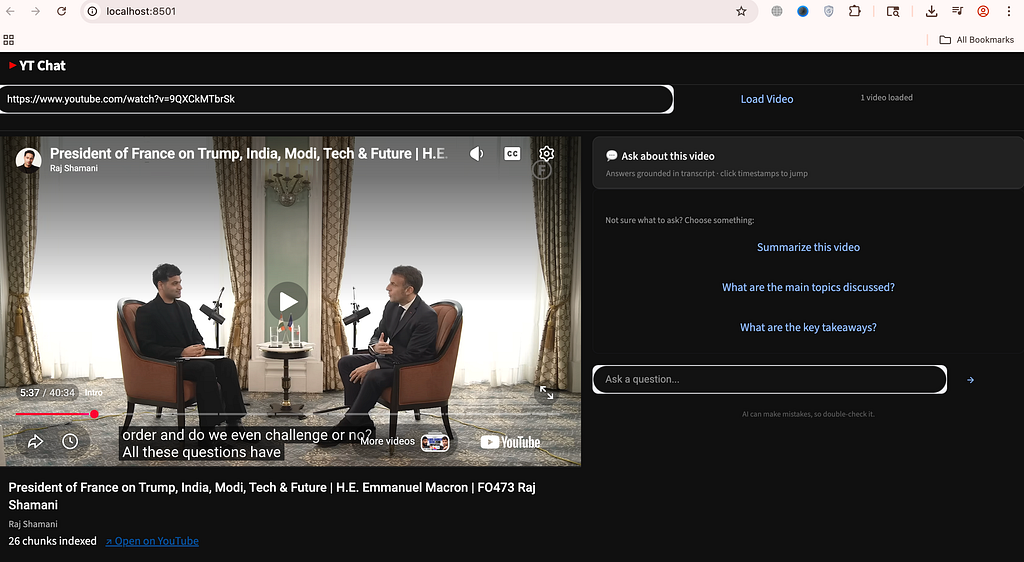
Let’s ask our first question. We will first ask in the global category.
What are the main topics discussed?
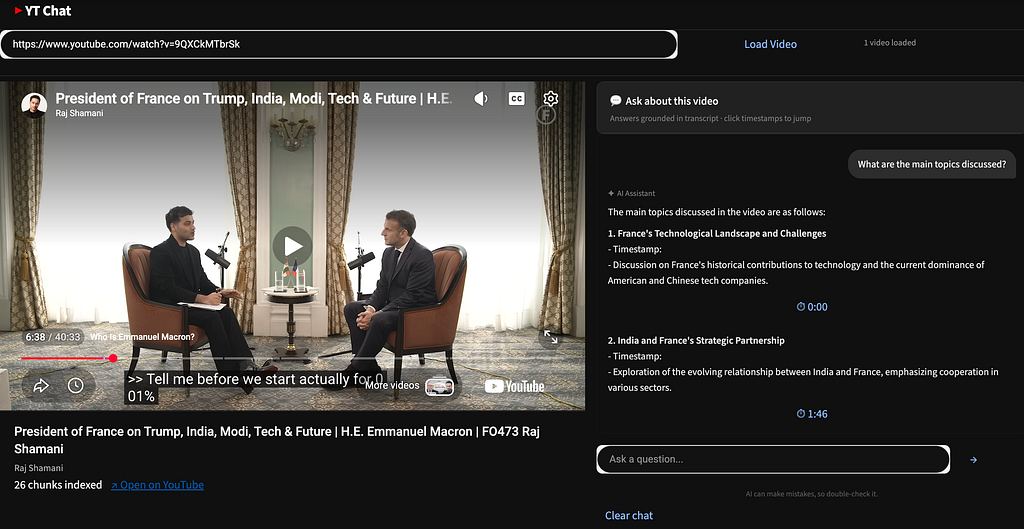
We see the topics segregated by timestamp in the answers.
Let’s ask our next question. It will route the system to the RAG system.
What is mentioned about the relation of America with France?
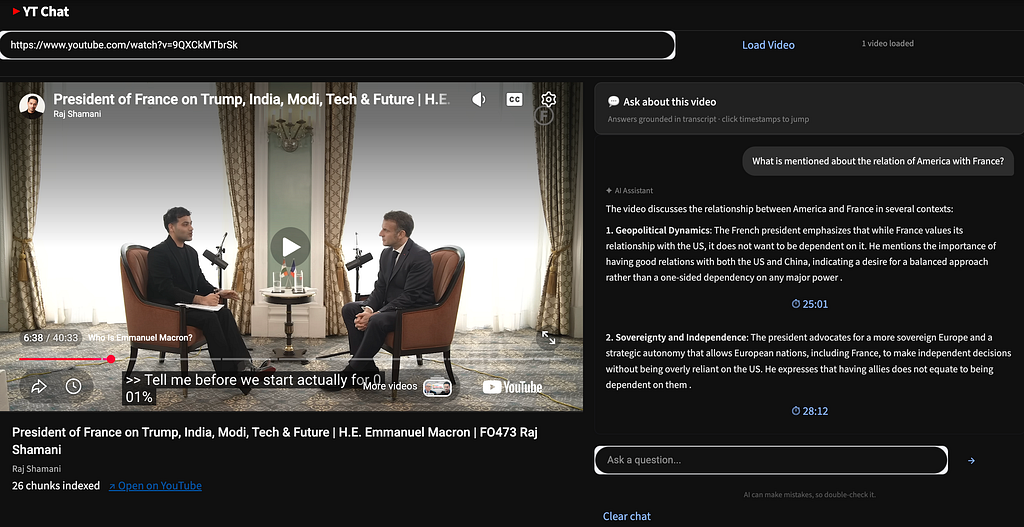
We see clear timestamp based answers.
There you go. We now have a complete end to end app where we can chat with it.
Next improvements
If you want to expand this project, the next logical improvements are:
- Add offline transcript caching
- Add multi -video support
- Comparison for two or more videos
- Multilingual Support
Conclusion
This project shows how combining transcripts, hybrid retrieval, and LLMs can transform videos into interactive, searchable knowledge systems. By grounding answers with timestamps and balancing semantic and keyword search, it delivers both accuracy and usability.
Ultimately, it highlights a powerful shift from passively watching content to actively querying and understanding it.
References
- BM25 Search
- Github Repo Alpha Iterations Agentic AI Usecases
- https://pypi.org/project/youtube-transcript-api/
- https://faiss.ai/index.html
Thanks for taking the time to read this article.
The journey can be challenging at first because the learning curve is steep, but the rewards make it worth the effort. If you enjoy learning and growing, feel free to follow along.
You can also connect with me on LinkedIn to stay updated and explore opportunities to collaborate.
And if your curiosity is still running like a loop without a break condition, check out my other articles.
- Build Agentic RAG using LangGraph
- Practical Guide to Using ChromaDB for RAG and Semantic Search
- Reading Images with GPT-4o: The Future of Visual Understanding with AI
- Agentic AI Project: Build Mini Perplexity AI Chatbot : Step by Step Guide [Code Included]
- Agentic AI: Build ReAct Agent using LangGraph
- Agentic AI Project: Build a multi-agent system with LangGraph and OpenAI API
- Building an AI Agent with Model Context Protocol (MCP): A Complete Guide
- TOON vs JSON: A Comprehensive Performance Comparison
- Building an Intelligent Resume Transformation Agent Powered by LangGraph and gpt-4o-mini
- Agentic AI Project: Build a Customer Service Chatbot for a Clinic
- Vectorless RAG: How I Built a RAG System Without Embeddings, Databases, or Vector Similarity
- Agentic AI Project: MLflow Observability for Generative AI — A Deep Dive with Text2SQL + RAG + WebSearch using LangGraph, Open AI
Stop Watching YouTube Videos. Build Agents to Start Chatting With Them. was originally published in Towards AI on Medium, where people are continuing the conversation by highlighting and responding to this story.