Computed and Grid-designed precise SVG Infographics for Agents
Quick start
Install the plugin marketplace in Claude Code, then install the svg-infographics plugin:
claude /plugin marketplace add stellarshenson/claude-code-plugins
claude /plugin install svg-infographics
The plugin auto-installs its Python library (stellars-claude-code-plugins) on first use. Then use the create command:
/svg-infographics:create 3 descriptive SVG infographics for the architecture \
document using an autogenerated blue/teal/pale-pink technical theme
The wrong abstraction
When you ask an LLM to “draw an SVG infographic”, you are asking it to be an SVG coder. It types <rect x="50" y="80" width="200" height="120"/>, guesses a y-offset for the text, hand-picks line endpoints. Every coordinate is a token prediction. Nothing snaps. No grid, no ruler, no alignment guide. The model is drawing blind.
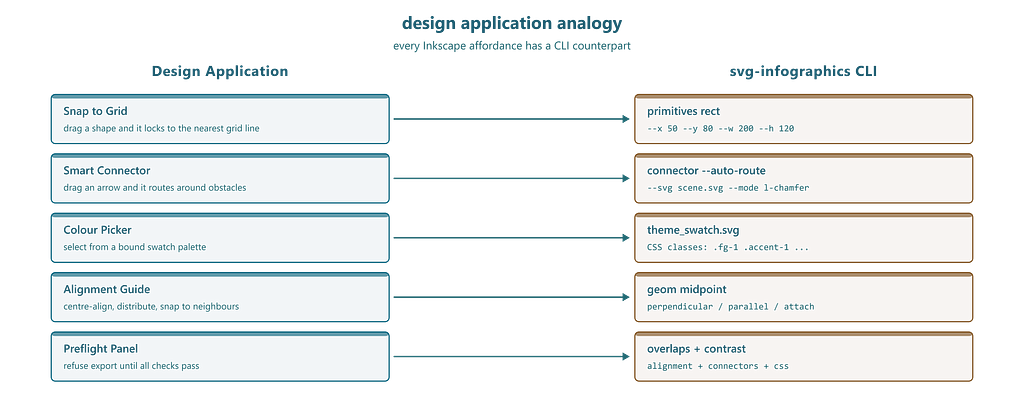
A human designer never works this way. Open any vector app and you get snapping, smart connectors, alignment guides, a colour swatch, and a layer panel. You place shapes — the application computes the geometry.
This plugin is that design tool — built for AI agents. Snap-to-grid placement, computed connectors that route around obstacles, theme-bound colours, and a validation panel that refuses broken output. The agent becomes the designer; the tool handles geometry, colours, and quality gates.
Across sixty-four production examples: SVG that ships on the first pass. No hand-editing. No 30-minute correction loops
What a designer gets that an LLM does not
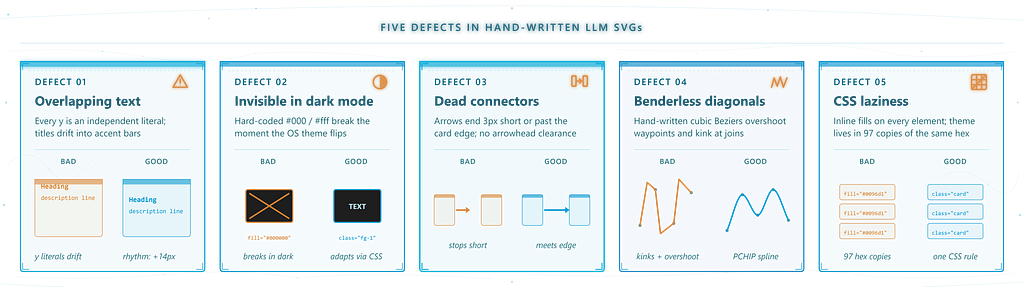
Five things that make design possible. Without them, you are coding pixels:
Snap-to-grid. An LLM typing x="147" has no grid. By the tenth card, rhythm is gone. Fix: 5-15 min per image.
Smart connectors. An LLM guesses endpoints, gets arrowheads wrong, leaves 3px gaps. Fix: 5–10 min per arrow.
Colour swatches. An LLM types fill="#000000" - invisible in dark mode. Fix: 10-20 min for CSS overrides.
Alignment guides. Three independent x values are never quite equal. Fix: 5-10 min per pass.
A quality gate. An LLM ships XML and hopes. You open it, see problems, iterate. Fix: 30–90 min per image.
For a six-image article, that is 3–6 hours of hand-editing with zero creative value
Twelve tools in a CLI
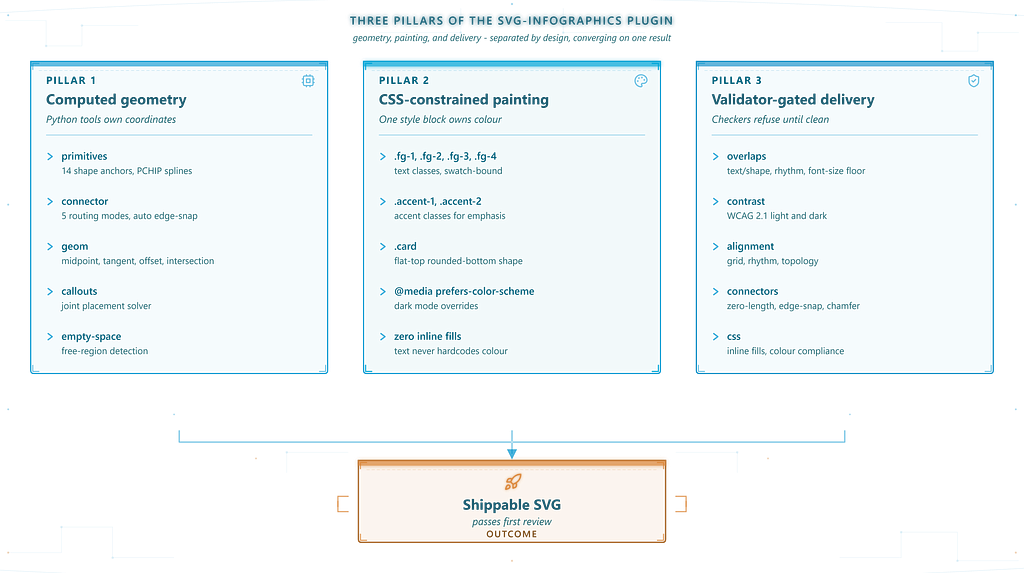
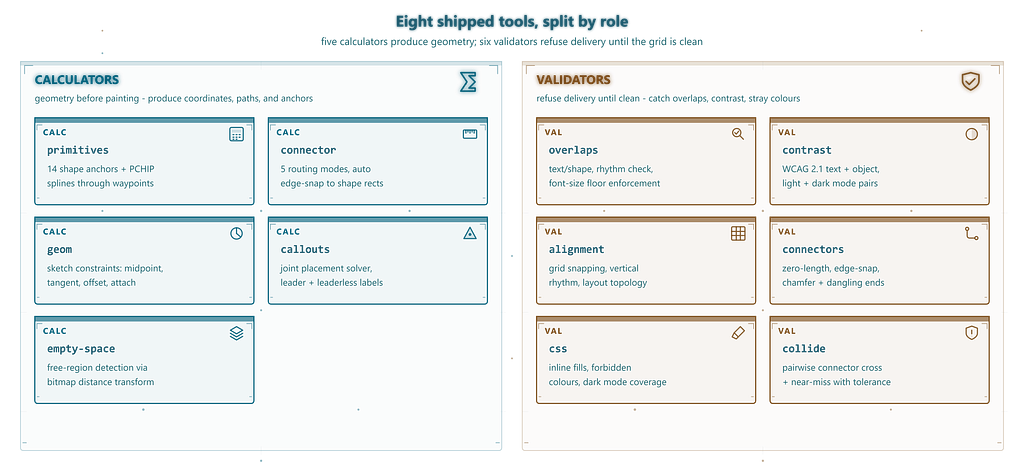
The svg-infographics CLI exposes twelve tools - six for design, six for validation.
Design tools:
Six calculators that replace the geometry you would normally eyeball. They turn placement, routing, and charting into computed operations — the agent says where and what, the tools handle exact coordinates and anchors.
- primitives (shape palette) - rect, circle, hexagon, star, arc, cube, cylinder, sphere, plus PCHIP spline curves. Returns exact anchors and paste-ready snippets
- connector (smart connector) - five routing modes with snap-to-edge, auto-routing around obstacles, arrowhead computation
- geom (alignment guides and constraints) - midpoint, perpendicular, tangent, intersection, parallel, polar, attachment points, containment
- callouts (auto-placement) - joint label positioning via solver with overlap avoidance
- empty-space (free-region detection) - "where can I put this without overlapping anything?"
- charts (chart panel) - bar, line, area, radar, pie via pygal with theme-matched palettes
Quality panel:
Six validators that act as the quality gate before delivery. Each checker targets a specific defect class — overlaps, contrast, alignment, connector integrity, CSS hygiene, and collision — so nothing ships with a known flaw.
- overlaps - text/shape overlap, spacing rhythm, font-size floors, callout collisions
- contrast - WCAG 2.1 for text AND objects in both light and dark mode
- alignment - grid snapping, vertical rhythm, layout topology
- connectors - dead ends, missing chamfers, edge-snap violations
- css - inline fills, missing dark-mode overrides, forbidden colours
- collide - pairwise connector intersection with near-miss detection
The agent calls primitives rect --x 50 --y 80 --w 200 --h 120 and gets the rect plus named anchors. Eighteen shape types - rectangles to isometric cubes to PCHIP splines. Each returns exact anchor coordinates so connectors snap without guessing.
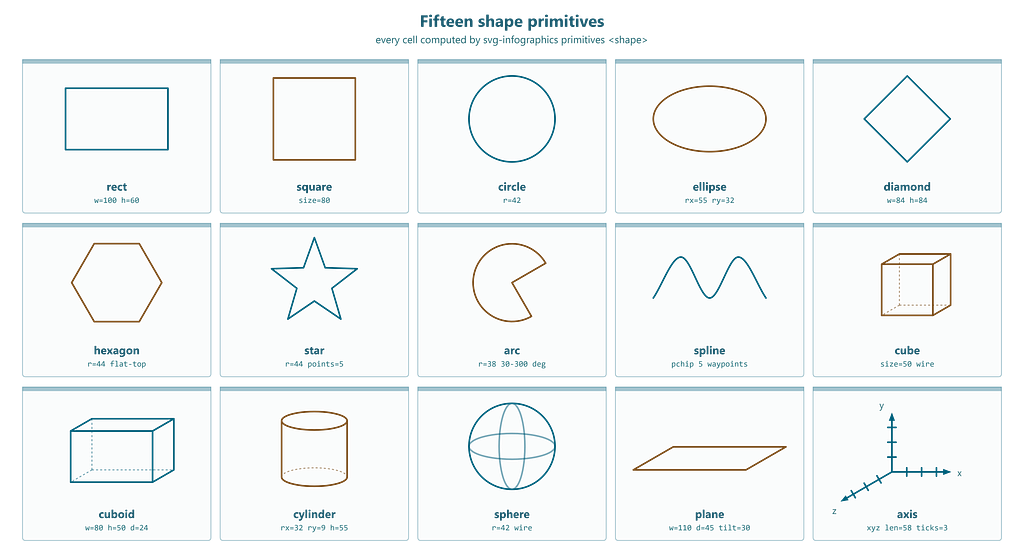
Every feature a designer expects from a vector application maps to a CLI call. The agent works the same way a human would — palette, connectors, alignment, validation — just through tool invocations instead of mouse clicks.
The twelve tools split into two groups: six calculators that compute geometry, and six validators that reject broken output before delivery.
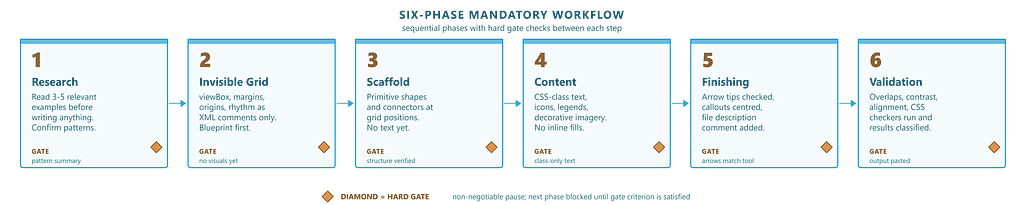
Six phases, no shortcuts
Phase 1 — Research. Study examples
Phase 2 — Grid. Define viewbox, margins, columns as comments
Phase 3 — Scaffold. Structural elements at computed positions.
Phase 4 — Content. Text and icons via CSS classes
Phase 5 — Finishing. Connectors and callout labels
Phase 6 — Validation. All six checkers must pass
The key is Phase 2. The grid exists before anything is drawn. Every position is calculated from it
Connectors that route around obstacles
Five routing modes:
- straight — single line, auto-snaps to edges
- l — axis-aligned right-angle bend
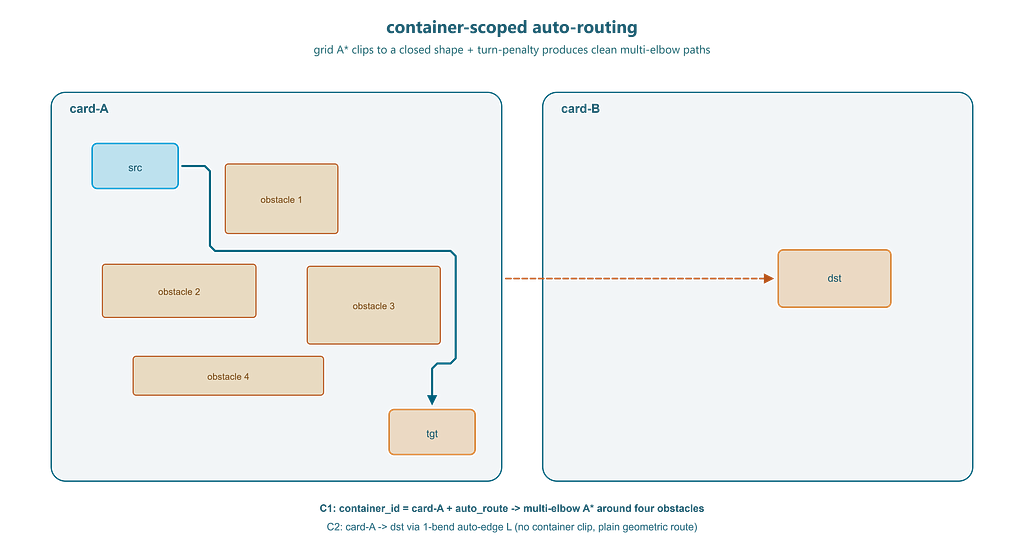
- l-chamfer — softened corners with auto-routing via A*
- spline — smooth PCHIP curves (no overshoot)
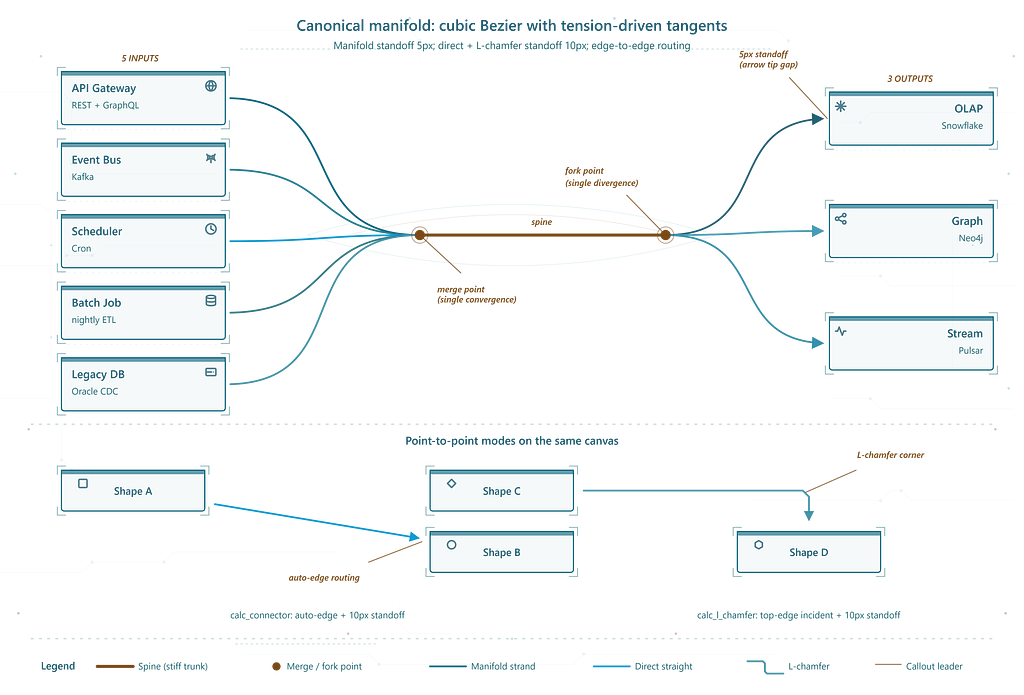
- manifold — Sankey-style bundle with merge/fork topology
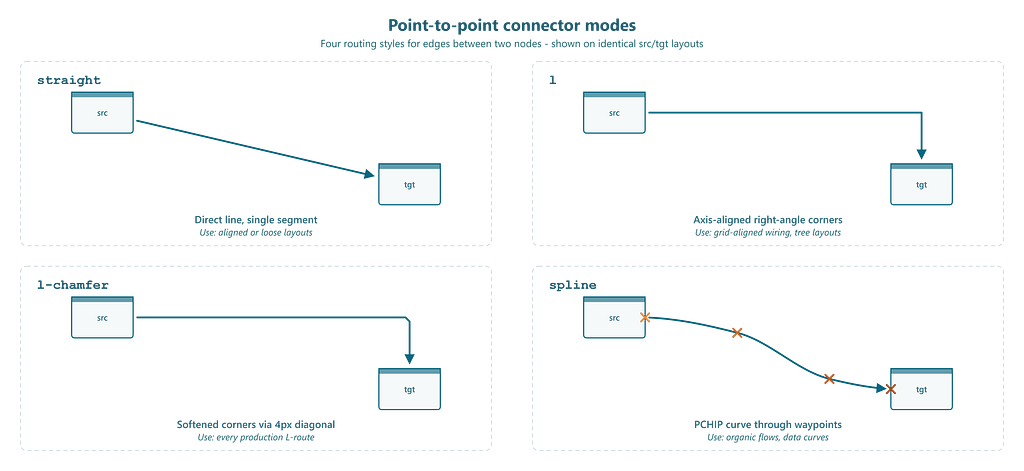
Pass --auto-route --svg scene.svg and the tool rasterises every shape as an obstacle, runs A* with turn penalty, and returns a chamfered path with clean stems. Container-scoped routing (--container-id) clips inside a shape. Straight-line collapse kicks in when endpoints nearly align - the tool handles it automatically.
svg-infographics connector --mode l-chamfer \
  --src-rect "90,140,84,44" --start-dir E \
  --tgt-rect "380,400,84,44" --end-dir S \
  --auto-route --svg scene.svg --container-id card-A \
  --chamfer 5 --standoff 4 --arrow end
Callouts that do not overlap
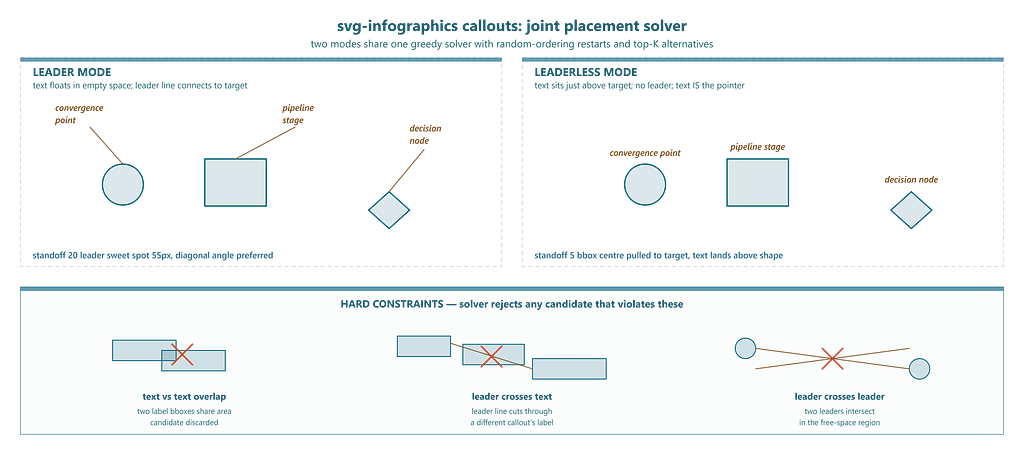
The callout solver places ALL labels simultaneously via greedy search with five random restarts. Hard constraints on text-text overlap, leader crossing, and leader-text crossing.
Leader mode — line connecting text to target, scored on length and angle. Leaderless mode — text placed directly near target, scored on centre distance.
Manifold: seven connectors in one call
Four sources into a spine, out to three sinks. The manifold mode takes the entire topology at once:
svg-infographics connector --mode manifold \
  --starts "[(50,100),(50,200),(50,300),(50,400)]" \
  --ends   "[(800,150),(800,300),(800,450)]" \
  --spine-start "(400,250)" --spine-end "(600,250)" \
  --shape spline --tension "(0.4, 0.7)" --arrow end
One call, seven strands, zero manual coordinates.
Charts with palette enforcement
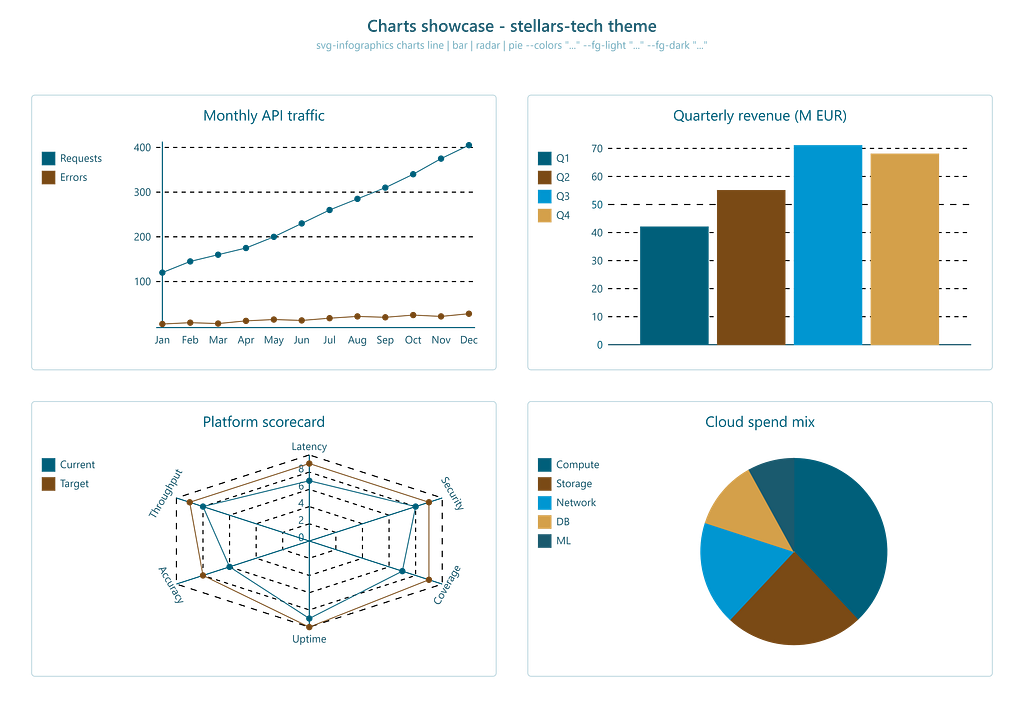
The charts tool wraps pygal with automatic WCAG contrast auditing on every series. Pass --colors and --colors-dark from the swatch; the tool injects dark-mode CSS and flags anything below 7:1 contrast.
Fail-first validation
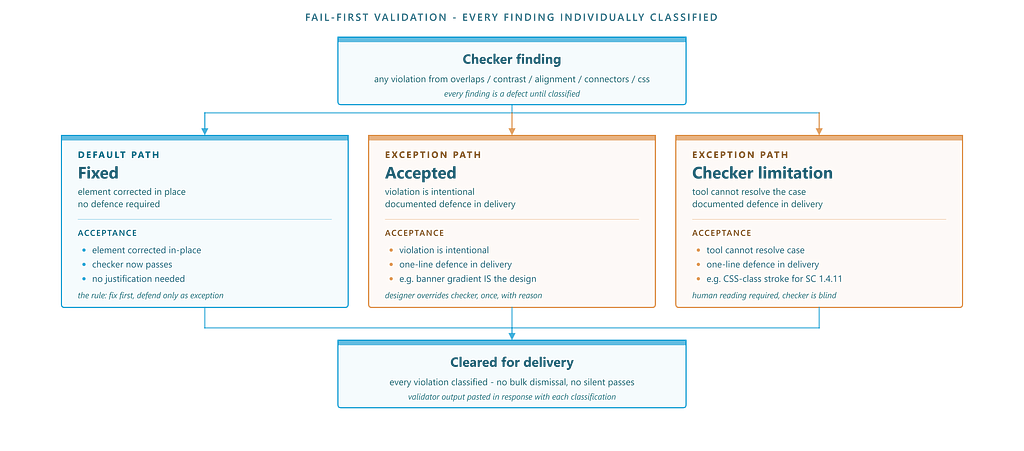
Every finding is a real defect until individually classified as Fixed, Accepted, or Checker limitation. No bulk dismissals. LLMs dismiss every warning given the choice — the fail-first rule inverts the default.
Theme swatches
Before any deliverable, a theme_swatch.svg must exist and be approved. All colours labelled with CSS class names, rendered in both modes. If the palette is wrong, it is wrong before ten SVGs are built.
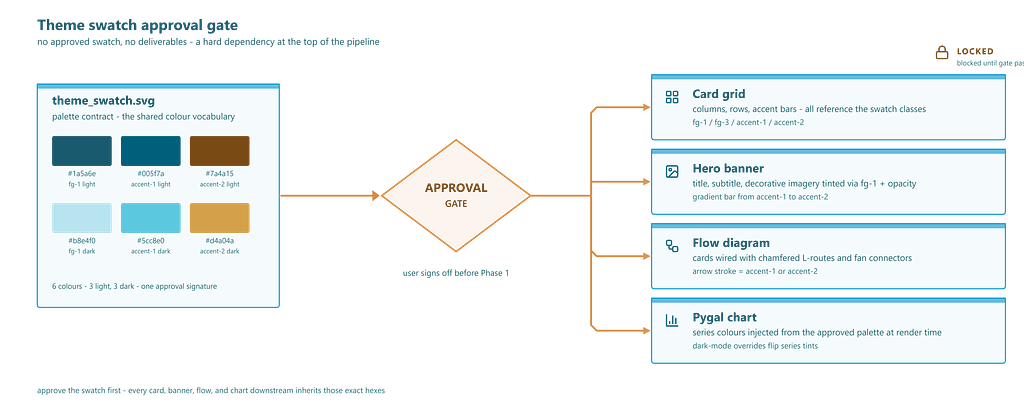
Your colours, enforced everywhere
Without constraints, LLMs reach for #000000 and #333333 - generic output that looks like AI output. The plugin enforces your brand. Every element references CSS classes from the approved swatch. No inline fills. When your brand updates, change the swatch and every diagram inherits the new palette through CSS.
SVGs that remember their intent
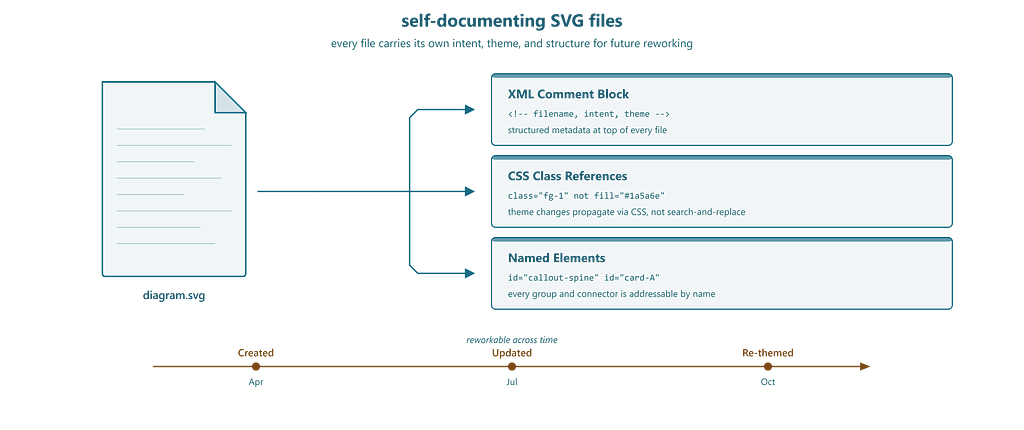
Every file starts with a structured XML comment: filename, what it shows, design intent, theme. Every element references a named CSS class. Every group has a semantic id.
The graphics are reworkable long after creation. Open the SVG months later, read the comment block, update the content without reverse-engineering the layout. The file is its own specification.
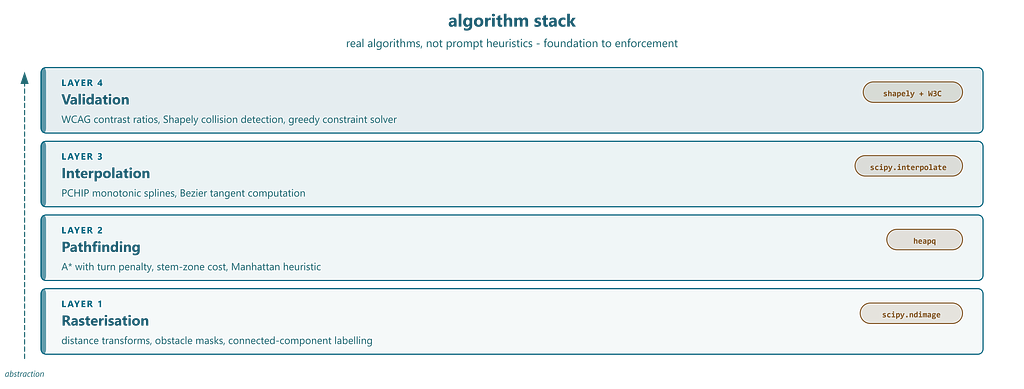
Algorithms, not heuristics
No prompt tricks. Every capability is a real algorithm: A pathfinding* for connector routing, Euclidean distance transforms for free-region detection, PCHIP interpolation for overshoot-free splines, WCAG 2.1 contrast from W3C luminance formula, greedy constraint satisfaction for callout placement, Shapely geometry for collision detection.
The same algorithms that power design application snapping engines and EDA routers — exposed as CLI calls.
Beyond card grids
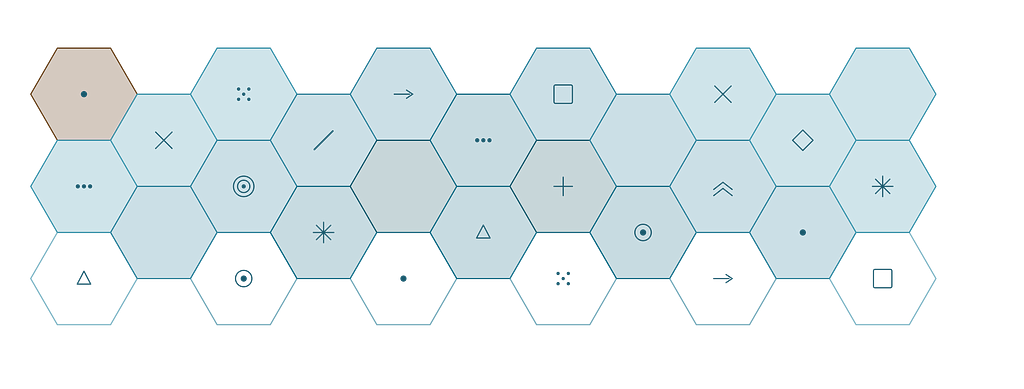
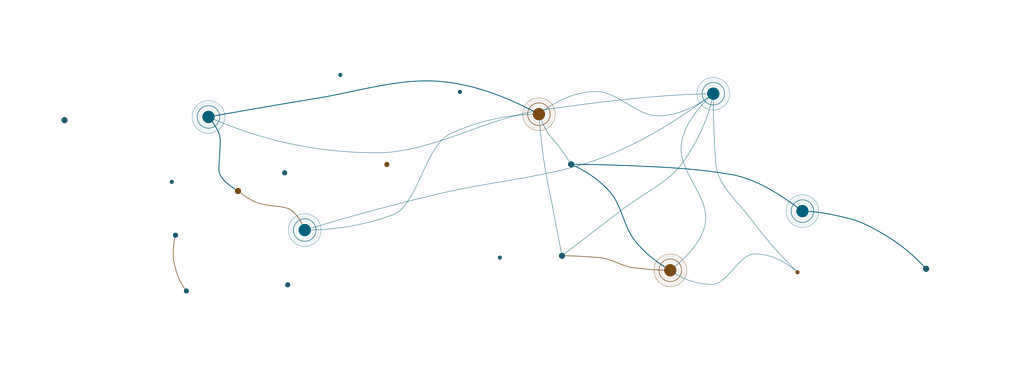
The same pipeline produces organic layouts — hexagonal tessellations via primitives hexagon with polar spacing, constellation maps with spline connectors between radial clusters. Every coordinate traces back to a tool call.
Tools, not tokens
When you need an LLM to produce structured visual output, do not ask it to code the format. Give it a design application and let it be the designer. The application handles coordinates, constraints, and quality. The model handles intent.
/svg-infographics:create - and let the agent use the tool.
How it was developed
The plugin was not designed from a feature wishlist. It was developed with scientific discipline, targeting the most frequent and painful AI failure modes.
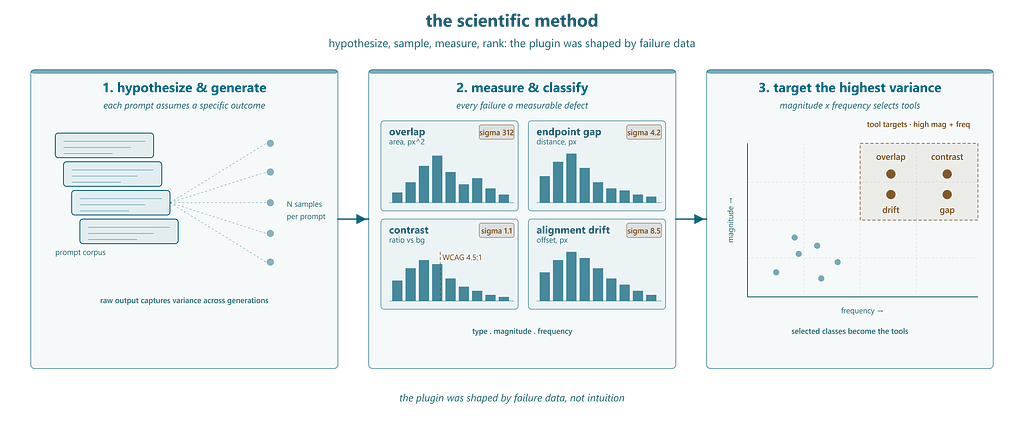
A large corpus of image prompts was written, each assuming a specific outcome. The raw LLM output was collected across multiple generations to capture variance. Every failure was catalogued as a measurable defect — overlap area in pixels, endpoint gap, contrast ratio, alignment drift — classified by type, measured by magnitude, tracked across generations to quantify how consistently each failure appeared.
The highest-variance, highest-magnitude failure classes became tool targets. Endpoint gaps led to the routing engine. Overlap led to the callout solver. Contrast failures led to the WCAG checker. Grid drift led to computed-position primitives. Each tool eliminates one measured defect class.
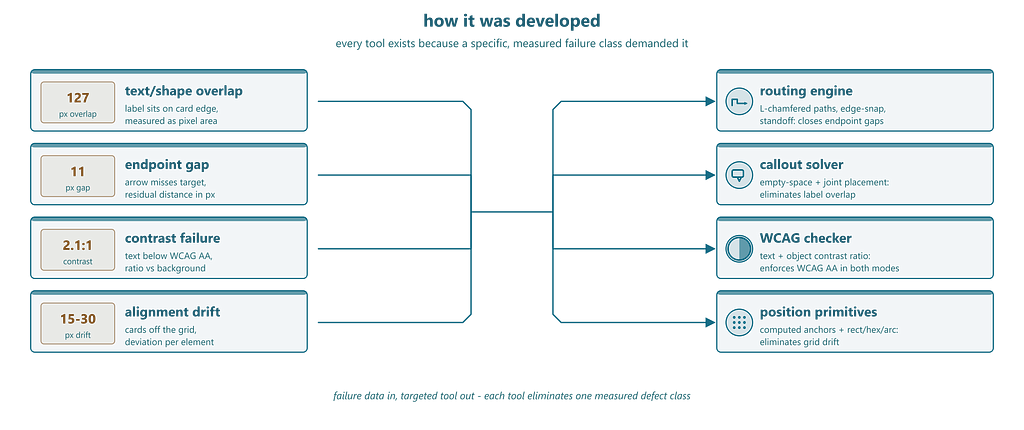
The result: a plugin shaped by failure data, not intuition.
Every infographic in this article was produced by the plugin itself — the agent as designer, the tool as application
Konrad Jelen is a data scientist and CTO specializing in AI solutions for manufacturing, finance and market research
Stop Fixing Your AI SVGs was originally published in Towards AI on Medium, where people are continuing the conversation by highlighting and responding to this story.