The first time I heard two engineers argue about RAG and MCP, I genuinely thought they were debating Pokémon evolutions. One of them kept insisting, “They’re basically the same thing,” while the other nodded confidently like he’d just solved distributed systems. Meanwhile, the production agent they built was sitting in the corner like a confusion things it could quote every policy document in the company but couldn’t check whether a pipeline failed five minutes ago. Classic.
That’s when it hit me:
Most developers treat RAG and MCP like interchangeable buzzwords, when in reality they’re solving completely different problems.
RAG is your agent’s memory: the part that remembers everything your organization has ever written. MCP is its hands: the part that actually does things in the real world. Mix them up, and you end up with an AI that’s book‑smart but completely useless in a live system. It’s like hiring someone who can recite your entire wiki from memory but freezes the moment you ask them to open a browser tab.
This article is here to fix that.
By the time you’re done, you’ll have the mental model, the theory, and a working code example not just familiarity, but clarity you can actually use in production.
The One-Line Distinction
RAG = READ  →  Pull knowledge from documents your LLM was never trained on
MCP = DO    →  Execute actions against live systems and real-time data
Memorize that. Everything else flows from it.
Part 1: RAG — Giving Your LLM a Long-Term Memory
What Is RAG?
Retrieval-Augmented Generation (RAG) is a pattern where you augment an LLM’s prompt with relevant content retrieved at query time from a knowledge base you control.
LLMs are frozen at their training cutoff. They know nothing about:
- Your internal documentation
- Last quarter’s architecture decisions
- Your team’s runbooks or SLAs
- Anything written after their cutoff date
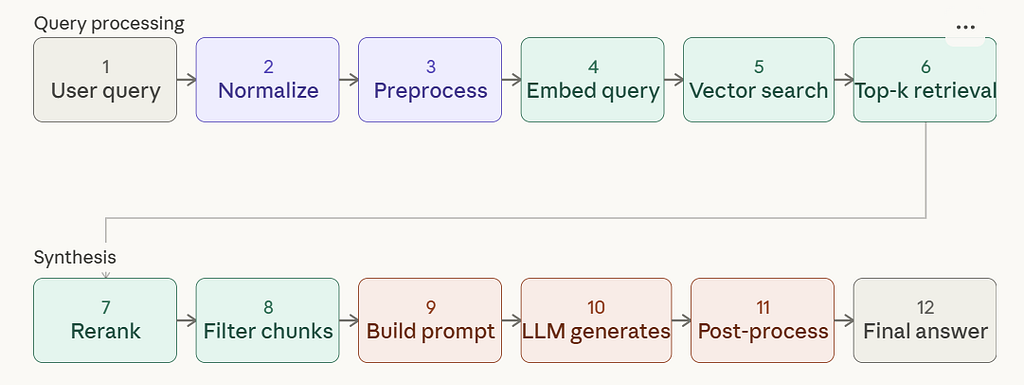
RAG fixes this. You pre‑index your documents into a vector store, and when a user asks a question, the system fetches the most semantically relevant chunks and injects them into the LLM’s context window. This gives the model “just‑in‑time knowledge” without retraining.
In practice, this means if someone asks, “What’s our SLA for pipeline retries?”, the model doesn’t guess, means, it retrieves the exact policy text and answers with grounded facts. RAG is the memory layer of your AI agent. It tells the model what your organization knows, not what it should do.
The RAG Flow
When to use RAG?
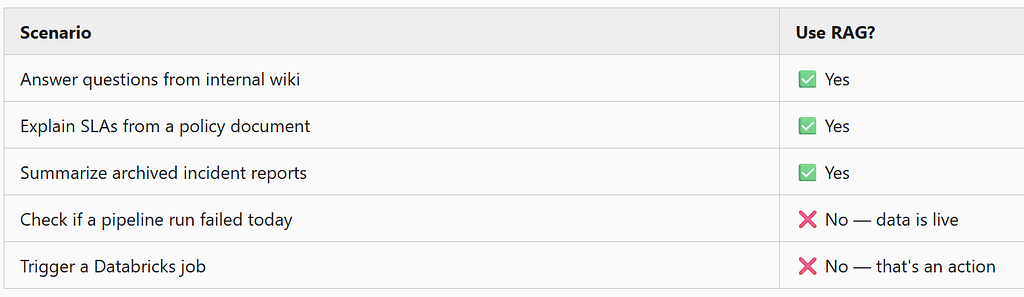
RAG is perfect when your knowledge is static or semi-static — documentation, runbooks, contracts, whitepapers, onboarding guides.
Part 2: MCP — Giving Your LLM Hands
What Is MCP?
Model Context Protocol (MCP) is an open standard (introduced by Anthropic) that defines a structured way for LLMs to invoke external tools, APIs, and live systems.
Think of it as function calling with a formal specification. Instead of your LLM hallucinating an answer about live data, it says:
“I need to check something. Let me call the right tool.”
MCP tools can:
- Query a live database
- Trigger a Databricks workflow
- Read from a Kafka topic
- Call a REST API
- Write a record to a system of record
In other words, MCP turns your LLM from a talker into a doer.
It gives the model controlled access to real systems with typed schemas, guardrails, and predictable behavior.
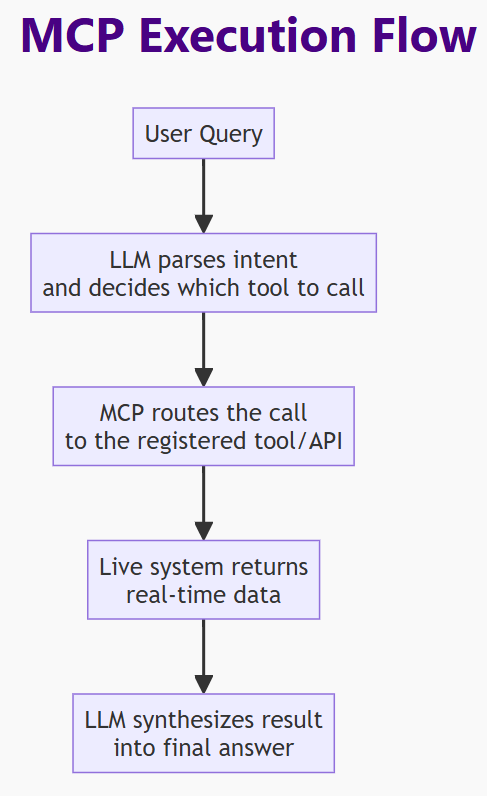
For example, if a user asks, “Did last night’s pipeline run fail?”, the model doesn’t guess so it calls your get_pipeline_status tool, fetches the live result, and responds with real data.
MCP is the action layer of your AI agent. It tells the model what the system is doing right now, not what the documentation says.
The MCP Flow
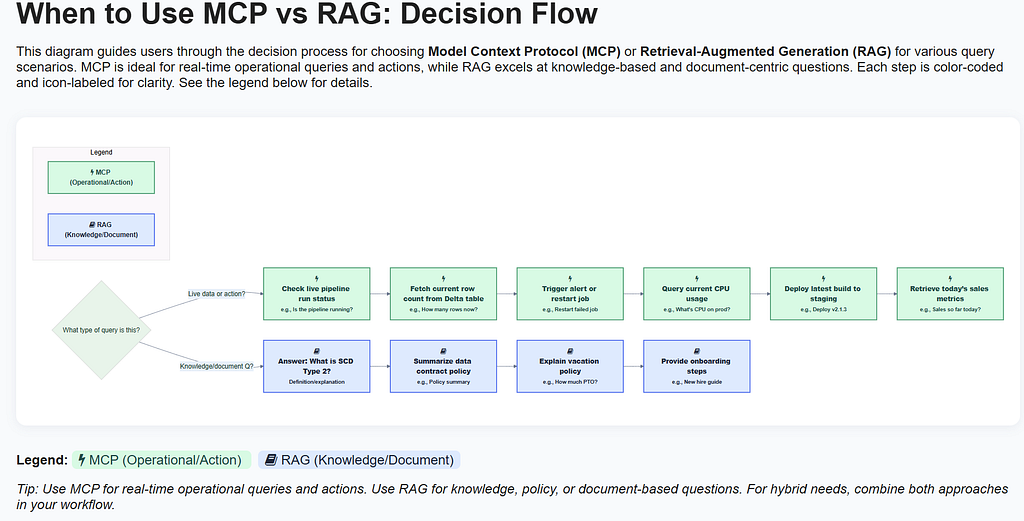
Here’s the expanded “When to Use MCP” table rendered as a visual decision diagram:
Part 3: The Real Power — Using Both Together
Real user questions aren’t clean. They mix knowledge and action in a single sentence:
“What’s our SLA for pipeline failures, and did the sales ingestion job breach it last night?”
That single question has two parts:
- “What’s our SLA?” → Retrieve from a static runbook → RAG
- “Did it breach last night?” → Query live job monitoring API → MCP
A pure RAG system can’t answer part two. It has no access to live systems. A pure MCP system doesn’t know your SLA unless you hard-code it. In other words, A pure MCP system can’t answer part one, unless you hard‑code every policy into a tool, it has no long‑term memory. Together, they give your agent both memory and agency.
→ RAG tells the model what your organization knows.
→ MCP tells the model what your systems are doing right now.
→ And modern AI agents need both to behave intelligently in real workflows
User asks one question
         │
    ┌────┴────┐
    ▼         ▼
  RAG         MCP
Search docs  Call job
Pull SLA     monitoring API
    └────┬────┘
         ▼
   One unified answer
Part 4: Code — Build It Yourself
Project: Data Pipeline Support Agent
A modular agent that can answer questions about pipeline policies (RAG) and check live job run status (MCP-style tool calls). No Databricks or Airflow needed — all live data is simulated.
Project Structure
rag_vs_mcp_demo/
├── agent/
│   ├── llm_router.py        # Keyword-based RAG/MCP/hybrid classifier
│   ├── openai_agent.py      # Main agent: RAG + OpenAI tool calling
│   ├── openai_client.py     # OpenAI client + tool schema
│   └── orchestrator.py      # Orchestrator (no LLM required)
├── rag/
│   ├── embedder.py          # HuggingFace embeddings wrapper
│   ├── retriever.py         # Chunk → embed → FAISS → retrieve
│   └── vector_store.py      # FAISS wrapper
├── tools/
│   ├── fake_api.py          # Simulated latency + failures
│   ├── pipeline_status.py   # Fake live pipeline status data
│   ├── router.py            # Tool dispatcher
│   └── row_count.py         # Fake row count tool
├── data/
│   ├── runbook_sla.md
│   ├── dataquality_standards.md
│   └── oncall_responsibilities.md
├── examples/
│   └── demo_query.py
├── .env.example
└── requirements.txt
Setup
# 1. Create and activate a virtual environment
python -m venv venv
source venv/bin/activate        # macOS/Linux
# venv\Scripts\activate         # Windows

# 2. Install dependencies
pip install -r requirements.txt

# 3. Set your OpenAI API key
cp .env.example .env
# Open .env and paste your key: OPENAI_API_KEY=sk-...
First run downloads the all-MiniLM-L6-v2 embedding model (~80MB). Cached after that.
The requirements.txt includes:
requirements.txt:
openai>=1.30.0
anthropic>=0.25.0
langchain>=0.2.0
langchain-community>=0.2.0
faiss-cpu>=1.7.4
sentence-transformers>=2.7.0
python-dotenv>=1.0.0
Step 1 — Store Your Policy Docs as Separate Files
Rather than hardcoding policy text into your script, the repo stores knowledge in dedicated .md files inside data/. This makes it easy to add new docs without touching code — just drop a new .md file into the folder and it's auto-loaded at startup.
data/
├── runbook_sla.md               # Pipeline SLA thresholds and retry caps
├── dataquality_standards.md     # Null rate, duplicate, schema drift rules
└── oncall_responsibilities.md   # Acknowledgment windows and RCA requirements
Example — data/runbook_sla.md:
# Pipeline SLA Policy

All critical ingestion pipelines must complete within 4 hours.

If a pipeline exceeds 4 hours, an incident must be raised automatically.

Failure rate threshold: 2% of total records.

Retries capped at 3 attempts before escalation.
Step 2 — Build the RAG Pipeline (Modular)
The RAG logic is split across three files: embedder.py wraps the HuggingFace model, vector_store.py wraps FAISS, and retriever.py ties them together.
rag/retriever.py — the end-to-end RAG pipeline:
from langchain.text_splitter import RecursiveCharacterTextSplitter
from .embedder import Embedder
from .vector_store import VectorStore

class RAGRetriever:
    """
    End-to-end RAG pipeline:
    - split documents
    - embed chunks
    - store in FAISS
    - retrieve top-k chunks
    """

    def __init__(self, chunk_size=300, chunk_overlap=30):
        self.splitter = RecursiveCharacterTextSplitter(
            chunk_size=chunk_size,
            chunk_overlap=chunk_overlap
        )
        self.embedder = Embedder()
        self.vectorstore = VectorStore(self.embedder.model)

    def index(self, raw_text: str):
        """Split + embed + store."""
        chunks = self.splitter.create_documents([raw_text])
        self.vectorstore.build(chunks)

    def retrieve(self, query: str) -> str:
        """Return top-k chunks as a single string."""
        docs = self.vectorstore.search(query, k=3)
        return "\n\n".join([doc.page_content for doc in docs])
Step 3 — Define the MCP Tool (Live Job Monitor)
tools/pipeline_status.py — simulated live pipeline data. In production, replace LIVE_JOB_RUNS with a real Databricks or Airflow API call.
LIVE_JOB_RUNS = {
    "sales_ingestion": {
        "run_id": "run_20240407_001",
        "status": "FAILED",
        "duration_minutes": 312,
        "failure_reason": "Timeout after 5 hours 12 minutes",
        "records_processed": 1_840_000,
        "failure_rate_pct": 0.8,
        "retries": 3,
        "last_run": "2024-04-07 02:15:00"
    },
    "inventory_sync": {
        "run_id": "run_20240407_002",
        "status": "SUCCESS",
        "duration_minutes": 87,
        "failure_rate_pct": 0.1,
        "records_processed": 540_000,
        "retries": 0,
        "last_run": "2024-04-07 03:42:00"
    },
    "customer_360": {
        "run_id": "run_20240407_003",
        "status": "RUNNING",
        "duration_minutes": 220,
        "failure_rate_pct": None,
        "records_processed": 920_000,
        "retries": 1,
        "last_run": "2024-04-07 01:00:00"
    }
}

def get_pipeline_run_status(pipeline_name: str) -> dict:
    """
    Fake MCP tool: returns live pipeline status.
    In production, replace with Databricks / Airflow / REST API.
    """
    key = pipeline_name.lower().replace(" ", "_")
    return LIVE_JOB_RUNS.get(key, {"error": f"Pipeline not found: {pipeline_name}"})
Step 4 — The LLM Router
agent/llm_router.py — a lightweight keyword classifier that decides whether a query needs RAG, MCP, or both. This avoids an extra LLM call just to route the intent.
class LLMRouter:
    """
    Decides whether a query needs:
    - RAG (knowledge retrieval)
    - MCP (live tool call)
    - HYBRID (both)
    """

    def classify(self, query: str) -> str:
        q = query.lower()

        mcp_keywords = [
            "status", "failed", "running", "breach",
            "row count", "records", "live", "today",
            "last night", "trigger", "restart", "job"
        ]

        rag_keywords = [
            "what is", "explain", "policy", "runbook",
            "sla", "documentation", "standard", "definition"
        ]

        needs_mcp = any(k in q for k in mcp_keywords)
        needs_rag = any(k in q for k in rag_keywords)

        if needs_mcp and needs_rag:
            return "hybrid"
        if needs_mcp:
            return "mcp"
        if needs_rag:
            return "rag"

        return "unknown"
Step 5 — Build the Agent (RAG + MCP Together)
agent/openai_agent.py — the main agent. It auto-loads all .md files from data/ at startup, always runs RAG first to pull policy context, then lets the LLM decide whether to call a live tool.
import json
import os
import glob
from agent.openai_client import client, mcp_tools
from tools.pipeline_status import get_pipeline_run_status
from rag import RAGRetriever

# ── Initialize RAG once at module load ──────────────────────────
def _load_data_docs() -> str:
    data_dir = os.path.join(os.path.dirname(__file__), "..", "data")
    md_files = glob.glob(os.path.join(data_dir, "*.md"))
    if not md_files:
        raise FileNotFoundError(f"No .md files found in {data_dir}")
    combined = []
    for path in sorted(md_files):
        with open(path, "r") as f:
            combined.append(f.read())
    print(f"[RAG] Loaded {len(md_files)} doc(s) from data/")
    return "\n\n".join(combined)

_rag = RAGRetriever()
_rag.index(_load_data_docs())

# ── Agent ────────────────────────────────────────────────────────
def pipeline_support_agent(user_query: str):
    print(f"\n{'='*60}")
    print(f"USER QUERY: {user_query}")
    print(f"{'='*60}\n")

    # Step 1: RAG — retrieve relevant policy context
    policy_context = _rag.retrieve(user_query)
    print(f"[RAG] Retrieved policy context:\n{policy_context}\n")
    print("-" * 40)

    system_prompt = """
You are a data engineering support agent with two capabilities:
1. You know internal pipeline policies (context provided below).
2. You can call live monitoring tools to check real pipeline run data.

Rules:
- If the question requires policy/SLA knowledge: use the provided context.
- If it requires live pipeline status: call the get_pipeline_run_status tool.
- If it requires BOTH: do both, then synthesize a single clear answer.
- Always be specific. If an SLA was breached, state it clearly with numbers.
"""

    messages = [
        {"role": "system", "content": system_prompt},
        {
            "role": "user",
            "content": (
                f"Policy & Runbook Context (from internal docs):\n"
                f"---\n{policy_context}\n---\n\n"
                f"User Question: {user_query}\n\n"
                f"Answer this question. Use the tool if you need live pipeline data."
            )
        }
    ]

    # Step 2: First LLM call — may trigger a tool call
    response = client.chat.completions.create(
        model="gpt-4.1",
        messages=messages,
        tools=mcp_tools,
        tool_choice="auto"
    )

    message = response.choices[0].message

    # Step 3: Handle tool call if triggered
    if message.tool_calls:
        tool_call = message.tool_calls[0]
        args = json.loads(tool_call.function.arguments)
        pipeline_name = args["pipeline_name"]

        print(f"[MCP] Tool called: {tool_call.function.name}")
        print(f"[MCP] Pipeline: {pipeline_name}")

        tool_result = get_pipeline_run_status(pipeline_name)
        print(f"[MCP] Live result: {json.dumps(tool_result, indent=2)}\n")
        print("-" * 40)

        # Feed tool result back for final synthesis
        messages.append(message)
        messages.append({
            "role": "tool",
            "tool_call_id": tool_call.id,
            "content": json.dumps(tool_result)
        })

        final = client.chat.completions.create(
            model="gpt-4.1",
            messages=messages
        )

        print(f"[AGENT ANSWER]\n{final.choices[0].message.content}")
        return

    # Pure RAG answer — no tool needed
    print(f"[AGENT ANSWER]\n{message.content}")
Step 6 — Run It
Always run from the project root, not from inside examples/:
cd rag_vs_mcp_demo
python -m examples.demo_query
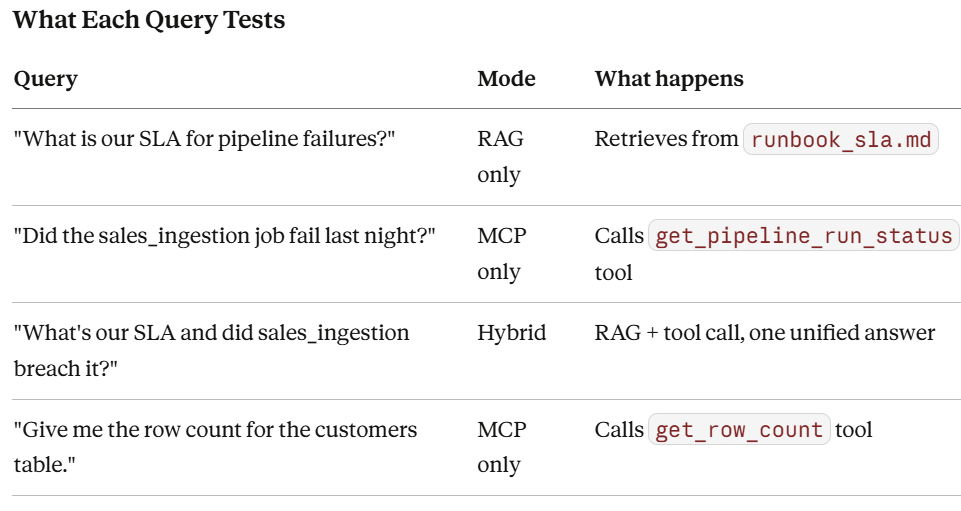
examples/demo_query.py:
from agent.openai_agent import pipeline_support_agent

# Query 1: Pure RAG — policy question only
pipeline_support_agent("What is our SLA for pipeline failures?")

# Query 2: Pure MCP — live data only
pipeline_support_agent("Did the sales_ingestion job fail last night?")

# Query 3: Hybrid — RAG + MCP combined
pipeline_support_agent("What's our SLA and did sales_ingestion breach it?")

# Query 4: MCP row count tool
pipeline_support_agent("Give me the row count for the customers table.")
Sample Output (Hybrid Query):
============================================================
USER QUERY: What's our SLA and did sales_ingestion breach it?
============================================================

[RAG] Loaded 3 doc(s) from data/
[RAG] Retrieved policy context:
All critical ingestion pipelines must complete within 4 hours.
If a pipeline exceeds 4 hours, an incident must be raised automatically.
Pipeline retries are capped at 3 attempts before escalation.

[MCP] Tool called: get_pipeline_run_status
[MCP] Pipeline: sales_ingestion
[MCP] Live result: {
  "status": "FAILED",
  "duration_minutes": 312,
  "failure_reason": "Timeout after 5 hours 12 minutes",
  "retries": 3
}

[AGENT ANSWER]
Yes — the sales_ingestion pipeline breached your SLA last night.

SLA BREACH:
- Policy requires completion within 4 hours (240 minutes)
- Last night's run took 312 minutes (5 hours 12 minutes)
- That's a 72-minute breach — significant enough to trigger an automatic incident

RETRY ESCALATION:
- The pipeline hit the maximum retry cap (3 attempts)
- Per your policy, this triggers escalation — it should not retry automatically again

REQUIRED ACTIONS (per your runbook):
1. Raise an incident ticket immediately if not already done
2. On-call engineer must acknowledge within 15 minutes
3. Root cause analysis must be submitted within 24 hours of resolution
Part 5: Extending the Repo
To add real pipelines, replace LIVE_JOB_RUNS in tools/pipeline_status.py with a live API call to Databricks, Airflow, or your own monitoring system. To add more knowledge docs, drop any .md file into data/ — they are auto-loaded at startup without any code changes.
Part 6: The Mental Model — Commit This to Memory
┌──────────────────────────────────────────────────────┐
│                                                      │
│    Question type        →    Tool to use             │
│                                                      │
│    "What does our       →    RAG                     │
│     policy say about X?"     (search docs)           │
│                                                      │
│    "What happened to    →    MCP                     │
│     pipeline X today?"       (call live API)         │
│                                                      │
│    "Did X breach our    →    RAG + MCP               │
│     policy last night?"      (both, one answer)      │
│                                                      │
└──────────────────────────────────────────────────────┘
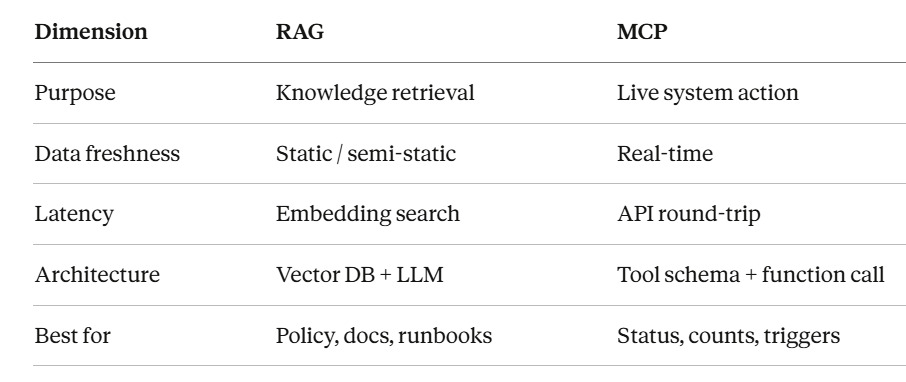
Quick Differences:
Closing Thought
RAG makes your agent informed. MCP makes your agent capable. Neither alone is enough for production-grade AI systems.
The agents that will matter in enterprise in data engineering, in operations, in customer support, are the ones that can recall institutional knowledge and act on live systems in the same breath.
That’s the architecture worth building toward.
If this helped clarify your thinking, follow me for more deep-dives on LangGraph, Databricks, and production AI systems for data engineers and AI Engineer.
All code in this article is available to run locally. Please clone from this repo: https://github.com/Sudip-Pandit/rag_Vs_mcp_diff_demo and run as per the instruction given in this article.
If this helped sharpen your thinking, you can follow my work on GitHub — https://github.com/Sudip-Pandit — and on Medium, where I’ll be publishing more articles and research notes on LangGraph, agentic systems, and production‑grade AI for data engineers.
RAG vs MCP: The Architectural Difference Every AI Developer Must Understand was originally published in Towards AI on Medium, where people are continuing the conversation by highlighting and responding to this story.