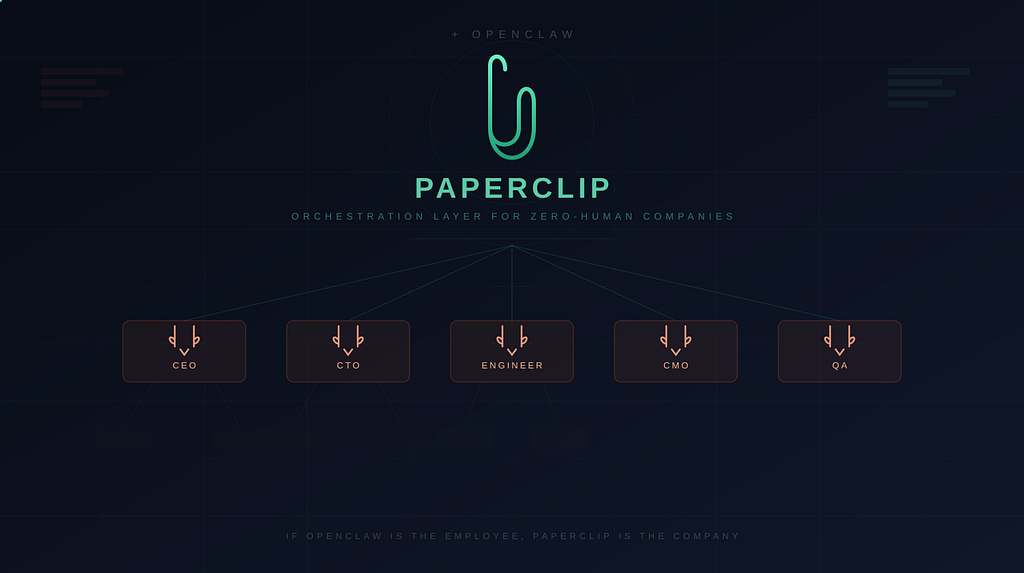
If OpenClaw Is the Employee, Paperclip Is the Company
The AI agent landscape shifted hard in early 2026. OpenClaw, the autonomous AI assistant created by Peter Steinberger, had already proven that a single agent could replace an entire personal assistant. It could manage your inbox, scrape websites, send emails, and execute recurring tasks autonomously through WhatsApp, Telegram, and Slack.
But a single employee doesn’t make a company.
What happens when you need ten agents working together: a marketing writer, a code reviewer, an email manager, and a data analyst, all aligned to the same business goals, all running autonomously? That’s the coordination problem Paperclip was built to solve.
What Is Paperclip?
Paperclip is an open-source Node.js server with a React dashboard that orchestrates teams of AI agents into structured organizations. Created by the pseudonymous developer @dotta, it launched on March 4, 2026 and crossed 30,000 GitHub stars within three weeks, making it one of the fastest-rising open-source AI repositories of the quarter.
The origin story is refreshingly practical. @dotta was running an automated hedge fund and found himself with 20+ Claude Code tabs open simultaneously. No shared context. No cost tracking. No way to recover state after a reboot. Paperclip grew out of that frustration.
The tagline from the repo says it all: “If it can receive a heartbeat, it’s hired.”
Paperclip is not a chatbot, not a single-agent framework, and not a drag-and-drop workflow builder. It models companies, complete with org charts, goals, budgets, and governance. It sits above individual agent runtimes (Claude Code, OpenClaw, Codex, Cursor, or any HTTP-compatible agent) and provides the organizational layer that multi-agent systems have been missing.
Understanding OpenClaw: The Agent That Paperclip Orchestrates
To appreciate what Paperclip does, you first need to understand OpenClaw and the paradigm it introduced.
OpenClaw (formerly Clawdbot, then Moltbot, after Anthropic’s trademark complaints forced a couple of renames) is an open-source autonomous AI assistant created by Peter Steinberger. It runs locally on your machine and connects to your everyday messaging apps. Unlike cloud-based chatbots that reset with every session, OpenClaw maintains persistent identity and memory through a system of plain Markdown files stored on your disk.
The Workspace Architecture
Every OpenClaw agent lives inside a workspace directory, typically ~/.openclaw/workspace, containing a set of .md files that collectively define the agent's identity and operational behavior:
- SOUL.md is the identity layer. It defines the agent’s personality, communication style, values, and behavioral boundaries. Every session begins with OpenClaw reading this file. The OpenClaw docs describe it as the agent “reading itself into being.”
- AGENTS.md is the procedural layer. Where SOUL.md answers “who are you?”, AGENTS.md answers “what do you do and how?” It holds workflow rules, SOPs, and decision logic.
- MEMORY.md is the persistence layer. Patterns, preferences, and facts accumulate here over time, giving the agent continuity across sessions.
- HEARTBEAT.md is the autonomy layer. It defines scheduled tasks in plain English, essentially cron for your agent. The heartbeat daemon runs every 30 minutes by default.
- TOOLS.md describes which tools the agent has access to and how to use them.
- USER.md stores context about the human operator: preferences, communication style, priorities.
- IDENTITY.md holds the agent’s name, ID, and metadata for routing.
This plain-text architecture is a deliberate design choice. Everything is inspectable with any text editor, version-controllable with Git, and portable across machines. No databases, no proprietary formats. The files are the agent.
The Heartbeat Mechanism
The heartbeat is what transforms OpenClaw from a reactive chatbot into a proactive agent. Every 30 minutes (configurable), the Gateway daemon wakes the agent, which reads its HEARTBEAT.md checklist and decides whether any item requires action. If nothing needs attention, it responds with HEARTBEAT_OK, which the Gateway silently drops. If something does need attention, the agent acts on it autonomously.
This is the mechanism Paperclip builds on top of. When OpenClaw’s docs say the agent can act “without being prompted,” they mean the heartbeat daemon provides autonomous scheduling that runs regardless of whether a human is actively interacting with the system.
The Scale Problem
OpenClaw is excellent as a single autonomous agent. But real businesses don’t run on one employee. When you have five, ten, or twenty agents all operating independently, each with their own SOUL.md, their own heartbeat schedule, their own memory, coordination breaks down fast:
- No shared context between agents
- No cost tracking across the fleet
- No way to recover state after a system restart
- No governance over what agents do autonomously
- No alignment between individual agent actions and business objectives
This is exactly the gap Paperclip fills.
Paperclip’s Core Architecture
Paperclip’s architecture is built around a few key primitives that mirror real organizational structures.
The Company Model
Every deployment starts with a company definition: a name and a mission statement. This mission propagates downward, so every goal, every project, and every task traces back to it. When an agent picks up a ticket, it sees the full ancestry:
"I am researching Facebook ads for Granola" (current task)
  → because I need to create Facebook ads for our software (parent)
    → because I need to grow signups by 100 users (parent)
      → because I need revenue to $2,000 this week (parent)
        → because our mission is building the #1 AI note-taking app
This goal-aware execution means agents always know why they’re working, not just what to do. And in practice, that distinction turns out to matter a lot.
Org Charts and Delegation
Paperclip implements hierarchical organizational structures. A typical setup looks like:
- CEO Agent receives the company mission, breaks it into strategic goals, and delegates to direct reports.
- CTO Agent handles technical decisions, delegates coding tasks to engineering agents.
- CMO Agent manages marketing strategy, delegates content creation and campaign execution.
- Engineer Agents execute specific coding tasks assigned by the CTO.
- QA Agent reviews the output of other agents before it reaches human review.
Delegation flows up and down the org chart automatically. When the CEO creates a project, it flows to the CTO, who decomposes it into tasks for engineers. Cross-team requests route to the best-suited agent.
Heartbeats in Paperclip
Paperclip extends OpenClaw’s heartbeat concept into a coordination layer. Agents wake on a schedule, check their work queue, execute assigned tasks, and report upward. The key difference from standalone OpenClaw heartbeats is that Paperclip coordinates across agents.
Between heartbeats, agents are dormant. No tokens burned, no cost accruing. This is very different from running agents 24/7. It’s closer to employees checking their inbox at regular intervals.
The Ticket System
All communication in Paperclip happens through structured tickets. Every instruction, every response, every tool call and decision is recorded with full tracing. The system uses an append-only audit log: no edits, no deletions, full accountability.
This matters more than it sounds. When you run twenty agents through raw terminal sessions, there’s no trace of what happened, no way to audit decisions, and no mechanism to figure out why something went wrong.
Budget Controls
Every agent gets a monthly token budget. At 80% utilization, Paperclip issues a warning. At 100%, the agent auto-pauses and new tasks are blocked. The human operator (the “board”) can override this limit, but the default behavior prevents runaway costs.
Cost tracking operates at multiple levels: per agent, per task, per project, per goal, and per company. This granularity matters when you’re managing a fleet of agents that could collectively burn hundreds of dollars in API credits overnight.
The Adapter System: How Paperclip Connects to Agents
Paperclip is deliberately unopinionated about agent runtimes. It connects to agents through adapters, which are pluggable modules that bridge Paperclip’s orchestration layer to whatever execution environment your agent actually runs in.
Process Adapter (Local Agents)
For agents running on the same machine, Paperclip spawns them as subprocesses. The claude_local adapter, for example, launches Claude Code sessions directly:
{
  "adapterType": "process",
  "adapterConfig": {
    "adapter": "claude_local",
    "model": "claude-sonnet-4-20250514",
    "billingType": "api",
    "sessionBehavior": "resume-or-new",
    "heartbeatSchedule": {
      "enabled": true,
      "intervalSec": 1800
    }
  }
}
The sessionBehavior: "resume-or-new" option is worth noting. It means agents resume the same task context across heartbeats instead of restarting from scratch each time.
HTTP Adapter (Remote Agents)
For agents running on separate infrastructure, including remote OpenClaw instances, Paperclip communicates via HTTP webhooks:
{
  "adapterType": "http",
  "adapterConfig": {
    "url": "https://openclaw.example.com/invoke",
    "method": "POST",
    "headers": {
      "Authorization": "Bearer {{OPENCLAW_TOKEN}}"
    },
    "timeoutMs": 30000,
    "payloadTemplate": {
      "paperclip": {
        "agentId": "{{agent.id}}",
        "companyId": "{{company.id}}",
        "runId": "{{run.id}}"
      }
    }
  }
}
Secrets are stored encrypted in a company_secrets table and injected at runtime. Never hardcoded in the adapter config.
OpenClaw Gateway Adapter
Paperclip ships a dedicated openclaw_gateway adapter that communicates with OpenClaw via its WebSocket Gateway protocol. This adapter supports:
- Structured request/response frames over WebSocket (ws:// or wss://)
- Device-based authentication using Ed25519 keypairs with a cryptographic handshake
- Session persistence with configurable strategies (fixed, per-issue, or per-run)
- Streaming event logs parsed into Paperclip’s transcript format
- Auto-pairing on first connection for seamless setup
The first-time setup requires a device pairing step (running openclaw devices approve --latest), after which persistent device keys eliminate repeated approvals.
Third-Party Adapters
The adapter model is extensible. Nous Research, for example, published a hermes-paperclip-adapter that integrates their Hermes Agent (30+ native tools, persistent memory, MCP support) as a Paperclip employee. The adapter spawns Hermes in single-query mode, captures output, parses token usage, and reports results back to Paperclip.
Setting Up Paperclip: A Practical Walkthrough
Prerequisites
- Node.js 20+
- pnpm 9.15+ (for development from source)
- No external database required. Paperclip creates an embedded PostgreSQL automatically.
Quick Start
The fastest path is the onboarding command:
npx paperclipai onboard --yes
This installs everything, creates a local database, and launches the dashboard at http://localhost:3100. The interactive setup walks you through creating your first company.
From Source
git clone https://github.com/paperclipai/paperclip.git
cd paperclip
pnpm install
pnpm dev
Useful development commands:
pnpm dev          # Full dev (API + UI, watch mode)
pnpm dev:server   # Server only
pnpm build        # Build all
pnpm typecheck    # Type checking
pnpm test:run     # Run tests
pnpm db:generate  # Generate DB migration
pnpm db:migrate   # Apply migrations
First Company Setup
Once the dashboard launches:
- Define your company. Set a name and mission statement.
- Set business goals. For example, “Respond to all customer emails within 1 hour” or “Publish 3 blog posts per week.”
- Hire a CEO agent. Choose which runtime powers it (Claude, Codex, OpenClaw). The CEO is the top of your org chart.
- Approve hiring. The CEO recommends additional agents. You approve each one and set monthly token budgets.
- Monitor from the dashboard. Watch agents work through tasks, track costs, and intervene when needed.
Integrating an OpenClaw Agent
To connect an existing OpenClaw instance:
- In the Paperclip UI, create a new agent with adapter type openclaw_gateway.
- Configure the gatewayUrl pointing to your OpenClaw Gateway's WebSocket endpoint.
- Set an authentication token in the adapter config.
- Trigger a wakeup run.
- On first connection, approve the device pairing: openclaw devices approve --latest
- Set a persistent devicePrivateKeyPem in the adapter config to avoid re-approving after restarts.
Once connected, OpenClaw becomes another employee in the organization. Tasks assigned to it in Paperclip are dispatched through the Gateway adapter, and results flow back into Paperclip’s ticket system and audit log.
Multi-Agent Workflow: A Real Example
Here’s what a content pipeline for an autonomous marketing agency might look like in Paperclip:
- Content Strategist — Topic research, openclaw_gateway, OpenClaw
- Writer — Draft creation, process, Claude Code
- Editor — Review and refinement, process, Claude Code
- Publisher — Final posting, http, Custom webhook
The flow works like this:
- The CEO agent receives the goal “Publish 3 blog posts per week” and creates tasks for the Content Strategist.
- The Content Strategist (OpenClaw) monitors trending topics, researches keywords, and submits topic proposals as tickets.
- The Writer picks up approved topics and produces drafts.
- The Editor reviews drafts for quality and consistency.
- The Publisher posts approved content through external APIs.
Each step is a ticket. Each handoff is logged. Each agent operates within its budget. The human operator sees everything from a single dashboard and only steps in at approval gates.
Governance and Safety
Approval Gates
Certain actions require human approval by default. Hiring new agents, for instance, is gated by board approval. Configuration changes are versioned with rollback support.
Audit Trail
Every conversation, decision, tool call, and API request is logged in an append-only history. Nothing is editable or deletable. When things go wrong with autonomous agent systems (and they will), you need a complete record of what happened and why.
Security Considerations
OpenClaw has been flagged by Cisco as a potential security risk due to its broad system permissions and susceptibility to prompt injection. Paperclip’s governance layer adds structured guardrails on top: budget caps limit blast radius, approval gates constrain autonomous decisions, and audit logs provide traceability. But these are complementary safeguards, not replacements for proper agent sandboxing.
Worth noting: a vulnerability (CVE-2026–25253) was identified and patched in OpenClaw, and VirusTotal integration (v2026.2.6) now provides security scanning for community-contributed skills.
What’s Coming: Clipmart and Beyond
Paperclip’s roadmap includes Clipmart, a marketplace where users can download pre-built company templates: content agencies, trading desks, development shops, all with org structures, agent configs, and skills baked in. One-click import into your Paperclip instance.
The concept of “importable, shareable companies” might end up being the most consequential feature on the roadmap. Instead of configuring agents from scratch, you’d download a battle-tested organizational template and customize it. Think of it as an “acqui-hire” for agent teams.
Other things on the roadmap:
- Bring-your-own-ticket-system integration (connecting to existing project management tools)
- A plugin system for extending capabilities
- Maximizer Mode, a feature discussed in recent podcasts by the creator that hasn’t been fully detailed yet
When Should You Use Paperclip?
Paperclip makes sense when:
- You’re managing five or more AI agents and need coordination
- You want 24/7 autonomous operation with human oversight at the board level
- You need cost visibility and budget enforcement across agents
- You need an audit trail for agent decisions and actions
- You’re building an AI-first business with multiple specialized roles
Paperclip is overkill when:
- You have a single agent. A standalone OpenClaw or Claude Code session is enough.
- You need a code review tool. Paperclip orchestrates work, not pull requests.
- You want a drag-and-drop workflow builder. Paperclip models organizations, not pipelines.
The Bigger Picture
2025 was the year individual AI agents proved their value. OpenClaw showed that one autonomous agent, with the right memory system and heartbeat scheduling, could do meaningful work without constant supervision.
2026 is shaping up to be the year of the AI company. The shift is from single-agent tooling to multi-agent orchestration. Microsoft launched Copilot Cowork. Anthropic launched Claude Marketplace. Nvidia is building NemoClaw. And open-source projects like Paperclip are asking a different question entirely: what if you skip the enterprise vendor and build the company yourself?
Paperclip’s core insight is that the hard problem in multi-agent AI isn’t making individual agents smarter. It’s making them coordinate. And coordination is, at its core, an organizational design problem: reporting structures, information flow, delegation patterns, feedback loops, and escalation paths.
The tooling is early. The rough edges are real. But the architectural pattern of treating multi-agent systems as companies rather than pipelines represents a genuine shift in how we think about autonomous AI workforces. I’ll be watching this space closely over the next few months.
Paperclip is open-source, MIT-licensed, and self-hosted. No account required.
- GitHub: github.com/paperclipai/paperclip
- Website: paperclip.ing
If you found this useful, follow me for more deep dives on AI engineering, agentic systems, and production AI architecture.
Paperclip: The Open-Source Operating System for Zero-Human Companies was originally published in Towards AI on Medium, where people are continuing the conversation by highlighting and responding to this story.