The incident that pushed me to build this
It was a Monday morning. A dashboard used by the clinical team was showing wrong numbers. The first Slack message came in at 9:03 AM: “Something’s off with the membership report.”
The next 25 minutes looked like this: open the dashboard, find the underlying table, search the codebase for anything that writes to it, check Airflow for recent DAG runs, ask a teammate if they know which pipeline owns it, find a second pipeline that also writes to the same table, realize there’s also a BigQuery scheduled query doing something to it that nobody documented.
By 9:28 AM we had an answer. By 9:35 AM the issue was fixed. The fix took 7 minutes. The investigation took 25.
That ratio — where finding the problem takes longer than solving it — is a lineage problem. And it happens every single time.
Why most data warehouses don’t have good lineage
The honest truth is that most data warehouses aren’t built on a single clean abstraction. They accumulate tools over time:
- Airflow DAGs for scheduled ETLs
- dbt models for transformations
- One-time Python scripts that never got cleaned up
- Cron jobs running on someone’s VM
- BigQuery scheduled queries set up directly in the UI
- Cloud Transfer Services pulling from external sources
- API-based connectors fetching from third-party platforms
Not because it’s the right architecture. Because different problems got solved by different people at different times, and the warehouse just absorbed all of it. This is how real data projects evolve — and there’s no shame in it.
The problem is that none of the existing lineage tools were designed for this reality.
Why existing tools fall short
BigQuery’s native lineage graph is the first thing most BigQuery users try. It works well for jobs run directly in BigQuery and requires no setup. But it has two practical limitations. First, it’s a visual graph in the UI — you click through nodes, you can’t query it programmatically. You can’t ask “show me all tables downstream of X” and get a list back. Second, it shows you table-to-table edges but loses pipeline attribution. You see that table A feeds table B, but not which Airflow DAG or which Python script made that happen. When you’re debugging an incident, that distinction matters a lot.
dbt lineage is excellent — if you’re using dbt. Because dbt models explicitly declare their dependencies on other models, the lineage graph is exact and complete for everything written in dbt. The catch is that it only knows about transformations written in dbt. Your Airflow DAGs loading raw data into BigQuery, your Python scripts calling the BigQuery API directly, your scheduled queries — dbt has no idea those exist.
Dataplex is Google’s managed data governance product inside GCP. It can automatically infer lineage by hooking into BigQuery’s built-in lineage tracking and is genuinely powerful. But it’s a full platform — you’re onboarding into Google’s data catalog, setting up lakes and zones, managing IAM for the service, and paying for it. If all you want is to answer one question during an incident, the overhead is hard to justify.
OpenLineage is an open standard for emitting lineage events from your pipelines. Airflow has a native integration and it works well in fully instrumented environments. The limitation is that it requires your pipelines to emit events. Your custom Python scripts, cron jobs, and anything that calls BigQuery directly won’t appear unless you add the SDK calls manually. In a mixed-orchestrator warehouse, that’s a significant gap.
All four tools assume you’ve standardized on something. Most warehouses haven’t. They’ve grown organically: Airflow DAGs alongside cron jobs, scheduled queries next to API connectors, scripts that were temporary until they weren’t. Adopting a full lineage platform just to answer one question is rarely worth the effort.
What I built instead
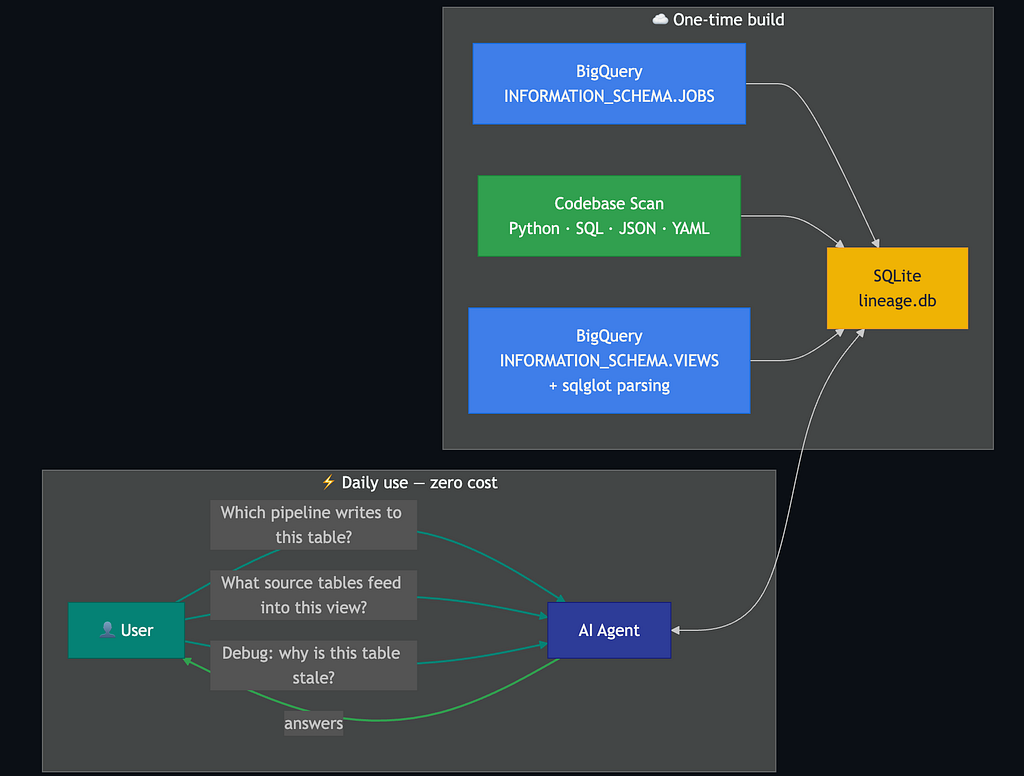
I built a Claude Code skill called /data-lineage. It's not a platform, a SaaS product, or a new piece of infrastructure. It's a SKILL.md file that teaches Claude how to build a lineage database from your existing BigQuery metadata and codebase, and then answer questions about it in natural language.
The entire output is a single SQLite file that lives in your repo.
How it works
The skill triangulates lineage from three independent sources:
1. BigQuery job history
SELECT
  destination_table,
  referenced_tables,
  labels,
  user_email,
  creation_time
FROM `region-us`.INFORMATION_SCHEMA.JOBS
WHERE creation_time > TIMESTAMP_SUB(CURRENT_TIMESTAMP(), INTERVAL 60 DAY)
  AND state = 'DONE'
  AND statement_type NOT IN ('SELECT', 'SCRIPT')
This query captures every write operation — INSERT, MERGE, CREATE TABLE AS SELECT — regardless of what triggered it. An Airflow DAG, a Python script, a scheduled query, a data engineer running something manually — they all appear in job history equally. For Airflow jobs, it extracts the dag_id from job labels, so you get full pipeline attribution alongside the table edges.
2. Codebase static analysis
The skill walks your Python, SQL, JSON, and YAML files looking for fully-qualified BigQuery table references in the format project.dataset.table. For Airflow repositories, it extracts dag_id from DAG definitions, Variable.get() configs, and JSON config files, then maps each DAG to the tables it touches. This catches pipelines that haven't run in the last 60 days and wouldn't appear in job history at all.
3. View definition parsing
SELECT table_schema, table_name, view_definition
FROM `region-us`.INFORMATION_SCHEMA.VIEWS
Every view’s SQL is parsed using sqlglot, a Python SQL parser that understands BigQuery dialect. It walks the SQL AST to extract all source table references, revealing dependency chains that neither job history nor code scanning would find on their own.
All three sources are combined into a local SQLite database with a unified schema:
CREATE TABLE lineage (
  target_dataset  TEXT NOT NULL,
  target_name     TEXT NOT NULL,
  target_type     TEXT NOT NULL,      -- 'TABLE' or 'VIEW'
  source_tables   TEXT,               -- JSON array
  pipeline_id     TEXT,               -- dag_id or file path
  pipeline_type   TEXT,               -- 'airflow_dag' or 'script'
  edge_source     TEXT NOT NULL,      -- 'job_history', 'codebase_scan', 'view_definition'
  write_pattern   TEXT,               -- 'MERGE', 'INSERT', 'CREATE_TABLE_AS_SELECT'
  first_seen      TEXT,
  last_seen       TEXT,
  job_count       INTEGER,
  user_email      TEXT
);
What the output looks like
After the one-time build, the skill prints a summary:
Lineage scan complete.
  Orchestrator:  Airflow (45 DAGs detected)
  Tables:        412
  Views:         247
  Pipelines:     39
  Datasets:      14
  Sources:       job_history (156), codebase_scan (259), view_definition (247)
Database: ./.claude/skills/data-lineage/lineage.db
From that point on, every lineage question is answered from local SQLite — no BigQuery queries, instant results. You ask in natural language inside the same Claude Code session:
Which pipeline writes to the users table?
What source tables feed into the orders_summary view?
What would break if I change the schema of the transactions table?
Who last wrote to the inventory table and when?
Claude queries lineage.db and traces the full dependency graph across DAGs, views, and tables in seconds.
The hidden cost this solves
There’s something I find underrated about this approach. When you’re debugging a data issue with an AI agent, every lineage question the agent asks can trigger multiple BigQuery queries — scanning job history, reading view definitions, searching across datasets. If you’re going back and forth with the agent across a 30-minute debugging session, those queries add up fast, both in cost and in latency.
Building the lineage once into a local SQLite file eliminates that cost entirely. Every subsequent question — in that session or any future session — is answered from disk in milliseconds.
How to install it
You need Claude Code and a BigQuery MCP tool configured in your settings. Any MCP server that can run read-only BigQuery queries will work — mcp-bigquery-server is a lightweight option.
Then open Claude Code in your data project repo and run:
Install this skill: https://github.com/drharunyuksel/claude-code-data-lineage
Claude reads the repository, sets up the skill, and installs the required Python dependencies automatically. On first run, type:
/data-lineage
The build takes a few minutes depending on your job history volume and codebase size. After that, the database is cached and refreshed only when it’s more than 7 days old.
Limitations worth knowing
The codebase scan is heuristic-based regex parsing. It works well for standard patterns. It’s genuinely good enough for most real warehouses, but it’s not the same as the exact dependency graph dbt gives you for dbt models.
This skill is also designed and tested for BigQuery specifically. It queries BigQuery’s INFORMATION_SCHEMA and parses BigQuery SQL dialect. That said, because it's a Claude Code skill rather than compiled code, you can ask Claude to adapt it for Snowflake or Redshift by prompting it to modify the INFORMATION_SCHEMA queries and SQL parsing accordingly.
What’s next
The current setup is local — the SQLite file lives in your repo and is personal to your Claude Code session. The natural next step is a team-shared version: an ETL (Airflow, Prefect, or a simple cron job) that writes the same lineage data to a BigQuery table on a schedule, so the whole team can query it from a shared dashboard or through their own AI agents.
If that’s something you’d find useful, the README has guidance on asking Claude to generate that ETL for you.
The repository is open source: github.com/drharunyuksel/claude-code-data-lineage
If you work with BigQuery and have felt this pain, give it a try and let me know what you think.
I’m a data engineer at Enara Health building pipelines and tooling that make clinical data useful. I spend most of my time between BigQuery, Airflow, and Claude Code, trying to make the boring parts of data work disappear. If you’re building with AI agents or just want to swap notes on developer tooling, find me on LinkedIn.
I Turned Claude Code Into a Data Lineage Tool for BigQuery. Zero Infrastructure, One Command. was originally published in Towards AI on Medium, where people are continuing the conversation by highlighting and responding to this story.