
I Tested 50 AI Tools So You Don’t Have To — Here Are the Only 7 Worth Paying For
I have a confession: I’m addicted to trying new AI tools.
Over the past 12 months, I’ve signed up for, tested, and put real work through more than 50 AI-powered platforms. I’ve spent over $3,000 in subscriptions. I’ve wasted entire weekends migrating between tools that promised to “10x my productivity.”
And I’ve learned something that no AI tool roundup article will tell you:
90% of AI tools are the same product with different logos.
The AI tool market has exploded. ProductHunt launches 15+ AI tools every single day. Your LinkedIn feed is a rotating billboard of “revolutionary” AI products. Everyone has a “game-changing” tool to sell you.
But after testing 50+ of them — across writing, video, marketing, sales, voice, automation, and design — I’ve narrowed my permanent stack down to just 7 tools.
These are the ones I actually pay for with my own money. The ones that survived the 90-day test. The ones where canceling would genuinely hurt my business.
Here they are, ranked by impact on my bottom line.
1. GoHighLevel — The All-in-One That Actually Delivers
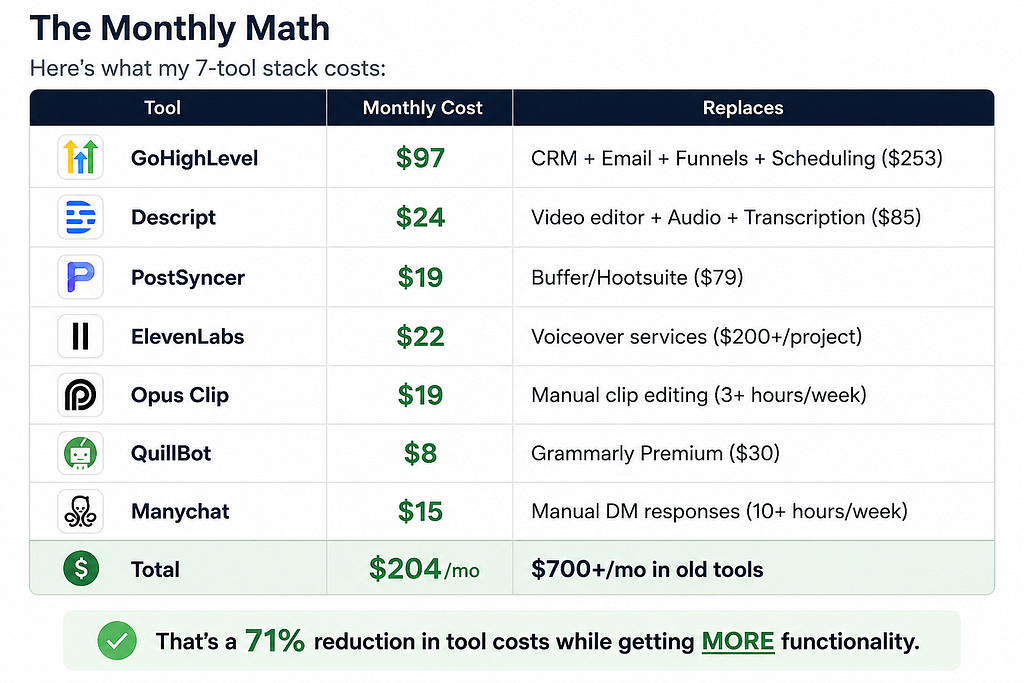
What it replaces: CRM + email marketing + landing pages + funnels + appointment scheduling + SMS marketing
Monthly cost: $97/mo (replaces $300+ in separate tools)
Why it survived the cut:
I was paying for Mailchimp ($45/mo), Calendly ($12/mo), ClickFunnels ($147/mo), and a basic CRM ($49/mo) before I found GoHighLevel. That’s $253/month for four tools that didn’t talk to each other.
GoHighLevel consolidated everything into one dashboard. My leads come in, get tagged, enter email sequences, book calls, and get follow-up SMS messages — all automatically. No Zapier. No integrations to maintain. No “this tool doesn’t sync with that tool” headaches.
The AI features they’ve added in 2026 are what push it over the edge:
- AI-powered conversation bots that handle initial lead qualification
- AI content generation for emails and landing pages
- Automated workflow suggestions based on your data
Is it perfect? No. The learning curve is real — expect 2–3 weeks to get fully set up. The interface isn’t as pretty as some competitors. But in terms of raw value-per-dollar, nothing else comes close.
Who it’s for: Anyone running a service business, agency, or content business who’s tired of paying for 5+ separate marketing tools.
Who should skip it: If you only need email marketing, just use Kit (ConvertKit). GoHighLevel is overkill for single-purpose use.
Try GoHighLevel free for 14 days
2. Descript — The Video Editor That Feels Like Cheating
What it replaces: Video editor + audio editor + transcription service + screen recorder
Monthly cost: $24/mo
Why it survived the cut:
Descript’s core innovation is so simple it sounds fake: you edit video by editing text.
Import your footage. Descript transcribes it. Delete a word from the transcript — it deletes from the video. Rearrange paragraphs — the video rearranges. Add a sentence — the AI clones your voice and speaks it.
I went from spending 4+ hours editing a 10-minute YouTube video to finishing in 45 minutes. The quality didn’t drop. If anything, my videos got better because I actually finish editing them now instead of giving up halfway through.
Key features I use daily:
- Text-based editing — The core feature. Delete “ums,” rearrange sections, cut dead air, all by editing a transcript.
- Studio Sound — One click removes background noise and normalizes audio. It’s like having a $500 microphone when you’re recording on a $30 one.
- AI voice cloning — Made a mistake? Type the correction. Descript speaks it in your voice. Seamlessly.
- Screen recording — Built in. No need for Loom or OBS for basic recordings.
The competitor landscape here is interesting. CapCut is free and good for short-form. Premiere Pro is still the power tool for Hollywood-level editing. But for content creators making YouTube videos, podcasts, and course content? Descript is the sweet spot.
Who it’s for: YouTubers, podcasters, course creators, and anyone who creates video content regularly.
Who should skip it: If you only make TikToks/Reels, CapCut is free and fine. Descript’s value is in long-form.
3. PostSyncer — The Social Media Tool Nobody Knows About (Yet)
What it replaces: Buffer, Hootsuite, Later, Sprout Social
Monthly cost: $19/mo
Why it survived the cut:
I was paying $79/month for Buffer’s team plan. It did the job, but every time I wanted a new feature — AI captions, multi-platform analytics, team collaboration — the price went up.
PostSyncer does everything Buffer does at a fraction of the cost. But the reason it earned a permanent spot in my stack is the AI caption generator.
You upload an image or paste a link, and PostSyncer generates platform-specific captions for LinkedIn, Twitter/X, Instagram, Facebook, and TikTok. Not the same caption everywhere — actually different versions optimized for each platform’s culture and algorithm.
The scheduling is rock-solid. The calendar view is clean. The analytics show you what’s working across all platforms in one dashboard.
Is it as polished as Hootsuite Enterprise? No. But for solo creators and small teams, it’s the best value I’ve found in social media management.
Who it’s for: Content creators, solopreneurs, and small marketing teams posting to multiple platforms.
Who should skip it: Enterprise teams with 10+ accounts need something like Sprout Social.
Try PostSyncer (code SCOTT for 10% off)
4. ElevenLabs — The Voice AI That’s Actually Ready
What it replaces: Professional voiceover artists (for certain use cases), text-to-speech tools
Monthly cost: $22/mo (Starter plan)
Why it survived the cut:
I need voiceovers for YouTube intros, course content, and explainer videos. Hiring a voiceover artist costs $50–200 per script. ElevenLabs costs $22/month for unlimited generations.
But the real reason it made the cut: the quality is now indistinguishable from human voice for 90% of use cases. I’ve shown people ElevenLabs-generated audio and they genuinely cannot tell it’s AI.
What I use it for:
- YouTube video narration when I don’t want to record myself
- Podcast intros and outros
- Explainer video voiceovers
- Testing different tones/voices before committing to a style
The voice cloning feature is ethically iffy but practically incredible. Upload 30 seconds of your voice and it can generate hours of content in your voice. I use it for fixing mistakes in recordings without having to re-record.
Who it’s for: Content creators who need voiceovers regularly, course creators, and anyone doing text-to-speech at scale.
Who should skip it: If you only need basic TTS, Google’s free tools are fine. ElevenLabs is for when quality matters.
5. Opus Clip — The Repurposing Machine
What it replaces: Manual clip cutting, hiring a video editor for short-form content
Monthly cost: $19/mo
Why it survived the cut:
Here’s my content multiplication formula:
- Record one 15-minute YouTube video
- Upload to Opus Clip
- Get 10–15 short-form clips, auto-captioned, scored by virality potential
- Post the top 5 to TikTok, Instagram Reels, YouTube Shorts, and LinkedIn
One video becomes 20+ pieces of content across 4 platforms. That’s the game.
Opus Clip’s AI analyzes your video for the most engaging moments — hooks, punchlines, key insights — and cuts them into vertical short-form clips. It adds captions, scores each clip’s viral potential, and exports them ready to post.
Before Opus Clip, I was spending 2 hours per video manually cutting clips. Now it takes 10 minutes to review what the AI generated and pick the best ones.
The virality score is surprisingly accurate. My highest-scoring Opus clips consistently outperform the ones I would have chosen manually.
Who it’s for: Anyone creating long-form video who wants to maximize reach with short-form.
Who should skip it: If you only create short-form content, you don’t need a repurposing tool.
6. QuillBot — The Silent Workhorse
What it replaces: Grammarly Premium (for most users)
Monthly cost: $8/mo
Why it survived the cut:
QuillBot doesn’t have the brand recognition of Grammarly. But for what I actually use a writing assistant for — paraphrasing, grammar checking, summarizing, and translation — it does 90% of what Grammarly does at a quarter of the price.
The paraphrasing tool is the killer feature. I use it to:
- Rewrite blog sections that feel clunky
- Generate alternative headlines for A/B testing
- Rephrase technical content for different audience levels
- Avoid self-plagiarism when covering similar topics across platforms
The grammar checker catches the same errors as Grammarly. The summarizer helps me condense research papers and articles into usable notes.
Is Grammarly better? Slightly, in some areas. The tone detection is more nuanced. The plagiarism checker is more comprehensive. But is it $22/month better? For me, no.
Who it’s for: Writers, bloggers, and content creators who want a solid writing assistant without paying Grammarly Premium prices.
Who should skip it: If you’re writing for publication or academia, Grammarly’s plagiarism checker might be worth the premium.
7. Manychat — The DM Automation That Actually Converts
What it replaces: Manual DM responses, basic chatbots
Monthly cost: $15/mo (Pro)
Why it survived the cut:
Social media DMs are where buying decisions happen. But responding to hundreds of DMs manually? Impossible for a solo creator.
Manychat automates Instagram and Facebook DMs with AI-powered conversation flows. Someone comments a keyword on your post? They get an automatic DM with exactly the information they need.
My workflow:
- Post content with a CTA: “Comment TOOLS for my free AI toolkit”
- Manychat sends a DM with the download link
- Follow-up sequence asks what their biggest challenge is
- Based on their answer, sends relevant tool recommendations (with my affiliate links)
Result: 300+ DM conversations per week. Zero manual effort. And the conversion rate from DM to affiliate click is 3–5x higher than a link in bio.
The AI has gotten smart enough that most people don’t realize they’re talking to a bot until 3–4 messages in. And by then, they’ve already gotten genuine value.
Who it’s for: Creators and businesses with active Instagram/Facebook audiences who want to monetize DM traffic.
Who should skip it: If your audience is primarily on LinkedIn or Twitter, Manychat doesn’t cover those platforms (yet).
The Tools That Didn’t Make the Cut (And Why)
Quick hits on popular tools I tested and dropped:
- Jasper ($49/mo) — Good AI writer, but ChatGPT + a solid prompt library does the same thing for $20/mo.
- Synthesia ($30/mo) — AI avatars are cool but the quality gap with HeyGen is noticeable.
- Loom ($15/mo) — Great product, but Descript includes screen recording so it’s redundant.
- ClickFunnels ($147/mo) — Powerful but overpriced. GoHighLevel does everything it does for $97/mo with MORE features.
- Hootsuite ($99/mo) — The enterprise tax is real. PostSyncer at $19/mo does what most creators need.
- Grammarly Premium ($30/mo) — See QuillBot above. Paying 3.75x for marginal improvements.
My Advice: The 90-Day Rule
Before you rush to sign up for all seven, here’s my actual recommendation:
Start with ONE tool. The one that solves your biggest pain point right now.
- Spending too much on marketing tools? → Start with GoHighLevel.
- Spending too long editing video? → Start with Descript.
- Can’t keep up with social media posting? → Start with PostSyncer.
Use it exclusively for 90 days. Master it. Build workflows around it. THEN add the next one.
The creators who win with AI tools aren’t the ones using the most tools. They’re the ones who’ve deeply integrated 3–5 tools into their actual workflow.
Quality over quantity. Always.
I review AI tools every week on my blog at aitoolinsider.xyz. If you found this useful, follow me here on Medium for more honest breakdowns — no hype, no sponsored content, just what actually works.
I Tested 50 AI Tools and Spent $3,000 — Only 7 Survived My 90-Day Cut was originally published in Towards AI on Medium, where people are continuing the conversation by highlighting and responding to this story.