Learn how I built a persistent AI workflow for weekly report automation using file-based memory and model independence. My AI assistant Axel remembers 52 weeks of context and generates reports in 3 minutes — no more babysitting ChatGPT.
Most people use AI like this:
Week 1: Paste meeting notes into ChatGPT → Get a decent report → Save it somewhere
Week 2: Open ChatGPT again → Paste last week’s report + this week’s notes → “Write this week’s report in the same format”
Week 3: Repeat. But now ChatGPT’s memory is fuzzy on the details. You have to manually compare: Did I already mention this feature last week? Is this the same metric or a new one? What was the exact phrasing I used for that risk?
You end up spending 20 minutes babysitting the AI — re-explaining context, copy-pasting old reports, fact-checking what it forgot.
I did this for months. Then I realized: the problem isn’t that AI has no memory. It’s that I was treating it like a vending machine instead of building a persistent system.
Now my workflow looks like this:
I have an AI assistant named Axel. He lives in a Project workspace where all my weekly reports, meeting notes, and strategic docs are stored as files.
When I type “Clean the notes and generate the weekly report”, Axel will:
- Read this week’s messy notes
- Check last week’s report (the actual file, not a fuzzy memory)
- Reference Leo’s product roadmap (another file in the same workspace, Leo is my Product Strategist)
- Pulls in Query’s data analysis charts (if I generated any earlier)
- Generates a new report with automatic gap analysis
If I don’t like the output? I click “Regenerate” and switch the underlying model (Claude/GPT/Gemini/DeepSeek). Axel’s persona stays the same: his communication style, his memory, his context. Only the engine changes.
I don’t spend 20 minutes comparing reports anymore. I spend 3 minutes reviewing, maybe tweaking a sentence, done.
This automation saved me 17 hours last month. More importantly, it freed me from the mental overhead of “AI babysitting” — that exhausting loop of re-explaining context every time I need a report.
Part 1: The Real Problem — Fuzzy Memory vs. File-Based Memory
Let’s be honest: ChatGPT’s memory feature is impressive. It remembers your preferences, your writing style, even details from conversations weeks ago.
But here’s what it doesn’t do well:
1. Structured recall
Ask ChatGPT “What were the three risks I mentioned in last week’s report?” and you’ll get…an approximation. Maybe it remembers two. Maybe it conflates Week 3’s risk with Week 5’s. You end up opening your saved report to double-check anyway.
2. Cross-conversation continuity
If you use ChatGPT for reports, Claude for data analysis, and Gemini for brainstorming, none of them know what the others are doing. You’re the glue, manually shuttling context between tools. This kills productivity.
3. Version control
ChatGPT’s memory updates itself. That’s great for casual use, but terrible for work that needs precision. Did I already announce Feature X in last month’s update? I don’t want AI to “think” it remembers, I want it to check the file.
This is why I shifted from conversation-based memory to file-based memory.
Instead of relying on AI to remember things, I give it a workspace where everything is stored as files:
Week_1_Report.md
Week_2_Report.md
Leo_Product_Roadmap_Q1.md
Query_Sales_Data_Analysis.md
...
When Axel generates Week 3’s report, he doesn’t rely on fuzzy memory. He reads Week_2_Report.mddirectly and compares it to this week's notes.
Files don’t forget. Conversations do.
Pro tip: All I need to do is make the file names easy and accurate enough for AI to read. Week_3_Report.md is clear. notes_final_v2_ACTUAL.md is not. Clean naming = AI knows exactly what to reference.
Part 2: The System — Mates, Projects, and Model Independence
Here’s how I built this AI workflow system using HaloMate (though the principles work with any AI tool that supports persistent workspaces).
Three core components:
1. Mates = Persistent Personas with Memory
A “Mate” is an AI assistant with a defined role and memory. Think of it like hiring a team member who remembers everything about your work style.
In my Weekly Reports Project, the three Mates I use most often are:
- Axel (Communication Specialist): Writes my weekly reports. His persona is defined by “Smart Brevity” — BLUF (Bottom Line Up Front), no fluff, active voice only. He knows I hate corporate jargon and prefer tight, scannable updates.
- Query (Data Analyst): Handles data analysis and chart generation. When I need a trend chart or risk heatmap, I ask Query. He saves the output as a file in the Project, and Axel references it later.
- Leo (Product Strategist): Doesn’t write reports, but maintains our product roadmap. When Axel writes the weekly update, he checks Leo’s roadmap to make sure the narrative aligns with our strategic direction.
Of course, I could ask one AI Mate to handle all of this — but dedicated specialists outperform generalists when you’re building a system, not just getting one-off answers. Each Mate maintains its own focused memory and expertise without cross-contamination. More importantly, when I only need data analysis, I’m not burning tokens on Axel’s 52 weeks of report-writing context, I just ping Query with a clean slate. Separate Mates = sharper focus + lower costs.
Key insight: These Mates aren’t locked to specific models. Axel can use Claude, GPT, or Gemini — his persona and memory stay the same, only the underlying engine changes.
This is what I call model independence. My asset isn’t GPT-4o or Claude Sonnet. My asset is Axel’s communication style, his memory of past reports, and the workflow automation I’ve built around him.
When GPT-100 comes out, Axel will still work. I’ll just swap the engine.
2. Projects = Shared Workspace
A Project is a persistent file system that all my Mates can access. Think of it like a Dropbox folder, but integrated directly into the AI workflow — and here’s the key part: both humans and AI can edit these files, with full version control.
In my Weekly_Reports Project, I have:
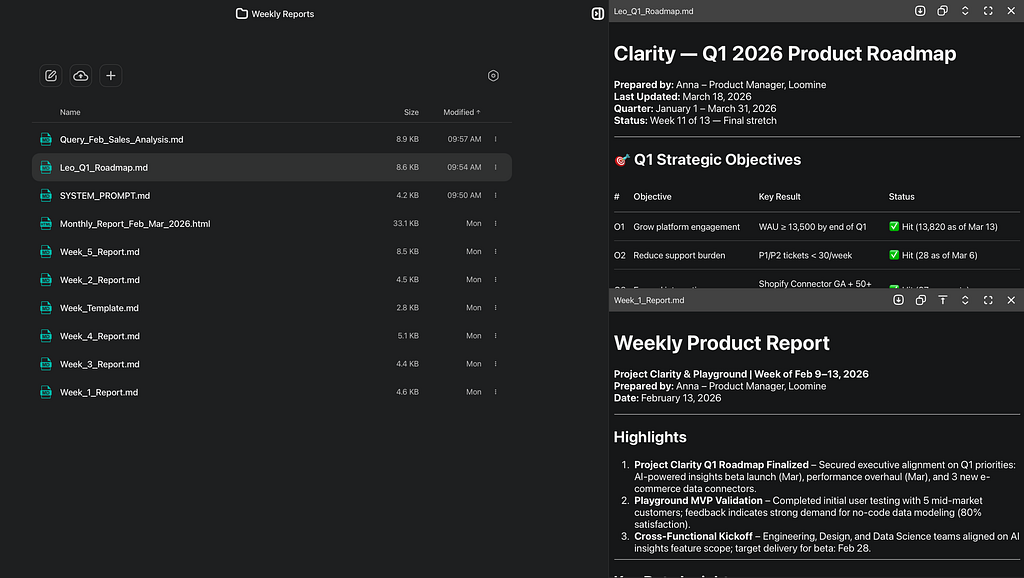
When I ask Axel to generate Week 4’s report, he:
- Reads Week_3_Report.md (to avoid repeating content)
- Checks Leo_Q1_Roadmap.md (for strategic context)
- Pulls in Query_Feb_Sales_Analysis.md if relevant
- Follows the rules in SYSTEM_PROMPT.md (his "operating manual")
If I spot an error in Week_3_Report.md, I can edit it directly in the Project. Axel will see the updated version next time. If Query generates a chart but the data needs tweaking, I can update Query_Feb_Sales_Analysis.md myself or ask Query to make the edits. The version history is tracked, so I can always roll back if needed.
The magic: I don’t have to copy-paste anything. All the context is already there, structured as files that both of us can work with. This is what makes the automation reliable.
3. Model Independence = The “Second Opinion” Workflow
Here’s where it gets interesting.
Most weeks, I use Claude Sonnet 4.6 to generate reports. It’s fast, the output is clean, and Axel’s persona works well with it.
But sometimes I hit a complex decision — like when this week’s plan conflicts with last week’s priorities. In those cases, I want a second opinion.
So I click “Regenerate” and switch the model:
- Claude Sonnet 4.6 → Gives me a balanced, nuanced take
- GPT-5.4 Thinking→ More assertive, direct recommendations
- Gemini-3.1-Pro→ Sometimes surfaces angles I didn’t consider

Crucially: Axel’s persona doesn’t change. His communication style, his memory of past reports, his understanding of our product strategy, all of that stays consistent. Only the reasoning engine underneath changes.
This is the opposite of how most people use AI — they might think “I’m a Claude person or I’m a GPT person”.
I think: “I’m an Axel person. Axel just happens to use different engines depending on the task.”
Part 3: How It Actually Works — A Real Week
Let me walk you through a real week.
Monday–Thursday: Accumulation
I keep my own notes somewhere (Notion, Apple Notes, whatever works). Throughout the week, I jot down:
- Meeting highlights
- Quick thoughts (“Talked to Customer A — they want Feature X prioritized”)
- Data points
- Decisions made
- Or even some complaints;)
I don’t structure any of this. It’s raw material for my own reference.
If I need data analysis during the week, I ping Query:
“Query, analyze last month’s sales data and create a trend chart showing conversion rates by channel.”
Query generates the chart and writes a summary. These go into the Project workspace.
Leo is off doing his own thing — I chat with him separately about product strategy, roadmap priorities, and long-term direction. All of that lives in his memory. When I’m writing a weekly report and need strategic context, I can pull Leo directly into the Weekly Reports Project, ask him for his take, and have him generate a roadmap summary or strategic brief as a file (like Leo_Q1_Roadmap.md). Once it's saved in the Project, Axel can reference it — Leo's strategic thinking becomes a living document that informs every report, without me manually bridging the two conversations.
Friday: Report Generation (3-Minute Workflow)
I open a chat with Axel and paste all my messy notes from the week in one go. Then I type:
“Clean the notes and generate the weekly report.”
This is a trigger phrase — Axel knows exactly what to do.
He will:
- Read Week_3_Report.md (last week's output)
- Scan the messy notes I just pasted
- Check Leo_Q1_Roadmap.md for strategic alignment
- Pull in Query_Feb_Sales_Analysis.md if relevant
- Generate a new report following his SYSTEM_PROMPT.md rules
Output: Week_4_Report.md
Total time: 3 minutes.
If I don’t like the framing, I click “Regenerate”, switch from Claude to GPT or other models, and get a different angle. Axel’s style stays the same.
After the report is done, I clean up the Project workspace — delete temporary notes I pasted, keep only the important stuff and the final report. This matters because more files means more tokens consumed, so I keep the workspace lean.
The “Gap Analysis”
Here’s a subtle but powerful detail: because Axel reads last week’s report as a file, he can automatically do gap analysis.
For example:
- Last week I said “Feature X will ship next Tuesday.”
- This week’s notes don’t mention Feature X.
- Axel flags this: “Last week we committed to shipping Feature X. No update in this week’s notes, should this be addressed?”
I didn’t ask him to do this. It’s built into his workflow because he has structured access to past reports, not just fuzzy memory.
This kind of productivity boost is what happens when you build a system instead of just using a tool.
Scaling Up: Quarterly Reports and Performance Reviews
Here’s where the system really shines.
When it’s time to write a quarterly report or my annual performance review, I don’t start from scratch. All my weekly reports are sitting in the Project.
I just tell Axel:
“Read all the weekly reports from Q1 and generate a quarterly summary.”
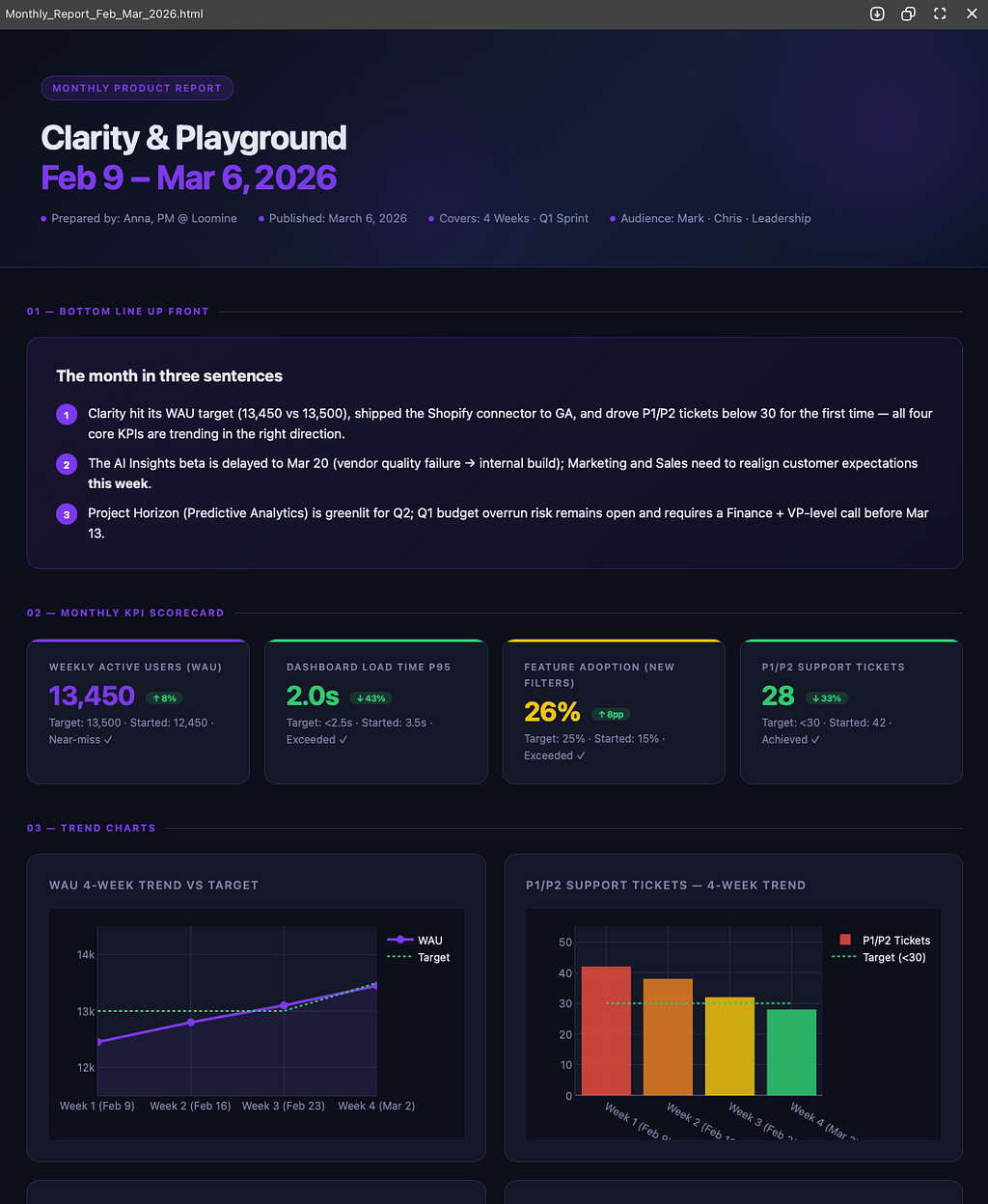
He scans all 12 files, identifies key themes, major wins, recurring risks, and produces a polished quarterly report. If I want it as a nice-looking web page instead of a markdown file, I can ask him to generate an HTML version with charts and formatting.
Same thing for annual performance reviews. Instead of scrambling to remember what I did in March, I have 52 weeks of structured reports. Axel reads them all and writes a comprehensive self-assessment.
This is the compound interest of file-based memory. Each weekly report isn’t just a deliverable — an asset that makes future reports easier.
Part 4: Why This Matters Beyond Reports
I’ve been talking about weekly reports, but this AI workflow system works for any recurring task that needs continuity:
Literary translation:
Create a Project with glossary.md, style_guide.md, and chapter files. Your translator Mate remembers character names, tone, and past decisions. When a new chapter arrives, they reference the glossary automatically.
Content series:
Store your brand_voice.md and past articles in a Project. Your writer Mate knows your style and won't contradict something you wrote two months ago.
Client projects:
Keep project_brief.md, meeting notes, and deliverables in one workspace. Your project manager Mate can generate status updates without you re-explaining the client's goals every time.
The core insight:
I’m not building a “report bot”. I’m building a system where the persona, memory, and workflow are more valuable than any individual AI model.
When OpenAI deprecated GPT-4o in August 2025, users were devastated. They’d built workflows around that model. Some even talked about “grief”, they’d lost their AI’s “personality.”
This system avoids that problem. Axel’s personality is not by which model he's using. If Claude shuts down a model tomorrow, I switch Axel to GPT. His memory and his persona stay intact.
Part 5: How to Build Your Own AI Report Automation System (4-Step Framework)
You don’t need HaloMate specifically. The principles work with any tool that supports:
- Persistent file storage
- The ability to reference files in prompts
- Model switching (optional, but powerful)
Here’s how to start:
Step 1: Pick One Recurring Task You Hate
Weekly reports, client updates, content drafts — anything you do repeatedly. The more repetitive, the better candidate for automation.
Don’t try to automate everything at once. Start with one workflow that causes you the most pain.
Step 2: Set Up Your 3-Layer Architecture
- Layer 1: Workspace — Where will files live
- Layer 2: Rules — Write a SYSTEM_PROMPT.md that defines tone, format, and behavior
- Layer 3: Memory — Save outputs as files. Each new output references the previous one.
This is the foundation of any persistent AI system.
Step 3: Build a “Messy → Clean” Demo
Create one messy input (meeting notes, rough draft, data dump) and one polished output (report, article, summary). This becomes your proof-of-concept.
Run it once manually. If it works, you’ve validated the workflow. Now you can automate it.
Step 4: Iterate and Lock in the Rules
When you find a bug (e.g., “The AI keeps using passive voice”), don’t just fix it once — write the rule into SYSTEM_PROMPT.md so it never happens again.
This is how you build a self-improving system. Each iteration makes the next report better.
Final Thought
Most people ask: “Which AI is best?”
I ask: “What system can I build so the AI becomes less important over time?”
The answer: Persistent personas, file-based memory, and model independence.
Axel isn’t ChatGPT. He isn’t Claude. He’s Axel — and he’ll still be Axel when GPT-100 comes out.
That’s the system I built. And now, Friday at 5pm, I’m not staring at a blank doc. I’m reviewing a report that wrote itself.
I Don’t Use AI to Write My Reports. I Built a System That Remembers How. was originally published in Towards AI on Medium, where people are continuing the conversation by highlighting and responding to this story.