I’ve been experimenting with and building AI agents for production systems for several years now. In that time, I’ve shipped prompt pipelines that power customer-facing features, debugged agents that silently hallucinated tool arguments, watched a model upgrade quietly regress behavior nobody caught for two weeks, and spent more hours than I’d like to admit in each of the provider playgrounds.
At some point, I started asking myself: why is this so inefficient?
The ecosystem around LLMs and Agents has been evolving rapidly. But if you take a closer look at the actual tooling for developers, there’s a pretty obvious fracture. You’ve got vendor playgrounds: OpenAI Playground, Google AI Studio, and Claude.ai. They’re fine for a first-pass sanity check. But the moment you’re working across multiple providers, need variables in your prompts, want to track what a run actually costs, or need to replay something from yesterday, you’re out of luck.
On the other side, you have a growing market of cloud-hosted SaaS tools: observability platforms, eval frameworks, and logging pipelines. Most of them are good at the one thing they do. But they’re fragmented by design. You monitor in one tool, run evals in another, and do the actual prompting back in a playground. Every context switch breaks flow. And everything, your prompts, your API keys, your agent traces — gets routed through someone else’s servers. Not to mention cost. As an indie AI enthusiast, assembling a coherent workflow from paid tools can get expensive quickly.
What I kept looking for was something that handled the full loop of AI development in one place:
- Design a scenario or agent
- Run it against the model I care about
- Debug exactly what happened
- Assert that it behaves correctly with a test suite
- Know what it’s costing me
- Do all of this locally, without my data leaving my machine
That tool didn’t exist. So I built Reticle — a local desktop app I think of as Postman for AI.
Here’s what it can do.
Scenarios
The most common first question when building an LLM feature is: which model should I use? The answer almost always depends on your specific prompt and use case — and the only honest way to find it is to test.
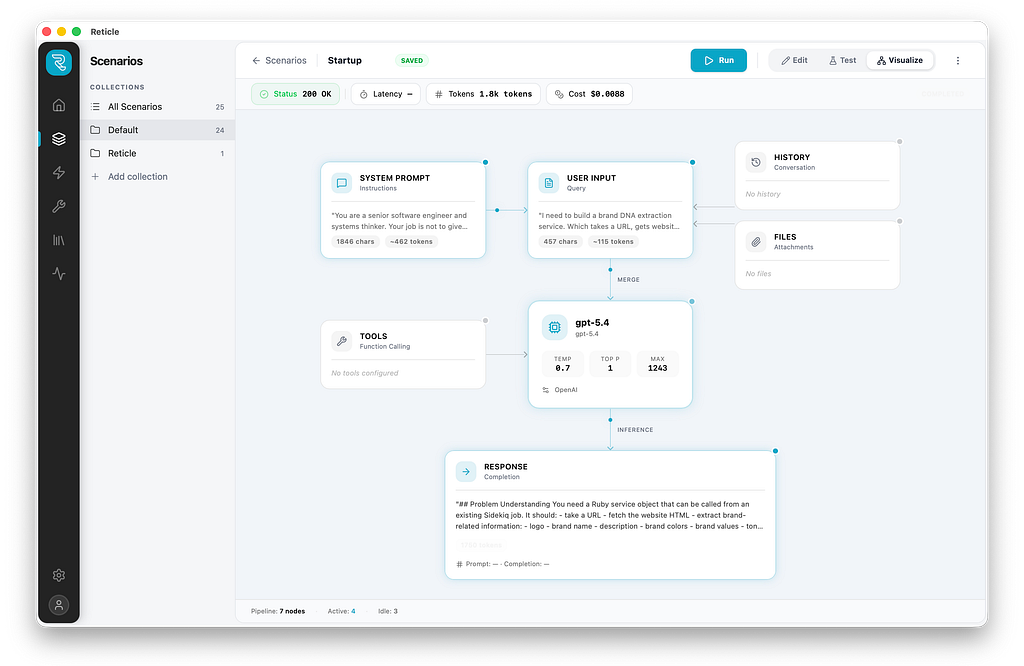
Reticle’s Scenarios let you design a prompt once, with a system message, variables like {{user_name}} or {{context}}, multi-turn conversation history, tool calling, file, and full model controls — then run it against OpenAI, Anthropic, and Google models side by side. Run console outputs, latency, token usage, and cost, which is pretty useful as costs tend to accumulate quickly if you experiment a lot.
No copy-pasting between tabs. No cloning the same prompt, with slightly different data. Just run, compare, decide.
The {{variable}} system solves a subtle pain point: in real products, prompts are templates. They have dynamic content filled in at runtime. Testing them with hardcoded strings doesn't reflect production behavior. Scenarios let you define variables once and test with realistic, parameterized inputs.
Agents
Agents are notoriously hard to debug because the reasoning loop is opaque. You fire a task, something happens inside, and you get a final answer. If it’s wrong, good luck figuring out where it went wrong.
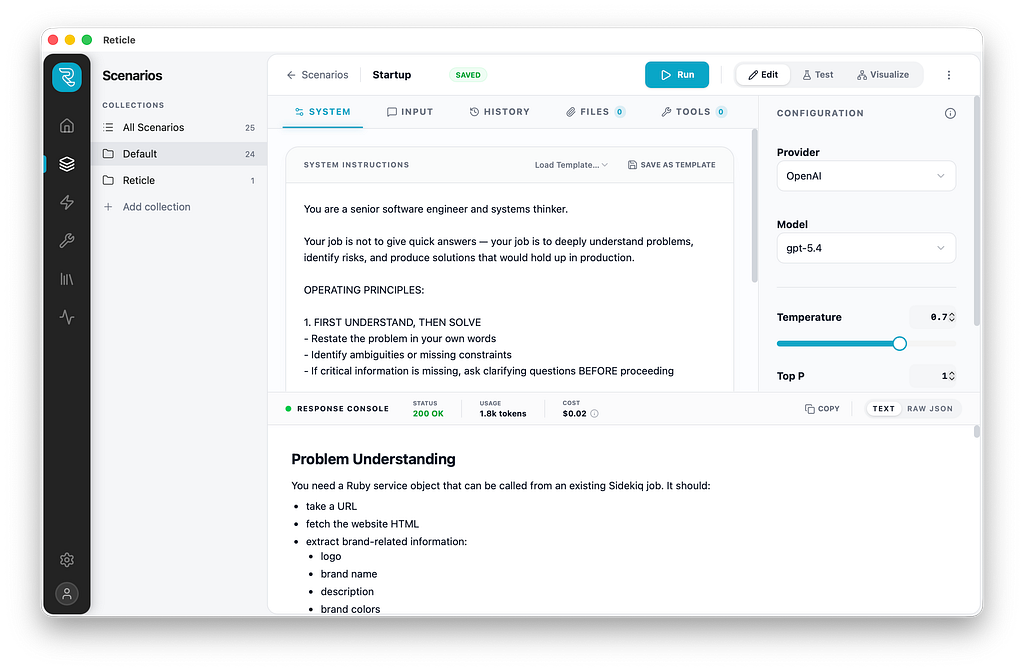
Reticle’s Agents use a ReAct architecture (Reasoning + Acting) and expose the full execution trace in real time:
- Every iteration of the loop
- Every LLM request, with the exact messages sent
- Every tool call, with the arguments passed and the result returned
- Token usage and latency at each step
- The final response
When an agent misuses a tool by passing the wrong argument, fails to handle an error, or gets stuck in a loop, you can see exactly when and why. This changes debugging from guesswork to observation.
You can also control the loop: max steps, timeout, and other constraints. A common issue in production agents is runaway loops that inflate cost and latency. Being able to observe and bound the loop behavior during development means you’re not discovering these issues in production.
Tools
Building agents means giving models access to tools — web search, database queries, API calls. But here’s the problem: when you’re iterating on how the model reasons about tools, you don’t want to fire live API calls on every test run. You want the model to think it called the tool, get a plausible result, and continue without actually touching anything.
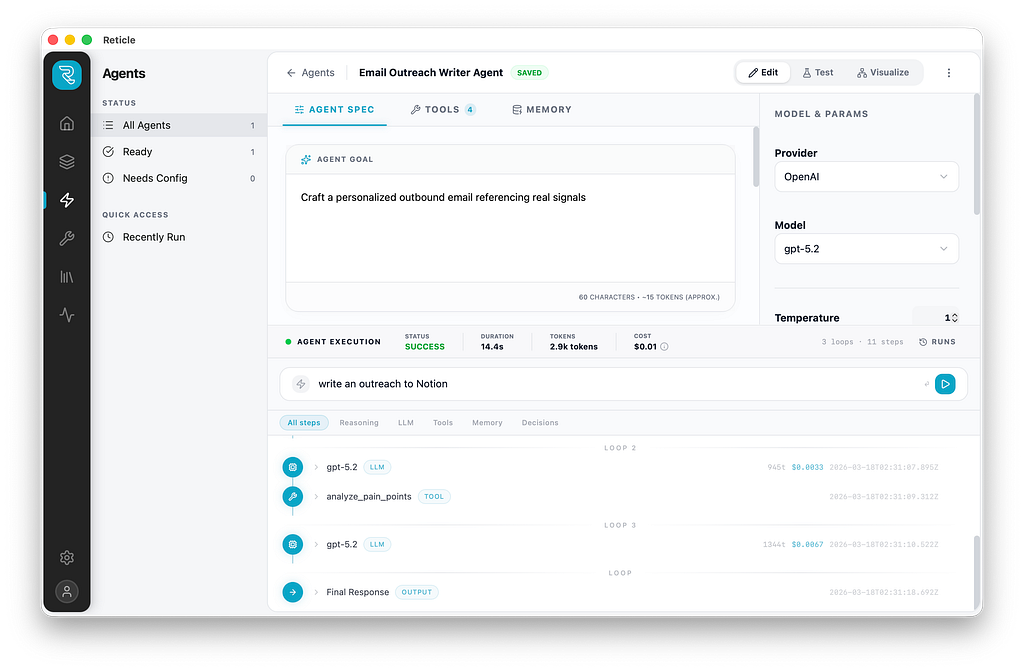
Reticle has two execution modes for every tool:
Mock mode returns a fixed JSON payload. The model receives a realistic tool result, and the iteration loop stays fast and safe. Perfect for prototyping reasoning chains.
Code mode runs real TypeScript via an isolated Deno subprocess with scoped permissions. When you’re ready to validate end-to-end behavior, check that the model is passing the right arguments, that the actual API responds as expected, and that the result gets used correctly, you flip to code mode and wire up a real implementation.
The practical effect is a clean separation between two distinct development phases that most tools conflate. Prototype fast in mock mode. Validate in code mode. The tool definition stays the same across both.
Evals
This is the feature I wish I had earlier in my AI development journey.
In a traditional software project, tests tell you whether a change broke something. In AI systems, there’s often no equivalent — prompt tweaks, model upgrades, and tool changes go out, and you find out from users whether something regressed.
Reticle’s Evals let you build a test suite directly inside the app. You define test cases — inputs plus expected outputs — and write assertions that run automatically. The assertion types cover a wide range of validation needs:
- contains / equals / not_contains for text matching
- json_schema for structured output validation using AJV
- tool_called / tool_not_called for verifying agent behavior
- tool_sequence for checking the order of tool invocations
- llm_judge for subjective quality criteria, delegated to another model
The llm_judge assertion deserves a callout. For a lot of real-world outputs, tone, reasoning quality, helpfulness — you can't write a rule-based assertion. But you can write a criteria statement and let another model evaluate it. This makes it practical to write evals for things that were previously untestable.
Test cases can be built in the app, pasted in, or imported from JSON or CSV. When you’re ready to evaluate, you run the suite and get pass/fail counts, per-case results, and aggregate cost and latency across the run.
Before Reticle, every model upgrade was a leap of faith. Now I run evals first.

Local by default: Your data stays yours
Everything in Reticle lives on your machine. Scenarios, agents, test cases, run history, and API keys are stored in a local SQLite database. Nothing is synced to an external server. No account required.
API key handling in particular is worth mentioning. The app runs a local proxy on your machine that intercepts outbound LLM requests and injects the appropriate API key at the last moment, just before the request leaves your device. The frontend never touches your keys. No third-party service ever sees them.
For developers working with proprietary prompts, sensitive data, or in organizations with strict data governance requirements, this is a first-class design constraint, not an afterthought.
What’s next
Reticle is in public beta, actively used, and under continued development. Core features are stable. More agent architectures, broader provider support, and expanded eval types are on the roadmap.
If you’re building AI-powered products and the current tooling landscape feels as fragmented to you as it did to me, give it a try.
- Download: reticle.run
- Source: github.com/fwdai/reticle
- Bug reports/feedback: GitHub Issues
If it’s useful, a ⭐ on GitHub goes a long way.
I Built Postman for AI Agents — Local, Free, and Open Source was originally published in Towards AI on Medium, where people are continuing the conversation by highlighting and responding to this story.