
Keeping up with AI these days feels like drinking from a firehose. New models, new frameworks, new “paradigm shifts”, every week there’s something supposedly unmissable. I got tired of tab-hopping across TechCrunch, Hacker News, and MIT Technology Review, hoping to piece together what actually mattered. So I built a pipeline to do it for me.
OrchestNews fetches AI and tech news every week, deduplicates the noise, summarises articles using a local LLM, extracts the big trends, ranks them by what I care about, pushes everything into Notion as a searchable archive, and pings me on Slack when it’s ready. Fully local. Zero paid APIs.
Why Local-First?
One design decision shapes everything here: this pipeline uses Ollama with phi3 instead of any cloud API.
- Cost. Summarising 50 articles every week, indefinitely, adds up. Local inference is free after setup.
- Privacy. I didn’t want the article data and generated summaries leaving my machine.
- Resilience. A pipeline that depends on an external API breaks when that API goes down, hits rate limits, or changes pricing.
- The learning. Local LLMs are less well-behaved than GPT-4. They produce malformed JSON, time out, and give inconsistent outputs. Building defensively against all of that teaches you things cloud API wrappers hide from you.
If you’ve only ever used managed LLM APIs, building something local at least once is genuinely worth the friction.
System Architecture
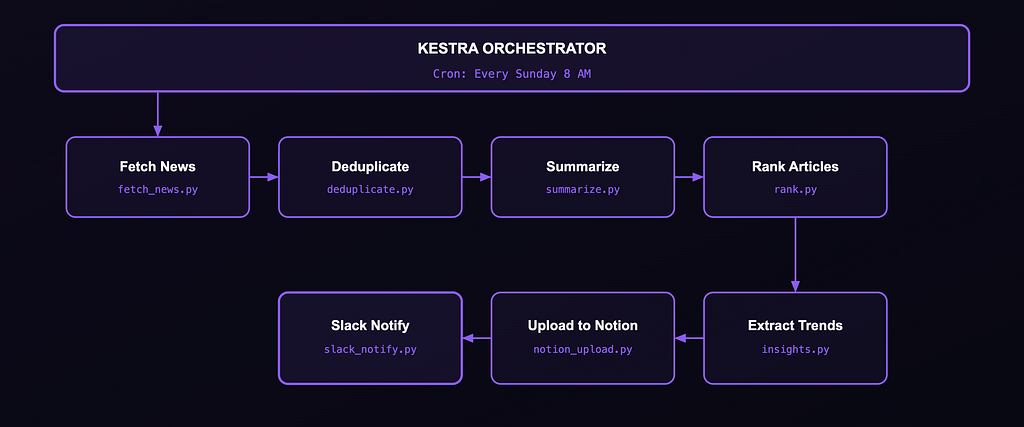
Eight Python scripts. One Kestra workflow YAML. One docker-compose.yml. The whole thing runs on a laptop.
Why Kestra? I looked at Airflow and Prefect. Airflow felt heavy for a personal project. Prefect is Python-first, which is great, but I wanted a workflow definition that lives as a first-class YAML artifact. Kestra’s UI gives you a live DAG view and per-task logs, which turned out to be invaluable during debugging. If you want to get up to speed quickly, I went through the Kestra Fundamentals course and got certified — it’s free and covers exactly what you need to build something like this.
Why phi3 over llama3? Memory. llama3 on 16GB RAM during a seven-step pipeline means constant resource pressure. phi3 is lighter and faster. For structured extraction tasks - summarise this, return JSON with these exact keys - it was more than good enough. The tradeoff is that it occasionally produces weirder outputs, but that’s what defensive coding is for.
The Docker Compose Setup
docker compose up -d
Two services: Postgres for Kestra’s metadata store, and Kestra itself. The key detail is that Kestra gets access to the Docker socket so it can spin up each task in an isolated container:
kestra:
  image: kestra/kestra:latest
  command: server standalone
  volumes:
    - /var/run/docker.sock:/var/run/docker.sock
    - /tmp/kestra-wd:/tmp/kestra-wd
  ports:
    - "8080:8080"
Once it’s up, head to localhost:8080, import the workflow YAML, and you're running.
The Workflow, Step by Step
Step 0: Trigger
triggers:
  - id: weekly_schedule
    type: io.kestra.plugin.core.trigger.Schedule
    cron: "0 8 * * 0"
No cron daemon, no systemd timer. Kestra handles scheduling and keeps a full run history.
Step 1: Fetching News
feedparser pulls from three RSS feeds. The getattr pattern handles feeds that return incomplete entries without throwing:
for entry in parsed.entries[:10]:
    articles.append({
        "title": getattr(entry, "title", "No Title"),
        "link": getattr(entry, "link", ""),
        "description": (
            getattr(entry, "summary", "")
            or getattr(entry, "description", "")
        )
    })
The :10 cap per source keeps the article count manageable before it hits the LLM step.
Step 2: Deduplication
Tech news has a bad duplication problem. One announcement gets picked up by all three sources with slightly different titles. Exact matching won’t catch it:
if not any(
    SequenceMatcher(None, title, seen).ratio() > 0.75
    for seen in seen_titles
):
    unique_articles.append(article)
    seen_titles.add(title)
unique_articles = unique_articles[:6]  # keep the pipeline lightweight
The hard cap of 6 is a deliberate choice — feeding 30 articles into phi3 one by one on a laptop gets slow fast.
Step 3: AI Summarisation
Ollama runs on the host machine, not inside Docker. host.docker.internal is how the container reaches it:
endpoint = os.environ.get("OLLAMA_ENDPOINT", "http://host.docker.internal:11434")
res = requests.post(f"{endpoint}/api/generate", json={
    "model": "phi3",
    "prompt": prompt,
    "stream": False
}, timeout=120)
The prompt tells phi3 to return only a JSON object with summary, category, and importance. The timeout=120 is generous - phi3 is slower than cloud APIs, and a hard cutoff kills valid in-progress inferences.
Step 4: Ranking & Personalisation
Each run increments a counter for every category it sees, then uses that count as a boost:
user_prefs["categories"][category] = (
    user_prefs["categories"].get(category, 0) + 1
)
boost = user_prefs["categories"].get(category, 0)
art["final_score"] = base_score + (boost * 0.3)
ranked = sorted(articles, key=lambda x: x["final_score"], reverse=True)[:5]
The * 0.3 weight keeps the boost from overriding the LLM's importance score. Preferences build automatically over time - categories you see often rank higher without any manual configuration. Only the top 5 make it through.
Step 5: Trend Extraction
The top articles get fed back into Ollama to pull out macro trends. Same JSON-by-position extraction, same fallback pattern:
output = ask_ollama(prompt)
start = output.find("[")
end = output.rfind("]") + 1
trends = json.loads(output[start:end])
If that fails entirely, three hardcoded fallback trends keep the pipeline finishing, and Slack still fires.
Step 6: Notion Upload
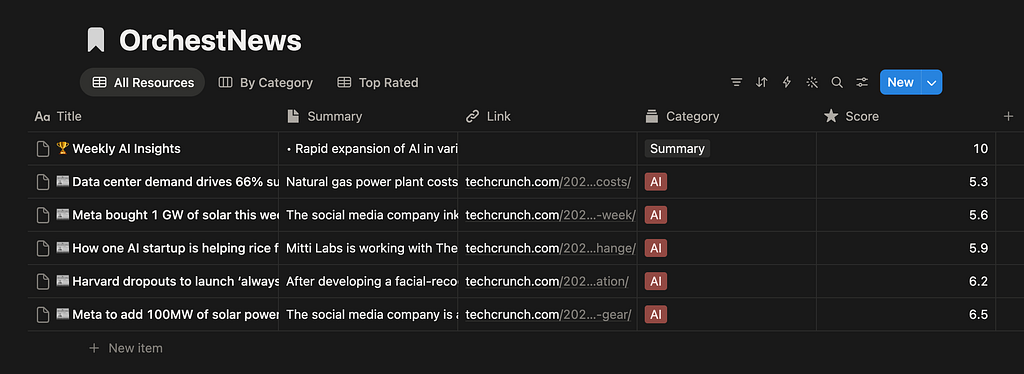
Articles go in as individual database entries. The allowed categories list must exactly match your Notion select field schema — anything outside it gets silently rejected:
allowed_categories = ["LLMs", "Agents", "Startups", "Research", "Infra", "AI", "Summary"]
category = art.get("category") or "AI"
if category not in allowed_categories:
    category = "AI"
link = art.get("link")
if not link or not str(link).startswith("http"):
    link = None  # Notion rejects empty strings for URL fields
After all articles are uploaded, the script creates a single “🏆 Weekly AI Insights” summary page with the extracted trends, then writes the page URL to notion_status.json for the next step.
Step 7: Slack Notification
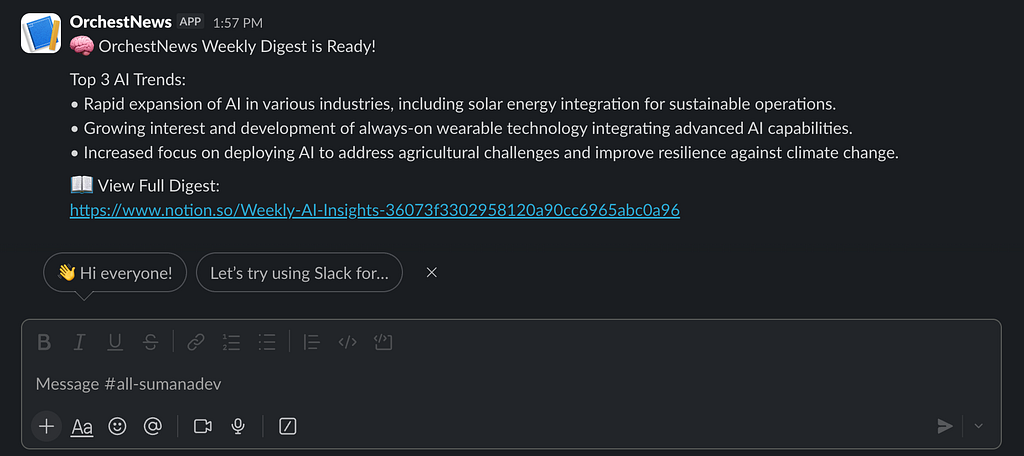
notion_url = status.get("url", "Notion link unavailable")
payload = {
    "text": f"""
🧠 OrchestNews Weekly Digest is Ready!
Top 3 AI Trends:
{bullet_trends}
📖 View Full Digest:
{notion_url}
"""
}
requests.post(webhook_url, json=payload)
The Notion URL comes from notion_status.json written by the previous step. No shared state - every script reads inputs from files and writes outputs to files.
The Debugging Chronicles
1. phi3 Refuses to Return Pure JSON
The biggest headache. Despite the prompt sayingJSON only, No markdown, No explanation, phi3 would return JSON wrapped in a code fence with an explanation before and after. json.loads() fails immediately on that.
The fix is extracting by position rather than trusting the output is clean:
start = response.find("{")
end = response.rfind("}") + 1
data = json.loads(response[start:end])
And always a fallback when even that fails — a degraded summary beats a crashed pipeline:
except Exception:
    data = {"summary": art["description"][:150], "category": "AI", "importance": 5}
2. Notion’s Category Field Is Strict
phi3 occasionally invented categories outside my schema (“AI Safety & Ethics”, “Cloud & MLOps”), which caused silent 400 failures - no loud error, just a missing entry. Validating before upload fixed it.
3. Notion Rejects Empty URL Fields
"" throws a 400. None is fine. One startswith("http") check before every upload.
Lessons Learned
Treat LLM output as untrusted input. Every response in this pipeline goes through a parsing layer that assumes failure. Write code that expects valid JSON, and your pipeline will break constantly.
Orchestration is automated failure management, not just automation. The happy path is trivial. The real engineering is what happens when step 4 fails — does step 5 still run? Kestra’s task logs made debugging significantly faster than running scripts by hand.
Smaller models need more explicit prompts. GPT-4 fills in vague gaps. phi3 does not. Specify the exact output format, give an example, and explicitly ban commentary. The prompt engineering burden shifts to you.
File-based handoffs make every step debuggable in isolation. When something goes wrong mid-pipeline, you inspect the intermediate JSON file, fix the script, and re-run from that step. No need to re-fetch, re-deduplicate, or re-summarise from scratch.
Running It Yourself
git clone https://github.com/sumana2001/OrchestNews
cd OrchestNews
docker compose up -d
ollama pull phi3
# Open localhost:8080, import workflows/, trigger a run
You’ll need a Notion integration token + database ID and a Slack Incoming Webhook URL. Full setup in the README.
Closing Thoughts
OrchestNews is not the most technically sophisticated thing I’ve built. But it’s one of the most useful. Every week, I get a Slack ping, click through to Notion, and have a structured digest of what mattered in AI — ranked by what I care about, trends already pulled out.
The real value was in building it. Wiring up workflow orchestration, local LLM inference, fuzzy deduplication, and multi-system integrations in one cohesive pipeline forces you to think about AI systems engineering in ways tutorials don’t. You can read about “defensive coding for LLM outputs” abstractly. Chasing down the bug where phi3 wraps JSON in explanatory prose makes it stick permanently.
Complete code on GitHub: github.com/sumana2001/OrchestNews
Questions about the architecture or any specific step? Drop them in the comments.
I Built an AI News Intelligence Pipeline Using Kestra, Ollama, Notion & Slack — Zero Paid APIs was originally published in Towards AI on Medium, where people are continuing the conversation by highlighting and responding to this story.