A first-person walkthrough of building a natural language data agent from scratch: the architecture, the tools, the blocker that changed everything, and what I learned about how agents actually work in practice.
I am a data engineer, not an AI researcher. I have never trained a model. I do not have a machine learning background. But I wanted to understand AI agents properly — not from a tutorial, but by actually building one end to end.
So I picked a dataset I genuinely find interesting — 75 years of Formula 1 racing history, from 1950 to 2024 — loaded it into a real PostgreSQL database, and built an agent that lets you ask it questions in plain English and get accurate, database-backed answers.
Ask it “Who has the most race wins of all time?” and it figures out the right SQL, runs it, and tells you. Ask it “Which constructor won the most championships in the 1990s?” and it does the same. No hardcoded answers. No lookup tables. Every response generated live from real data.
This article is the honest version of how I built it — including the dead ends, the surprising simplicity of the core loop, and the specific blocker that forced me to rethink my entire architecture halfway through.
Why F1 data?
A few reasons. The dataset is rich — 14 tables covering races, drivers, constructors, lap times, pit stops, qualifying sessions, and championship standings going back to 1950. It is public and free on Kaggle. And most importantly, it is the kind of data where natural language queries actually make sense. “Which driver had the fastest average pit stop in 2023?” is a question a real F1 fan would ask — and it is exactly the kind of multi-table query that is genuinely annoying to write in SQL from scratch.
The goal was never to build a production application. The goal was to understand the agent pattern deeply enough to explain it clearly and use it in real work. Building something you care about is the fastest way to learn.
The architecture — high level
Before getting into the details, here is the full flow from a user question to a final answer:
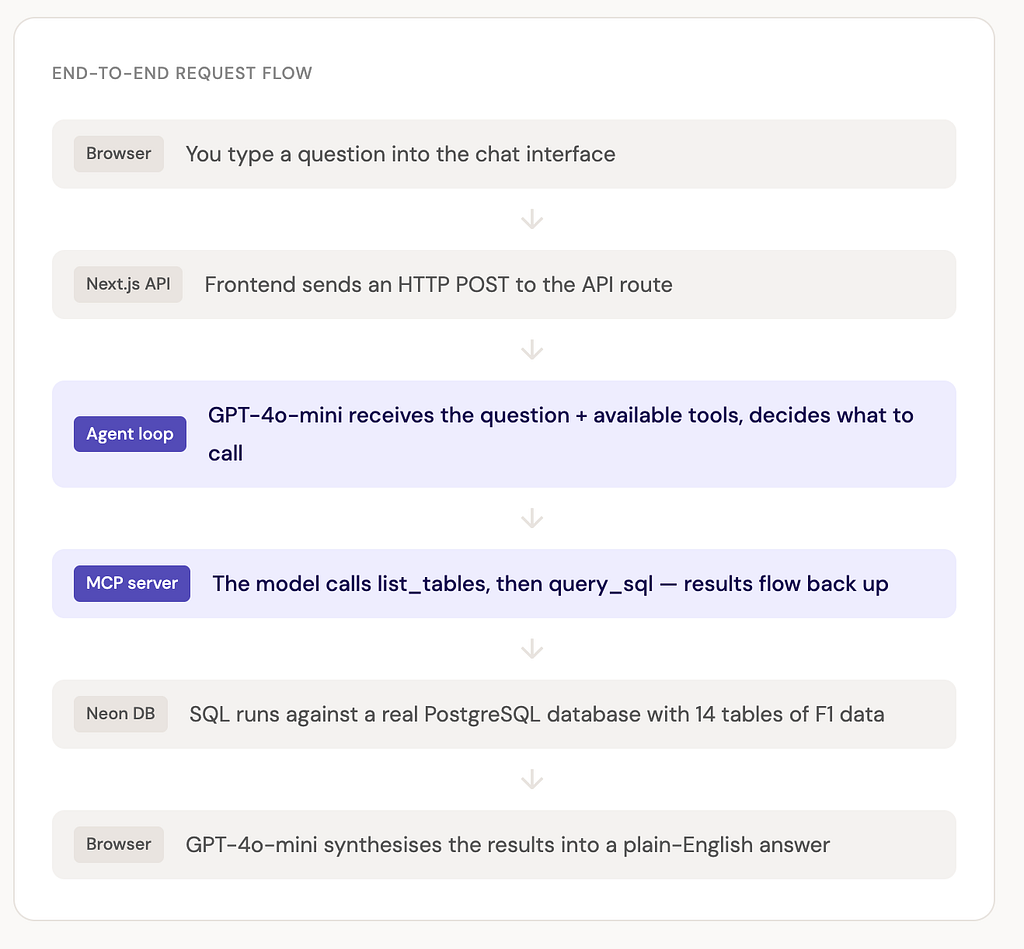
The two highlighted steps are where the interesting things happen. Everything else — the frontend, the database, the hosting — is standard infrastructure. The agent loop and the MCP server are the novel parts, and they are also the parts that most people have never built before.
The database — 14 tables, 75 years of data
The data comes from the Kaggle F1 World Championship dataset, which is well-maintained and covers every race from 1950 to 2024. I loaded it into a Neon serverless PostgreSQL database-free tier, no credit card, spins up in about 30 seconds.
The schema has 14 tables. The core ones the agent uses most are races, results, drivers, and constructors. The interesting ones for complex queries are lap_times, pit_stops, and qualifying. All column names are snake_case, foreign keys use the _id suffix, and the whole thing is standard relational SQL- nothing exotic.
One important design decision: the agent never has the schema hardcoded into its context. Instead, it calls a list_tables tool at the start of every conversation to discover the schema dynamically. This makes the agent more robust — if you change the schema, the agent adapts automatically rather than working from stale hardcoded knowledge.
The two tools — keeping it deliberately simple
This is the part that surprises most people: the agent has exactly two tools. That is it.
list_tables — returns all table names and their full column definitions. The model calls this first to understand what data is available before it tries to write any SQL.
query_sql — executes a read-only SELECT statement against the database and returns the results as formatted text. The model provides the SQL, the server runs it, and sends back the rows.
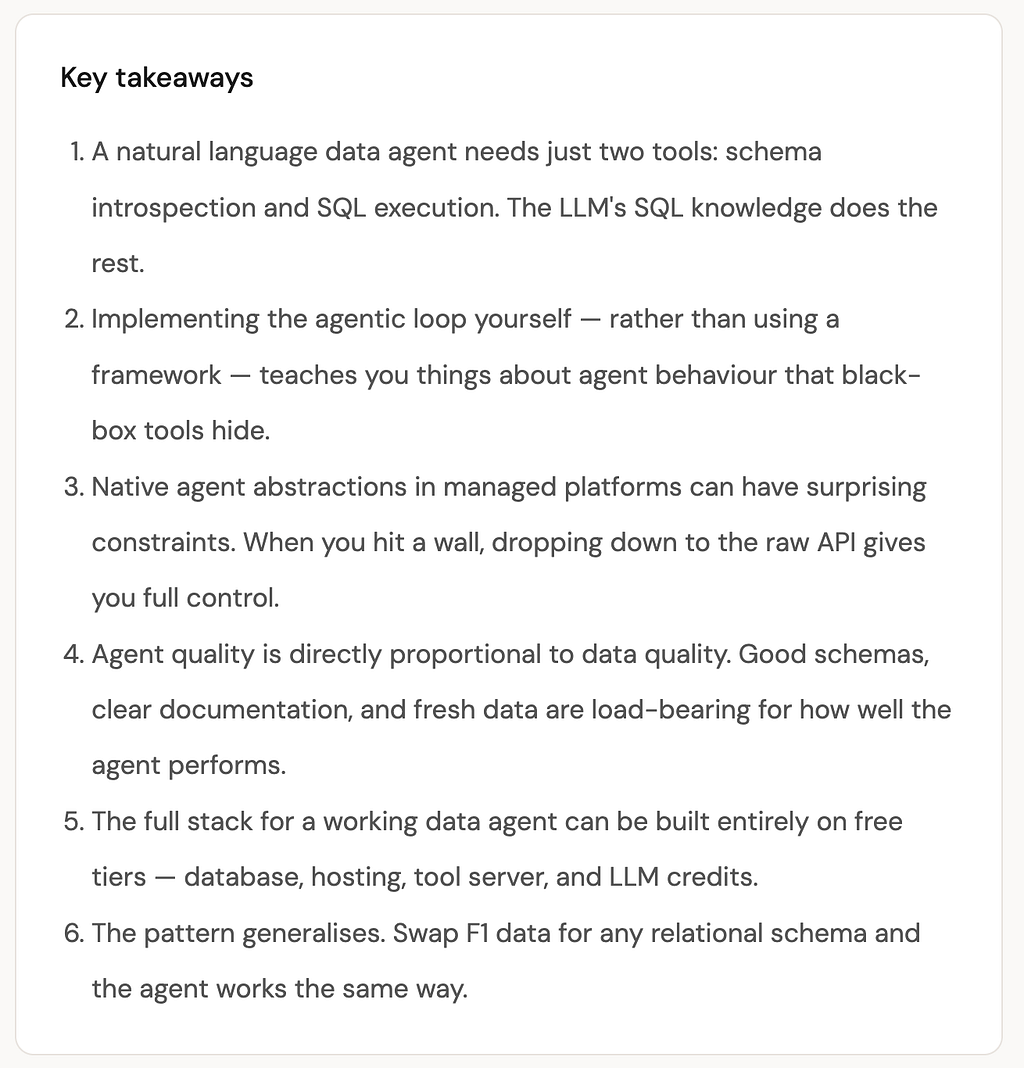
Two tools. No vector search, no semantic layer, no fancy retrieval pipeline. Just schema introspection and SQL execution. It is enough to answer a remarkable range of questions accurately.
The MCP server that exposes these tools is a small Node.js HTTP server. MCP stands for Model Context Protocol — a standard that defines how AI models communicate with external tools. Think of it as a USB standard for AI agents: any MCP-compatible model can connect to any MCP server and use its tools without custom integration code. I deployed it as a Docker container on Render.com’s free tier.
The agentic loop in practice
In the previous article I described the agentic loop in the abstract. Here is what it actually looks like for a real question in this project.
The core loop lives in a single file: frontend/app/api/chat/route.ts. Here is the heart of it:
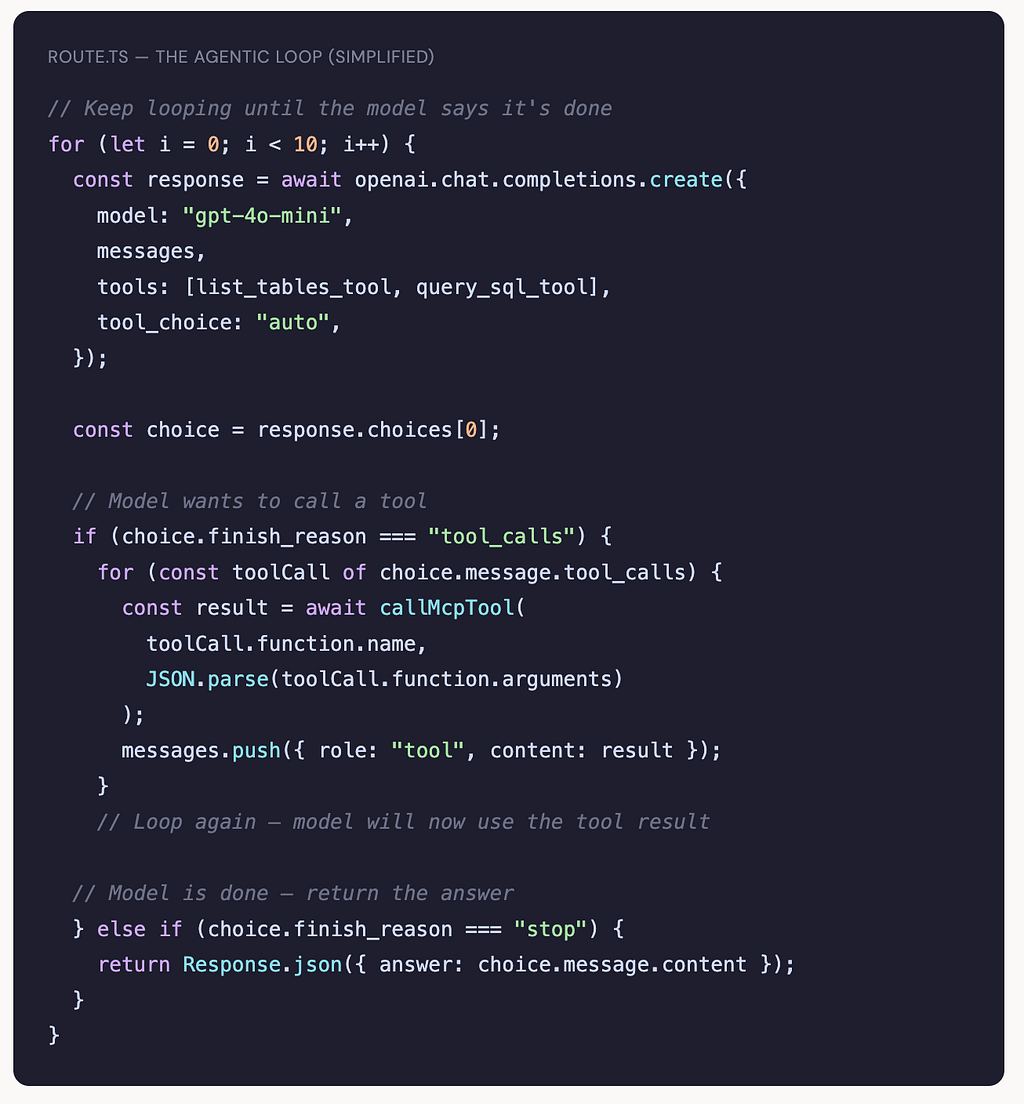
That loop — send messages, check if the model wants a tool, call it, add the result, repeat — is the entire agent runtime. Most questions resolve in three iterations: call list_tables, call query_sql with the right SQL, then write the answer. The loop cap of 10 is a safety net that almost never triggers.
Here is what that looks like from the inside for a real question:
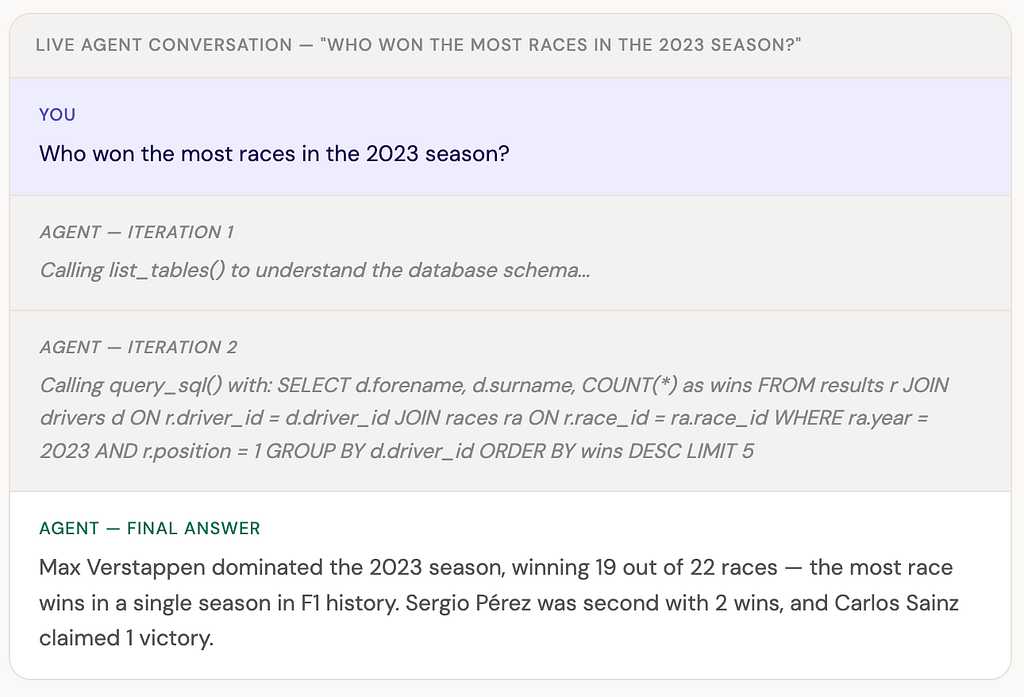
The agent wrote that SQL from scratch. I did not write it. I did not hardcode any F1 knowledge into the system. It discovered the schema, figured out the right joins across three tables, and synthesised the result into a sentence that correctly contextualises Verstappen’s 2023 season as historically significant.
The blocker that changed everything
This is the part I want to be honest about, because tutorials usually skip it.
My original plan was to use Azure AI Foundry’s native agent feature — it has built-in support for threads, runs, and MCP tool integration. I set it up, got it working locally, and then hit a wall: Foundry’s MCP integration requires the application to call a submit_tool_approval endpoint to explicitly permit each tool call. There is no way to bypass this programmatically. The agent would start, reach a tool call, and then sit there waiting for a manual approval that never came.
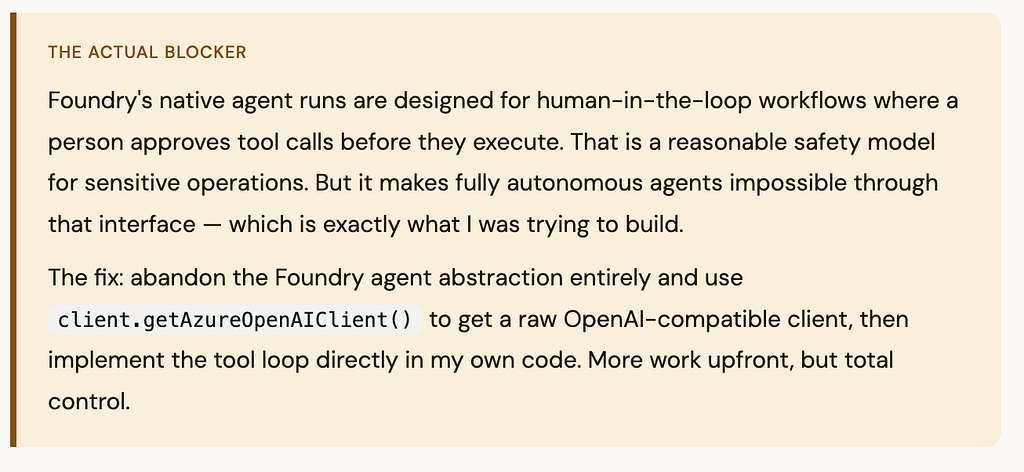
This was frustrating at the time but genuinely valuable in hindsight. Implementing the loop myself meant I understood exactly what was happening at every step. I could log each iteration, inspect the tool calls, and debug failures precisely. Black-box agent frameworks hide this — which is convenient until something goes wrong.
The tech stack — all free tier
One thing I wanted to prove with this project: you can build a real, working AI agent without spending anything. Here is the full stack:
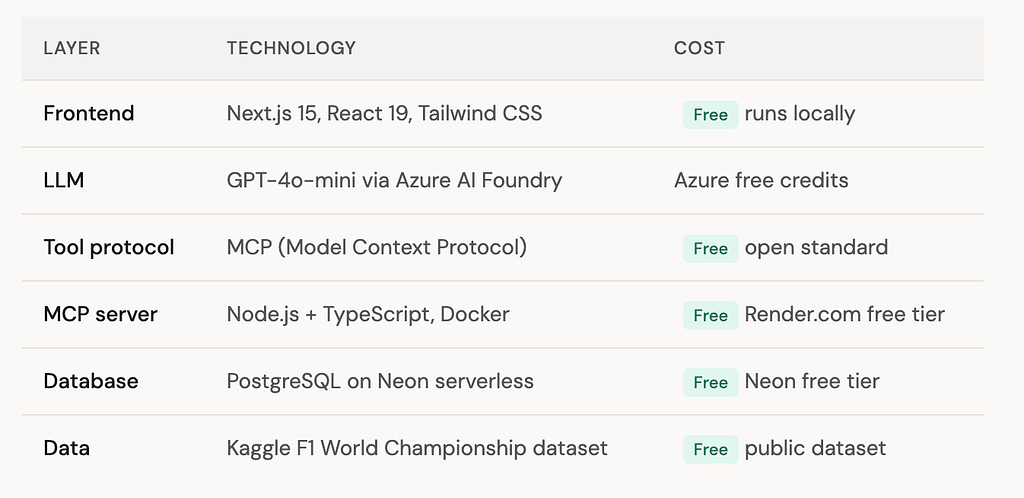
The only real cost is LLM API calls, and GPT-4o-mini is cheap enough that for a side project you can run hundreds of queries before hitting a meaningful bill. The database, server, and hosting are all genuinely free.
What the agent is good at — and where it struggles
After building and using this agent, I have a clear picture of where the pattern works well and where it falls down.
It is excellent at straightforward aggregation questions — wins, championships, race counts, fastest laps. These map cleanly to single SQL queries and GPT-4o-mini handles the joins reliably once it has seen the schema.
It handles comparative questions well too — “which decade had the most different race winners?” requires a more complex query but the model figures it out most of the time, usually with one extra iteration to refine the SQL.
Where it struggles: questions that require multiple separate queries and synthesis across them. “How did Schumacher’s 2000s dominance compare to Verstappen’s 2020s?” is something a human analyst would answer by running several queries and then reasoning across the results. The agent tends to try to answer this in one complex query, which often produces a less accurate result than breaking it down.
The other failure mode is schema ambiguity. When the same concept exists in multiple tables — for example, points appear in both results and driver_standings — the model sometimes picks the wrong one. Better column documentation would help here, which brings us back to why dbt documentation matters for AI agents, as I mentioned in the previous article.
What I would do differently
A few things I would change if I built this again. First, I would add a third tool: get_sample_rows(table_name) that returns a few example rows from any table. When the agent can see actual data values — not just column names — it makes significantly fewer mistakes about data types and value formats.
Second, I would write a system prompt that explicitly lists common multi-table join patterns for this specific schema. The model knows SQL well, but giving it the three or four most common joins upfront reduces the schema-exploration iterations from three down to two for most questions.
Third, I would add structured logging around every tool call and iteration. Debugging agent failures without logs is genuinely painful — you can see the final wrong answer but you cannot see which SQL query produced the wrong intermediate result without tracing back through the conversation history manually.
Why this matters beyond F1
The F1 data is just the context. The pattern — LLM plus schema introspection tool plus SQL execution tool, running in a loop — is directly applicable to any relational database. Your company’s sales data, your product analytics warehouse, your operations database. The two tools stay the same. Only the database changes.
For data engineers, the practical takeaway is this: the infrastructure you already build and maintain — pipelines, warehouses, clean schemas, good documentation — is exactly the foundation that makes agents like this work. The agent is useless against a poorly documented schema with ambiguous column names and stale data. It is remarkably capable against a well-maintained one.
The data engineer’s job does not disappear when agents arrive. It becomes more important, because the quality of the data infrastructure is now directly visible in the quality of the AI’s answers.

I Built an AI Agent on 75 Years of F1 Data — Here is How It Works was originally published in Towards AI on Medium, where people are continuing the conversation by highlighting and responding to this story.