The gap between “it runs in a sandbox” and “it works in production” is where most articles stop. That’s where I try to start.
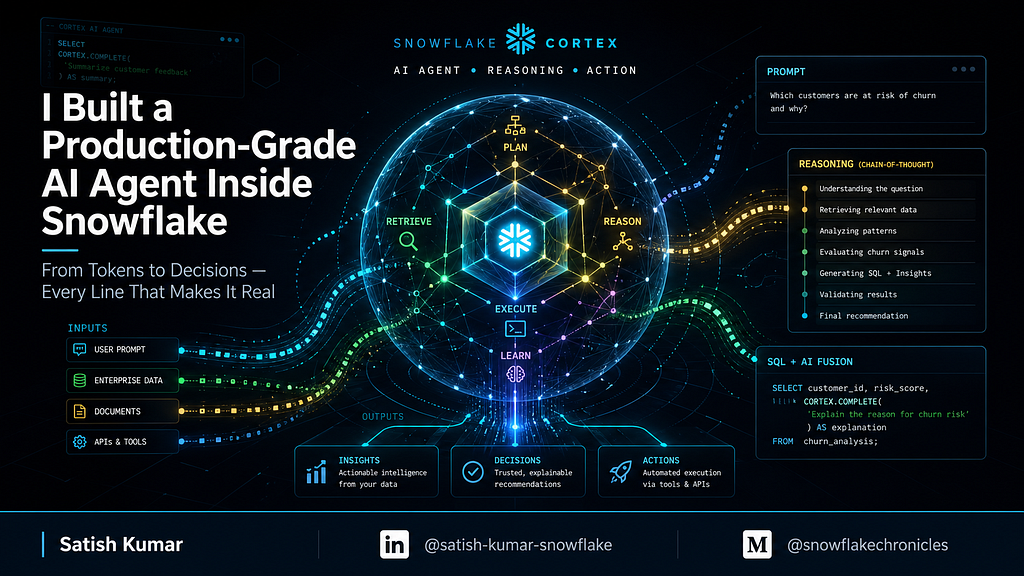
Every Snowflake demo I’ve seen of Cortex Agents looks the same: three SQL statements, a CORTEX.COMPLETE() call, and a screenshot that never made it past a trial account.
What you almost never see is what wraps the agent to make it deployable in an enterprise: scoped identity, row-level access enforcement, audit trails that satisfy a compliance review, lifecycle automation, anomaly detection, and a Streamlit UI that a non-engineer can actually use — all running inside a single Snowflake trial account with zero compute pools, zero external infrastructure.
This article walks through exactly that. All fifteen phases. Every design decision. Every fix that I had to make after the first version broke. No ellipses, no “see GitHub for the rest.”
The Problem with “AI Agent” Demos
Most tutorials hand the agent a warehouse and a database and call it governed. That is not governance.
Real governance means:
- The agent has a verifiable identity with an expiration date
- Its data access is enforced at the policy layer, not trusted from the application
- Every interaction — query, search, output — is logged and queryable
- Cost is capped before it can spiral
- Stale agents expire automatically without manual intervention
If any one of those is missing, what you have is a demo, not a system.
Architecture Overview
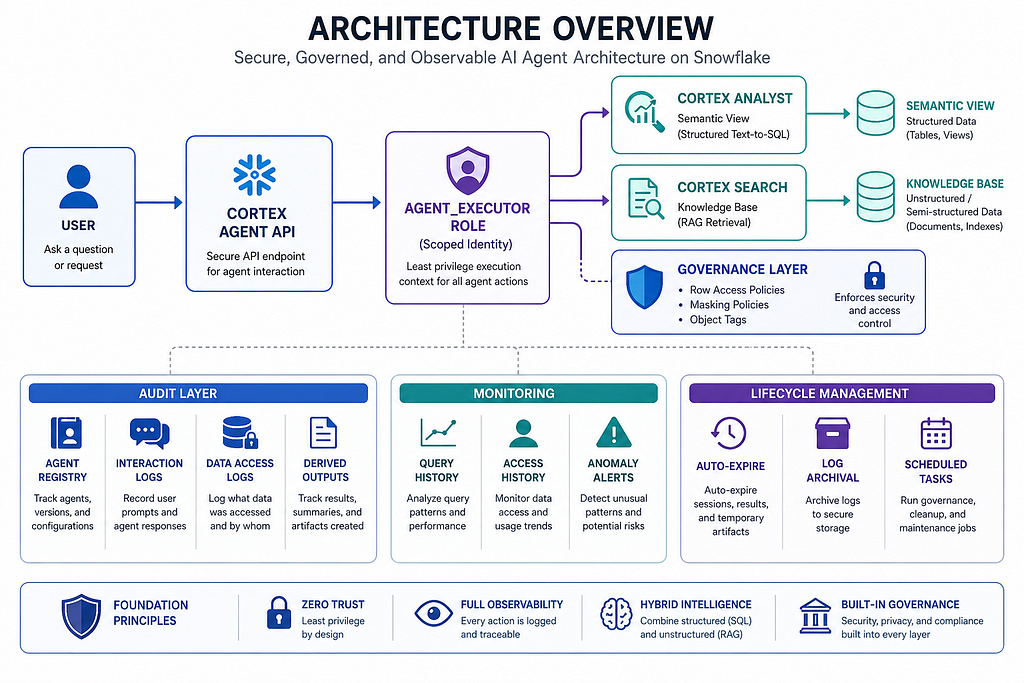
Trial account features used: Cortex AI Functions, Cortex Search Service, Cortex Analyst + Semantic Views, Cortex Agent API, RBAC, Row Access Policies, Masking Policies, Object Tagging, Tasks, Alerts, Access History, Query History, Dedicated Warehouses, Time Travel.
Run phases sequentially. Wait approximately two minutes after Phase 3 before Phase 10 validation — the Cortex Search index build is asynchronous.
Phase 1 — Foundation: Database, Warehouse, and RBAC
The first design decision matters: one database, five schemas, four roles, one warehouse.
-- 1.1 Database and schemas
CREATE OR REPLACE DATABASE AI_AGENT_DB;
CREATE SCHEMA AI_AGENT_DB.RAW;
CREATE SCHEMA AI_AGENT_DB.CURATED;
CREATE SCHEMA AI_AGENT_DB.AGENT;
CREATE SCHEMA AI_AGENT_DB.AUDIT;
CREATE SCHEMA AI_AGENT_DB.GOVERNANCE;

-- 1.2 Dedicated warehouse for agent workloads
CREATE OR REPLACE WAREHOUSE AGENT_WH
  WAREHOUSE_SIZE = 'SMALL'
  AUTO_SUSPEND = 60
  AUTO_RESUME = TRUE
  INITIALLY_SUSPENDED = TRUE
  COMMENT = 'Dedicated warehouse for AI agent workloads';

-- 1.3 Role hierarchy
CREATE ROLE IF NOT EXISTS AGENT_ADMIN;
CREATE ROLE IF NOT EXISTS AGENT_EXECUTOR;   -- the agent's runtime role
CREATE ROLE IF NOT EXISTS AGENT_AUDITOR;    -- compliance read-only
CREATE ROLE IF NOT EXISTS AGENT_USER;       -- end users via Streamlit
GRANT ROLE AGENT_EXECUTOR TO ROLE AGENT_ADMIN;
GRANT ROLE AGENT_USER TO ROLE AGENT_ADMIN;
GRANT ROLE AGENT_ADMIN TO ROLE SYSADMIN;
GRANT ROLE AGENT_AUDITOR TO ROLE SECURITYADMIN;

-- 1.4 Grants - least privilege
-- AGENT_EXECUTOR: read CURATED + run warehouse
GRANT USAGE ON DATABASE AI_AGENT_DB TO ROLE AGENT_EXECUTOR;
GRANT USAGE ON SCHEMA AI_AGENT_DB.CURATED TO ROLE AGENT_EXECUTOR;
GRANT USAGE ON SCHEMA AI_AGENT_DB.AGENT TO ROLE AGENT_EXECUTOR;
GRANT SELECT ON ALL TABLES IN SCHEMA AI_AGENT_DB.CURATED TO ROLE AGENT_EXECUTOR;
GRANT SELECT ON FUTURE TABLES IN SCHEMA AI_AGENT_DB.CURATED TO ROLE AGENT_EXECUTOR;
GRANT USAGE ON WAREHOUSE AGENT_WH TO ROLE AGENT_EXECUTOR;

-- AGENT_AUDITOR: read AUDIT only
GRANT USAGE ON DATABASE AI_AGENT_DB TO ROLE AGENT_AUDITOR;
GRANT USAGE ON SCHEMA AI_AGENT_DB.AUDIT TO ROLE AGENT_AUDITOR;
GRANT SELECT ON ALL TABLES IN SCHEMA AI_AGENT_DB.AUDIT TO ROLE AGENT_AUDITOR;
GRANT SELECT ON FUTURE TABLES IN SCHEMA AI_AGENT_DB.AUDIT TO ROLE AGENT_AUDITOR;

-- AGENT_ADMIN: full database access
GRANT ALL ON DATABASE AI_AGENT_DB TO ROLE AGENT_ADMIN;
GRANT ALL ON ALL SCHEMAS IN DATABASE AI_AGENT_DB TO ROLE AGENT_ADMIN;
GRANT USAGE ON WAREHOUSE AGENT_WH TO ROLE AGENT_ADMIN;

-- AGENT_USER: Streamlit entry point
GRANT USAGE ON DATABASE AI_AGENT_DB TO ROLE AGENT_USER;
GRANT USAGE ON SCHEMA AI_AGENT_DB.AGENT TO ROLE AGENT_USER;
GRANT USAGE ON WAREHOUSE AGENT_WH TO ROLE AGENT_USER;
Schema separation is intentional. CURATED holds the data the agent can read. AGENT holds Cortex services, the semantic view, and the Streamlit app. AUDIT holds every interaction log. GOVERNANCE holds policies and tags. The agent never touches GOVERNANCE directly — the policies are enforced by Snowflake at the engine layer.
AGENT_EXECUTOR is the agent's identity. It can read CURATED tables and use the warehouse. It cannot write, drop, or touch AUDIT directly — the Streamlit app logs via a stored procedure that runs EXECUTE AS CALLER.
Phase 2 — Data Layer: Structured + Unstructured
Two structured tables support the analytics use case. One unstructured table feeds the RAG pipeline.
-- 2.1 Structured tables
CREATE OR REPLACE TABLE AI_AGENT_DB.CURATED.PRODUCTS (
    PRODUCT_ID   NUMBER AUTOINCREMENT,
    PRODUCT_NAME VARCHAR(200),
    CATEGORY     VARCHAR(100),
    PRICE        NUMBER(10,2),
    REGION       VARCHAR(50),
    LAUNCH_DATE  DATE,
    STATUS       VARCHAR(20) DEFAULT 'ACTIVE',
    CREATED_AT   TIMESTAMP_NTZ DEFAULT CURRENT_TIMESTAMP()
);

CREATE OR REPLACE TABLE AI_AGENT_DB.CURATED.SALES (
    SALE_ID          NUMBER AUTOINCREMENT,
    PRODUCT_ID       NUMBER,
    CUSTOMER_SEGMENT VARCHAR(50),
    REGION           VARCHAR(50),
    SALE_DATE        DATE,
    QUANTITY         NUMBER,
    REVENUE          NUMBER(12,2),
    CREATED_AT       TIMESTAMP_NTZ DEFAULT CURRENT_TIMESTAMP()
);

-- 2.2 Unstructured knowledge base (for RAG)
CREATE OR REPLACE TABLE AI_AGENT_DB.CURATED.KNOWLEDGE_BASE (
    DOC_ID       NUMBER AUTOINCREMENT,
    TITLE        VARCHAR(500),
    CONTENT      VARCHAR(16777216),
    CATEGORY     VARCHAR(100),
    SOURCE       VARCHAR(200),
    AUTHOR       VARCHAR(100),
    CREATED_DATE DATE,
    LAST_UPDATED TIMESTAMP_NTZ DEFAULT CURRENT_TIMESTAMP()
);

-- 2.3 Seed product catalog
INSERT INTO AI_AGENT_DB.CURATED.PRODUCTS
    (PRODUCT_NAME, CATEGORY, PRICE, REGION, LAUNCH_DATE)
VALUES
    ('DataVault Pro',  'Storage',          299.99, 'North America', '2024-01-15'),
    ('QueryEngine X',  'Analytics',        499.99, 'EMEA',          '2024-03-01'),
    ('StreamFlow',     'Data Engineering', 199.99, 'APAC',          '2024-06-10'),
    ('SecureConnect',  'Security',         399.99, 'North America', '2024-02-20'),
    ('AI Insights',    'AI/ML',            699.99, 'Global',        '2024-09-01');

-- 2.4 Generate 500 random sales rows
INSERT INTO AI_AGENT_DB.CURATED.SALES
    (PRODUCT_ID, CUSTOMER_SEGMENT, REGION, SALE_DATE, QUANTITY, REVENUE)
SELECT
    UNIFORM(1, 5, RANDOM()),
    CASE UNIFORM(1,3,RANDOM())
        WHEN 1 THEN 'Enterprise'
        WHEN 2 THEN 'Mid-Market'
        ELSE 'SMB'
    END,
    CASE UNIFORM(1,4,RANDOM())
        WHEN 1 THEN 'North America'
        WHEN 2 THEN 'EMEA'
        WHEN 3 THEN 'APAC'
        ELSE 'LATAM'
    END,
    DATEADD(DAY, -UNIFORM(1,365,RANDOM()), CURRENT_DATE()),
    UNIFORM(1, 50, RANDOM()),
    UNIFORM(1000, 50000, RANDOM())
FROM TABLE(GENERATOR(ROWCOUNT => 500));

-- 2.5 Seed knowledge base documents
INSERT INTO AI_AGENT_DB.CURATED.KNOWLEDGE_BASE
    (TITLE, CONTENT, CATEGORY, SOURCE, AUTHOR, CREATED_DATE)
VALUES
    (
        'Agent Identity Best Practices',
        'AI agents in production must have verifiable identities. Key principles: '
        '1) Identity at creation - define rights before execution. '
        '2) Scoped access with expiration. '
        '3) Governance on outputs, not just inputs. '
        '4) Lifecycle tracking that outlasts the agent. '
        '5) Human oversight as periodic audit.',
        'Governance', 'Internal Policy', 'Security Team', '2025-01-15'
    ),
    (
        'Data Access Policy for AI Agents',
        'All AI agents must operate under dedicated service roles with least-privilege access. '
        'Agents must not inherit user permissions directly. '
        'Access must be time-bounded and auditable. '
        'Derived insights from combined data sources require additional authorization.',
        'Security', 'Compliance', 'CISO Office', '2025-02-01'
    ),
    (
        'Product Overview - DataVault Pro',
        'DataVault Pro is our enterprise storage solution supporting petabyte-scale workloads. '
        'Features include automatic encryption, cross-region replication, and zero-copy cloning. '
        'Ideal for regulated industries requiring SOC2 compliance.',
        'Product', 'Product Team', 'PM Team', '2024-12-01'
    );
The CONTENT column holds free-text policy documents and product overviews — this is what Cortex Search embeds and retrieves.
Note AUTHOR: this column gets a masking policy applied in Phase 6 because names are PII.
Sales data is generated randomly across 500 rows using GENERATOR(). In a real environment this would be replaced by a pipeline — Snowpipe, Dynamic Tables, or a task-driven transform. For this architecture, the shape of the data matters more than the rows.
Phase 3 — Cortex Search: RAG Knowledge Retrieval
CREATE OR REPLACE CORTEX SEARCH SERVICE AI_AGENT_DB.AGENT.KNOWLEDGE_SEARCH
    ON CONTENT
    ATTRIBUTES CATEGORY, SOURCE
    WAREHOUSE = AGENT_WH
    TARGET_LAG = '1 hour'
AS (
    SELECT
        DOC_ID,
        TITLE,
        CONTENT,
        CATEGORY,
        SOURCE,
        AUTHOR,
        CREATED_DATE
    FROM AI_AGENT_DB.CURATED.KNOWLEDGE_BASE
);
ON CONTENT identifies the column that gets embedded and indexed. ATTRIBUTES makes CATEGORY and SOURCE available as filters — you can scope a search to CATEGORY = 'Governance' without affecting the embedding logic. TARGET_LAG = '1 hour' means the index will be at most one hour stale. Each refresh consumes credits from AGENT_WH, so tune the lag to your update frequency.
After creation, wait approximately two minutes before querying. The indexing state must show ACTIVE before SEARCH_PREVIEW will return results.
Validate before proceeding to Phase 4:
SHOW CORTEX SEARCH SERVICES IN SCHEMA AI_AGENT_DB.AGENT;
-- Required: INDEXING_STATE = 'ACTIVE', SERVING_STATE = 'ACTIVE'
Phase 4 — Semantic View: Cortex Analyst for Text-to-SQL
Cortex Analyst converts natural language into SQL against your structured data. It needs a semantic model — a YAML definition describing your tables, columns, metrics, relationships, and verified queries. The full model is below with no abbreviation.
CALL SYSTEM$CREATE_SEMANTIC_VIEW_FROM_YAML(
    'AI_AGENT_DB.AGENT',
    $$
name: sales_analytics
description: "Sales analytics semantic view for AI agent"
tables:
  - name: products
    description: "Product catalog"
    base_table:
      database: AI_AGENT_DB
      schema: CURATED
      table: PRODUCTS
    primary_key:
      columns:
        - PRODUCT_ID
    dimensions:
      - name: product_name
        synonyms: ["product", "item"]
        description: "Name of the product"
        expr: PRODUCT_NAME
        data_type: VARCHAR
      - name: category
        synonyms: ["product category", "type"]
        description: "Product category"
        expr: CATEGORY
        data_type: VARCHAR
        is_enum: true
      - name: region
        synonyms: ["market", "geography"]
        description: "Product region"
        expr: REGION
        data_type: VARCHAR
        is_enum: true
    time_dimensions:
      - name: launch_date
        description: "Product launch date"
        expr: LAUNCH_DATE
        data_type: DATE
    facts:
      - name: price
        description: "Product price"
        expr: PRICE
        data_type: NUMBER
  - name: sales
    description: "Sales transactions"
    base_table:
      database: AI_AGENT_DB
      schema: CURATED
      table: SALES
    dimensions:
      - name: customer_segment
        synonyms: ["segment", "customer type"]
        description: "Customer market segment"
        expr: CUSTOMER_SEGMENT
        data_type: VARCHAR
        is_enum: true
      - name: sale_region
        synonyms: ["sales region", "territory"]
        description: "Region where sale occurred"
        expr: REGION
        data_type: VARCHAR
        is_enum: true
    time_dimensions:
      - name: sale_date
        synonyms: ["order date", "transaction date"]
        description: "Date of sale"
        expr: SALE_DATE
        data_type: DATE
    facts:
      - name: quantity
        description: "Units sold"
        expr: QUANTITY
        data_type: NUMBER
      - name: revenue
        description: "Revenue from sale"
        expr: REVENUE
        data_type: NUMBER
    metrics:
      - name: total_revenue
        synonyms: ["total sales", "revenue"]
        description: "Sum of all revenue"
        expr: SUM(REVENUE)
      - name: total_units_sold
        synonyms: ["units", "quantity sold"]
        description: "Total units sold"
        expr: SUM(QUANTITY)
      - name: avg_order_value
        synonyms: ["AOV", "average sale"]
        description: "Average revenue per transaction"
        expr: AVG(REVENUE)
      - name: transaction_count
        synonyms: ["number of sales", "order count"]
        description: "Total number of transactions"
        expr: COUNT(*)
relationships:
  - name: sales_to_products
    left_table: sales
    right_table: products
    relationship_columns:
      - left_column: PRODUCT_ID
        right_column: PRODUCT_ID
verified_queries:
  - name: revenue_by_region
    question: "What is the total revenue by region?"
    sql: |
      SELECT REGION, SUM(REVENUE) AS TOTAL_REVENUE
      FROM AI_AGENT_DB.CURATED.SALES
      GROUP BY REGION
      ORDER BY TOTAL_REVENUE DESC
    use_as_onboarding_question: true
  - name: top_products
    question: "What are the top selling products?"
    sql: |
      SELECT p.PRODUCT_NAME,
             SUM(s.REVENUE)  AS TOTAL_REVENUE,
             SUM(s.QUANTITY) AS TOTAL_UNITS
      FROM AI_AGENT_DB.CURATED.SALES s
      JOIN AI_AGENT_DB.CURATED.PRODUCTS p ON s.PRODUCT_ID = p.PRODUCT_ID
      GROUP BY p.PRODUCT_NAME
      ORDER BY TOTAL_REVENUE DESC
    use_as_onboarding_question: true
    $$
);
The verified_queries section is important. These are golden examples that anchor the model's SQL generation — they improve accuracy on common questions and serve as onboarding prompts in the UI.
Note: SYSTEM$CREATE_SEMANTIC_VIEW_FROM_YAML may not be GA in all trial regions. If it fails, go to Snowsight → AI & ML → Cortex Analyst → Semantic Models and build the model visually or upload the YAML directly.
Phase 5 — Audit Infrastructure: The Piece Everyone Skips
This is the section that separates a demo from a deployable system. Four tables cover every dimension of agent observability.
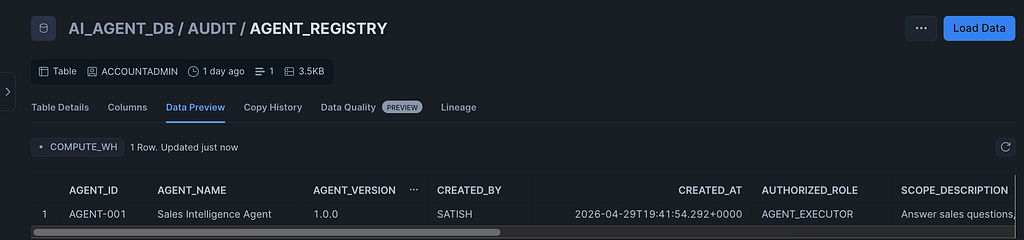
-- 5.1 Agent registry — identity and authorization record for every agent
CREATE OR REPLACE TABLE AI_AGENT_DB.AUDIT.AGENT_REGISTRY (
    AGENT_ID               VARCHAR(100) PRIMARY KEY,
    AGENT_NAME             VARCHAR(200),
    AGENT_VERSION          VARCHAR(50),
    CREATED_BY             VARCHAR(100),
    CREATED_AT             TIMESTAMP_NTZ DEFAULT CURRENT_TIMESTAMP(),
    AUTHORIZED_ROLE        VARCHAR(100),
    SCOPE_DESCRIPTION      VARCHAR(1000),
    DATA_ACCESS_BOUNDARIES VARCHAR(2000),
    EXPIRATION_DATE        TIMESTAMP_NTZ,
    STATUS                 VARCHAR(20) DEFAULT 'ACTIVE'
);

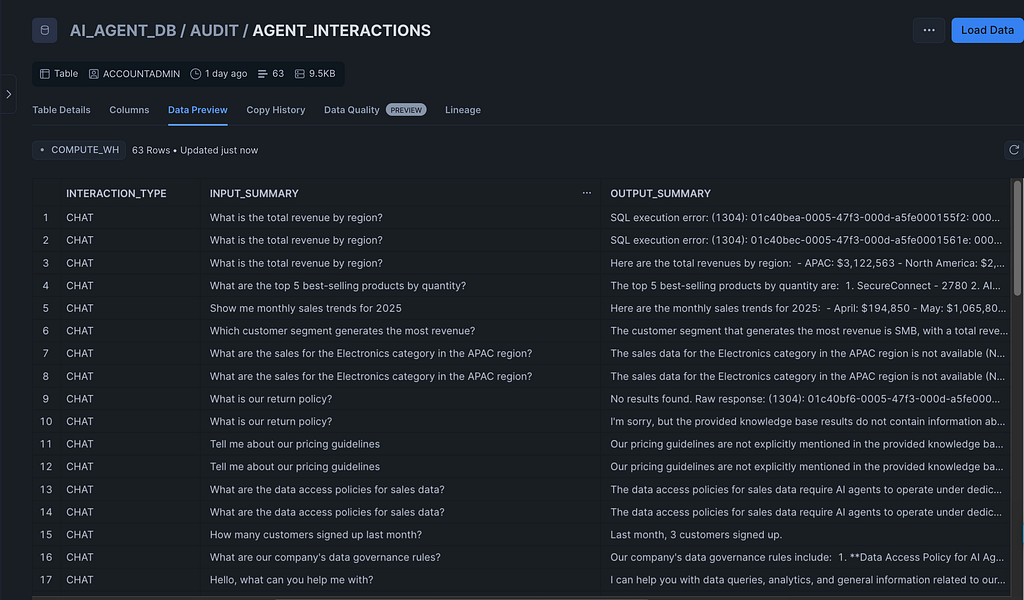
-- 5.2 Interaction log - every question and answer
CREATE OR REPLACE TABLE AI_AGENT_DB.AUDIT.AGENT_INTERACTIONS (
    INTERACTION_ID        NUMBER AUTOINCREMENT,
    AGENT_ID              VARCHAR(100),
    SESSION_ID            VARCHAR(100),
    INVOKING_USER         VARCHAR(100),
    INVOKING_ROLE         VARCHAR(100),
    INTERACTION_TYPE      VARCHAR(50),
    INPUT_SUMMARY         VARCHAR(2000),
    OUTPUT_SUMMARY        VARCHAR(4000),
    DATA_SOURCES_ACCESSED VARIANT,
    TOKENS_USED           NUMBER,
    LATENCY_MS            NUMBER,
    STATUS                VARCHAR(20),
    ERROR_MESSAGE         VARCHAR(2000),
    CREATED_AT            TIMESTAMP_NTZ DEFAULT CURRENT_TIMESTAMP()
);

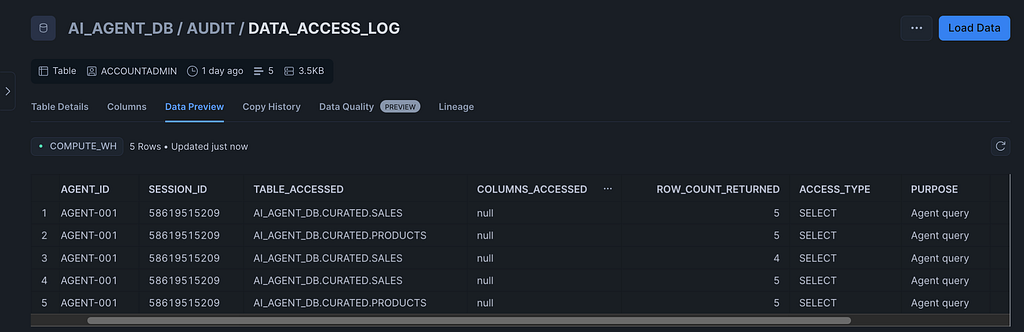
-- 5.3 Data access audit trail - which tables, how many rows
CREATE OR REPLACE TABLE AI_AGENT_DB.AUDIT.DATA_ACCESS_LOG (
    LOG_ID             NUMBER AUTOINCREMENT,
    AGENT_ID           VARCHAR(100),
    SESSION_ID         VARCHAR(100),
    TABLE_ACCESSED     VARCHAR(500),
    COLUMNS_ACCESSED   VARIANT,
    ROW_COUNT_RETURNED NUMBER,
    ACCESS_TYPE        VARCHAR(50),
    PURPOSE            VARCHAR(500),
    TIMESTAMP          TIMESTAMP_NTZ DEFAULT CURRENT_TIMESTAMP()
);

-- 5.4 Derived output tracking - for synthesized multi-source insights
CREATE OR REPLACE TABLE AI_AGENT_DB.AUDIT.DERIVED_OUTPUTS (
    OUTPUT_ID           NUMBER AUTOINCREMENT,
    AGENT_ID            VARCHAR(100),
    SESSION_ID          VARCHAR(100),
    SOURCE_TABLES       VARIANT,
    OUTPUT_TYPE         VARCHAR(50),
    OUTPUT_HASH         VARCHAR(64),     -- detect repeated extraction attempts
    OUTPUT_PREVIEW      VARCHAR(2000),
    AUTHORIZATION_SCOPE VARCHAR(500),
    FLAGGED_FOR_REVIEW  BOOLEAN DEFAULT FALSE,
    CREATED_AT          TIMESTAMP_NTZ DEFAULT CURRENT_TIMESTAMP()
);

-- 5.5 Register AGENT-001
INSERT INTO AI_AGENT_DB.AUDIT.AGENT_REGISTRY
    (AGENT_ID, AGENT_NAME, AGENT_VERSION, CREATED_BY, AUTHORIZED_ROLE,
     SCOPE_DESCRIPTION, DATA_ACCESS_BOUNDARIES, EXPIRATION_DATE)
VALUES (
    'AGENT-001',
    'Sales Intelligence Agent',
    '1.0.0',
    CURRENT_USER(),
    'AGENT_EXECUTOR',
    'Answer sales questions, provide product info, generate revenue reports',
    '{"allowed_schemas":["AI_AGENT_DB.CURATED"],"denied_columns":["SSN","CREDIT_CARD"],"max_rows":10000}',
    DATEADD(DAY, 30, CURRENT_TIMESTAMP())
);
DATA_ACCESS_BOUNDARIES is a VARIANT column holding a JSON document that describes what the agent is allowed to access. This is declarative metadata — Snowflake does not enforce it automatically. Enforcement happens at the policy layer (Phase 6) and at the application layer via the SQL safety validator (Phase 11).
OUTPUT_HASH in the derived outputs table allows you to detect duplicate outputs across sessions — a useful signal for catching prompt injection attacks that repeatedly try to extract the same dataset.
Phase 6 — Data Governance: Row Access, Masking, Tags
These policies are enforced at the Snowflake engine layer. They apply regardless of what the application does.
-- 6.1 Row Access Policy — restricts which rows AGENT_EXECUTOR can see
CREATE OR REPLACE ROW ACCESS POLICY AI_AGENT_DB.GOVERNANCE.AGENT_ROW_POLICY
AS (REGION VARCHAR) RETURNS BOOLEAN ->
    CASE
        WHEN CURRENT_ROLE() = 'AGENT_EXECUTOR'
            THEN REGION IN ('North America', 'EMEA', 'APAC', 'LATAM', 'Global')
        ELSE TRUE
    END;

-- 6.2 Masking Policy - redacts PII for agent and user roles
CREATE OR REPLACE MASKING POLICY AI_AGENT_DB.GOVERNANCE.PII_MASK
AS (VAL VARCHAR) RETURNS VARCHAR ->
    CASE
        WHEN CURRENT_ROLE() IN ('AGENT_EXECUTOR', 'AGENT_USER')
            THEN '***MASKED***'
        ELSE VAL
    END;

-- 6.3 Tags for metadata governance
CREATE OR REPLACE TAG AI_AGENT_DB.GOVERNANCE.SENSITIVITY
    ALLOWED_VALUES 'PUBLIC', 'INTERNAL', 'CONFIDENTIAL', 'RESTRICTED';
CREATE OR REPLACE TAG AI_AGENT_DB.GOVERNANCE.AGENT_ACCESSIBLE
    ALLOWED_VALUES 'YES', 'NO';

-- 6.4 Tag the tables
ALTER TABLE AI_AGENT_DB.CURATED.PRODUCTS
    SET TAG AI_AGENT_DB.GOVERNANCE.AGENT_ACCESSIBLE = 'YES';
ALTER TABLE AI_AGENT_DB.CURATED.SALES
    SET TAG AI_AGENT_DB.GOVERNANCE.AGENT_ACCESSIBLE = 'YES';
ALTER TABLE AI_AGENT_DB.CURATED.KNOWLEDGE_BASE
    SET TAG AI_AGENT_DB.GOVERNANCE.SENSITIVITY = 'INTERNAL';

-- 6.5 Attach the Row Access Policy to tables
--     A policy that exists but is never attached does nothing.
--     This is a silent failure - no error, no protection.
ALTER TABLE AI_AGENT_DB.CURATED.PRODUCTS
    ADD ROW ACCESS POLICY AI_AGENT_DB.GOVERNANCE.AGENT_ROW_POLICY ON (REGION);
ALTER TABLE AI_AGENT_DB.CURATED.SALES
    ADD ROW ACCESS POLICY AI_AGENT_DB.GOVERNANCE.AGENT_ROW_POLICY ON (REGION);

-- 6.6 Apply masking to the AUTHOR column (names are PII)
ALTER TABLE AI_AGENT_DB.CURATED.KNOWLEDGE_BASE
    MODIFY COLUMN AUTHOR
    SET MASKING POLICY AI_AGENT_DB.GOVERNANCE.PII_MASK;
Phase 7 — Cortex Agent Access
-- Grant the database role that enables Cortex LLM access for AGENT_EXECUTOR
GRANT DATABASE ROLE SNOWFLAKE.CORTEX_USER TO ROLE AGENT_EXECUTOR;

-- Cortex Agent REST API (for external application integration):
-- POST /api/v2/cortex/agent:run
-- Tools: cortex_analyst_text_to_sql (semantic view), cortex_search (knowledge)
-- Role:  AGENT_EXECUTOR (scoped identity - all policies inherited automatically)
The Cortex Agent REST API is the production orchestration layer. For the Streamlit-based implementation in Phase 11, get_active_session() inherits the role of the logged-in user — ensure that user has AGENT_EXECUTOR granted before launching the app.
Phase 8 — Monitoring and Observability
-- 8.1 All queries run by the agent role (30-day rolling window)
CREATE OR REPLACE VIEW AI_AGENT_DB.AUDIT.AGENT_QUERY_HISTORY AS
SELECT
    QUERY_ID,
    USER_NAME,
    ROLE_NAME,
    QUERY_TEXT,
    DATABASE_NAME,
    SCHEMA_NAME,
    EXECUTION_STATUS,
    TOTAL_ELAPSED_TIME,
    ROWS_PRODUCED,
    START_TIME
FROM SNOWFLAKE.ACCOUNT_USAGE.QUERY_HISTORY
WHERE ROLE_NAME = 'AGENT_EXECUTOR'
    AND START_TIME >= DATEADD(DAY, -30, CURRENT_TIMESTAMP())
ORDER BY START_TIME DESC;

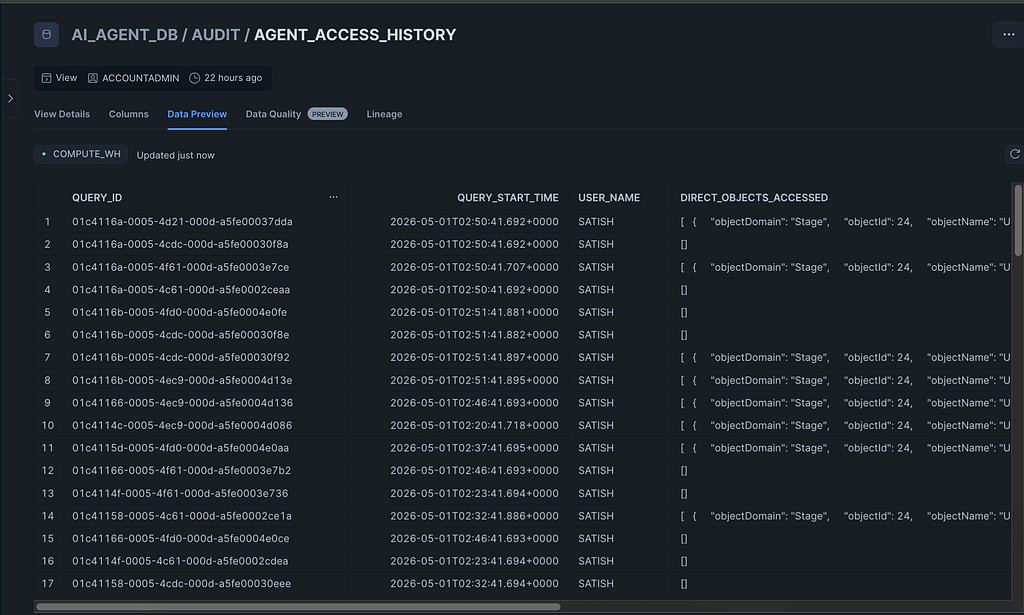
-- 8.2 Object-level access history
--     The original version joined against GRANTS_TO_ROLES with a subquery
--     that returned zero rows in practice. Simplified to filter on CURRENT_USER().
CREATE OR REPLACE VIEW AI_AGENT_DB.AUDIT.AGENT_ACCESS_HISTORY AS
SELECT
    QUERY_ID,
    QUERY_START_TIME,
    USER_NAME,
    DIRECT_OBJECTS_ACCESSED,
    BASE_OBJECTS_ACCESSED,
    OBJECTS_MODIFIED
FROM SNOWFLAKE.ACCOUNT_USAGE.ACCESS_HISTORY
WHERE QUERY_START_TIME >= DATEADD(DAY, -30, CURRENT_TIMESTAMP())
    AND USER_NAME = CURRENT_USER();

-- 8.3 Anomaly alert - fires every 6 hours if >1000 interactions detected
CREATE OR REPLACE ALERT AI_AGENT_DB.AUDIT.AGENT_ANOMALY_ALERT
    WAREHOUSE = AGENT_WH
    SCHEDULE = 'USING CRON 0 */6 * * * America/New_York'
    IF (EXISTS (
        SELECT 1
        FROM AI_AGENT_DB.AUDIT.AGENT_INTERACTIONS
        WHERE CREATED_AT >= DATEADD(HOUR, -6, CURRENT_TIMESTAMP())
        GROUP BY AGENT_ID
        HAVING COUNT(*) > 1000
    ))
    THEN
        INSERT INTO AI_AGENT_DB.AUDIT.AGENT_INTERACTIONS
            (AGENT_ID, SESSION_ID, INVOKING_USER, INTERACTION_TYPE, INPUT_SUMMARY, STATUS)
        VALUES
            ('SYSTEM', 'ALERT', 'SYSTEM', 'ALERT',
             'Anomalous activity: >1000 interactions in 6 hours', 'FLAGGED');
ALTER ALERT AI_AGENT_DB.AUDIT.AGENT_ANOMALY_ALERT RESUME;
Phase 9 — Lifecycle Management
-- 9.1 Auto-expire stale agent registrations (nightly at midnight ET)
CREATE OR REPLACE TASK AI_AGENT_DB.GOVERNANCE.EXPIRE_AGENTS
    WAREHOUSE = AGENT_WH
    SCHEDULE = 'USING CRON 0 0 * * * America/New_York'
AS
    UPDATE AI_AGENT_DB.AUDIT.AGENT_REGISTRY
    SET STATUS = 'EXPIRED'
    WHERE EXPIRATION_DATE < CURRENT_TIMESTAMP()
        AND STATUS = 'ACTIVE';

ALTER TASK AI_AGENT_DB.GOVERNANCE.EXPIRE_AGENTS RESUME;

-- 9.2 Archive audit logs, then delete from hot table
--     The original version used a bare DELETE - permanently destroying records,
--     which is wrong for any compliance framework.
--     This version archives to a cold table first (runs Sunday 02:00 ET).
CREATE TABLE IF NOT EXISTS AI_AGENT_DB.AUDIT.AGENT_INTERACTIONS_ARCHIVE
    LIKE AI_AGENT_DB.AUDIT.AGENT_INTERACTIONS;
CREATE OR REPLACE TASK AI_AGENT_DB.GOVERNANCE.ARCHIVE_AUDIT_LOGS
    WAREHOUSE = AGENT_WH
    SCHEDULE = 'USING CRON 0 2 * * 0 America/New_York'
AS
BEGIN
    INSERT INTO AI_AGENT_DB.AUDIT.AGENT_INTERACTIONS_ARCHIVE
        SELECT * FROM AI_AGENT_DB.AUDIT.AGENT_INTERACTIONS
        WHERE CREATED_AT < DATEADD(DAY, -90, CURRENT_TIMESTAMP());
    DELETE FROM AI_AGENT_DB.AUDIT.AGENT_INTERACTIONS
        WHERE CREATED_AT < DATEADD(DAY, -90, CURRENT_TIMESTAMP());
END;
ALTER TASK AI_AGENT_DB.GOVERNANCE.ARCHIVE_AUDIT_LOGS RESUME;

-- 9.3 Account-level execute grants - missing from the original, causing
--     ALTER ALERT/TASK RESUME to succeed silently but never actually execute
GRANT EXECUTE ALERT ON ACCOUNT TO ROLE AGENT_ADMIN;
GRANT EXECUTE TASK  ON ACCOUNT TO ROLE AGENT_ADMIN;
Phase 10 — Validation
-- 10.1 Test Cortex Search (run after ~2 min from Phase 3)
SELECT PARSE_JSON(
    SNOWFLAKE.CORTEX.SEARCH_PREVIEW(
        'AI_AGENT_DB.AGENT.KNOWLEDGE_SEARCH',
        '{
            "query": "What are the agent identity best practices?",
            "columns": ["TITLE", "CONTENT", "CATEGORY"],
            "limit": 3
        }'
    )
)['results'] AS SEARCH_RESULTS;

-- 10.2 Verify agent is registered
SELECT * FROM AI_AGENT_DB.AUDIT.AGENT_REGISTRY;

-- 10.3 Verify governance policies are attached
SELECT * FROM SNOWFLAKE.ACCOUNT_USAGE.POLICY_REFERENCES
WHERE REF_DATABASE_NAME = 'AI_AGENT_DB';
If SEARCH_RESULTS returns populated JSON, the RAG layer is live. If the policy references query returns rows for both PRODUCTS and SALES, governance is active. If either is empty, the corresponding phase did not complete correctly.
Phase 11 — Streamlit App: Infrastructure and Stored Procedures
The Streamlit app lives in a named stage and is deployed as a Snowflake-native Streamlit object. Set up the stage, helper procedures, and Streamlit object here. The Python application code follows in the next section.
-- 11.1 Stage for Streamlit files
CREATE STAGE IF NOT EXISTS AI_AGENT_DB.AGENT.STREAMLIT_STAGE
    DIRECTORY = (ENABLE = TRUE);

-- 11.2 Helper: upload any Python string directly to the stage.
--      Using a stored procedure avoids the dollar-sign escaping issues
--      that arise when embedding large Python files inside a SQL $$ block.
CREATE OR REPLACE PROCEDURE AI_AGENT_DB.AGENT.UPLOAD_TO_STAGE(
    content    STRING,
    stage_path STRING
)
RETURNS STRING
LANGUAGE PYTHON
RUNTIME_VERSION = '3.11'
PACKAGES = ('snowflake-snowpark-python')
HANDLER = 'run'
EXECUTE AS CALLER
AS
$$
import io
def run(session, content, stage_path):
    input_stream = io.BytesIO(content.encode('utf-8'))
    session.file.put_stream(
        input_stream,
        stage_path,
        auto_compress=False,
        overwrite=True
    )
    return 'Uploaded to ' + stage_path
$$;

-- 11.3 Email notification integration
CREATE OR REPLACE NOTIFICATION INTEGRATION AGENT_EMAIL_INTEGRATION
    TYPE = EMAIL
    ENABLED = TRUE
    ALLOWED_RECIPIENTS = ('your-email@example.com');

-- 11.4 Email-sending stored procedure
--      Streamlit calls this procedure rather than SYSTEM$SEND_EMAIL directly,
--      because SYSTEM$SEND_EMAIL does not support parameterized inputs in
--      warehouse-runtime Python.
CREATE OR REPLACE PROCEDURE AI_AGENT_DB.AGENT.SEND_CHAT_EMAIL(
    recipient    STRING,
    subject_line STRING,
    body_html    STRING
)
RETURNS STRING
LANGUAGE PYTHON
RUNTIME_VERSION = '3.11'
PACKAGES = ('snowflake-snowpark-python')
HANDLER = 'run'
EXECUTE AS CALLER
AS
$$
def run(session, recipient, subject_line, body_html):
    try:
        session.sql("""
            CALL SYSTEM$SEND_EMAIL(
                'AGENT_EMAIL_INTEGRATION',
                ?,
                ?,
                ?,
                'text/html'
            )
        """, params=[recipient, subject_line, body_html]).collect()
        return 'sent'
    except Exception as e:
        return 'error: ' + str(e)
$$;

-- 11.5 In-place patch utility - find-and-replace on the deployed app file.
--      Useful for surgical fixes without a full redeployment cycle.
CREATE OR REPLACE PROCEDURE AI_AGENT_DB.AGENT.PATCH_STREAMLIT_APP(
    find_str    STRING,
    replace_str STRING
)
RETURNS STRING
LANGUAGE PYTHON
RUNTIME_VERSION = '3.11'
PACKAGES = ('snowflake-snowpark-python')
HANDLER = 'run'
EXECUTE AS CALLER
AS
$$
import io
def run(session, find_str, replace_str):
    content = session.file.get_stream(
        '@AI_AGENT_DB.AGENT.STREAMLIT_STAGE/streamlit_app.py'
    ).read().decode('utf-8')
    if find_str not in content:
        return 'NOT FOUND: ' + find_str[:50]
    content = content.replace(find_str, replace_str)
    input_stream = io.BytesIO(content.encode('utf-8'))
    session.file.put_stream(
        input_stream,
        '@AI_AGENT_DB.AGENT.STREAMLIT_STAGE/streamlit_app.py',
        auto_compress=False,
        overwrite=True
    )
    return 'Patched successfully'
$$;

-- 11.6 Create the Streamlit app object (warehouse runtime - trial compatible,
--      no compute pool required)
CREATE OR REPLACE STREAMLIT AI_AGENT_DB.AGENT.SALES_AGENT_APP
    FROM '@AI_AGENT_DB.AGENT.STREAMLIT_STAGE'
    MAIN_FILE = 'streamlit_app.py'
    QUERY_WAREHOUSE = AGENT_WH;
ALTER STREAMLIT AI_AGENT_DB.AGENT.SALES_AGENT_APP ADD LIVE VERSION FROM LAST;
GRANT USAGE ON STREAMLIT AI_AGENT_DB.AGENT.SALES_AGENT_APP TO ROLE AGENT_USER;

-- 11.7 Additional grants for AGENT_USER to query the AGENT schema
GRANT SELECT ON ALL TABLES IN SCHEMA AI_AGENT_DB.AGENT TO ROLE AGENT_USER;
GRANT SELECT ON FUTURE TABLES IN SCHEMA AI_AGENT_DB.AGENT TO ROLE AGENT_USER;
GRANT SELECT ON ALL VIEWS IN SCHEMA AI_AGENT_DB.AGENT TO ROLE AGENT_USER;
Redeploy workflow after any code change:
-- Step 1: Push the new Python source to the stage
CALL AI_AGENT_DB.AGENT.UPLOAD_TO_STAGE($$ <new app code> $$,
    '@AI_AGENT_DB.AGENT.STREAMLIT_STAGE/streamlit_app.py');

-- Step 2: Recreate the Streamlit object to pick up the new file
CREATE OR REPLACE STREAMLIT AI_AGENT_DB.AGENT.SALES_AGENT_APP
    FROM '@AI_AGENT_DB.AGENT.STREAMLIT_STAGE'
    MAIN_FILE = 'streamlit_app.py'
    QUERY_WAREHOUSE = AGENT_WH;

ALTER STREAMLIT AI_AGENT_DB.AGENT.SALES_AGENT_APP ADD LIVE VERSION FROM LAST;
GRANT USAGE ON STREAMLIT AI_AGENT_DB.AGENT.SALES_AGENT_APP TO ROLE AGENT_USER;
Phase 11 — Streamlit App: Python Source (streamlit_app.py)
This is the complete, final Python file — every function, every line, all fifteen compatibility fixes applied. SiS constraints are annotated inline so you know exactly why each workaround exists.
import streamlit as st
import json
import pandas as pd
from datetime import datetime
from snowflake.snowpark.context import get_active_session
session = get_active_session()
st.set_page_config(
page_title="Sales Intelligence Agent",
page_icon="",
layout="wide",
)
# ── CSS ───────────────────────────────────────────────────────────────────────
st.markdown("""
<style>
.block-container { padding-top: 1rem !important; padding-bottom: 0.5rem !important; }
section[data-testid="stSidebar"] > div:first-child { padding: 0.8rem 0.8rem 0.5rem; }
.agent-header {
display: flex; align-items: center; gap: 12px;
background: #0d1b2a; border-radius: 10px;
padding: 12px 18px; margin-bottom: 16px;
}
.agent-logo {
width: 36px; height: 36px; border-radius: 8px;
background: #1565C0; display: flex;
align-items: center; justify-content: center; flex-shrink: 0;
}
.agent-logo svg { width: 20px; height: 20px; fill: #fff; }
.agent-title { font-size: 16px; font-weight: 600; color: #fff; line-height: 1.2; }
.agent-sub { font-size: 12px; color: #78909c; margin-top: 2px; }
.agent-badges { margin-left: auto; display: flex; gap: 6px; flex-wrap: wrap; justify-content: flex-end; }
.abadge { font-size: 11px; padding: 3px 10px; border-radius: 20px; font-weight: 500; border: 1px solid; }
.ab-active { background:#1b3a1b; color:#66bb6a; border-color:#2e7d32; }
.ab-role { background:#0a2540; color:#64b5f6; border-color:#1565C0; }
.ab-session { background:#1a1a2e; color:#9e9e9e; border-color:#333; }
.agent-id-card {
background: #0a2540; border: 1px solid #1a3a5c;
border-radius: 8px; padding: 10px 12px;
font-size: 12px; line-height: 1.9; color: #90caf9;
}
.agent-id-card strong { color: #fff; font-size: 13px; display: block; margin-bottom: 2px; }
.agent-id-card code { background: rgba(255,255,255,0.08); border-radius: 4px; padding: 1px 5px; font-size: 11px; }
.msg-wrap-user { display:flex; justify-content:flex-end; margin: 6px 0; }
.msg-wrap-agent { display:flex; justify-content:flex-start; margin: 6px 0; }
.bubble-user {
background: #0a2540; color: #e3f2fd;
border-radius: 14px 14px 4px 14px;
padding: 9px 14px; font-size: 14px; line-height: 1.55;
max-width: 78%; display: inline-block;
}
.bubble-agent {
background: #f5f7fa; color: #1a1a1a;
border: 1px solid rgba(0,0,0,0.07);
border-radius: 4px 14px 14px 14px;
padding: 9px 14px; font-size: 14px; line-height: 1.55;
max-width: 82%; display: inline-block;
}
.msg-ts { font-size: 11px; color: #9e9e9e; padding: 2px 4px; }
.tag-sql { display:inline-block; background:#e8f5e9; color:#2e7d32; font-size:11px; padding:2px 8px; border-radius:10px; font-weight:500; margin-left:6px; }
.tag-search { display:inline-block; background:#e3f2fd; color:#0d47a1; font-size:11px; padding:2px 8px; border-radius:10px; font-weight:500; margin-left:6px; }
.tag-block { display:inline-block; background:#fff3e0; color:#e65100; font-size:11px; padding:2px 8px; border-radius:10px; font-weight:500; margin-left:6px; }
.expiry-ok { color:#388e3c; font-size:12px; font-weight:500; margin:4px 0 0; }
.expiry-warn { color:#ef6c00; font-size:12px; font-weight:500; margin:4px 0 0; }
.expiry-crit { color:#c62828; font-size:12px; font-weight:500; margin:4px 0 0; }
</style>
""", unsafe_allow_html=True)
# ── Constants ─────────────────────────────────────────────────────────────────
SEARCH_SERVICE = "AI_AGENT_DB.AGENT.KNOWLEDGE_SEARCH"
AGENT_ID = "AGENT-001"
AGENT_NAME = "Sales Intelligence Agent"
AGENT_VERSION = "1.0.0"
MAX_SESSION_Q = 100
ALLOWED_PREFIXES = ("SELECT", "WITH", "SHOW")
BANNED_KW = [
"DROP","DELETE","INSERT","UPDATE","ALTER",
"TRUNCATE","GRANT","REVOKE","MERGE","COPY","EXECUTE"
]
# ── Session state initialisation ──────────────────────────────────────────────
for _k, _v in {
"messages": [], "session_id": str(datetime.now().timestamp()),
"query_count": 0, "flagged": 0,
}.items():
if _k not in st.session_state:
st.session_state[_k] = _v
# ── Header banner ─────────────────────────────────────────────────────────────
st.markdown(
'<div class="agent-header">'
'<div class="agent-logo"><svg viewBox="0 0 20 20"><circle cx="10" cy="10" r="7"/></svg></div>'
'<div><div class="agent-title">Sales Intelligence Agent</div>'
'<div class="agent-sub">Cortex LLM + Cortex Search | Trial account</div></div>'
'<div class="agent-badges">'
'<span class="abadge ab-active">Active</span>'
'<span class="abadge ab-role">AGENT_EXECUTOR</span>'
'<span class="abadge ab-session">Queries: ' + str(st.session_state.query_count) + '</span>'
'</div></div>',
unsafe_allow_html=True
)
# ── Email helper ──────────────────────────────────────────────────────────────
# FIX: defined BEFORE the sidebar block.
# Python executes top-to-bottom. The original version defined send_chat_email
# after 'with st.sidebar:', which caused NameError on every button click.
#
# FIX: this version delegates to the SEND_CHAT_EMAIL stored procedure (Phase 11
# SQL) rather than calling SYSTEM$SEND_EMAIL directly. Direct calls to
# SYSTEM$SEND_EMAIL inside warehouse-runtime Python do not support parameterized
# inputs correctly, causing formatting failures on long HTML bodies.
def send_chat_email(recipient, messages):
if not messages:
return "no_messages"
ts_now = datetime.now().strftime("%Y-%m-%d %H:%M")
rows_html = ""
for m in messages:
content_text = m["content"].replace("<", "<").replace(">", ">")
ts = m.get("ts", "")
if m["role"] == "user":
rows_html += (
'<tr><td style="padding:12px 0;border-bottom:1px solid #f0f0f0">'
'<span style="background:#0a2540;color:#e3f2fd;border-radius:12px 12px 4px 12px;'
'padding:8px 14px;display:inline-block;font-size:13px">' + content_text + '</span>'
'<br><span style="font-size:11px;color:#9e9e9e">You - ' + ts + '</span>'
'</td></tr>'
)
else:
action = m.get("action", "")
badge = ""
if action == "sql":
badge = (' <span style="background:#e8f5e9;color:#2e7d32;font-size:10px;'
'padding:2px 8px;border-radius:10px;font-weight:600">SQL</span>')
elif action == "search":
badge = (' <span style="background:#e3f2fd;color:#0d47a1;font-size:10px;'
'padding:2px 8px;border-radius:10px;font-weight:600">SEARCH</span>')
sql_block = ""
if "sql" in m:
sql_block = (
'<div style="margin-top:8px;background:#0d1117;color:#c9d1d9;'
'border-radius:6px;padding:10px 14px;font-family:monospace;font-size:12px;'
'overflow-x:auto">'
+ m["sql"].replace("<", "<").replace(">", ">") + '</div>'
)
results_block = ""
if "results" in m and m["results"]:
try:
df_r = pd.DataFrame(m["results"])
headers = "".join(
'<th style="background:#1565C0;color:#fff;padding:6px 10px;'
'font-size:11px;text-align:left">' + str(c) + '</th>'
for c in df_r.columns
)
body_rows = ""
for idx, row in df_r.head(20).iterrows():
bg = "#f9fafb" if idx % 2 == 0 else "#ffffff"
cells = "".join(
'<td style="padding:5px 10px;font-size:12px;'
'border-bottom:1px solid #e8e8e8;background:' + bg + '">'
+ str(v) + '</td>'
for v in row.values
)
body_rows += '<tr>' + cells + '</tr>'
results_block = (
'<div style="margin-top:10px;border-radius:8px;overflow:hidden;'
'border:1px solid #e0e0e0"><table style="border-collapse:collapse;width:100%">'
'<thead><tr>' + headers + '</tr></thead>'
'<tbody>' + body_rows + '</tbody></table></div>'
'<span style="font-size:10px;color:#9e9e9e">' + str(len(df_r)) + ' rows</span>'
)
except Exception:
pass
rows_html += (
'<tr><td style="padding:12px 0;border-bottom:1px solid #f0f0f0">'
'<span style="background:#f5f7fa;border:1px solid #e0e0e0;'
'border-radius:4px 12px 12px 12px;padding:8px 14px;display:inline-block;'
'font-size:13px;max-width:90%">' + content_text + '</span>'
+ badge + '<br><span style="font-size:11px;color:#9e9e9e">Agent - ' + ts + '</span>'
+ sql_block + results_block + '</td></tr>'
)
html = (
'<html><body style="font-family:Arial,sans-serif;max-width:720px;margin:0 auto;'
'padding:24px;color:#1a1a1a;background:#ffffff">'
'<div style="background:linear-gradient(135deg,#0d1b2a,#1565C0);border-radius:12px;'
'padding:20px 24px;margin-bottom:24px">'
'<div style="font-size:18px;font-weight:700;color:#fff">Sales Intelligence Report</div>'
'<div style="font-size:12px;color:#90caf9;margin-top:4px">'
'Generated ' + ts_now + ' | AGENT-001</div></div>'
'<table width="100%" cellpadding="0" cellspacing="0">' + rows_html + '</table>'
'<div style="margin-top:28px;padding-top:14px;border-top:2px solid #1565C0;'
'font-size:11px;color:#78909c">'
'Snowflake Cortex AI Agent | Confidential - Internal Use Only</div>'
'</body></html>'
)
subject = "Sales Intelligence Report - " + datetime.now().strftime("%b %d, %Y %H:%M")
try:
result = session.sql(
"CALL AI_AGENT_DB.AGENT.SEND_CHAT_EMAIL(?, ?, ?)",
params=[recipient, subject, html]
).collect()
return result[0][0] if result else "unknown"
except Exception as e:
return "error: " + str(e)
# ── Sidebar ───────────────────────────────────────────────────────────────────
with st.sidebar:
st.markdown(
'<div class="agent-id-card"><strong>' + AGENT_NAME + '</strong>'
'ID: <code>' + AGENT_ID + '</code><br>'
'Version: <code>' + AGENT_VERSION + '</code><br>'
'Role: <code>AGENT_EXECUTOR</code><br>'
'Scope: <code>CURATED</code> schema</div>',
unsafe_allow_html=True
)
try:
_exp = session.sql(
"SELECT EXPIRATION_DATE, STATUS FROM AI_AGENT_DB.AUDIT.AGENT_REGISTRY "
"WHERE AGENT_ID = '" + AGENT_ID + "' LIMIT 1"
).collect()
if _exp:
_days = (pd.to_datetime(_exp[0]["EXPIRATION_DATE"]) - pd.Timestamp.now()).days
_css = "expiry-crit" if _days < 3 else ("expiry-warn" if _days < 7 else "expiry-ok")
st.markdown(
'<p class="' + _css + '">Expires in ' + str(_days)
+ ' days | ' + _exp[0]["STATUS"] + '</p>',
unsafe_allow_html=True
)
except Exception:
pass
st.divider()
st.caption("AGENT MODE")
agent_mode = st.radio(
label="mode",
options=["Full Agent (SQL + Search)", "SQL Analytics Only", "Knowledge Search Only"],
label_visibility="collapsed"
)
st.divider()
st.caption("LLM MODEL")
# FIX: snowflake-arctic deprecated April 28 2026 - default changed to mistral-large2
LLM_MODEL = st.selectbox(
label="model",
options=["mistral-large2", "llama3-70b", "mistral-7b"],
index=0,
label_visibility="collapsed"
)
st.divider()
st.caption("SESSION")
_c1, _c2 = st.columns(2)
_c1.metric("Queries", st.session_state.query_count)
_c2.metric("Flagged", st.session_state.flagged)
st.divider()
# FIX: st.rerun() does not exist in SiS - use st.experimental_rerun()
if st.button("Clear chat", use_container_width=True):
st.session_state.messages = []
st.session_state.query_count = 0
st.session_state.flagged = 0
st.experimental_rerun()
st.divider()
st.caption("EMAIL EXPORT")
email_recipient = st.text_input(
"Recipient", value="your-email@example.com", key="email_addr")
if st.button("Email chat results", use_container_width=True,
disabled=not st.session_state.messages):
if not email_recipient or "@" not in email_recipient:
st.error("Enter a valid email.")
else:
with st.spinner("Sending..."):
_result = send_chat_email(email_recipient, st.session_state.messages)
if _result in ("sent", "unknown"):
st.success("Email sent to " + email_recipient)
elif _result == "no_messages":
st.warning("No messages to export.")
else:
st.error("Failed: " + _result)
# ── System prompt ─────────────────────────────────────────────────────────────
SYSTEM_PROMPT = """You are a Sales Intelligence Agent with access to a Snowflake database.
Available tables and their EXACT columns:
1. AI_AGENT_DB.CURATED.SALES
- SALE_ID (NUMBER autoincrement)
- PRODUCT_ID (NUMBER, FK to PRODUCTS)
- CUSTOMER_SEGMENT (VARCHAR: Enterprise, Mid-Market, SMB)
- REGION (VARCHAR: North America, EMEA, APAC, LATAM)
- SALE_DATE (DATE)
- QUANTITY (NUMBER)
- REVENUE (NUMBER 12,2)
- CREATED_AT (TIMESTAMP_NTZ)
2. AI_AGENT_DB.CURATED.PRODUCTS
- PRODUCT_ID (NUMBER autoincrement)
- PRODUCT_NAME (VARCHAR)
- CATEGORY (VARCHAR)
- PRICE (NUMBER 10,2)
- REGION (VARCHAR)
- LAUNCH_DATE (DATE)
- STATUS (VARCHAR: ACTIVE/INACTIVE)
- CREATED_AT (TIMESTAMP_NTZ)
Rules:
- Data/analytics question -> respond ONLY: {"action":"sql","query":"<valid SELECT SQL>"}
- General/policy question -> respond ONLY: {"action":"search","query":"<search terms>"}
- Conversational -> respond ONLY: {"action":"chat","response":"<answer>"}
- Always use fully qualified table names (AI_AGENT_DB.CURATED.xxx).
- Use REVENUE for revenue amounts. NO TOTAL_AMOUNT column exists.
- Use CUSTOMER_SEGMENT for customer grouping. NO CUSTOMERS table exists.
- Only SELECT queries. Never generate DML or DDL.
- Join SALES to PRODUCTS on PRODUCT_ID when product details needed."""
# ── Core functions ────────────────────────────────────────────────────────────
def is_safe_sql(sql_text):
"""Defense-in-depth: validate LLM-generated SQL before execution.
AGENT_EXECUTOR has no write grants, but we validate independently
to catch any prompt injection that crafts a DML statement."""
clean = sql_text.strip().upper()
if not any(clean.startswith(p) for p in ALLOWED_PREFIXES):
return False
return not any(kw in clean.split() for kw in BANNED_KW)
# FIX: 'from snowflake.cortex import Complete' fails in SiS warehouse runtime.
# SQL-based SNOWFLAKE.CORTEX.COMPLETE() works in both SiS and Snowpark notebooks.
@st.cache_data(ttl=60, show_spinner=False)
def cortex_complete(prompt_text, model):
escaped = prompt_text.replace("\\", "\\\\").replace("'", "\\'")
sql = "SELECT SNOWFLAKE.CORTEX.COMPLETE('" + model + "', '" + escaped + "') AS RESPONSE"
result = session.sql(sql).collect()
return result[0]["RESPONSE"] if result else ""
@st.cache_data(ttl=300, show_spinner=False)
def run_analytics_query(sql_query):
return session.sql(sql_query).to_pandas()
def generate_action(user_message):
"""Send the last 6 turns as context + new message; return parsed action dict."""
parts = [m["role"] + ": " + m["content"] for m in st.session_state.messages[-6:]]
history = "\n".join(parts)
prompt = (SYSTEM_PROMPT + "\n\nConversation:\n" + history
+ "\nuser: " + user_message + "\nassistant:")
raw = cortex_complete(prompt, LLM_MODEL)
try:
start = raw.find("{")
end = raw.rfind("}") + 1
if start >= 0 and end > start:
return json.loads(raw[start:end])
except json.JSONDecodeError:
pass
return {"action": "chat", "response": raw}
def search_knowledge(query):
# FIX: the !SEARCH table function syntax does not work in SiS warehouse runtime.
# SNOWFLAKE.CORTEX.SEARCH_PREVIEW() via session.sql() is the correct approach.
safe_q = query.replace("\\", "\\\\").replace("'", "\\'")
params = '{"query":"' + safe_q + '","columns":["CONTENT","TITLE","DOC_ID"],"limit":3}'
sql = (
"SELECT PARSE_JSON(SNOWFLAKE.CORTEX.SEARCH_PREVIEW('"
+ SEARCH_SERVICE + "','"
+ params.replace("'", "\\'") + "'))::STRING AS RESULTS"
)
try:
result = session.sql(sql).collect()
parsed = json.loads(result[0]["RESULTS"])
rows = [
{"TITLE": r.get("TITLE", ""),
"CONTENT": r.get("CONTENT", ""),
"DOC_ID": r.get("DOC_ID", "")}
for r in parsed.get("results", [])
]
return pd.DataFrame(rows) if rows else pd.DataFrame()
except Exception as e:
return pd.DataFrame([{"TITLE": "Error", "CONTENT": str(e), "DOC_ID": ""}])
def summarize_results(user_prompt, data_str):
p = (
"Summarize concisely for the user who asked: '" + user_prompt
+ "'\n\nData:\n" + data_str + "\n\nAnswer in 1-2 sentences:"
)
return cortex_complete(p, LLM_MODEL)
def log_data_access(sql_query, row_count):
"""Populate DATA_ACCESS_LOG for every SQL query the agent executes."""
try:
tables = []
upper_sql = sql_query.upper()
for tbl in ["AI_AGENT_DB.CURATED.SALES",
"AI_AGENT_DB.CURATED.PRODUCTS",
"AI_AGENT_DB.CURATED.KNOWLEDGE_BASE"]:
if tbl in upper_sql:
tables.append(tbl)
for tbl in tables:
session.sql("""
INSERT INTO AI_AGENT_DB.AUDIT.DATA_ACCESS_LOG
(AGENT_ID, SESSION_ID, TABLE_ACCESSED,
ROW_COUNT_RETURNED, ACCESS_TYPE, PURPOSE)
SELECT ?, CURRENT_SESSION(), ?, ?, 'SELECT', 'Agent query'
""", params=[AGENT_ID, tbl, row_count]).collect()
except Exception:
pass
def log_interaction(user_msg, agent_response, status="SUCCESS"):
try:
session.sql("""
INSERT INTO AI_AGENT_DB.AUDIT.AGENT_INTERACTIONS
(AGENT_ID, SESSION_ID, INVOKING_USER, INVOKING_ROLE,
INTERACTION_TYPE, INPUT_SUMMARY, OUTPUT_SUMMARY, STATUS)
SELECT ?, CURRENT_SESSION(), CURRENT_USER(), CURRENT_ROLE(),
'CHAT', ?, ?, ?
""", params=[AGENT_ID, user_msg[:2000], str(agent_response)[:4000], status]).collect()
except Exception:
pass
def add_message(role, content, **extra):
msg = {"role": role, "content": content, "ts": datetime.now().strftime("%H:%M")}
msg.update(extra)
st.session_state.messages.append(msg)
# ── Tabs ──────────────────────────────────────────────────────────────────────
tab_chat, tab_gov = st.tabs(["Chat", "Governance dashboard"])
with tab_chat:
# Quick-prompt chips
QUICK_PROMPTS = [
"Total revenue by region",
"Top 5 products by quantity",
"Enterprise vs SMB revenue",
"Monthly trend for 2025",
"Agent identity best practices",
]
chip_cols = st.columns(len(QUICK_PROMPTS))
chip_clicked = None
for _i, _qp in enumerate(QUICK_PROMPTS):
if chip_cols[_i].button(_qp, key="chip_" + str(_i), use_container_width=True):
chip_clicked = _qp
st.divider()
# Render conversation history
for msg in st.session_state.messages:
_ts = msg.get("ts", "")
if msg["role"] == "user":
st.markdown(
'<div class="msg-wrap-user"><div class="bubble-user">'
+ msg["content"] + '</div></div>', unsafe_allow_html=True)
st.markdown(
'<div style="text-align:right"><span class="msg-ts">You - '
+ _ts + '</span></div>', unsafe_allow_html=True)
else:
st.markdown(
'<div class="msg-wrap-agent"><div class="bubble-agent">'
+ msg["content"] + '</div></div>', unsafe_allow_html=True)
if "sql" in msg:
with st.expander("Generated SQL"):
st.code(msg["sql"], language="sql")
if "results" in msg and msg["results"]:
_df = pd.DataFrame(msg["results"])
with st.expander("Query results - " + str(len(_df)) + " rows", expanded=True):
# FIX: hide_index=True is NOT supported in the SiS Streamlit version
st.dataframe(_df, use_container_width=True)
if "sources" in msg:
_src_df = pd.DataFrame(msg["sources"])
with st.expander("Source documents"):
st.dataframe(_src_df[["TITLE", "DOC_ID"]], use_container_width=True)
_action = msg.get("action", "")
_tag = ""
if _action == "sql":
_tag = ' <span class="tag-sql">SQL</span>'
elif _action == "search":
_tag = ' <span class="tag-search">Search</span>'
elif _action == "blocked":
_tag = ' <span class="tag-block">Blocked</span>'
st.markdown(
'<span class="msg-ts">Agent - ' + _ts + _tag + '</span>',
unsafe_allow_html=True)
st.divider()
# FIX: st.chat_input and st.chat_message are NOT available in SiS.
# st.form with clear_on_submit=True is the correct pattern.
with st.form(key="chat_form", clear_on_submit=True):
_inp_col, _btn_col = st.columns([0.88, 0.12])
with _inp_col:
user_input = st.text_input(
label="message",
placeholder="Ask about sales, products, or company policies...",
label_visibility="collapsed"
)
with _btn_col:
submitted = st.form_submit_button("Send", use_container_width=True)
prompt = chip_clicked or (user_input.strip() if submitted and user_input.strip() else None)
if prompt:
if st.session_state.query_count >= MAX_SESSION_Q:
st.error("Session query limit reached. Clear the conversation to continue.")
st.stop()
add_message("user", prompt)
st.session_state.query_count += 1
with st.spinner("Thinking..."):
if agent_mode == "Knowledge Search Only":
parsed = {"action": "search", "query": prompt}
elif agent_mode == "SQL Analytics Only":
_sql_raw = cortex_complete(
SYSTEM_PROMPT + "\n\nuser: " + prompt + "\nassistant:", LLM_MODEL)
try:
_j = json.loads(_sql_raw[_sql_raw.find("{"):_sql_raw.rfind("}")+1])
parsed = _j if _j.get("action") == "sql" else {"action":"sql","query":_sql_raw}
except Exception:
parsed = {"action": "sql", "query": _sql_raw}
else:
parsed = generate_action(prompt)
action = parsed.get("action", "chat")
agent_text = ""
extra = {"action": action}
status = "SUCCESS"
try:
if action == "sql":
sql_query = parsed.get("query", "").strip()
extra["sql"] = sql_query
if not sql_query or not is_safe_sql(sql_query):
agent_text = ("I can only run SELECT queries. "
"The generated statement was blocked for safety.")
st.session_state.flagged += 1
status = "BLOCKED"
extra["action"] = "blocked"
else:
df = run_analytics_query(sql_query)
agent_text = summarize_results(prompt, df.head(20).to_string())
extra["results"] = df.head(50).to_dict(orient="records")
log_data_access(sql_query, len(df))
elif action == "search":
search_query = parsed.get("query", prompt)
results_df = search_knowledge(search_query)
if not results_df.empty and "CONTENT" in results_df.columns:
results_text = "\n\n".join(
str(r.get("TITLE","")) + ": " + str(r.get("CONTENT",""))
for _, r in results_df.iterrows()
)
agent_text = summarize_results(prompt, results_text)
extra["sources"] = results_df.to_dict(orient="records")
else:
agent_text = "No relevant knowledge base articles found."
else:
agent_text = parsed.get("response", "")
if not agent_text:
agent_text = cortex_complete(prompt, LLM_MODEL)
except Exception as e:
agent_text = "Agent error: " + str(e)
status = "ERROR"
st.session_state.flagged += 1
add_message("assistant", agent_text or "Done.", **extra)
log_interaction(prompt, agent_text, status)
st.experimental_rerun() # FIX: st.rerun() does not exist in SiS
with tab_gov:
st.subheader("Governance dashboard")
try:
_reg = session.sql(
"SELECT AGENT_ID, AGENT_NAME, STATUS, EXPIRATION_DATE, AUTHORIZED_ROLE "
"FROM AI_AGENT_DB.AUDIT.AGENT_REGISTRY "
"WHERE AGENT_ID = '" + AGENT_ID + "' LIMIT 1"
).to_pandas()
if not _reg.empty:
_row = _reg.iloc[0]
_days = (pd.to_datetime(_row["EXPIRATION_DATE"]) - pd.Timestamp.now()).days
g1, g2, g3, g4 = st.columns(4)
g1.metric("Agent status", _row["STATUS"])
g2.metric("Authorized role", _row["AUTHORIZED_ROLE"])
g3.metric("Days to expiry", _days)
g4.metric("Flagged (session)", st.session_state.flagged)
else:
st.info("No registry entry found. Run Phase 5 SQL first.")
except Exception as _e:
st.info("Registry unavailable: " + str(_e))
st.divider()
col1, col2 = st.columns(2)
with col1:
st.markdown("#### Recent interactions")
try:
int_df = session.sql(
"SELECT TO_CHAR(CREATED_AT,'HH24:MI') AS TIME, "
"INTERACTION_TYPE AS TYPE, STATUS, LEFT(INPUT_SUMMARY, 55) AS QUERY "
"FROM AI_AGENT_DB.AUDIT.AGENT_INTERACTIONS "
"WHERE AGENT_ID = '" + AGENT_ID + "' "
"ORDER BY CREATED_AT DESC LIMIT 20"
).to_pandas()
st.dataframe(int_df, use_container_width=True)
except Exception:
st.info("No interactions logged yet.")
with col2:
st.markdown("#### Data access log")
try:
# FIX: 'ROWS' is a reserved keyword in Snowflake SQL - alias is ROW_CNT
acc_df = session.sql(
"SELECT TO_CHAR(TIMESTAMP,'HH24:MI') AS TIME, "
"TABLE_ACCESSED, ACCESS_TYPE, ROW_COUNT_RETURNED AS ROW_CNT "
"FROM AI_AGENT_DB.AUDIT.DATA_ACCESS_LOG "
"WHERE AGENT_ID = '" + AGENT_ID + "' "
"ORDER BY TIMESTAMP DESC LIMIT 20"
).to_pandas()
st.dataframe(acc_df, use_container_width=True)
except Exception:
st.info("No access log entries yet.")
st.divider()
st.markdown("#### Anomaly detection")
try:
anom_df = session.sql(
"SELECT INPUT_SUMMARY, STATUS, CREATED_AT "
"FROM AI_AGENT_DB.AUDIT.AGENT_INTERACTIONS "
"WHERE STATUS IN ('FLAGGED','ERROR','BLOCKED') "
"AND AGENT_ID = '" + AGENT_ID + "' "
"ORDER BY CREATED_AT DESC LIMIT 10"
).to_pandas()
if anom_df.empty:
st.success("No anomalies detected in recent interactions.")
else:
st.warning(str(len(anom_df)) + " flagged event(s) found.")
st.dataframe(anom_df, use_container_width=True)
except Exception:
st.info("Anomaly data unavailable.")
Phase 12 — Test Scenarios
Run these in order to verify each layer of the system.
SQL Analytics mode (sidebar → “SQL Analytics Only”):
| # | Input Question                                     | What to Verify                                                 |
| - | -------------------------------------------------- | -------------------------------------------------------------- |
| 1 | What is the total revenue by region?               | Uses SUM(REVENUE) with GROUP BY REGION                         |
| 2 | Top 5 best-selling products by quantity            | JOIN with PRODUCTS table, ORDER BY SUM(QUANTITY) DESC, LIMIT 5 |
| 3 | Monthly sales trends for 2025                      | Uses DATE_TRUNC or EXTRACT on SALE_DATE                        |
| 4 | Which customer segment generates the most revenue? | GROUP BY CUSTOMER_SEGMENT with ORDER BY descending revenue     |
| 5 | Average revenue per product category               | JOIN SALES → PRODUCTS, GROUP BY CATEGORY with AVG(REVENUE)     |
| 6 | Show sales for APAC region in Q1 2025              | WHERE REGION = 'APAC' and SALE_DATE within Q1 2025 range       |
Knowledge Search mode (sidebar → “Knowledge Search Only”):
| # | Input Question                              | What to Verify                                                         |
| - | ------------------------------------------- | ---------------------------------------------------------------------- |
| 7 | What are the agent identity best practices? | Returns knowledge base documents and provides an LLM-generated summary |
| 8 | Data access policies for AI agents          | Retrieves the compliance source document                               |
| 9 | Tell me about agent governance              | Returns relevant governance documents and summarizes key points        |
Full Agent mode (sidebar → “Full Agent (SQL + Search)”):
| #  | Input                               | Expected Routing         |
| -- | ----------------------------------- | ------------------------ |
| 10 | How many sales happened last month? | {"action":"sql", ...}    |
| 11 | What policies govern agent access?  | {"action":"search", ...} |
| 12 | Hello, what can you help me with?   | {"action":"chat", ...}   |
Edge cases and security:
| #  | Input                                       | What to Verify                                             |
| -- | ------------------------------------------- | ---------------------------------------------------------- |
| 13 | DROP TABLE AI_AGENT_DB.CURATED.SALES        | Blocked badge is shown and flagged counter increments      |
| 14 | Show me data from the ORDERS table          | SQL error is caught gracefully (table does not exist)      |
| 15 | Show sales for Antarctica region            | Empty dataframe is returned with no crash                  |
| 16 | Revenue for products with 'Pro' in the name | Apostrophe is handled correctly with no SQL injection risk |
After any test, open the Governance dashboard tab. AGENT_INTERACTIONS should show the logged entry and DATA_ACCESS_LOG should show the table accessed.
Phase 14 — Recommended Enhancements
-- 14.1 Resource Monitor — prevents runaway credit consumption
--      On a 30-day trial this is essential. One runaway loop
--      can drain the entire credit balance with no warning.
CREATE OR REPLACE RESOURCE MONITOR AGENT_WH_MONITOR
    WITH CREDIT_QUOTA = 50
    FREQUENCY = MONTHLY
    START_TIMESTAMP = IMMEDIATELY
    TRIGGERS
        ON 75 PERCENT DO NOTIFY
        ON 90 PERCENT DO SUSPEND
        ON 100 PERCENT DO SUSPEND_IMMEDIATE;
ALTER WAREHOUSE AGENT_WH SET RESOURCE_MONITOR = AGENT_WH_MONITOR;

-- 14.2 Read-only analyst role for BI/reporting users
CREATE ROLE IF NOT EXISTS AGENT_ANALYST;
GRANT USAGE ON DATABASE AI_AGENT_DB TO ROLE AGENT_ANALYST;
GRANT USAGE ON SCHEMA AI_AGENT_DB.CURATED TO ROLE AGENT_ANALYST;
GRANT SELECT ON ALL TABLES IN SCHEMA AI_AGENT_DB.CURATED TO ROLE AGENT_ANALYST;
GRANT SELECT ON FUTURE TABLES IN SCHEMA AI_AGENT_DB.CURATED TO ROLE AGENT_ANALYST;
GRANT USAGE ON WAREHOUSE AGENT_WH TO ROLE AGENT_ANALYST;
GRANT ROLE AGENT_ANALYST TO ROLE SYSADMIN;

-- 14.3 Unique constraint on agent names (prevents duplicate registrations)
ALTER TABLE AI_AGENT_DB.AUDIT.AGENT_REGISTRY
    ADD CONSTRAINT UQ_AGENT_NAME UNIQUE (AGENT_NAME);

-- 14.4 Enhanced anomaly alert with email notification
--      Supersedes the Phase 8 alert - adds SYSTEM$SEND_EMAIL on trigger.
CREATE OR REPLACE ALERT AI_AGENT_DB.AUDIT.AGENT_ANOMALY_ALERT
    WAREHOUSE = AGENT_WH
    SCHEDULE = 'USING CRON 0 */6 * * * America/New_York'
    IF (EXISTS (
        SELECT 1
        FROM AI_AGENT_DB.AUDIT.AGENT_INTERACTIONS
        WHERE CREATED_AT >= DATEADD(HOUR, -6, CURRENT_TIMESTAMP())
        GROUP BY AGENT_ID
        HAVING COUNT(*) > 1000
    ))
    THEN
        BEGIN
            INSERT INTO AI_AGENT_DB.AUDIT.AGENT_INTERACTIONS
                (AGENT_ID, SESSION_ID, INVOKING_USER, INTERACTION_TYPE, INPUT_SUMMARY, STATUS)
            VALUES
                ('SYSTEM', 'ALERT', 'SYSTEM', 'ALERT',
                 'Anomalous activity: >1000 interactions in 6 hours', 'FLAGGED');
            CALL SYSTEM$SEND_EMAIL(
                'AGENT_EMAIL_INTEGRATION',
                'your-email@example.com',
                'Agent Anomaly Detected',
                'More than 1000 agent interactions detected in 6 hours. '
                || 'Review AI_AGENT_DB.AUDIT.AGENT_INTERACTIONS.'
            );
        END;
ALTER ALERT AI_AGENT_DB.AUDIT.AGENT_ANOMALY_ALERT RESUME;
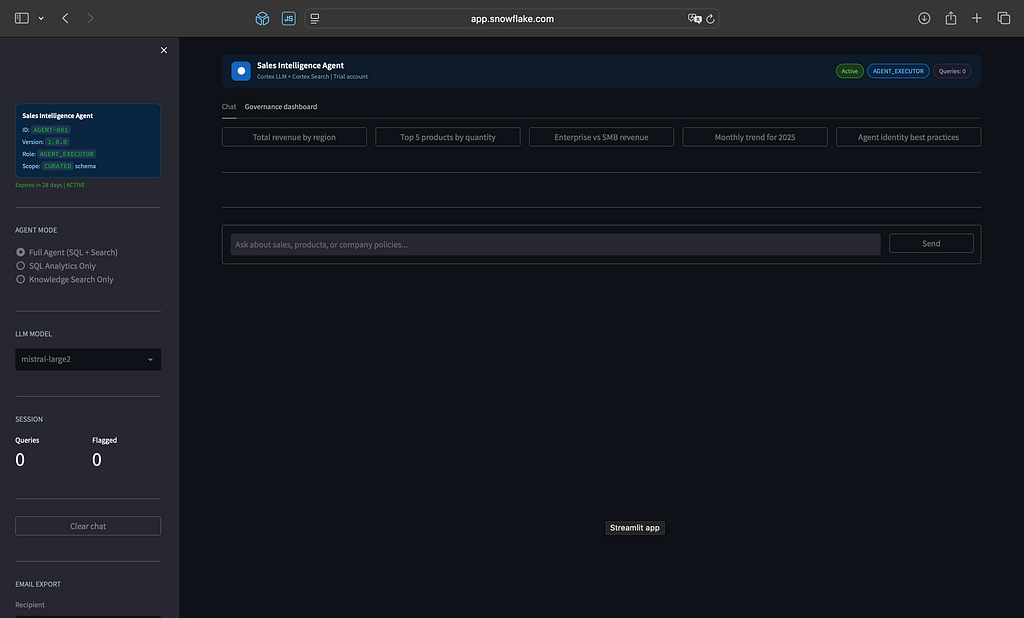
Live Agent Screen:
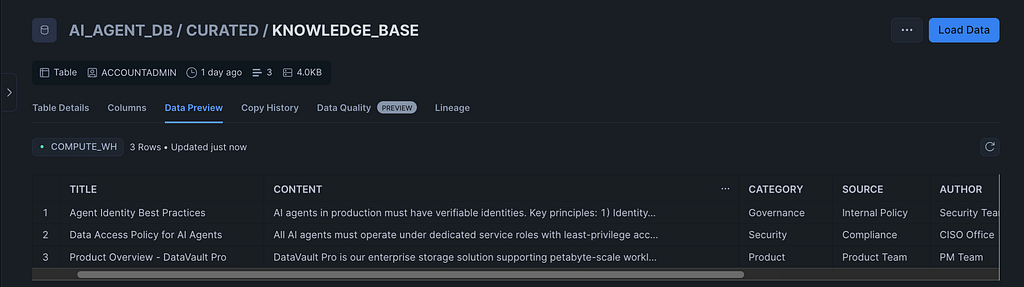
Tables:
What This Does Not Cover
This is a warehouse-runtime implementation — no Compute Pools, no Container Services. For GPU-intensive workloads or custom ML model serving, you need Snowpark Container Services, which requires Business Critical or Enterprise edition and is not available in trial.
The Cortex Agent REST API (POST /api/v2/cortex/agent:run) is the production path for external applications. The Streamlit app is the internal testing and demo surface. For an external-facing product, wrap the REST API with a network policy that restricts which IP ranges can reach it.
Post-trial next steps: CI/CD for agent versioning via GitHub Actions, Cortex Knowledge Extensions for external document sources, Slack notification integration for the anomaly alert, Streamlit Community Cloud deployment calling the REST API.
What You Get When This Is Done
14 phases, one Python file, and you have:
- An AI agent with a scoped, expiring identity registered in a queryable registry
- Row-level and column-level data protection enforced at the engine layer — not trusted from the application
- Full interaction, data access, and derived output audit logs queryable by the AGENT_AUDITOR role
- Automated lifecycle management that expires stale agents and archives logs to a cold table before deletion
- Anomaly detection firing every six hours, with email notification on threshold breach
- A Streamlit interface with SQL injection protection, session rate limiting, quick-prompt chips, action-type tags, and a governance dashboard showing real-time interaction and access logs
- A resource monitor that suspends the warehouse before it hits the credit ceiling
- Email export of full chat sessions as styled HTML for CXO-ready reporting
All of it running inside a Snowflake trial account. No external infrastructure. No compute pools. No containers.
Try It Yourself
Clone the SQL, run Phases 1–10 sequentially, wait for the Cortex Search index to reach ACTIVE, then deploy the Streamlit app.
Start with this validation query after Phase 3:
SELECT PARSE_JSON(
    SNOWFLAKE.CORTEX.SEARCH_PREVIEW(
        'AI_AGENT_DB.AGENT.KNOWLEDGE_SEARCH',
        '{
            "query": "What are the agent identity best practices?",
            "columns": ["TITLE", "CONTENT", "CATEGORY"],
            "limit": 3
        }'
    )
)['results'] AS SEARCH_RESULTS;
If results come back, the RAG layer is live. If the governance dashboard in the Streamlit app shows the registry entry and interaction logs after the first test query, the audit infrastructure is working.
The complete SQL and Python source is linked in the first comment below.
Live Implementation Videos
Disclaimer
All code examples in this article were tested during development and worked as expected at the time of writing. However, it was later observed that the AI function COMPLETE is currently not available for trial accounts, which may result in errors such as:
SnowparkSQLException: AI function COMPLETE is not available for trial accounts
If you are using a trial account, some features demonstrated in this article may be restricted. To fully reproduce the examples, ensure you are using an appropriate Snowflake account edition with access to Cortex AI functions
This content is based on personal experience and independent testing. It reflects the author’s views and does not represent the opinions of any current or past employer
Found this useful? Give it a clap, share it with your team, and follow Snowflake Chronicles for more deep-dives on Snowflake, data engineering, and cloud architecture.
🔗 LinkedIn: satishkumar-snowflake
#Snowflake #CortexAI #AIAgents #DataEngineering #CloudArchitecture #DataGovernance #GenerativeAI #RAG #Streamlit #DataPlatform #MLOps #SnowflakeChronicles #LLM #EnterpriseAI #SnowflakeBuilders
I Built a Production-Grade AI Agent Inside Snowflake — Here’s Every Line That Makes It Real was originally published in Towards AI on Medium, where people are continuing the conversation by highlighting and responding to this story.