Every AI agent tutorial starts the same way: connect an LLM to some tools, send a prompt, get a response. It works in the demo. It falls apart in production.
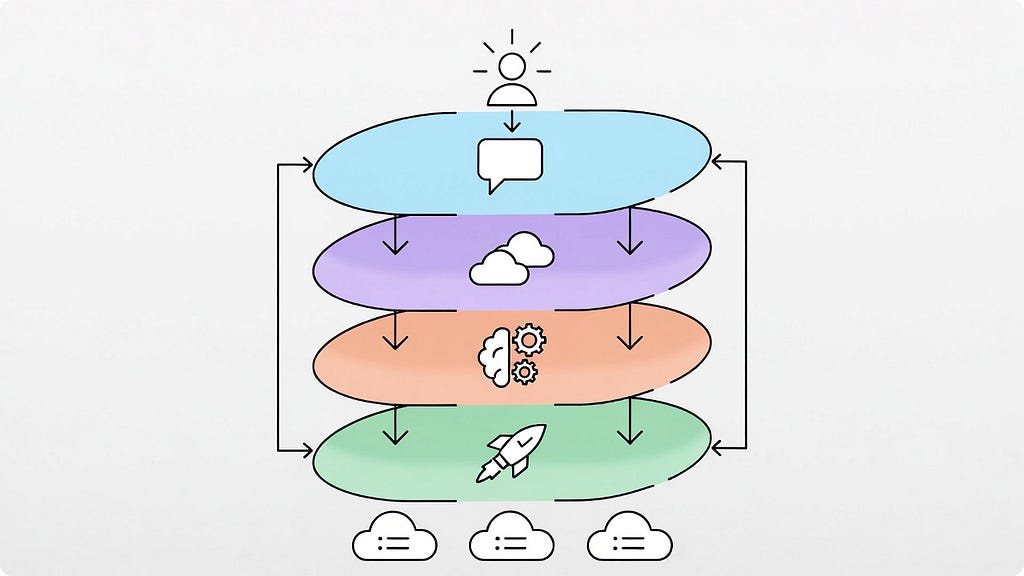
The reason is simple. Most tutorials teach you how to call an AI API. They don’t teach you how to build a system that can reliably operate in the real world — where things already exist, where changes have consequences, and where failures happen at the worst possible time.
This post is different. I’m going to walk you through the architecture of an AI agent that can actually manage cloud infrastructure. Not the “hello world” version. The version that understands what’s already deployed, plans changes intelligently, handles failures gracefully, and doesn’t destroy your production environment.
Whether you’re building your own agent, evaluating existing tools, or just trying to understand how this technology works — this is the foundation you need.
What Makes Infrastructure Different from Other AI Agent Problems
Before we get into architecture, let’s understand why infrastructure is one of the hardest domains for AI agents.
When you build a chatbot, the worst case is a bad answer. When you build a code generation agent, the worst case is code that doesn’t compile. When you build an infrastructure agent, the worst case is a production outage, a massive cloud bill, or deleted data that can’t be recovered.
Infrastructure has three properties that make it uniquely challenging for AI:
It’s stateful. Your cloud environment has hundreds or thousands of resources that depend on each other. A VPC contains subnets. Subnets contain instances. Instances reference security groups. Security groups reference other security groups. You can’t reason about any single resource without understanding the web of relationships around it.
It’s persistent. When you create a cloud resource, it stays created. It costs money every hour. It affects other systems. Unlike generating a code file you can delete, infrastructure changes have immediate, lasting, real-world impact.
It’s shared. Multiple teams, multiple tools, and multiple processes all operate on the same infrastructure simultaneously. Your agent isn’t the only thing making changes. It needs to account for what others have done, are doing, and might do.
These properties mean you can’t just wrap an LLM with some AWS API calls and call it an agent. You need architecture.
The Four-Layer Architecture
Every production-grade AI agent that operates on infrastructure needs four distinct layers. You can implement them in different ways, but you can’t skip any of them. Each layer solves a specific problem, and together they create a system that’s intelligent, aware, and reliable.
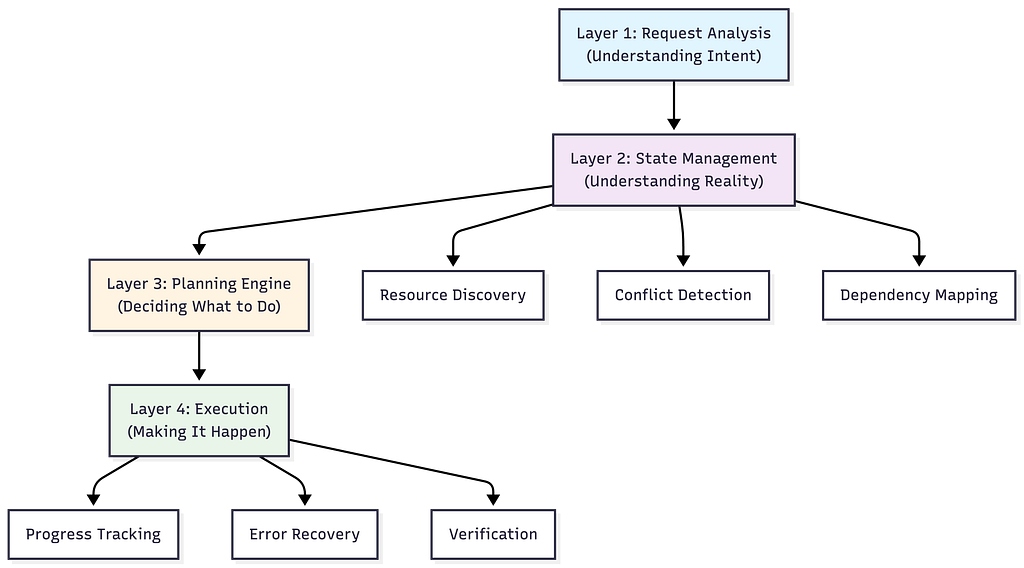
Let’s walk through each layer with a concrete example. Imagine a user types: “Deploy a web application with a database and load balancer.”
Layer 1: Request Analysis
The first layer transforms natural language into structured intent. This sounds simple, but it’s where the agent’s understanding begins.
A naive approach sends the user’s text directly to an LLM and asks for infrastructure code. This is what most tutorials do. It’s also why most tutorials produce agents that don’t work in real environments.
A proper request analysis layer extracts several things:
Action type. Is the user asking to create something, modify something, query something, or destroy something? Each action type triggers completely different downstream behavior. Creating resources requires dependency ordering. Modifying resources requires understanding current state. Destroying resources requires safety checks.
Resource requirements. What infrastructure components does the request imply? “Web application with a database and load balancer” implies compute instances, a database service, a load balancer, networking (VPC, subnets), security groups, and DNS configuration. The agent needs to identify both the explicit and implicit requirements.
Constraints. What requirements does the user express or imply? “High availability” means multi-AZ deployment. “Cost-effective” means smaller instance types. “Production-ready” means encryption, backups, monitoring. These constraints shape every decision the agent makes downstream.
The output of this layer isn’t code. It’s a structured representation of what the user wants:
Intent:
  action: deploy
  components:
    - type: web_application
      count: 2 (implied by load balancer)
    - type: database
      requirements: [persistent storage]
    - type: load_balancer
      routes_to: web_application
  constraints:
    - networking: required
    - security_groups: required
  implicit_requirements:
    - vpc
    - subnets (public + private)
    - security_groups
    - iam_roles
This structured intent becomes the input for the next layer. The key insight: separate understanding from execution. The agent should fully understand what’s being asked before it starts figuring out how to do it.
Layer 2: State Management
This is the layer that separates real agents from demos. It answers the most important question in infrastructure automation: what already exists?
Why State Management Is Non-Negotiable
Consider what happens without state awareness. The user asks to deploy a web application. The agent generates code to create a VPC, subnets, security groups, instances, a database, and a load balancer. The user runs it. It fails because:
- A VPC with that CIDR range already exists
- The security group name is already taken
- The database subnet group conflicts with an existing one
- The load balancer name collides with one from another team
The user spends 45 minutes debugging and fixing. This is the experience most people have with AI infrastructure tools today.
With state management, the agent knows all of this before it generates a single line of code. It reuses the existing VPC. It picks a non-conflicting security group name. It works with the existing subnet groups. It avoids the naming collision.
The Three Functions of State Management
State management does three things:
Resource Discovery scans your cloud environment and builds a map of what exists. This isn’t just listing resources — it’s understanding relationships. Which instances are in which subnets? Which security groups reference which other security groups? What naming patterns does the team use?
Discovered Infrastructure:
├── VPC: vpc-abc123 (10.0.0.0/16)
│   ├── Public Subnet: subnet-pub-1 (AZ-a)
│   ├── Public Subnet: subnet-pub-2 (AZ-b)
│   ├── Private Subnet: subnet-priv-1 (AZ-a)
│   └── Private Subnet: subnet-priv-2 (AZ-b)
├── Security Groups:
│   ├── web-sg (ports 80, 443 from 0.0.0.0/0)
│   ├── app-sg (port 8080 from web-sg)
│   └── db-sg (port 5432 from app-sg)
├── Load Balancer: prod-alb-01 (no targets)
├── Naming Pattern: prod-{service}-{resource}
└── Tags: Environment=prod, Team=platform
Conflict Detection compares what the user wants with what already exists. It identifies naming conflicts, CIDR overlaps, port collisions, and resource limit issues before any changes are attempted.
Dependency Mapping understands the relationships between resources — both existing and planned. You can’t create an EC2 instance without a subnet. You can’t create a subnet without a VPC. You can’t attach a security group that doesn’t exist yet. The agent builds a directed graph of these dependencies:
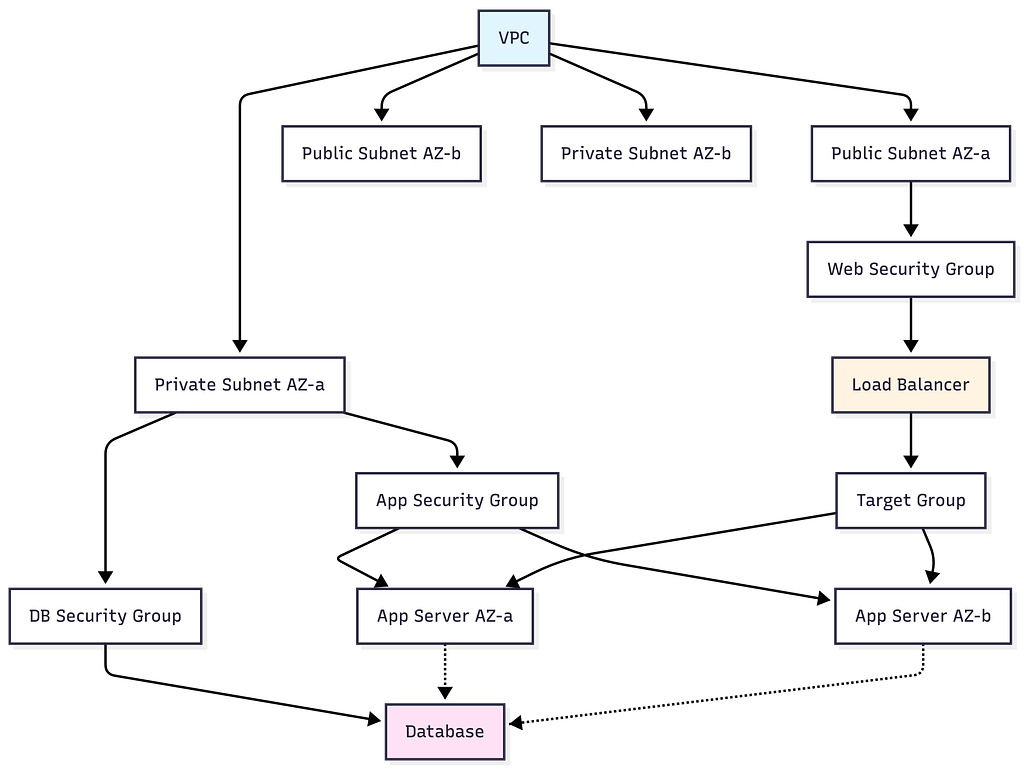
Resources that already exist get marked as “resolved” in the graph. The agent only needs to create what’s missing. This is how the agent avoids duplicating infrastructure — it builds on what’s already there.
The Managed vs. Discovered Distinction
A subtle but important concept: the agent maintains two categories of resources.
Managed resources are things the agent created and tracks. It knows their full history, configuration, and purpose. It can modify or delete them confidently.
Discovered resources are things that already existed when the agent scanned the environment. The agent knows they’re there and can work with them, but it treats them more carefully. It won’t modify or delete discovered resources without explicit permission, because it doesn’t know their full context — another team might depend on them.
This distinction prevents one of the most dangerous failure modes: an agent that “cleans up” resources it didn’t create, breaking things it doesn’t understand.
Layer 3: Planning Engine
With structured intent from Layer 1 and environmental context from Layer 2, the agent can now generate an intelligent plan.
This is where the LLM does its most valuable work. Not generating generic code — reasoning about your specific situation.
What Good Planning Looks Like
The planning engine receives:
- What the user wants (structured intent)
- What already exists (discovered resources)
- What the agent has previously deployed (managed resources)
- Organizational policies (instance type limits, naming conventions, security requirements)
- Dependency graph (what depends on what)
It produces an execution plan — an ordered sequence of operations that transforms the current state into the desired state.
Execution Plan: Deploy Web Application
━━━━━━━━━━━━━━━━━━━━━━━━━━━━━━━━━━━━━
Phase 1: Networking (reuse existing)
  ✓ VPC vpc-abc123 - exists, no changes needed
  ✓ Subnets - exist across 2 AZs, sufficient
  ✓ Security groups - exist, rules are compatible
Phase 2: Database
  → CREATE RDS PostgreSQL instance
    Name: prod-webapp-db
    Instance: db.t3.medium
    Multi-AZ: yes
    Subnet group: private subnets
    Security group: db-sg
    Estimated time: 8-12 minutes
Phase 3: Application
  → CREATE EC2 instance prod-webapp-app-01 (AZ-a)
  → CREATE EC2 instance prod-webapp-app-02 (AZ-b)
    Instance type: t3.medium
    Security group: app-sg
    User data: application bootstrap script
    Estimated time: 2-3 minutes
Phase 4: Load Balancer Configuration
  ✓ REUSE ALB prod-alb-01 (exists, no targets)
  → CREATE target group prod-webapp-tg
  → REGISTER app instances with target group
  → CREATE listener rule for /webapp/*
    Estimated time: 1-2 minutes
Summary:
  Resources to create: 5
  Resources to reuse: 6
  Estimated total time: 12-18 minutes
  Estimated monthly cost: ~$180
  Risk level: LOW (building on proven infrastructure)
Notice what the plan does and doesn’t do. It doesn’t create a new VPC — one exists. It doesn’t create new security groups — compatible ones exist. It reuses the idle load balancer instead of creating a new one. It follows the team’s naming convention. It deploys across multiple AZs for availability.
This is the difference between an AI that generates code from training data and an AI that reasons about your environment.
The Plan as a Contract
The plan serves as a contract between the agent and the user. Before any infrastructure changes happen, the user sees exactly what will be created, what will be reused, what it will cost, and what the risks are.
This is critical for trust. Nobody wants an AI agent that just starts creating cloud resources without explanation. The plan gives the user a chance to review, modify, or reject before anything happens.
Think of it like terraform plan — but generated intelligently based on natural language input and environmental awareness, rather than from hand-written configuration files.
Layer 4: Execution Orchestrator
The plan is approved. Now the agent needs to make it real.
This layer is pure engineering. No AI required — just careful, reliable execution with proper error handling. And it’s where most of the complexity lives.
Dependency-Ordered Execution
The agent executes operations in the order dictated by the dependency graph. Database before application servers (because the app needs a database connection string). Application servers before load balancer registration (because you can’t register instances that don’t exist).
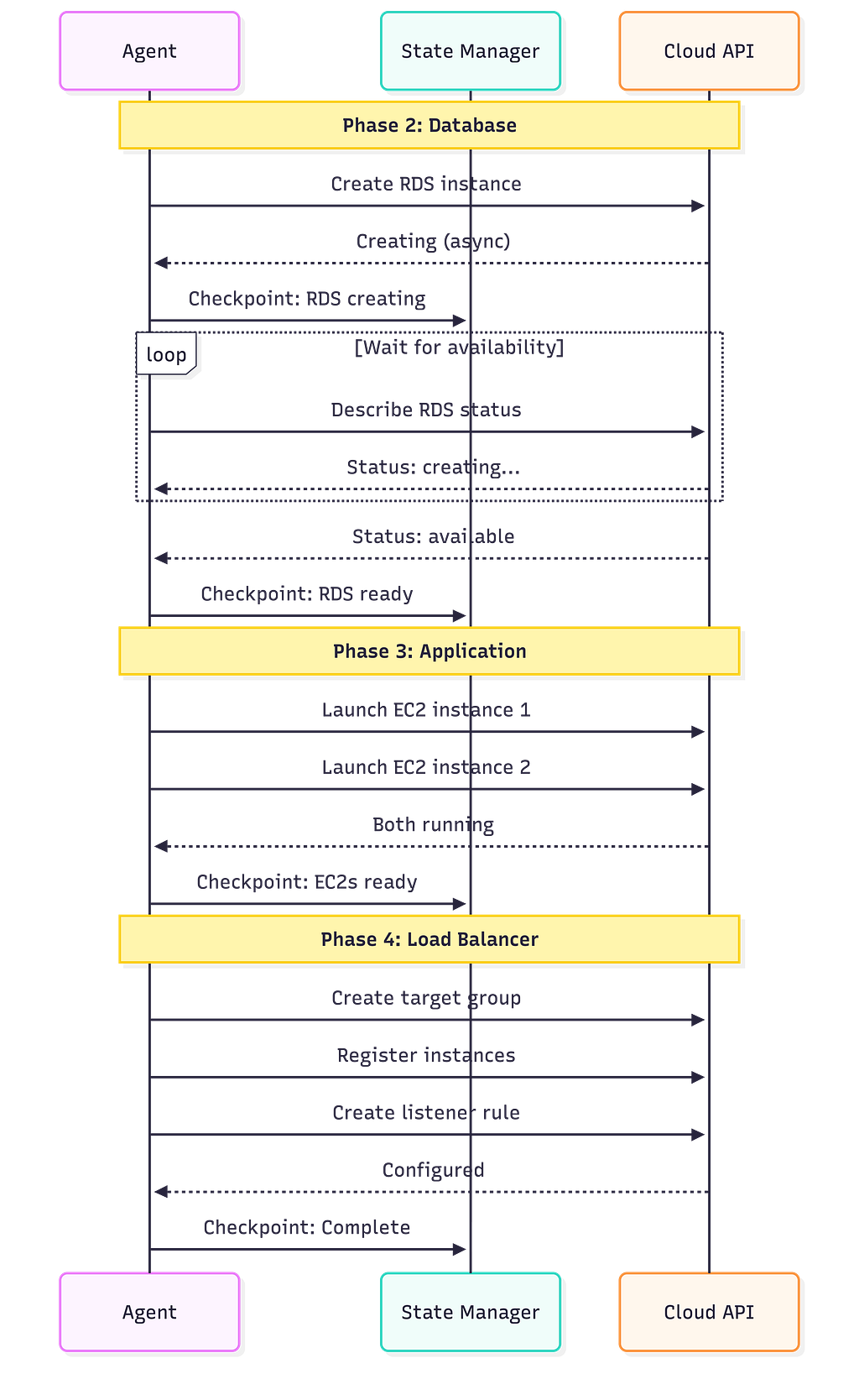
Checkpointing: Surviving Crashes
After every operation, the agent saves its progress. This is called checkpointing, and it’s what makes the agent resilient.
If the agent process crashes after creating the database but before launching application servers, it can restart and resume from the last checkpoint. It reads its state, sees “database created, application servers not started,” and picks up where it left off.
Without checkpointing, a crash means orphaned resources, an inconsistent state, and manual cleanup. With it, crashes become minor inconveniences instead of disasters.
This is the same principle that makes database transactions reliable. Each operation is recorded before the next one begins.
Verification: Trust but Verify
After each phase completes, the agent verifies the result. Not just “did the API return success?” but “is the resource actually working?”
- Database created? → Can we establish a connection?
- EC2 instance launched? → Is the health check passing?
- Load balancer configured? → Is traffic routing correctly?
API success codes tell you the request was accepted. Verification tells you the result is correct. These are different things, and the gap between them is where subtle bugs hide.
Putting It All Together
Let’s trace the complete flow one more time, from request to running infrastructure:
- Request Analysis: Parse “deploy a web application with a database and load balancer” into a structured intent. Identify action type, resource requirements, constraints, and implicit needs.
- State Management: Scan the cloud environment. Build a map of existing resources. Detect potential conflicts. Map dependencies between existing and needed resources.
- Planning: Send structured intent + environmental context to the LLM. Generate a phased execution plan that reuses existing resources, avoids conflicts, respects policies, and orders operations by dependency.
- Human Review (variable): Present the plan. Show what will be created, reused, and changed. Show estimated cost and risk. Wait for approval.
- Execution: Execute operations in dependency order. Checkpoint after each step. Handle errors with retry, adapt, rollback, or escalate. Verify each result.
- Completion: Update the state with all new resources. Generate audit log. Report final status.
The entire flow — from natural language to running infrastructure — takes minutes, not hours. And it produces infrastructure that fits your environment, follows your conventions, and doesn’t conflict with what already exists.
What’s Next
This architecture is the foundation. But there’s a question we haven’t addressed — the one everyone asks first: “How do we trust AI with production infrastructure?”
The answer isn’t “don’t.” It’s “build safety into every layer.” Permission boundaries, policy guardrails, state validation, human approval gates, and execution safety nets. Five layers of protection that make autonomous agents possible without keeping you up at night.
That’s what we’ll cover next.
These patterns come from 18 months of building and iterating on AI infrastructure agents. The complete implementation — state management, planning engine, execution orchestrator, error recovery, all of it — is documented in “The AIOps Book” with full code examples in Go.
But the architecture and patterns in this post stand on their own. Understanding these four layers changes how you think about AI systems that interact with the real world.
How to Build an AI Agent That Actually Understands Your Cloud Infrastructure was originally published in Towards AI on Medium, where people are continuing the conversation by highlighting and responding to this story.