No embeddings. No vector databases. Just an LLM reading a smart map of your document. Here’s exactly how.

I published a piece last week about why I stopped using vector databases for document RAG.
A lot of you asked the same question in the comments: “Okay, but how does it actually work under the hood?”
Fair. So let’s go deep.
This is a full technical breakdown of PageIndex — the tree-building process, the query mechanism, the two-LLM-call architecture, and the three things it does that vectors simply cannot. If you read this and want to build it yourself, you’ll have everything you need.
Let’s get into it.
First, Why Vector RAG Breaks on Long Documents
Before we talk about PageIndex, it’s worth being precise about why standard RAG fails — not just that it fails.
When you run a 200-page financial report through a typical RAG pipeline, four things go wrong:
1. Chunking destroys structure. You split the document into 512-token pieces. In doing so, you break tables across chunks. Footnotes get separated from the numbers they annotate. A sentence that says “as shown in Section 4.2” becomes meaningless because Section 4.2 is in a different chunk with no connection.
2. Similarity is not relevance. Embedding your query and finding the nearest vector finds text that looks like your query — not text that answers it. These are genuinely different things. The nearest neighbor to “What was Q3 profit?” might be a paragraph that mentions profit in a completely different context.
3. Cross-references are invisible. When a document says “See Appendix G for a full breakdown,” a vector retrieval system just sees characters. It has no mechanism to follow that pointer. Appendix G might as well not exist.
4. Vocabulary gaps fail silently. You ask about “profitability.” The document uses “EBITDA margins.” The embedding distance between those two phrases can be large enough that the retrieval misses the answer entirely — with no error, no warning, just a wrong or incomplete response.
The result on real financial documents: ~31% accuracy. On a benchmark. With a known answer. That’s the ceiling standard RAG hits.
The Core Insight: Retrieval Is a Reasoning Problem

PageIndex was built by the team at Vectify AI around one central idea:
Similarity ≠ Relevance. Relevance requires reasoning.
Instead of building an index that enables fast approximate lookup, PageIndex builds an index that enables intelligent navigation. The difference in outcome is enormous.
The inspiration is AlphaGo. Not in a marketing sense — in a genuine architectural sense. AlphaGo didn’t evaluate every possible move on the board. It built a tree of possibilities and used a reasoning model to navigate toward the most promising branches. PageIndex does the same thing with document sections.
Step 1: Building the Tree Index
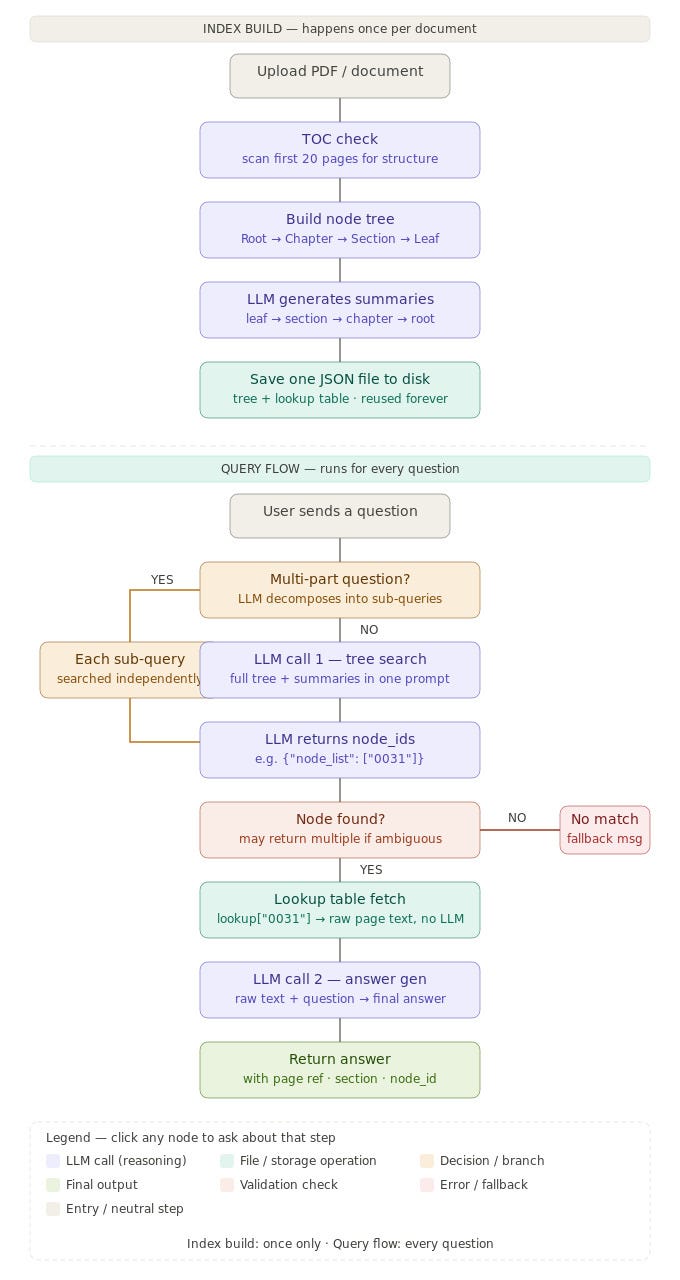
When you feed a document into PageIndex, the first thing it does is build a hierarchical tree index — one JSON file per document.
Here’s the structure:
Root (whole-document summary)
├── Chapter: Financials
│   ├── Section: Q1–Q2
│   │   ├── Leaf Page 0018 (raw page text)
│   │   └── Leaf Page 0019 (raw page text)
│   └── Section: Q3–Q4
│       ├── Leaf Page 0024 (raw page text)
│       └── Leaf Page 0025 (raw page text)
├── Chapter: Risk Factors
│   └── ...
└── Chapter: Appendices
    └── ...
Every single node in this tree — from individual pages up to the root — gets a plain-English summary written by an LLM.
The summarization rolls up like this:
- Leaf nodes: The LLM reads the raw page text and writes a concise summary of what’s on that page.
- Section nodes: The LLM reads all the child leaf summaries and rolls them up into a section-level summary.
- Chapter nodes: The LLM reads all the section summaries beneath it and writes a chapter summary.
- Root node: The LLM reads all chapter summaries and writes a whole-document summary.
The end result is a single JSON file. Every node has an ID, a summary, and pointers to its children. The raw page text lives only at the leaf nodes. Everything above is summaries of summaries — an intelligent table of contents that the document itself rarely provides.
Step 2: Query Time — Exactly 2 LLM Calls
This is the part that surprises most people.
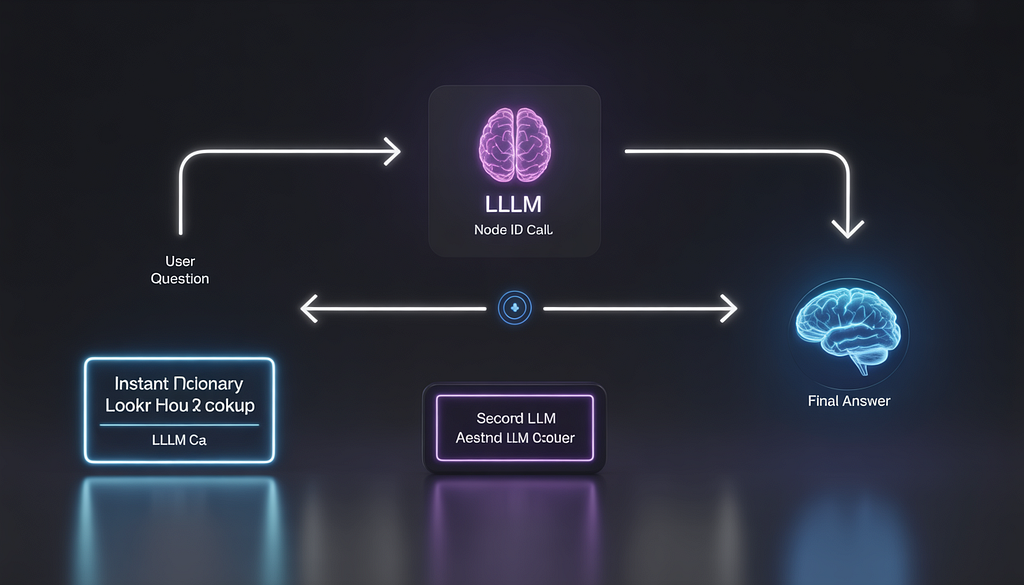
Every single query — regardless of document length or complexity — uses exactly 2 LLM calls. Always.
Here’s the sequence:
User question
     ↓
[LLM Call 1] — Full tree sent to LLM → LLM reasons, returns node_id
     ↓
Dictionary lookup (no LLM, instant)
     ↓
[LLM Call 2] — Raw page text + question → LLM writes final answer
     ↓
Answer returned to user
Call 1: Navigation
The entire tree — all nodes, all summaries — is sent to the LLM in a single prompt. For a typical 300-page document, this is around 80 nodes × 40 words per summary = roughly 3,200 words. That fits comfortably in a single context window.
The LLM reads every summary the way a human expert scans a table of contents. It reasons about which node is most likely to contain the answer and returns a node_id.
No similarity math. No vector lookup. The LLM thinks about where to go.
The lookup: pure dictionary access
Once the LLM returns node_id: "0031", the system does lookup["0031"] — a Python dictionary lookup. No model involved. Zero latency. The raw page text is returned instantly.
Call 2: Answer generation
The raw page text from the retrieved node is combined with the original question and sent to the LLM. The LLM writes the final answer.
That’s it. Two calls. Every time.
Step 3: The Three Things Vectors Can Never Do
This is where PageIndex gets genuinely interesting — not just as a more accurate system, but as a fundamentally different kind of system.
1. Cross-reference following
When a document says “For the full breakdown, see Appendix G,” a vector retrieval system ignores that completely. It’s just characters.
In PageIndex, the summary of that node might say: “This section references Appendix G for detailed methodology.” The LLM reads that during navigation and understands it as a pointer. It can choose to navigate directly to the Appendix G node — following the document’s own logic, the way a human reader would.
Vectors never follow pointers. PageIndex does it naturally.
2. Vocabulary gap bridging
Ask PageIndex about “profitability” in a document that uses “EBITDA margins” and “net income growth.” The LLM navigating the tree understands these are the same concept. It doesn’t need lexical overlap. It doesn’t need semantic proximity in embedding space. It reasons about meaning.
This is the vocabulary gap problem, and it’s the silent killer of vector RAG in professional documents. Finance, law, medicine — every domain has specialized vocabulary that creates gaps that embeddings can’t reliably bridge. LLM reasoning handles it natively.
3. Ambiguous node handling
Sometimes two sections of a document both seem relevant to a query. Standard RAG picks one (whichever scores highest) and silently drops the other. You never know what got missed.
PageIndex handles this explicitly: if the LLM determines that two nodes are both relevant, it returns both node_ids. Both pages are fetched. Both are included in the context for the final answer. Nothing is silently dropped. Everything gets synthesized.
Bonus: Multi-part queries
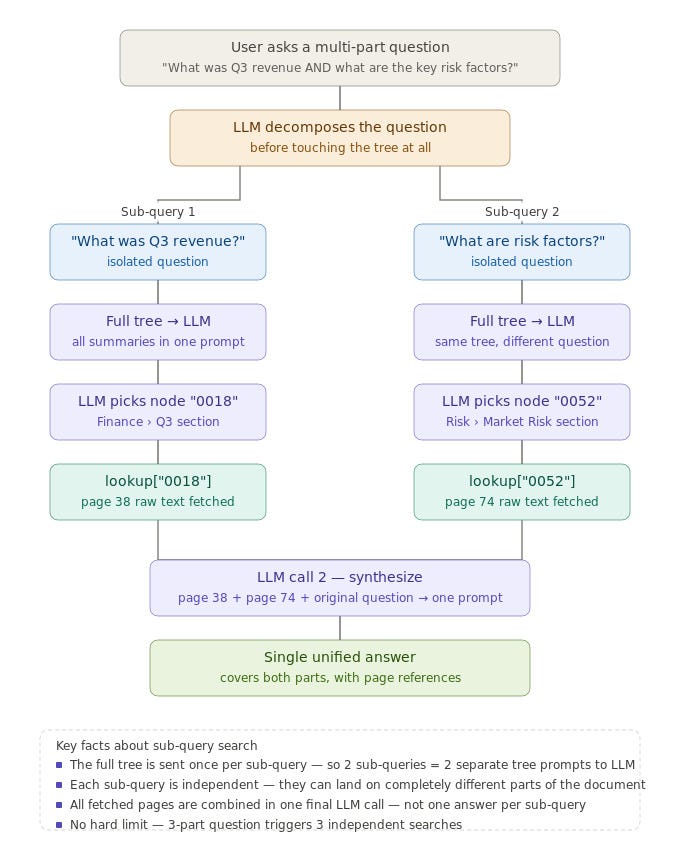
“What was Q3 revenue AND what were the key risk factors for the year?”
PageIndex automatically splits this into two sub-queries, runs each independently through the tree, fetches both relevant pages, and synthesizes them into a single answer. No prompt engineering required. The LLM handles the decomposition.
The Numbers
On FinanceBench — the benchmark specifically designed to test AI systems on real financial document questions:
System Accuracy PageIndex (Vectify AI) 98.7% GPT-4 Turbo + RAG 60% Perplexity AI 45% Standard RAG (FAISS) 31% Keyword Search (BM25) 14%
The gap between PageIndex and the next-best system isn’t incremental. It’s a different league.
FinanceBench is exactly the type of task PageIndex is built for: long, structured documents with specific factual questions that require navigating to the right section. The benchmark rewards precision. PageIndex delivers it.
What’s in the JSON Index File
For the engineers in the room — here’s what the output actually looks like conceptually:
{
  "nodes": {
    "0000": {
      "type": "root",
      "summary": "Annual report for FY2024. Covers financial statements, risk factors, and appendices.",
      "children": ["0001", "0002", "0003"]
    },
    "0001": {
      "type": "chapter",
      "title": "Financial Statements",
      "summary": "Consolidated income statement, balance sheet, segment breakdown for FY2024.",
      "children": ["0010", "0011"]
    },
    "0010": {
      "type": "section",
      "title": "Q3-Q4 Results",
      "summary": "Operating revenue, EBITDA margins by segment for H2 FY2024.",
      "children": ["0024", "0025"]
    },
    "0024": {
      "type": "leaf",
      "page": 87,
      "summary": "Q3 segment breakdown: North America $2.4B, EMEA $1.1B, APAC $0.8B.",
      "text": "[raw page text here]"
    }
  }
}
One file. One document. The entire structure of a 300-page report captured in a navigable JSON that an LLM can reason over in a single context window.
Know the Limits
I said this in my last article and I’ll say it again: PageIndex is not the right tool for every situation.
It excels at single-document, deep-accuracy retrieval. The tree index is built per document. If you have 3,000 documents and want to do broad semantic search across all of them, the compute cost of building trees for each document is high, and the query mechanism isn’t optimized for that use case.
For broad multi-document search, vector RAG still wins on efficiency. Think of PageIndex as your specialist — you bring it in when accuracy on a specific document is non-negotiable.
How to Get Started
Four ways to try it, from zero-setup to full self-hosted:
Chat Platform → chat.pageindex.ai Upload any PDF and start asking questions. No setup, no code. Results in seconds.
GitHub → github.com/VectifyAI/PageIndex Full source code under MIT license. Includes cookbooks for vectorless RAG, vision-based RAG (works directly from PDF page images — no OCR needed), and agentic patterns.
API / Docs → docs.pageindex.ai REST API and SDK for production integrations.
MCP Server → pageindex.ai/mcp Drop it into Claude, Cursor, or any MCP-compatible agent and your agent gets reasoning-based document retrieval immediately.
The Bigger Picture
I keep coming back to this: PageIndex isn’t just a better retrieval algorithm. It’s a different model of what retrieval should be.
Vector RAG treats retrieval as a search problem — find the nearest neighbor to your query. PageIndex treats retrieval as a reasoning problem — navigate to the right answer.
As LLMs get faster and cheaper, the cost argument for approximate vector search weakens. The reason to choose it over reasoning-based retrieval becomes narrower. We’re early in that shift, but the direction seems clear.
For structured, high-stakes documents — the kind where a wrong answer has real consequences — there’s now a system that hits 98.7% accuracy without a single embedding, without a vector database, and without chunking a document into pieces that lose all the structure that made it meaningful in the first place.
That’s worth understanding deeply, whether or not you use PageIndex specifically.
If this was useful, follow along — I write about RAG, LLMs, and AI engineering tools worth knowing. Drop questions or your own experience with PageIndex in the comments.
How PageIndex Actually Works — A Technical Deep Dive was originally published in Towards AI on Medium, where people are continuing the conversation by highlighting and responding to this story.