And How You Can Join
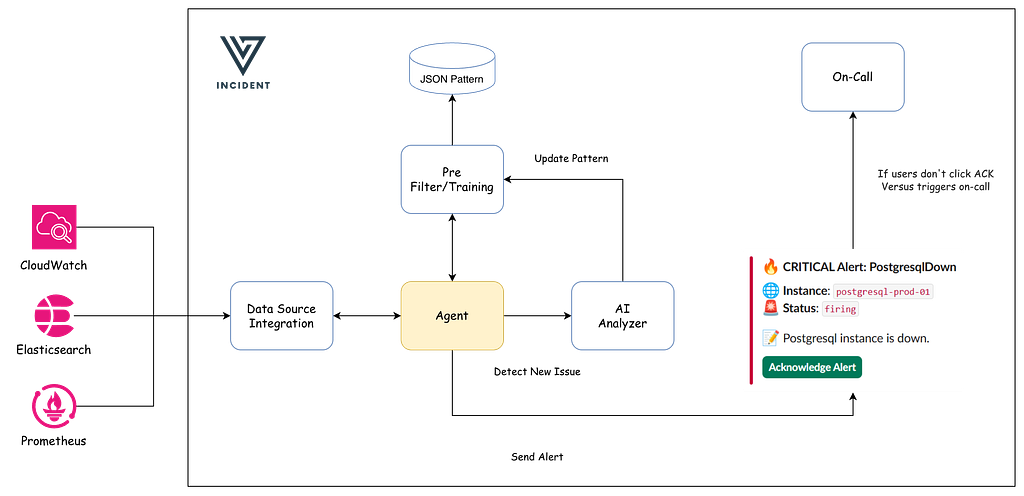
What if your incident tool could read your logs, learn what “normal” looks like, and create incidents for problems it discovers on its own — before anyone configures a threshold, before anyone writes a rule, before a single user complains?
I maintain an open-source tool, and want to add an AI agent mode. Not a chatbot. Not a dashboard. An agent that sits inside the existing pipeline, watches your logs continuously, and only speaks up when something genuinely unusual happens.
This post is the architecture I’ve planned and started implementing; the code is open source, and I’d love for others to build this with me. Here’s how it works.
Why Most AI Alerting Attempts Fail — And the Lesson for All of Us
Before building anything, I spent time studying why teams that have tried adding AI to monitoring keep hitting the same walls. The pattern is remarkably consistent.
The typical approach: dump all your logs into an LLM, ask it “are there any problems?”, and send the response to Slack. This works in a demo with 50 log lines. In production, it fails in three predictable ways — and understanding these failures is the most important lesson in this entire post, regardless of whether you ever use my tool.
Cost explosion. A medium-sized application produces millions of log lines per day. Sending all of them to an LLM would cost hundreds of dollars per hour. Most teams discover this on day two and shut the project down. The mistake isn’t using AI — it’s using AI as the first step instead of the last.
Alert fatigue. An LLM looking at raw logs will find “problems” everywhere. A deprecation warning becomes a critical alert. A retry that succeeded becomes an incident. A log rotation message triggers a page. Within a week, the team ignores every alert the AI produces. You’ve taken a problem that existed before (too many alerts) and made it worse (too many expensive alerts). The root cause: the AI has no concept of what’s normal for your system.
Privacy disaster. Logs contain passwords, tokens, API keys, personally identifiable information, internal hostnames, and database connection strings. Sending raw logs to an external AI provider is a security incident waiting to happen. Most tutorials skip this entirely. In production, it’s the first thing that will get your project killed by the security team.
These aren’t edge cases. They’re the inevitable result of treating AI as a magic box instead of as one component in a larger system.
The architecture I’ll walk through inverts the approach completely. The AI sees less than 1% of your logs — only the ones that every other filter couldn’t explain. That single design decision is what makes cost, noise, and privacy manageable at the same time.
The Core Idea: Filter Cheap, Escalate Smart
The entire architecture rests on one principle that I think applies far beyond incident management: use cheap, fast, deterministic processing to handle the bulk of the work, and only invoke the AI for the cases that genuinely require intelligence.
Think of it like a hospital triage system. A nurse doesn’t send every patient to the specialist. She checks vital signs first. Normal vitals? Go home. Slightly elevated? Monitor. Dangerously abnormal? Get the specialist immediately. The specialist sees maybe 5% of patients — but those are the 5% who actually need specialist-level attention.

Each stage is cheaper and faster than the next. Regex matching costs microseconds. Pattern clustering costs milliseconds. Only the AI call costs real money — and by the time a log line reaches the AI, you already know it’s worth analyzing.
This isn’t a new idea. It’s how spam filters, fraud detection systems, and intrusion detection systems have worked for decades. The AI is the last resort, not the first. What’s new is applying this layered filtering specifically to log-based incident detection, and wiring the output directly into an existing alert pipeline.
If you take one thing from this post and apply it to your own system — even one you build from scratch — let it be this: never put the AI at the front of the funnel.
How to Deploy AI in Production Without Losing Sleep
Here’s what stops most teams from deploying AI in their production pipeline: fear. And it’s justified. What if it creates false incidents at 3 AM? What if it floods Slack? What if it misses real problems while catching fake ones?
I spent a lot of time thinking about this, and the answer is borrowed from a practice that’s been proven in machine learning, database migrations, and feature flag rollouts: never go from “off” to “live” in a single step. Always have a middle stage where you can validate the system’s judgment before trusting it.
That’s why the agent has three modes:
Training mode — The agent reads your logs but takes no action. Zero. It just observes. It builds a catalog of patterns it sees — “these 47 log message formats appear thousands of times a day, they’re probably normal.” After a few days of training, you have a fingerprint of your system’s baseline behavior. This is the most important phase, and the one most people would be tempted to skip. Don’t skip it. The quality of your training period determines the quality of everything that comes after.
Shadow mode — The agent starts making decisions but doesn’t act on them. It logs what it would have reported: “I would have created a P2 incident for this unknown error pattern.” You review the shadow log. If it’s catching real issues and ignoring noise, you’re ready. If not, you tune the rules and train longer. Shadow mode is where you build trust. It’s also where you discover the edge cases you didn’t anticipate — the log format you forgot about, the scheduled job that looks like an error, the deployment noise that happens every Thursday.
Detect mode — The agent goes live. Unknown patterns and frequency spikes get sent to the AI, findings become real incidents, and your team gets paged through the channels they already use.
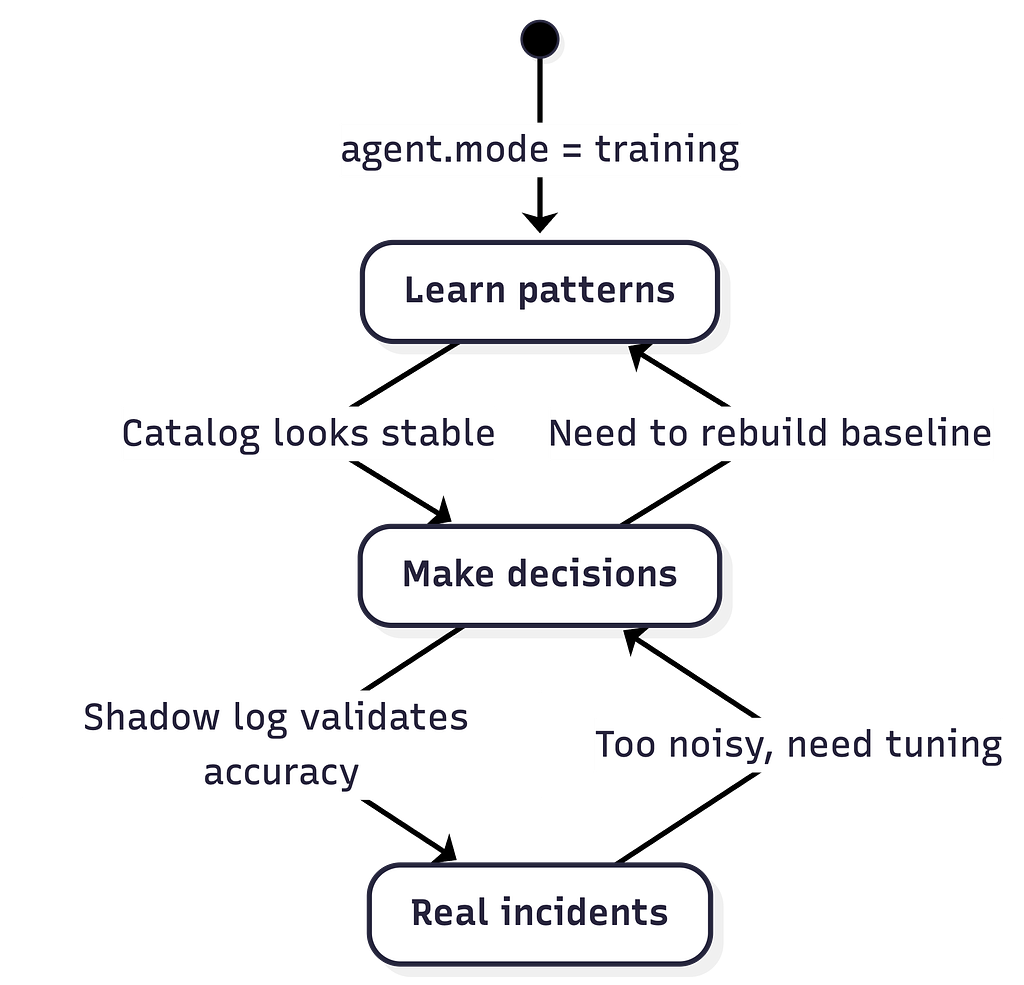
Notice the arrows go both directions. This is intentional. If detect mode turns out to be too noisy, you drop back to shadow. If your application changes significantly (major refactor, new logging library, new services), you go back to training to rebuild the baseline. The system is designed to be tuned continuously, not configured once and forgotten.
This might sound slow. Four weeks before the agent goes live. But consider the alternative: deploying a naive AI alerting system on day one, drowning your team in false positives for two weeks, and having the entire project killed because “AI alerting doesn’t work.” The three-mode approach is slower to start and dramatically more likely to succeed.
The Architecture
The system is built from four components. Each does exactly one job, and they compose into a pipeline. This matters for a reason that goes beyond engineering elegance: it means you can adopt pieces of this architecture independently. Using Loki instead of Elasticsearch? Swap the source. Want to use Claude instead of GPT? Swap the analyzer. Running your own alerting stack? Swap the incident emitter. The pipeline is the idea; the components are replaceable.
Component 1: SignalSource
Most monitoring tools wait for webhooks. The agent actively pulls logs on a schedule. This is a deliberate architectural choice that solves three problems at once.
No instrumentation required. You don’t need to configure your application to send logs somewhere new. The agent reads from where logs already live — Elasticsearch, Loki, CloudWatch. This is huge for adoption. If you’ve ever tried to get 15 teams to add a new logging endpoint, you know that “just add a webhook” is never “just.”
Backpressure control. The agent decides how fast to consume. During a log storm (which is exactly when you need incident detection most), it doesn’t get overwhelmed by a firehose of incoming data — it processes at its own pace, prioritizing analysis quality over speed.
Crash recovery for free. The agent tracks a cursor — the timestamp of the last log it processed — in Redis. If it crashes and restarts, it picks up exactly where it left off. No missed logs, no duplicates. No complex retry logic. The cursor pattern is one of the simplest and most reliable distributed systems primitives, and it’s all we need here.
Each log source implements the same interface: give me a name, and give me logs since a timestamp. Adding support for a new log backend means writing one file that fulfills this contract. The pipeline doesn’t change.
Component 2: Detector
This is where the real value lives. The detector pipeline runs four stages, each filtering out more noise before anything reaches the AI. I think of these stages as layers of understanding — from “is this safe to process?” all the way up to “is this unusual?”
Stage 1: Redaction. Before any processing, strip sensitive data. Emails, JWT tokens, AWS keys, passwords, bearer tokens — all replaced with safe placeholder tokens. This happens first so that no downstream component — including the AI — ever sees raw secrets. This is non-negotiable. If you’re building anything that sends log data to an external service, redaction must be the first step, not an afterthought.
Stage 2: Regex matching. User-defined rules catch known critical errors immediately. “Out of memory: Killed process” is always critical. “panic:” is always critical. “HTTP 5xx” is always high. These patterns never need AI analysis — the operator already knows they’re important. Regex rules are the escape hatch that lets operators encode tribal knowledge: the errors they’ve seen before, the patterns they always want to catch, the things they never want the system to ignore.
Stage 3: Pattern mining. This is the most interesting stage, and the one that makes the economics work. A Drain3-style algorithm clusters log messages by their structural template. It strips variable parts — timestamps, IP addresses, user IDs, numbers — and groups messages that share the same skeleton.
Here’s why this matters: imagine your application produces a “Failed to connect to database” error with different IPs and retry counts in each line. Without pattern mining, each line looks unique. With pattern mining, they all collapse into a single pattern — same structure, different variables. That pattern gets an ID, the agent tracks how often it appears, and after training, the agent knows this pattern shows up 12 times per hour on average. It’s “known.” In detect mode, seeing it again doesn’t trigger analysis — it’s expected background noise.
The power of pattern mining is that it gives the agent a concept of “shape” for log messages. It can recognize that two log lines are essentially the same message, even if every variable in them is different. This is what turns millions of log lines into a few hundred patterns — and what makes the 99% suppression rate possible.
Stage 4: Frequency analysis. Even known patterns can signal problems — if they suddenly appear 100x more than usual. A database connection error 12 times an hour is normal. The same error 1,200 times in an hour means something has changed. The agent maintains a moving baseline (EWMA — Exponentially Weighted Moving Average) for each pattern. When the current count significantly exceeds the baseline, it’s a spike. Spikes get forwarded to the AI even though the pattern itself is known, because frequency is information that the pattern alone doesn’t capture.
After all four stages, each log event gets one of three verdicts: known (seen before, normal frequency — suppress it), unknown (never seen this pattern — ask the AI), or spike (known pattern, abnormal frequency — ask the AI). In a typical production system, 95–99% of log lines are “known.” The AI only sees the rest.
Component 3: AIAnalyzer
Now we’re at the expensive part. But because we’ve filtered aggressively, the AI is analyzing maybe 50–100 log events per hour instead of millions. That changes the economics entirely.
The AI receives a batch of unusual signals and does what humans do when triaging an incident: classifies the severity, identifies the likely root cause, categorizes the affected system, and suggests what the team should do next. The output is a structured finding — a title, a summary, a severity level, a confidence score, and actionable suggestions.
But I don’t trust the AI unconditionally, and neither should you. Three safeguards bound its behavior:
Rate limiting. A hard cap on AI calls per hour, enforced through Redis. Even if the detector pipeline goes haywire and classifies everything as unknown, the AI budget is bounded. This is the “circuit breaker” that prevents a bad day from becoming an expensive day.
Result caching. If the same pattern triggers the AI twice in an hour, the second call returns the cached result. Pattern mining makes this incredibly effective — structurally identical errors hit the cache even when every variable value is different. The pattern ID is the cache key, not the raw log text.
Deduplication. A cooldown window prevents the same pattern from creating multiple incidents in quick succession. One “database connection pool exhaustion” incident per 15 minutes, not one per log line. This is what prevents alert storms — even when the underlying problem is generating thousands of log lines per minute.
Component 4: CreateIncident
Here’s the payoff of building on an existing incident tool instead of starting from scratch. The AI finding becomes an incident through the exact same function that handles webhooks from Alertmanager, CloudWatch, Sentry, and everything else Versus Incident already supports.
That means every existing integration works automatically:
- Slack, Teams, Telegram, Email, Lark — same templates, same channels, same formatting
- PagerDuty and AWS Incident Manager — same on-call schedules, same escalation policies
- Acknowledgment flows — same ack URLs, same timeout-and-escalate state machine
The agent doesn’t need its own notification system. It doesn’t need its own on-call rotation logic. It doesn’t need its own template engine. It feeds into the pipeline that already exists and that the team already trusts.
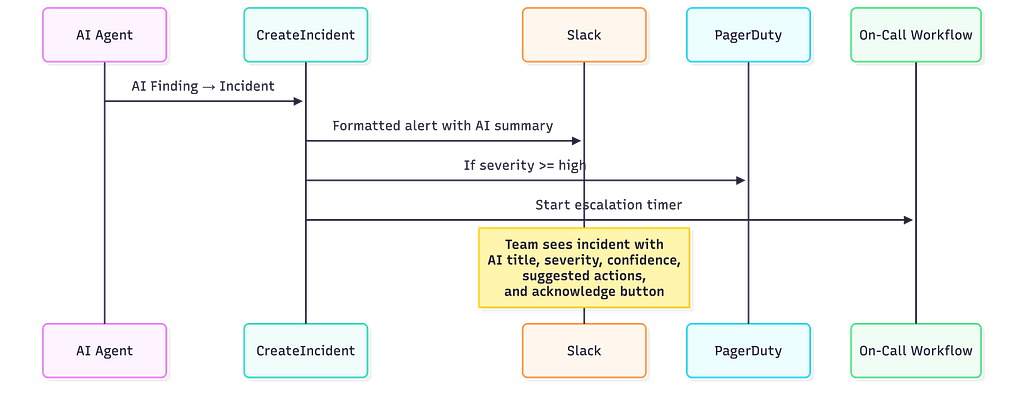
This is the single biggest lesson I want to share: if you’re adding AI capabilities to any system, look for ways to reuse the infrastructure that already exists downstream. Don’t rebuild notification, escalation, and delivery. Plug into what’s already there. You inherit years of battle-tested reliability for free, and your users don’t need to learn anything new.
How the Agent Gets Smarter Without Retraining
The pattern catalog is the agent’s long-term memory. It’s a file on disk — not a database, not a cloud service — that stores every log pattern the agent has learned, along with its frequency baseline, when it was first seen, how many times it’s been observed, and any labels operators have assigned.
During training, the catalog grows as the agent encounters new log patterns. After training, it serves as the definition of “normal.” Anything not in the catalog is unknown; anything in the catalog but spiking is suspicious.
What makes this approach powerful is that the agent improves through operational feedback, not model retraining. Operators review the catalog through a REST API. They can label patterns (“this is a known deploy artifact — always suppress”), promote candidates to “known” status, or remove false negatives (“this pattern looks normal but it’s actually a silent failure — always escalate”). Every correction makes the agent more accurate, and the corrections are immediate — not waiting for the next training run.
The catalog is stored on disk because it needs to survive restarts but doesn’t need the complexity of a database. It uses atomic writes (write to a temp file, then rename) with rotating backups to prevent corruption. It’s simple, reliable, and boring — which is exactly what you want for the component that defines your production baseline.
One design decision worth highlighting: the catalog can optionally auto-promote patterns. If a candidate pattern appears more than N times in detect mode without ever being flagged as a real problem, it automatically becomes “known.” This means the agent gradually adapts to your evolving system without manual intervention. But the threshold is configurable, and you can set it to zero (never auto-promote) if you prefer full manual control.
The Deployment Playbook
Here’s how I’d recommend rolling this out — and how I plan to do it myself:
Enable training mode. Point the agent at your Elasticsearch cluster. Let it run for 5–7 days during normal traffic. It builds a pattern catalog silently — no alerts, no noise, no risk. Make sure the training period covers your typical traffic patterns: weekday peaks, weekend lulls, batch jobs, scheduled deployments. The broader the training window, the fewer false positives later.
Review the catalog. Use the admin API to inspect learned patterns. Label the ones you recognize. Remove any that shouldn’t be suppressed — for example, if a real error pattern got marked as “known” because it happened frequently during training (think: a persistent bug your team hasn’t fixed yet). This review is where human judgment meets machine learning, and it’s the most valuable 30 minutes you’ll spend.
Enable shadow mode. The agent starts classifying logs and making decisions, but only logs what it would do. Review the shadow output daily. Are the incidents it would create real? Is the severity reasonable? Are there false positives from deploy noise, batch jobs, or log rotation? Tune the regex rules and pattern catalog based on what you see.
Go live. Switch to detect mode. Start with a high confidence threshold so only high-confidence findings create incidents. Lower the threshold gradually as you build trust. Tell your team what’s happening — they should know that some incidents are now AI-generated, and they should know how to provide feedback (promote/suppress patterns).
Ongoing: Tune and grow. Review AI-generated incidents regularly. Promote patterns that turn out to be benign. Add regex rules for errors you always want to catch. Watch the metrics. The system gets better every week, not through retraining a model, but through the same operational feedback loop your team already uses for tuning alert thresholds.
What’s Next
This post covered the architecture — the “why” behind every design decision. Now comes the implementation, and that’s where I could use help.
The roadmap starts with Elasticsearch as the first log source, then expands to Loki, CloudWatch, and eventually metrics and traces. Each new source is just another implementation of the signal source interface. Each new AI provider is just another analyzer. The architecture is designed to grow without rewriting.
Whether you’re building something similar for your own stack or you’re interested in contributing to Versus Incident directly, here are the principles I think matter most:
- Filter cheap before you escalate expensive. Pattern mining and frequency analysis eliminate 99% of noise before the AI sees anything. This applies to any system where AI calls cost money.
- Learn before you alert. A training period builds a baseline. A shadow period validates accuracy. Never go from one step to live in one step.
- Reuse what already works. Don’t build a new notification system. Feed findings into the pipeline your team already uses and trusts.
- Bound everything. Rate limits, dedup windows, hard caps. Every external call should have a maximum. Every failure should have a fallback. Production systems need ceilings, not just floors.
The AI isn’t the product. The system is. The AI is just the specialist at the end of the pipeline — the one that only gets called when every cheaper option has been exhausted.
How I’m Building an AI SRE Agent to Analyze Production was originally published in Towards AI on Medium, where people are continuing the conversation by highlighting and responding to this story.