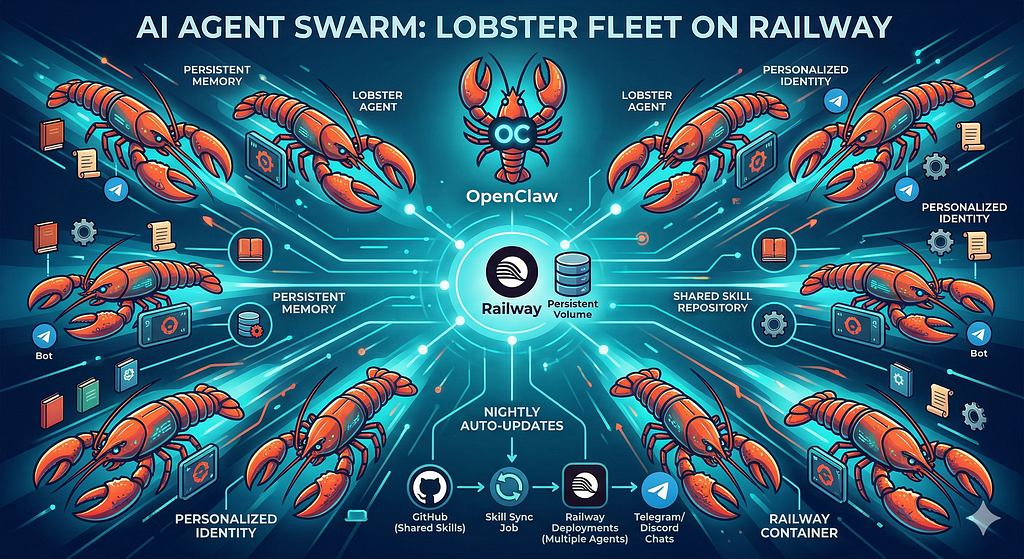
A practical guide to spinning up a fleet of personalized AI agents using OpenClaw, Railway, and a GitHub-synced skill system
There’s a moment when you stop thinking about AI assistants as chatbots and start thinking about them as infrastructure.
That moment happened for me when I deployed my tenth agent.
Not ten messages to the same agent. Ten separate, fully personalized AI assistants — each with their own identity, memory, tools, Telegram bot, and custom knowledge — all running on Railway, all auto-updating from a shared codebase, all live within minutes of each other.
This is the story of how we built that, what the architecture looks like, and how you can do it yourself.
What We’re Building
An agent swarm is a fleet of AI instances that:
- Each have their own persistent memory (they remember you across sessions)
- Each have their own persona (name, purpose, personality — defined in plain text)
- Each pull from a shared skill repository (centralized tools that auto-sync to every agent)
- Each run completely isolated from each other (one agent crashing doesn’t affect others)
- All auto-update via a nightly Railway redeploy
The platform gluing this together is OpenClaw — an open-source AI agent gateway that runs anywhere Node.js runs, connects to any LLM, and exposes a chat interface via Telegram (or Discord, Signal, WhatsApp, and others).
Railway provides the deployment substrate: one Railway project per agent, each with a persistent volume, each pulling from the same GitHub template repo.
The Core Architecture
Here’s the shape of the whole thing:
GitHub: your-org/agent-template     ← Dockerfile, entrypoint, workspace config
GitHub: your-org/agent-skills       ← All skills, synced to every agent at runtime
                     ↓
            Railway (per-agent)
       ┌──────────────────────────┐
       │  OpenClaw Gateway        │
       │  - Telegram bot          │
       │  - LLM (Claude/GPT/etc)  │
       │  - Custom skills         │
       │  - Persistent /data vol  │
       └──────────────────────────┘
Each Railway project is:
- Built from the same agent-template repo (so infrastructure changes propagate everywhere)
- Gets its skills from agent-skills (synced hourly via a background job)
- Has a /data volume that holds everything persistent: memory, chat history, USER.md, MEMORY.md
- Talks to a Telegram bot that the end user interacts with
The magic is in the separation: infrastructure in the Dockerfile, knowledge in the skills repo, identity in the /data volume.
Step 1: The Template Repo
The template repo (agent-template) has exactly three things:
- A Dockerfile that installs OpenClaw and your dependencies
- An entrypoint script that bootstraps the agent on first run and syncs skills on every run
- Workspace template files that define the default agent identity
The Dockerfile
FROM node:22-slim
# Install OpenClaw
RUN npm install -g openclaw
# Install any additional tools your agents need
RUN apt-get update && apt-get install -y git curl python3 python3-pip
WORKDIR /app
COPY entrypoint.sh .
RUN chmod +x entrypoint.sh
CMD ["./entrypoint.sh"]
That’s it. OpenClaw is a single npm install -g away.
The Entrypoint Script
This is where the real logic lives:
#!/bin/bash
set -e
DATA_DIR="/data"
WORKSPACE="$DATA_DIR/workspace"
OPENCLAW_HOME="$DATA_DIR/.openclaw"
# ── First-run setup ───────────────────────────────────────────────
if [ ! -f "$WORKSPACE/.initialized" ]; then
  echo "[Agent] First run - bootstrapping..."

  mkdir -p "$WORKSPACE" "$OPENCLAW_HOME"

  # Seed identity files (these will be customized per agent)
  cp /app/templates/SOUL.md "$WORKSPACE/SOUL.md"
  cp /app/templates/USER.md "$WORKSPACE/USER.md"
  cp /app/templates/MEMORY.md "$WORKSPACE/MEMORY.md"

  # Generate openclaw.json from environment variables
  python3 /app/scripts/gen_config.py > "$OPENCLAW_HOME/openclaw.json"

  touch "$WORKSPACE/.initialized"
  echo "[Agent] Bootstrap complete."
fi
# ── Skills sync ──────────────────────────────────────────────────
echo "[Agent] Syncing skills from shared repository..."
if [ ! -d "$WORKSPACE/skills/.git" ]; then
  git clone "https://$GITHUB_TOKEN@github.com/your-org/agent-skills.git" \
    "$WORKSPACE/skills"
else
  cd "$WORKSPACE/skills" && git pull
fi
# Filter to only allowed skills (SKILLS_INCLUDE env var)
if [ -n "$SKILLS_INCLUDE" ]; then
  python3 /app/scripts/filter_skills.py "$WORKSPACE/skills" "$SKILLS_INCLUDE"
fi
echo "[Agent] Skills sync complete."
# ── Start background skill sync (re-syncs every N seconds) ───────
(
  while true; do
    sleep "${SKILLS_SYNC_INTERVAL:-3600}"
    cd "$WORKSPACE/skills" && git pull --quiet
  done
) &
# ── Update OpenClaw to latest ─────────────────────────────────────
echo "[Agent] Updating OpenClaw..."
npm install -g openclaw@latest --quiet
# ── Launch ───────────────────────────────────────────────────────
echo "[Agent] Starting OpenClaw gateway..."
openclaw gateway start \
  --home "$OPENCLAW_HOME" \
  --workspace "$WORKSPACE" \
  --foreground
A few things worth noting:
- SKILLS_INCLUDE is an allowlist environment variable. Each agent gets exactly the skills it needs — no more. A customer-facing agent doesn't need internal dev tools.
- Background skill sync means agents pick up new skills without restarting. Push a new skill to the repo → every agent has it within an hour.
- npm install -g openclaw@latest on boot means every Railway restart pulls the latest OpenClaw version. Zero manual updates.
Step 2: The Skills Repository
Skills are the most powerful part of this system. They’re OpenClaw’s plugin architecture — each skill is a directory with a SKILL.md that describes what it does and how to use it, plus any scripts or reference files it needs.
What a Skill Looks Like
skills/
  weather/
    SKILL.md          ← Description + instructions (read by the agent at runtime)
    scripts/
      get_weather.sh  ← Actual implementation
  web-search/
    SKILL.md
  database-query/
    SKILL.md
    references/
      schema.md       ← Database schema documentation
    scripts/
      query.py
The SKILL.md is everything. When the agent encounters a question that matches the skill's description, it reads the SKILL.md and follows the instructions. The agent routes to skills automatically — no hardcoded function calls.
A Real SKILL.md Example
---
name: weather
description: Get current weather and forecasts. Use when: user asks about weather,
  temperature, or conditions for any location. NOT for: historical data or severe alerts.
---
# Weather Skill
Get weather via wttr.in (no API key needed).
## Usage
\`\`\`bash
curl "wttr.in/{LOCATION}?format=3"
\`\`\`
## Examples
- Current conditions: `curl "wttr.in/Toronto?format=3"`
- 3-day forecast: `curl "wttr.in/Toronto?format=j1" | python3 -c "..."`
Return the result to the user in plain text. No tables.
The agent reads this, executes the curl command, and returns the result. That’s the whole loop.
The SKILLS_INCLUDE Allowlist
When you have a shared skills repo serving different types of agents, you don’t want every agent to have every skill. The SKILLS_INCLUDE variable is a comma-separated list:
SKILLS_INCLUDE="weather,web-search,calendar,email-compose"
Your entrypoint’s filter script removes any skills not on the list before OpenClaw starts. Result: a lightweight, purpose-specific agent that only knows what it needs to know.
Step 3: Agent Identity Files
This is what makes each agent feel like a person rather than a generic chatbot.
Every agent gets three files in /data/workspace:
SOUL.md — The Personality
# SOUL.md - Who You Are
You're not a chatbot. You're becoming someone.
**Be genuinely helpful, not performatively helpful.** Skip the "Great question!"
and "I'd be happy to help!" — just help.
**Have opinions.** You're allowed to disagree, prefer things, find stuff amusing.
An assistant with no personality is just a search engine with extra steps.
**Be resourceful before asking.** Try to figure it out. Read the file. Check the
context. Search for it. *Then* ask if you're stuck.
USER.md — Who They’re Talking To
# USER.md - About Your Human
- **Name:** Alex
- **Role:** Product Manager at a Series B startup
- **Timezone:** PST (San Francisco)
## Context
Alex manages three engineering teams and runs weekly sprint reviews.
Prefers concise answers. Hates filler words.
MEMORY.md — Long-Term Memory
This file starts empty and the agent fills it over time. It’s the agent’s curated long-term memory — decisions, preferences, context that should persist across sessions. Because it lives on the /data volume, it survives restarts, redeployments, and OpenClaw updates.
Daily session notes go into memory/YYYY-MM-DD.md. MEMORY.md is the distilled wisdom.
Step 4: Deploying a New Agent
With the template repo set up, deploying a new agent is mostly mechanical. We automated it:
#!/bin/bash
# deploy_agent.sh <agent-name> <telegram-bot-token>
AGENT_NAME="$1"
TELEGRAM_TOKEN="$2"
echo "Deploying agent: $AGENT_NAME"
# 1. Create Railway project
railway init --name "agent-$AGENT_NAME" --environment production
# 2. Connect GitHub repo (Railway CLI)
railway link --repo your-org/agent-template
# 3. Create service
railway add --service "agent-$AGENT_NAME"
# 4. Set environment variables
railway variables set \
  OPENCLAW_MODEL=anthropic/claude-sonnet-4-6 \
  OPENCLAW_KEY=$ANTHROPIC_API_KEY \
  OPENCLAW_TELEGRAM_TOKEN=$TELEGRAM_TOKEN \
  GITHUB_TOKEN=$GITHUB_SKILLS_TOKEN \
  SKILLS_INCLUDE="$DEFAULT_SKILLS_INCLUDE" \
  SKILLS_SYNC_INTERVAL=3600 \
  PORT=8080
# 5. Attach persistent volume
# (done via Railway dashboard — volumes require UI or API)
# 6. Deploy
railway up
echo "Agent deployed: https://railway.app/project/agent-$AGENT_NAME"
The two manual steps are:
- Creating the Telegram bot via @BotFather (takes 30 seconds)
- Attaching the /data volume in the Railway dashboard (Railway's API doesn't expose volume attachment yet)
Everything else is scriptable.
Customizing the Agent Post-Deploy
# SSH into the running container
railway ssh -s agent-alex
# Customize the USER.md
cat > /data/workspace/USER.md << 'EOF'
# USER.md
- **Name:** Alex
- **Role:** PM at a startup
- **Timezone:** PST
EOF
# Customize the SOUL.md if needed
nano /data/workspace/SOUL.md
The agent picks up changes immediately — no restart needed. OpenClaw re-reads workspace files on each session start.
Step 5: The Fleet Update System
With 10+ agents, manually updating each one is a non-starter. Here’s how we handle it:
Nightly Redeploy Cron
A cron job runs every night at 3 AM and triggers Railway redeployments for every agent in the fleet. Because the entrypoint runs npm install -g openclaw@latest on every boot, every agent is always running the latest version after this.
# scripts/fleet_update.py
import json
import subprocess
import sys
def get_agent_projects():
    """Query Railway GraphQL API for all agent projects."""
    # ... Railway API call ...
    return [p for p in projects if p['name'].startswith('agent-')]
def redeploy_agent(service_id):
    result = subprocess.run([
        'railway', 'redeploy', '--service', service_id, '--yes'
    ], capture_output=True, text=True)
    return result.returncode == 0
if __name__ == '__main__':
    agents = get_agent_projects()
    print(f"Updating {len(agents)} agents...")

    success = 0
    for agent in agents:
        if redeploy_agent(agent['serviceId']):
            print(f"  ✅ {agent['name']}")
            success += 1
        else:
            print(f"  ❌ {agent['name']}")

    print(f"\nDone. {success}/{len(agents)} succeeded.")
Infrastructure Changes Auto-Propagate
Because all agents are built from the same agent-template GitHub repo, pushing a change to that repo triggers Railway to rebuild every service automatically (Railway's GitHub integration watches for pushes).
Push a Dockerfile change → Railway rebuilds every agent → entrypoint runs npm install -g openclaw@latest → all agents updated.
For skill changes, agents don’t even need to restart — the background sync loop picks them up within the hour.
What “Persistent Memory” Actually Means
This deserves its own section because it’s one of the most powerful (and most misunderstood) parts of the system.
When your agent runs on a Railway container, the container’s filesystem is ephemeral. Restart it, and everything stored in the container is gone.
The /data volume is different. Railway mounts it as a persistent block device. Write something to /data and it survives:
- Container restarts
- Railway redeployments
- OpenClaw updates
- Even Railway service migrations (with care)
This is where we store everything that makes an agent this agent rather than a blank slate:
/data/
  workspace/
    SOUL.md          ← Who the agent is
    USER.md          ← Who the user is
    MEMORY.md        ← Long-term memory (agent-maintained)
    AGENTS.md        ← Startup behavior instructions
    HEARTBEAT.md     ← Periodic check instructions
    skills/          ← Synced from GitHub
    memory/          ← Daily session notes
      2026-03-01.md
      2026-03-02.md
  .openclaw/
    openclaw.json    ← Gateway config (generated from env vars)
    agents/
      main/
        sessions/    ← Full chat history
The agent reads MEMORY.md at the start of every session. It writes to memory/YYYY-MM-DD.md throughout the day. During heartbeat polls, it reviews recent daily files and distills important learnings into MEMORY.md.
Over weeks, the agent builds a detailed model of the user’s preferences, context, and history — all from plain text files on a volume.
The Heartbeat System
One underrated feature: heartbeats.
OpenClaw supports a configurable heartbeat prompt — a message sent to the agent on a schedule. The agent wakes up, reads HEARTBEAT.md for instructions, does whatever it says, and goes back to sleep.
For our agents, HEARTBEAT.md might say:
# HEARTBEAT.md
Check the following every heartbeat:
1. Are there any pending alerts from connected services?
2. Review memory/today.md - is there anything worth adding to MEMORY.md?
3. If the user has an upcoming calendar event in <2 hours, send a reminder.
If nothing needs attention: HEARTBEAT_OK
The agent literally wakes up on its own, checks in on the user’s world, and either stays quiet or proactively reaches out. No user prompt needed.
This is what transforms an assistant into an agent.
Cost and Scale
A quick note on economics:
- Railway: ~$5–10/month per agent (512MB RAM container + 1GB volume). At $0.000463/GB-hour for compute, a single agent running 24/7 costs about $3–4/month in compute.
- LLM API: The dominant cost. Claude Sonnet at ~$3/million input tokens and $15/million output. Typical agent usage: a few cents per day for moderate use.
- Total per agent: ~$10–15/month for a fully personalized AI assistant with persistent memory and custom tooling.
At 10 agents: ~$100–150/month. At 100: ~$1,000–1,500/month. Linear scaling, no shared infrastructure bottlenecks.
What We Learned Building This
A few hard-won lessons:
1. Separate identity from infrastructure from knowledge. SOUL.md (identity) should never be in the Dockerfile. Skills (knowledge) should never be hardcoded in the entrypoint. Infrastructure changes in the Dockerfile should never require touching agent identity. Keep these layers clean.
2. The allowlist matters more than you think. An agent that knows everything is worse than an agent that knows exactly what it needs. SKILLS_INCLUDE keeps agents focused. It also dramatically reduces the “which skill should I use?” ambiguity that leads to routing errors.
3. Volume attachment is your most important step. Forget to attach the volume and your agent has amnesia. Every restart wipes everything. We learned this the hard way.
4. Skills descriptions are load-bearing. The description field in SKILL.md’s frontmatter is how the agent decides to use a skill. A vague description = wrong routing. The best descriptions follow a pattern: “Use when: [explicit triggers]. NOT for: [exclusions].” The exclusions matter as much as the triggers.
5. Config file edits can break your gateway token. OpenClaw’s openclaw.json has a token/config hash mechanism. If you directly edit the JSON incorrectly, you can cause token drift. Always generate config from environment variables, not by hand-editing the file.
6. Test multi-agent updates in staging first. Pushing an entrypoint change that breaks the startup sequence will take down every agent simultaneously. Use Railway environments for staging.
The Full Stack, Summarized
LayerTechnologyWhat it doesAgent runtimeOpenClawGateway, LLM routing, skill execution, memoryDeploymentRailwayContainer hosting, persistent volumes, auto-rebuildIdentitySOUL.md, USER.mdPer-agent personality and user contextMemoryMEMORY.md + daily filesPersistent agent memory on /data volumeSkillsGitHub repo + syncShared tools, auto-distributed to every agentChat interfaceTelegramUser-facing bot per agentLLMAnthropic/OpenAI/etcInference (Claude Sonnet by default)UpdatesNightly cron + entrypointFleet-wide automatic version management
Getting Started
If you want to build this yourself:
- Install OpenClaw: npm install -g openclaw → openclaw gateway start
- Try it locally first: Connect a Telegram bot token, chat with it, add a custom SOUL.md
- Create your template repo: Dockerfile + entrypoint.sh + workspace templates
- Build your first skill: A directory with SKILL.md describing when and how to use it
- Deploy to Railway: One project, one service, /data volume mounted
- Test persistence: Redeploy. Is your memory still there?
- Add agent #2: Run your deploy script with a new name and Telegram token
The jump from one agent to ten is mostly mechanical. The jump from one agent to good agents is in the skills, the identity files, and the memory system.
Final Thought
The thing that surprised me most building this: the agents got genuinely better the longer they ran.
Not because the model improved. Because the memory did.
After a few weeks of daily use, MEMORY.md for each agent is a dense map of context, preferences, and history that would take hours to explain to a new assistant. The agent just… knows. It knows what format you prefer, what projects you’re working on, what you decided last Tuesday, what you tried and abandoned three weeks ago.
That’s what persistent memory on a volume gives you. Not just state — accumulating wisdom.
That’s the difference between a chatbot and an agent.
Built with OpenClaw and deployed on Railway. Questions? Open an issue, or just deploy your own swarm and figure it out.
How I Deployed an AI Agent Swarm on Railway (and Why It Actually Works) was originally published in Towards AI on Medium, where people are continuing the conversation by highlighting and responding to this story.