Using Codex, Claude Code, GitHub Copilot, Antigravity, Stitch, and MCP tools to design, build, test, and improve a FastAPI + NiceGUI + LangGraph application.
Introduction
I built DailyAI because I had a simple problem: I was not staying up to date with AI news.
Every day, there are new model releases, new tools, new research papers, new product launches, and announcements from companies like OpenAI, Google, Anthropic, Meta, Microsoft, and many others. The AI ecosystem moves very fast, and it is difficult to follow everything properly.
At the same time, the way we consume information is changing.
Most of us do not always want to read long articles first. We want the important point quickly. We want a short summary, the main idea, and the reason why it matters. But sometimes, when something is important, we still want to deep dive into the original source.
That is where the idea for DailyAI came from.
The goal was not to replace full articles. The goal was to create a product where users can first understand the important AI updates quickly, and then open the original article when they want more context.
In simple words:
Summary first. Source always available. Deep dive when needed.
DailyAI became both a product experiment and an engineering experiment for me.
I used multiple AI coding tools while building it: Codex, Claude Code, GitHub Copilot, Antigravity, Stitch, and MCP-based code review tooling. But I want to be clear: these tools did not magically build the whole product for me.
I used them as assistants for different parts of the workflow — planning, UI thinking, implementation, debugging, review, and testing.
This post is an honest breakdown of that workflow.
What DailyAI Is
DailyAI is an AI news intelligence platform built with a Python-based stack.
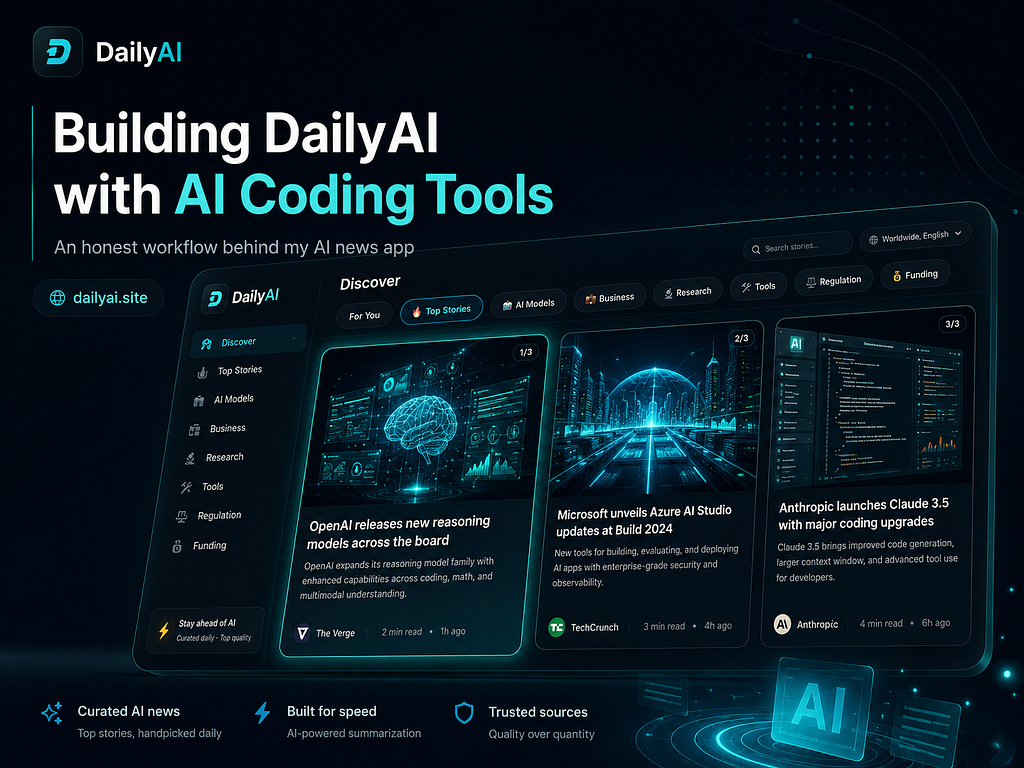
The repository currently describes the app as a FastAPI + NiceGUI application that ingests RSS sources, processes stories through a LangGraph pipeline, serves a mobile-first feed UI, and exposes API endpoints for feed access, personalization, and operations.
The core stack includes:
Backend: FastAPI
UI: NiceGUI
Pipeline: LangGraph + LangChain
Storage: SQLite by default, optional Supabase
Scheduler: APScheduler
Runtime: Python 3.11+
The current repository structure is source-first, with the main application code under src/dailyai. The project separates API routes, graph logic, LLM prompts/providers, services, storage, and UI modules.
A simplified view of the structure is:
src/dailyai/
├── api/
├── graph/
├── llm/
├── services/
├── storage/
└── ui/
This was important because I did not want DailyAI to become one large app.py file. I wanted the project to be easier to understand, test, and extend.
The Real Motivation
The motivation behind DailyAI was not only technical.
I personally felt that I was missing important AI updates. I would see one update on LinkedIn, another on X, another in a newsletter, and another in a blog post. But there was no simple place where I could quickly understand:
What happened?
Why does it matter?
Is it worth reading fully?
Where is the original source?
DailyAI tries to solve this in a small but useful way.
The idea is:
1. Collect AI-related news.
2. Remove duplicate or less useful items.
3. Show a short summary.
4. Keep the original article link visible.
5. Let users deep dive when they want.
This is important because I do not want AI summaries to remove traffic from original sources. The summary should act as a discovery layer, not a replacement for the full article.
Why I Used Multiple AI Coding Tools
I did not use multiple AI tools just for the sake of saying I used many tools.
Each tool had a different role in my workflow.
The main idea was:
Use the right AI tool for the right engineering task.
Some tools were better for planning. Some were better for code quality. Some were better for UI exploration. Some were better for testing and GitHub-based workflows.
Here is how I used them honestly.
1. Stitch for UI and UX Direction
I used Stitch mainly for UI and UX design thinking.
Before implementing UI changes in the actual system, I used Stitch to explore the visual direction, layout ideas, and product feel. This helped me think through questions like:
- How should the news card look?
- How much information should be visible at first?
- Where should the source link appear?
- How can the UI feel mobile-first?
- How do I make the product feel like a quick daily habit?
After that, I implemented the ideas in the actual application using NiceGUI components.
This separation helped me because UI design and UI implementation are not the same thing.
Stitch helped me with the design direction. The actual implementation still had to fit the real codebase, the existing theme, the NiceGUI structure, and the product constraints.
A typical prompt I used for this kind of design thinking was:
I am building a mobile-first AI news app called DailyAI.
The user should quickly understand:
- headline
- short summary
- why it matters
- source
- option to read full article
Create a clean UI concept for a news card.
The design should feel modern, minimal, and suitable for daily reading.
Avoid too much text on the first view.
The output was not copied directly into production. I used it as visual direction and then translated it into the real code.
2. Antigravity for Planning Documents
I used Antigravity mainly for planning.
For me, Antigravity was helpful when I wanted to think through a feature before jumping into code. It was good for planning documents, breaking features into steps, and thinking about dependencies.
For example, before implementing or improving a feature, I could ask:
Create a planning document for improving DailyAI's article summary flow.
Context:
- DailyAI shows AI news summaries.
- Users should be able to open the original article.
- The summary should be short, but useful.
- The UI should stay mobile-first.
Include:
- user problem
- feature goal
- implementation steps
- files likely affected
- edge cases
- test plan
This helped me slow down before coding.
That was one of the biggest improvements in my workflow: I stopped asking AI tools to immediately write code. Instead, I first asked for a plan.
The planning step helped me avoid messy implementation.
3. Claude Code for Code Quality and Refactoring
I used Claude Code mostly when I wanted better code quality, refactoring suggestions, or deeper reasoning about the codebase.
Claude was helpful for questions like:
Is this module doing too much?
Can this function be split?
Where should this logic live?
Is this API route too heavy?
Can this be made easier to test?
For example I used prompts like:
Review this DailyAI service module for maintainability.
Focus on:
- functions doing too much
- missing error handling
- unclear naming
- logic that should move out of route handlers
- places where tests would be useful
Do not rewrite everything.
Suggest practical improvements that fit the current structure.
This was useful because DailyAI is not only a demo script. It has separate modules for API, graph, services, storage, LLM logic, and UI. The repository README shows this separation clearly.
Claude Code helped me think more carefully about the quality of changes instead of only adding more features.
4. GitHub Copilot for Fast In-Editor Work and Model Switching
I used GitHub Copilot for smaller coding tasks inside the editor.
Copilot was useful when I already knew what I wanted and needed help writing it faster.
Examples:
- small helper functions
- type hints
- docstrings
- repetitive test cases
- validation logic
- simple refactors
- quick explanations
One thing I liked was switching between models when needed. For smaller tasks, I did not need to use the most expensive or heavy reasoning model. Copilot helped me save tokens and stay inside the coding flow.
This kind of task does not need a full coding agent. It needs quick, practical assistance. That is where Copilot was useful.
5. Codex for GitHub Control, Testing, and Bug Fix Loops
I used Codex when I wanted a more controlled coding environment around GitHub, testing, and bug fixes.
Codex was useful for workflows like:
1. Inspect the issue.
2. Understand the changed files.
3. Suggest a small fix.
4. Run tests in the same environment.
5. Adjust the fix if tests fail.
6. Keep the diff focused.
For me, this was valuable because the bug-fix workflow should not stop after generating code. The fix should be tested.
A typical Codex prompt looked like this:
I am working on DailyAI.
Task:
Investigate why this test is failing and propose a minimal fix.
Rules:
- Do not rewrite unrelated modules.
- Keep the public API response unchanged.
- Run the relevant tests after the fix.
- If the test still fails, explain why and adjust.
- Summarize the final diff.
This workflow felt closer to a real engineering loop:
bug → hypothesis → small fix → test → adjust → final diff
That is more useful than simply asking AI to “fix everything.”
6. MCP and code-review-mcp for Safer Repository Exploration
The repository includes an .mcp.json configuration for a code-review-graph MCP server.
It also contains agent documentation files such as CLAUDE.md, AGENTS.md, and GEMINI.md, which instruct agents to use the code-review graph before directly scanning files. The documented workflow includes tools for detecting changes, understanding impact radius, finding affected flows, querying callers/callees/imports/tests, and checking coverage.
This was important because large codebases can become expensive and noisy for AI tools if they read too many files blindly.
The idea was:
- Do not scan everything first.
- Understand structure first.
- Then inspect only what matters.
For code review, this kind of graph-based workflow is useful because it can help answer questions like:
- What changed?
- Which functions are affected?
- Which tests cover this area?
- Could this change break another flow?
- Is this a risky refactor?
This does not replace manual review. But it gives a better starting point.
The Engineering Discipline Around the AI Tools
The most important part of this project was not the number of AI tools.
The important part was how I used them.
I tried to keep a workflow like this:
1. Understand the product problem.
2. Create a small plan.
3. Make a focused implementation.
4. Review the change.
5. Run formatting and linting.
6. Run tests.
7. Push through CI.
8. Avoid merging code that I cannot explain.
The repository has quality tooling configured in pyproject.toml, including Ruff, mypy, and pytest configuration.
It also includes a pre-commit configuration with Ruff formatting, Ruff linting, mypy, YAML checks, end-of-file fixing, trailing whitespace checks, and merge-conflict checks.
The local commands are simple:
uv run ruff format .
uv run ruff check .
uv run mypy .
uv run pytest -q
The repository also contains GitHub Actions CI. The CI runs on pushes and pull requests to main, uses a Python 3.11 and 3.12 matrix, installs dependencies, runs Ruff, runs mypy as a non-blocking check, and runs the test suite.
That gave me a basic but useful production-style quality gate.
Branch-Based Development
I also used branch-based development instead of putting every change directly into the main branch.
The project documentation describes a development lifecycle with focused branches from main, small reviewable commits, tests for behavior changes, local quality gates, pull requests, CI checks, and deployment using the configured platform start command.
This is the kind of workflow I wanted:
main
├── feature/ui-improvements
├── feature/article-briefs
├── feature/personalization
├── fix/feed-refresh
├── fix/summary-fallback
Not every branch needs to be big. In fact, smaller branches are better.
A good branch should answer one question:
What changed, and why?
Example: The News Pipeline
One core part of DailyAI is the pipeline that processes news.
The repository describes the pipeline as including collection, deduplication, trust/sentiment/topic tagging, and formatting.
A simplified version of the idea is:
collect → deduplicate → curate → score/tag → format → serve
A simplified code example looks like this:
from typing import TypedDict
from langgraph.graph import END, StateGraph

class PipelineState(TypedDict):
    country_code: str
    raw_articles: list[dict]
    deduplicated_articles: list[dict]
    curated_articles: list[dict]
    final_feed: list[dict]
    errors: list[str]

def build_news_pipeline():
    graph = StateGraph(PipelineState)
    graph.add_node("collect", collect_articles)
    graph.add_node("deduplicate", deduplicate_articles)
    graph.add_node("curate", curate_articles)
    graph.add_node("format", format_feed)
    graph.set_entry_point("collect")
    graph.add_edge("collect", "deduplicate")
    graph.add_edge("deduplicate", "curate")
    graph.add_edge("curate", "format")
    graph.add_edge("format", END)
    return graph.compile()
The prompt style I used for this type of work was:
Refactor the DailyAI news refresh logic into a clearer pipeline.
Requirements:
- Keep each step small.
- Avoid putting business logic inside API routes.
- Track errors without crashing the whole refresh.
- Keep the output compatible with the current UI.
- Make the steps easier to test.
The important thing was not just “use LangGraph.” The important thing was separating responsibilities.
Example: Summary First, Full Article Still Available
The product philosophy of DailyAI is simple:
Users should get the summary quickly, but the original source should remain one click away.
This is important because AI summaries are useful, but they should not completely replace the original content.
The UI should help the user decide:
Is this update relevant to me?
Should I read the full article?
Is this worth sharing or saving?
A simple article object can look like this:
article = {
    "title": "New AI model released",
    "summary": "A short explanation of the update and why it matters.",
    "source": "Original Publisher",
    "url": "https://original-source.example/article",
    "topic": "models",
    "country": "global",
}
The design goal is not to hide the source. The source is part of the product value.
Actual Mistakes I Made
This is the part I want to keep honest.
Mistake 1: Asking AI for too much at once
Bad prompt:
Improve the whole app and make it production ready.
This creates large, risky changes.
Better prompt:
Improve **only** the article card UI.
Constraints:
- Do not change API response structure.
- Keep the current route names.
- Only modify the UI component and related CSS/theme code.
- Explain the change before implementing.
Mistake 2: Treating UI design and implementation as the same task
Stitch was useful for UI direction, but the design still had to be implemented carefully inside the real NiceGUI app.
The lesson:
- Use design tools for direction.
- Use the real codebase for implementation.
Mistake 3: Adding features faster than tests
AI tools make it easy to add features quickly. But fast feature development without tests creates long-term problems.
So I started using more test-oriented prompts:
Before adding another feature, suggest the highest-risk test cases for the current flow.
Focus on user-facing failures and regression risk.
Mistake 4: Letting AI scan too much code
For larger tasks, blindly reading files can waste tokens and create confusion.
The MCP graph workflow helped by encouraging agents to first understand structure, impact radius, and related tests before reading everything.
Mistake 5: Overstating what the app does
This is important.
That is why I do not want to say:
I built a massive enterprise-scale AI platform.
A better and more honest version is:
I built a working AI news application with a production-oriented workflow:
structured modules, CI, tests, linting, MCP-based review context, and multiple AI tools used intentionally across design, planning, coding, and debugging.
My Practical AI Coding Workflow
This is the workflow I would recommend to anyone building with multiple AI tools:
1. Use Stitch for UI/UX exploration.
2. Use Antigravity for planning documents.
3. Use Claude Code for code quality and refactoring.
4. Use GitHub Copilot for fast in-editor completions and model switching.
5. Use Codex for GitHub-aware bug fixing, testing, and controlled implementation.
6. Use MCP/code-review tools for repository understanding and impact analysis.
7. Use Ruff, mypy, pytest, and CI to verify the result.
The workflow is not:
AI writes everything.
The workflow is:
AI supports different parts of the engineering process, but the developer owns the product, the architecture, and the final decision.
What I Learned
The biggest lesson from building DailyAI is that AI coding tools are most useful when they are used with constraints.
They are very good at:
- generating first drafts
- creating implementation plans
- improving code structure
- writing repetitive code
- suggesting tests
- reviewing changes
- debugging specific failures
- explaining unfamiliar code paths
But they still need human judgment for:
- product direction
- UI taste
- architecture boundaries
- what to ship
- what not to ship
- whether the code is maintainable
- whether the feature actually helps the user
For me, the strongest workflow was not using one AI tool for everything. It was using different tools for different jobs.
Final Thought
DailyAI started from a personal problem: I wanted to stay updated with AI news without spending too much time reading scattered updates across the internet.
The product gives users a short summary first, but keeps the original article available for deeper reading.
The engineering journey behind it taught me something equally important:
AI-assisted development is not about removing engineering discipline.
It is about making disciplined engineering faster.
Codex, Claude Code, GitHub Copilot, Antigravity, Stitch, and MCP tools helped me build faster and think more clearly.
But the real value came from the workflow around them:
planning → implementation → review → linting → testing → CI → iteration
That is how I built DailyAI.
Not perfectly. Not magically.
But honestly, step by step, with AI as a coding partner and engineering discipline as the guardrail.
Thank you for reading :)
with love,
Shivang
How I Built DailyAI With AI Coding Tools: An Honest Workflow Behind My AI News App was originally published in Towards AI on Medium, where people are continuing the conversation by highlighting and responding to this story.