You keep hearing about dbt. Your data team uses it. Job listings mention it. Here’s what it actually is, why engineers love it, and how AI tools are making it accessible even if you’ve never touched it before.
If you’ve spent any time in data circles recently, you’ve heard the word dbt. It appears in job descriptions, Slack channels, and conference talks like it’s the solution to every data problem. But if you’ve searched for a plain-English explanation and ended up more confused than when you started — this one’s for you.
We’re going to cover what dbt is, why it exists, how it works, and what a simple dbt model actually looks like. Then we’ll look at how AI tools are making dbt faster to write and easier to learn — even for engineers who are completely new to it.
No prior dbt experience needed. By the end of this article, you’ll know what dbt does, where it fits in a modern data stack, and how to get started using AI to write your first models.
The problem dbt solves
Before dbt, the Transform step in ELT pipelines was a mess. Data teams would write transformation logic scattered across Python scripts, stored procedures, one-off SQL files saved in random folders, and — if you’re old enough to remember — Excel macros. There was no standard way to version it, test it, document it, or run it reliably.
The result looked something like this:
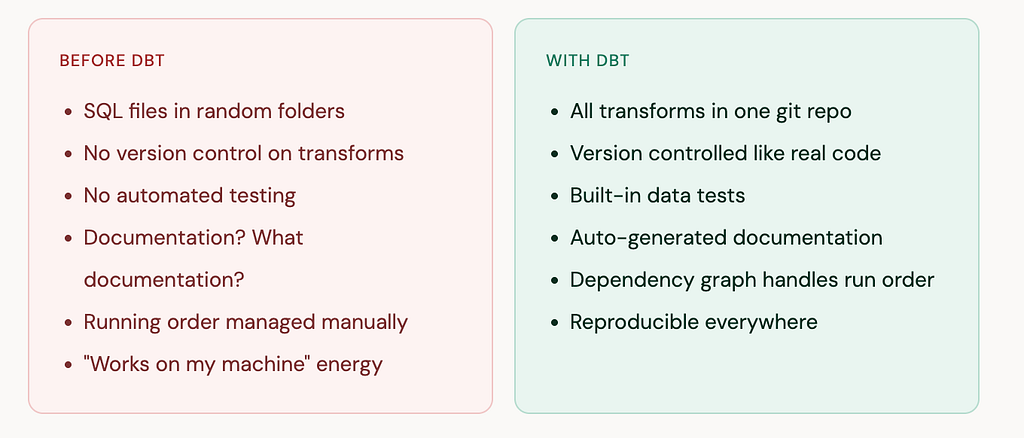
dbt (data build tool) brought software engineering best practices to SQL. It treats your transformation logic as code — with version control, testing, modularity, and documentation — rather than a pile of scripts nobody wants to touch.
What dbt actually does — in one sentence
dbt takes SQL SELECT statements you write, figures out the dependencies between them, and runs them in the right order inside your data warehouse to build clean, tested, documented tables.
That’s it. dbt doesn’t move data — that’s your pipeline’s job. It doesn’t store data — that’s your warehouse’s job. It just transforms data that’s already in your warehouse, using SQL you write, with engineering guardrails around it.
The three things you write in dbt

What a real dbt model looks like
Here’s the thing that surprises most people when they first see dbt: the models are just SQL. Not a special language, not a framework with a steep learning curve — just SELECT statements with a couple of dbt-specific additions.
Let’s say you have raw order data loaded into your warehouse and you want to build a clean orders table for analysts to use. Here’s what a staging model looks like:
models/staging/stg_orders.sql
-- This file becomes a table called stg_orders in your warehouse
-- dbt handles running it. You just write the SELECT.

WITH source AS (

    SELECT * FROM {{ source('raw', 'orders') }}

),

renamed AS (

    SELECT
        order_id,
        customer_id,
        LOWER(status)                          AS status,
        CAST(amount_cents AS FLOAT64) / 100    AS amount_usd,
        DATE(created_at)                        AS order_date

    FROM source
    WHERE order_id IS NOT NULL

)

SELECT * FROM renamed
The only dbt-specific thing in that file is {{ source('raw', 'orders') }} — a Jinja template that references your declared source table. Everything else is plain SQL. dbt reads this file, runs it against your warehouse, and creates the stg_orders table.
Now here’s where dbt’s power shows up. You can reference that staging model in a downstream model using {{ ref() }}:
models/marts/orders_daily.sql
-- References stg_orders using {{ ref() }}
-- dbt automatically runs stg_orders first

SELECT
    order_date,
    COUNT(order_id)       AS order_count,
    SUM(amount_usd)       AS total_revenue_usd,
    AVG(amount_usd)       AS avg_order_value_usd

FROM {{ ref('stg_orders') }}

GROUP BY order_date
ORDER BY order_date DESC
Because orders_daily references stg_orders via ref(), dbt knows to always run stg_orders first. You never have to manage run order manually.
The dbt layer pattern
Most dbt projects follow a three-layer structure. Think of it as progressively cleaning and shaping your data from raw to business-ready:
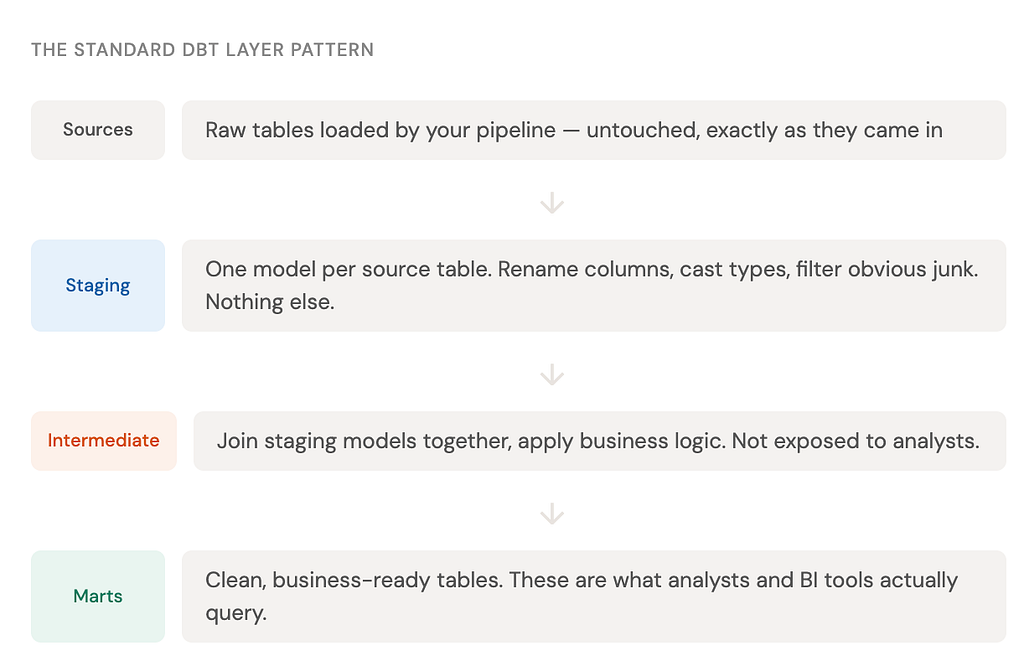
You don’t have to follow this pattern exactly, but it’s widely adopted because it makes projects readable and maintainable. When something breaks, you know exactly which layer to look at.
Adding tests in 5 lines of YAML
One of the most underrated parts of dbt is how easy it is to add data quality tests. You don’t write test code — you declare what should be true about your data in a YAML file and dbt handles the rest:
models/staging/schema.yml — data tests in YAML
version: 2

models:
  - name: stg_orders
    description: "Cleaned and renamed orders from the raw source."
    columns:
      - name: order_id
        description: "Unique identifier for each order."
        tests:
          - unique
          - not_null
      - name: status
        tests:
          - accepted_values:
              values: ['pending', 'completed', 'cancelled']
      - name: amount_usd
        tests:
          - not_null
Run dbt test and dbt checks every one of those assertions against your actual data. If any fail, you know before your analysts do. This alone is worth the investment in learning dbt.
Now — how AI makes dbt faster
This is where it gets genuinely exciting for anyone learning dbt today. You’re entering at the best possible time, because AI tools have become remarkably good at two of the most time-consuming parts of dbt work: writing models and writing documentation.
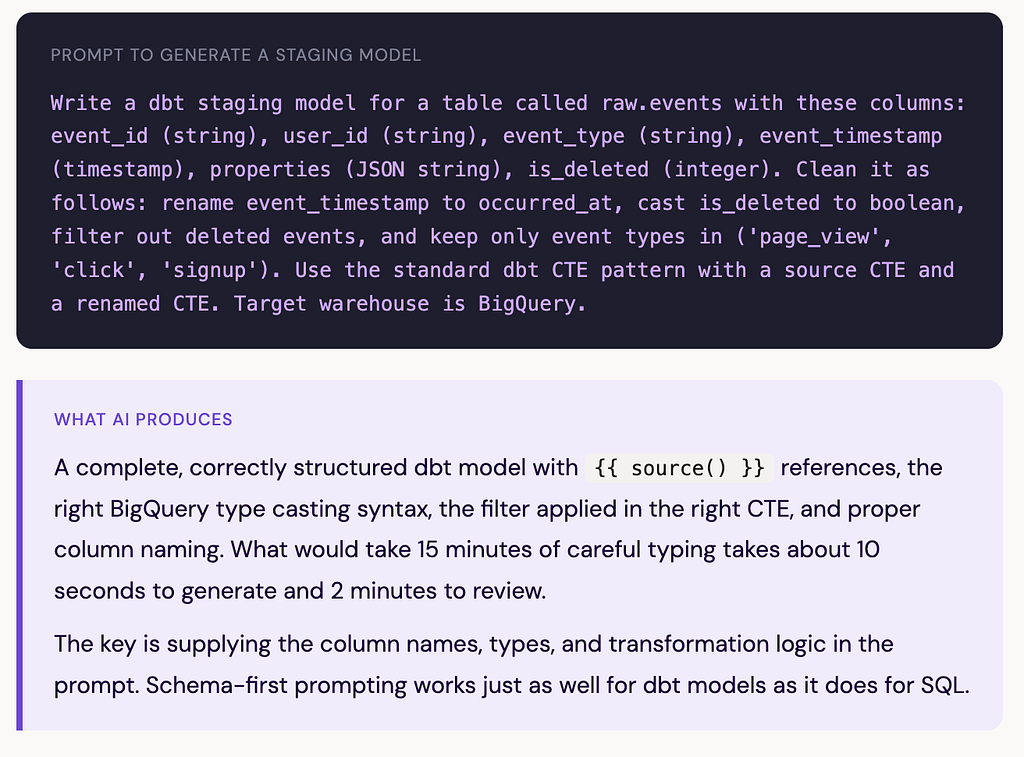
1. Generating dbt models from a description
Given a clear description of your source table and what you want to clean, AI can scaffold a complete staging model — including the CTE structure, column renaming, type casting, and null handling — in seconds.
2. Auto-generating dbt documentation
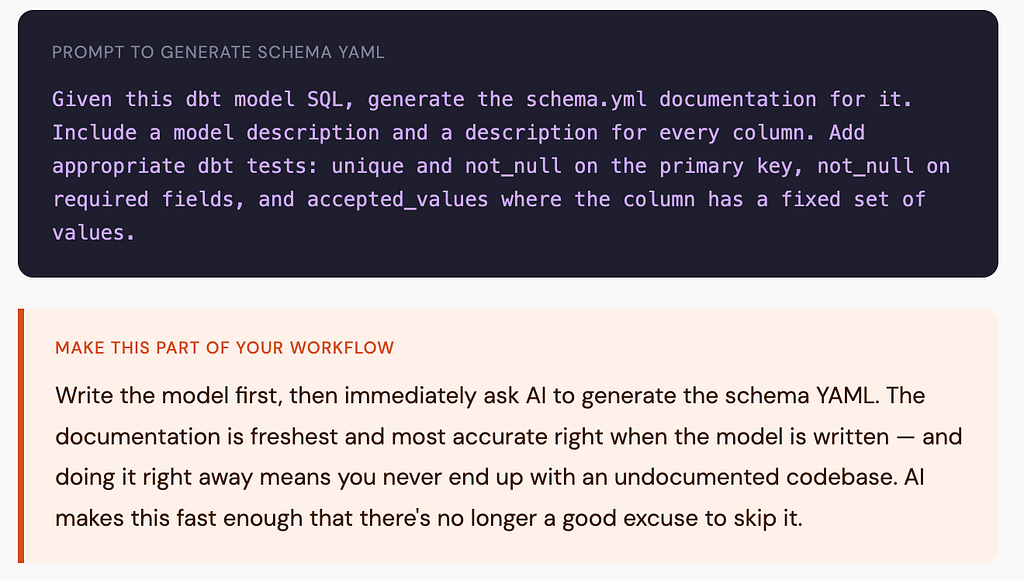
Writing YAML documentation for every model and column is important but genuinely tedious. It’s the task most teams skip, and then regret six months later when a new analyst asks “what does this column mean?”
AI is excellent at this. Give it your model SQL and ask it to generate the schema YAML with column descriptions, and it will produce a solid first draft in seconds:
3. Explaining unfamiliar dbt syntax
When you’re learning dbt, you’ll inevitably hit Jinja macros, dbt_utils functions, or config blocks you don't recognise. AI is a much faster reference than documentation for these. "What does {{ dbt_utils.star(ref('stg_orders'), except=['created_at']) }} do?" gets you an instant answer with an example.
Should you learn dbt if you’re just starting out?
Yes — and the timing has never been better. dbt is now a standard skill in data engineering and analytics engineering job descriptions. It’s also genuinely well-designed: the learning curve is shallow if you already know SQL, the community is large and active, and dbt Core (the open source version) is completely free.
Start with dbt Core locally, use the free DuckDB adapter to run models on your laptop without a cloud warehouse, and use AI to help you scaffold your first few models. You’ll be comfortable with the basics within a weekend.
dbt Explained Simply — and How AI Makes It Even Easier was originally published in Towards AI on Medium, where people are continuing the conversation by highlighting and responding to this story.