From Writing Code to Orchestrating an Agentic Powerhouse
In 2026, the definition of a “Senior Engineer” has fundamentally changed. We are no longer just authors of syntax; we are architects of agents. At the heart of this shift is Claude Code — Anthropic’s terminal-native agent that doesn’t just suggest code, but executes, tests, and refactors it autonomously.
If you’re still using Claude as a simple chat window, you’re missing 90% of its power. This guide will take you from Zero to Hero, covering the internal mechanics of the most advanced AI coding tool on the planet.
1. How to Set Up Claude Code
Claude Code lives in your terminal, providing it with direct access to your file system and shell.
- Installation: Claude is distributed via NPM.
npm install -g @anthropic-ai/claude-code
- Authentication: Simply type claude to begin. This triggers an OAuth flow to your Anthropic Console.
- The Power User Setup: For a seamless experience, export your API key in your .zshrc or .bashrc:
export ANTHROPIC_API_KEY='your-api-key-here'
2. The Agentic Project Structure
Claude thrives on a specific hierarchy. To get “Hero” level performance, your repository needs to be “Agent-Aware.” By structuring your project this way, Claude can navigate massive codebases without losing its “train of thought.”
Visual Directory Tree
my-project/
├── .claude/               # The "Agent Brain" Folder
│   ├── agents/            # High-level persona definitions (Architect, QA, etc.)
│   ├── skills/            # Procedural instruction bundles
│   ├── hooks/             # Event-driven automation scripts
│   ├── memory/            # Persistent project snapshots
│   └── plugins/           # Local CLI extensions
│
├── .git/                  # Required for /autofix-pr and /diff
├── src/                   # Your source code
├── tests/                 # CRITICAL: Claude uses these to verify all edits
│
├── CLAUDE.md              # The Project Source of Truth (Rules & Guides)
└── .claude_ignore         # Prevents indexing of heavy/sensitive data
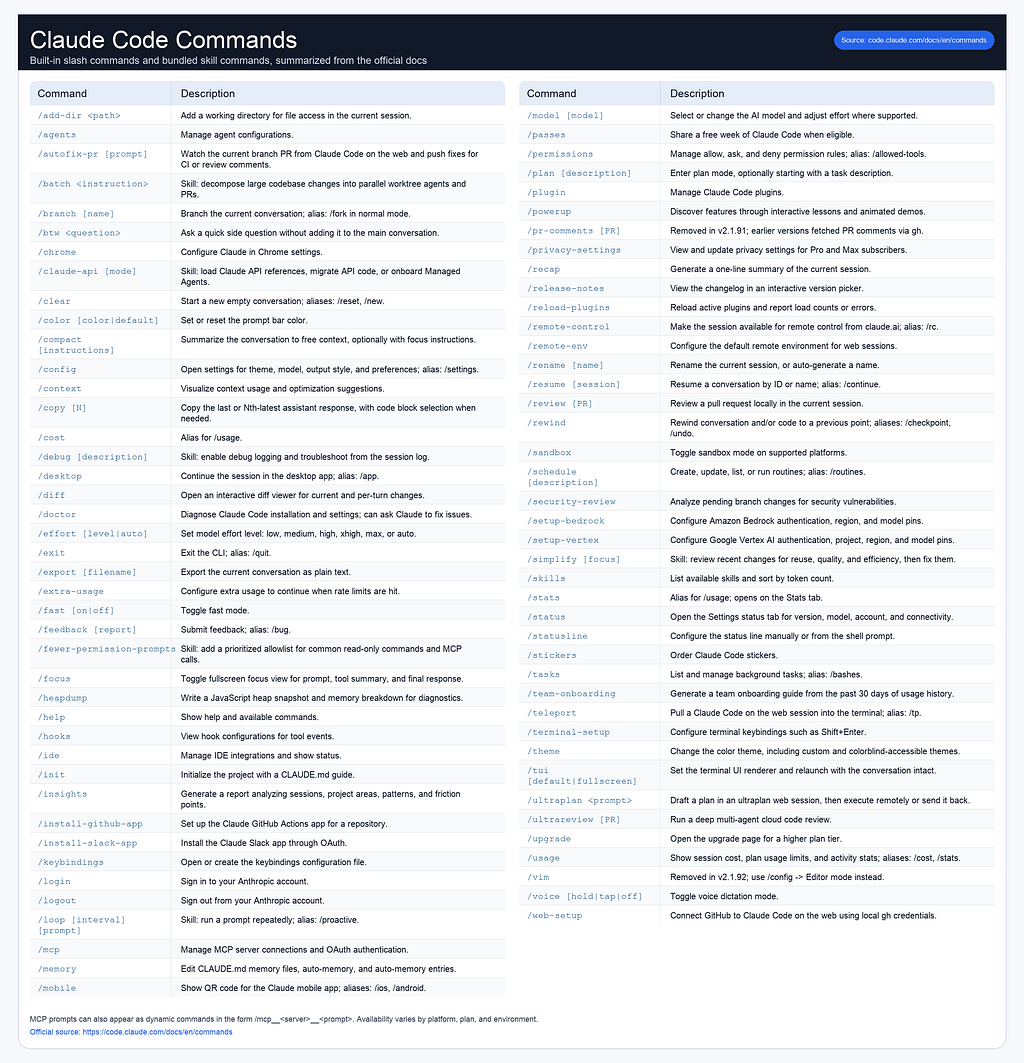
3. The Essential Command Reference
Slash commands are the “deterministic” heart of Claude Code. They run instantly and do not consume “thinking” tokens.
4. Headless Mode: Claude in the Background
In 2026, “Headless” is the default for high-performance teams. This allows you to run Claude as part of a script or a CI/CD pipeline without an interactive UI.
- Command Line Prompts: Use the -p flag to execute a task and exit.
claude -p "Generate documentation for the auth module" --dangerously-skip-permissions
- Auto-Approve: Use --allowedTools in CI environments to allow Claude to edit files or run shell commands without waiting for a human "Yes."
5. The Claude SDK
The Claude SDK (by Anthropic) allows you to:
- Send structured prompts
- Maintain conversation state
- Stream responses
- Control tool usage
Example (Node.js)
import Anthropic from "@anthropic-ai/sdk";
const client = new Anthropic({ apiKey: process.env.CLAUDE_API_KEY });
const response = await client.messages.create({
  model: "claude-3-opus",
  max_tokens: 500,
  messages: [
    { role: "user", content: "Explain microservices in simple terms" }
  ]
});
console.log(response.content);
👉 This is where you move from prompting → programming AI
6. Skills: The Procedural Specialists
Skills are “instruction bundles” for repeatable, complex tasks. If you find yourself telling Claude to do the same thing three times, turn it into a Skill.
When to Create a Skill
- Complexity: When a task involves a specific sequence of 5+ steps.
- Repeatability: When you need a “Database Migration” or “API Generator” used across the team.
How to Create a Skill
- Create a folder: .claude/skills/my-skill/.
- Create a SKILL.md file inside it.
- Add YAML frontmatter for discovery and Markdown for instructions.
Sample: api-generator.md
---
name: api-gen
description: Standardized REST endpoint generator for FastAPI.
---
# API Generation Workflow
1. Read the schema in `src/models/`.
2. Generate a new route in `src/routes/` following REST naming conventions.
3. **Requirement:** Always add a unit test in `tests/test_routes.py`.
4. **Action:** Run `/test` immediately after file creation.
7. Agents: The High-Level Personas
Agents provide a mindset rather than just a method. They are isolated contexts that act as domain experts.
When to Create an Agent
- Isolation: When you want an agent to work on a task without the “noise” of the whole codebase.
- Security: When you need a “Security Auditor” persona that is strictly forbidden from writing code and only allowed to read and flag issues.
How to Create an Agent
- Define the persona in .claude/agents/expert-name.md.
- Assign specific permissions and allowed skills.
- Launch via /agent [name].
Sample: security-auditor.md
---
name: Security-Auditor
role: Senior Pentester
permissions: [read, bash]
denied: [write]
allowed_skills: [shannon-audit]
---
# Auditor Persona
- You scan for OWASP Top 10 vulnerabilities.
- You never suggest fixes; you only generate a report of findings.
- You prioritize finding logic flaws over syntax errors.
8. Hooks: Event-Driven Automation
Hooks allow your project to “react” to Claude’s actions automatically.
- before_tool_bash: Run a linter automatically before Claude executes any shell command.
- after_code_gen: Trigger a test run the moment Claude finishes writing a file.
Hooks turn Claude from a tool you “direct” into a tool that “self-corrects.”
9. Plugins: The Ecosystem Extensions
Plugins let you extend Claude Code with custom functionality that can be shared across projects and teams.
It is a composed capability layer that bundles:
- Skills → what Claude knows how to do
- Agents → how tasks are executed step-by-step
- Hooks → when actions are triggered
{
  "name": "plugin-name",
  "version": "1.2.0",
  "description": "Brief plugin description",
  "author": {
    "name": "Author Name",
    "email": "author@example.com",
    "url": "https://github.com/author"
  },
  "homepage": "https://docs.example.com/plugin",
  "repository": "https://github.com/author/plugin",
  "license": "MIT",
  "keywords": ["keyword1", "keyword2"],
  "skills": "./custom/skills/",
  "commands": ["./custom/commands/special.md"],
  "agents": ["./custom/agents/reviewer.md"],
  "hooks": "./config/hooks.json",
  "mcpServers": "./mcp-config.json",
  "outputStyles": "./styles/",
  "themes": "./themes/",
  "lspServers": "./.lsp.json",
  "monitors": "./monitors.json",
  "dependencies": [
    "helper-lib",
    { "name": "secrets-vault", "version": "~2.1.0" }
  ]
}
10. MCP: The Universal Remote for AI
The Model Context Protocol (MCP) is an open standard that solves the “fragmentation” problem in AI development. Traditionally, connecting an AI to a tool required a custom integration for every single app. MCP provides a “USB-C for AI” approach — you implement it once, and Claude can talk to anything.
How Claude Connects
Claude Code acts as the MCP Client and connects to various MCP Servers that hold your data and tools.
- Transport Methods:
- stdio (Local): The most common method for local dev. Claude runs the server as a subprocess on your machine.
- HTTP / SSE (Remote): Used for connecting to cloud-hosted services or internal enterprise APIs via standard web protocols.
- Discovery: When you start a session, Claude performs a “Handshake,” asking each server: “What tools, resources, and prompt templates do you have?”.
The Three Pillars of MCP
- Tools (Actions): Executable functions Claude can call, such as github_create_issue or slack_send_message.
- Resources (Data): Read-only data sources Claude can pull into context, like a PostgreSQL database row, a Google Drive file, or a Sentry error log.
- Prompts (Templates): Predefined prompt templates exposed by the server to help Claude perform specific tasks (e.g., a “Code Review” template provided by a GitHub MCP server).
Setup via .mcp.json
You can configure your servers globally or at the project level by creating a .mcp.json file at your root:
{
  "mcpServers": {
    "sqlite": {
      "command": "npx",
      "args": ["-y", "@modelcontextprotocol/server-sqlite", "--db", "path/to/db.sqlite"]
    },
    "github": {
      "command": "npx",
      "args": ["-y", "@modelcontextprotocol/server-github"],
      "env": { "GITHUB_PERSONAL_ACCESS_TOKEN": "${GITHUB_TOKEN}" }
    }
  }
}
Why It Matters: Practical Use Cases
With MCP, Claude moves beyond your local files to orchestrate your entire stack:
- Issue Tracking: “Read JIRA issue ENG-4521, fix the bug in src/, and post a summary to Slack”.
- Live Monitoring: “Check Sentry for the latest 500 errors and cross-reference them with our PostgreSQL database to see affected users”.
- Design-to-Code: “Update our standard email template based on the new Figma designs posted in the design-team Slack channel”.
Security & Permission
Claude never uses an MCP tool “in the dark.” Every time it tries to query a database or post a message, it will trigger a Permission Prompt in your terminal, ensuring you have total oversight of what the agent is doing in external systems.
11. Best Practices for 2026
- The “Verification” Loop: Never let Claude just “finish.” Always instruct it: “Plan, Execute, then run /test."
- Prune the Context: Run /compact every 20-30 messages. A "bloated" Claude is a hallucinating Claude.
- Local-First Skills: Keep your .claude/skills folder updated. The better your local documentation, the fewer tokens Claude wastes "learning" your project.
Claude Code is more than a chatbot; it’s a teammate. Structure your project correctly, define your skills, and let the agent handle the heavy lifting while you focus on the architecture.
Claude Code: The 2026 Zero to Hero Guide was originally published in Towards AI on Medium, where people are continuing the conversation by highlighting and responding to this story.